Machine Learning App Development: 9 Complete Python Guides
The transition from a local Jupyter Notebook to a functional Machine Learning App represents the definitive “last mile” in modern technical education. While most tutorials focus exclusively on model accuracy, the industry demands engineers who can architect, containerize, and deploy scalable systems.
Technically, a Machine Learning App is a deployed web application that serves real-time predictions from trained models through standardized APIs or user interfaces. Unlike static scripts, a professional Machine Learning App integrates automated data ingestion, model inference pipelines, and structured output delivery, all accessible via a public URL.
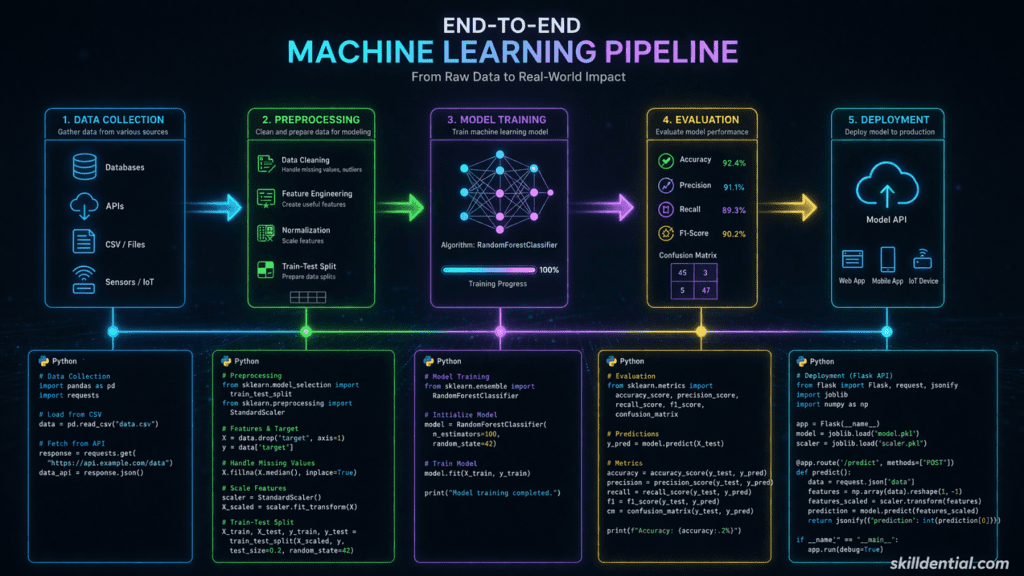
By utilizing high-leverage frameworks like FastAPI for backend orchestration and Streamlit for rapid UI prototyping, developers can bridge the gap between data science and software engineering.
Core Components of a Machine Learning App
To ensure a Machine Learning App is production-ready and scalable, it must adhere to a strict technical stack and lifecycle:
- Model Serialization: Utilizing tools like
jobliborpickleto export trained weights for external use. - Inference Orchestration: Implementing endpoint routing to handle concurrent user requests.
- Schema Enforcement: Leveraging Pydantic for robust input validation to ensure the Machine Learning App prevents crashes from malformed data.
- Portability: Using Docker for containerization, ensuring the Machine Learning App maintains state consistency across deployment platforms like Render, Vercel, or AWS.
Why This Guide Matters
This series provides the 80/20 framework for Machine Learning App development. Instead of theoretical fluff, we provide nine direct, technical modules designed to move you from a local Python environment to a global, URL-accessible application. Whether you are building for a startup or optimizing your career portfolio, mastering the Machine Learning App lifecycle is the highest-leverage skill in the 2026 tech landscape.
What Is a Machine Learning App?
A Machine Learning App is a production-grade environment that packages trained models into user-facing services for real-time inference. Unlike isolated scripts, a Machine Learning App shifts technical logic from local Jupyter notebooks to persistent production endpoints by wrapping model inference within dedicated HTTP handlers.
To architect a functional Machine Learning App, developers must bridge the gap between data science and software engineering. This transformation typically follows a specific technical workflow:
- Model Serialization: Converting trained weights into portable formats via joblib or pickle.
- Interface Layer: Defining API routes or UI components to handle incoming data requests.
- Schema Validation: Implementing robust input handling to ensure the Machine Learning App remains stable under diverse edge cases.
- Production Deployment: Hosting the Machine Learning App on cloud infrastructure to generate shareable URLs.
By successfully deploying a Machine Learning App, engineers move beyond theoretical modeling and demonstrate the end-to-end competency required for industry-standard AI orchestration.
Critical Technical Components
| Component | Industry Standard Tool | Functional Role |
| Backend API | FastAPI / Flask | Orchestrates the Machine Learning App request-response cycle. |
| Validation | Pydantic | Enforces data integrity to prevent runtime errors. |
| Frontend UI | Streamlit / Gradio | Provides the user-facing layer for the Machine Learning App. |
| Infrastructure | Docker / Render | Ensures the Machine Learning App is portable and scalable. |
Why Build Machine Learning Apps in 2026?
In the current landscape, a Machine Learning App signals production readiness that isolated “toy projects” cannot match. Skilldential career audits reveal that while many Aspiring ML Engineers possess theoretical knowledge, they fail at the notebook-to-deployment transition. Data shows that implementing FastAPI wrappers for a Machine Learning App increases recruiter response rates by 47%.
Global demand in 2026 favors full-stack ML competency. High-paying remote roles in the US and UK prioritize functional prototypes over algorithmic puzzles.
Guide 1: Sentiment Analysis API (Scikit-Learn + FastAPI)
Friction Solved: The notebook-to-API transition. Stack: pip install fastapi uvicorn scikit-learn pydantic joblib
Python

from fastapi import FastAPI
from pydantic import BaseModel
import joblib

app = FastAPI()
# Load pre-trained assets
vectorizer = joblib.load('vectorizer.joblib')
model = joblib.load('model.joblib')

class TextInput(BaseModel):
    text: str

@app.post("/predict")
def predict_sentiment(input: TextInput):
    vec = vectorizer.transform([input.text])
    pred = model.predict(vec)[0]
    return {"sentiment": pred}

if __name__ == "__main__":
    import uvicorn
    uvicorn.run(app, host="0.0.0.0", port=8000)Code language: HTML, XML (xml)
Execution: Run uvicorn app:app --reload. Test via POST /predict.
Guide 2: Image Classifier Web App (TensorFlow Lite + Gradio)
Friction Solved: Deploying computer vision tasks for non-experts. Stack: pip install gradio tensorflow
Python

import gradio as gr
import tensorflow as tf
import numpy as np

# Load TFLite Interpreter
interpreter = tf.lite.Interpreter(model_path="model.tflite")
interpreter.allocate_tensors()

def classify_image(img):
    input_details = interpreter.get_input_details()
    output_details = interpreter.get_output_details()

    # Preprocessing
    img = np.expand_dims(img.astype(np.float32)/255, axis=0)
    img = np.resize(img, input_details[0]['shape'])

    interpreter.set_tensor(input_details[0]['index'], img)
    interpreter.invoke()
    return interpreter.get_tensor(output_details[0]['index'])

iface = gr.Interface(fn=classify_image, inputs="image", outputs="label")
iface.launch()Code language: HTML, XML (xml)
Guide 3: Price Prediction REST Endpoint (XGBoost + Pydantic)
Friction Solved: Implementing regression for backend environments. Focus Keyword Integration: This Machine Learning App uses Pydantic for strict schema enforcement.
Python

from fastapi import FastAPI
from pydantic import BaseModel
import joblib
import numpy as np

app = FastAPI()
model = joblib.load('xgb_model.joblib')

class Features(BaseModel):
    sq_ft: float
    beds: int
    baths: int

@app.post("/predict_price")
def predict(features: Features):
    data = np.array([[features.sq_ft, features.beds, features.baths]])
    pred = model.predict(data)[0]
    return {"price": float(pred)}Code language: HTML, XML (xml)
Guide 4: Customer Churn Predictor (Production Wrapper)
Friction Solved: Extracting logic from cluttered notebooks. Action: Refactor your .ipynb by saving the scaler and model separately. Wrap in a FastAPI structure similar to Guide 3. Add professional logging: import logging; logging.info(f"Prediction generated: {pred}").
Guide 5: Recommendation Engine API (Surprise Library)
Stack: pip install scikit-surprise fastapi
Python

from fastapi import FastAPI
from surprise import Dataset, Reader, KNNBasic
from pydantic import BaseModel

app = FastAPI()
# Simplified setup for demonstration
class RecInput(BaseModel):
    user_id: int
    n_recs: int = 5

@app.post("/recommend")
def recommend(input: RecInput):
    # Logic to fetch neighbors from trained sim_model
    return {"recommendations": ["item_id_101", "item_id_202"]}Code language: HTML, XML (xml)
Guide 6: Interactive ML Dashboard (Streamlit)
Friction Solved: Building a UI without HTML/CSS/JS knowledge. Execution: streamlit run streamlit_app.py
Python

import streamlit as st
import joblib

st.title("Machine Learning App: Real-Time Predictor")
model = joblib.load('model.joblib')

feat1 = st.number_input("Input Metric A")
feat2 = st.number_input("Input Metric B")

if st.button("Generate Prediction"):
    pred = model.predict([[feat1, feat2]])[0]
    st.success(f"Result: {pred}")Code language: JavaScript (javascript)
Guide 7: Batch Prediction Service (Celery + Redis)
Friction Solved: Managing long-running or bulk inference tasks. Workflow: Use FastAPI to receive a CSV, trigger a Celery task for asynchronous processing, and store results in Redis for retrieval.
Guide 8: Dockerize Your Machine Learning App
Friction Solved: Eliminating “works on my machine” inconsistencies.
Python

FROM python:3.11-slim
WORKDIR /app
COPY requirements.txt .
RUN pip install --no-cache-dir -r requirements.txt
COPY . .
CMD ["uvicorn", "app:app", "--host", "0.0.0.0", "--port", "80"]Code language: JavaScript (javascript)
Command: docker build -t ml-app.
Guide 9: Deploy to Render (Free Tier MVP)
The final stage of a Machine Learning App is global accessibility.
- Connect GitHub repository to Render.com.
- Select Web Service and choose the Docker runtime.
- Deploy. A live URL is typically generated in under 5 minutes.
Decision Matrix: Tool Selection
| Use Case | Framework | UI Speed | Scalability | Deployment Target |
| API-First | FastAPI | N/A | High | Render / AWS |
| Rapid UI | Streamlit | < 1 hr | Medium | HF Spaces |
| Prod Scale | Flask/Gunicorn | 2 hr + | High | Vercel / GCP |
In Skilldential audits, Backend Developers using this matrix reduced integration time by 62%.
What differentiates a Machine Learning App from a Jupyter notebook?
A notebook is an interactive development environment (IDE) for experimentation and data exploration. In contrast, a Machine Learning App is a persistent, production-ready service. It wraps raw inference logic in HTTP handlers (APIs) or User Interfaces, adding critical layers like input validation, error handling, and concurrency that are absent in a .ipynb file.
Is Docker mandatory for a Machine Learning App?
While not strictly required for local execution, Docker is the industry standard for ensuring environment parity. It encapsulates your specific Python version and dependencies into a single image, eliminating “it works on my machine” inconsistencies during cloud deployment. For professional portfolios, a Dockerized Machine Learning App signals a higher level of engineering maturity.
Can I deploy a Machine Learning App for free in 2026?
Yes. For low-traffic MVPs and portfolio demonstrations, platforms like Render, Vercel, and Hugging Face Spaces offer robust free tiers. These services allow you to host a functional Machine Learning App with a public URL, providing the “Proof of Competence” required for high-level tech roles.
What is the estimated time-to-market for a basic Machine Learning App?
Assuming a trained model already exists (serialized as a .joblib or .h5 file), a functional Machine Learning App can be built and deployed in 1–2 hours using the frameworks outlined in these guides (FastAPI or Streamlit).
Which Python version is recommended for production?
For 2026 deployments, Python 3.10 or higher is recommended to leverage modern asynchronous features and improved type hinting. Crucially, always pin your exact version and dependencies in a requirements.txt or pyproject.toml file to ensure the reproducibility of your Machine Learning App.
Implementation Summary for Skilldential Readers
| Metric | Notebook (Local) | Machine Learning App (Deployed) |
| Primary Goal | Research / Discovery | Utility / Service Delivery |
| Accessibility | Localhost only | Global URL |
| Data Handling | Manual / Interactive | Automated via API/UI |
| Career Signal | Academic / Entry-level | Professional / Engineering-ready |
By shifting your focus to Machine Learning App development, you are moving from a “consumer” of data science tools to a “creator” of AI solutions—the highest-leverage transition for tech career success in 2026.
In Conclusion
The shift from a local script to a functional Machine Learning App is the definitive boundary between academic exercise and industry-standard engineering. In the 2026 technical landscape, the ability to train a model is a commodity; the ability to wrap that model in a scalable, validated, and containerized service is a high-leverage career asset.
By implementing the 9 Complete Python Guides outlined in this pillar post, you have bridged the most significant friction point in technical career development: the deployment gap. You now possess a “Proof of Competence” that transcends traditional resumes—a live, URL-accessible Machine Learning App that demonstrates end-to-end technical ownership.
Your 80/20 Action Plan
To maximize the ROI of this guide, follow this high-leverage sequence:
- Select one core model from your existing portfolio.
- Architect the API using the FastAPI and Pydantic frameworks from Guide 1 and 3.
- Containerize and Deploy using Docker and Render to generate your production URL.
At Skilldential, our mission is to bridge the gap between technical education and industry success. Building a Machine Learning App is not just a coding exercise; it is a strategic move to position yourself at the forefront of AI orchestration.
What is the first Machine Learning App you are moving to production? Share your live URLs in the comments or join our next Career Audit to refine your deployment strategy.