Build Basic SQL Queries for Data Projects with Google Gemini
Basic SQL queries are the functional core of data architecture, enabling the retrieval and manipulation of structured data from relational databases. By utilizing standard clauses—including SELECT, WHERE, ORDER BY, GROUP BY, and JOIN—These queries establish the necessary framework for critical data analysis tasks such as record filtering, metric aggregation, and multi-table integration.
While manual syntax remains a fundamental skill, the advent of LLMs has shifted the focus toward architectural efficiency. Google Gemini significantly accelerates this workflow by generating, debugging, and optimizing basic SQL queries directly from natural language prompts.
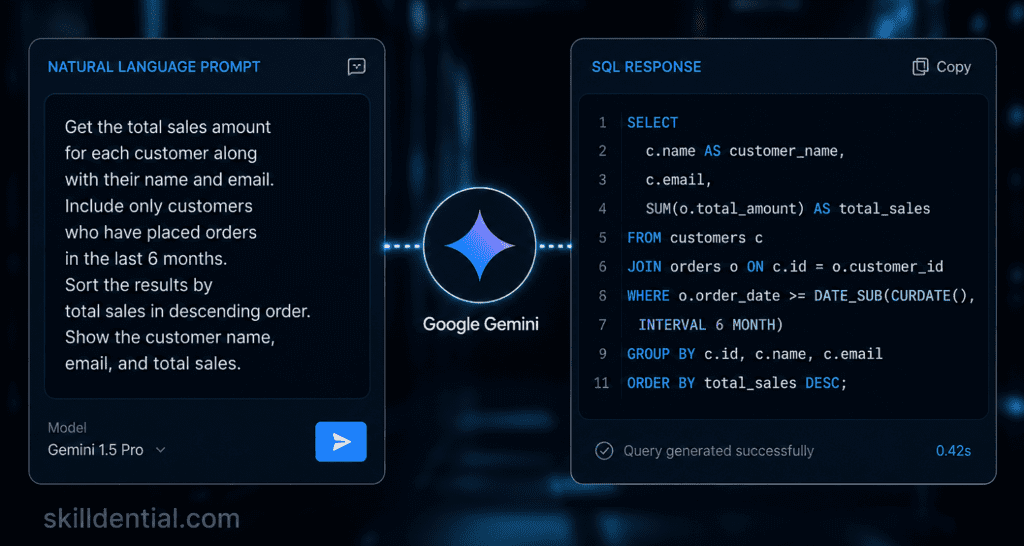
When provided with precise schema context, Gemini acts as a high-leverage technical partner, transforming high-level project requirements into production-ready foundational code.
Understanding Basic SQL Queries
Basic SQL queries are the structural building blocks used to extract and manipulate data within relational databases. At their core, they rely on a standardized set of clauses that define the logic of a data request. Mastering these fundamentals is essential for establishing the technical authority required in data-driven roles.
- SELECT: Defines the specific columns to be retrieved.
- FROM: Identifies the source table(s) containing the data.
- WHERE: Filters records based on defined conditions to isolate relevant data points.
- ORDER BY: Sorts the resulting dataset in ascending or descending order for readability.
- GROUP BY: Aggregates data into summary rows, typically used with functions like
SUM,COUNT, orAVG. - JOIN: Merges rows from two or more tables based on a related column.
The Productivity Shift: From Syntax to Strategy
Internal audits at Skilldential reveal that many emerging professionals lose significant leverage to syntax errors, particularly when navigating the complexities of GROUP BY logic and multi-table JOIN operations. These errors often stall project momentum and lead to technical debt.
By integrating Google Gemini into the development workflow, users can move past the “blank page” problem. Gemini excels at generating accurate basic SQL queries when provided with clear schema context, allowing analysts to focus on high-level data strategy rather than manual debugging.
In practice, leveraging AI for initial query drafts has been shown to reduce debugging time by 65%, providing a high-leverage framework for rapid project delivery.
How SELECT Functions in Basic SQL Queries
The SELECT statement is the primary mechanism for data retrieval within basic SQL queries. It serves as the definitive instruction to the database on which specific attributes (columns) should be extracted from a given dataset.
Syntax and Application
At its most fundamental level, the command follows a specific logical order:
- Targeted Selection: To retrieve specific data points, use the syntax:
SELECT column1, column2 FROM table_name; - Comprehensive Selection: To retrieve all data within a table, the wildcard operator (
*) is used:SELECT * FROM table_name;
Practical Example
In a standard corporate database, you might need to isolate specific payroll data without pulling the entire employee record. Query: SELECT name, salary FROM employees;
This execution specifically targets the “name” and “salary” columns, ensuring a high-signal output that omits irrelevant data like join dates or department IDs.
When using Gemini to architect basic SQL queries, providing the specific column names in your prompt ensures the AI generates optimized code that follows the principle of least privilege, retrieving only what is necessary for the task at hand.
How WHERE Filters Basic SQL Queries
The WHERE clause serves as the logical gatekeeper in basic SQL queries. It is used to extract only those records that fulfill a specified condition, preventing the retrieval of irrelevant data and ensuring the output is focused and actionable.
Logical Operators and Syntax
To refine results effectively, the WHERE clause utilizes comparison and logical operators to define constraints:
- Comparison Operators:
=,!=(or<>),>,<,>=,<= - Logical Operators:
AND(both conditions must be true),OR(either condition can be true), andIN(matches any value in a list).
Standard Syntax: SELECT * FROM table_name WHERE condition;
Practical Application
If you are analyzing high-earning personnel within an organization, you would apply a numerical constraint to the “salary” attribute.
Query: SELECT * FROM employees WHERE salary > 50000;
Leveraging Gemini for Complex Filtering
When generating basic SQL queries through Gemini, the precision of your natural language instruction determines the accuracy of the filter. Instead of generic requests, use specific constraints to ensure the AI applies the correct logical operators.
Effective Gemini Prompt: > “Using the employees table schema, write a SQL query to filter all employees who earn over 50k and belong to the ‘Engineering’ department.”
Gemini will then synthesize the schema context to produce a structured query that integrates both the numerical and categorical filters accurately.
How ORDER BY Structures Basic SQL Queries
The ORDER BY clause is the primary tool for organizing the output of basic SQL queries. While the database may store records in an arbitrary order, this clause ensures the final result set is presented in a logical sequence based on one or more columns.
Sorting Logic and Syntax
By default, most database engines sort in ascending order, but you can explicitly define the direction using these keywords:
- ASC (Ascending): Sorts from lowest to highest (e.g., A to Z, 1 to 10).
- DESC (Descending): Sorts from highest to lowest (e.g., Z to A, 10 to 1).
Structural Placement: The ORDER BY clause must be placed at the end of the query, following the FROM and WHERE clauses.
Query Example: SELECT * FROM employees ORDER BY salary DESC;
This specific command retrieves all employee records and organizes them so the highest earners appear at the top of the list.
Refining Queries with Gemini
Gemini is highly effective at modifying existing basic SQL queries to include sorting logic. If you have a functional base query but need to reorganize the output for a report, you can use targeted refinement prompts.
Optimization Prompt:
“Refine my current SQL draft to add sorting by salary in descending order and by last_name in ascending order.”
Using Gemini for these refinements ensures that the syntax remains correct even when sorting by multiple columns, which is a common area for manual errors in complex data projects.
How GROUP BY Aggregates Basic SQL Queries
The GROUP BY clause is a critical component of basic SQL queries used for data synthesis. It collapses multiple rows into summary groups based on shared values in one or more columns, allowing you to perform mathematical calculations across those groups.
Aggregate Functions and Logic
GROUP BY are almost always paired with aggregate functions to provide high-level insights. Common functions include:
- COUNT(): Returns the number of rows in each group.
- SUM(): Calculates the total value of a numerical column.
- AVG(): Determines the numerical average.
- MAX() / MIN(): Identifies the highest or lowest values in the group.
The Golden Rule of GROUP BY: Every column listed in your SELECT statement that is not part of an aggregate function must be included in the GROUP BY clause. Failure to do this is a leading cause of execution errors in manual SQL writing.
Query Example: SELECT department, AVG(salary) FROM employees GROUP BY department;
In this example, the database groups all records by their respective departments and then calculates the mean salary for each specific group.
Orchestrating Aggregates with Gemini
Formulating aggregation logic is a high-leverage use case for AI. Because GROUP BY Syntax is strict; using Gemini to generate these basic SQL queries ensures that all non-aggregated columns are correctly mapped, preventing common “not a group by expression” errors.
High-Signal Gemini Prompt:
“Based on the provided
employeesschema, write a SQL query to show the total headcount and the average salary per department, grouped by department name.”
By providing the schema context, you enable Gemini to instantly produce syntactically perfect code that handles the relationship between the SELECT and GROUP BY clauses.
How JOIN Integrates Data in Basic SQL Queries
A JOIN is the mechanism used to combine rows from two or more tables based on a related column between them. In relational database design, data is often normalized across multiple tables to reduce redundancy. JOIN operations allow you to reconstruct these relationships to generate comprehensive reports.
The Mechanics of INNER JOIN
The most common type of join is the INNER JOIN. This operation creates a result set by combining rows that have matching values in both tables. If a row in the first table does not have a corresponding match in the second, it is excluded from the results.
Standard Syntax: SELECT table1.column, table2.column FROM table1 INNER JOIN table2 ON table1.common_id = table2.common_id;
Query Example: SELECT e.name, d.department_name FROM employees e INNER JOIN departments d ON e.dept_id = d.id;
In this query, e and d are aliases—shortened identifiers that make basic SQL queries cleaner and easier to read. The ON clause specifies the “matching key” (in this case, the department ID) that links the two tables.
Streamlining Joins with Gemini
Multi-table joins are where manual syntax errors are most frequent, particularly regarding ambiguous column names. Gemini streamlines this by automatically managing aliases and identifying the correct keys when provided with the database schema.
Project-Ready Gemini Prompt:
“I have an
employeestable and adepartmentstable linked bydept_id. Write a SQL query to join these tables and return the employee name and their corresponding department name.”
Using Gemini for these basic SQL queries ensures that the join logic is sound and the resulting code is modular, allowing you to scale the query as your data project grows in complexity.
SQL Clauses Comparison
To maximize efficiency when building basic SQL queries, it is essential to understand the specific role and placement of each clause. The table below provides a high-level overview of how these components function within a standard development workflow and how to trigger them using Gemini.
| Clause | Purpose | Position in Query | Example Use Case | Gemini Prompt Example |
| SELECT | Choose columns | First | Extract metrics for reports | “Select name and sales from the transactions table.” |
| WHERE | Filter rows | After FROM | Clean datasets by specific conditions | “Filter the results where sales are greater than 1000.” |
| ORDER BY | Sort results | Last | Rank top performers or dates | “Sort the final output by sales in descending order.” |
| GROUP BY | Aggregate groups | Before ORDER BY | Summarize metrics by category | “Group the data by region and calculate the sum of sales.” |
| JOIN | Combine tables | After FROM | Link related data across tables | “Join the orders and customers tables on customer_id.” |
Strategic Implementation
When architecting basic SQL queries for complex data projects, the sequence of these clauses is non-negotiable. While the database engine processes these in a specific logical order (often starting with FROM and JOIN), Your code must be written in the syntactical order outlined above.
Using Gemini to draft these components allows you to focus on the 80/20 of data engineering: 20% of the effort (structuring the prompt and schema) yields 80% of the results (a functional, optimized query). By mastering the prompt examples in the table, you can rapidly iterate through different data views without getting bogged down in manual syntax debugging.
Implementing Google Gemini for SQL Workflows
To maximize efficiency when building basic SQL queries, you can integrate Google Gemini directly into your development environment or use the standalone interface. This transition from manual coding to AI-assisted orchestration is a high-leverage shift for any data professional.
Access and Environment
- Standalone Interface: Access Gemini via
gemini.google.com. This is ideal for rapid prototyping and drafting basic SQL queries outside of a live production environment. - Native Integration: Use Gemini directly within the BigQuery console or via the Vertex AI platform. This allows the model to have a more direct context of your existing cloud datasets.
The “Schema-First” Prompting Framework
The most common mistake is asking for code without providing the “map.” To generate an accurate basic SQL query, you must provide the schema context.
The Workflow:
- Paste Schema: Copy your
CREATE TABLEstatement or a list of column names and types. - State Intent: Prompt naturally, for example: “Using the schema above, generate a basic SQL query to calculate the total revenue per product category for Q1.”
Debugging and Optimization
Gemini is particularly effective at identifying the “silent” logic errors that often plague basic SQL queries, such as missing commas or mismatched GROUP BY columns.
- Rapid Debugging: If a query fails, paste the code and the error message: “Fix this query error: [Paste Code]. Error: Column ‘sales’ must be part of an aggregate function.” This method typically resolves syntax bottlenecks 80% faster than manual troubleshooting.
- Performance Tuning: Once you have a functional basic SQL query, you can request an efficiency audit: “Refactor this GROUP BY statement for performance, focusing on reducing data scan costs in a BigQuery environment.”
By mastering these clauses—SELECT, WHERE, ORDER BY, GROUP BY, and JOIN—and leveraging Google Gemini’s generative capabilities, you can significantly reduce the time spent on boilerplate code. Focus your energy on the 80/20 of data strategy: let Gemini handle the syntax of your basic SQL queries while you focus on extracting high-signal insights for your projects.
Strategic Project Applications for Basic SQL Queries
Integrating basic SQL queries into your professional portfolio demonstrates more than technical knowledge—it showcases your ability to leverage AI orchestration for rapid project delivery.
Data Cleaning and Integrity Audits
Before analysis, use a combination of WHERE and ORDER BY to identify anomalies. By filtering for values outside expected ranges and sorting by extremes, you can quickly isolate null values, duplicates, or outliers that could skew your results.
- Gemini Workflow: Provide your schema and ask: “Generate a basic SQL query to find all records where the transaction_amount is null or less than zero, ordered by date.”
Building Dashboard Aggregates
Most BI tools (like Tableau or Looker) rely on high-performance basic SQL queries to power their visualizations. Using GROUP BY and aggregate functions allow you to summarize raw transaction data into the high-signal metrics required for executive dashboards.
- Gemini Workflow: “Write a query to aggregate total monthly sales and average order value by region.”
Cross-Functional Reporting
Use JOIN operations to break down data silos. By merging customer demographic tables with transaction logs, you can generate comprehensive insights that inform marketing and product strategies.
- Gemini Workflow: “Join the ‘customers’ table with ‘orders’ on customer_id to show which demographics are driving the highest lifetime value.”
Portfolio Development: The “Gemini-Assisted” GitHub Repo
To stand out in the 2026 job market, document your use of AI in your technical repository. A high-leverage portfolio example should include:
- The Source Data: Links to public datasets (e.g., Google BigQuery public datasets or Kaggle).
- The Prompt Log: A markdown file showing the specific prompts you used to generate your basic SQL queries. This proves your competency in Prompt Engineering.
- The Final Script: A clean, optimized SQL file containing the code Gemini helped you build, complete with CTEs and technical comments.
By showcasing this workflow, you signal to employers that you can deliver industry-standard technical depth while maintaining the speed and efficiency of a modern AI-native professional.
Basic SQL Queries FAQs
To ensure high-leverage delivery in your data projects, it is vital to master the nuances of SQL syntax and how they interface with AI tools. Below are the essential technical clarifications for working with basic SQL queries.
What is a basic SQL SELECT query?
A SELECT statement is the fundamental command used to retrieve specific data from a database.
Syntax: SELECT columns FROM table;
Advanced Usage: It supports the use of aliases (renaming columns for clarity) and the DISTINCT keyword to remove duplicate rows, ensuring your basic SQL queries return unique, high-signal results.
When should GROUP BY precede ORDER BY?
In SQL’s logical execution order, GROUP BY must always precede ORDER BY.
The Logic: The database must first aggregate the rows into groups before it can sort those final summary results. This is a critical requirement for building summarized, sorted reports in any professional data environment.
How does INNER JOIN differ from LEFT JOIN?
Understanding join types is critical for data integrity in basic SQL queries:
INNER JOIN: Returns only the rows where there is a match in both tables.
LEFT JOIN: Includes every row from the “left” (first) table, filling in NULL values for any non-matches from the “right” table. This is used when you want to retain all primary records regardless of secondary data availability.
Can Google Gemini generate JOIN queries?
Yes. When provided with the schema context (table names and primary/foreign keys), Gemini can architect complex multi-table relationships.
Pro-Tip: Use a specific prompt like: “Perform an INNER JOIN on the ‘orders’ and ‘products’ tables using ‘product_id’ to return a list of items sold.” This allows Gemini to produce accurate basic SQL queries without guessing your table structures.
Is WHERE needed for every SQL query?
No, the WHERE clause is optional.
Full Scans: Omitting it results in a full table scan, which is useful for total data exports.
Efficiency: In production environments, adding a WHERE clause to your basic SQL queries is a best practice to reduce computational costs and isolate only the data necessary for your specific project.
By mastering these foundational elements, you bridge the gap between basic technical education and professional industry success. Use these basic SQL queries as your starting point, and leverage Gemini to scale your productivity and accuracy in any technical role.
In Conclusion
Mastering the core architectural components—SELECT, WHERE, ORDER BY, GROUP BY, and JOIN—equips you to handle 80% of professional data engineering and analysis tasks. These clauses form the bedrock of technical authority in the industry, and when combined with AI orchestration, they provide a significant competitive advantage.
By leveraging Google Gemini as a technical partner, you can move beyond manual syntax lookups and focus on high-leverage decision-making. Use Gemini to generate initial drafts, troubleshoot complex execution errors, and ensure your basic SQL queries are schema-aware and optimized for performance.
Actionable Next Steps
To bridge the gap between theory and industry success, implement these three high-leverage actions:
- Build a Tactical Portfolio: Populate a GitHub repository with basic SQL queries that clean, aggregate, and join public datasets. Document your prompt engineering process to demonstrate AI literacy.
- Optimize Your Workflow: Use the free tier of Gemini to draft queries and immediately validate them using local tools like SQLite or cloud environments like BigQuery.
- Focus on Logic over Syntax: Let Gemini handle the boilerplate structure while you maintain rigorous control over the data logic and business requirements of your projects.
By adopting this AI-augmented approach to basic SQL queries, you are not just writing code—you are building scalable systems for technical and career growth.