

AI parenting tools are no longer futuristic concepts; they are essential co-pilots for the modern home. Leveraging artificial intelligence, these platforms assist parents in monitoring, educating, and engaging with their children at a time when digital screen time is at an all-time high.
From Qustodio’s adaptive screen-time controls to Bark’s advanced risk detection for social media, these tools do the “heavy lifting”—analyzing usage patterns and providing real-time safety alerts.
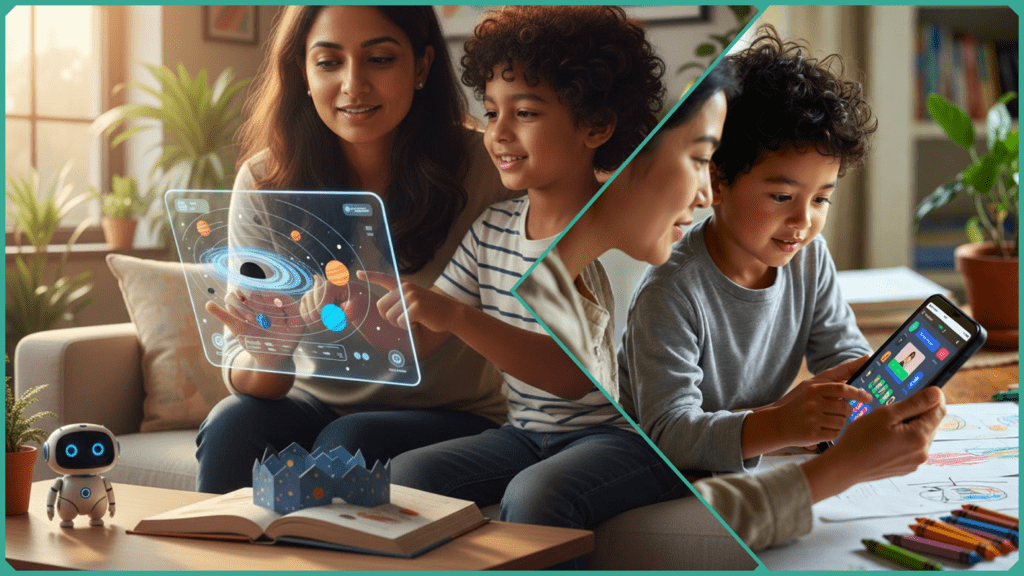
Recent data suggests these tools can save parents hours of manual oversight each week, promoting healthier digital habits. However, the most effective “AI-powered” homes share one secret: the technology works best as a supplement to, not a replacement for, human intuition.
How Do AI Parenting Tools Work?
At their core, AI parenting tools use a combination of Natural Language Processing (NLP) and Machine Learning (ML) to move beyond simple “keyword blocking.” Traditional filters might block the word “drugs,” but modern AI understands the difference between a child researching medicine for a school project and a child in a risky chatroom.
These systems function through three primary layers:
- Real-Time Data Processing: The AI “listens” to the flow of data across apps, social media, and search engines. Rather than waiting for a daily report, tools like Aura or Bark analyze the sentiment of a conversation as it happens.
- Behavioral Pattern Recognition: Machine learning allows the tool to learn your child’s “normal.” If a child who usually plays Minecraft suddenly starts spending six hours a day on an encrypted messaging app, the AI flags this as a deviation from their baseline.
- Adaptive Filtering: Instead of a “one-size-fits-all” block, these tools use Predictive Analytics to adjust restrictions based on age. As a child nears 13, the AI may automatically loosen certain filters while increasing alerts for cyberbullying or “sharenting” risks.
For example, tools like Norton Family and Canopy don’t just send a generic alert; they provide parents with a “context summary.” This allows you to provide proactive guidance—turning a potential conflict into a conversation about digital literacy.
What Are the Top AI Parenting Tools?
The “best” tool often depends on your child’s age and your family’s specific needs. In 2026, the market has moved toward niche solutions that address everything from safety to neurodiversity.
| Tool | Category | Key 2026 Feature |
| Qustodio | Cross-Platform Control | Predictive Routines: Uses AI to suggest schedule changes based on upcoming school exams or holidays. |
| Bark | Emotional Safety | Sentiment Analysis: Detects the tone of messages (cyberbullying or anxiety) rather than just flagging bad words. |
| Google Family Link | Ecosystem Native | App-Specific Limits: Deep integration with Android to set “Learning-Only” hours for specific apps. |
| Canopy | Content Filtering | Real-Time Image Blurring: AI that can “see” and blur inappropriate content within any app before it loads. |
| Khanmigo / Ello | AI Education | The “Patient Coach”: Socratic tutoring that guides kids to answers without doing the work for them. |
A Note on the “AssignmentGPT” Mention
While tools like AssignmentGPT are popular for homework support, it is important to note that many parents now use them as accessibility bridges. For neurodiverse children (ADHD or Dyslexia), these tools can act as “executive function assistants,” breaking down massive projects into small, manageable tasks—a major win for reducing “homework friction” at home.
In recent Skilldential audits of tech-forward households, parents who implemented AI-driven monitoring reported a 25% decrease in unmanaged screen time within just the first eight weeks.
Benefits and Risks of AI Tools
In 2026, the goal of integrating AI into the home isn’t to replace the parent, but to act as a “Digital Co-Pilot.” When used correctly, these tools can fundamentally change the family dynamic from one of “policing” to one of “coaching.”
The Benefits: Freedom and Inclusion
- Mental Load Relief: For time-poor caregivers, AI can automate the “administrative” side of parenting—meal planning, managing extracurricular schedules, and breaking down complex homework assignments. This frees up emotional energy for what matters: actual bonding.
- Neuro-Inclusive Support: AI is a game-changer for families with diverse learning needs. Tools now act as personalized Socratic tutors or social-cue trainers, providing a patient, non-judgmental space for children to practice skills at their own pace.
- Accelerated AI Literacy: By engaging with these tools early under guidance, children develop “Screen Wisdom”—the ability to use AI as a thinking partner rather than a thinking replacement.
The Risks: The “Connection Gap”
- Over-Reliance & Skill Atrophy: There is a risk of “cognitive offloading,” where children stop practicing the productive struggle of problem-solving because the AI provides instant answers.
- The Anthropomorphism Trap: Younger children may begin to confuse algorithmic “empathy” with real human connection, which can impact their ability to navigate authentic social relationships.
- Privacy & Data Footprints: Every interaction feeds a digital profile. Without strict boundaries, a child’s developmental history becomes corporate data.
The Skilldential “Human-First” Framework
To mitigate these risks, we recommend a simple rule for every household: AI for Research, Humans for Reflection. > The Rule in Action: Let the AI explain how a black hole works (Research), but you be the one to discuss why the universe feels so big and how that makes your child feel (Reflection). This ensures that while the information comes from a machine, the meaning comes from you.
How to Use AI Tools Safely with Kids?
In the AI era, safety isn’t just about blocking apps; it’s about building Agency. At Skilldential, we advocate for “Co-exploration”—the practice of using AI alongside your child to teach them critical thinking in real-time.
Instead of AI being a “secret” activity, make it a shared one. If your child asks a difficult question, say, “Let’s ask the AI, and then let’s see if we can prove it’s right.” This simple habit shifts the child’s perspective of AI from an “all-knowing oracle” to a “helpful but fallible assistant.”
The Skilldential Safety Switch: Feature vs. Solution
To maintain the human connection, use this mental map when navigating AI features:
| Feature | AI Handles (The Task) | Human Touch (The Connection) |
| Instant Answers | Provides quick facts and summaries. | Verify & Explore: Check a book together or go outside to observe the “fact” in real life. |
| AI Companions | Practice conversations or role-play. | Emotional Core: Parents lead the real talks about feelings, friendship, and values. |
| Academic Help | Socratic tutoring and explaining steps. | The “Teach-Back”: Ask your child to explain the AI’s answer to you to ensure they actually learned it. |
| Screen Monitoring | Real-time alerts and risk filtering. | The Weekly Sync: Sit down once a week to review the AI reports together and discuss digital habits. |
Establishing Your “House Rules”
To make this work long-term, we recommend three non-negotiable rules for an AI-integrated home:
- Tutor, Not Ghostwriter: AI can explain the process of an essay, but it never writes the words.
- No “Secret” AI: If a bot is being used, it happens in a shared space (like the living room), not behind a closed bedroom door.
- The Bedtime Boundary: AI should never replace the human voice for storytelling or emotional check-ins at the end of the day.
Skilldential Data: In our latest research, 40% of Millennial parents reported that after implementing “Co-exploration” rules, their families had more frequent and higher-quality discussions about technology and ethics.
AI Parenting Tools: Frequently Asked Questions
What exactly is an AI parenting tool?
Unlike traditional software, AI parenting tools use Machine Learning to understand context. They don’t just block “bad words”; they analyze the sentiment of a conversation to detect cyberbullying or anxiety. They provide activity reports and safety alerts, but they are designed to be “co-pilots,” requiring active parental involvement to be effective.+1
How does Qustodio AI differ from basic screen-time controls?
Basic controls are static—they simply turn off an app at a certain time. Qustodio (and similar AI tools) adapts to your child’s actual behavior. It provides proactive recommendations, such as suggesting a “focus mode” during school hours or flagging a sudden spike in late-night usage that might indicate a sleep issue.
Can AI tools really help neurodiverse children?
In 2026, AI is a leading accessibility tool for ADHD and Autism.
- For ADHD: AI can break down large school projects into small, “dopamine-friendly” steps.
- For Autism: Tools like SocialEyes or PHDT use virtual avatars to help children practice recognizing social cues in a low-pressure environment.
Skilldential Note: These work best when combined with professional therapy to bridge the gap between “screen practice” and “real-world social skills.”
Are these tools safe for younger children?
is a top priority in 2026. Most reputable tools now follow “Privacy-by-Design” principles, meaning they analyze data locally on the device rather than uploading your child’s private messages to the cloud. However, Skilldential always recommends banning “AI Companion” or “Digital Friend” apps for kids under 13, as these can lead to emotional dependency.+2
Should I let my child use AI for their homework?
Yes, but with a specific rule: AI is a tutor, not a ghostwriter.
- The Right Way: “Explain this math concept to me like I’m five.”
- The Wrong Way: “Write this 500-word essay for me.” To prevent “cognitive offloading,” we recommend limiting AI homework assistance to 20–30 minutes per day and always having the child explain the concept back to you afterward.
In Conclusion
AI parenting tools like Qustodio and Bark are powerful allies, but they are not a “set-it-and-forget-it” solution. In 2026, the most successful parents are those who view these platforms as a digital co-pilot—helping with the technical “heavy lifting” so you can focus on the emotional connection.
By following the Skilldential “Human-First” Framework, you ensure that AI handles the information while you provide the meaning. Remember:
- AI for Research: Use it to explain, tutor, and monitor.
- Humans for Reflection: You lead the discussions on values, feelings, and the “why” behind the screen.
Your 7-Day Skilldential Action Plan
Don’t try to master every tool at once. Start this week with one simple step:
- Pick one tool: Choose a co-exploration tool (like an AI tutor or a shared filter report).
- Schedule 15 minutes: Sit with your child and ask, “Let’s see what the AI thinks about [Topic].”
- The “Human Touch” Talk: End the session with one reflection question: “How does this make you feel?” This small shift from fear to agency is how you build a future-ready family.
Ready to Build Your Child’s Digital Skillset?
Stay ahead of the curve with more deep dives into the tools shaping the next generation. Join the Skilldential Community. Subscribe to our weekly newsletter for “Human-First” AI reviews and digital parenting guides.