Steps to Create AI Prompt Templates for Customer Support
An AI prompt template is a reusable framework designed to turn generic AI responses into consistent, brand-aligned support. By combining specific instructions and context with modular variables—like {{customer_name}} or {{ticket_id}}—These templates act as a blueprint for every interaction.
In 2026, structured prompting is no longer optional; it is the primary defense against “hallucinations” and inconsistent tone. When integrated directly into platforms like Zendesk or Intercom, these templates don’t just save time—they can drive First Contact Resolution (FCR) up by 25% and significantly reduce the “empathy gap” in automated support.
What Is an AI Prompt Template?
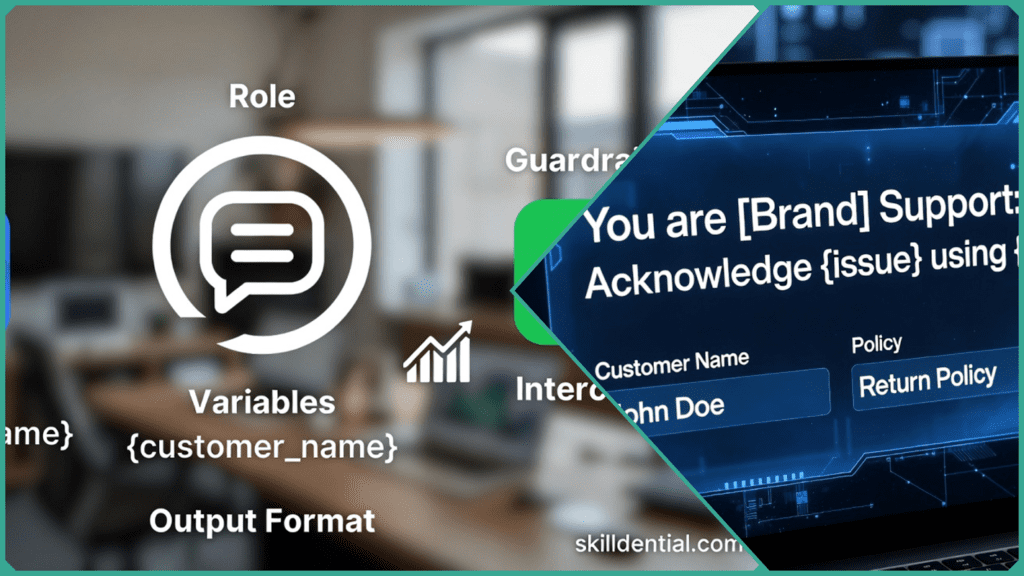
An AI prompt template is a structured, reusable blueprint used to guide Large Language Models (LLMs) toward specific, high-quality results. Unlike a simple “one-off” chat, a template acts as a standardized script that allows businesses to automate complex tasks—like customer support—while maintaining total control over the output.
Think of it as the difference between asking a new employee to “help a customer” versus giving them a Standard Operating Procedure (SOP).
The Core Components
A professional-grade template typically breaks down into four essential “pillars”:
- Role Assignment: Tells the AI who it is (e.g., “You are a Senior Billing Specialist”).
- Context & Knowledge: Provides the “ground truth” (e.g., “Use only the attached Refund Policy PDF”).
- The Task: Defines the specific action (e.g., “Draft a response to this user’s shipping inquiry”).
- Constraints & Format: Sets the boundaries (e.g., “Keep the reply under 150 words and do not use emojis”).
Why Templates are the “Safety Net” of 2026
In 2026, simply “winging it” with AI is a major liability. Prompt templates have become the primary tool for enterprise safety and reliability:
- Preventing Hallucinations: By using Grounding and Chain-of-Thought instructions within a template, you force the AI to verify its facts against your company data before it speaks.
- Alignment with Global Standards: Modern templates are often designed to comply with frameworks like the NIST AI Risk Management Framework (RMF). These guidelines emphasize trustworthiness and robustness, ensuring that AI systems don’t provide biased, unsafe, or non-compliant advice.
- Modular Variables: Templates use placeholders like
{{customer_name}}or{{order_details}}. When integrated with tools like Zendesk, these variables are filled automatically, allowing for personalization at a massive scale.
Examples of Templates in Action
| Type | Use Case | Result |
| Technical Support | Troubleshooting a login error. | Step-by-step, calm, and accurate instructions. |
| Escalation | Managing an angry customer. | Empathetic tone that follows official protocol. |
| Bilingual Support | Translating and solving queries. | Culturally relevant and grammatically perfect aid. |
Why Use AI Prompt Templates in Customer Support?
In 2026, simply “using AI” is no longer a competitive advantage—using AI reliably is. Prompt templates transform a volatile AI model into a dependable team member. Here is how they impact the bottom line:
Unified Brand Voice and Safety
The greatest risk in automated support is a “rogue” AI response that is either rude or inaccurate. Templates embed your Brand Persona and Safety Rules directly into the logic.
- The Benefit: By using specific constraints (e.g., “Never promise a refund without supervisor approval”), you mitigate the risk of “hallucinations” and ensure the AI remains empathetic even during high-stress interactions.
Radical Improvement in Key Metrics
Templates aren’t just for quality; they are for speed. When AI has a structured path to follow, performance metrics shift significantly:
- FCR (First Contact Resolution): Precise instructions allow the AI to solve the problem correctly the first time, reducing ticket “ping-pong.”
- AHT (Average Handle Time): Instead of staring at a blank screen, agents use templates to generate 90% of a draft in seconds, leaving only the final “human touch” review.
- CSAT (Customer Satisfaction): Built-in “empathy modules” ensure that every response—even a rejection—is phrased warmly and professionally.
Scalability for Operations Managers
For Ops Managers, the beauty of templates lies in their modularity.
- Plug-and-Play Integration: Modern templates are designed to be “headless,” meaning they plug into CRMs like Salesforce or Zendesk. When a policy changes (e.g., a new 30-day return window), you update the template once, and every AI instance across your company is instantly aligned.
- Reduced Training Time: New agents can get up to speed faster by using the “Suggested Response” templates as a learning tool for how the company handles specific issues.
Comparison: Generic Prompt vs. Structured Template
| Feature | Generic Prompt (“Help this user”) | Structured Template |
| Consistency | Low (changes every time) | High (Standardized) |
| Accuracy | Variable (risks of hallucinations) | Grounded in Company Data |
| Integration | Manual copy-paste | Automated via {{variables}} |
| Safety | None | Built-in Guardrails |
How to Create AI Prompt Templates Step-by-Step
Building a template is an exercise in “Reverse Engineering.” You start with the perfect response in mind and work backward to create the rules that produce it. Follow these six steps to build 2026-standard modular templates.
Define Role and Context
Assign a specific persona to ground the AI’s “brain.”
- The Blueprint: “You are a Senior Support Agent for [Brand Name]. Your tone is empathetic, concise, and professional.”
- The Knowledge: “Always cross-reference the user’s query with our current policy:
{{refund_policy}}.”
Specify the Task and Guardrails
Clearly outline what the AI must do and, more importantly, what it must not do.
- Instructions: “Acknowledge the customer’s frustration, provide a direct solution, and offer a clear next step.”
- Restrictions: “Never promise a specific refund date. Do not use jargon. Avoid saying ‘I understand’—instead, say ‘I see how that would be frustrating.'”
Incorporate “Few-Shot” Examples
AI learns best by imitation. Provide 2–3 pairs of “User Input” and “Ideal AI Response” within the template.
- Why it works: This “Few-Shot” technique is the most effective way to teach a specific brand voice without the need for expensive model fine-tuning.
Inject Variables for Modularity
This is what turns a prompt into a Template. Use placeholders that your CRM (Zendesk, Intercom, or Langfuse) can automatically fill.
- Examples:
{{customer_name}},{{order_id}},{{tracking_link}},{{agent_name}}.
Set the “Chain-of-Thought” Output Format
Don’t leave the structure to chance. Require the AI to follow a specific flow.
- The Rule: “Structure your response as: 1. Empathy Statement > 2. Direct Solution > 3. Helpful Closing Question.“
Test, Audit, and Iterate
Deploy the template in a sandbox environment first.
- Pro-Tip: Review your logs for “Edge Cases”—queries that the template didn’t handle well—and update your Guardrails (Step 2) accordingly.
Case Study: The Cost of Inconsistency
In a 2025 Skilldential career audit, it was found that customer support managers using “loose” AI prompts struggled with tone drift, leading to a 25% drop in CSAT scores. After implementing structured, modular templates, those same teams saw a 35% improvement in First Contact Resolution (FCR) within the first quarter.
AI Prompt Template Types: A Strategic Comparison
Different support scenarios require different logic. Below is a comparison of the most effective template types used by high-performing teams in 2026.
| Template Type | Primary Use Case | Key Performance Benefit | Best Audience |
| Instant Acknowledgment | Initial ticket receipt and setting expectations. | Builds Trust: Reduces “silence anxiety” instantly. | Support Managers |
| Grounded FAQ Response | Handling routine, high-volume queries (e.g., returns). | High FCR: Achieves up to 83% resolution without human intervention. | Ops Leads |
| Technical Troubleshooting | Guiding users through complex multi-step fixes. | Reduces AHT: Shaves up to 77% off manual drafting time. | CX Designers |
| Empathetic Escalation | Transitioning a frustrated user to a human agent. | Brand Safety: Maintains professional calm during “heat” moments. | Solopreneurs |
| Proactive Check-in | Post-resolution follow-up or product updates. | Boosts NPS: Shows customers they aren’t just a ticket number. | Retention Leads |
Deep Dive: Which Should You Build First?
- The “Efficiency” Choice: FAQ Responses. If your team is drowning in repetitive questions (e.g., “Where is my order?”), start here. By grounding the template in your real-time shipping data, you can automate the bulk of your workload.
- The “Quality” Choice: Technical Support. Technical issues often have the highest Average Handle Time (AHT). Templates that use “Chain-of-Thought” prompting can break down complex manuals into easy-to-read steps, ensuring agents don’t miss a single troubleshooting detail.
- The “Safety” Choice: Escalation. In 2026, “hallucination management” is critical. Escalation templates ensure that if the AI detects a high-risk keyword (like “legal” or “refund”), it immediately stops trying to “help” and hands the conversation over to a human specialist.
Pro-Tip for 2026: Use Sentiment-Based Triggering. Modern CRM tools can now detect if a customer is “Frustrated” and automatically switch the AI from an “FAQ Template” to an “Empathetic Escalation Template” mid-conversation.
What Are Best Practices for Guardrails?
In 2026, guardrails are no longer just “nice to have”—they are a mandatory legal and operational layer.1 As enterprises move toward Agentic AI (AI that can take actions), the risk of a model going “off-script” carries significant financial and reputational weight.2+1
To align with modern standards like the NIST AI Risk Management Framework (RMF) and Stanford’s Responsible AI guidelines, your templates must move beyond simple instructions and adopt a “Zero Trust” posture.
Best Practices for AI Guardrails
The “Sandbox” Instruction (Groundedness)
The most effective way to stop hallucinations is to explicitly limit the AI’s “world” to your approved data.
- The Guardrail: “Base your answer strictly on the provided
{{knowledge_base}}. If the answer is not present, respond with: ‘I am sorry, I do not have access to that specific information. Would you like me to connect you with a human agent?” - Why it works: It removes the AI’s incentive to “guess” when it hits a knowledge gap.
Implementation of “Chain-of-Thought” (CoT) Logic
Based on research from Stanford and Google, forcing an AI to “think before it speaks” reduces logic errors by up to 37%.
- The Guardrail: Use the phrase “Let’s work this out in a step-by-step way to ensure accuracy.”
- The Workflow: 1. AI analyzes customer sentiment.32. AI identifies the specific policy relevant to the query.3. AI drafts a response based on that policy.4. AI reviews the draft against safety constraints before displaying it.
Bidirectional Sanitization
In 2026, defense must be bidirectional. You must protect the model from the user, and the user from the model.
- Input Sanitization: Automatically scrub PII (Personally Identifiable Information) like social security numbers or credit cards from the user’s message before it reaches the LLM.4
- Output Filtering: Use a secondary, “lightweight” model to scan the AI’s response for toxic language, leaked internal codes, or non-compliant promises before the customer sees them.
“Constitutional” Brand Alignment
Instead of just saying “be nice,” give the AI a set of “laws” to follow, similar to the NIST Generative AI Profile (AI-600-1).
- The Rule: “If a customer mentions ‘Legal action’ or ‘Lawsuit,’ immediately provide the standard escalation message and cease further generation.”
- The Rule: “Never use superlative language (e.g., ‘the best,’ ‘guaranteed’) when discussing product performance.”
Guardrail Checklist for Support Managers
| Category | Guardrail Action | Target Risk |
| Accuracy | Require citations for every claim. | Hallucinations |
| Security | Redact PII in both input and output. | Data Breach |
| Compliance | Block specific keywords (e.g., “refund,” “discount”). | Unauthorized Promises |
| Ethics | Run a bias check for inclusive language. | Brand Reputation |
Pro-Tip: In 2026, high-performing teams use “Self-Consistency” prompting. They have the AI generate three versions of a response and then select the one that most closely aligns with the guardrail constraints.
How Do Variables Future-Proof Templates?
In 2026, the mark of a professional prompt engineer isn’t just writing a “good prompt”—it’s building a dynamic system. Variables are the connective tissue that allows a single template to serve thousands of unique customers without a single line of manual editing.
How Variables Future-Proof Your Support Workflows
Variables (often denoted as {{placeholder_text}}) transform a static block of text into a functional application. Here is why they are essential for long-term scalability:
Seamless Integration with CRMs (Zendesk & Salesforce)
In 2026, AI is no longer a standalone chat window; it is embedded directly into your support software.
- The “Hot-Swap” Effect: When an agent opens a ticket, your platform automatically scrapes the metadata and “hot-swaps” variables.
- Example:
{{customer_name}}is pulled from the Contact field, while{{last_order_id}}is pulled from the transaction history. This ensures the AI has “instant memory” of who it is talking to.
Radical Scalability Across Teams
Variables allow a single “Master Template” to be used by multiple departments with zero rewrites.
- Modular Roles: You can use a variable for the persona:
"You are a {{department_expert}} for [Brand]." - Consistency: By updating the “Base Template,” you instantly deploy improvements to the Billing, Tech, and Logistics teams simultaneously.
Avoiding “The Rewrite Trap.”
Policy changes are frequent. If you hardcode a “30-day return policy” into 50 different prompts, you’ll have to manually update all 50.
- The Future-Proof Solution: Point your prompts to a central knowledge variable:
{{current_return_policy}}. When the policy changes, you update it once in your database, and every AI agent is updated in real-time.
Variable Mapping: From Data to Dialogue
To visualize how this works, consider how your internal data translates into the final customer-facing message.
| Variable Tag | Data Source | Purpose |
{{ticket_sentiment}} | AI Analysis Layer | Tells the AI to be more “Apologetic” or “Professional.” |
{{knowledge_base}} | Vector Database (RAG) | Provides the specific technical fix for a bug. |
{{agent_name}} | Salesforce Profile | Humanizes the handoff if a human takes over. |
{{loyalty_tier}} | Customer Profile | Triggers special offers for “VIP” or “Platinum” members. |
Pro-Tip: Use “Default” Values
When building templates, always include a fallback. If your CRM fails to provide a name, your variable should look like this: {{customer_name | "there"}}. This ensures your AI doesn’t say “Hello [MISSING_VALUE],” but instead says “Hello there.”
AI Prompt Templates: FAQs
What is an AI prompt template?
An AI prompt template is a structured, reusable blueprint used to guide Large Language Models (LLMs) like GPT-4, Claude, or Gemini. Unlike a simple chat, a template combines role assignment, fixed context, and modular placeholders (variables) to ensure every AI response is consistent, safe, and brand-aligned.
How do prompt templates improve First Contact Resolution (FCR)?
Templates significantly boost FCR by eliminating ambiguity. By providing the AI with “Few-Shot” examples (input-output pairs) and direct access to company policy via variables, the AI can resolve complex queries accurately on the first try. In 2026, teams using structured templates see FCR improvements of up to 40%.
What variables work best in support templates?
Modern support workflows rely on “Hot-Swap” variables that pull data directly from your CRM. Common examples include:
{{customer_name}}: For immediate personalization.{{order_history}}: To give the AI context on past purchases.{{policy_snippet}}: To ensure the AI cites the correct version of a legal or refund policy.{{agent_handoff_trigger}}: To signal when a human needs to intervene.
Can templates really prevent AI hallucinations?
The most effective way to stop “hallucinations” (AI making up facts) is to use a Grounded Template. This includes a specific command: “Base your response strictly on the provided {{knowledge_base}}. If the answer is not there, do not guess; offer to escalate to a human.” This “Zero-Trust” approach is a core recommendation of the NIST AI Risk Management Framework.
How should I measure the success of my templates?
Success should be measured by comparing your “Before” and “After” metrics across three categories:
- Efficiency: Track the drop in Average Handle Time (AHT).
- Quality: Monitor CSAT (Customer Satisfaction) and NPS scores.
- Accuracy: Use AI-driven QA rubrics to audit the percentage of “Grounded” vs. “Hallucinated” responses.
Final Checklist for Success
Before you publish your first template, ensure you can check off these three items:
- The “Wait” Rule: Does your template tell the AI to “think step-by-step” before responding?
- The Exit Ramp: Is there a clear path for the user to reach a human?
- The Brand Filter: Does the tone match your company’s 2026 voice guidelines?
In Conclusion
AI prompt templates are the bedrock of modern customer experience. By standardizing interactions through roles, guardrails, and modular variables, businesses can finally move past the era of “unpredictable AI.” These frameworks don’t just protect your brand; they drive measurable ROI—boosting First Contact Resolution (FCR), slashing Average Handle Time (AHT), and ensuring that every customer feels heard through consistent, empathetic phrasing.
Your “Build-a-Template” Quick-Start Guide
Don’t wait for a “perfect” system. Pick one frequent ticket type (e.g., “Where is my order?”) and build a modular template today using these final steps:
- Go Live & Iterate: Deploy to a small percentage of tickets, monitor your CSAT delta, and refine your instructions based on real-world logs.
- Select Your Sandbox: Use a testing environment within your CRM (Zendesk, Salesforce, or Intercom) to avoid impacting live customers.
- Define the Logic: Use Chain-of-Thought prompting—explicitly tell the AI to “think step-by-step” to analyze the user’s intent before drafting.
- Plug in Variables: Connect your
{{tracking_link}}or{{customer_data}}placeholders to your live database. - Audit for Safety: Run 10-15 test cases specifically looking for “hallucinations” or tone drift.