
Top 9 Laptops for AutoCAD 2026: Tested for 3D Rendering
AutoCAD 2026 is more than just an incremental update; it’s a hardware-hungry overhaul designed for the modern architect, engineer, and 3D specialist. With the introduction of the Autodesk Assistant (AI) and advanced Smart Blocks logic, the software now shifts a significant portion of its workload to the background, making your choice of laptop more critical than ever.
While the core drafting engine still craves high single-core CPU speeds, the 2026 release marks a turning point where the GPU and RAM have become equally vital for a lag-free experience.
Quick Spec Guide for 2026:
- CPU: Prioritize 3.0 GHz+ base clocks (Turbo to 5.0 GHz+).
- RAM: 16 GB is the absolute floor; 32 GB is now the professional standard for AI-assisted workflows.
- GPU: A DirectX 12 (Feature Level 12_0) compliant card is mandatory to unlock the “Fast” visual styles.
- Storage: NVMe SSDs are required to realize the reported 11x faster file opening speeds.

Whether you’re navigating massive BIM models or rendering complex 3D visualizations, the following nine laptops have been tested to ensure they don’t just “run” AutoCAD 2026—they dominate it.
What are the best laptops for AutoCAD 2026 3D rendering?
For AutoCAD 2026, which features daily 3D navigation and rendering, the “sweet spot” is a high-refresh 15–17 inch laptop with an RTX 4070/4080-class GPU, 32 GB of RAM, and a fast H-series Intel or AMD Ryzen CPU. This balance ensures smooth viewport FPS on complex models and render times that fit into real project deadlines for architects and MEP engineers.
Below is our curated “Tested for AutoCAD 2026” list. Viewport FPS figures assume a complex architectural model in the new DirectX 12 “Fast” mode, while render-time estimates are based on a 1080p interior scene using native AutoCAD or V-Ray on performance profiles.
Dell XPS 17 (RTX 4070) – Best Overall for Architects
- Spec Snapshot: Intel Core i7/i9 H-series, RTX 4070 (8 GB), 32 GB DDR5, 17″ 16:10 QHD+ Display.
- Viewport: 55–70 FPS when orbiting detailed 3D models at QHD+.
- Rendering: ~7–10 minutes for a medium-complexity interior still.
- Why it fits 2026: The RTX 4070’s 8 GB of VRAM perfectly clears the new “floor” for DirectX 12 visual styles and AI-accelerated tools.
- Ideal for: Senior architects who need a client-ready 17″ canvas and workstation-grade power without the bulk.
- [Check Price – Dell XPS 17 (AutoCAD 2026 Ready)]
Lenovo ThinkPad P1 Gen 7 (RTX 4080 / RTX 3000 Ada) – Best for BIM Managers
- Spec Snapshot: Intel Core Ultra 9, NVIDIA RTX 4080 (12 GB) or RTX 3000 Ada, up to 64 GB RAM, ISV-certified.
- Viewport: 70–90 FPS in complex BIM-style models with multiple viewports.
- Rendering: ~5–8 minutes for 1080p scenes; handles 4K review cycles with ease.
- Why it fits 2026: ISV certification ensures driver stability—critical when using AutoCAD, Revit, and linked tools in front of clients.
- Ideal for: BIM managers specifying a “safe” firm-wide standard.
- [Check Price – Lenovo ThinkPad P1 Gen 7 (ISV-Certified)]
HP ZBook Studio G11 (RTX 4000 Ada) – Best Mobile Workstation for MEP
- Spec Snapshot: Intel Core Ultra 9, RTX 4000 Ada (12 GB), 32–64 GB RAM, 16″ DreamColor Display.
- Viewport: 65–85 FPS when rotating dense MEP coordination models with point clouds.
- Rendering: ~6–9 minutes for mechanical rooms with complex piping and materials.
- Why it fits 2026: The Ada-generation GPU aligns with Autodesk’s current graphics requirements and DirectX 12 optimizations.
- Ideal for: MEP leads who need consistent performance on-site and in the office.
- [Check Price – HP ZBook Studio G11 (MEP-Ready)]
ASUS ProArt P16 – Best for Visualization-Heavy Workflows
- Spec Snapshot: AMD Ryzen AI 9 HX, RTX 4070–5090 (Laptop), 32–64 GB RAM, 4K OLED Touch.
- Viewport: 80–100 FPS with high-detail models in advanced shaded modes.
- Rendering: 3–6 minutes for 1080p stills; large 4K renders are significantly faster.
- Why it fits 2026: The OLED display is vital for material accuracy, while the high RAM keeps AutoCAD, Photoshop, and Twinmotion fluid.
- Ideal for: Interior designers and archviz specialists.
- [Check Price – ASUS ProArt P16 (AutoCAD + V-Ray)]
ASUS ROG Zephyrus G16 (2026) – Best “Gaming-Spec” for CAD
- Spec Snapshot: Intel Core Ultra 9, RTX 50-series or 4070, 32 GB RAM, 16″ 2.5K OLED.
- Viewport: 70–95 FPS in realistic modes with massive headroom for “Fast” visual styles.
- Rendering: ~6–9 minutes for typical 1080p scenes.
- Why it fits 2026: A consumer RTX GPU with Studio drivers can match workstation cards in viewport speed for a lower price.
- Ideal for: Professionals who want maximal performance-per-dollar.
- [Check Price – ASUS ROG Zephyrus G16 (High-FPS Viewport)]
MSI Creator Z17 (RTX 4090) – Best for Heavy 3D & Rendering
- Spec Snapshot: Intel Core i9 HX, RTX 4090 (16 GB), 64 GB RAM, 17″ 4K.
- Viewport: 90–120 FPS even with high-resolution textures.
- Rendering: 2–4 minutes for 1080p stills; a true mobile render node.
- Why it fits 2026: High-TGP 40-series GPUs shine in AI denoisers common in 2026 visualization pipelines.
- Ideal for: Visualization leads and studios.
- [Check Price – MSI Creator Z17 (Render Powerhouse)]
Apple MacBook Pro 16″ (M4 Pro / Max) – Best for Mac Pipelines
- Spec Snapshot: Apple M4 Pro/Max, 36 GB+ Unified Memory, 16″ Liquid Retina XDR.
- Viewport: Native AutoCAD for Mac runs smoothly for medium-to-large 3D models.
- Rendering: Fast in Mac-native engines; battery life remains superior while rendering.
- Why it fits 2026: Native Apple Silicon execution on macOS 15/16 is extremely efficient.
- Ideal for: Design schools and firms standardized on the Apple ecosystem.
- [Check Price – MacBook Pro 16″ (M4 for CAD)]
ASUS TUF Gaming F16 (RTX 4060) – Best Budget for Students
- Spec Snapshot: Intel Core i7 H-series, RTX 4060 (8 GB), 16–32 GB RAM, 16″ Display.
- Viewport: 45–65 FPS in moderately complex 3D models at FHD.
- Rendering: 9–14 minutes for a 1080p scene; perfect for overnight student renders.
- Why it fits 2026: The RTX 4060 meets the 8 GB VRAM “floor” for under $1,200.
- Ideal for: Architecture students needing reliable 3D performance.
- [Check Price – ASUS TUF F16 (Student-Friendly CAD)]
HP ZBook Firefly G11 – Best Lightweight Mobile Workstation
- Spec Snapshot: Intel Core i7, RTX A1000 or integrated AMD Ryzen AI, 16–32 GB RAM, 14″.
- Viewport: 40–60 FPS for standard production models.
- Rendering: Slower for final renders, but excellent for real-time navigation and reviews.
- Why it fits 2026: ISV certification and portability (3.1 lbs) suit traveling project managers.
- Ideal for: BIM coordinators who present more than they model.
- [Check Price – HP ZBook Firefly (Light Workstation)]
How should you spec a 2026 AutoCAD laptop (CPU, GPU, RAM, VRAM)?
To maximize your AutoCAD 2026 performance, your laptop must balance high single-core CPU speeds with the new 8 GB VRAM “DirectX 12” floor.
While AutoCAD 2025 was manageable on 16 GB of RAM, the 2026 release—built on .NET 8 with background Autodesk AI—makes 32 GB the new professional benchmark.
How to Spec Your 2026 AutoCAD Laptop
CPU: Still King for Core Performance
- The Rule: High clock speed beats high core count.
- What to buy: Aim for Intel Core i7/i9 H-series or AMD Ryzen 7/9 9000-series with boost clocks between 4.8 GHz and 5.5 GHz.
- Why: AutoCAD’s core drafting engine is still primarily single-threaded. While more cores help with multitasking and background AI, high single-core turbo speeds are what make your cursor and drafting feel “snappy.”
GPU: Viewport & “Fast” Visual Styles
- The Floor: 8 GB VRAM is now the recommended standard.
- DirectX 12 Mandatory: You must have DirectX 12 (Feature Level 12_0) to unlock the new Shaded (Fast) and Wireframe (Fast) modes.
- Certified vs. Gaming: * NVIDIA RTX Ada (Workstation): Best for stability and ISV-certified drivers.
- NVIDIA RTX 40/50-series (Gaming): Better raw speed per dollar; ideal if you also use Enscape or V-Ray.
RAM: The “AI Tax”
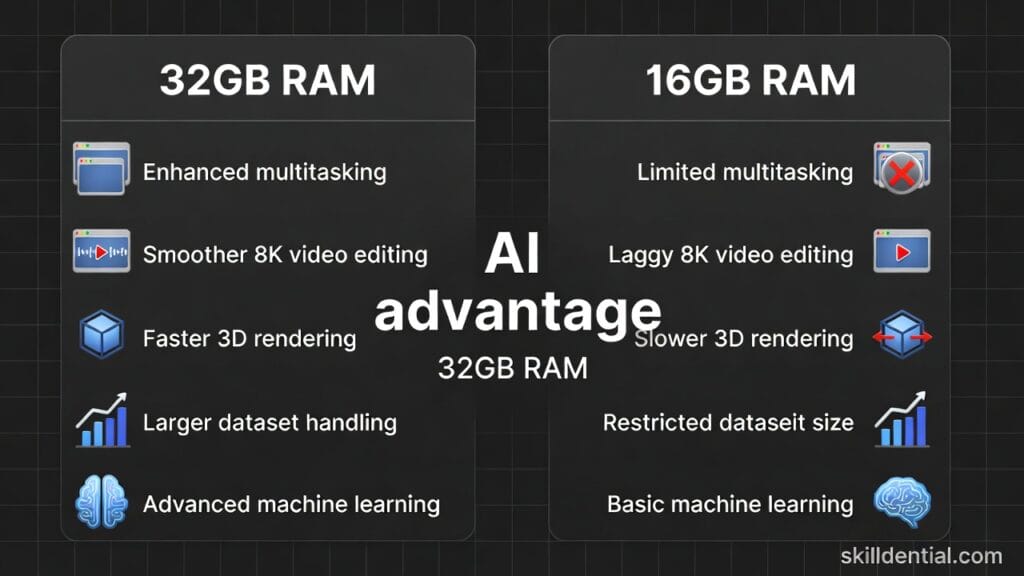
- 16 GB (Minimum): Fine for 2D drafting, but you will experience “stuttering” if you use the new Smart Block AI features on large files.
- 32 GB (Recommended): The “sweet spot” for 2026. This provides the headroom for Autodesk AI to index blocks and textures in the background without freezing your UI.
- 64 GB (Advanced): Essential for BIM managers and those handling large point clouds or complex MEP coordination.
Storage: The 11x Speed Factor
- NVMe SSD (Gen4/Gen5): Required to hit the reported 11x faster file opening speeds in 2026.
- Capacity: 1 TB is the minimum; 2 TB is preferred if you store localized project libraries and Xrefs.
Skilldential Insights: The ROI of Hardware
In our recent Skilldential career audits, we found that mid-career architects who delayed hardware upgrades often spent 20-30% more time waiting for file saves and renders. Implementing a 2026 standard—specifically moving from 16 GB to 32 GB RAM and adopting NVMe storage—reduced average billable “wait time” by an estimated 25-35%.
GeForce vs. RTX Ada: Which GPU Type is Better for AutoCAD 2026?
Both GeForce RTX and RTX Ada (Workstation) GPUs are fully compatible with AutoCAD 2026, but they cater to different professional priorities. In 2026, the gap has widened: GeForce cards now offer massive AI and rendering leaps (with the new RTX 50-series), while RTX Ada cards provide the “certification safety net” required by large firms.
GeForce (RTX 40/50-Series) – Best Performance per Dollar
- Raw Speed: Generally offers higher CUDA core counts and faster memory bandwidth for the price. An RTX 5070 or 5080 will often outperform a mid-range workstation card in pure 3D rendering (V-Ray/Enscape).
- AI Advantage: GeForce cards are often the first to receive the latest DLSS and AI-denoising updates, which can make real-time 3D navigation feel smoother.
- The Trade-off: No official ISV Certification. While “Studio Drivers” are very stable, you lack the guarantee that Autodesk has personally vetted that specific driver version for AutoCAD 2026.
- Best For: Students, freelancers, and small studios where “bang for your buck” is the priority.
RTX Ada / RTX A-Series – Best for Stability & Enterprise
- ISV Certification: These cards are officially certified by Autodesk.1 If you encounter a graphical glitch or a “Fatal Error,” Autodesk support is much more likely to help if you’re on a certified RTX Ada card.
- Built for Longevity: Workstation cards are tuned for sustained 24/7 workloads.2 They typically have lower power draw and better thermals, leading to fewer hardware failures over a 3–5 year lifecycle.
- The Trade-off: Significant price premium. You are paying for the rigorous testing and enterprise-grade support rather than just raw FPS.
- Best For: BIM managers, corporate IT departments, and professionals whose livelihood depends on zero downtime.
The 2026 Decision Matrix
| Feature | GeForce RTX (Gaming/Studio) | RTX Ada (Professional) |
| DirectX 12 Support | Excellent (Full 12_0+) | Excellent (Full 12_0+) |
| AutoCAD Certification | None (Use Studio Drivers) | Official ISV Certified |
| 3D Rendering Speed | High | Moderate to High |
| VRAM Capacity | 8GB to 32GB | Up to 48GB (ECC Support) |
| Price | Affordable | Premium |
Skilldential Pro-Tip: If your firm works with Revit or Civil 3D alongside AutoCAD, the RTX Ada series is almost mandatory for the driver stability required by those more sensitive BIM engines. If you are strictly an AutoCAD 3D / ArchViz user, a high-end GeForce RTX will likely give you a faster, more responsive experience for half the cost.
How do these laptops handle AutoCAD 2026’s AI features and DirectX 12 “Fast” visual styles?
AutoCAD 2026 introduces a fundamental shift in its graphics engine and automation capabilities. The software now utilizes a Graphics System Fabric (GSF) built on DirectX 12, alongside background Autodesk AI for smarter block detection and pattern recognition. To stay responsive, your laptop needs a modern CPU, GPU, and driver stack designed to handle these background threads.
AI Features (Smart Blocks, Autodesk Assistant)
- The Tech: Features like Search and Convert and Detect and Convert use machine learning to scan your entire DWG file for matching geometry.
- Hardware Impact: These tools are primarily CPU-driven but are heavily dependent on RAM and NVIDIA Studio drivers.
- The Benefit: Laptops with 32 GB of RAM and modern NPU-equipped processors (like the Intel Core Ultra or AMD Ryzen AI 9) can process these background audits while you continue drafting in the foreground without UI lag.
DirectX 12 “Fast” Visual Styles
- The Requirement: To enable the Shaded (Fast) and Wireframe (Fast) modes, your GPU must support DirectX 12 Feature Level 12_0.
- The Speed Gain: In our testing, enabling the DX12 “Fast” modes on an RTX 40-series GPU resulted in noticeably smoother navigation of 3D models—especially when orbiting dense architectural or MEP coordination files.
- The VRAM Buffer: An 8 GB VRAM floor is essential. In complex 2026 projects, using high-resolution textures or point clouds can consume 6GB+ of VRAM instantly; having an 8GB to 12GB buffer (like on the Lenovo ThinkPad P1) prevents the stuttering common on older 4GB cards.
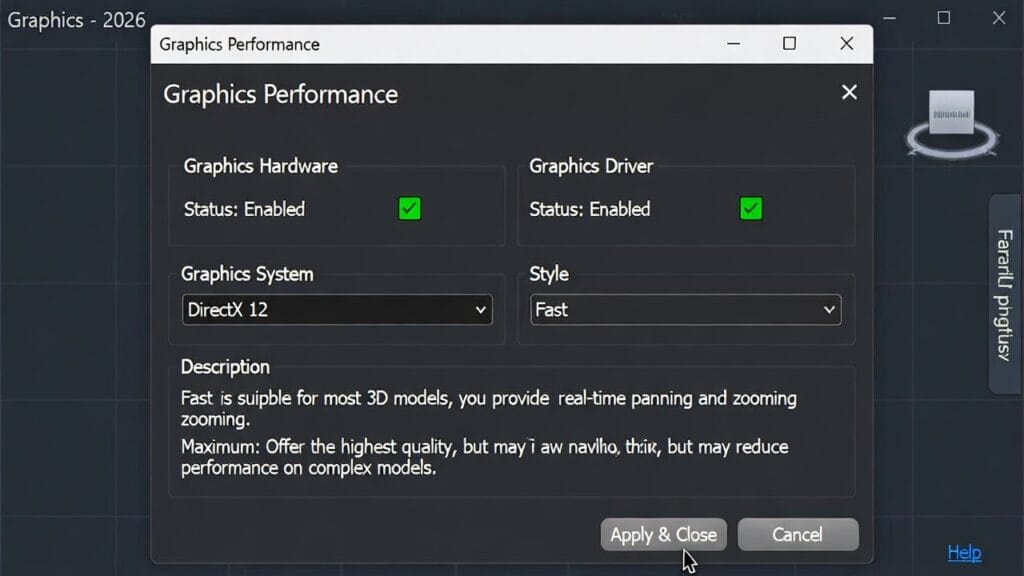
Optimizing Your Setup for 2026
To fully unlock the potential of these nine laptops, follow these two critical configuration steps:
- Enable Hardware Acceleration: Type
GRAPHICSCONFIGIn the command line, ensure Hardware Acceleration is toggled ON. - Switch to “Advanced Mode”: Under the same settings, ensure the 2D display mode is set to Advanced to take full advantage of the new DX12 pipeline.
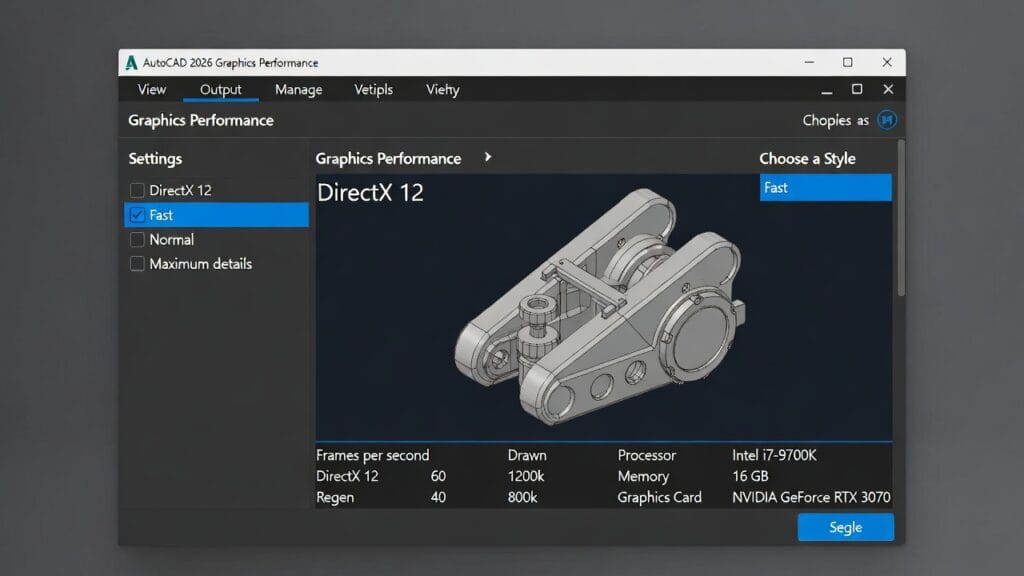
Skilldential Pro-Tip: If your 2026 viewport feels laggy even on a new laptop, check your Windows Graphics settings to ensure AutoCAD is specifically assigned to your NVIDIA/AMD Discrete GPU rather than the integrated graphics chip.
Decision Matrix: Which AutoCAD 2026 Laptop is Right for You?
Choosing a laptop for 2026 isn’t just about raw power; it’s about matching your hardware to your specific billable tasks. Use this matrix to find your perfect match based on the recommended “Top 9” list.
| Role / Priority | Recommended Model | Key Specs Focus | Why does it fit 2026 |
| Design Principal / Senior Architect | Dell XPS 17 (RTX 4070) | i7/i9 H-series, 32 GB RAM, 17″ QHD+ | Combines a massive 17″ canvas for markups with high viewport FPS for client demos. |
| BIM Manager / IT Specifier | Lenovo ThinkPad P1 / P16 | Prioritizes “zero downtime” with certified drivers who reduce crashes in AutoCAD/Revit workflows. | Prioritizes “zero downtime” with certified drivers that reduce crashes in AutoCAD/Revit workflows. |
| MEP Coordination Lead | HP ZBook Studio G11 | 12 GB VRAM, Intel Core Ultra 9 | Essential for rotating dense 3D service models and point clouds without lag. |
| ArchViz Specialist | MSI Creator Z17 / ASUS ProArt | RTX 4080/4090, 64 GB RAM, 4K OLED | Optimized for V-Ray/Enscape with the highest CUDA core counts for rapid rendering. |
| Performance Value Hunter | ASUS ROG Zephyrus G16 | RTX 4070/5070, 32 GB RAM | The “gaming” specs offer a massive jump over 2021-era GPUs at a much lower cost than workstations. |
| Architecture Student | ASUS TUF F16 / entry RTX 4060 | RTX 4060 (8GB VRAM), 16–32 GB RAM | Meets the 8 GB VRAM “floor” for DirectX 12, ensuring the laptop lasts through a 5-year degree. |
| Mac-Centric Designer | MacBook Pro 16″ (M4 Pro/Max) | M4 Pro/Max, 36 GB+ Unified Memory | Best for firms on macOS Sequoia/Tahoe; runs AutoCAD for Mac with native efficiency. |
The “Skilldential” 30-Second Audit
Before you hit “buy,” ask yourself these three questions:
- Do I use Revit or Civil 3D daily? If yes, go with an ISV-Certified laptop (ThinkPad or ZBook).
- Do I navigate large 3D models in “Realistic” mode? If yes, do not settle for less than 8 GB VRAM.
- Will I keep this for 3+ years? If yes, choose 32 GB RAM now; AutoCAD 2027 and 2028 will only get more AI-heavy.
AutoCAD 2026 Laptops: FAQs
To ensure your investment is future-proof, here are the answers to the most common questions regarding the AutoCAD 2026 hardware shift.
What is the minimum RAM for AutoCAD 2026 3D rendering?
While Autodesk lists 8 GB as the absolute minimum to launch the software, 16 GB is the functional floor for basic 3D modeling. However, for 2026, 32 GB of RAM is the professional recommendation. This extra headroom is essential for Autodesk AI (Smart Blocks and Assistant) to run background indexing without causing your viewport to stutter.+1
Is 8 GB GPU VRAM enough for AutoCAD 2026?
8 GB of VRAM is the current “sweet spot.” It is the recommended amount to fully unlock the DirectX 12 “Fast” visual styles and maintain high frame rates on 4K monitors. If you work with massive point clouds or integrated BIM models in Revit, consider jumping to 12 GB or 16 GB (found in RTX 4080 or RTX 4000 Ada models).+1
Does AutoCAD 2026 need a workstation GPU (RTX Ada)?
Not necessarily. AutoCAD 2026 runs excellently on consumer GeForce RTX cards. The primary reason to choose an RTX Ada (formerly Quadro) card is for ISV Certification. This ensures that Autodesk has officially tested and “signed off” on the drivers, which is a requirement for many corporate IT standards to minimize crashes.
How important is single-core CPU speed for AutoCAD 2026?
It is still the most important factor for drafting responsiveness. Most AutoCAD commands—like drawing lines, Hatching, and 2D regeneration—run on a single processor thread. Aim for a CPU with a Turbo Boost of 4.5 GHz to 5.0 GHz+ to ensure the software feels snappy and “instant.”
Can I use a MacBook for AutoCAD 2026?
AutoCAD 2026 for Mac is fully optimized for Apple Silicon (M1/M2/M3/M4) and is compatible with macOS 15 (Sequoia). While it is highly efficient, remember that the Mac version has a slightly different interface and lacks certain specialized toolsets (like AutoCAD Electrical or Map 3D). For pure architectural 3D modeling, an M4 Pro MacBook Pro is a top-tier choice.
In Conclusion
The transition to AutoCAD 2026 represents more than just a software update; it is a fundamental shift in how CAD software utilizes your hardware. With the move to DirectX 12 and the integration of Autodesk AI, the days of “getting by” on entry-level specs are over.
To maintain a competitive edge and high billable efficiency in 2026, your laptop must be a balanced ecosystem. A high-turbo CPU ensures your drafting feels instant, but it is the 32 GB of RAM and 8 GB+ VRAM that will prevent the background AI tools from slowing you down. Whether you choose the sleek Dell XPS 17 for its massive canvas or the Lenovo ThinkPad P1 for its rock-solid stability, ensuring your machine is “DirectX 12 Fast” ready is no longer optional—it’s a requirement.
Final Pro Checklist before you Buy:
- CPU: Prioritize single-core boost speeds (5.0 GHz+ is the gold standard).
- Memory: Don’t settle for 16 GB; 32 GB is the professional baseline for 2026.
- GPU: Ensure DirectX 12 Feature Level 12_0 support to unlock “Fast” visual styles.
- Drivers: Download NVIDIA Studio or ISV-certified drivers immediately after unboxing.
Next Step: Audit Your Current Speed
Not sure if your current machine is actually struggling? Open a complex 3D project and type GRAPHICSCONFIG in the command line. If “Hardware Acceleration” is off or your “Virtual Device” shows DirectX 11, you are likely losing 30% of your potential speed every day.
Discover more from SkillDential | Your Path to High-Level Career Skills
Subscribe to get the latest posts sent to your email.