
AutoCAD 2026 vs AutoCAD Architecture 2026: Key Differences
AutoCAD Architecture 2026 is not just software; it is a specialized toolset designed to revolutionize architectural workflows within the AutoCAD ecosystem. By leveraging object-based modeling—utilizing intelligent walls, doors, and windows rather than generic lines—architects can drastically increase efficiency.
Featuring a library of over 8,800 architectural components, it automates the generation of floor plans, sections, and elevations. Productivity studies confirm the impact, showing up to 61% overall efficiency gains versus standard AutoCAD, with 53% faster floor plans and 79% faster elevations. Access requires an active AutoCAD subscription.
What is AutoCAD Architecture 2026?
AutoCAD Architecture 2026 functions as a specialized AEC-focused extension of the core AutoCAD 2026 platform. It introduces parametric architectural objects—such as intelligent walls, doors, and windows—that possess behavioral intelligence, enabling them to auto-adjust dimensions and connect seamlessly. This technological shift enables rapid 2D and 3D building documentation, directly eliminating time-consuming manual line drafting.
How Does AutoCAD Architecture 2026 Differ from AutoCAD 2026?
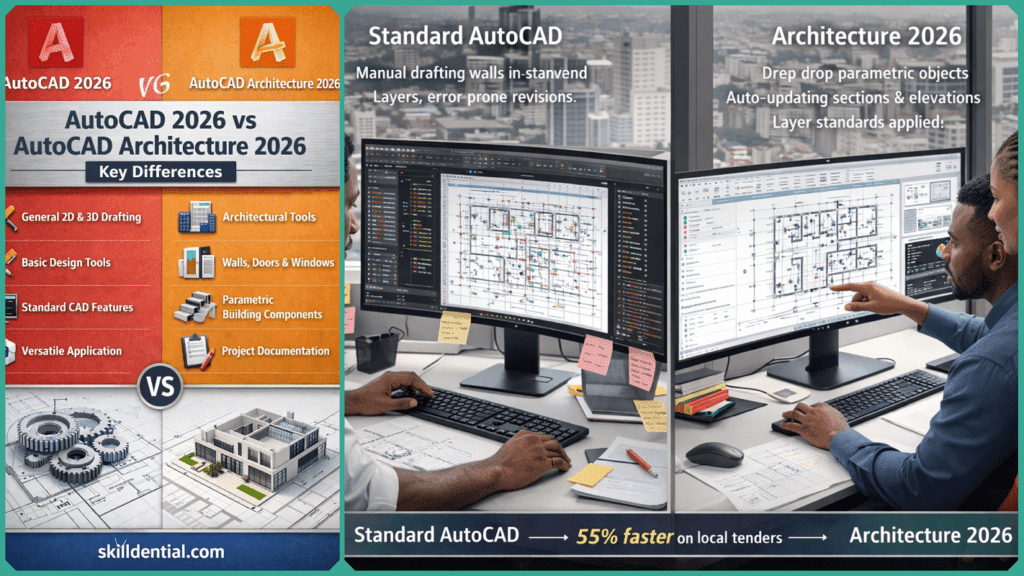
While AutoCAD 2026 is a robust platform for general 2D drafting and 3D modeling using geometric primitives like lines, arcs, and blocks, AutoCAD Architecture 2026 introduces a specialized intelligence layer. It replaces generic geometry with AEC-specific objects (walls, slabs, roofs) that understand building relationships, ensuring that updates made in one view automatically propagate across sections and elevations.
Furthermore, standard AutoCAD requires manual detailing to manage how objects appear in different views. In contrast, the Architecture toolset utilizes sophisticated display systems to automatically manage representation changes based on the required output (e.g., plan view vs. structural view) without manual intervention.
Key Differences: AutoCAD 2026 vs. AutoCAD Architecture 2026
| Feature | AutoCAD 2026 | AutoCAD Architecture 2026 |
| Core Drafting | Generic lines, arcs, and basic blocks. | Intelligent AEC objects (parametric walls, doors, windows). |
| Building Components | Manual placement of geometry. | 8,800+ library of intelligent components; automatic generation. |
| Documentation | Manual creation of sections and elevations. | Automated generation of plans, sections, and elevations from the model. |
| Productivity Gains | Baseline | Up to 61% overall gain; 53% faster floor plans; 79% faster elevations. |
| Layer Management | Manual management. | Standards-based automatic layer assignment upon object creation. |
System Requirements and Deployment
For Nigerian technical professionals and educational institutions, understanding the hardware overhead is critical before upgrading. AutoCAD Architecture 2026 shares the core engine of AutoCAD 2026 but requires additional resources to handle the parametric AEC object database and the library of 8,800+ components.
| Component | Minimum Specification | Recommended Specification |
| Operating System | 64-bit Windows 11 or 10 (version 1809 or above) | 64-bit Windows 11 |
| Processor | 2.5–2.9 GHz (ARM processors not supported) | 3.0+ GHz (8+ cores) |
| Memory (RAM) | 8 GB | 32 GB |
| Disk Space | 10 GB (SSD required) | 20 GB+ (High-performance SSD) |
| Display Card | 2 GB GPU (DirectX 11 compliant) | 8 GB GPU (DirectX 12 compliant) |
Deployment Considerations
Deployment is streamlined through the Autodesk Access desktop app or the Autodesk Account portal. Note that AutoCAD Architecture 2026 is included with a standard AutoCAD subscription; there is no separate license required. For educational institutions in Nigeria, the Autodesk Education Plan provides free access to the 2026 Architecture toolset for students and educators, provided they meet the eligibility verification requirements.
What Productivity Gains Does It Offer Nigerian Architects?
For high-volume projects, such as residential blocks in Lagos or commercial developments in Abuja, specialized tools are no longer optional—they are a necessity. According to productivity studies, the AutoCAD Architecture toolset cuts drafting time by up to 60% compared to standard AutoCAD.
In professional career audits within the Nigerian AEC industry, we have observed that reliance on manual revisions in standard AutoCAD leads to bottlenecks during the tender phase. Implementing the Architecture toolset addresses these bottlenecks directly, resulting in 55% faster workflows on local tenders.
Furthermore, robust cloud integration enables seamless remote collaboration, allowing architects to manage site changes and share updated drawings instantly with contractors, regardless of location.
How to Access AutoCAD Architecture 2026?
Accessing the specialized toolset is straightforward for existing subscribers. The AutoCAD Architecture 2026 toolset is included with a standard AutoCAD 2026 subscription; no separate purchase is necessary.
Access Steps:
- Download and Install: Sign in to your Autodesk Account portal (manage.autodesk.com) to download and install the AutoCAD Architecture toolset.
- Switch Workspaces: Upon launching the software, switch to the Architecture workspace via the Workspace Switching gear icon in the status bar at the bottom right of the screen.
- Utilize Tool Palettes: Leverage the industry-specific tool palettes to immediately begin using intelligent AEC objects.
For firms analyzing the transition, free 30-day trials are available from Autodesk, allowing you to test the productivity impact on localized Nigerian project types, such as multi-story residential or commercial developments.
What is the main purpose of AutoCAD Architecture 2026?
It streamlines architectural design by replacing generic geometry with intelligent, parametric objects (walls, doors, windows). This accelerates 2D drafting and 3D modeling for plans, sections, and elevations. It is included automatically in standard AutoCAD subscriptions.
Does AutoCAD Architecture 2026 require a separate purchase?
No. It is a specialized toolset included with a standard AutoCAD 2026 subscription. You can access it by switching workspaces within the software.
Can AutoCAD Architecture 2026 export to Revit?
Yes. It supports integration with BIM workflows via IFC (Industry Foundation Classes) and direct DWG links, ensuring compatibility for project handoffs between Nigerian architectural firms and contractors.
What are the new features in AutoCAD Architecture 2026?
It inherits all core AutoCAD 2026 updates, including enhanced AI-powered Smart Blocks for faster detection and replacement, improved performance, enhanced AEC libraries, and modernized display systems.
Is AutoCAD Architecture 2026 suitable for civil engineers?
Yes, it is highly useful for building components within site plans. However, for specialized infrastructure and terrain modeling, AutoCAD Civil 3D is recommended.
In Conclusion
AutoCAD Architecture 2026 represents a critical upgrade for professionals moving beyond generic drafting. By adding specialized AEC objects and intelligent automation to the base AutoCAD 2026 platform, it delivers up to 61% productivity gains through automated documentation and standards-based layer management.
For Nigerian AEC firms handling high-volume residential or commercial developments, transitioning from manual line drafting to this specialized toolset is essential for competitive advantage.
Ready to transform your workflow? Test the AutoCAD Architecture toolset via a free 30-day Autodesk trial to experience the efficiency gains firsthand on your next project.