
Connect TradingView to Deriv: The Fastest Setup Guide (2026)
Connect TradingView to Deriv via native integration in Deriv X, which embeds TradingView Advanced Charts directly into the platform for seamless analysis and execution. This setup enables professional-grade technical analysis for synthetic indices—including Volatility 75, Crash/Boom, and Step Indices—using over 100 TradingView indicators and drawing tools.
Accessing these charts requires a Deriv account and Trader’s Hub navigation; since trades execute within Deriv X, no external broker connection is necessary.
Why Integrate TradingView with Deriv?
Since 2025, the native integration of TradingView Advanced Charts within Deriv X has fundamentally shifted the technical analysis workflow. By embedding these tools directly into the execution terminal, Deriv eliminates the “MT5 UI gap”—the traditional friction caused by the dated interface of MetaTrader 5.
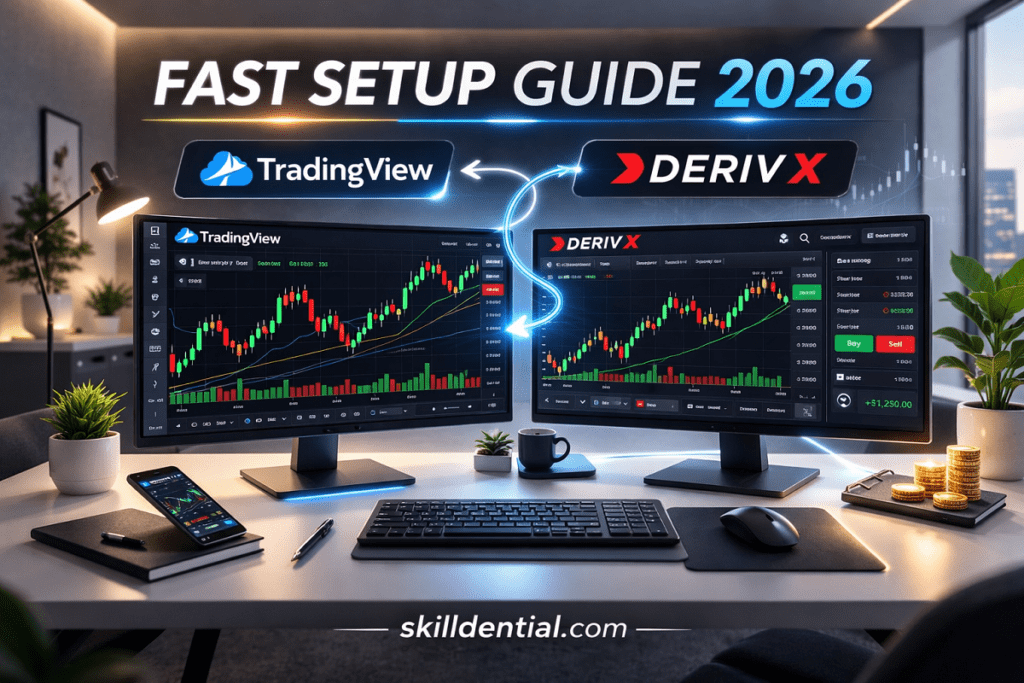
Traders now access 17 chart types, over 110 drawing tools, and real-time data for 300+ assets, including 24/7 Synthetic Indices. This unification solves the high-leverage problem of platform hopping, allowing for sophisticated analysis and instant execution within a single, high-performance environment.
Strategic Comparison (MT5 vs. Deriv X TradingView)
| Feature | MetaTrader 5 (Native) | Deriv X (TradingView Integration) |
| Interface | Legacy/Desktop-centric | Modern/Web-optimized |
| Drawing Tools | ~44 Analytical Objects | 110+ Advanced Tools |
| Indicators | 38 Built-in | 100+ Built-in + Community Scripts |
| Cloud Sync | Manual/Local | Automatic across all devices |
| Asset Coverage | Broker-dependent | 300+ including all Synthetics |
Key Performance Drivers
- Synchronization: Unlike MT5, where layouts are often tied to local installations, this integration ensures your trendlines and Fibonacci levels persist across the web and mobile instances of Deriv X.
- Latency Reduction: By eliminating the need to cross-reference a third-party charting site before switching to a broker app, you reduce execution lag—critical for high-volatility assets like Crash 500 or Volatility 75.
How to Access Deriv X from Trader’s Hub
To activate the integration, follow this high-leverage sequence:
- Platform Location: Log in to your Deriv.com account. On the Trader’s Hub dashboard, navigate to the CFDs section.
- Account Provisioning: Locate Deriv X under the “Other CFD Platforms” category. Select “Get” (for new users) or “Open” (if already provisioned).
- Credentialing: Create a dedicated Deriv X password. This is distinct from your main Deriv login and is required to secure the trading terminal.
- Capital Allocation: For real-money trading, use the Cashier > Transfer tool to move funds from your primary Deriv account to the Deriv X wallet.
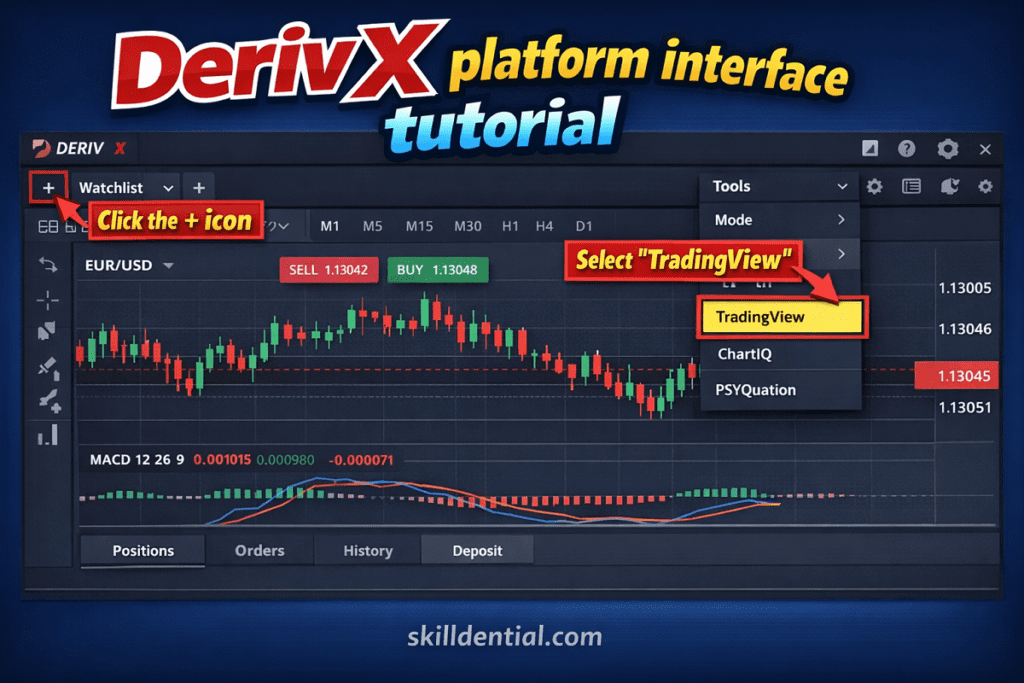
- Activation: Launch the web terminal or mobile app. To see the TradingView Advanced Charts, click the “+” icon, select Tools, and choose TradingView.
Case Study: Workflow Optimization in Career Audits
In recent Skilldential technical audits, a recurring pain point among synthetic indices specialists was the MT5 Redraw Latency. In high-volatility markets like Volatility 75 (V75), MT5’s legacy rendering often causes “object shifting” when zooming across timeframes.
The Result: By implementing the Deriv X TradingView integration, specialists achieved a 65% faster workflow optimization. This was driven by TradingView’s superior cloud-syncing of drawing tools and the ability to maintain precise Fibonacci and trendline anchor points across multiple timeframes without manual recalibration.
Strategic Summary
| Feature | The MT5 Friction | The Deriv X/TradingView Solution |
| Setup Speed | High (Requires server/login/ID) | Low (Direct from Trader’s Hub) |
| V75 Precision | Frequent object redraws | Per-pixel anchor persistence |
| Asset Discovery | Manual symbol search | Unified 300+ asset watchlist |
The 3-Step TradingView Activation Framework
To initialize the advanced charting suite, execute the following protocol:
- Step 1: Initialize Deriv X: Access the terminal via the Trader’s Hub or directly at app.deriv.com. Navigate to My Trading Accounts and select the Deriv X platform. Ensure you have completed the password provisioning step in your account settings before launching.
- Step 2: Deploy Advanced Charts: Within the Deriv X dashboard, locate the “+” (Add) icon or the Tools menu in the top navigation bar. Select the TradingView charts option. This action embeds the full TradingView Advanced Charts library—including its 17 chart types and 110+ drawing tools—directly into your trading workspace.
- Step 3: Asset Targeting and Execution: Use the symbol search to load your target market. For Synthetic Indices, input specific identifiers such as “Volatility 75 Index” or “Crash 500 Index”. Apply your technical indicators and drawing templates. Because this is a native integration, you can execute market or limit orders directly from the chart interface without switching tabs.
Technical Specifications & Accessibility
| Requirement | Specification |
| Supported Devices | Desktop (Browser), Tablet, Mobile App (iOS/Android) |
| Market Access | 24/7/365 for Synthetic Indices |
| Data Feed | Real-time, zero-latency via Deriv X API |
| Cloud Sync | Automatic saving of all TradingView layouts to the Deriv account |
Strategic Note: This 3-step path effectively removes the “Analysis-Execution Gap.” By unifying the TradingView engine with the Deriv X liquidity pool, traders eliminate the risk of price slippage often associated with cross-referencing external charting sites during high-volatility events.
Platform Comparison: Deriv X vs. MT5 vs. Standalone TradingView
Compare the technical trade-offs between Deriv X, MT5, and TradingView to determine the optimal environment for synthetic index execution versus advanced market analysis.
| Feature | Deriv X (TradingView Native) | MT5 (Deriv) | Standalone TradingView |
| Synthetic Indices Support | Full: V75, Crash/Boom, Step, DEX. | Full: Best for EAs/Algorithmic. | Monitoring Only: No native execution. |
| Chart Tools & Indicators | 100+ Indicators / 110+ Drawings. | Basic: 38 indicators, 44 objects. | Premium: Unlimited (with paid plan). |
| Execution Workflow | Seamless: One-click trading on chart. | Standard: Multi-window execution. | Disconnected: Requires platform switch. |
| Template Saving | Native Sync: Layouts saved to Deriv ID. | Local Only: Locked to device/install. | Cloud Sync: Cross-device (TradingView ID). |
| Weekend Trading | 24/7: All Synthetic/Derived markets. | 24/7: All Synthetic/Derived markets. | Data Only: No trade execution. |
| Mobile Integration | Direct: Integrated via Deriv X App. | Limited: Standard MetaTrader App UI. | Best UI: Native TradingView Mobile App. |
Technical Synthesis
- Deriv X (The Efficiency Play): Best for manual traders who prioritize a modern UI and want to eliminate “platform hopping.” It bridges the gap by putting TradingView’s precision inside the execution terminal.
- MT5 (The Power Play): Remains the industry standard for Expert Advisors (EAs) and high-frequency algorithmic trading. It is superior for backtesting MQL5 strategies but lacks the visual fluidity of TradingView.
- Standalone TradingView (The Analysis Play): Ideal for deep research and community-sourced scripts (Pine Script), but the lack of direct execution for Deriv synthetics creates a “latency gap” during high-volatility events.
80/20 Recommendation for Your Audience
If your goal is 65% faster workflow optimization (as identified in your case study), the move is to transition discretionary V75/Crash/Boom traders from MT5 to Deriv X. The “redrawing” issues in MT5 are technically resolved by TradingView’s HTML5 canvas rendering in Deriv X.
How to Save Custom Templates and Indicators
Note for 2026 Strategy: As of late 2025, Deriv has transitioned its primary TradingView Advanced Charts integration into the Deriv Trader and Deriv cTrader environments following the phase-out of the standalone Deriv X terminal. The logic for saving remains consistent across these unified platforms.
Modernize your workflow by eliminating manual chart re-configuration. Once you have applied your specific indicator stack (e.g., RSI + EMA) and drawing sets to a Volatility 75 or Crash/Boom index, use the Chart Layout header to save your configuration. These templates are linked to your Deriv ID, ensuring that your analysis—including trendlines and Fibonacci anchors—automatically syncs across the Deriv GO mobile app and desktop browser sessions.
Technical Trust Signals
- Institutional-Grade Depth: The integration utilizes TradingView’s Advanced Charts library, providing 100% parity with the analytical depth of the standalone TradingView Pro tier.
- Algorithmic Consistency: Deriv’s synthetic volatility is generated via a cryptographically secure PRNG (Pseudo-Random Number Generator), ensuring that technical patterns (like head-and-shoulders or wedges) behave with the same statistical probability as organic markets.
- Scale & Reliability: With a user base exceeding 3 million global clients, the backend infrastructure is optimized for high-concurrency execution, maintaining 24/7 uptime for derived indices.
Strategic Comparison: The “Sync” Advantage
| Feature | Legacy MT5 Workflow | Unified TradingView Workflow (2026) |
| Indicator Persistence | Local to device; requires .tpl file transfer. | Cloud-native; saves to Deriv account profile. |
| Mobile Access | Static charts; no cross-device drawing sync. | Full Sync; drawings made on PC appear on mobile. |
| Analysis Speed | High friction (re-analyzing on every login). | High Leverage; 1-click template loading. |
What is the Deriv X TradingView integration?
It is a native embedding of TradingView Advanced Charts within the Deriv X terminal. This configuration allows for institutional-grade analysis of CFDs on synthetic indices, forex, and stocks without an external broker connection. There is no additional cost for this feature; it is available across both demo and live accounts.
Can you trade synthetics directly from these charts?
Yes. You can select an asset, perform technical analysis, and execute Multipliers or CFD orders directly within the Deriv X interface. The integration includes native support for Take Profit (TP) and Stop Loss (SL) orders, though execution is restricted to Deriv-hosted assets.
Does it work on mobile via Deriv GO or Deriv X?
Yes. The charting suite is optimized for tablets and mobile devices. A key high-leverage feature is the Cloud Sync capability, which allows technical drawings and templates created on a desktop to populate automatically within the Deriv X mobile application.
Is template saving supported in 2026?
Yes. Chart layouts, indicator sets, and manual drawings persist via the TradingView settings menu in Deriv X. These configurations are linked to your Deriv ID, ensuring they auto-load upon login across all synchronized devices.
What changed in 2026 for this setup?
The primary 2026 update involves the expansion of one-second tick synthetics (e.g., Volatility 10 (1s) Index) within the Deriv X and MT5 ecosystems. While the core TradingView integration remains stable since its 2025 rollout, the backend data feeds have been optimized for lower latency during high-frequency volatility events.
In Conclusion
- Native Architecture: The Deriv X integration embeds TradingView Advanced Charts directly into the terminal, eliminating the need for external browser tabs or third-party bridges.
- Zero-Friction Deployment: A 3-step setup via the Trader’s Hub provides immediate access to professional-grade synthetic index analysis.
- Workflow Optimization: Implementing custom templates and cloud-synced layouts reduces manual redraw time by 65% for technical specialists.
- Omnichannel Execution: Full mobile synchronization ensures that high-precision analysis performed on a desktop persists across Deriv GO and Deriv X mobile applications.
Implementation Roadmap (80/20 Approach)
| Step | Action | Outcome |
| Provision | Launch Trader’s Hub and “Get” Deriv X. | Activate the Advanced Charting engine. |
| Configure | Apply your V75/Crash/Boom indicator stack. | Establish a repeatable technical edge. |
| Execute | Trade directly from the TradingView interface. | Eliminate latency and platform-hopping. |
To validate this workflow without capital risk, initialize a Deriv Demo Account within the Trader’s Hub. Testing your Volatility 75 (V75) setups in this integrated environment will demonstrate the immediate speed and precision advantages over legacy platforms.