Microsoft Designer vs Adobe Illustrator: Which is Better?
Choosing the right design tool requires aligning software capabilities with operational workflows. Adobe Illustrator stands as the definitive industry-standard vector-graphics workstation, engineered for professionals who demand absolute precision, granular path control, and infinite, non-lossy scaling. It is the baseline requirement for creating production-ready logos, complex iconography, technical illustrations, and high-resolution print or web assets.
In contrast, Microsoft Designer is a cloud-based, AI-driven layout and ideation engine optimized for velocity and automated asset generation. Instead of manual manipulation, it leverages generative AI to quickly produce social media content, presentations, and digital marketing collateral.
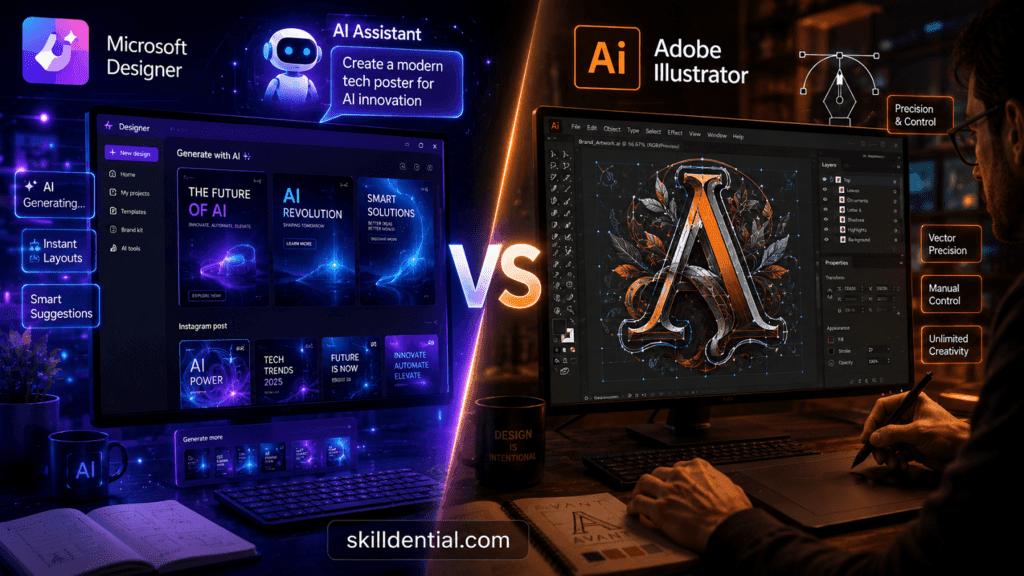
Ultimately, determining whether Microsoft Designer or Adobe Illustrator is better depends on your specific technical skill level, budget, and output requirements. While Adobe Illustrator is the superior choice for precision-oriented vector creation and scalable brand assets, Microsoft Designer excels for non-designers who require rapid, AI-assisted visual layouts.
How do Microsoft Designer and Adobe Illustrator differ in core purpose?
The fundamental distinction between Microsoft Designer and Adobe Illustrator lies in their operational philosophy: automated composition versus manual precision.
| Dimension | Microsoft Designer | Adobe Illustrator |
| Core Engine | Generative AI layout & prompt-driven orchestration | Professional vector-graphics manipulation workstation |
| Primary Asset Output | Raster-based digital layouts (PNG, JPEG, PDF) | Scalable vector graphics (AI, EPS, SVG, PDF) |
| Execution Method | Text-to-image, template customization, automated scaling | Manual path plotting, anchor-point manipulation, and bezier curve control |
| Target User | Solopreneurs, marketers, and non-designers | Professional graphic designers, illustrators, and brand identity specialists |
Technical Workflows
Executing projects efficiently requires selecting a tool whose underlying architecture matches your production requirements. The workflow inside Adobe Illustrator centers on absolute manual precision, coordinate-based vector manipulation, and rigorous asset specification.
Conversely, Microsoft Designer bypasses manual asset assembly entirely, substituting the traditional canvas with an AI-driven, prompt-to-layout pipeline optimized for immediate digital distribution.
Microsoft Designer: Generative Layout Engine
Microsoft Designer operates as a high-velocity ideation tool built on an AI stack. It treats design as an optimization problem, utilizing predictive layout algorithms to generate complete compositions from unstructured user text or baseline assets.
- Friction Reduction: Eliminates the blank-canvas barrier by instantly providing layout variations, typographic pairings, and contextual imagery.
- Limitations: Lacks structural editing capabilities. Users cannot alter the underlying vector architecture of a graphic, isolate individual geometric nodes, or control precise print separations.
Adobe Illustrator: Vector-Graphics Workstation
Adobe Illustrator is engineered for infinite scalability and absolute asset control. Every element within the canvas exists as a mathematical coordinate (vectors) rather than fixed pixel grids, allowing for lossless scaling from micro-iconography to large-format billboards.
- Micro-Control: Provides absolute governance over every anchor point, bezier handle, path intersection, and color profile (including exact Pantone matching for physical print production).
- Limitations: High technical barrier to entry. The software requires deep domain knowledge of vector theory, print compliance, and manual tools to execute a concept from scratch.
Strategic Alignment
- Deploy Microsoft Designer when: The strategic objective is speed-to-market, high-volume digital asset variation, or empowering cross-functional teams (e.g., social media management, internal presentations) to generate clean visuals without design software overhead.
- Deploy Adobe Illustrator when: The objective is foundational brand asset creation, proprietary intellectual property development (e.g., logos, trademarks), or any workflow requiring precise manufacturing, engraving, apparel production, or high-fidelity print specifications.
Is Microsoft Designer better for non‑designers and content creators?
For individuals without formal design training, Microsoft Designer delivers significantly higher immediate ROI and operational velocity than Adobe Illustrator.
Velocity via Automation
Microsoft Designer lowers the barrier to entry by replacing manual canvas construction with AI-driven workflows.
- Prompt-to-Layout Pipelines: Users generate structured visual layouts, presentation slides, and marketing assets from natural language inputs rather than building grids and typesetting text manually.
- One-Click Optimization: Routine production tasks—such as background removal, asset resizing for multiple platform dimensions, and color palette shifts—are handled via single-click automated actions.
- Ecosystem Integration: For small-business owners and content creators operating within the Microsoft 365 ecosystem, the tool inserts seamlessly into daily administrative and marketing workflows, minimizing file-transfer friction.
The Contrast with Adobe Illustrator
While Adobe Illustrator integrates its own generative AI features (via Adobe Firefly), its ecosystem remains firmly anchored in professional vector production.
Achieving a baseline marketing layout in Adobe Illustrator requires manual configuration of artboards, typographic hierarchies, color modes (RGB vs. CMYK), and layer management.
For non-designers needing immediate, “good-enough” digital assets, the steep learning curve of Adobe Illustrator represents an unnecessary operational bottleneck. Microsoft Designer optimizes for time-to-market, allowing non-technical creators to sustain high-volume content production without software overhead.
Is Adobe Illustrator better for professional designers and students?
For design agency professionals, commercial illustrators, and university students, Adobe Illustrator is not merely an option—it is an absolute baseline competency. The software’s vector architecture provides the pixel-perfect scalability, complex path manipulation, and exact color management required for high-stakes print, brand identity systems, and commercial art production.
Granular Vector Control and Core Toolsets
Professional workflows demand tools that allow total control over geometry. Adobe Illustrator delivers this precision through an expansive, specialized toolset:
- The Pen Tool & Anchor-Point Editing: Allows manual placement, manipulation, and anchoring of paths and bezier handles to construct precise custom typography and complex shapes.
- Vector Intelligence & Effects: Features like Live Trace convert raster images into clean vectors instantly, while advanced 3D environments, dithered gradients, and the Turntable tool allow professionals to simulate multi-angle spatial dimensionality without compromising file scalability.
- Advanced Color Precision: Native support for exact Pantone libraries, spot colors, and CMYK color profiles ensures that digital assets translate perfectly to physical printing presses and manufacturing pipelines without color shifting.
Agency Ecosystem & Hiring Filters
Design agencies, enterprise marketing departments, and cross-platform production pipelines rely heavily on the Adobe Creative Cloud ecosystem. Adobe Illustrator integrates flawlessly into broader video production, web, and motion graphics pipelines involving Adobe Photoshop, InDesign, and After Effects.
For students entering the job market, mastery of Adobe Illustrator is a mandatory prerequisite for passing portfolio reviews and automated HR hiring filters. While tools like Microsoft Designer serve well for rapid, entry-level social layouts, corporate design roles and competitive agency positions require candidates who can build foundational brand assets from the ground up using Adobe Illustrator.
What are the key technical differences between Illustrator and Designer?
The core engine mechanics determine how each application processes and renders digital artwork.
- Adobe Illustrator: Operates as a native desktop and cloud vector graphics workstation. Every visual element is calculated as a mathematical coordinate equation mapping paths, anchor points, bezier curves, and coordinate fills. This mathematical baseline ensures infinite scalability without pixelation, loss of fidelity, or rendering distortion.
- Microsoft Designer: Functions as a cloud-based layout orchestration and rendering engine built atop Microsoft’s design-AI stack (utilizing models like DALL-E). It treats the canvas primarily as a flat raster compositing layer, combining text strings, pre-built template blocks, and AI-generated pixel grids into flat graphic files.
File Portability & Output Fidelity
Production capabilities dictate where these tools fit within design, manufacturing, and engineering pipelines.
- Adobe Illustrator: Engineered for cross-media distribution and asset editing. It outputs high-fidelity vector formats—such as native AI, EPS, SVG, and production-grade layered PDFs. These file types preserve distinct vector layer structures, editable font paths, embedded metadata, and geometric clipping masks.
- Microsoft Designer: Built for immediate web and screen distribution. It optimizes for web-standard raster formats, exporting primarily as PNG and JPEG files, with flat PDF options for presentations. It lacks the internal framework to generate or export layered, fully editable vector files like native SVG or industrial EPS format.
Color Engineering Standards
Color space accuracy marks the boundary between digital-first layout tools and production-ready workstations.
- Adobe Illustrator: Features advanced, professional-grade color profile architecture. It natively manages complex color spaces, shifting between RGB (screen matrices), grayscale, and CMYK (four-color process commercial inks). It includes embedded international color libraries like Pantone for exact spot-color verification in physical manufacturing.
- Microsoft Designer: Configured natively for the sRGB color space, making it highly effective for web interfaces and digital screen displays. It does not contain an engine for CMYK color conversion, spot-color mapping, or print-run dot-gain profiling.
Canvas Control & Modification Infrastructure
The mechanical control model dictates how users alter and manipulate geometric shapes.
Adobe Illustrator (Absolute Manual Precision)
[Anchor Point Coordinate] ---> (Bezier Handle Modulation) ---> [Infinite Vector Scale]

Microsoft Designer (Prompt-Based Orchestration)
[Natural Language Input] ---> (Predictive AI Layout Engine) ---> [Static Raster Layer]
Code language: CSS (css)- Adobe Illustrator: Grants complete manual autonomy. Designers use the Pen Tool, Direct Selection tool, Pathfinders, Shape Builders, and Gradient Meshes to plot paths, join nodes, manipulate anchor handles, and shade complex dimensional vector art from an empty canvas.
- Microsoft Designer: Restricts canvas manipulation to layout-level adjustments. Users modify layouts using automated text boxes, AI-powered background removal tools, global color themes, and prompt-driven layout reshuffling. It does not provide low-level node-editing tools or manual bezier-curve drawing mechanics.
How do pricing and budgets affect the choice between Microsoft Designer and Adobe Illustrator?
Software procurement costs and licensing structures heavily dictate tool selection for independent creators, enterprise agencies, and scaling businesses.
- Adobe Illustrator: Operates strictly on a subscription-based software-as-a-service (SaaS) model through Adobe Creative Cloud. Users can license it as a single-app plan (approximately $22.99/month) or as part of the All Apps bundle (approximately $59.99/month). There is no perpetual licensing option, meaning ongoing overhead is mandatory to maintain access to project source files.
- Microsoft Designer: Positioned as an accessible, cloud-first utility. A robust tier is available completely free of charge to anyone with a personal Microsoft account. Advanced capabilities, higher-resolution AI generations, and expanded storage are bundled directly into standard Microsoft 365 Personal and Family subscriptions, adding zero marginal cost for users already operating within the Microsoft Office ecosystem.
Return on Investment (ROI) Metrics
Evaluating financial viability depends on calculating the time-to-value ratio based on the operator’s business model.
Solopreneurs, Marketers, and Small Businesses
For operations where graphic design is a supporting function rather than the core product, Microsoft Designer offers an immediate, high-yield ROI.
- Zero Capital Outlay: Eliminates software licensing overhead, freeing capital for direct marketing spend or product development.
- Reduced Labor Overhead: Bypasses the need to hire specialized agency contractors for routine asset creation like social banners, simple slide decks, or ad layouts.
- Low Training Costs: The zero-learning-curve interface eliminates the hidden operational cost of employee training time.
Creative Agencies, Design Professionals, and Enterprise Teams
For businesses where design assets constitute the core intellectual property, the subscription cost of Adobe Illustrator is easily justified as a baseline cost of doing business.
- Asset Longevity & Ownership: Creating core assets like brand logos, vector systems, and trademarks in a native vector environment ensures they remain infinitely reusable, scalable, and modifiable for decades.
- Client Compliance: Most enterprise clients and commercial print vendors demand final deliverables in industry-standard formats (.ai, .eps, .svg) that comply with professional printing presses. Delivering non-vector, flattened assets can cause project rejection, brand consistency issues, and financial penalties.
- Workflow Leverage: When combined with professional design fees, the cost of an Adobe Illustrator license is fully amortized across billable client hours, serving as a high-leverage tool for generating commercial-grade revenue.
Strategic Selection: When to Deploy Microsoft Designer
Operational velocity and resource allocation dictate when an enterprise or creator should opt for Microsoft Designer over a professional workstation like Adobe Illustrator.
High-Velocity Content Production
- Multi-Variant Campaign Scaling: Deploy Designer when you need to quickly generate across-the-board variants of social media graphics, display advertisements, or e-commerce promotional banners. Its automated one-click resizing and predictive asset scaling bypass the manual artboard configurations required in Adobe Illustrator.
- Rapid Ideation and Mood Boarding: Use it as an agile layout prototyping tool. The prompt-driven workspace allows teams to rapidly generate layout iterations and test typographic pairings before committing resources to high-fidelity asset development.
Low Technical Overhead Requirements
- Empowering Non-Designers: Ideal for small business owners, solopreneurs, and cross-functional corporate communications teams who lack formal vector graphics training. The AI-driven composition engine eliminates the steep technical barrier associated with Adobe Illustrator’s pen tool and pathfinder configurations.
- Prompt-First Workflows: Perfect for scenarios where natural language prompts and structured templates are sufficient to deliver “good-enough,” clean, and visually cohesive screen-ready assets within tight deadlines.
Microsoft 365 Ecosystem Dominance
- Native Document Integration: Choose Designer if your corporate infrastructure operates within the Microsoft 365 ecosystem. Its deep integration allows users to instantly push custom-generated visual assets, branding elements, and layout recommendations directly into Microsoft Teams, Word, and PowerPoint presentation workflows.
Severe Resource and Budget Constraints
- Zero or Low Marginal Licensing Capital: When capital must be preserved, the Designer provides an optimal entry point. It removes the recurring licensing overhead of an Adobe Creative Cloud subscription while still offering advanced consumer-facing utilities like automatic background removal and smart formatting.
Operational Boundary: Microsoft Designer is engineered exclusively for digital screen distribution and rapid marketing output. If your project requirements include custom font creation, corporate logo identity architecture, package design, or industrial-grade CMYK print separations, your workflow must remain in Adobe Illustrator.
Strategic Selection: When to Deploy Adobe Illustrator
When precision, asset longevity, and industrial compatibility are non-negotiable, Adobe Illustrator is the mandatory production standard. The tool should be selected over automated alternatives like Microsoft Designer across several key operational scenarios.
High-Stakes Brand Identity & Scalable System Architecture
- Foundational Asset Creation: Deploy Adobe Illustrator when designing corporate logos, proprietary iconography, typography, and brand systems. Because the software builds assets using mathematical vector equations, these core files can scale flawlessly from a smartphone app icon to a multi-story stadium billboard without pixelation or quality loss.
- Complex Illustration & Custom Geometry: Use it when the project demands intricate visual execution, such as custom editorial illustrations, complex packaging dielines, detailed infographics, or perspective-based artwork that requires low-level manipulation of anchor points and bezier paths.
Commercial Print Production & Manufacturing Compliance
- Exact Color Management: Choose Adobe Illustrator when your outputs must interface with physical printing presses, textile manufacturing, or product packaging pipelines. It provides the native CMYK color spaces, exact Pantone matching libraries, and spot-color separation controls necessary to prevent shifting colors on the press.
- Press-Ready Specifications: It is the required platform when files must contain technical printer specifications like custom document bleeds, crop marks, vector clipping masks, and transparency flattening controls that guarantee flawless physical execution.
Professional Agency Integration & Pipeline Interoperability
- Creative Cloud Ecosystem Synergy: Utilize Adobe Illustrator if your production pipeline depends on other professional industry-standard tools. Vector assets built here import natively into Adobe InDesign for editorial layout, Adobe Photoshop for digital compositing, and Adobe After Effects for motion graphics and animation, preserving layers and editability throughout the pipeline.
Career Alignment & Industry Competency
- Professional and Institutional Prerequisites: Choose Adobe Illustrator if you are a design student, agency professional, or creative director aiming to meet the strict technical standards of the global design market. Mastery of this environment is a non-negotiable hiring filter for professional brand design, advertising, and commercial production roles.
Operational Boundary: While Adobe Illustrator can technically create basic social media images, using it solely for low-complexity, high-volume digital layouts is inefficient. Its complex interface is optimized for industrial vector accuracy and strategic asset development, not for quick automated composition.
What do non‑designers really struggle with?
Data from Skilldential career audits indicates that non-designer content creators and small-business owners face significant operational bottlenecks when using traditional, manual design applications. Their primary struggles center on production inefficiency rather than creative ideation.
Manual Layout Reformatting & Dimension Scaling
Non-designers spend an unfeasible amount of time manually adjusting structural layouts to fit varying platform dimensions. Converting a single asset from a horizontal web banner into a vertical mobile layout or a square social post requires manual layer repositioning, font resizing, and asset realignment. This repetitive mechanical work creates a severe operational bottleneck.
High Time-to-Market Latency
Without automated templates or predictive layout engines, non-technical creators encounter a steep “blank-canvas” barrier. Designing assets from scratch requires manual configuration of alignment grids, typographic hierarchies, and balanced whitespace. This high-friction workflow leads to delayed production cycles and inconsistent visual branding.
Strategic Solutions and Career Trajectories
The design tool chosen directly impacts productivity metrics and employment outcomes, depending on the operator’s professional track.
The Non-Designer Track: Automation via AI
Implementing AI-augmented layout tools like Microsoft Designer directly addresses the inefficiencies of manual production for non-designers.
- 40–50% Reduction in Editing Time: Shifting to prompt-driven layouts and automated single-click asset resizing allows non-designers to bypass manual adjustments entirely.
- Sustained Web Quality: This technical shift maintains an acceptable quality baseline for web and social channels while freeing up critical operational hours for core business scaling.
The Professional Track: Mastery of Vector Architecture
For graphic design students and career-focused professionals, the operational requirements are entirely inverted. Velocity is secondary to technical precision.
- 30–35% Increase in Hiring Velocity: Candidates who master Adobe Illustrator early in their development significantly improve their placement rates within specialized branding agencies and illustration-focused creative teams.
- The Industry Skill Signal: Corporate design teams and creative directors view deep Adobe Illustrator proficiency—specifically regarding anchor-point optimization, complex pathfinder operations, and print compliance—as the ultimate signal of professional, technical rigor. Automated alternatives cannot substitute for this foundational competency in high-tier corporate environments.
Decision Matrix: Microsoft Designer vs. Adobe Illustrator
Choosing between Microsoft Designer and Adobe Illustrator depends on your technical requirements, output destination, and available production time. Use this direct comparison matrix to align each tool’s capabilities with your specific operational goals.
| Criterion | Better in Microsoft Designer | Better in Adobe Illustrator |
| Learning Curve | Very low: Features a click-through interface and natural language AI prompts. | Steeper: Requires structured practice with vector tools, bezier handles, and path mechanics. |
| Primary Output Type | Raster Layouts: Optimizes for screen distribution, social media posts, and digital presentations. | Scalable Vectors: Engineered for high-fidelity print runs, logos, and custom illustrations. |
| Vector Editing Depth | Limited: Focuses on global canvas layouts, template modifications, and automated adjustments. | Deep: Provides absolute path manipulation, anchor-point engineering, and gradient meshes. |
| Integration Ecosystem | Microsoft 365: Connects directly with Teams, Word, OneDrive, and PowerPoint workflows. | Adobe Creative Cloud: Offers seamless pipeline asset sharing with Photoshop, InDesign, and After Effects. |
| Cost for Individuals / SMBs | Lower Entry Point: Free options available or bundled directly into existing Microsoft 365 tiers. | Premium Investment: Standard subscription-based software-as-a-service (SaaS) overhead. |
| Best-Fit Audience | Non-Designers & Content Creators: Built for rapid marketing asset execution and solopreneurs. | Professional Designers & Students: The mandatory standard for creative professionals and students. |
What is Microsoft Designer used for?
Microsoft Designer is an AI-driven, cloud-based graphic layout and ideation app designed to generate social media graphics, digital advertisements, promotional visuals, and presentations.
By leveraging natural language text prompts and smart templates, it automates composition and layout generation. It is engineered specifically for non-designers and small-business operators who need swift, clean, and cohesive screen-ready assets without manual software configuration.
What is Adobe Illustrator used for?
Adobe Illustrator is the industry-standard vector graphics workstation used to design scalable digital and print assets from the ground up. It is the primary tool for creating corporate logo systems, bespoke typography, iconography, complex brand identity layouts, and detailed packaging dielines.
Because it processes artwork using coordinate geometry and mathematical paths rather than fixed pixels, assets can scale infinitely without blurriness or distortion.
Can Microsoft Designer replace Adobe Illustrator?
Microsoft Designer cannot replace Adobe Illustrator for professional vector illustration, commercial print workflows, or master brand asset creation. Designer lacks low-level anchor-point manipulation, bezier curve control, CMYK color separating mechanics, and native vector export formats (.ai, .eps, .svg).
However, for high-volume content creators, it can replace Adobe Illustrator for generating simple social media frames and digital advertising variations where raw operational velocity overrides technical precision.
Is Adobe Illustrator better for beginners than Microsoft Designer?
For absolute beginners whose goal is to produce functional social media content or basic web graphics quickly, Microsoft Designer is significantly better due to its low technical friction and prompt-driven layout automation.
Adobe Illustrator is the superior choice for a beginner only if that individual intends to pursue a specialized professional career track in graphic design, illustration, or brand strategy, as mastery of its vector engine remains a non-negotiable industry filter.
Which tool is cheaper for small businesses?
Microsoft Designer offers a substantially lower financial barrier to entry, providing a capable free tier alongside expanded capabilities built directly into existing Microsoft 365 personal and business subscriptions.
Adobe Illustrator requires a dedicated subscription-based software investment (historically ranging from $20.99 to $31.49/month for single-app access depending on commitment terms), which represents a recurring overhead expense that is primarily justified when an organization sells proprietary vector design intellectual property or manages high-volume physical print runs.
In Conclusion
Choosing between Microsoft Designer and Adobe Illustrator requires analyzing your current operational goals, required output file formats, and technical capability.
- Deploy Microsoft Designer if: You are a non-designer, small-business operator, or content creator who prioritizes production speed, generative AI layout automation, and minimal software friction. It provides an immediate, cost-effective framework for generating clean, web-ready graphics without a steep learning curve.
- Deploy Adobe Illustrator if: You are a professional designer, brand strategist, or industry-focused student who requires absolute vector path precision, industrial print-run compatibility, and infinite asset scalability.
Ultimately, software superiority depends entirely on workflow context. For high-volume, multi-platform digital asset creation, Microsoft Designer optimizes operational velocity.
For building long-term corporate brand identity systems, custom typography, and navigating competitive agency hiring filters, Adobe Illustrator remains the indispensable industry standard. Non-designers should scale their visual output using automated AI tools, transitioning into Adobe Illustrator only as their requirements shift toward precise, custom asset architecture.