Power Automate vs n8n: Features, Pricing, & Best Use Cases
Selecting between Power Automate and n8n requires a first-principles analysis of infrastructure, cost-to-scale ratios, and integration depth. While both platforms facilitate complex automation, they serve distinct technical ecosystems.
Core Value Propositions
- Power Automate (Enterprise Ecosystem): As Microsoft’s flagship workflow automation platform, Power Automate offers seamless synchronization across the Microsoft 365 stack. With over 600 connectors and enterprise-grade security, it is optimized for organizations requiring deep integration with Azure, Teams, and SharePoint. Licensing starts at $15/user/month, positioning it as a premium, low-friction solution for corporate environments.
- n8n (Developer Flexibility): In contrast, n8n is a fair-code automation tool designed for maximum technical control. It supports native JavaScript and Python logic, features AI-native nodes with LangChain integration, and offers a self-hosted version that is free to operate. Paid cloud tiers begin at approximately $7/month, providing a high-leverage alternative for scaling without linear cost increases.
Decision Framework
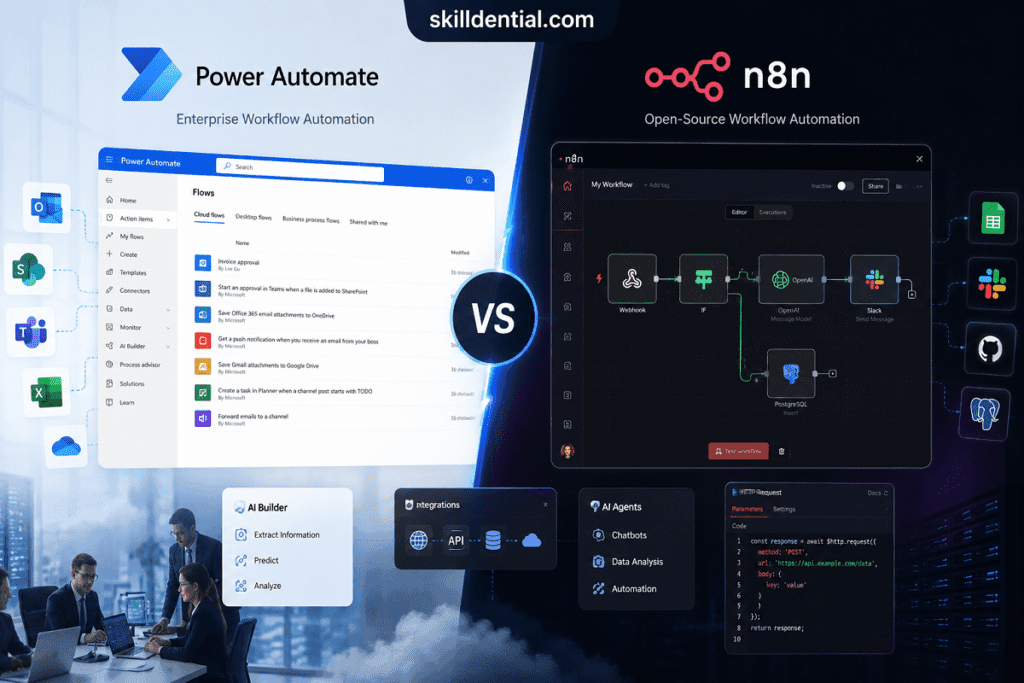
The choice between these systems depends on the specific organizational “North Star”:
- Deployment & Governance: Prioritize Power Automate if your infrastructure is built on Microsoft’s tenant architecture and requires centralized governance and pre-built connectors.
- Logic & Customization: Prioritize n8n for sophisticated AI workflows, developer-centric flexibility, and significant cost efficiency at scale, particularly when handling high-volume data processing that would be cost-prohibitive under Power Automate licensing models.
How do Power Automate and n8n compare in features?
To evaluate Power Automate and n8n through an industry-standard lens, we must analyze their feature sets based on technical flexibility, ecosystem integration, and architectural control.
Feature Comparison: Technical Architecture
| Feature Category | Power Automate | n8n |
| Logic & Scripting | Expression-based (WDL) with limited custom code blocks. | Native JavaScript/Python nodes for limitless data manipulation. |
| Integration Set | 600+ connectors; heavy focus on SaaS and Microsoft-managed APIs. | 400+ nodes; emphasizes direct API calls and open-source flexibility. |
| Branching/Looping | Standard sequential logic; complex loops often require nesting. | Bidirectional data flow; advanced branching and sophisticated looping. |
| Hosting Model | Cloud-native (SaaS) or Desktop (RPA). | Cloud-hosted or Self-hosted (Docker) for data sovereignty. |
Ecosystem & AI Capabilities
Power Automate is designed as the “glue” for the Microsoft ecosystem. Its feature set is characterized by deep integration with Microsoft 365 and Power Platform.
- AI Builder: Streamlines document processing, sentiment analysis, and object detection with pre-built models.
- Copilot Integration: Utilizes natural language to generate flow structures, reducing the barrier for business-user entry.
n8n functions as an “orchestration layer” for developers and technical operators. It prioritizes granular control over data structures.
- AI-Native Nodes: Direct integration with LangChain allows for the creation of sophisticated AI agents.
- Memory & Tools: Supports building agents with persistent memory and the ability to utilize external tools (Function Calling) within the workflow itself.
Strategic Framework: Use Case Optimization
Applying a First Principles approach to your selection:
- System of Record (Power Automate): Deploy when the primary objective is automating standard enterprise tasks within a governed Microsoft environment. It excels at “low-code” scenarios where business users need to trigger actions in Teams, SharePoint, or Excel without managing underlying API authentications.
- System of Innovation (n8n): Deploy when building custom products, complex AI pipelines, or high-volume data processing. Its ability to handle native code and AI-native memory nodes makes it the superior choice for technical teams building bespoke automation that requires high-leverage scaling and developer-level flexibility.
Comparative Analysis: Power Automate vs. n8n (2026 Metrics)
Using a first-principles approach, the following table breaks down the technical and strategic divergence between Power Automate and n8n.
Key Feature Matrix (2026 Update)
| Feature | Power Automate | n8n |
| Hosting | Cloud-only (SaaS via Microsoft Azure). | Hybrid: Self-host (Docker/NPM) or n8n Cloud. |
| Connectors | 1,000+ (Deeply optimized for M365/Dynamics). | 400+ (Highly extensible via REST/GraphQL nodes). |
| Custom Logic | WDL Expressions: limited inline code. | Native JavaScript & Python inside any node. |
| AI Capability | AI Builder & Copilot (Pre-trained models). | LangChain Nodes (Custom AI agents & memory). |
| Data Privacy | Microsoft Cloud Governance (Enterprise-grade). | Full Sovereignty (Data stays on your server). |
| Learning Curve | Low: Optimized for “Citizen Developers.” | Moderate: Best for technical/dev-ops users. |
Technical Deep Dive
An analytical comparison of the underlying architecture, logic engines, and infrastructure models that differentiate Power Automate and n8n for enterprise-scale deployment.
Integration Strategy
- Power Automate: Operates as a “System of Record” glue. In 2026, it features over 1,000 connectors. It is the definitive choice for Microsoft 365 environments, offering native triggers for SharePoint, Teams, and Excel that require zero API configuration.
- n8n: Operates as an “Orchestration Layer.” While it has fewer pre-built connectors, its HTTP Request node and Native Scripting allow for faster integration with bespoke or undocumented APIs without waiting for a vendor-managed connector.
Advanced AI & Logic
- Power Automate: Leverages Microsoft Copilot for natural-language flow creation. AI Builder is highly effective for high-leverage tasks like OCR, sentiment analysis, and invoice processing within a managed framework.
- n8n: Optimized for the “AI Engineer.” Its native LangChain integration enables the construction of autonomous agents with persistent memory and complex tool-use capabilities. The 2026 update fully supports Python scripts, making it a powerful tool for data science and advanced AI pipelines.
Scaling & Cost Logic
- Power Automate: Pricing is typically per-user or per-flow ($15/user/month base). It is highly cost-effective for organizations already embedded in the M365 E3/E5 ecosystem, where “seeded” licenses reduce marginal costs.
- n8n: Offers an 80/20 leverage point for high-volume execution. Because the self-hosted version has no “per-execution” fee, it is significantly cheaper for data-intensive workflows that would trigger high consumption costs in a traditional SaaS model.
Strategic Recommendation
- Choose Power Automate if your objective is Enterprise Governance and rapid deployment within a Microsoft-centric workforce.
- Choose n8n if your objective is Technical Flexibility, data sovereignty, or building custom AI-driven products with a need for native code execution.
What is the pricing difference between Power Automate and n8n?
The pricing structures of Power Automate and n8n represent two fundamentally different financial models: seat-based enterprise SaaS vs. execution-based or self-hosted “fair-code” software.
Cost Structure Breakdown
| Metric | Power Automate | n8n |
| Starting Price | $15 per user/month | Free (Self-hosted) or ~$24/month (Cloud) |
| Licensing Logic | Per User/Per Flow: Costs scale linearly with headcount. | Flat Fee/Execution: Costs scale with workflow volume. |
| Free Tier | Limited “seeded” flows with M365 licenses. | Unlimited desktop use and self-hosting. |
| Premium Access | Requires paid licenses for “Premium Connectors.” | All nodes/integrations are included in all tiers. |
Scaling Analysis: The “Cost Gap”
When applying an 80/20 analysis to ROI, the financial divergence becomes most apparent during organizational scaling.
The Power Automate Model (Linear Scaling)
Power Automate utilizes a seat-based model. If an organization scales a specific automation to 100 users, the cost is typically $1,500/month ($15 x 100). This model is predictable but can lead to high marginal costs for simple automations distributed across large teams.
The n8n Model (Volume Scaling)
n8n follows a flat-fee or consumption-based model. For the same 100 users, the cost remains at the Cloud tier (starting around $24–$50/month) or $0 if self-hosted on internal infrastructure. This allows for high-leverage growth where the cost per user decreases as the user base expands.
Strategic Financial Considerations
- Infrastructure Overhead: While n8n is free for self-hosting, it requires technical resources for maintenance, updates, and server security. Power Automate eliminates this overhead through Microsoft’s fully managed cloud environment.
- The “Microsoft Tax”: For organizations already paying for high-tier Microsoft 365 licenses (E3/E5), basic Power Automate capabilities are often “seeded” (included). However, any connection to external databases (SQL, Salesforce, HTTP APIs) triggers the need for premium per-user licenses.
- High-Volume Execution: For technical teams running thousands of automated tasks or AI-agent loops daily, n8n provides superior cost efficiency. Its lack of “per-run” penalties makes it the optimal choice for data-heavy operations.
Strategic Cost Analysis: Power Automate vs. n8n
A first-principles evaluation of pricing models reveals that Power Automate is optimized for enterprise governance, while n8n is engineered for high-leverage scaling and technical autonomy.
Economic Comparison Matrix
| Cost Factor | Power Automate | n8n Cloud (Pro) |
| License Base | $15/user/month | ~$50/month flat |
| Premium Connectors | Extra license required | Included |
| Volume Costs | Fair use limits apply | 10k–50k runs included |
| Yearly Total (5 users) | $900/year | $600/year |
| Self-Hosted Option | None | Free |
Skilldential Career Audit Insights
Data from Skilldential career audits indicates a significant friction point for freelancers and SMBs regarding Power Automate’s per-user licensing. As workflows scale across teams, the linear cost increase often outweighs the marginal utility of the automation.
- The Scaling Trap: In Power Automate, adding users to a workflow increases the annual burn rate without necessarily increasing the workflow’s output.
- The n8n Advantage: Implementing n8n self-hosting has demonstrated a 67% cost reduction for teams executing 5,000+ monthly automation runs. By decoupling execution volume from headcount, teams can “build once and scale forever” without incurring per-seat penalties.
Decision Logic for Financial ROI
- Select Power Automate if your organization already possesses an enterprise Microsoft E3/E5 agreement and requires a managed, low-maintenance environment where the “Microsoft Tax” is already a sunk cost.
- Select n8n for technical ventures, AI-driven startups, or agencies where high-volume data processing and the ability to self-host provide a defensive moat through lower operational overhead and total data sovereignty.
Which platform is better for AI workflows and automation creators?
To determine which platform provides the highest leverage for AI development, we must evaluate them through the lens of System Flexibility vs. Managed Utility.
AI Workflow Capabilities: Technical Comparison
| Capability | Power Automate (Microsoft) | n8n (AI-Native) |
| Framework Support | Proprietary AI Builder / Azure Open AI | LangChain (Native Integration) |
| Model Choice | Fixed (GPT-4o, Llama via Azure) | Agnostic (OpenAI, Anthropic, Ollama, Groq) |
| Agent Architecture | Copilot Studio (Structured) | Autonomous Agents (Open-ended) |
| Memory Management | Managed (Microsoft-defined) | Granular (Custom vector store/memory nodes) |
| Data Handling | Pre-defined document processing | Chained embedding and retrieval (RAG) |
n8n: The AI Architect’s Advantage
n8n is fundamentally superior for building complex AI agents. Its LangChain-native nodes allow creators to build sophisticated workflows that include:
- Vector Store Integration: Direct connections to Pinecone or Qdrant for Retrieval-Augmented Generation (RAG).
- Tool Calling: The ability to give AI agents “hands” to execute JavaScript or call external APIs based on reasoning.
- Prompt Control: Full customization of system prompts and temperature settings without the abstraction layers imposed by Microsoft.
Power Automate: The Enterprise Utility
Power Automate excels at “High-Volume Commodity AI.” Its AI Builder is optimized for specific, repeatable enterprise tasks:
- Document Intelligence: Best-in-class OCR for invoices and receipts.
- Ecosystem Safety: Operates within the Microsoft Trust Center, ensuring data used in AI prompts stays within the corporate tenant.
- Low-Code Integration: Ideal for business users who need to add sentiment analysis or prediction models to an existing SharePoint or Dynamics workflow without writing JSON or Python.
Strategic Recommendation for Creators
- Choose n8n if your goal is to build AI-native products or autonomous agents. Its ability to chain classification, embedding, and retrieval steps in a single visual workflow—with full prompt customization—is unmatched for technical creators.
- Choose Power Automate if your focus is on Enterprise Process Optimization. It is the path of least resistance for automating standard business documents and leveraging pre-trained Microsoft models within a governed environment.
For those pursuing the Skilldential philosophy of “build once, scale forever,” n8n provides the technical infrastructure to build proprietary AI systems that remain independent of restrictive SaaS licensing and model lock-in.
AI workflow comparison
Using a first-principles approach, the technical divergence between Power Automate and n8n in the AI domain centers on the trade-off between governed utility and architectural sovereignty.
AI Capability Comparison Matrix
| AI Capability | Power Automate | n8n |
| LLM Flexibility | Restricted to the Microsoft AI stack. | Agnostic: Any provider (OpenAI, Anthropic, Local/Ollama). |
| AI Agents | Limited; highly structured. | Native Support: Complex agents with memory and tools. |
| Custom Prompts | Restricted by abstraction layers. | Full Control: Granular prompt engineering at every step. |
| Vector DB Integration | Limited ecosystem support. | Native: Pinecone, Weaviate, Qdrant, and Milvus. |
Technical Analysis for Creators
A strategic breakdown of model orchestration, agentic autonomy, and the structural advantages of open-source flexibility for building high-leverage AI systems.
Architecting Autonomous Agents
n8n is the superior environment for developers building autonomous AI agents. Unlike the rigid structures in Power Automate, n8n provides native LangChain nodes that facilitate:
- Memory Management: Maintaining state and context across multi-step interactions.
- Tool Calling: Enabling an LLM to interact with external APIs, databases, or custom code to perform tasks beyond text generation.
- Sequential Logic: Chaining classification, embedding, and retrieval steps in a single visual workflow.
Model Sovereignty and Vendor Lock-in
Power Automate operates as a closed loop within the Microsoft/Azure ecosystem. While this ensures enterprise-grade security and compliance, it creates a high-friction environment for those experimenting with specialized models or local hosting.
n8n’s open architecture allows creators to swap LLM providers instantly. This is a high-leverage strategy for “building once and scaling forever,” as it prevents your infrastructure from being deprecated by a single vendor’s pricing or API changes.
Strategic Verdict
For technical creators and AI builders, n8n is the optimal choice for scalable workflows. It provides the high-signal, zero-fluff infrastructure required to build proprietary AI systems without the constraints of enterprise “guardrails.” Power Automate remains the efficient choice only for those whose primary utility is derived from automating existing Microsoft-resident data.
Which automation tool fits enterprise teams best?
In an enterprise context, the choice between Power Automate and n8n is determined by the organization’s requirement for centralized governance versus technical sovereignty.
Enterprise Alignment Matrix
| Enterprise Factor | Power Automate | n8n |
| M365 Integration | Native: Zero-configuration triggers. | Manual: Requires API/OAuth setup. |
| Governance Tools | Built-in: DLP policies, Admin Center. | Custom: Requires external management. |
| Compliance | Microsoft Managed: ISO, SOC, GDPR. | Self-Managed: Depends on hosting. |
| IT Admin Control | Centralized: Unified identity via Entra ID. | Distributed: Managed per instance/Docker. |
The Microsoft Ecosystem Advantage
Power Automate is the industry standard for organizations built on the Microsoft stack. It provides a “System of Governance” that simplifies deployment for HR, Finance, and Corporate IT departments.
- Security & Compliance: By operating within the Microsoft Trust Center, it inherits all existing security certifications. Data remains within the tenant, satisfying strict GDPR and SOC requirements without additional engineering.
- Administrative Oversight: IT administrators can apply Data Loss Prevention (DLP) policies to prevent sensitive SharePoint data from being sent to non-sanctioned external services. This level of granular, non-technical control is a significant barrier to entry for open-source alternatives.
The n8n “Privacy First” Alternative
While Power Automate excels in managed environments, n8n provides an alternative path for enterprises with high data-privacy mandates or specialized technical requirements.
- Data Sovereignty: Because n8n can be self-hosted behind a corporate firewall, it is often preferred by security-focused firms (e.g., Fintech or Defense) that cannot permit internal data to traverse third-party cloud servers.
- Developer Autonomy: Technical teams use n8n as a “System of Innovation,” building bespoke tools that bypass the rigid constraints of Microsoft’s per-user licensing and pre-defined connector logic.
Strategic Verdict for Enterprises
- Deploy Power Automate if your primary goal is Operational Efficiency and risk mitigation across a non-technical workforce. It is the highest-leverage tool for standardizing corporate workflows.
- Deploy n8n if your primary goal is Architectural Control or building proprietary, high-volume AI systems where data cannot leave the internal network.
For Skilldential practitioners, the enterprise strategy is to use Power Automate for administrative “plumbing” and n8n for technical “engines,” creating a hybrid infrastructure that balances governance with innovation.
Is Power Automate or n8n better for beginners?
The choice between Power Automate and n8n for beginners depends on whether the user seeks “no-code convenience” or “technical control.”
Beginner Accessibility Matrix
| Feature | Power Automate | n8n |
| Onboarding | Instant: Integrated into the M365 app launcher. | Varies: Cloud is instant; self-hosting is technical. |
| Creation Method | Natural Language: Copilot-driven prompts. | Visual Logic: Node-based canvas. |
| Logic Building | Drag-and-drop templates. | API mapping and JSON-like data flow. |
| Skill Requirement | Zero-code / Business users. | Junior Dev / IT Support / Technical Hobbyists. |
Power Automate: The “Citizen Developer” Path
For absolute beginners, Power Automate provides the lowest barrier to entry. In 2026, its Copilot integration allows users to build workflows simply by describing them in plain English (e.g., “Send a Teams message when a specific SharePoint file is updated”).
- Managed Abstraction: It hides technical complexities like API headers and authentication, making it ideal for non-technical professionals in HR, Marketing, or Finance.
- Template Library: Thousands of pre-configured “recipes” allow users to deploy common automations in minutes without understanding the underlying logic.
n8n: The “Technical Creator” Path
While n8n is visually intuitive, it is often described as a “nightmare” for pure no-code users but a “dream” for those with basic technical curiosity. It is the better choice for beginners who want to transition into AI Engineering or Technical SEO.
- Transparent Logic: Unlike Power Automate’s abstracted connectors, n8n exposes the data at every step. This makes it an excellent tool for learning how APIs, webhooks, and JSON structures function.
- AI Sandbox: For beginners specifically interested in AI, n8n’s LangChain nodes offer a more hands-on way to understand how LLMs, memory, and vector databases interact compared to the “black box” of Microsoft’s AI Builder.
Strategic Recommendation
- Choose Power Automate if your goal is Instant Utility. Use it to solve immediate business problems within the Microsoft ecosystem without worrying about how the “plumbing” works.
- Choose n8n if your goal is Technical Mastery. Use it as a high-leverage learning platform to build a career in automation, where understanding the underlying architecture provides a long-term competitive advantage.
At Skilldential, we recommend beginners start with Power Automate for quick wins, then transition to n8n to build the high-leverage technical systems required for true career growth.
How do I choose between Power Automate and n8n?
Choosing between Power Automate and n8n is a strategic decision that pivots on whether you prioritize enterprise governance within a closed ecosystem or technical sovereignty across a diverse stack.
Selection Logic: The 80/20 Rule
A high-leverage decision framework designed to isolate the 20% of technical requirements that dictate 80% of the platform’s long-term ROI and operational success.
Choose Power Automate if:
- M365 Ecosystem Dominance: Your organization is already invested in Microsoft 365 (Teams, SharePoint, Dynamics 365). The marginal cost of “standard” connectors is often zero.
- Governance & Compliance: You require built-in Data Loss Prevention (DLP), SOC 2 compliance, and centralized IT administration through the Microsoft Power Platform Admin Center.
- Non-Technical Workforce: You need a “Citizen Developer” environment where business users can build workflows using Copilot (natural language) and managed templates.
- Legacy Systems: You require RPA (Robotic Process Automation) to interact with older desktop applications that lack modern APIs.
Choose n8n if:
- AI Agent Orchestration: You are building sophisticated AI systems using LangChain. n8n offers superior flexibility for managing memory, tool-calling, and custom LLM providers (OpenAI, Anthropic, or local models via Ollama).
- Technical Flexibility: Your team is comfortable with JavaScript or Python. n8n allows you to inject custom code at any node for complex data transformation that would be clunky in Power Automate.
- Cost Efficiency at Scale: You need to process high-volume automations without per-user or per-execution penalties. Self-hosting n8n is free, making it the highest-leverage choice for data-heavy operations.
- Data Sovereignty: You have strict privacy requirements that forbid data from leaving your infrastructure. Self-hosting via Docker keeps all credentials and data within your own firewall.
Quick Comparison Matrix (2026)
| Factor | Power Automate | n8n |
| Primary User | Business Users / IT Admins | Developers / Technical Creators |
| Logic Engine | Expression-based (WDL) | Native JavaScript/Python |
| Scaling Cost | Linear: $15/user or $150/flow | Flat: Free (Self-host) or ~$24+ (Cloud) |
| AI Focus | AI Builder (Document OCR/Prediction) | AI Agents (LangChain, RAG, Memory) |
| Ecosystem | Deep Microsoft Integration | Agnostic / API-First |
Strategic Recommendation
If your goal is to “build once and scale forever” (the Skilldential philosophy), n8n is the superior engine for technical builders due to its lack of vendor lock-in and open architecture. However, if your “North Star” is corporate standardization and rapid deployment across a 50+ person team already on Microsoft 365, Power Automate is the lower-friction choice.
What is Power Automate used for?
Power Automate is designed for enterprise workflow automation within the Microsoft ecosystem. Its primary utility lies in synchronizing files, getting notifications, and collecting data across Microsoft 365 (Teams, SharePoint, Excel) and Dynamics 365. It is the standard for automating business approvals and document processing using low-code tools.
Is n8n free to use?
Yes, n8n is free for self-hosting on your own infrastructure (via Docker or desktop). For those who prefer a managed service, n8n Cloud tiers in 2026 typically range from €20/month (Starter) to €50/month (Pro), with a high-end Business tier at €667/month for advanced enterprise features like Git integration and SSO.
Can n8n integrate with Microsoft 365?
Yes. While not as “native” as Power Automate, n8n connects to Microsoft 365 through standard API nodes. You can automate Outlook, SharePoint, and Teams, though it requires a one-time technical setup for OAuth2 authentication or App Registrations in Azure.
Which tool is better for AI automation?
n8n is superior for technical AI builders. Its 2026 architecture includes native LangChain nodes and supports a model-agnostic approach (OpenAI, Anthropic, or local models via Ollama).
This allows for the creation of autonomous agents with custom memory and tool-calling capabilities. Power Automate is better for “commodity AI,” such as pre-trained document OCR and sentiment analysis within a governed environment.
Does Power Automate support custom code?
Power Automate supports logic through a proprietary expression language (WDL) and can call Azure Functions for custom code. However, n8n offers a higher-leverage environment by allowing you to write native JavaScript and Python directly inside any workflow node for complex data manipulation.
In Conclusion
The selection between Power Automate and n8n is a decision between Managed Governance and Architectural Sovereignty.
Final High-Leverage Comparison
- Power Automate remains the definitive choice for Microsoft 365 enterprises. It provides the governance, security compliance, and low-code accessibility required by HR, Finance, and Corporate IT departments to automate at scale within a protected ecosystem.
- n8n is the superior engine for AI builders and technical creators. Its open architecture, native LangChain support, and flexible hosting models offer the technical “moat” needed to build proprietary AI systems without restrictive per-user licensing.
Executive Summary
| Pillar | Power Automate Strategy | n8n Strategy |
| Pricing | Seat-based ($15/user/month). Scales with headcount. | Flat-rate or Free Self-hosting. Scales with volume. |
| AI Workflows | AI Builder for managed document tasks and OCR. | LangChain & AI Agents for custom, high-logic RAG. |
| Governance | Native Microsoft DLP and centralized IT control. | Data Sovereignty through internal firewall hosting. |
The Verdict
- Start with Power Automate if your infrastructure is Microsoft-centric, your team is non-technical, or you require immediate enterprise-grade compliance.
- Invest in n8n if you are building autonomous AI agents, require developer-level flexibility with JavaScript/Python, or need to achieve maximum cost efficiency at scale.
For Skilldential practitioners, the highest-leverage move is to master both: use Power Automate for administrative connectivity and n8n as the powerful, independent engine for your proprietary AI and data pipelines.