Naviance Resume Builder vs Other Tools: Which Is Better?
The Naviance Resume Builder functions as a foundational utility within the broader PowerSchool Naviance college and career readiness ecosystem. Primarily designed for high school students, the Naviance Resume Builder serves as a digital repository for extracurriculars, awards, and early work experiences, effectively bridging the gap between academic achievement and initial career planning.
Unlike commercial standalone alternatives—such as Zety, Canva, or Resume.com—which prioritize aesthetic customization, rapid ATS (Applicant Tracking System) optimization, and market-ready formatting, the Naviance Resume Builder is constrained by its institutional focus.
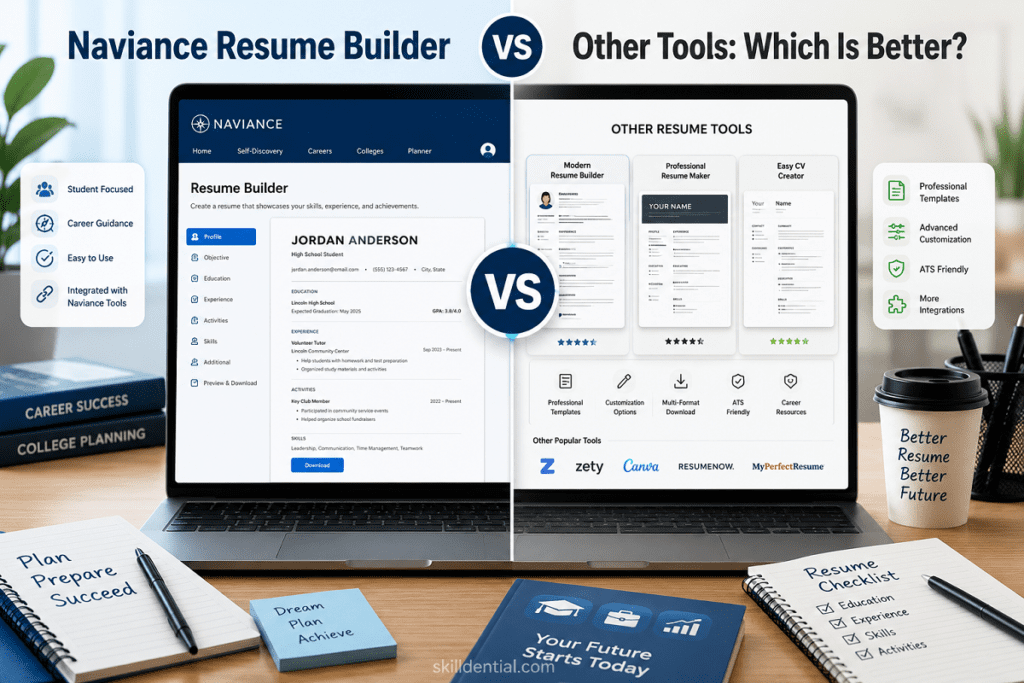
While it provides a structured, guided environment for students with school-sponsored access, it lacks the advanced design flexibility and iterative, AI-driven tailoring found in industry-standard tools. To decide whether the Naviance Resume Builder is the right choice, weigh the convenience of a free, school-integrated system against the need for a professional-grade document that meets current hiring standards.
What Makes Naviance Resume Builder Different from Other Resume Tools?
The Naviance Resume Builder serves as an institutional utility embedded within a comprehensive college and career planning ecosystem, rather than a standalone consumer product. Access is restricted to students through their school’s PowerSchool Naviance account, typically found under the “About Me > My Stuff” section.
The fundamental differences between Naviance and commercial tools like Zety or Canva stem from their core architecture and intended objectives:
- Institutional Integration vs. Market Versatility: Naviance serves as a centralized repository for school-related documentation. Its primary strength is portfolio integration, allowing students to pull achievements, extracurricular activities, and project history directly from other Naviance modules to populate resume sections. This reduces data entry redundancy and ensures consistency across college application materials.
- Utility Focus: Unlike consumer tools designed for competitive job hunting, the Naviance Resume Builder is optimized for academic tracking and guidance. It provides a structured, step-by-step framework that is highly effective for students with limited professional experience, helping them map out high school accomplishments before they enter the workforce.
- Design & ATS Constraints: Where commercial builders focus on visual customization, AI-driven keyword matching, and ATS (Applicant Tracking System) optimization, the Naviance Resume Builder prioritizes simplicity and institutional record-keeping. It offers three default templates with minimal design flexibility and lacks the automated ATS-parsing checks found in modern, performance-oriented resume platforms.
- Access Barriers: Commercial resume tools are readily available for independent use. In contrast, the Naviance Resume Builder is entirely dependent on institutional licensing; it cannot be accessed or maintained once a student graduates and their school-provided account is deactivated, making it a temporary staging ground rather than a lifelong career management tool.
Strategic Note: If your objective is to build a document that can withstand the scrutiny of modern ATS software or visual review by recruiters, the Naviance Resume Builder should be treated as a drafting environment for your initial data collection. Once you have a firm list of your academic and extracurricular achievements, you should transition that data to a professional tool that supports ATS-compliant formatting and modern, high-conversion design layouts.
How Do Free Resume Builders Like Resume.com and Google Docs Compare?
When moving beyond the Naviance Resume Builder, users often transition to accessible, consumer-grade alternatives. While these tools offer greater flexibility, they represent a fundamental trade-off: you gain public accessibility and design control at the cost of the structured, institutional guidance found in Naviance.
Resume.com: The “No-Frills” Free Utility
Owned by Indeed, Resume.com functions as a straightforward, genuinely free alternative. Unlike “freemium” competitors that lock exports behind a paywall, it offers 100% free PDF and TXT downloads.
- Pros: Truly free with no subscription traps; clean, intuitive interface; standard ATS-friendly structure.
- Cons: Extremely limited template variety (15 basic options); no AI-powered tailoring or keyword optimization; no expert guidance.
- Strategic Verdict: It is an efficient, low-effort tool for job seekers who already have a firm grasp of their resume content and simply need a clean, compliant export. However, it lacks the sophisticated feature set required for competitive career positioning.
Google Docs: The Flexible Blank Canvas
Google Docs acts as a document editor rather than a specialized resume builder. While it is ubiquitous and highly accessible, it is not optimized for professional resume development.
- Pros: Complete control over formatting, fonts, and layout; familiar, cloud-based environment; excellent for collaborative drafting.
- Cons: Lack of built-in guidance for content or ATS compliance; “hidden” table and formatting structures often confuse ATS software, potentially causing parsing errors; manual, time-consuming alignment.
- Strategic Verdict: Google Docs is best utilized as a drafting environment where you maintain your “master” resume. Because it lacks resume-specific logic, it requires significant manual effort to ensure your final output is both visually professional and ATS-compliant.
The Comparative Landscape
| Feature | Naviance Resume Builder | Resume.com | Google Docs |
| Primary Audience | High School Students | Budget-Conscious Job Seekers | General Users |
| Accessibility | Institutional Access Only | Public / Indeed Account | Public / Google Account |
| ATS Optimization | Baseline | Moderate | Manual (User-Dependent) |
| Guidance | High (Integrated) | Low (Self-Directed) | None |
| Data Leverage | High (Portfolio Sync) | Low | Low |
While Resume.com and Google Docs surpass the Naviance Resume Builder in accessibility and design variety, they lack the high-leverage “ecosystem” benefits—such as automatic portfolio synchronization and college-readiness tracking—that make Naviance a powerful starting point. For maximum effectiveness, treat the Naviance Resume Builder as an early-stage data aggregator, and pivot to a dedicated, AI-driven ATS-optimization tool once you begin applying for professional roles.
Are Canva Resumes Better for Visual Appeal but Worse for ATS?
Canva Resume Builder is the industry leader for visual aesthetics, offering a vast library of sophisticated templates that integrate icons, complex multi-column layouts, and custom typography. However, this design-first philosophy introduces a significant technical liability: ATS (Applicant Tracking System) incompatibility.
The Design-to-Parsing Gap
Most ATS software operates by stripping away visual elements to parse raw text. When you submit a highly designed Canva document, the software often struggles to interpret:
- Multi-column layouts: The software may read the document in an illogical order (e.g., reading across columns rather than top-to-bottom), scrambling your experience timeline.
- Embedded graphics and icons: These elements are often invisible to ATS, meaning the system may ignore the data attached to them.
- Non-standard fonts: Custom fonts can lead to character-encoding errors, rendering the content unreadable to the software.
Strategic Application: When to Use What
The utility of a resume tool is entirely dependent on the destination of the document. Choosing the wrong tool for the environment can result in immediate disqualification.
- Human-Only Review (Colleges & Scholarships): If your target audience is an admissions committee or a scholarship board that manually reviews submissions, Canva can be a competitive advantage. It allows for branding and visual storytelling that stands out in a pile of standard-format documents.
- Automated Review (Corporate Job Boards): If you are applying to companies that use enterprise ATS (e.g., Workday, Greenhouse, Lever), Canva is a liability. In these environments, compliance is king. Standardized, single-column layouts—like those generated by Naviance Resume Builder, Zety, or a clean Google Docs template—ensure your data is parsed correctly by the system’s algorithms.
The “Hybrid Strategy” for High-Leverage Outcomes
To maximize your professional output, adopt a bifurcation strategy:
- The “System” Master: Maintain your core data in a text-based, ATS-compliant environment (like Naviance Resume Builder for students or a structured doc for professionals). This is your “Source of Truth” that will always pass an automated screen.
- The “Visual” Version: Only deploy a Canva-designed resume when you have a direct contact, an email introduction to a recruiter, or a human-led application portal where you know the document will be opened by a person rather than a machine.
Strategic Summary: Prioritize Naviance Resume Builder or similar standard-format tools when your objective is to navigate automated hiring filters. Save Canva for scenarios where you have high confidence that a human will be the primary reader, as the risk of “jumbled” data in an ATS is far too high to justify the aesthetic benefits during initial job screening.
Are you currently building a resume for a specific application, or are you creating a master document to be used for multiple types of submissions?
How Does Zety Compare to Naviance for Students?
When choosing between Zety and the Naviance Resume Builder, you are essentially choosing between a specialized career-advancement engine and an institutional data-management tool. While both assist in the documentation of early career experiences, their underlying mechanisms, cost structures, and intended outcomes differ significantly.
Feature-Set Comparison
- Intelligence & Content Generation: Zety incorporates AI-driven content suggestions tailored to specific industries and experience levels, including 80+ student-specific templates. It actively guides users in phrasing bullet points to emphasize impact. Naviance Resume Builder provides a static, modular framework that relies on the user to supply the content, prioritizing organizational consistency over professional marketing.
- Customization vs. Constraints: Zety offers drag-and-drop customization and a library of 750+ templates, allowing for a high degree of visual and structural control. Naviance is intentionally limited to three pre-set templates, minimizing design variance to ensure consistency for school-managed reporting.
- Export & ATS Utility: Zety is built for the competitive job market, offering exports designed specifically to pass modern ATS filters. Naviance provides basic PDF and DOCX downloads that are functional but lack the advanced keyword-optimization logic found in premium tools.
The Cost of Leverage
The most critical differentiator is the access model.
- Naviance: Included in school/district licensing fees, making it “free” to the student. Its value proposition is tied to the Naviance ecosystem—the ability to sync data with college applications and counselor-led career planning.
- Zety: Operates as a freemium service. While plain-text exports are free, unlocking the full professional potential (high-quality PDF/DOCX downloads and full formatting) requires a recurring subscription.
Strategic Verdict
| Feature | Naviance Resume Builder | Zety |
| Primary Value | Portfolio/Data Integration | AI Content & ATS Optimization |
| User Experience | Institutional/Static | Consumer-Grade/Interactive |
| ATS Capability | Baseline/Standard | High/Configurable |
| Financial Cost | $0 (Institutional Access) | Subscription-Based ($2.70/wk+) |
Use the Naviance Resume Builder for what it was built for: aggregating your high school extracurriculars, awards, and early milestones within the context of your academic records. It is a vital tool for maintaining a clean, internal history.
However, as you transition toward internships, part-time work, or university-level career entry, Zety represents a superior leverage point. Its AI-assistance and ATS-ready formatting provide the competitive edge required to stand out in a professional hiring pipeline where academic records are secondary to market-ready skills and achievements.
Key Differences in Features and Customization
Choosing the right tool depends on your current stage—whether you are still in school and leveraging institutional systems, or entering the competitive job market where ATS compliance is your primary hurdle.
| Feature | Naviance Resume Builder | Resume.com | Canva | Zety | Google Docs |
| Primary Cost | Free (School Access) | Free (100%) | Free + Pro Tier | Paid Subscription | Free |
| Templates | 3 Default | 15+ Basic | 500+ Visual | 18+ Professional | 350+ Vetted |
| ATS Compatibility | Baseline | High | Low | Very High | High (if simple) |
| Access | School Only | Public | Public | Public | Public |
| Portfolio Sync | Yes (Native) | No | No | No | No |
| Customization | Limited | Moderate | Extensive (Visual) | Extensive (AI/Data) | Full Manual |
Strategic Analysis of the Tool Landscape
To select the right resume tool, you must assess the trade-off between institutional convenience and professional marketability. The following analysis compares these platforms based on their ATS performance, design leverage, and core utility to help you determine which tool aligns with your specific career stage and application requirements.
The Institutional Specialist: Naviance Resume Builder
The Naviance Resume Builder is an ecosystem tool, not a standalone product. Its value is entirely derived from its integration with your school’s data. If you are currently enrolled, use it to maintain a comprehensive historical record of your activities. However, it should not be your final destination for job applications, as it lacks the advanced formatting options required to bypass modern ATS software.
The Budget-Conscious Utility: Resume.com
Resume.com provides a functional, no-frills path for job seekers. Because it is owned by Indeed, it focuses on the basics that recruiters expect. It is best used for a quick, “get-it-done” resume when you need a clean export without worrying about paywalls.
The Design-First Risk: Canva
Canva is an outlier. While it is unmatched in aesthetic appeal and visual flexibility, it is often a liability in corporate hiring. Because ATS software parses text, the complex layouts and graphical elements in Canva can cause your application to be misread or completely discarded. Reserve Canva for roles where you are emailing a hiring manager directly or working in creative fields where a human will definitely see the document first.
The Professional Standard: Zety
Zety represents the current benchmark for professional resume tools. Its combination of AI-driven content suggestions and ATS-optimized templates makes it the most “high-leverage” option for those serious about getting hired. While it requires a subscription for full-featured exports, the return on investment (in terms of interview conversion rates) is typically higher than using free, unoptimized tools.
The “Source of Truth”: Google Docs
Google Docs is your fallback for total control. While it provides no automated guidance, it is the safest environment for your “Master Resume.” By keeping a simple, single-column version in Google Docs, you ensure you always have an ATS-compliant, highly portable document that you can edit and export without relying on proprietary software platforms.
Strategic Recommendation:
For the highest ROI, use the Naviance Resume Builder to aggregate your data while in school, but move your final content into Zety or a clean Google Docs template before hitting “Apply” on any job board. This hybrid approach ensures you never lose your institutional records while maintaining maximum competitive readiness.
When Should You Use Naviance Resume Builder Instead of Alternatives?
The Naviance Resume Builder is not a general-purpose job-hunting tool; it is an institutional system. You should prioritize its use when your objective is alignment with school-mandated milestones or academic administrative processes.
Specifically, rely on the Naviance Resume Builder in the following high-leverage scenarios:
- Integrated College Applications: When your school utilizes the Naviance ecosystem for college submissions, using the internal builder ensures perfect data synchronization. This eliminates manual entry errors and creates a single, consistent narrative for your counselor recommendations and transcript packages.
- Structured Academic Documentation: For students with limited professional work history, the platform’s guided, modular framework is superior to a blank document. It forces you to map out extracurriculars, leadership roles, and volunteer hours in a way that aligns with common scholarship and college admission requirements.
- Mandatory Institutional Compliance: If your school or counselor requires documentation to be generated via the Naviance Resume Builder for internal review, tracking, or feedback, you should utilize it regardless of its aesthetic or ATS limitations. Meeting these internal institutional requirements is a prerequisite for school-based support and documentation.
When to Pivot: If your primary objective shifts from college/scholarship acquisition to competitive professional job searching, the utility of the Naviance Resume Builder diminishes. In an external hiring environment—where you are competing against seasoned applicants—you must transition to an ATS-optimized, professionally tailored tool like Zety or a master Google Docs template.
Strategic Rule: Use Naviance as your internal “Source of Truth” for your academic and extracurricular data, then export that content into a market-ready tool when preparing for real-world job applications.
When Should You Choose Zety, Resume.com, or Google Docs Instead?
When you graduate from the school-centric requirements of Naviance, your resume strategy must pivot toward market-readiness. You should transition to external tools when your goal is to outperform other applicants in an automated hiring environment.
Select these alternatives based on your current objective:
- Zety (High-Leverage/Competitive): Use this when you are applying for high-stakes internships or early-career roles where resume quality is a primary differentiator. The ROI of the subscription is justified by the AI-driven content tailoring and robust ATS-optimized templates, which actively work to improve your “interview-to-application” conversion rate.
- Resume.com (Low-Friction/Free): Choose this when you need a functional, ATS-ready resume immediately but lack the budget for a subscription. It is the most reliable “zero-cost” option for entry-level job seekers who need to clear basic digital filters without the complexity of building a document from scratch.
- Google Docs (Strategic Flexibility): Use this as your Master Resume environment. It offers the highest level of manual control, making it perfect for rapid iteration. You should maintain your core, validated content here so that you can quickly customize and export specific versions for different job applications without relying on third-party formatting limitations.
- Canva (Context-Specific): Reserve this strictly for roles where a human will provide the first review. If you are applying to a creative agency, a design-heavy role, or sending your resume directly to a recruiter’s inbox, the visual impact of Canva is an asset. Never use it for corporate portals that rely on automated screening.
Strategic Summary: Your resume is a dynamic asset, not a static document. Use Naviance Resume Builder to consolidate your high school foundation, but migrate that data into Zety or Google Docs as you enter the job market. This shift from an “institutional” record to a “market-competitive” tool is the most effective way to optimize your professional trajectory.
Which of these tools are you leaning toward for your next application, or would you like a breakdown of how to audit your current resume for ATS compatibility?
What Common Problems Do Students Face with Each Tool?
Every resume tool carries inherent technical or functional trade-offs. Understanding these “failure points” allows you to mitigate risks before your resume reaches a recruiter’s desk or an ATS filter.
| Tool | Common Student Challenges |
| Naviance | Rigidity & Generic Output: Users often find the three available templates restrictive, resulting in a resume that looks identical to peers’ and lacks the visual “polish” needed to stand out. |
| Resume.com | Data Loss: The platform’s 48-hour guest session limit often leads to accidental data loss for students who forget to link an account, forcing them to restart their work from scratch. |
| Canva | ATS Invisibility: Complex layouts (multi-column), icons, and graphic elements often confuse parsing software, leading to jumbled data or total rejection before a human even sees the file. |
| Zety | The “Paywall Trap”: Users frequently spend hours building a polished resume only to find that high-quality PDF/DOCX exports are locked behind a paid subscription, creating urgency-induced frustration. |
| Google Docs | Formatting Fatigue: Because it is a word processor, not a builder, adjusting margins, tables, and spacing is entirely manual. Small tweaks often “break” the entire layout, requiring hours of tedious readjustment. |
Strategic Mitigation (The Skilldential Audit)
Based on professional audits of resume workflows, the most effective strategy is to avoid relying on a single tool for the entire lifecycle of your document.
- The “Hybrid” Workflow: Use Naviance as your internal data aggregator for school-mandated records, then export that content into a clean Google Docs or Zety template for job applications. This method consistently yields higher satisfaction and better formatting control.
- The “Plain Text” Test: Before submitting any resume, export it to PDF and copy the text into a simple Notepad file. If your contact info, experience, and headings appear out of order or jumbled, your current template is a liability for ATS portals.
- The “Master Document” Rule: Regardless of the tool you use, maintain your “Master Resume” in a simple, single-column Google Doc. This ensures that no matter what happens to a third-party platform’s interface or pricing model, you always retain a clean, ATS-compliant version of your professional history.
Are you currently experiencing a specific formatting issue with your resume, or are you looking to audit your existing content for ATS compliance?
How Can You Combine Tools for Better Results?
To maximize your competitive edge, move away from the “one-size-fits-all” resume. Instead, adopt a multi-tool workflow that separates data collection from document design. This ensures your institutional records remain intact while your job-application documents remain market-ready.
The High-Leverage Hybrid Workflow
- Step 1: The Institutional Base (Naviance): Use the Naviance Resume Builder as your primary data repository. Its portfolio integration is unbeatable for tracking school-related history, extracurriculars, and counselor-verified milestones.
- Step 2: The “Source of Truth” Migration: Export your Naviance file as a DOCX. Import this into Google Docs to create your Master Resume. This version should use a clean, single-column layout—the “gold standard” for ATS compliance.
- Step 3: Strategic Optimization (Zety & Resume.com): Use Zety‘s free AI suggestions to audit and sharpen your bullet points. If you are applying to highly competitive roles, use Jobscan (or similar free ATS-checkers) to compare your Master Resume against specific job descriptions.
- Step 4: The “Final Polish” Pivot:
- For Corporate/ATS Portals: Use your clean, single-column Google Docs Master version. It is guaranteed to parse correctly in any system.
- For Human Review (Networking/Creative): Take the content from your Master Resume and drop it into a visually striking Canva template. This gives you the visual “pop” needed to stand out without risking automated rejection in cold-apply portals.
Technical Auditing (The 80/20 Test)
Regardless of which tools you combine, perform this quick audit on your final document before submission:
The Notepad Test: Copy the entire text of your resume and paste it into Notepad (or any plain text editor). If the resulting text is missing sections or reads out of chronological order, your resume will fail an automated ATS screen. If this happens, your design is too complex; simplify your layout until the text parses linearly in Notepad.
By decoupling your resume’s content (maintained in Google Docs/Naviance) from its delivery (optimized for ATS or visual impact), you gain total control over your career assets.
Would you like a template structure for a “Master Resume” in Google Docs that serves as the perfect foundation for these hybrid workflows?
Can I access Naviance Resume Builder without being enrolled in a school?
No. Naviance is an institutional tool tied to PowerSchool’s K-12 readiness ecosystem. You must be a student at an institution that holds an active, district-wide, or school-wide license to gain access. There is no public, independent consumer version available.
Which resume builder is completely free with no payment walls?
Resume.com and Google Docs are your primary options for completely free tools. Resume.com provides unrestricted PDF and TXT downloads (though saving progress requires an Indeed account after 48 hours). Google Docs provides full, unlimited access to customizable templates without any subscription requirements.
Can Canva resumes be rejected by applicant tracking systems (ATS)?
Frequently, yes. Because Canva prioritizes aesthetic design over data structure, ATS software often struggles to parse its multi-column layouts, custom fonts, and graphical elements. This can cause the software to misread your experience or exclude your content entirely, leading to an automatic rejection before a human recruiter sees your file.
Does Zety require payment to download formatted resumes?
Yes. While you can use the Zety interface to build and preview your resume for free, downloading a professional, formatted version (PDF or DOCX) requires a paid subscription. You are limited to free plain-text (.txt) exports unless you select a paid plan.
What is the main advantage of Naviance over standalone resume builders?
The primary advantage is institutional data synergy. Unlike standalone tools, Naviance is deeply integrated into your academic records, allowing you to pull extracurricular activities, projects, and achievements directly from your student profile. This creates a cohesive narrative for college admissions, and counselors review that standalone tools cannot replicate.
In Conclusion
The Naviance Resume Builder remains a specialized institutional utility, best leveraged by students needing seamless portfolio integration and counselor-aligned documentation for academic milestones. However, it is not a professional-grade tool for the competitive job market.
For broader career success, your resume strategy should be dynamic:
- Prioritize ATS-compliant, single-column formats found in Google Docs or Resume.com for all automated application portals.
- Reserve visual tools like Canva exclusively for direct-to-recruiter submissions where human review is guaranteed.
- Utilize Zety when you require advanced AI-assisted phrasing and professional-grade layouts for high-stakes internships or entry-level opportunities.
The optimal workflow: Use Naviance as your internal “Source of Truth” to aggregate academic data, then migrate that content into an ATS-optimized Google Docs master file for all job applications. By bifurcating your strategy, you ensure total compliance with institutional requirements while maintaining the technical edge needed to bypass hiring filters and land interviews.