ATS-Friendly Resume Template: Free Download & Writing Guide
An ATS-friendly resume template is a clean, single-column document format designed to be accurately read and parsed by employer-used Applicant Tracking Systems. These templates avoid complex graphics, tables, and headers that can confuse automated screening software.
By leveraging standard section headings, simple fonts, and keyword-optimized content, using a dedicated ATS-friendly resume template significantly reduces the risk of automatic rejection due to formatting errors and improves your chances of passing initial screening.
If you’re applying for jobs in 2026, your application likely passes through an Applicant Tracking System before a human ever sees it. Studies suggest that up to 75% of resumes are filtered out by automated software before reaching a recruiter.
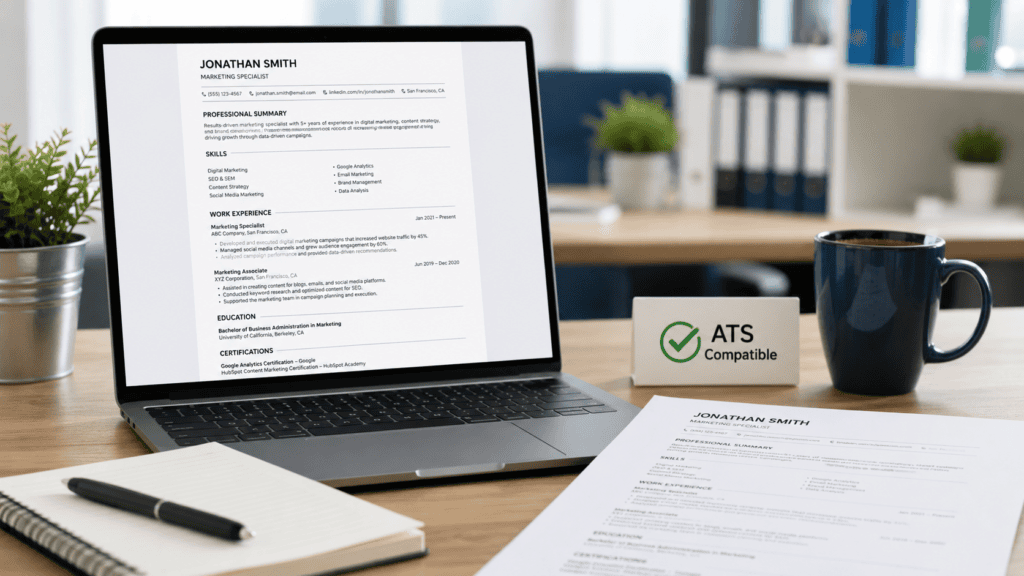
This guide is built for recent graduates, career changers, students, and professionals who need a battle-tested ATS-friendly resume template that works with—not against—these hiring algorithms.
Below, you will learn what makes a document fully scannable, how to download and customize a free ATS-friendly resume template, and the core best practices for formatting, keyword optimization, and file types. By the end, you’ll have a professional, editable resume ready to submit with confidence.
What Is an ATS-Friendly Resume?
An ATS-friendly resume is a document specifically formatted to be easily read, parsed, and scored by Applicant Tracking Systems. Rather than relying on heavy graphic design elements that can cause parsing errors, build your document around a structured, ATS-friendly resume template so these systems can automatically extract your work history, skills, and qualifications before a human recruiter reviews them.
Key Characteristics of an ATS-Friendly Resume Template
- Simple, Clean Layout: A single-column format that strictly avoids complex tables, floating text boxes, and background graphics.
- Standard Section Headings: Clear labels such as “Work Experience,” “Education,” and “Skills” that automated systems recognize instantly.
- ATS-Compatible Typography: Standard system fonts like Arial, Calibri, or Times New Roman styled in 10–12 point size.
- Keyword Optimization: Strategic integration of job-specific terms and core competencies directly matching the target job description.
- Proper File Formatting: Saved in formats natively supported by parsing software—typically
.docxor text-based.pdffiles—ensuring your ATS-friendly resume template maintains its visual and functional integrity upon upload.
How Does ATS Software Work?
Applicant Tracking Systems (ATS) are recruitment software tools used by employers to automate, manage, and filter high volumes of job applications. When you submit your application, the ATS parses the document, extracts key text data, and scores your profile against the target job description. Utilizing an ATS-friendly resume template guarantees that this automated engine correctly categorizes your experience instead of dropping critical details.
The ATS Parsing Process
- Parsing: The software strips your document down to raw text and maps the extracted information into designated fields (e.g., Full Name, Contact Info, Work History, Skills, Education).
- Keyword Matching: The system scans your parsed text for explicit target keywords, hard skills, certifications, and contextual phrases present in the job posting.
- Scoring & Ranking: The algorithm calculates a match index based on keyword density and relevant experience, ranking candidates in the recruiter’s dashboard.
- Filtering: Submissions with missing core competencies or structural parsing errors fail to meet threshold scores and are routed away from human review.
Why Formatting Matters
Complex visual formatting—such as multi-column layouts, embedded tables, non-standard headers, footers, and graphical elements—frequently breaks the ATS text-parsing engine.
When the system encounters these elements, it can misread, scramble, or completely ignore vital parts of your career history. Implementing a clean, standardized ATS-friendly resume template eliminates structural parsing errors, ensuring every keyword and accomplishment registers accurately.
Free ATS-Friendly Resume Template (Download & Edit)
Below is a free, professional ATS-friendly resume template available in both Microsoft Word (.docx) and Google Docs formats. You can download, edit, and customize this ATS-friendly resume template to align with your career background and target role.
Template Specifications
| Feature | Specification |
| Document Type | Digital Document (Google Docs / MS Word) |
| Target Audience | Graduates, Job Seekers, Career Changers, Professionals |
| File Formats | .docx, Text-Based PDF |
| ATS Compatibility | Workday, Taleo, Greenhouse, Lever, iCIMS |
| Cost | 100% Free |
Download Options
- Google Docs: Edit ATS-Friendly Resume Template in Google Docs (Click to make an editable copy)
- Microsoft Word: Download
.docxATS-Friendly Resume Template (Save and customize offline)
Note: Ensure you replace placeholder links with your actual hosted asset paths before publishing.
Template Layout & Text Blueprint
[Your Full Name]
[Phone Number] | [Email Address] | [LinkedIn Profile URL] | [City, State/Country]

PROFESSIONAL SUMMARY
Results-driven [Your Profession] with [X years] of experience in [Industry/Field]. Skilled in [Core Competency 1], [Core Competency 2], and [Core Competency 3]. Proven track record in delivering [quantifiable result/achievement]. Seeking to leverage expertise in [Core Area] as a [Target Job Title] at [Company Name].

WORK EXPERIENCE
[Job Title] | [Company Name] | [Location] | [Start Date] – [End Date]
• Achieved [specific result] by [action taken], resulting in [quantifiable outcome/percentage].
• Led [project/task] that improved [metric] by [X% / $Y].
• Collaborated with cross-functional teams to [key milestone/achievement].

[Previous Job Title] | [Company Name] | [Location] | [Start Date] – [End Date]
• [Responsibility/achievement optimized with target job keyword].
• [Responsibility/achievement optimized with target job keyword].

EDUCATION
[Degree Name] | [University/Institution Name] | [Graduation Year]
• Relevant Coursework: [Course 1], [Course 2], [Course 3]
• Honors & Awards: [GPA / Academic Honors / Scholarships]

SKILLS
• Technical Skills: [Skill 1], [Skill 2], [Skill 3]
• Industry Tools: [Tool 1], [Tool 2], [Tool 3]
• Core Competencies: [Skill 1], [Skill 2], [Skill 3]

CERTIFICATIONS (Optional)
• [Certification Name] | [Issuing Organization] | [Year Obtains]

PROJECTS (Optional)
• [Project Name]: [Brief description of the initiative, tools utilized, and measured outcome].
Code language: PHP (php)
Evaluation: Pros & Cons
Pros
- Parser-Optimized: Single-column architecture designed specifically as an ATS-friendly resume template.
- Standardized Taxonomy: Uses industry-standard headers recognized instantly by scanning software.
- Cross-Platform Accessibility: Edits seamlessly across Microsoft Word and Google Docs.
- Cost-Effective: Completely free and ready for immediate download.
Cons
- Minimalist Aesthetics: May lack the decorative flair wanted for creative roles (supplement with an online portfolio link).
- Manual Customization Needed: Requires deliberate keyword tailoring for every specific job application.
Privacy Best Practices
- Omit Sensitive Personal Data: Exclude full home address, birth date, marital status, or national identification numbers.
- Use Professional Channels: Provide a clean personal email address and a customized LinkedIn profile URL.
Template Alternatives & Comparisons
- Monster.com: Provides free foundational templates paired with basic resume advice.
- Indeed: Offers a built-in resume builder with basic ATS layout options.
- Microsoft Word: Includes built-in simple templates within its online document repository.
Verdict
This ATS-friendly resume template is the optimal choice for candidates looking to pass automated candidate filters without paying for subscription-based resume builders. It serves as a reliable, high-converting foundation for recent graduates, career switchers, and experienced professionals alike.
Step-by-Step: How to Custom-Build Your Resume
Follow this actionable step-by-step process to customize the ATS-friendly resume template above and optimize your application for automated screening engines.
Step 1: Start With a Clean, Single-Column Format
Populate your ATS-friendly resume template using a single-column architecture with standard 1-inch margins on all sides. Strictly avoid text boxes, multi-column tables, headers/footers, and graphics—these elements scramble parser text extraction.
Step 2: Extract & Target Keywords From the Job Description
Analyze your target job posting to identify recurring technical skills, tools, and industry terms. Naturally integrate these exact-match keywords across your summary, work experience, and skills sections within your ATS-friendly resume template.
Step 3: Write a High-Impact Professional Summary
Craft a tight, 2–3 sentence opening profile that defines your experience level, core domain, and top value proposition. Include 1–2 high-priority keywords matching the job description to immediately establish relevance.
Step 4: Quantify Achievements Over Duties
Instead of listing generic daily tasks, use strong action verbs paired with hard metrics to prove your impact.
- Weak: “Responsible for managing sales process.”
- Strong: “Optimized sales funnel pipeline, driving a 22% increase in recurring revenue over 6 months.”
Step 5: Structure a Dedicated Skills Section
Organize hard skills, technical toolstacks, and core competencies into bulleted lists. This enables ATS engines to extract your primary skill set cleanly during the initial parsing phase.
Step 6: Export to an ATS-Compatible File Format
Unless an employer explicitly asks for a different format, save your finalized ATS-friendly resume template as a .docx or a clean, text-based .pdf. Never export your resume as an image file (e.g., PNG, JPEG), as ATS software cannot read image data.
Best Formatting Practices for ATS Compatibility
Adhering to strict formatting standards ensures that your ATS-friendly resume template translates cleanly from a digital file into the employer’s applicant tracking database.
Typography Standards
- ATS-Compatible Fonts: Stick to universally supported system fonts such as Arial, Calibri, Garamond, Georgia, or Times New Roman.
- Font Sizing: Keep body text between 10–12 points and standard section headings between 14–16 points for optimal hierarchy.
Margins & Spacing
- Use standard 1-inch margins on all sides. If space is tight, you can reduce margins down to a minimum of 0.5 inches, but avoid going lower to prevent page clipping during parsing.
Standard Section Headings
Stick to universally recognized section titles within your ATS-friendly resume template. Custom or creative titles can confuse automated algorithms.
- Recommended:
Professional Summary,Work Experience,Education,Skills,Certifications,Projects. - Avoid: Where I’ve Been, My Journey, Competencies & Superpowers.
Bullet Points & Symbols
- Use standard solid circles (
•), hyphens (-), or open circles (o). - Strictly avoid custom symbols, icons, checkmarks, or arrows, as parser engines often convert unsupported symbols into unreadable gibberish.
Professional File Naming Conventions
Always save your finalized ATS-friendly resume template with a clean, identifiable file name that includes your name and the document type.
- Correct:
FirstName_LastName_Resume.pdforFirstName_LastName_Resume.docx - Incorrect:
Resume_Draft_v2.pdforDocument123.docx
Common ATS Mistakes to Avoid
Even when using a baseline ATS-friendly resume template, minor formatting errors can compromise how automated systems parse your document. Steer clear of these frequent pitfalls:
- Placing Contact Info in Headers or Footers: Many ATS engines bypass page headers and footers entirely. Always keep your full name, email, phone number, and LinkedIn link within the main body text of your ATS-friendly resume template.
- Including Logos, Icons, or Headshots: Graphics, company logos, and profile photos confuse image-to-text algorithms and increase the risk of immediate rejection.
- Using Multi-Column Layouts or Tables: Tables and multi-column designs frequently cause parsing software to read across columns horizontally, scrambling your employment timeline and job responsibilities.
- Using Non-Standard Fonts or Text Colors: Stick strictly to neutral black text. Custom fonts, light gray text, or vibrant colors reduce scannability for both human reviewers and automated scanners.
- Exporting as an Image-Based PDF: If you save a document scan or export a design as an image-only PDF, the ATS sees a blank page. Ensure your finalized ATS-friendly resume template is exported as a standard, text-searchable PDF or
.docxfile.
How to Tailor Your Resume for Specific Jobs
A static resume submitted across dozens of job postings rarely achieves high match scores. Customizing your baseline ATS-friendly resume template for each target role significantly improves keyword density and parser relevance.
Deconstruct the Target Job Description
Analyze the job posting thoroughly to uncover core pattern clusters. Take note of hard skills, soft skills, software tools, and domain-specific terminology that appear repeatedly or are listed under “Minimum Qualifications.”
Build an Actionable Keyword List
Group extracted keywords into two primary priority tiers:
- Tier 1 (Required/Non-Negotiable): Essential tools, certifications, and core job functions.
- Tier 2 (Preferred/Bonus): Secondary skills and industry methodologies.
Customize Key Resume Sections
Systematically update the top half of your ATS-friendly resume template to reflect Tier 1 keywords:
- Professional Summary: Reframe your primary title and value proposition using the exact terminology from the job title.
- Skills Section: Front-load required technical competencies and software suites.
- Experience Bullet Points: Swap generic verbs with contextual keywords that mirror the job duties.
Maintain a Master Template vs. Role-Specific Variants
Keep a comprehensive master version of your ATS-friendly resume template containing your full career history. For every active application, save a targeted version (e.g., FirstName_LastName_Resume_TargetCompany.pdf) with optimized keywords tailored directly to that role.
What is an ATS-friendly resume template?
An ATS-friendly resume template is a clean, single-column document framework specifically built to be read, parsed, and indexed by Applicant Tracking Systems. It uses standard section headings, clear typography, and a streamlined structure to ensure automated software accurately extracts your work history and skills.
What file format should I use for an ATS-friendly resume template?
Export your finalized ATS-friendly resume template as a .docx or text-based .pdf file unless the job application explicitly requests a different format. Always avoid image-only PDFs, scanned files, or uncommon file extensions (.pages, .odt), as automated parsers cannot process them.
Can I use a two-column ATS-friendly resume template?
No. Multi-column layouts often cause ATS algorithms to read across the page horizontally rather than top-to-bottom, scrambling your employment dates and job duties. A single-column ATS-friendly resume template remains the gold standard for reliable parsing.
How do I test if my ATS-friendly resume template is parsing correctly?
A quick way to test your document is to copy all text from your saved resume and paste it into a plain text editor (like Notepad or TextEdit). If the extracted text appears in logical order without scrambled words, missing sections, or overlapping blocks, your ATS-friendly resume template is ready for submission.
Should I include a photo or graphics on an ATS-friendly resume template?
No. Headshots, company logos, and decorative graphics confuse parsing software and can trigger automatic submission errors. Keep your ATS-friendly resume template strictly text-based to maximize deliverability and scannability.
In Conclusion
Securing interviews in today’s automated hiring landscape requires an application document engineered for both software parsers and human recruiters. Utilizing a clean, single-column ATS-friendly resume template paired with strategic keyword placement ensures your qualifications are indexed accurately rather than filtered out automatically.
Summary of Best Practices
- Stick to Clean Architecture: Use a single-column ATS-friendly resume template with standard typography, 1-inch margins, and traditional section headers.
- Optimize File Delivery: Export your document strictly as a
.docxor text-based.pdf—never as an image-based file or graphic design layout. - Eliminate Parsing Roadblocks: Avoid embedded tables, multi-column grids, non-standard symbols, logos, and placing contact info inside page headers or footers.
- Tailor per Application: Customize your core summary, key skills, and work history bullet points with exact-match terms extracted from target job descriptions.
Final Actionable Steps
- Download the Template: Grab the free ATS-friendly resume template (available above in Google Docs and Word formats) as your standardized baseline.
- Populate Your Career Data: Insert your employment history, technical tools, and quantifiable achievements into the established framework.
- Tailor & Export: For every target role, adjust your skills and summary section to mirror priority job keywords, then export your finalized file as a
.docxor text-based.pdf.
Ideal Candidates for This Setup
This framework is engineered for recent graduates, job seekers, career switchers, and experienced professionals who want a reliable, high-converting, and ATS-compatible document without relying on paid resume-building subscriptions.