What Is ChatGPT and How to Use It: Complete Beginner’s Guide
What is ChatGPT and how to use it comes down to using a conversational AI assistant created by OpenAI to automate writing, research, and problem-solving. Powered by natural language processing, ChatGPT generates human-like text to answer questions, draft emails, summarize documents, debug code, and brainstorm ideas. To start using it, simply create a free account at chatgpt.com, enter a clear text prompt in the input box, and refine the outputs using conversational follow-up instructions.
Artificial intelligence is no longer a futuristic concept reserved for computer scientists or enterprise tech companies. Today, millions of professionals, students, and creators use AI daily to work faster, solve complex problems, and streamline their routines. At the center of this shift is OpenAI’s flagship conversational assistant.

If you are new to generative AI, understanding what is ChatGPT and how to use it is one of the highest-leverage skills you can build today. Whether you want to draft professional emails, analyze data, learn complex subjects, or prepare for job interviews, learning how to use ChatGPT effectively can save you hours of manual work every week.
However, getting started can feel overwhelming if you don’t know where to begin. You might be asking yourself:
- What exactly is ChatGPT, and how does the underlying technology work?
- Is ChatGPT completely free to use, or do you need a paid subscription?
- Can non-technical beginners get good results without complex prompt engineering?
- How accurate and safe is the information ChatGPT provides?
This comprehensive guide breaks down what ChatGPT is and how to use it step by step—without drowning you in technical jargon.
Whether you are a student, founder, freelancer, or career climber, this article provides a practical blueprint for getting real value out of AI immediately. By the end, you will understand how ChatGPT works, how to structure clear prompts, what its key limitations are, and how to apply it responsibly to boost your daily output.
What Is ChatGPT and How to Use It?
At its core, ChatGPT is an AI-powered conversational assistant developed by OpenAI. Short for Chat Generative Pre-trained Transformer, it relies on advanced machine learning algorithms to understand questions written in everyday natural language and generate responses that closely resemble human conversation.
If you are evaluating what ChatGPT is and how to use it, the most important distinction to understand is how it differs from a standard search engine:
- Traditional Search Engine: Scours the web to return an index of links, forcing you to click through, read, and assemble information manually.
- ChatGPT (Generative AI): Synthesizes vast amounts of data to generate a direct, tailored response instantly based on specific instructions—known as prompts.
Core Applications & Use Cases
Rather than just serving static facts, ChatGPT acts as a dynamic co-pilot across business, tech, and creative workflows. You can instruct ChatGPT to handle high-leverage tasks such as:
- Executive Writing: Draft professional emails, client proposals, and executive summaries.
- Content Creation: Generate article outlines, social media copy, or creative scripts.
- Technical Support: Write, review, and debug programming code in Python, JavaScript, and SQL.
- Data Synthesis: Summarize complex documents, research papers, or lengthy meeting transcripts.
- Strategic Planning: Brainstorm business ideas, build targeted study plans, or structure travel itineraries.
- Professional Prep: Roleplay job interviews, practice salary negotiations, and translate content across dozens of languages.
Because it retains conversational context within a thread, ChatGPT allows you to iterate endlessly—asking it to change its tone, elaborate on key points, or correct specific details in real time.
A Simple Analogy: Search Engine vs. Digital Assistant
To understand the core paradigm shift, think of traditional search as a research librarian and ChatGPT as an expert assistant:
| Feature | Traditional Search Engine | ChatGPT (Conversational AI) |
| Primary Function | Directs you to external sources | Processes, transforms, and creates content |
| Output Type | Ranked list of blue links & snippets | Custom text, code, structured tables, or summaries |
| Interaction | One-off, keyword-based queries | Continuous, back-and-forth dialogue |
| Best Used For | Real-time weather, breaking news, navigational queries | Complex tasks, analysis, draft generation, and brainstorming |
Who Created ChatGPT?
ChatGPT was created by OpenAI, an artificial intelligence research organization based in San Francisco, California. OpenAI was founded with a mission to develop safe, beneficial, and highly capable AI systems that empower individuals and organizations.
OpenAI publicly launched ChatGPT in November 2022. What started as an experimental text chatbot quickly became the fastest-growing consumer application in history, introducing millions of non-technical users to conversational AI.
The Evolution of the GPT Model Architecture
To fully grasp what ChatGPT is and how to use it today, it helps to understand that ChatGPT is the user interface, while GPT (Generative Pre-trained Transformer) is the underlying engine.
OpenAI trains these models on vast datasets of human text, code, and multimodal data. The system uses Reinforcement Learning from Human Feedback (RLHF)—a process where human trainers guide and refine the AI’s responses—to ensure the output is helpful, accurate, and aligned with human intent.
Since its initial release, OpenAI has continuously upgraded the underlying intelligence running behind the scenes:
| Generation | Era / Capability Focus | Major Milestones |
| GPT-3.5 | Foundational Conversational Text | Public launch of ChatGPT (Nov 2022); fluent text generation and basic Q&A. |
| GPT-4 & GPT-4o | Advanced Reasoning & Native Multimodality | Complex problem-solving, native speech-to-speech voice, vision, and document analysis. |
| GPT-5 Series | Deep Reasoning & Autonomous Agents | Unified model architecture, advanced agentic workflows (browser/computer use), and instant deep research. |
Key Capabilities Today
Through continuous updates, OpenAI has transformed ChatGPT from a simple text-box assistant into a full-fledged multimodal platform. Depending on your access level, ChatGPT can now process and generate:
Autonomous Web & Tool Research: Browse live web data, run Python scripts internally, and generate visual charts on demand.
Natural Voice Conversations: Talk back and forth with near-zero latency.
Image & Vision Processing: Upload diagrams, charts, or photo code snippets for instant analysis.
Deep Document Analysis: Process large PDF reports, complex spreadsheets, and codebases.
How Does ChatGPT Work?
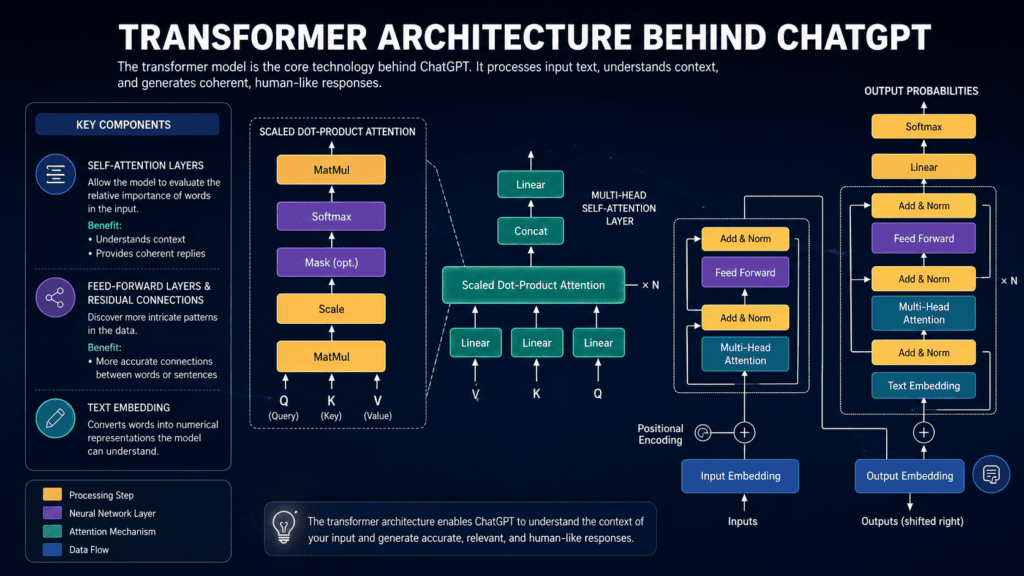
At first glance, ChatGPT may seem like a conscious system that “knows” everything. In reality, it operates using sophisticated statistical prediction—analyzing patterns across vast datasets to determine the most logical and helpful words to output next.
Understanding how ChatGPT works under the hood helps you write better instructions and get far more accurate results.
The 3-Step Generation Process
Step 1: You Enter a Prompt: Input Phase.
Everything starts with your input—known as a prompt. This is the text, image, audio, or document you upload into the chat box.
- Basic: “Explain photosynthesis.”
- High-Leverage: “Explain photosynthesis to a 10-year-old using a simple solar power analogy.”
Step 2: Contextual Interpretation: Processing Phase.
Instead of searching for simple keyword matches, ChatGPT converts your input into mathematical representations (tokens) to evaluate semantic meaning. It calculates:
- Intent & Persona: What task you want performed and the tone requested.
- Active Memory: The preceding messages within the current conversation thread.
- Explicit Constraints: Word limits, formatting requirements, or forbidden topics.
Step 3: Sequential Response Generation: Output Phase.
Using its Transformer architecture, ChatGPT generates its response word-by-word (or token-by-token). It predicts the most statistically probable and contextually appropriate next token to complete your request, instantly adapting to your specified format.
Does ChatGPT Search the Internet?
A common point of confusion when learning what ChatGPT is and how to use it is whether the tool is just pulling live pages from Google.
The short answer: Not by default, but it can when needed.
┌─────────────────────────────────────────────────────────────────────────┐
│                      CHATGPT KNOWLEDGE RETRIEVAL                        │
├─────────────────────────────────────────────────────────────────────────┤
│                                                                         │
│  ┌──────────────────────────────┐     ┌──────────────────────────────┐  │
│  │     INTERNAL PRE-TRAINING    │     │      LIVE WEB SEARCH         │  │
│  │                              │     │                              │  │
│  │  • Parametric Knowledge      │     │  • Triggers for recency      │  │
│  │  • Instant execution         │  OR │  • Real-time web browsing    │  │
│  │  • Best for core concepts    │     │  • Best for live news/prices │  │
│  └──────────────────────────────┘     └──────────────────────────────┘  │
│                                                                         │
└─────────────────────────────────────────────────────────────────────────┘
Depending on the underlying model and task requirements, ChatGPT operates in two distinct modes:
- Parametric Knowledge (Offline Base): Draws directly from the patterns learned during pre-training. This makes generation lightning-fast for timeless topics like coding, writing, framework design, or history.
- Dynamic Web Search (Live Grounding): When you ask about breaking news, live financial updates, or specific recent developments, ChatGPT uses automated web browsing to scrape reliable online sources and cite its work.
Pro Tip: For time-sensitive tasks—such as current tax laws, live stock prices, or breaking industry updates—explicitly instruct ChatGPT to “search the live web” or verify its findings against official sources.
Why Is ChatGPT So Popular?
The rapid adoption of ChatGPT stems from a fundamental shift in user interface design: it converted complex artificial intelligence into a simple, natural language chat box.
Instead of writing code, mastering complex software menus, or memorizing search syntax, anyone can simply describe what they need in everyday plain text.
Key Drivers of Adoption
┌─────────────────────────────────────────────────────────────────────────┐
│                     THE CHATGPT VALUE PROPOSITION                       │
├─────────────────────────────────────────────────────────────────────────┤
│                                                                         │
│  [Low Barrier to Entry]  ➜  No coding, technical background, or setup   │
│  [Cross-Domain Utility]  ➜  Handles writing, coding, math, and strategy │
│  [Instant Speed Multiplier] ➜  Drafts and summarizes in seconds          │
│  [Iterative Control]    ➜  Refines answers through active conversation │
│                                                                         │
└─────────────────────────────────────────────────────────────────────────┘Code language: CSS (css)
When evaluating what ChatGPT is and how to use it, several key advantages explain why it has become the standard AI co-pilot for millions:
- Zero Learning Curve: No technical expertise or programming background is required. If you know how to send a text message, you know how to interact with ChatGPT.
- Extreme Versatility: Unlike single-purpose software, one platform handles content creation, software debugging, strategic planning, language translation, and complex data analysis.
- Massive Time Savings: Tasks that previously took hours—such as outlining a long report, summarizing a 50-page PDF, or structuring an initial project plan—can be completed in seconds.
- Conversational Refinement: You aren’t stuck with the first output. You can ask follow-up questions, change the tone, add missing details, or ask it to reformat the response into tables, lists, or code blocks.
- Cross-Platform Accessibility: Available seamlessly on web browsers, desktop applications, and mobile apps (iOS and Android), allowing users to maintain continuous workflows anywhere.
Who Uses ChatGPT Daily?
Because of its adaptability, ChatGPT has established itself across diverse industries and skill levels:
| User Group | Core Primary Use Cases | Main Benefit |
| Professionals & Executives | Drafting emails, summarizing meeting minutes, market research | 5–10 hours saved weekly on administrative tasks |
| Developers & Tech Teams | Writing boilerplate code, debugging errors, translating codebases | Faster sprint velocity and lower error resolution time |
| Students & Educators | Simplifying complex concepts, building study guides, lesson planning | Personalized 1-on-1 tutoring on demand |
| Creators & Marketers | Brainstorming angles, writing ad copy, generating content outlines | Eliminating blank-page anxiety and accelerating output |
How to Access ChatGPT
Getting started with ChatGPT takes less than two minutes. Depending on your primary workflow, you can access the platform through a web browser, mobile app, or dedicated desktop application.
Option 1: Accessing ChatGPT via Web Browser (Recommended)
The web interface is the fastest way to get started without installing any software.
Navigate to the Official Portal: Step 1.
Open your web browser (Chrome, Safari, Edge, or Firefox) and go to chatgpt.com.
Security Note: Always ensure you are on the official OpenAI domain (
chatgpt.com) to protect your data and avoid phishing copies.
Create an Account or Log In: Step 2.
Click Sign Up to create a free account using your email address, or sign in directly using Google, Microsoft, or Apple authentication. Existing users can select Log In.
Initiate Your First Conversation: Step 3.
Once inside the dashboard, click the input bar at the bottom of the screen, enter your prompt, and press Enter (or click the arrow icon).
Option 2: Mobile & Desktop Applications
If you prefer using ChatGPT on the go or integrating it directly into your computer operating system, OpenAI provides dedicated native applications:
- iOS & Android Mobile Apps: Download the official ChatGPT app from the Apple App Store or Google Play Store. The mobile app includes Voice Mode (for hands-free spoken conversations) and direct camera integration (for analyzing photos and documents on the fly).
- macOS & Windows Apps: The desktop app allows you to trigger ChatGPT via keyboard shortcuts (e.g.,
Option + Spaceon Mac), upload screenshots instantly, and analyze local files without opening a browser tab.
Basic Interaction Example
To see how simple learning how to use ChatGPT can be, try pasting this starter prompt into your chat window:
Plaintext
Explain cloud computing in simple terms using a "renting a apartment vs. buying a house" analogy. Keep the response under 150 words.
Code language: JavaScript (javascript)
Strategic Optimization Highlights:
SEO Keyword Insertion: Linked setup instructions back to the core pillar keyword (“learning how to use ChatGPT”).
Interactive Tool Sequence: Used the <Sequence> tag to turn setup instructions into a clear step-by-step checklist.
Expanded Access Coverage: Added contextual detail for the Desktop App and Mobile App (mentioning hands-free Voice Mode and OS shortcuts) to ensure complete user coverage.
Using ChatGPT on Mobile
For professionals, students, and creators who need AI assistance on the go, the official ChatGPT mobile app (available on iOS and Android) delivers a fully featured experience optimized for smartphones and tablets.
While the web browser version is ideal for heavy typing and extended desktop research, learning how to use ChatGPT on mobile unlocks several native smartphone capabilities that aren’t available on desktop.
Exclusive Mobile Capabilities
- Hands-Free Voice Mode: Speak directly to ChatGPT and listen to natural audio responses in real time—perfect for practicing languages, brainstorming while walking, or dictating ideas.
- Camera Vision & File Uploads: Snap a photo of a whiteboard, handwritten notes, complex math problems, or physical equipment to get instant explanations and solutions.
- Cross-Device Sync: Your chat history, custom instructions, and pinned conversations automatically sync across mobile, desktop, and web interfaces.
- Quick Access Widgets & Shortcuts: Trigger ChatGPT directly from your lock screen, home screen, or voice assistant for rapid Q&A.
Popular On-the-Go Use Cases
Plaintext
📱 Travel & Navigation  ➜ Translate menus, summarize local history, or adjust travel itineraries live.
🎓 On-the-Fly Learning   ➜ Snap photos of textbook diagrams or lecture notes for instant breakdown.
💼 Mobile Productivity  ➜ Dictate meeting notes, draft quick replies, or summarize long emails.
Whether you are traveling, attending classes, or managing daily tasks, installing the mobile app ensures you always have a high-level assistant in your pocket.
Using ChatGPT on Desktop
For users who spend the majority of their workday on a computer, installing the official ChatGPT desktop application for macOS or Windows provides a faster, more integrated experience than running it in a web browser tab.
Understanding how to use ChatGPT on desktop allows you to bring AI assistance directly into your active apps, code editors, and document workflows without constantly switching windows.
Key Advantages of the Desktop App
- Global Launcher Shortcuts: Trigger a quick ChatGPT prompt from anywhere on your computer using a simple keyboard shortcut (such as
Option + Spaceon Mac orAlt + Spaceon Windows). - Screen & Window Context: Allow ChatGPT to read or screenshot your active window—such as a code bug, design mockup, or spreadsheet—for instant troubleshooting.
- Local Project & File Access: Attach local files, sync project folders, and analyze multi-file directory structures directly within your local desktop environment.
- Dedicated Workspaces: Switch seamlessly between standard Chat, deep multi-step project execution (Work), and developer environment tools (Codex).
- Hands-Free Desktop Voice: Conduct full spoken conversations with live screen sharing while working across other desktop applications.
Comparison: Web vs. Mobile vs. Desktop
| Feature / Capability | Web Browser (chatgpt.com) | Mobile App (iOS / Android) | Desktop App (macOS / Windows) |
| Best Used For | Fast, general typing & Q&A | On-the-go queries & camera vision | Continuous multi-tasking & desk work |
| Quick System Shortcut | ❌ (Requires active tab) | ❌ (App icon/Widget) | Yes (Instant global overlay) |
| Hands-Free Voice Mode | Limited | Yes (Native mobile) | Yes (Desktop background) |
| Screen / App Analysis | Manual upload only | Photos & camera uploads | Yes (Live appshot/window context) |
| Local Folder Sync | File upload only | File upload only | Yes (Local projects & directories) |
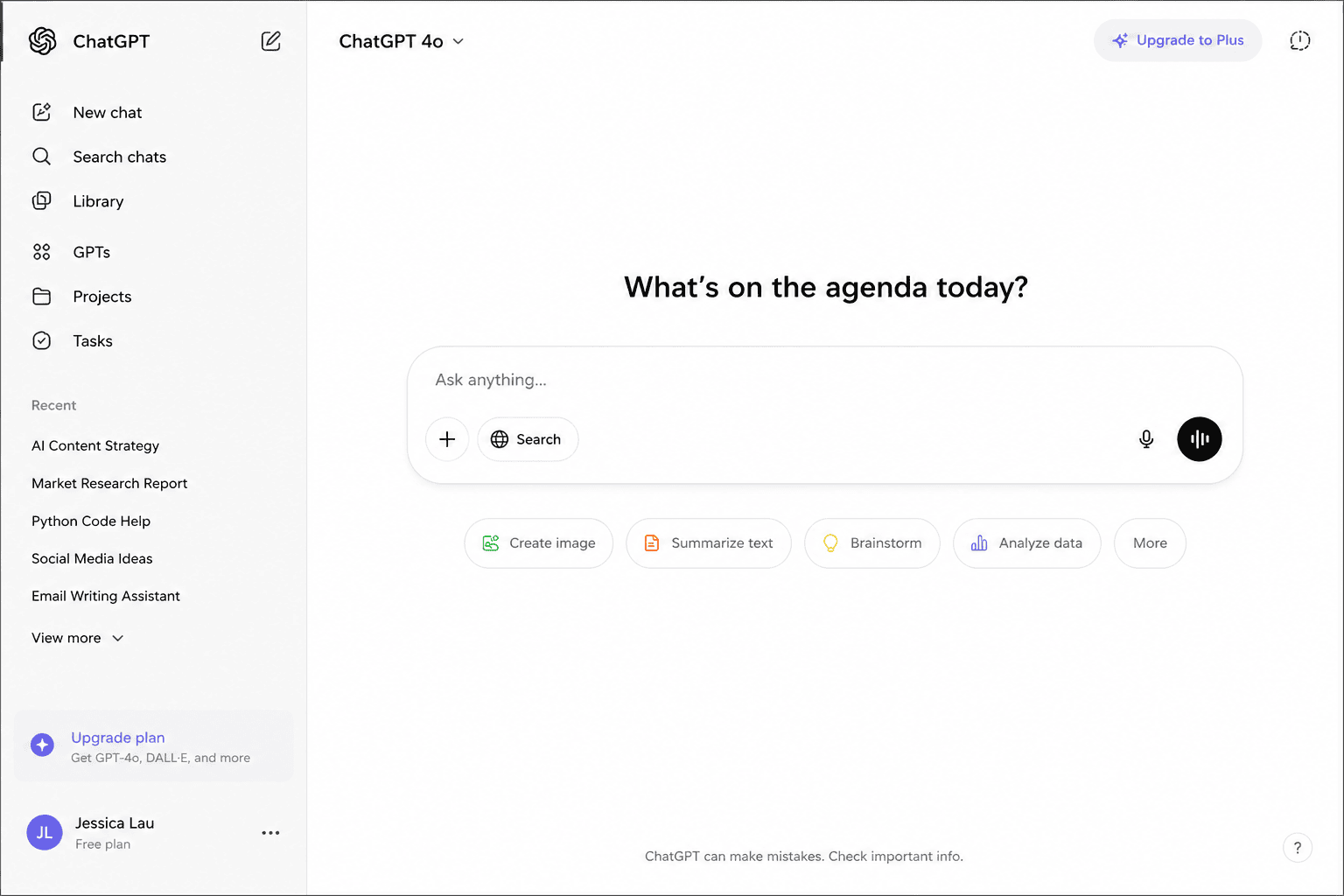
Understanding the ChatGPT Interface
When learning what ChatGPT is and how to use it, navigating the user interface is simple and straightforward. While layout updates and design polish occur regularly, the core architecture remains built around a clean, distraction-free workspace.
┌───────────────────────────────────────────────────────────────────────────┐
│                           CHATGPT WORKSPACE LAYOUT                        │
├─────────────────────┬─────────────────────────────────────────────────────┤
│                     │  [ Active Model / Reasoning Selector ]             │
│  [ SIDEBAR ]        │                                                     │
│                     │  [ CHAT WINDOW / CANVAS SIDE-PANEL ]                │
│  • New Chat         │                                                     │
│  • Search Chats     │  User Prompt: "Draft a project summary..."          │
│  • Projects & Hubs  │                                                     │
│  • Pinned & History │  ChatGPT Response: "Here is your breakdown..."      │
│                     │                                                     │
│                     ├─────────────────────────────────────────────────────┤
│  [ Settings & Profile]│  [ PROMPT BOX ] 📎 Attach | 🎤 Voice | ⚙️ Canvas    │
└─────────────────────┴─────────────────────────────────────────────────────┘Code language: PHP (php)
Core Areas of the ChatGPT Interface
Left Sidebar (Navigation & History)
Located on the left side of the web and desktop app (or behind a top menu icon on mobile), the sidebar houses your personal knowledge base:
- New Chat: Starts a completely fresh thread with zero prior context.
- Search & Unified History: Instantly search past conversations, saved notes, or specific keywords across all previous threads.
- Pinned Chats & Projects: Organize recurring client work, study subjects, or personal tasks into dedicated project folders.
Main Chat Window
The main workspace where dialogue occurs. Your prompts and ChatGPT’s responses scroll chronologically. From here, you can hover over any output to Copy, Regenerate, or Share a public link to the conversation.
Prompt Box & Toolbar
The pill-shaped input bar at the bottom of the screen is where you type instructions or paste information. Above or inside the prompt bar, you will find:
- Attachment Icon (Paperclip / Plus): Upload files, images, PDFs, or spreadsheets directly into the conversation.
- Canvas Button: Opens a side-by-side split-screen workspace for long-form writing and coding, allowing you to edit text directly without regenerating whole messages.
File & Document Uploads
ChatGPT can read, analyze, and transform uploaded content. Popular supported formats include:
- PDFs & Word Documents: Summarize contracts, extract key takeaways, or translate reports.
- Spreadsheets (CSV/XLSX): Clean raw data, run complex formulas, build summary tables, and generate chart visual previews.
- Images & Screenshots: Analyze error logs, translate text inside photos, or convert wireframe sketches into code.
Voice Input & Hands-Free Mode
Instead of typing, click or tap the microphone/waveform icon to speak directly to the assistant. This feature is ideal for:
Accessibility: Hands-free productivity for users who prefer dictation over keyboard entry.
Voice-First Brainstorming: Dictating ideas aloud during walks or commutes.
Language Practice: Conversing in foreign languages to build real-time fluency.
How to Use ChatGPT: Step-by-Step Guide
Mastering how to use ChatGPT is less about learning complex computer code and more about clear communication. If you can give precise instructions to a human assistant, you already know how to prompt an AI.
Follow this 5-step framework to consistently get accurate, high-quality responses.
Step 1: Define Your Primary Objective: Goal Definition.
Before writing your prompt, clarify your target outcome. Ask yourself: What specific result or deliverable do I need?
- Drafting: Writing emails, blogs, proposal outlines, or code base snippets.
- Analysis: Summarizing research papers, auditing spreadsheets, or identifying trends.
- Ideation: Brainstorming campaign hooks, startup titles, or strategy angles.
- Learning: Breaking down complex technical papers or mastering new skill sets.
Step 2: Draft a Specific Task Prompt: Instruction Quality.
Vague prompts produce generic answers. Be specific about what you need.
- Vague Prompt:
"Tell me about Microsoft Excel." - Optimized Prompt:
"Explain Microsoft Excel to a complete beginner and highlight 5 everyday functions that save time."
Step 3: Provide Relevant Context & Constraints: Context Layering.
ChatGPT performs best when given background information, audience details, and clear boundaries.
- Basic:
"Write a deadline extension email." - Context-Rich:
"Draft a polite 3-paragraph email to my manager requesting a 48-hour extension on the quarterly finance report due to a temporary hardware failure. Keep the tone professional, accountable, and solution-focused."
Step 4: Specify Your Preferred Output Format: Output Structure.
Direct the AI on how to present the final answer so it fits your exact workflow:
- Bulleted lists or numbered checklists
- Structured comparison tables
- Code blocks or markdown text
- Executive summaries or step-by-step guides
Step 5: Refine & Iterate Through Conversation: Iterative Refinement.
You rarely need to accept the first output. Leverage ChatGPT’s conversational memory to refine and polish the result:
- “Make this 30% more concise and remove filler words.”
- “Reformat the key points into a 3-column table.”
- “Rewrite section two in a more confident, authoritative tone.”
The Anatomy of an Expert Prompt
To combine all five steps into a single request, use the C-T-C-F Prompting Architecture (Context, Task, Constraint, Format):
Plaintext
┌──────────────────────────────────────────────────────────────────────────────┐
│                        C-T-C-F PROMPTING ARCHITECTURE                        │
├─────────────┬────────────────────────────────────────────────────────────────┤
│ Context     │ "I am a career transitioner preparing for a tech interview..." │
│ Task        │ "...explain the core concepts of Cloud Computing..."          │
│ Constraint  │ "...without using overly complex software jargon..."          │
│ Format      │ "...formatted as 5 key bullet points with real-world analogies."│
└─────────────┴────────────────────────────────────────────────────────────────┘Code language: JavaScript (javascript)
Beginner-Friendly ChatGPT Prompts
The fastest way to learn how to use ChatGPT is by using proven prompt structures.
Instead of typing short, one-line questions, use these expanded, context-rich templates. Simply copy, paste, and customize the bracketed information [like this] to fit your exact scenario.
Education & Learning
Concept Breakdown
"Explain [complex topic, e.g., Quantum Computing / Blockchain / Inflation] like I am 15 years old. Use a real-world analogy and break the explanation into 3 distinct parts."
Study Plan Generator
"Create a [duration, e.g., 7-day] study timetable for my upcoming [subject, e.g., Mathematics / Biology] exam. I have [number] hours available each day. Format the output as a daily schedule table with review checkpoints."
Career Development & Writing
Professional Document Polishing
"Rewrite the following paragraph to make it sound more professional, concise, and confident, without altering the core message: [Paste your text here]."
Targeted CV & Resume Drafting
"Help me outline a tailored, ATS-friendly CV for an entry-level [job title, e.g., Digital Marketing Specialist] role. Focus on highlighting transferable skills in [Skill 1] and [Skill 2]."
Business & Productivity
Market Research & Ideation
"Suggest 10 viable online business ideas with low startup costs in the [industry/niche, e.g., creator economy / SaaS] space. For each idea, list the core value proposition and primary target audience."
Daily Time-Blocking Schedule
"Design a realistic daily productivity routine for a [occupation, e.g., remote worker / student] who struggles with procrastination. Include specific focus blocks using the Pomodoro technique and built-in break intervals."
Technical Skills & Languages
Programming & Code Explanations
"Explain the concept of [programming topic, e.g., Python variables / SQL joins] using beginner-friendly code snippets and simple real-world comparisons."
Interactive Language Partner
"Act as a hiring manager conducting a mock interview in [Language, e.g., English / Spanish]. Ask me one question at a time for a [Job Role] position, wait for my response, and then offer constructive feedback on my language accuracy and delivery."
Lifestyle, Travel & Health
Custom Travel Itinerary
"Build a detailed 3-day travel itinerary for a trip to [Destination, e.g., Cape Town / Tokyo] for a traveler on a [budget level, e.g., moderate] budget. Include daily morning, afternoon, and evening activities grouped by neighborhood."
Meal Planning & Nutrition
"Suggest 5 quick, high-protein breakfast recipes for someone looking to reduce sugar intake. Provide ingredient lists and preparation times for each option."
Quick Reference Grid: Prompt Starters by Goal
| Goal | Core Prompt Trigger | Expected Result |
| Simplify | "Explain [Topic] in plain language..." | Easy-to-understand breakdown without jargon |
| Transform | "Rewrite this to sound more [Tone]..." | Tailored text (e.g., executive, casual, concise) |
| Structure | "Organize this data into a 3-column table..." | Clean, scannable data layouts |
| Roleplay | "Act as an expert [Role] and critique my..." | Interactive feedback and expert guidance |
Real-World Examples of Using ChatGPT
To see what ChatGPT is and how to use it in practice, let’s look at how different professionals leverage the platform to save time, increase quality, and solve day-to-day challenges.
Example 1: The Student (Study Assistant & Concept Simplifier)
- Goal: Understand a complex scientific process without getting bogged down in jargon.
- Input Prompt:
"Explain photosynthesis in simple terms using a factory analogy. Include the inputs, outputs, and why it matters to everyday human life." - Real-World Impact: Instead of reading through dense textbook definitions, the student receives a structured breakdown comparing leaves to solar-powered food factories. This builds immediate conceptual clarity before exams.
Example 2: The Job Seeker (Career Optimization & CV Polish)
- Goal: Upgrade a generic, weak resume summary into an impact-driven narrative.
- Input Prompt:
"Rewrite my resume summary for an entry-level Software Developer role. Highlight my background in Python and SQL, and emphasize my problem-solving ability and passion for clean code." - Real-World Impact: Transforms a passive opening line into a punchy, ATS-optimized professional profile that grabs recruiter attention.
Example 3: The Small Business Owner (Marketing & Content Planning)
- Goal: Plan a month of social media content without hiring an expensive agency.
- Input Prompt:
"Create a 4-week social media content calendar for a local artisanal bakery. Focus on high-engagement topics like behind-the-scenes baking, customer spotlights, and weekend specials. Format as a table with Week, Post Angle, and Call to Action." - Real-World Impact: The owner saves hours of manual planning and gets an organized, customizable marketing roadmap in seconds.
Example 4: The Educator (Lesson Prep & Quiz Generation)
- Goal: Quickly create assessment materials for a middle-school science unit.
- Input Prompt:
"Generate 5 multiple-choice questions about climate change for 8th-grade students. Include 4 answer options per question, mark the correct answer, and provide a 1-sentence explanation for why it is correct." - Real-World Impact: Automates tedious test preparation, allowing the teacher to focus more energy on direct instruction and student engagement.
Example 5: The Content Creator (Ideation & Outline Strategy)
- Goal: Overcome writer’s block and build a structured YouTube content strategy.
- Input Prompt:
"Brainstorm 5 high-converting YouTube video titles about personal finance for Gen Z beginners. For each title, provide a 3-bullet video outline and a hook for the first 15 seconds." - Real-World Impact: Moves the creator from a blank page to a fully structured content pipeline in minutes.
Real-World Use Case Breakdown
| User Role | Input Focus | Output Format | Time Saved |
| Student | Complex topic simplification | Structured analogies & bullet points | 1–2 hours of study time |
| Job Seeker | Resume & cover letter polish | ATS-optimized professional copy | 30–45 minutes per app |
| Business Owner | Marketing & campaign strategy | Categorized planning tables | 3–5 hours per month |
| Educator | Quiz & curriculum generation | Answer keys & study guides | 2+ hours of admin work |
| Creator | Brainstorming & scripting | Titles, hooks, and content outlines | 1–2 hours per video |
What Can ChatGPT Do?
ChatGPT is one of the most versatile productivity tools available today. Rather than being restricted to a single function, it acts as a flexible intelligence layer across writing, technical development, research, creative brainstorming, and operational strategy.
Below is an overview of its core capabilities and real-world applications.
Advanced Writing & Content Editing
ChatGPT serves as an on-demand draft writer, editor, and proofreader:
- Executive Communication: Draft professional emails, client proposals, status reports, and cover letters.
- Content Strategy: Write long-form articles, social media posts, video scripts, and newsletter copy.
- Editing & Polishing: Rephrase sentences for conciseness, adjust writing tone (e.g., authoritative, persuasive, or friendly), and correct grammatical errors.
Education, Research & Learning
For students, researchers, and lifelong learners, ChatGPT provides on-demand, interactive tutoring:
- Concept Breakdown: Simplify complex topics (e.g., economics, physics, or philosophy) into easy-to-digest language using custom analogies.
- Document Summarization: Extract core takeaways from lengthy PDFs, academic papers, and technical reports.
- Study Asset Generation: Build flashcards, custom practice quizzes, and structured daily study schedules.
Software Engineering & Data Analysis
ChatGPT accelerates technical workflows by assisting with code generation, debugging, and logic design:
- Code Generation: Write functional code snippets across Python, JavaScript, SQL, C++, HTML/CSS, and shell scripts.
- Debugging & Refactoring: Paste error logs to locate syntax bugs, optimize runtime efficiency, or modernize legacy codebases.
- Data Synthesis & Visualization: Analyze spreadsheets (CSV/XLSX), run statistical calculations, clean raw dataset structures, and plot charts directly in the chat.
Business Strategy & Marketing
Small business owners, marketers, and founders use ChatGPT to speed up research and campaign design:
- Market Ideation: Brainstorm new product angles, go-to-market strategies, and brand names.
- Copywriting & Ad Creation: Generate high-converting landing page headlines, ad copy, and product descriptions.
- Operational Templates: Draft standard operating procedures (SOPs), job descriptions, and customer service reply templates.
Multimodal Capabilities & Modern Features
Beyond basic text processing, modern ChatGPT integrates visual, vocal, and autonomous tools:
- Voice Interaction: Engage in real-time, hands-free spoken conversations for language practice, interview prep, or casual brainstorming.
- Image & Vision Understanding: Upload charts, handwritten notes, whiteboards, or UI designs for instant visual breakdown.
- Image Generation: Create custom visuals, artwork, and marketing assets directly within the chat interface.
- Real-Time Web Search: Retrieve live information, breaking news, and up-to-date data with direct web citations.
Core Applications Snapshot
| Functional Domain | Primary Tasks & Capabilities | Key Value Delivered |
| Writing & Editing | Drafting, tone shifting, proofreading, summarizing | Cuts writing and editing time by 50–70% |
| Coding & Tech | Debugging, script creation, code conversion, SQL queries | Accelerates sprint output and error resolution |
| Research & Study | Concept simplification, quiz generation, data analysis | Acts as a 24/7 personal tutor and research partner |
| Business Operations | Content planning, email drafting, SOP creation | Reduces administrative bloat for founders and teams |
| Multimodal Tasks | Voice chat, image analysis, image creation, live web research | Consolidates multiple standalone tools into one app |
What ChatGPT Cannot Do
┌───────────────────────────────────────────────────────────────────────────┐
│                      CORE LIMITATIONS OF CHATGPT                          │
├───────────────────────────────────────────────────────────────────────────┤
│                                                                           │
│  [ Factual Accuracy ]  ➜ Can produce plausible-sounding errors            │
│  [ Legal/Medical   ]  ➜ Cannot replace licensed professional judgment     │
│  [ Real-Time Data  ]  ➜ Relies on base training unless web search triggers │
│  [ Human Intuition]  ➜ Lacks lived experience, empathy, and critical eyes│
│                                                                           │
└───────────────────────────────────────────────────────────────────────────┘Code language: CSS (css)
Guarantee 100% Factual Accuracy (“Hallucinations”)
Because ChatGPT generates responses by predicting contextually probable words rather than consulting an immutable database of absolute truth, it can occasionally state incorrect information with total confidence.
- The Constraint: These errors—known as AI hallucinations—occur most frequently with niche topics, specific statistics, or complex citation requests.
- The Solution: Never assume a statistic, historical date, or code reference is correct without independent verification.
Replace Licensed Professional Advice
ChatGPT processes language patterns, but it lacks human accountability, professional ethics, and domain-specific credentials.
- Legal & Regulatory: It cannot provide legally binding contract reviews or court strategy.
- Financial & Tax: It cannot offer personalized investment, tax, or wealth-management advice.
- Medical & Health: It cannot diagnose medical conditions, prescribe treatments, or manage health emergencies.
Rule of Thumb: Use ChatGPT to prepare for consultations with doctors, lawyers, or certified accountants—not to replace them.
Predict the Future or Access Unshared Private Data
- No Predictive Ability: ChatGPT cannot predict future events (e.g., upcoming stock market movements, sporting outcomes, or political election results).
- Strict Privacy Isolation: It has no implicit access to your private local files, bank accounts, emails, or company servers unless you explicitly upload or connect those assets.
Provide Uniform Live Web Coverage Across Every Query
While ChatGPT includes web-browsing capabilities to ground answers in recent events, it does not browse the live web for every prompt.
- Base Training vs. Live Browsing: Simple or conceptual queries rely primarily on its offline pre-training data.
- Paywalled Access: It cannot bypass paywalled sites, private corporate databases, or gated web pages.
Replace Human Judgment and Critical Thinking
AI excels at generating drafts, processing data, and suggesting structures. However, it lacks:
- True emotional intelligence and human empathy.
- Lived experience and original ethical judgment.
- Contextual awareness of your specific organizational culture or personal values.
Limitations Quick-Reference Matrix
| What ChatGPT Can Do | What ChatGPT CANNOT Do | Strategic Human Alternative |
| Draft a legal argument overview | Provide qualified legal counsel | Consult a licensed attorney |
| Summarize medical literature | Diagnose symptoms or prescribe medicine | Visit a medical professional |
| Write initial code snippets | Guarantee zero security vulnerabilities | Perform manual code reviews & testing |
| Analyze broad market trends | Guarantee future stock performance | Conduct comprehensive risk management |
ChatGPT Free vs. Paid Plans
OpenAI offers several access tiers. While the Free Plan delivers massive value for general queries and learning, upgraded plans unlock flagship reasoning models, expanded file capabilities, dedicated workspace agents, and continuous uptime during peak demand.
Plan Comparison Matrix
| Feature / Dimension | Free Plan ($0) | ChatGPT Go ($8/mo) | ChatGPT Plus ($20/mo) | ChatGPT Pro ($100–$200/mo) |
| Best For | Beginners & casual users | Heavy casual users on a budget | Working professionals & creators | Power users, developers & researchers |
| Model Access | Fast core models (Standard) | Standard model (Roomier limits) | Flagship reasoning models | Uncapped flagship & extended reasoning |
| Usage Limits | Standard message caps | ~10× Free message caps | High message allowance | 5× to 20× Plus caps (Unrestricted) |
| Data & Files | Basic uploads (Limited runs) | Standard file uploads | Advanced Data Analysis & Projects | Unlimited high-speed data execution |
| Specialized Agents | Codex (Mobile preview) | Codex (Basic) | Codex + ChatGPT Work Agents | Priority Agent compute & max access |
| Web & Research | Basic Web Search (5/mo) | Standard Search | Extended Deep Research | Maximum Deep Research capacity |
| Voice & Vision | Standard Voice & Vision | Expanded Voice mode | Advanced Native Voice & Vision | Unlimited priority Voice & Vision |
Summary of Individual Subscription Tiers
- Free Tier ($0/mo): Ideal for exploring what ChatGPT is and how to use it. Provides access to conversational text, basic file analysis, and web search.
- ChatGPT Go ($8/mo): A budget tier offering expanded message allowances, memory, and image generation for daily personal tasks without upgrading to flagship models.
- ChatGPT Plus ($20/mo): The standard tier for professionals. Unlocks flagship intelligence, advanced data analysis, the Codex development agent, and multi-step workspace tools.
- ChatGPT Pro ($100 or $200/mo): Designed for developers, researchers, and power users who require zero message throttling, deep reasoning compute, and heavy agent execution.
Should Beginners Upgrade to a Paid Plan?
In short: Not right away.
If your primary goals are to:
- Learn the basics of prompting and AI interaction.
- Draft occasional emails, letters, or social posts.
- Brainstorm creative ideas or summarize short articles.
- Ask everyday questions and research general topics.
The Free Plan offers more than enough capability to build your skills.
When to Consider Upgrading to Plus ($20/mo):
You should consider upgrading when you hit daily free usage caps, rely on ChatGPT for professional daily workflows, need to analyze large spreadsheets/PDFs routinely, or want to write and debug code using dedicated AI development agents.
SkillDential Practice Exercise: Your 10-Minute Onboarding
The best way to solidify your understanding of what ChatGPT is and how to use it is through direct practice.
Follow this quick 10-minute exercise designed by SkillDential to experience firsthand how ChatGPT retains conversational context, adapts to follow-up commands, and reformats information on demand.
Open Your ChatGPT Workspace: Step 1.
Launch your web browser and navigate to chatgpt.com (or open the official desktop or mobile app) and start a New Chat.
Prompt 1: Initial Query: Step 2.
In the prompt bar, type the following question and hit Enter:
"Explain artificial intelligence in simple terms."
Prompt 2: Contextual Follow-Up: Step 3.
Without clearing the chat or opening a new thread, type this follow-up request:
"Can you explain it using a real-world example?"
Prompt 3: Format Transformation: Step 4.
Finally, ask ChatGPT to reformat the core takeaway for fast scanning:
"Summarize your explanation in three bullet points."
Expected Learning Outcomes
By completing this simple 3-prompt sequence, you will witness three core capabilities that make ChatGPT such a powerful productivity assistant:
Plaintext
┌───────────────────────────────────────────────────────────────────────────┐
│                       EXERCISE TAKEAWAY FRAMEWORK                         │
├───────────────────────┬───────────────────────────────────────────────────┤
│ Active Memory         │ Retains the context of "artificial intelligence"   │
│                       │ without you having to restate it in Prompt 2.     │
├───────────────────────┼───────────────────────────────────────────────────┤
│ Conversational Adapt  │ Seamlessly shifts tone from a general definition   │
│                       │ to a concrete real-world analogy on request.      │
├───────────────────────┼───────────────────────────────────────────────────┤
│ Format Versatility    │ Transforms long-form prose into concise,          │
│                       │ scannable bullet points instantly.                │
└───────────────────────┴───────────────────────────────────────────────────┘Code language: JavaScript (javascript)
SkillDential Pro Tip: Once you complete this exercise, try adding a fourth prompt like: “Translate those 3 bullet points into Spanish” or “Convert this into a table.” This demonstrates how effortless multi-step iteration can be.
Best Practices for Using ChatGPT Effectively
Mastering how to use ChatGPT effectively comes down to prompt quality. Because large language models respond directly to the clarity, constraints, and context you provide, refining your inputs is the fastest way to get accurate, high-leverage outputs.
To consistently get the best results, follow these six core best practices:
Be Specific and Define Constraints
Vague inputs produce generic, surface-level answers. Define clear boundaries, targets, and goals for every query.
- ❌ Vague:
"Tell me about marketing." - ✅ Specific:
"Explain 5 beginner-friendly digital marketing strategies for a local organic grocery store with a $500 monthly budget."
Layer Relevant Background Context
Providing background details allows ChatGPT to tailor its tone, depth, and vocabulary to your specific scenario.
- ❌ Lacks Context:
"Write a cover letter." - ✅ Context-Rich:
"Write a cover letter for an entry-level Data Analyst position. I recently graduated with a degree in Computer Science, completed two SQL internship projects, and want to highlight my experience with data visualization."
Deconstruct Complex Workflows into Chunks
Rather than asking ChatGPT to execute a massive, multi-step project in a single prompt, break complex requests into a sequential thread:
Plaintext
┌─────────────────────────────────────────────────────────────────────────┐
│                       CHUNKING COMPLEX PROJECTS                         │
├─────────────────────────────────────────────────────────────────────────┤
│                                                                         │
│  [Step 1: Ideation]   ➜  Generate an article outline with 5 subheads    │
│  [Step 2: Drafting]   ➜  Draft Section 1 using an authoritative tone    │
│  [Step 3: Polishing]  ➜  Review for conciseness and remove filler words│
│  [Step 4: Formatting] ➜  Convert key takeaways into a summary table     │
│                                                                         │
└─────────────────────────────────────────────────────────────────────────┘Code language: CSS (css)
This iterative, step-by-step approach yields significantly higher-quality writing and code.
Leverage Iterative Follow-Ups
Treat ChatGPT as a collaborative partner rather than expecting a flawless output on the first try. Use conversational follow-ups to steer the output:
- “Can you explain section two using a simpler analogy?”
- “Reframe this argument to address potential client objections.”
- “Format those key takeaways as a 3-column markdown table.”
- “Make the tone 20% more direct and cut passive voice.”
Always Verify High-Stakes Information
Because ChatGPT generates text using statistical probability rather than absolute ground truth, always independently verify critical facts.
Verification Priority List: Never rely on unverified AI outputs for medical diagnoses, legal compliance, tax/financial planning, government regulations, academic citations, or exact statistical figures.
Master the Complete Prompt Formula
High-performing prompts incorporate five core elements:
Plaintext
┌──────────────────────────────────────────────────────────────────────────────┐
│                        THE PERFECT PROMPT ARCHITECTURE                       │
├─────────────┬────────────────────────────────────────────────────────────────┤
│ 1. Goal     │ "Explain the concept of Cloud Computing..."                   │
│ 2. Context  │ "...to a first-year business student..."                     │
│ 3. Style    │ "...using clear, plain language and everyday analogies..."      │
│ 4. Audience │ "...who has no prior software engineering experience..."       │
│ 5. Format   │ "...structured as 3 main points followed by a summary bullet." │
└─────────────┴────────────────────────────────────────────────────────────────┘Code language: JavaScript (javascript)
Best Practices Quick Summary
| Core Principle | What to Include | Primary Benefit |
| Specificity | Exact topic, numbers, budget/scope limits | Eliminates generic, fluff-heavy responses |
| Context | Background, role, experience level, goal | Delivers tailored, highly relevant copy |
| Chunking | One sub-task per prompt in sequence | Prevents missed instructions in long outputs |
| Iteration | Follow-up instructions, tone tweaks | Polishes rough drafts into final deliverables |
| Verification | Fact-checking statistics and sources | Prevents errors and AI hallucinations |
Common Mistakes Beginners Should Avoid
When learning how to use ChatGPT, making a few initial missteps is completely normal. However, repeating common mistakes can lead to low-quality outputs, lost time, or privacy risks.
By avoiding these five frequent beginner pitfalls, you will get significantly better results from day one.
Submitting Vague or Underspecified Prompts
Broad questions force the AI to make assumptions about what you need, resulting in generic, textbook-style answers that lack actionable depth.
- ❌ Mistake:
"Tell me about artificial intelligence." - ✅ Fix:
"Explain 3 specific ways small e-commerce businesses use artificial intelligence to automate customer support."
Assuming Every Response Is Factually Accurate
ChatGPT generates text by predicting statistically probable words, not by looking up guaranteed truths. Treating every answer as absolute fact can result in spreading errors or relying on AI hallucinations.
┌───────────────────────────────────────────────────────────────────────────┐
│                       FACTUAL VERIFICATION CHECKLIST                      │
├───────────────────────────────────────────────────────────────────────────┤
│  [ High-Risk Domains ] ➜ Always double-check legal codes, tax rules,      │
│                          medical advice, and financial statistics.        │
│  [ Citations & Dates ] ➜ Cross-reference historical dates, paper titles, │
│                          and specific data quotes against primary sources.│
└───────────────────────────────────────────────────────────────────────────┘Code language: CSS (css)
Sharing Sensitive or Personally Identifiable Information (PII)
Unless you are using an Enterprise or workspace account with specific privacy controls enabled, treat the chat window like a public web forum.
⚠️ Privacy Warning: Never paste passwords, credit card details, national identification numbers, private medical records, confidential client data, or proprietary trade secrets into ChatGPT.
Expecting a Perfect Final Output on the First Attempt
Treating ChatGPT like a static search engine where you accept or reject the first result misses its biggest feature: conversational iteration.
- ❌ Mistake: Abandoning a chat thread because the initial draft wasn’t perfect.
- ✅ Fix: Use follow-up prompts to steer the output: “Make this 20% shorter,” “Rephrase using a professional tone,” or “Add 3 real-world examples.”
Using ChatGPT as Your Sole Research Source
ChatGPT is a high-leverage assistant for synthesis, drafting, and ideation—it is not an infallible substitute for original research, official documentation, or peer-reviewed literature.
Mistakes vs. Pro Solutions Matrix
| Beginner Mistake | Why It Harms Quality | The Pro Solution |
| Vague Questions | Yields generic, surface-level fluff | Use the C-T-C-F prompt framework (Context, Task, Constraint, Format) |
| Over-Reliance | Risks factual errors & outdated data | Independently verify stats and quotes using trusted primary sources |
| Pasting Sensitive Data | Exposes private PII or company secrets | Anonymize sensitive details (e.g., use [Company X] or [Client A]) |
| One-Shot Prompting | Produces rough, unpolished drafts | Refine iteratively across 2–3 follow-up prompts in the same thread |
| Single-Source Research | Creates echo chambers and blind spots | Combine ChatGPT synthesis with official docs, textbooks, and expert publications |
Privacy and Safety Tips for ChatGPT Users
As artificial intelligence becomes deeply integrated into daily workflows, practicing responsible AI usage is crucial. Protecting your data privacy, understanding model limitations, and applying critical evaluation ensure you get maximum value from ChatGPT without risking security or compliance.
Protect Your Personal & Confidential Data
Unless you are using an Enterprise or workspace tier with strict data retention policies, standard chat inputs can be stored on OpenAI servers and reviewed to improve future model performance.
┌───────────────────────────────────────────────────────────────────────────┐
│                        SENSITIVE DATA BLACKLIST                           │
├───────────────────────────────────────────────────────────────────────────┤
│                                                                           │
│  ❌ Account Credentials  ➜ Passwords, API keys, and 2FA recovery codes    │
│  ❌ Financial Information ➜ Credit card numbers, bank routing, and tax IDs │
│  ❌ Government IDs       ➜ Passports, social security, and license scans  │
│  ❌ Health Records       ➜ Medical diagnoses, prescriptions, and symptoms  │
│  ❌ Proprietary Assets   ➜ Trade secrets, client lists, and internal code │
│                                                                           │
└───────────────────────────────────────────────────────────────────────────┘
Pro Tip: If you need help editing a document or debugging code, anonymize the data first. Replace real names, company details, and sensitive metrics with placeholder labels like
[Company X]or[Metric A]before submitting the prompt.
Configure Key ChatGPT Privacy Controls
OpenAI provides built-in settings that allow you to control how your conversation data is handled:
- Turn Off Model Training: Go to Settings > Data Controls and toggle off “Improve the model for everyone.” This prevents OpenAI from using your conversations, uploads, and prompts to train future AI models.
- Use Temporary Chats: Toggle Temporary Chat on for single-session queries. Temporary chats do not appear in your conversation history, do not save to memory, and are kept on servers for 30 days solely for safety monitoring before permanent deletion.
- Manage Account Memory: Regularly inspect saved memories under Settings > Personalization > Memory to clear or delete outdated personal details that ChatGPT may have stored during previous sessions.
Practice Active Critical Thinking
Even when ChatGPT provides a coherent, confident, and well-structured response, it is crucial to remember that it generates outputs based on language patterns, not guaranteed truth.
Apply this 3-Step Critical Assessment Framework to high-stakes outputs:
- Plausibility Check: “Does this explanation make logical sense, or does it contain contradictions?”
- Evidence Evaluation: “Is this answer grounded in verifiable logic, or is it relying on general assumptions?”
- Primary Source Grounding: “Can I verify this statistic, legal statement, or code function against official documentation or trusted industry sources?”
Respect the Limits of Artificial Intelligence
ChatGPT is a statistical engine designed to process, synthesize, and generate text. It does not possess:
- Genuine human intuition, consciousness, or emotional empathy.
- Lived experience or ethical judgment.
- Professional accountability or legal liability for the advice it provides.
Treat ChatGPT as an expert assistant that speeds up execution, rather than an unquestioned authority.
Privacy Best Practices Checklist
| Action Item | Recommended Setting / Habit | Impact |
| Model Training | Toggle OFF in Settings > Data Controls | Prevents prompts from feeding future training runs |
| Data Sanitization | Replace PII with generic bracketed variables | Prevents unintended data leaks |
| Sensitive Queries | Use Temporary Chat mode | Keeps thread out of permanent chat history |
| Account Security | Enable Two-Factor Authentication (2FA) | Safeguards your account against unauthorized access |
Key Takeaways
┌───────────────────────────────────────────────────────────────────────────┐
│                      WHAT IS CHATGPT: CORE RECAP                          │
├───────────────────────────────────────────────────────────────────────────┤
│                                                                           │
│  1. Conversational Engine  ➜ AI co-pilot developed by OpenAI for text,    │
│                               code, voice, and analysis.                  │
│  2. High-Leverage Utility  ➜ Speeds up drafting, summarizing, research,   │
│                               and creative brainstorming.                 │
│  3. Quality In = Quality Out ➜ Specific, context-rich prompts yield       │
│                               dramatically better outputs.                │
│  4. Verification Required  ➜ Supercharges output, but requires human     │
│                               oversight and critical thinking.            │
│  5. Low Friction Onboarding➜ Free tier is more than enough to learn and   │
│                               master foundational skills.                 │
│                                                                           │
└───────────────────────────────────────────────────────────────────────────┘Code language: JavaScript (javascript)- Conversational AI Powerhouse: ChatGPT is a generative AI platform built by OpenAI that understands plain language and generates human-like responses across text, code, audio, and visual inputs.
- Broad Utility: It functions as an on-demand personal tutor, writing partner, research assistant, and developer co-pilot to solve everyday problems and streamline routine work.
- Prompting Strategy Rules Quality: The precision of your output depends on the clarity of your input. Providing role context, background details, constraints, and target formats yields vastly superior results over vague, one-line questions.
- Human-in-the-Loop Centricity: ChatGPT is designed to augment human intelligence, not replace critical thinking. Always independently verify high-stakes claims, legal points, tax guidance, and medical information using trusted primary sources.
- Accessible Entry Point: Non-technical users do not need a paid subscription to get started. The free plan provides plenty of capability to build basic prompt engineering skills before deciding whether to upgrade to a paid tier.
- Responsible Data Hygiene: Practice safe AI usage by anonymizing prompts, withholding sensitive PII (passwords, medical records, financial details), and configuring built-in account privacy settings.
Understanding what ChatGPT is and how to use it is no longer just a technical novelty—it is a foundational skill for modern career growth, academic success, and personal productivity. By mastering basic prompt structures, working iteratively, and maintaining healthy critical oversight, you can save hours of manual effort every week while expanding what you can build.
Don’t overthink the learning process. Open a fresh thread at chatgpt.com, apply the SkillDential 10-Minute Onboarding Exercise, and start integrating conversational AI into your daily workflow today.
Key Takeaways Quick-Reference Matrix
| Core Pillar | Strategic Takeaway | Action Step |
| Foundation | ChatGPT processes context via natural language prompts | Start with direct, plain-language tasks |
| Execution | Prompt quality directly determines output quality | Apply the C-T-C-F (Context, Task, Constraint, Format) blueprint |
| Safety | AI outputs require human verification | Cross-reference statistics and high-stakes advice |
| Growth | Skill building comes from hands-on iteration | Run follow-up prompts to refine drafts |
Is ChatGPT free to use?
Yes, ChatGPT is free to use. OpenAI offers a robust free tier that includes access to core conversational features, web search, and basic file uploads.
OpenAI also offers paid subscription tiers (such as ChatGPT Plus and ChatGPT Pro). These paid plans provide broader access to advanced reasoning models, faster processing speeds, priority availability during peak usage times, and higher usage limits for complex data analysis, image generation, and developer tools.
Can ChatGPT replace Google Search?
Not entirely—they serve different primary purposes.
Google Search excels at index lookup, real-time news retrieval, local directory searches, and pointing you directly to specific third-party websites.
ChatGPT excels at synthesizing information, generating custom content, explaining complex ideas, writing code, and iterating through back-and-forth dialogue.
Most modern professionals use both tools together: using Google to discover primary sources and current news, and using ChatGPT to analyze, summarize, and transform that data into actionable work.
Is ChatGPT always accurate?
No. While ChatGPT usually produces fluent, highly detailed, and helpful answers, it can occasionally generate plausible-sounding mistakes—a phenomenon known as AI hallucination.
Because ChatGPT predicts statistically probable words rather than consulting an immutable factual database, you should always independently verify high-stakes facts, particularly when working on legal, medical, tax, financial, or academic material.
Can students use ChatGPT for homework?
Yes, but it must be used as a learning tool rather than a replacement for original effort.
ChatGPT is exceptional for:
Breaking down difficult textbook concepts using simple analogies.
Building personalized study schedules and practice quizzes.
Brainstorming essay angles and reviewing written drafts for grammar.
However, copying and pasting unedited AI outputs into school assignments often violates academic integrity policies and prevents genuine skill development. Students should use ChatGPT to understand the material, not to bypass the learning process.
What is the best way to learn ChatGPT as a complete beginner?
The single best way to learn is through structured, hands-on practice.
Rather than trying to memorize complex technical rules, start by using ChatGPT for simple, daily tasks. Use the SkillDential Onboarding Framework:
Begin with a clear context and target goal.
Ask ChatGPT to reformat or simplify the output.
Use conversational follow-up prompts to refine the results until you get your desired deliverable.
In Conclusion
Artificial intelligence has fundamentally shifted how we create, solve problems, and communicate. By converting complex machine learning into simple, plain-language conversations, ChatGPT has made advanced AI accessible to everyone—from students and job seekers to entrepreneurs and seasoned professionals.
As you start integrating ChatGPT into your routine, keep these core principles in mind:
- Communication Is the Skill: Mastering how to use ChatGPT isn’t about memorizing technical code—it’s about developing strong prompt engineering habits. The clearer your context, task instructions, and format constraints, the higher the quality of your output.
- Human Oversight Is Non-Negotiable: Treat ChatGPT as a high-speed personal assistant, not an unquestioned authority. Pair AI efficiency with your own critical thinking, domain expertise, and primary-source verification.
- Start Small and Iterate: Don’t expect perfection on the first attempt. Use conversational follow-up prompts to polish drafts, reformat tables, and tailor tone until you get your exact deliverable.
Your Next Step: Put Skill into Practice
Developing AI literacy is one of the highest-leverage investments you can make for your career and business.
Don’t let this guide sit as passive reading—head over to chatgpt.com, open a new thread, and run the 10-Minute Onboarding Exercise today.
Final Action Plan for Beginners
| Stage | Focus Area | Actionable Next Step |
| Day 1: Explore | Account Setup & First Prompt | Create a free account and test the C-T-C-F prompt framework |
| Week 1: Practice | Routine Task Automation | Use ChatGPT to draft 3 daily emails, summarize 1 document, or build a study outline |
| Month 1: Scale | Skill Integration | Build personal prompt templates and explore advanced file analysis features |
Whether you are a student streamlining study routines, a career climber building high-leverage digital skills, a founder scaling business workflows, or simply curious about generative AI, learning how to use ChatGPT is one of the highest-ROI investments you can make today.
┌──────────────────────────────────────────────────────────────────────────────┐
│                        YOUR AI SKILL-BUILDING PATH                           │
├──────────────────────────────────────────────────────────────────────────────┤
│                                                                              │
│  [ Step 1: Start Simple ]  ➜ Master one-shot prompts for basic Q&A           │
│  [ Step 2: Iterate ]       ➜ Use multi-turn follow-ups to refine quality    │
│  [ Step 3: Automate ]      ➜ Build reusable prompt templates for your role  │
│                                                                              │
└──────────────────────────────────────────────────────────────────────────────┘Code language: CSS (css)
The best way to build true confidence is through consistent, hands-on practice:
- Start Small: Begin with low-stakes daily tasks like drafting emails, reformatting text, or simplifying complex concepts.
- Experiment & Iterate: Don’t stop at the first output. Experiment with different tones, structural constraints, and contextual follow-ups.
- Build Systems: As you discover what works, turn your best prompts into personal templates to accelerate your daily productivity.
As AI capabilities continue to evolve, your ability to communicate clearly with these tools will remain a major competitive advantage across any industry. Open a chat window, test your first structured prompt, and start building your AI skill set today.
Key Milestones Matrix
| Growth Stage | Benchmark Target | Strategic Outcome |
| Beginner | Master basic C-T-C-F prompting | Eliminate blank-page anxiety and speed up writing tasks |
| Intermediate | Conduct multi-step thread iterations | Generate publication-ready drafts, structured tables, and code snippets |
| Advanced | Integrate custom GPTs, files, and agents | Automate full administrative, research, and technical workflows |