ChatGPT Voice vs. ChatGPT Dictation: What’s the Difference?
If you are trying to speed up your workflow by speaking instead of typing, OpenAI offers two distinct audio modalities, but they serve fundamentally different functions. ChatGPT Voice is engineered for real-time, bidirectional spoken conversations, acting as an interactive sounding board. In contrast, standard ChatGPT Dictation functions purely as a speech-to-text input tool, converting your spoken words into an editable text prompt before you hit send.
Choosing the right mode matters: leveraging ChatGPT Voice when you need conversational brainstorming will accelerate your thinking, whereas using ChatGPT Dictation is optimal for rapid drafting and precise prompt engineering.
ChatGPT Voice vs. ChatGPT Dictation at a Glance
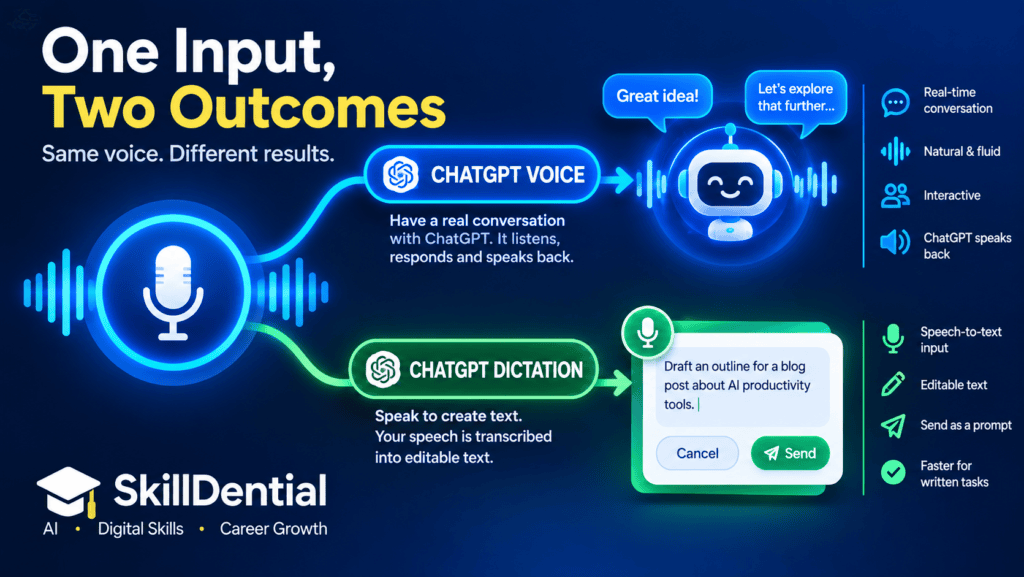
The core distinction comes down to interaction style:
- ChatGPT Voice: Talk with ChatGPT in a live, conversational stream.
- ChatGPT Dictation: Talk to ChatGPT to generate and refine a text input.
| Feature | ChatGPT Voice | ChatGPT Dictation |
| Primary Purpose | Real-time bidirectional conversation | High-speed speech-to-text input |
| ChatGPT Response | Spoken audio and text response | Standard text response |
| Pre-Send Editing | Dynamic and fluid ongoing exchange | Yes, review and edit text before submission |
| Best For | Brainstorming, mock interviews, deep dives | Drafting articles, long prompts, quick notes |
| Interruption | Fully interruptible mid-sentence (Live mode) | Not applicable (standard input method) |
| Ideal Workflow | Thinking aloud and verbal iteration | Speaking quickly to bypass keyboard friction |
OpenAI explicitly positions ChatGPT Voice for live verbal collaboration and working through complex ideas, whereas ChatGPT Dictation is optimized for frictionless transcription, allowing you to capture raw thoughts, edit the resulting text, and execute prompts efficiently.
What Is ChatGPT Voice?
ChatGPT Voice is a native, spoken conversation mode that replaces traditional typing with a fluid, human-like audio exchange. Rather than typing a query, waiting for text generation, and reading the output, you speak directly to the AI and receive spoken responses in real time.
Powered by OpenAI’s advanced audio capabilities (including the live, free-form experience), ChatGPT Voice supports simultaneous listening and speaking. This means you can naturally interrupt mid-sentence or steer the direction of the dialogue on the fly. Depending on your subscription tier and interface, ChatGPT Voice can also integrate visual context, process images, and execute live web searches during the conversation.
Ultimately, this mode shines when the conversational loop itself is the primary objective—acting as a dynamic, interactive collaborator rather than a static tool.
High-Leverage Use Cases for ChatGPT Voice
- Brainstorming structural angles or frameworks for a new project.
- Verbalizing and stress-testing solutions to complex technical or strategic problems.
- Simulating high-stakes mock interviews or client pitch sessions.
- Rehearsing presentations and refining your pacing out loud.
- Exploring unfamiliar subject matter through rapid, back-and-forth Q&A.
- Dictating and iterating on article outlines while walking or multitasking.
- Deploying ChatGPT Voice as an active sounding board to challenge your assumptions.
Practical Workflow Example
Instead of typing out a rigid prompt:
“Give me five possible angles for an article about AI productivity.”
You speak the request aloud, review the spoken response, and immediately iterate:
“I like the third idea, but make it more actionable for digital creators.”
This second interaction highlights ChatGPT Voice’s core advantage. You are not just converting speech into text; you are maintaining a continuous, context-aware dialogue that accelerates deep work.
What Is ChatGPT Dictation?
ChatGPT Dictation is a high-speed speech-to-text input mechanism designed to replace manual typing. When you tap the microphone icon to record your message, the system transcribes your spoken audio directly into the input field.
Crucially, ChatGPT Dictation does not initiate a spoken, conversational loop. The operational workflow is linear and text-centric:
Speak $\rightarrow$ Transcribe $\rightarrow$ Edit $\rightarrow$ Send $\rightarrow$ Receive standard text response
This makes ChatGPT Dictation the ideal choice when your ultimate output is written text, and you want to bypass the friction of a physical keyboard.
High-Leverage Use Cases for ChatGPT Dictation
- Dictating long, complex prompts without the fatigue of typing.
- Drafting professional emails or client communications at conversational speed.
- Capturing raw article ideas or outlines while on the go.
- Translating loose spoken thoughts into structured meeting notes.
- Explaining intricate technical problems with rich detail.
- Drafting long-form social media threads or content blocks.
- Batch-recording multi-step instructions for custom GPTs.
Practical Workflow Example
Instead of manually typing out a dense prompt, you use ChatGPT Dictation:
“Write a professional introduction for an article explaining five ways AI can help small businesses save time.”
The tool converts your speech into editable text in the message field. You can instantly review the transcript, fix any misheard terminology, and refine the wording before hitting send. That pre-submission editing gate is what fundamentally separates ChatGPT Dictation from real-time ChatGPT Voice.
ChatGPT Voice vs. Dictation: The Main Difference
The easiest way to choose a mode comes down to one question: Do you want a dynamic conversation, or do you want to generate text?
- Choose ChatGPT Voice when you want to interact with ChatGPT through live, spoken dialogue.
- Choose ChatGPT Dictation when you want to use your voice simply as a faster, lower-friction replacement for typing.
This core distinction directly impacts productivity for knowledge workers, strategists, and content creators.
Core Use-Case Breakdown
When You Are Brainstorming
- Verdict: ChatGPT Voice is the natural fit.
- Why: You can verbalize a half-formed idea, listen to ChatGPT’s instant analysis, interrupt to course-correct, and build out a robust concept across multiple rapid conversational turns without touching a keyboard.
When You Are Drafting
- Verdict: ChatGPT Dictation is more appropriate.
- Why: Writing requires structure and precision. Dictation lets you speak at length, capture your raw thoughts, review and edit the transcription for accuracy, and then fire off a clean, polished prompt to the AI.
When You Are Practicing Skills
- Verdict: ChatGPT Voice is indispensable.
- Why: Real-time feedback loops are critical for simulation. You can use ChatGPT Voice to practice:
- Job interviews and negotiation scenarios.
- Conference presentations and pitch delivery.
- Foreign language fluency and pronunciation.
- High-stakes workplace or client conversations.
When You Already Know Your Output
- Verdict: ChatGPT Dictation is faster.
- Why: If you have already formulated a detailed instruction in your head and just want to input a multi-paragraph prompt without dealing with keyboard fatigue, dictating the text allows you to execute commands instantly.
Does ChatGPT Voice Transcribe Your Conversation?
Yes, but with a critical caveat.
After a ChatGPT Voice session concludes, a written transcript is automatically saved to your chat history. However, OpenAI explicitly notes that these transcripts may not function as a flawless, word-for-word record. Variables like background noise, simultaneous talking, overlapping speech, and rapid-fire conversational pacing can introduce transcription errors.
Consequently, you should never treat a ChatGPT Voice transcript as an infallible legal or archival record.
When Transcript Accuracy Matters Most
This limitation is crucial to keep in mind if you are using ChatGPT Voice for high-stakes workflows, including:
- Conducting user research or qualitative interviews.
- Extracting action items from critical client meetings.
- Pulling exact quotations for articles or published content.
- Handling compliance, legal, or audit-adjacent tasks.
- Compiling detailed technical notes where specific terminology is vital.
The Takeaway
While ChatGPT Voice is unmatched for live brainstorming and dynamic problem-solving, always manually audit the generated transcript if your output requires absolute precision.
Which Is Better for Content Creators?
There is no universal winner because ChatGPT Voice and ChatGPT Dictation solve entirely different creative friction points. In fact, professional content creators often combine both features into a single, high-efficiency production workflow.
Workflow 1: Use ChatGPT Voice to Develop the Idea
- The Scenario: You have a vague concept and need a sounding board to break through writer’s block or avoid generic angles.
- The Process:
- Launch a ChatGPT Voice session and talk through your raw concept out loud:
“I want to write an article about AI tools for freelancers, but I don’t want it to sound like another generic AI listicle.” - Spar with the AI over structural angles, unique hooks, and counter-intuitive arguments through rapid, uninterrupted dialogue.
- Once the core concept and outline are locked in, transition to your drafting environment.
- Launch a ChatGPT Voice session and talk through your raw concept out loud:
Workflow 2: Use ChatGPT Dictation to Build the Detailed Prompt
- The Scenario: You already have a clear structure or a complex set of instructions in your head, but manual typing will slow you down.
- The Process:
- Use ChatGPT Dictation to speak a multi-paragraph prompt or article brief at conversational speed.
- Audit and refine the generated text in the message field—correcting specific product names, technical terminology, or data points.
- Append any final missing instructions and hit send to generate your draft.
Summary Recommendation for Creators
- Rely on ChatGPT Voice during the ideation, strategy, and outlining phases when you need dynamic feedback.
- Rely on ChatGPT Dictation during the execution phase when you need to bypass the keyboard to generate long-form prompts, emails, or social media copy quickly.
What final section or concluding summary would you like to add to round out this article?
Can You Use ChatGPT Voice for Brainstorming?
Yes. Brainstorming is arguably the single best use case for ChatGPT Voice.
The fluid, conversational format allows you to build out an idea progressively and organically, eliminating the pressure to formulate one monolithic, “perfect” text prompt on your first try.
A Real-World Brainstorming Walkthrough
A typical live session using ChatGPT Voice unfolds dynamically:
- You: “I want to create content about ChatGPT for professionals.”
- ChatGPT: Suggests several broad strategic directions.
- You: “The productivity angle is interesting. Give me some narrower topics.”
- ChatGPT: Suggests specific, niche sub-topics.
- You: “Which of those could work best as evergreen articles?”
Throughout this exchange, you never stop to touch a keyboard or re-type a prompt. You are thinking out loud, adjusting constraints on the fly, and letting the AI narrow down your focus in real time.
This interactive feedback loop is precisely what separates ChatGPT Voice from ChatGPT Dictation, where the objective is merely to translate a static spoken monologue into a single text block.
Can You Use Dictation to Write Articles?
Yes, but ChatGPT Dictation should be treated strictly as a high-speed input method rather than an autonomous writing system.
You can effectively dictate foundational writing blocks, including:
- Structured article outlines.
- Rough introductions or conclusion drafts.
- Bulleted lists of core ideas and arguments.
- Detailed, multi-paragraph prompts.
- Specific sections, paragraphs, or copy blocks.
- Iterative editing instructions for the AI.
From there, ChatGPT transforms that raw spoken input into structured, polished prose.
The Content Creator’s Dictation Workflow
To get clean, professional outputs, follow a disciplined pipeline:
Think $\rightarrow$ Dictate $\rightarrow$ Review Transcription $\rightarrow$ Send $\rightarrow$ Edit Output
The most critical step in this sequence is the review stage. Even with OpenAI’s continuous upgrades to its speech-to-text recognition models, automated transcription can still trip over specific linguistic hurdles. Always scan your text field for errors involving:
- Proper nouns, brand names, and software titles.
- Niche technical terminology or industry jargon.
- Exact numbers, percentages, and financial metrics.
- Acronyms, initialisms, and unusual foreign words.
By catching these misinterpretations before you hit send, you prevent the AI from building an entire draft on top of corrupted instructions.
What About ChatGPT’s Standard, Advanced, and Live Voice Options?
Navigating OpenAI’s audio features can get confusing because the terminology and interface layouts frequently shift. OpenAI’s ecosystem includes multiple voice configurations—such as Live, Advanced, and Standard—with exact availability depending on your subscription plan, region, mobile app version, and account or workspace settings.
To keep things clear for your workflow, look past the specific UI button you see on screen and focus on the core mechanic: conversational interaction versus text input.
OpenAI generally categorizes these experiences as follows:
- Live: The modern, natural, free-form voice experience allowing true simultaneous listening and speaking (allowing mid-sentence interruptions).
- Advanced: A real-time voice iteration that remains supported across specific accounts, workflows, or legacy access points.
- Standard: A more traditional, turn-by-turn voice experience that transcribes your speech into text before processing and generating a spoken response.
Because OpenAI’s app interface and feature rollouts are constantly evolving, the specific button labels or audio modes visible on your device may differ from another user’s account. Regardless of which version is active on your app, the underlying distinction remains: ChatGPT Voice is built for live dialogue, while ChatGPT Dictation is built for rapid text entry.
What About ChatGPT Record?
In addition to Voice and Dictation, OpenAI offers a dedicated Record feature, which serves an entirely different function.
While dictation handles short, single-burst text prompts, ChatGPT Record is designed to capture, transcribe, and synthesize long-form, multi-speaker audio—such as live meetings, extended brainstorming sessions, and detailed voice notes. Currently available primarily through the ChatGPT macOS desktop app for eligible Plus, Pro, Business, Enterprise, and Edu workspaces, Record processes the audio and automatically generates a structured summary or an interactive Canvas.
The Three Audio Workflows at a Glance
To keep your tool selection sharp, remember how OpenAI’s audio ecosystem breaks down:
- ChatGPT Voice: Have a live, back-and-forth verbal conversation.
- ChatGPT Dictation: Convert a short spoken message into editable text before sending.
- ChatGPT Record: Capture longer audio sessions and generate structured meeting notes, takeaways, or action items.
Though they all rely on OpenAI’s underlying speech recognition technology, they are built for distinct parts of a professional or creative workflow and are not interchangeable.
ChatGPT Voice vs. Dictation for Work
For professionals, selecting the right audio modality comes down to matching the feature to the specific task objective.
| Task | Optimal Feature | Primary Benefit |
| Brainstorming with AI | ChatGPT Voice | Dynamic, multi-turn exploration without breaking your train of thought |
| Thinking through a problem | ChatGPT Voice | Real-time interactive sounding board to stress-test ideas |
| Practicing an interview | ChatGPT Voice | Live conversational simulation with instant verbal feedback |
| Practicing a presentation | ChatGPT Voice | Rehearsing delivery, pacing, and responses out loud |
| Dictating an email prompt | ChatGPT Dictation | Rapidly bypassing keyboard friction for short, direct text inputs |
| Creating a detailed prompt | ChatGPT Dictation | Speaking a multi-paragraph brief and editing it before sending |
| Capturing a quick idea | ChatGPT Dictation | Fast, single-burst text entry for raw notes |
| Editing spoken input before sending | ChatGPT Dictation | Pre-submission review gate to correct names, figures, and technical terms |
| Recording a longer meeting | ChatGPT Record | Long-form audio capture and structured summary generation (where available) |
The core takeaway for knowledge workers is simple: do not view ChatGPT Voice as a superior version of Dictation. They are purpose-built systems engineered around entirely different interaction models—one designed for live spoken dialogue, the other for frictionless text entry.
ChatGPT Voice vs. Dictation for Students
For students, balancing audio tools depends on whether the goal is active, exploratory learning or rapid assignment drafting.
Use ChatGPT Voice When You Want to Learn Through Dialogue
- The Scenario: You are tackling a complex textbook chapter, a difficult scientific theory, or an abstract historical concept and need an interactive tutor.
- The Process: Instead of reading static text or typing out single questions, launch ChatGPT Voice to have a live dialogue:
“Explain photosynthesis as if I’m learning it for the first time.” - The Follow-Up: When the AI responds, you can naturally interrupt or ask for clarification on the fly:
“I understand the first part, but why does the plant actually need light?” - Why It Works: This creates a personalized, conversational tutoring session that adapts to your pacing without requiring you to stop and re-type prompts.
Use ChatGPT Dictation When You Want to Capture Your Thoughts
- The Scenario: You have a head full of ideas for an essay, lab report, or research project outline and want to bypass keyboard fatigue.
- The Process: Tap the microphone icon and dictate your raw thoughts into the input field:
“My essay should discuss three main effects of social media on students. The first is communication…” - The Next Steps: Review the transcription, correct any specific academic terminology, and prompt ChatGPT to organize, structure, or expand your rough notes into a formal outline.
A Note on Academic Integrity and Accuracy
While audio tools make brainstorming and drafting faster, students must maintain rigorous academic standards. Never treat conversational AI outputs or voice transcripts as automatically authoritative. Always verify factual claims, cross-reference data points, and rely on peer-reviewed academic sources for your final coursework.
Privacy: What Happens to Your Voice Data?
Because both features process audio signals rather than just typed text, handling voice inputs introduces distinct privacy considerations.
- ChatGPT Dictation Retention: OpenAI retains dictation audio while the associated chat remains in your active history. If you delete a conversation, the associated dictation audio files are slated for deletion within 30 days, barring safety exceptions, legal requirements, or instances where audio was disassociated and previously routed into training pipelines.
- ChatGPT Voice Retention: Audio clips from Live and Advanced Voice sessions are saved alongside your chat transcript and typically retained for 30 days. Deleting the conversation triggers the removal of these audio and video clips within 30 days (subject to security or legal review conditions). Standard Voice audio is generally purged immediately after transcription, unless you explicitly opt in to share audio clips for model training.
- Model Training and Controls: For personal accounts, OpenAI provides Data Controls in your settings allowing you to manage whether your inputs help train and improve future models. Audio-sharing permissions can also be managed independently depending on the platform version.
Best Practice
If your workflow involves handling confidential corporate material, sensitive personal data, or proprietary information, always consult your organization’s internal compliance policies and verify your active ChatGPT privacy settings before engaging voice features.
Common Mistakes to Avoid
When navigating OpenAI’s audio ecosystem, avoiding these five critical missteps will keep your workflows efficient and compliant:
- Assuming Voice and Dictation are interchangeable
- The Mistake: Treating both features as simple alternatives for bypassing the keyboard.
- The Reality: ChatGPT Voice is engineered for live, bidirectional dialogue, whereas ChatGPT Dictation is strictly a high-speed speech-to-text input mechanism. Match the feature to the interaction model.
- Treating a Voice transcript as a flawless recording
- The Mistake: Copying text straight from a voice log for legal, compliance, or quotation purposes without verification.
- The Reality: OpenAI notes that background noise, rapid pacing, and overlapping speech can cause errors. Always manually audit transcripts if exact wording is non-negotiable.
- Sending Dictation without a pre-submission review
- The Mistake: Hitting send immediately after speaking a long prompt without looking at the text box.
- The Reality: Speech recognition can easily trip over proper nouns, financial numbers, technical jargon, or acronyms. Always take a few seconds to scan and correct the text field.
- Ignoring privacy and legal consent when recording others
- The Mistake: Using audio-capture features in meetings or interviews without participants’ knowledge.
- The Reality: OpenAI explicitly advises users to review local wiretapping and privacy laws and secure explicit consent before capturing other individuals on audio or video.
- Choosing a feature based solely on the microphone icon
- The Mistake: Assuming that seeing a microphone anywhere in the app interface means the underlying workflow behaves the same way.
- The Reality: Always evaluate the destination of your audio—whether it’s launching an active AI conversation, transcribing a quick prompt, or logging a full multi-speaker meeting.
A Simple Rule to Remember
When deciding which audio mode to deploy on the fly, rely on this foundational heuristic:
If you want to talk with ChatGPT, use Voice. If you want ChatGPT to turn what you say into a text prompt, use Dictation.
This straightforward distinction handles the vast majority of everyday personal and professional workflows:
- “Help me think through this business idea.”$\rightarrow$ChatGPT Voice
- “Write this exactly as a detailed prompt I can send to ChatGPT.”$\rightarrow$ChatGPT Dictation
- “Ask me interview questions and respond to my answers.”$\rightarrow$ChatGPT Voice
- “Turn my spoken notes into a structured article outline.”$\rightarrow$ChatGPT Dictation
What final concluding thoughts or wrap-up section would you like to review next for this article?
Is ChatGPT Voice the same as Dictation?
No. ChatGPT Voice is engineered for live, bidirectional spoken conversations where ChatGPT responds verbally in real time. ChatGPT Dictation is strictly an input method that records your speech, converts it into text, and places it in the message field for you to review and edit before sending.
Can ChatGPT Dictation read the response aloud?
No. Dictation functions exclusively as a speech-to-text input mechanism. If your goal is a fully spoken, conversational back-and-forth where the AI answers via audio, you should use ChatGPT Voice.
Is ChatGPT Voice better for brainstorming?
Yes. ChatGPT Voice is ideal for brainstorming because it allows you to think out loud, pivot mid-sentence, and build concepts through rapid, multi-turn dialogue without having to type out every follow-up instruction.
Is Dictation better for writing?
ChatGPT Dictation is more efficient when you already know what you want to say and want to bypass the physical friction of typing. You can speak your thoughts rapidly, review the transcription for accuracy, and submit the clean text block to the AI.
Can I use both Voice and Dictation?
Yes. In fact, many professionals and content creators combine both in a single workflow. For instance, you might use ChatGPT Dictation to rapidly draft a complex, multi-paragraph prompt, and then switch to ChatGPT Voice to verbally stress-test and discuss the resulting output.
Does ChatGPT save Voice transcripts?
Yes. Transcripts of your ChatGPT Voice conversations are automatically added to your chat history. However, OpenAI notes that these transcripts may not capture every word perfectly due to background noise, overlapping speech, or rapid pacing.
Does ChatGPT save Dictation audio?
OpenAI states that dictation audio is retained while the associated chat remains active in your history. Once you delete the chat, the associated audio is scheduled for deletion within 30 days, barring standard exceptions related to security, legal requirements, or prior user opt-ins for model training.
In Conclusion
ChatGPT Voice and ChatGPT Dictation are engineered to solve entirely different friction points in your workflow.
- ChatGPT Voice is built for real-time interaction—acting as an interactive sounding board when you want to speak directly with the AI, brainstorm fluidly, simulate conversations, or talk through complex problems.
- ChatGPT Dictation is built for high-speed text input—allowing you to bypass the keyboard, convert spoken thoughts into editable text, review the transcription, and execute precise prompts.
Ultimately, maximizing productivity isn’t about declaring a single winner. It is about deploying each feature where it naturally excels: want a dynamic conversation? Use Voice. Want editable text? Use Dictation.
One Practical Next Step
Open the ChatGPT app today and test your next project using both methods back-to-back:
- Launch Voice and talk through a rough concept or outline for two minutes.
- Start a new chat using Dictation, speak a multi-paragraph prompt, review and edit the transcription, and hit send.
Comparing the two workflows directly will instantly reveal which modality best matches your personal working style and creative rhythm.