11 Best Mechanical Engineering Simulation Software Reviews
Mechanical engineering simulation software refers to the digital tools used to model how parts, assemblies, and systems behave under loads, motion, fluids, and thermal conditions before physical prototyping. These platforms typically integrate Finite Element Analysis (FEA), Computational Fluid Dynamics (CFD), thermal analysis, and motion studies within CAD or dedicated CAE environments.
Industry leaders such as Ansys, Simcenter, COMSOL, and cloud-native platforms like SimScale enable multiphysics workflows that provide high-fidelity results essential for both industrial and academic applications. Because pricing, licensing, and modular capabilities vary significantly by vendor, users should verify current configurations directly with official channels.
Mechanical engineering simulation software has evolved into a foundational component for design validation, allowing teams to reduce prototype dependency and de-risk product development across sectors like automotive, aerospace, energy, and manufacturing. By using the right simulation stack, students, freelancers, and enterprise engineering teams can significantly compress iteration cycles and identify performance issues that are otherwise difficult to detect during physical testing.
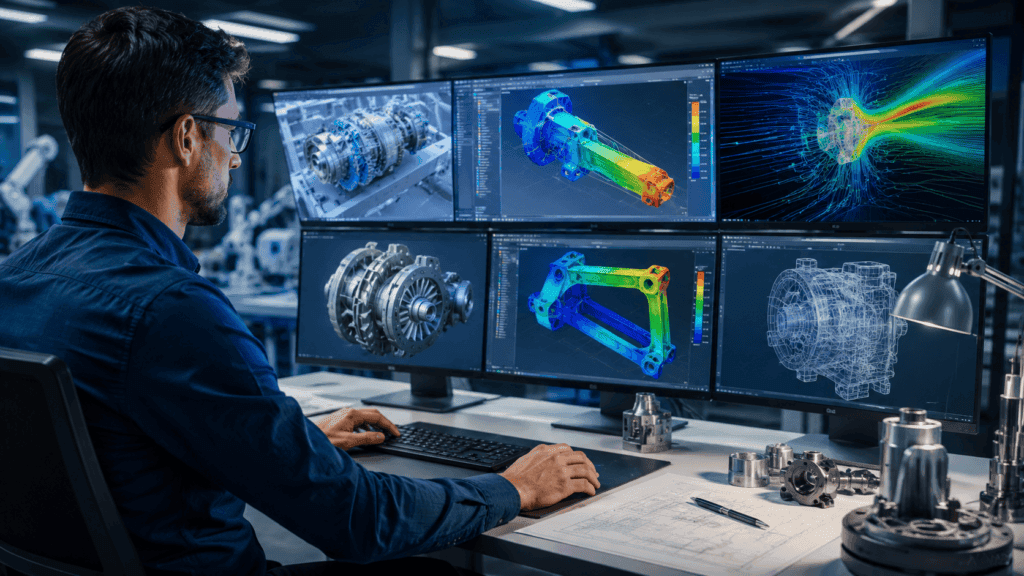
This guide is curated for mechanical, design, and CAE engineers, as well as lecturers and researchers who are actively evaluating FEA, CFD, thermal, motion, and multiphysics platforms for their specific workflows. You will gain a clear understanding of what mechanical engineering simulation software is, the distinctions between major simulation types, how top-tier tools differ, and how to select a platform based on your unique requirements for capability, cost, and ecosystem integration.
The article is organized into foundational concepts, a decision-making framework, a comparative technical table, in-depth reviews of 11 industry-standard tools, a comprehensive buying guide, and frequently asked questions—serving as an evergreen reference for your professional development and technical strategy.
What is Mechanical Engineering Simulation Software?
Mechanical engineering simulation software encompasses any Computer-Aided Engineering (CAE) or multiphysics platform that uses numerical methods—such as Finite Element Analysis (FEA) and Finite Volume Analysis (FVA)—to model the structural, fluid, thermal, and motion behavior of mechanical systems.
These tools are critical for validating parameters like stress, strain, stiffness, vibration, fatigue, heat transfer, and fluid dynamics during the design phase, long before a physical prototype is manufactured.
At its core, mechanical engineering simulation software integrates three fundamental pillars:
- Geometry: The physical model, either imported from neutral formats or created natively within a CAD environment.
- Material Models: Data defining the physical properties and behavioral limits of the components being tested.
- Numerical Solvers: The mathematical engines that calculate interactions across one or more physics domains.
Market offerings generally fall into two strategic categories:
- High-End Suites: Tools like Ansys and Simcenter Nastran prioritize extreme accuracy, high-performance computing (HPC) scalability, and comprehensive multiphysics coverage, designed for complex industrial requirements.
- Integrated CAD Environments: Platforms such as Autodesk Fusion and SOLIDWORKS Simulation emphasize design-embedded workflows, offering high accessibility for rapid iteration directly within the modeling interface.
From an implementation standpoint, mechanical engineering simulation software architectures vary based on compute needs. Simulations may run locally on high-performance workstations, on-premises clusters, or entirely via cloud infrastructure. Cloud-native solutions, such as SimScale, and specific cloud-integrated studies within platforms like Fusion 360, offload intensive calculations to external servers, bypassing local hardware limitations.
Because licensing models vary widely—from free student editions and named-user subscriptions to floating network licenses and consumption-based cloud credits—organizations must carefully align their software selection with their internal IT infrastructure, total cost of ownership (TCO), and data compliance constraints.
What Types of Simulations Do Mechanical Engineers Use Most?
Mechanical engineers primarily utilize a stack of mechanical engineering simulation software to conduct Finite Element Analysis (FEA), Computational Fluid Dynamics (CFD), thermal analysis, and motion/kinematic simulation. These are often integrated into complex multiphysics workflows, where the output of one analysis serves as the input for another, allowing engineers to address specific design challenges while managing varying computational requirements.
Core Simulation Types
Finite Element Analysis (FEA)
FEA is the workhorse of structural engineering. It discretizes complex solid structures into smaller elements to calculate stress, strain, displacement, vibration, buckling, and fatigue.
- Industry Standard Tools: Simcenter Nastran, Ansys Mechanical, Fusion 360, SOLIDWORKS Simulation, and FEATool Multiphysics.
- Capabilities: These tools handle both linear (static) and nonlinear (dynamic/large deformation) structural analyses, which are essential for validating safety factors.
Computational Fluid Dynamics (CFD)
CFD utilizes numerical methods to simulate fluid flow, pressure, turbulence, and heat transfer characteristics. This is vital for optimizing aerodynamics, cooling systems, and flow-control components.
- Industry Standard Tools: Siemens Simcenter STAR-CCM+ is the industry leader for high-fidelity CFD, while cloud-native tools like SimScale provide scalable access. Multiphysics environments like COMSOL and FEATool also offer robust CFD capabilities via specialized solvers.
Thermal Analysis
Thermal simulations predict heat distribution, thermal stresses, and cooling efficiency in systems ranging from consumer electronics to heavy-duty engines. These simulations model the three modes of heat transfer: conduction, convection, and radiation.
- Industry Standard Tools: Fusion 360 and SOLIDWORKS Simulation offer integrated thermal studies alongside structural tools, while COMSOL is preferred for scenarios requiring tightly coupled thermal-structural interaction (TSI).
Motion and Kinematic Simulation
Motion simulation focuses on the behavior of assemblies, evaluating kinematics, dynamics, joint loads, and contact points throughout a mechanism’s range of motion.
- Industry Standard Tools: Fusion 360 and SOLIDWORKS excel here, as they allow engineers to drive virtual assemblies and automatically export joint loads back into structural FEA modules for a seamless “motion-to-stress” workflow.
Fatigue and Durability Analysis
Crucial for long-term reliability, fatigue analysis uses stress history and material endurance data to estimate the lifecycle of components under cyclic loading. This is a critical requirement for rotating machinery, automotive suspensions, and aerospace structures.
- Industry Standard Tools: This capability is standard in high-end mechanical engineering simulation software suites like Ansys and Simcenter, which link structural results to fatigue solvers.
Workflow Integration
In modern industrial practice, engineers rarely perform these tasks in isolation. The most high-leverage workflows involve “chaining” these analyses. For example:
- CFD is run to generate pressure and thermal maps.
- Those results are imported into an FEA environment.
- The final structural output is pushed to Fatigue solvers.
This interconnected approach is what makes advanced mechanical engineering simulation software so effective at de-risking high-stakes projects and reducing the reliance on multiple, costly physical prototypes.
Which Simulation Software Categories Should Engineers Consider?
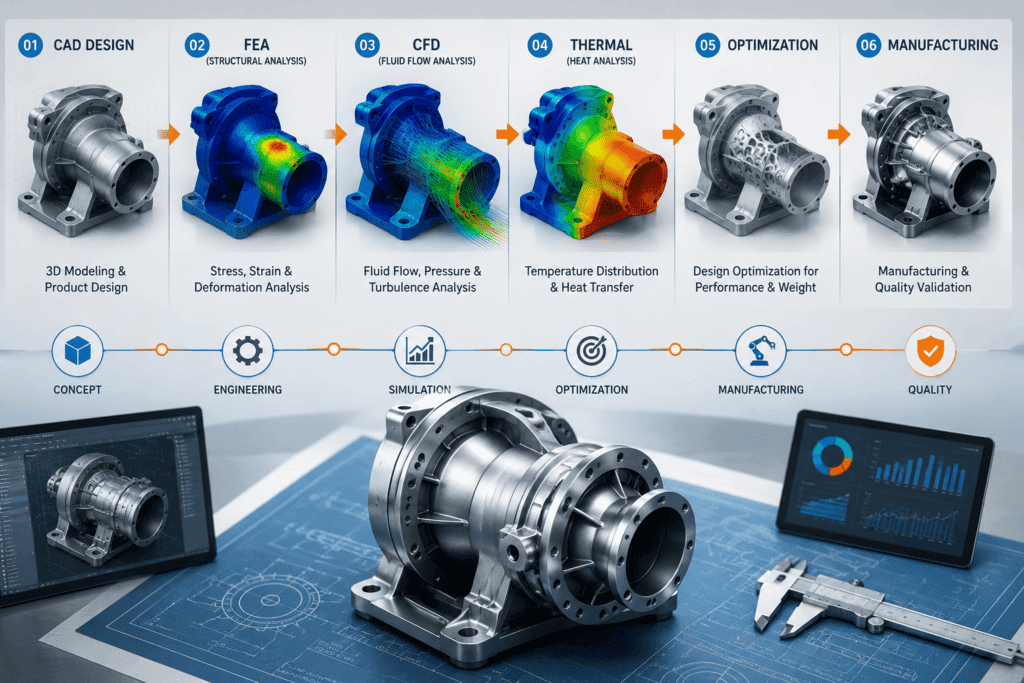
To effectively navigate the 2026 landscape of mechanical engineering simulation software, engineers should categorize tools based on the trade-offs between solver fidelity, workflow integration, and deployment model. Choosing a category first aligns expectations regarding learning curves, hardware infrastructure, and total cost of ownership.
Main Categories
Enterprise Multiphysics Suites
These platforms are the “gold standard” for complex, high-stakes industrial projects. They offer the broadest physics coverage, highly validated solvers, and extensive modularity for specialized disciplines like electromagnetics, crash analysis, or high-frequency fluid dynamics.
- Examples: Ansys Mechanical/Fluent, Siemens Simcenter, Dassault Systèmes SIMULIA (Abaqus), and Altair HyperWorks.
- Best For: Large organizations with dedicated CAE teams, established High-Performance Computing (HPC) infrastructure, and requirements for regulatory-grade accuracy.
CAD-Integrated Simulation Packages
These tools embed analysis directly into the design environment, prioritizing speed and accessibility. They allow engineers to perform “what-if” iterations without leaving their modeling interface, significantly reducing the friction between design and validation.
- Examples: Autodesk Fusion Simulation Extension, SOLIDWORKS Simulation, and Creo Flow Analysis.
- Best For: Product design teams, startups, and mechanical engineers who need rapid feedback on structural integrity or thermal performance early in the design cycle.
Cloud-Native Simulation Platforms
These solutions leverage browser-based interfaces to offload intensive calculations to the cloud, removing the need for costly local workstations or on-premise clusters.
- Examples: SimScale and Luminary Cloud.
- Best For: Distributed teams, organizations without internal HPC resources, and users who require scalable compute power on demand.
Solver-Centric and Research Tools
These environments are designed for extensibility, custom scripting, and advanced mathematical modeling. They are the preferred choice for R&D environments where standard templates are insufficient, and custom multiphysics coupling is required.
- Examples: COMSOL Multiphysics, MATLAB/Simulink (often used for system-level dynamic modeling), and FEATool Multiphysics.
- Best For: Academics, researchers, and consulting firms solving novel or highly specific physics problems.
Emerging Trends: The “New Constellation”
In 2026, a new layer of mechanical engineering simulation software has emerged, focused on AI-assisted workflows. Platforms like Neural Concept, Ansys SimAI, and Monolith AI are increasingly used to create “surrogate models” that predict performance instantly based on geometry, effectively replacing full solver runs for early-stage design exploration.
The video above provides a concise overview of the essential simulation tools currently in high demand, offering a helpful perspective on the job market and the specific simulation skills that lead to career advancement for mechanical engineers.
11 Best Mechanical Engineering Simulation Software (2026 Overview)
Below is an overview of the 11 best mechanical engineering simulation software solutions featured in this article. These tools were selected to represent a wide range of use cases, including enterprise engineering, CAD-integrated simulation, cloud-based platforms, and advanced research and multiphysics analysis. Each software is reviewed in detail to help you choose the best option for your engineering projects.
Comparison Table: Core Positioning and Typical Users
This table serves as a high-level reference to assist in selecting the right mechanical engineering simulation software for your specific project requirements, budget, and infrastructure.
| Software | Primary Focus | Typical Physics Covered | Deployment Model | Typical Users | Notable Strengths |
| Ansys Mechanical | Enterprise Multiphysics | Structural, Thermal, Vibration, Fatigue | Desktop + HPC + Cloud | Large firms, CAE teams | Industry-standard solvers, vast ecosystem |
| Simcenter Nastran | High-Fidelity FEA | Linear/Nonlinear, Dynamics, Acoustics | Desktop + HPC | Automotive/Aero, R&D | Robust FEM, reliability, legacy standards |
| COMSOL Multiphysics | Coupled Multiphysics | Structural, CFD, Thermal, EM | Desktop + Cluster | R&D, Academia | Flexible PDE framework, custom physics |
| Autodesk Fusion | CAD-Integrated CAE | Structural, Thermal, Generative | Desktop + Cloud | Product teams, SMEs | Seamless design-to-simulation workflow |
| SOLIDWORKS Sim. | CAD-Embedded FEA | Structural, Vibration, Thermal | Desktop | Mechanical/Product Eng. | Deep integration with SW CAD environment |
| SimScale | Cloud-Native FEA/CFD | Structural, Thermal, CFD | Browser/Cloud | Distributed teams, Students | No local HPC, collaborative agility |
| STAR-CCM+ | Advanced CFD | CFD, Heat Transfer, Motion | Desktop + HPC | Automotive, Energy, Aero | High-end CFD, complex geometries |
| Altair HyperWorks | Optimization-Centric | Structural, NVH, CFD | Desktop + HPC | Auto/Lightweighting | Optimization-driven design workflows |
| Creo Simulation Live | Real-Time Feedback | Structural, Modal | Desktop | Designers | GPU-accelerated instant insights |
| FEATool Multiphysics | Research-Oriented | Structural, CFD, Thermal | Desktop (MATLAB) | Researchers, Educators | Custom PDEs, MATLAB extensibility |
| Onshape Sim. | Cloud-Centric | Structural, Assemblies | Browser/Cloud | Students, CAD teams | Version-controlled, browser-based FEA |
Strategic Selection Guidance
When evaluating mechanical engineering simulation software, your choice should be driven by three primary factors:
- Physics Complexity: If your work involves coupled physics (e.g., fluid-structure interaction or electromagnetic-thermal coupling), enterprise suites like Ansys or COMSOL are required.
- Workflow Velocity: If the primary goal is iterative design validation, CAD-integrated tools (Fusion, SOLIDWORKS) provide faster time-to-insight by removing the “import/export” friction of external CAE files.
- Infrastructure Constraints: If you lack on-premise high-performance computing (HPC) power, cloud-native platforms (SimScale, Luminary Cloud) offer the most scalable performance without the capital expenditure of local clusters.
In 2026, the landscape is also shifting toward AI-assisted simulation. Tools like Ansys SimAI and Monolith AI are becoming essential for creating “surrogate models,” allowing engineers to predict performance instantly based on geometry—a high-leverage approach for teams looking to maximize their iteration cycles.
Practical Differences in Mechanical Engineering Simulation Software
In professional practice, the “center of gravity” for these platforms dictates their role in your workflow. While all claim to support “simulation,” the underlying architecture determines whether a tool is a design-assist utility or a high-stakes validation engine.
Ansys Mechanical
- Focus: Enterprise-grade multiphysics.
- Practical Edge: It is the industry standard for high-fidelity structural, thermal, and vibration analysis. The 2026 R1 release emphasizes GPU acceleration and integrated electronics reliability, making it essential for complex, mission-critical hardware.
- Licensing: High-tier, usually managed via enterprise agreements or floating network licenses, often paired with high-performance computing (HPC) packs.
Simcenter Nastran
- Focus: High-fidelity FEM solver fidelity.
- Practical Edge: Known for unmatched reliability in linear/nonlinear dynamics and acoustics. The 2026 updates have drastically reduced file sizes for complex runs and streamlined turbomachinery workflows through better scripting and automated meshing.
- Licensing: Generally sold as specialized modules (e.g., Dynamic Response, Aeroelasticity), targeting specialized CAE departments rather than general design teams.
COMSOL Multiphysics
- Focus: Deep, coupled multiphysics and PDE research.
- Practical Edge: Unlike others that focus on a specific domain, COMSOL excels at “fully coupled” problems—simulating chemical reactions alongside thermal and structural stresses in one environment. Its Application Builder allows you to wrap complex physics into simple, branded apps for non-expert users.
- Licensing: Modular, based on physics-specific add-ons (e.g., AC/DC Module, Heat Transfer Module).
Autodesk Fusion Simulation
- Focus: Integrated CAD-to-CAE workflow.
- Practical Edge: It removes the “import/export” friction by housing simulation directly inside your design environment. The 2026 updates have significantly boosted performance for large assemblies, making it the fastest path to “design-validation-iteration” cycles.
- Licensing: Included as part of the Fusion subscription extensions, making it the most accessible and cost-effective option for SMEs and freelance engineers.
SOLIDWORKS Simulation
- Focus: CAD-embedded structural and thermal validation.
- Practical Edge: For teams already committed to the SOLIDWORKS ecosystem, this tool is seamless. Recent 2026 updates focused on usability, such as better diagnostics for setup issues (e.g., missing materials or incomplete fixtures) and more precise load definitions for beam elements.
- Licensing: Tiered (Standard, Professional, Premium), allowing you to pay only for the level of analysis capability your team actually requires.
Ansys Mechanical
Ansys Mechanical is a flagship FEA solution designed for linear and nonlinear structural analysis, vibration, fatigue, and thermal-mechanical problems. It is the core of a massive ecosystem that includes dedicated solvers for electromagnetics, CFD, and systems simulation, making it the industry standard for aerospace, automotive, energy, and high-tech sectors.
Device Type
Designed as a powerful desktop workstation client, it scales to high-performance computing (HPC) clusters and cloud-based solvers for massive, multi-physics simulations.
AI Features (2026 Update)
Recent 2026 R1 releases have significantly bolstered AI-driven capabilities:
- Ansys SimAI: Allows users to train AI models on existing simulation data to predict outcomes for new geometries in minutes, bypassing the need for manual parameterization.
- Agentic Workflows: New AI-powered preprocessing and automated meshing suggestions reduce model preparation time.
- AnsysGPT: A 24/7 conversational AI assistant trained on Ansys documentation to streamline technical support and troubleshooting.
Key Specifications
- High-order finite element solvers for linear/nonlinear static and dynamic analysis.
- Advanced fatigue and thermal-structural coupling modules.
- GPU acceleration for faster iteration cycles and massive model handling.
Compatibility
Runs on Windows and Linux workstations; the server components support diverse enterprise IT configurations and cloud-based licensing portals.
Best For
- Enterprise mechanical teams require high-fidelity results for safety-critical hardware.
- Multi-disciplinary engineering groups that need to link mechanical simulation with electronics or fluid dynamics.
- Projects requiring deep nonlinear, contact, or fatigue physics.
Pros
- Physics Depth: Unmatched breadth across structural, vibration, and thermal regimes.
- Validation: Trusted by regulatory bodies and major industries for safety-critical compliance.
- Modern Workflows: Tight ECAD/MCAD integration and 2026-era GPU acceleration improve performance.
Cons
- High TCO: Significant licensing costs (often tens of thousands annually) and infrastructure requirements.
- Barrier to Entry: Steep learning curve; typically requires dedicated CAE specialists.
- Complexity: Can be “overkill” for simple part-level validation where CAD-integrated tools suffice.
Estimated Price Range
Pricing is quote-based and varies significantly by module and user count. Small configurations start in the low thousands, while enterprise-wide multi-user suites can reach six or seven figures annually. Elastic and “pay-per-use” licensing is available for flexibility.
Privacy Considerations
On-premise deployment ensures data remains behind internal IT firewalls. Cloud extensions and elastic licensing require review against specific data residency and compliance policies.
Verdict
Ansys Mechanical remains the benchmark for mechanical engineering simulation software in 2026. It is a high-end choice where accuracy and multiphysics integration justify the cost. While powerful, its complexity and price tag make it a strategic investment rather than a casual tool for SMEs, who may find more immediate ROI in cloud-native or CAD-integrated alternatives.
The video above demonstrates how recent updates in enterprise-level tools are focusing on reducing model preparation time and leveraging GPU power to improve iteration speeds in structural simulation workflows.
Siemens Simcenter Nastran
Simcenter Nastran is a premier finite element solver renowned for its computational performance, accuracy, and reliability. It is the industry standard for structural mechanics—including linear/nonlinear analysis, structural dynamics, acoustics, rotor dynamics, and aeroelasticity—making it a cornerstone tool for aerospace, automotive, and heavy machinery industries.
Device Type
A desktop FEA solver that functions either as a standalone solution or integrated within the broader Simcenter 3D environment. It is designed to scale from local workstations to high-performance computing (HPC) and cloud clusters.
AI Features (2026 Update)
While the Nastran solver itself focuses on deterministic finite element methods, AI integration is delivered through the wider Simcenter ecosystem.
- PhysicsAI: Now integrated into Simcenter SimLab, allowing for full-field and KPI predictions from CAD/mesh data without needing a full solver run, significantly accelerating design exploration.
- Workflow Automation: New AI-assisted tools for modal analysis and automated data capture reduce manual tasks in structural and testing workflows.
Key Specifications
- Comprehensive Solver: Supports linear/nonlinear structural analysis, vibro-acoustics, and optimization.
- Advanced Modules: Include specialized capabilities for aeroelasticity, rotor dynamics, and multistep nonlinear analysis.
- Efficiency: Features like “Superelements” allow for the efficient solution of massive models by decomposing complex assemblies into manageable pieces.
Compatibility
Available for all major engineering operating systems, Siemens maintains detailed support matrices for hardware and OS versions.
Best For
- CAE Departments requiring high-fidelity, safety-critical structural analysis.
- Organizations are already standardizing on the Siemens PLM/Simcenter software stack.
- Projects involving advanced dynamics, acoustics, or rotating machinery.
Pros
- Industry Standard: Over 50 years of validation in high-stakes industries.
- Solver Versatility: Single input/output format for all physics types, simplifying complex modeling processes.
- Customizability: The Direct Matrix Abstraction Programming (DMAP) capability allows users to write custom applications and analysis modules.
Cons
- Interface Dependency: As a solver-centric tool, it is most effective when paired with pre/post-processors like Simcenter 3D or Femap.
- Complexity: Steep learning curve; typically requires specialized CAE knowledge to utilize effectively.
Estimated Price Range
Enterprise-oriented and quote-based. Usually bundled within Simcenter/PLM packages, with costs scaling based on the specific modules and number of seats required.
Privacy Considerations
On-premise deployment ensures data control. Cloud-connected configurations (e.g., cloud bursting) should be reviewed against internal data residency and export control policies.
Verdict
Simcenter Nastran is an elite choice for structural engineering where reliability and solver depth are non-negotiable. It is ideal for teams working in regulated environments who benefit from a closed-loop “Digital Twin” workflow, but it is less suited for solo practitioners or those primarily focused on early-stage, design-centric iterations.
The video above provides an expert overview of the latest 2026 updates across the Simcenter mechanical suite, highlighting how new AI-driven workflows and simulation enhancements are streamlining the development of complex, multi-attribute products.
COMSOL Multiphysics
COMSOL Multiphysics is a finite element-based simulation platform engineered to couple structural mechanics, fluid flow, heat transfer, acoustics, electromagnetics, and chemical reaction engineering within a single, unified environment. It is the premier choice for R&D, academia, and specialized consulting where modeling novel, non-standard, or highly coupled multiphysics phenomena is the primary goal.
Device Type
A desktop application that scales to cluster and server-based computing environments. It provides the COMSOL Server™ and COMSOL Compiler™ tools to distribute simulation “apps” to non-expert users throughout an organization.
AI Features (2026 Update)
COMSOL has integrated significant AI-assisted functionality in recent versions (6.3 and 6.4):
- LLM-Assisted Simulation: Version 6.4 introduces a chatbot window that supports connections to GPT-5™, DeepSeek™, Google Gemini™, and other OpenAI API-compatible models. This allows for model-aware, interactive assistance directly within the interface.
- Surrogate Modeling: Enhanced support for efficient surrogate model creation using GPU-based training, enabling users to replace computationally expensive simulations with faster predictive models.
- Java API Assistance: A built-in chatbot tool assists with Java coding for the COMSOL API, streamlining the automation of repetitive modeling tasks and custom method generation.
Key Specifications
- Integrated Workflow: A single environment for geometry, physics definition, equation-based modeling, meshing, and post-processing.
- Equation-Based Modeling: Unlike “black box” solvers, users can explicitly define their own partial differential equations (PDEs), material models, and coupling conditions.
- GPU Acceleration: Version 6.4 utilizes the NVIDIA CUDA® direct sparse solver (cuDSS), providing massive speedups for matrix factorizations on supported hardware.
Compatibility
Available for major desktop platforms (Windows, Linux, macOS) with robust licensing options for both commercial and academic research environments.
Best For
- Researchers and R&D Engineers who need to model complex, tightly coupled physics (e.g., fluid-structure interaction with chemical reactions).
- Academic Institutions and labs are pioneering novel physical systems.
- Consultancies that need a flexible framework to build bespoke physics models for clients.
Pros
- Unmatched Flexibility: The ability to modify the underlying PDEs makes it the most adaptable platform on the market.
- Multiphysics Breadth: Seamlessly couples disparate physical phenomena without requiring external file transfers.
- Deployment: The “App Builder” is the industry leader for packaging complex simulations into simplified, shareable tools.
Cons
- Learning Curve: The depth of control can be overwhelming for users accustomed to simple, wizard-driven design software.
- Computational Cost: Highly coupled problems are computationally intensive and require significant hardware resources.
Estimated Price Range
Quote-based. Pricing depends on the specific modules required (e.g., Heat Transfer, AC/DC, CFD) and the license type (Single-user vs. Network). It is generally perceived as a mid-to-high-tier investment, though often competitive with enterprise suites when considering the “all-in-one” value of the multiphysics environment.
Privacy Considerations
Desktop deployment keeps data local, and the Model Manager provides secure, version-controlled database storage for local and server-based installations, helping firms meet data residency and IP security requirements.
Verdict
COMSOL Multiphysics is the definitive tool for mechanical engineering simulation software when you must look beyond standard structural or fluid problems to explore truly coupled physics. Its integration of LLMs in version 6.4 makes it significantly more accessible for 2026 workflows, solidifying its position as the top research-oriented simulation platform.
Autodesk Fusion (Fusion 360) Simulation
Autodesk Fusion is a unified, cloud-connected platform that integrates CAD, CAM, CAE, and PCB design. Its simulation module is designed to provide rapid, design-embedded validation for mechanical engineers, allowing for structural, thermal, and generative analysis without requiring the heavy overhead of enterprise-level CAE suites.
Device Type
A desktop application that utilizes cloud-based computing for complex simulation tasks, allowing users to offload intensive solves while maintaining local control of the design geometry.
AI Features (2026 Update)
Fusion has aggressively integrated native AI to move beyond simple automation:
- Autodesk Assistant: An integrated conversational AI that helps users troubleshoot design errors, navigate the interface, and execute commands using natural language.
- Generative Design: Uses evolutionary algorithms to explore thousands of design permutations based on specified loads, manufacturing constraints, and performance requirements, effectively acting as an AI-driven optimization co-pilot.
- AutoConstrain: Employs AI to intelligently define sketch geometry, reducing the manual effort required to fully constrain complex 3D models.
- Automated Documentation: AI-driven generation of 2D manufacturing drawings, significantly reducing manual detailing time.
Key Specifications
- Unified Workflow: Seamless integration of structural, thermal, modal, and buckling analysis within the CAD environment.
- Cloud Solving: Unlimited cloud-based solves for many simulation types are available via the Simulation Extension, allowing for parallel processing of multiple design iterations.
- Manufacturing Integration: Direct link between simulation results and CAM toolpaths, ensuring design intent is preserved through the entire “Design-to-Make” lifecycle.
Compatibility
Runs on standard Windows and macOS workstations; Autodesk provides a modular “Extension” model allowing users to pay for simulation and manufacturing capabilities only when needed.
Best For
- Product Development Teams needing to iterate rapidly between design and validation without exporting files to external solvers.
- SMEs and Freelancers who require professional-grade validation on a predictable, accessible subscription budget.
- Teams looking to leverage generative design for lightweighting and performance optimization.
Pros
- Platform Unity: Eliminates data loss and file-translation errors associated with moving models between separate CAD and CAE environments.
- Low Barrier to Entry: Highly intuitive interface compared to legacy CAE tools, with a lower annual cost of ownership.
- Scalable AI: Generative design and the Autodesk Assistant offer high-leverage productivity gains for both novice and expert users.
Cons
- Niche Limitations: While excellent for general design, it may lack the specific, highly specialized physics solvers required for extreme high-fidelity aerospace or complex chemical-multiphysics simulations.
- Subscription Ecosystem: Advanced simulation and design features are gated behind paid “Extensions,” which can increase costs for power users.
Estimated Price Range
The core Fusion platform starts at approximately $680/year. The “Fusion for Design” bundle, which includes advanced simulation extensions, is priced at roughly $2,190/year, reflecting its status as a complete, integrated end-to-end design and management platform.
Privacy Considerations
Fusion stores data in the Autodesk cloud. Organizations must review Autodesk’s data residency, encryption, and access control protocols—standard for modern SaaS—to ensure compliance with internal IP and security requirements.
Verdict
Autodesk Fusion remains the premier choice for mechanical engineering simulation software when workflow efficiency and “Design-to-Make” integration are the highest priorities. In 2026, its aggressive adoption of generative design and conversational AI makes it an exceptionally high-leverage tool for teams that need to innovate faster and reduce their reliance on physical prototyping.
SOLIDWORKS Simulation
SOLIDWORKS Simulation is Dassault Systèmes’ FEA suite natively integrated into the SOLIDWORKS CAD environment. It is designed to provide mechanical and product engineers with an accessible path to validate structural, vibration, and thermal performance without requiring a dedicated CAE specialist. The 2026 release focuses heavily on workflow efficiency and diagnostic clarity.
Device Type
A desktop application that runs as an integrated add-in within SOLIDWORKS CAD, typically deployed on high-performance engineering workstations.
AI Features (2026 Update)
While SOLIDWORKS Simulation remains rooted in deterministic, high-accuracy finite element methods, the 2026 release introduces “smart engineering” and AI-assisted productivity tools across the broader SOLIDWORKS ecosystem to accelerate design iterations. While the simulation solver itself is not “AI-driven,” the user experience is enhanced by:
- Intelligent Diagnostics: New AI-powered validity checks that automatically flag invalid mesh settings, missing material definitions, and incomplete fixture definitions before a solve is attempted.
- Workflow Automation: AI-assisted mate suggestions and assembly conflict detection in the base CAD environment ensure that the geometry fed into simulation is cleaner and more accurately constrained.
Key Specifications
- Structural Analysis: Linear and nonlinear static analysis for parts and assemblies.
- Connector Results: New capability to extract detailed force breakdowns (shear, axial, bending, torque) for pin connectors, specifically under random vibration loads.
- Thermal/Shell Modeling: Automated “fill thin slot” features and edge-based air vent definitions for more realistic thermal simulations in tightly packed assemblies.
Compatibility
Requires a compatible version of SOLIDWORKS CAD on Windows OS. Dassault Systèmes maintains a rigorous support matrix for hardware/OS combinations to ensure stability.
Best For
- Mechanical and Product Engineers who already model in SOLIDWORKS and need integrated, iterative validation.
- SMEs seeking a balance between high-end simulation power and ease of use.
- Educational Environments where standardizing on a single CAD/CAE interface is preferred for instruction.
Pros
- CAD-CAE Unity: Eliminates file export/import overhead, keeping simulations perfectly synced with CAD design changes.
- Usability: Diagnostics are significantly clearer in 2026, reducing the “guesswork” for non-CAE experts.
- Ecosystem: Seamless integration with SOLIDWORKS PDM and 3DEXPERIENCE cloud collaboration tools.
Cons
- Scope: Not designed for highly specialized multiphysics or exotic fluid-structure interaction problems found in aerospace or complex chemical R&D.
- Licensing: Tied strictly to the SOLIDWORKS ecosystem; users invested in other CAD platforms will find migration difficult.
Estimated Price Range
SOLIDWORKS uses a quote-based model, often bundled into tiers. Subscription pricing for CAD + Simulation bundles generally ranges from $3,000 to $5,000+ per seat annually, depending on the package (Standard/Professional/Premium) and the specific add-on modules.
Privacy Considerations
As a desktop-centric tool, design data remains local to your workstation or internal PDM server unless explicitly synced with 3DEXPERIENCE cloud services. Organizations should ensure that cloud-enabled collaboration settings are configured to comply with their specific IP and data residency policies.
Verdict
SOLIDWORKS Simulation is a high-leverage “workhorse” tool for mechanical teams already using SOLIDWORKS. It prioritizes practical validation over esoteric physics, making it arguably the most efficient choice for daily design iterations in 2026.
The video above provides an expert breakdown of the top enhancements in the 2026 release, including specific simulation improvements that help engineers detect issues faster and improve modeling precision.
SimScale
SimScale is a pioneering, AI-native cloud platform that delivers FEA, CFD, and thermal simulations directly through a web browser. By leveraging cloud-native architecture, it removes the constraints of on-premise hardware, complex software installations, and the “specialist bottleneck” often found in traditional CAE workflows.
Device Type
A fully browser-based client. Heavy computation is offloaded to elastic cloud infrastructure, enabling high-fidelity simulation on standard laptops and workstations.
AI Features (2026 Update)
SimScale has transitioned to an “AI-native” architecture, moving beyond simple automation to Agentic Engineering:
- Engineering AI Agents: Autonomous agents that can parse RFQ documents (PDFs), identify analysis requirements, assign materials, define boundary conditions, and execute multi-phase workflows without manual intervention.
- Physics AI: Delivers instant performance predictions using surrogate models linked to high-fidelity simulation data, allowing engineers to test thousands of design variants in seconds.
- Open Workflows: The new Workflows platform allows teams to register custom solvers, proprietary AI models, and external scripts to run natively within the SimScale infrastructure alongside built-in physics.
Key Specifications
- Unified Multiphysics: Comprehensive support for FEA (structural/thermal), CFD (laminar/turbulent/multiphase), Electromagnetics, and coupled simulations.
- PAMICS SPH Solver: A meshless Smoothed Particle Hydrodynamics solver that provides up to 20x faster fluid dynamics for complex motion, sloshing, and free-surface flows compared to traditional mesh-based methods.
- Agentic API: Users can trigger simulation pipelines via API from Slack, Jira, or custom tools, enabling “headless” automated engineering.
Best For
- Distributed teams need a collaborative “single source of truth” for simulation data.
- SMEs that need high-end simulation power without the massive capital expenditure (CapEx) of local HPC clusters.
- Engineering Orgs looking to scale design iteration speed through autonomous AI-orchestrated workflows.
Pros
- Infrastructure Agnostic: Zero installation and zero local hardware maintenance.
- Velocity: Teams using AI-enabled workflows report up to 2.8x faster simulation turnaround and 3x more design variants explored per program.
- Extensibility: The “Workflows” platform prevents vendor lock-in by allowing the integration of custom, in-house methods.
Cons
- Connectivity: Requires a stable internet connection for optimal responsiveness.
- Data Governance: As a cloud-native platform, organizations must align usage with internal security and data residency policies, though SimScale provides enterprise-grade access controls.
Estimated Price Range
Subscription-based pricing tiered by usage, features, and enterprise-level requirements. Organizations should request a custom quote based on their required seat count and compute volume.
Privacy Considerations
SimScale provides enterprise-grade security and governance controls. Because the platform is built for global engineering teams, it includes robust encryption and access management designed to satisfy strict IP requirements in aerospace, medical, and industrial sectors.
Verdict
SimScale is the leading choice for engineers prioritizing agility, scalability, and AI integration. By shifting simulation from a human-driven “craft” to an AI-managed “pipeline” it allows design engineers to perform high-fidelity validation much earlier in the cycle.
The webinar video above provides an expert walkthrough of SimScale’s 2026 AI-native features, demonstrating how agentic workflows and the new meshless solvers are accelerating engineering design cycles.
Siemens Simcenter STAR-CCM+
Simcenter STAR-CCM+ is a high-end computational fluid dynamics (CFD) and multiphysics platform designed for complex simulations involving fluid flow, heat transfer, and motion. It is the principal CFD solution within the Siemens Simcenter portfolio and is widely recognized for its ability to handle challenging geometries and advanced physical models in automotive, aerospace, and energy sectors.
Device Type
A desktop-based client with a client-server architecture, capable of scaling to high-performance computing (HPC) clusters and multi-GPU nodes for large-scale, high-fidelity CFD workloads.
AI Features (2026 Update)
Siemens has aggressively integrated AI into the platform in 2026 to move beyond traditional numerical methods:
- Simcenter PhysicsAI: A major add-on that uses geometric deep learning (GDL) to create AI-reduced-order models (ROMs). This allows engineers to predict performance—such as flow and thermal patterns—up to 1,000x faster than traditional solver runs.
- GPU-Accelerated Training: The PhysicsAI add-on now supports multi-GPU scaling, completing AI training tasks up to 3x faster.
- Predictive Workflows: Users can now train models on historical and newly generated simulation data (including Design of Experiments) to automate early-stage design screening.
Key Specifications
- Advanced Solvers: Support high-fidelity simulations including multiphase flows (VOF/MMP), reacting flows, and complex chemistry.
- GPU-Native Computing: Recent updates enable GPU-native execution for VOF and Mixture Multiphase (MMP) solvers, providing significant speedups in turnaround times.
- Integrated Environment: Combines CAD preparation (3D-CAD), meshing, solving, and post-processing in a single interface to reduce tool-switching.
Compatibility
Runs on standard Windows and Linux engineering workstations and clusters. Siemens maintains detailed hardware support matrices; recent releases have expanded full GPU acceleration support to include AMD devices on Windows.
Best For
- Teams tackling complex CFD challenges like external aerodynamics, combustion analysis, and turbomachinery.
- Organizations with the HPC or multi-GPU infrastructure required for large-scale, high-accuracy simulations.
- Engineers who need to bridge the gap between simulation and real-world results using advanced visualization (e.g., AR passthrough).
Pros
- Industry-Leading CFD: Unrivaled physics breadth for complex fluid, thermal, and motion scenarios.
- High Performance: Industry-first model-driven adaptive mesh refinement (AMR) and massively parallel polyhedral meshing significantly cut setup and solve times.
- AI Scalability: The PhysicsAI integration provides a clear path to high-speed design space exploration without sacrificing physical accuracy.
Cons
- Resource-demanding: Requires substantial hardware (GPU/HPC) and carries significant licensing costs.
- Steep Learning Curve: Not intended for simple “wizard-style” checks; it is a professional-grade tool requiring expertise.
Estimated Price Range
Enterprise-level pricing is negotiated based on solver modules, seat counts, and hardware deployment strategy. Organizations should expect a high-tier investment consistent with top-tier multiphysics enterprise suites.
Privacy Considerations
Primarily an on-premise deployment with data stored locally. Cloud-bursting capabilities are available but must be vetted against internal IP security and data residency policies.
Verdict
Simcenter STAR-CCM+ is the professional choice for mechanical engineering simulation software where the fidelity of fluid and thermal physics is the primary performance driver. Its 2026 AI integration makes it significantly more productive for teams moving toward “simulation-driven design.”
The video above provides an expert walkthrough of the latest 2602 enhancements, demonstrating how new workflows and performance optimizations streamline complex CFD and multiphysics tasks.
Altair HyperWorks (OptiStruct / SimLab focus)
Altair HyperWorks is an extensive CAE ecosystem that serves as a unified platform for simulation, optimization, and digital twin development. For mechanical engineers, the platform’s “center of gravity” lies in OptiStruct (for structural FEA and optimization) and SimLab (for highly automated pre-processing and process automation), making it a dominant choice for industries like automotive, aerospace, and heavy industrial manufacturing.
Device Type
A desktop-based enterprise suite that integrates with local High-Performance Computing (HPC) clusters. In 2026, it uses Altair One™ as a gateway for managing scalable cloud compute resources and collaborative workflows.
AI Features (2026 Update)
The 2026 release of HyperWorks emphasizes “AI-powered” simulation capabilities:
- Physics-Based AI: Integrates geometric deep learning and GPU-accelerated Reduced Order Modeling (ROM) to enable near-real-time performance predictions (up to 1,000x faster than traditional solvers).
- ExpertAI: An unsupervised machine learning tool that automates the interpretation of design exploration results, grouping vast amounts of data into “concept families” to help engineers identify optimal designs quickly.
- Agentic AI: Advanced HPC workflows now leverage agentic AI to optimize computational resource management and align simulation throughput with organizational goals.
Key Specifications
- Structural Optimization: Unmatched capabilities in topology, topography, and size optimization for lightweighting.
- Unified Environment: Combines meshing, morphing, FEA, and result visualization within a single modern interface (HyperMesh/HyperView).
- Process Automation: Extensive API, Python-based automation, and no-code tools allow engineers to standardize and repeat complex simulation pipelines.
Compatibility
Runs on standard engineering workstations (Windows/Linux) with robust support for large-scale GPU computing.
Best For
- Automotive & Aerospace Teams focused on lightweighting, NVH (Noise, Vibration, and Harshness), and durability.
- CAE Departments that need to automate high-volume simulation tasks using scripting or no-code workflows.
- Organizations that require a single license (Altair Units) to access a vast portfolio of structural, thermal, and fluid solvers.
Pros
- Optimization Leadership: The gold standard for topology optimization and generative structural design.
- Flexible Licensing: The “Altair Units” system is an industry differentiator, allowing teams to pool resources and access any tool in the ecosystem without buying individual seat licenses.
- AI Velocity: The 2026 integration of physics-based AI allows for rapid screening of design variants that would be prohibitively slow in other enterprise suites.
Cons
- Workflow Friction: Unlike CAD-embedded tools, HyperWorks often requires importing geometry, which can add steps compared to Fusion or SOLIDWORKS.
- Complexity: The depth of the toolset is high; it is generally overkill for casual users or simple design validation.
Estimated Price Range
Enterprise-oriented. Licensing is handled via “Altair Units,” a flexible, subscription-based model. Organizations acquire a pool of units shared across the team, providing access to the entire portfolio rather than specific modules. Specific costs are quote-based and scale with usage intensity.
Privacy Considerations
HyperWorks is a standard-bearer for secure, on-premise industrial simulation. While Altair One offers cloud-connected features, the platform remains highly compatible with strict internal IP controls, including air-gapped or localized license management.
Verdict
Altair HyperWorks is the high-leverage choice for mechanical engineering simulation software when structural optimization and advanced workflow automation are the primary requirements. In 2026, its aggressive push into Physics-AI makes it a critical tool for teams looking to perform “simulation-driven design” at scale.
(Note: As specific 2026 release webinars are often hosted on vendor portals, this resource highlights the core philosophy of the HyperWorks evolution.)
PTC Creo Simulation Live
PTC Creo Simulation Live (CSL) is a real-time, CAD-embedded simulation capability that leverages GPU-accelerated technology to provide instant structural, thermal, and modal analysis feedback. It is specifically designed to enable designers and engineers to validate design decisions in real-time as they model, rather than relying on batch-processed, high-end CAE runs.
Device Type
A desktop-based CAD application (PTC Creo Parametric) that utilizes high-performance GPU hardware to perform instantaneous calculations locally.
AI Features (2026 Update)
With the release of Creo 13 in June 2026, PTC has shifted from purely deterministic simulation to AI-enhanced engineering workflows:
- Creo AI Assistant: A chat-based expert resource embedded in the interface that provides real-time guidance on best practices, troubleshooting, and workflow optimization.
- Model-Aware Insights (Beta): The system can now read directly from the 3D model to extract design insights, validate compliance, and catch structural issues before they move to downstream analysis.
- Simulation-Driven Design: Creo 13 expands simulation coverage to include complex assemblies and electronics, allowing the AI to help identify problems in the digital model early in the development cycle.
Key Specifications
- Real-Time Feedback: Instant structural, thermal, and modal analysis updates as the user modifies geometry or loads.
- Fluid Simulation: Real-time internal and external fluid flow visualization, including streamlines and particle flow.
- GPU Acceleration: Relies on dedicated graphics hardware to maintain interactivity while performing continuous computation.
Compatibility
Requires an active Creo Parametric license and specific GPU hardware (NVIDIA RTX/Quadro series typically recommended). PTC maintains a rigorous hardware certification matrix for each release.
Best For
- Designers and Mechanical Engineers who need immediate validation during the “sketch and build” phase of product development.
- Teams are standardizing on the PTC ecosystem that wants to reduce the frequency of “back-and-forth” requests sent to dedicated CAE departments.
Pros
- Unrivaled Iteration Speed: The “Simulate Live” capability dramatically reduces the time spent on design-cycle loops.
- Workflow Continuity: Analysis happens inside the CAD environment, eliminating file export/import overhead.
- AI Guidance: The new Creo 13 AI Assistant significantly lowers the barrier for non-CAE specialists to correctly set up and interpret simulations.
Cons
- Validation Limits: It is an early-stage tool; it is not intended to replace final high-fidelity FEA validation or certification-grade multiphysics simulations.
- Hardware Reliance: Performance is highly dependent on local GPU capabilities, which may require significant workstation investment.
Estimated Price Range
Pricing for CSL is modular and varies based on your existing Creo bundle, region, and whether you are using perpetual or SaaS (Creo+) licenses. It is typically purchased as an extension to Creo Parametric.
Privacy Considerations
Because this is a desktop-centric tool, all design and simulation data stays local, aligning with strict IP and export control policies common in aerospace and defense.
Verdict
PTC Creo Simulation Live is an essential high-leverage tool for teams that prioritize design velocity. By integrating real-time simulation with the 2026-era AI guidance in Creo 13, PTC has made it easier than ever for non-analysts to perform sophisticated design validation without leaving their native CAD workflow.
The video above provides an expert-led walkthrough of the Creo 13 interface, showcasing the new AI Assistant and the latest advancements in real-time, simulation-driven design workflows.
FEATool Multiphysics (MATLAB-based)
FEATool Multiphysics is a fully integrated, MATLAB-based simulation platform designed to simplify Finite Element Analysis (FEA) and Computational Fluid Dynamics (CFD). It distinguishes itself by acting as a unified interface that bridges the gap between complex numerical solvers—such as FEniCS, OpenFOAM, and SU2—and the highly scriptable, extensible environment of MATLAB.
Device Type
A desktop-centric tool that functions either as a standalone application or as a fully integrated MATLAB toolbox.
AI/Numerical Features (2026 Update)
As of the latest mid-2026 updates (v1.18.1), FEATool focuses on robust, deterministic physics modeling rather than “black-box” AI. However, its core strength lies in its “Multi-Simulation” concept, which allows engineers to couple different physics solvers together—for example, using OpenFOAM for turbulent flow fields and FEniCS for structural stress—within one GUI. Users can leverage MATLAB’s native toolboxes to integrate their own AI/ML scripts for data processing or optimization workflows.
Key Specifications
- Integrated Workflow: Native CAD modeling (STEP, IGES, STL support), automatic meshing (Gmsh/Netgen), and 3D post-processing.
- Customization: Fully programmable via MATLAB m-scripting, allowing users to define custom partial differential equations (PDEs) and specialized material models.
- Solver Flexibility: Provides built-in interfaces to external high-performance solvers (OpenFOAM for CFD, FEniCS for FEA).
Compatibility
Verified for Windows and Linux; works seamlessly with modern MATLAB installations (supported through 2025a/2026 releases).
Best For
- Researchers and R&D Engineers who require custom PDE-based modeling that “wizard-style” CAE tools cannot handle.
- MATLAB Power Users who want to script simulation studies and integrate them into larger data analysis or optimization pipelines.
- Academic environments need an all-in-one platform to teach FEA, CFD, and coupled multiphysics.
Pros
- Scriptability: Unmatched ability to integrate simulation directly into MATLAB/Python-based research workflows.
- Solver Agnostic: The “multi-simulation” architecture allows you to choose the best solver for each physics domain.
- Transparency: Provides full access to the underlying equations, which is critical for academic validation and custom physics research.
Cons
- Niche Barrier: Requires proficiency in MATLAB and numerical modeling concepts, making it less accessible for standard product design teams.
- CAD Integration: While it has built-in geometry tools, it lacks the deep PLM/PDM integration found in enterprise suites like Ansys or Simcenter.
Estimated Price Range
Pricing is flexible, with specific tiers for commercial and academic use. It is generally considered a highly cost-effective alternative to enterprise multiphysics suites like COMSOL, though users must account for the underlying MATLAB licensing costs.
Verdict
FEATool Multiphysics is the professional’s choice for mechanical engineering simulation software when the project demands custom physics, PDE flexibility, and tight MATLAB integration. It is not designed to replace high-end, CAD-integrated enterprise suites for routine structural checks, but it is an indispensable tool for engineers pushing the boundaries of simulation research.
The video tutorial above demonstrates how to set up a coupled fluid-structure interaction (FSI) model, showcasing the toolbox’s capability to manage heat transfer and fluid flow within a single environment.
Onshape Simulation
Onshape Simulation is a cloud-native, browser-based Finite Element Analysis (FEA) environment integrated directly into the Onshape assembly interface. Unlike traditional desktop CAE tools, it eliminates installation and complex file management, allowing engineers to perform structural analysis as part of their standard design-iteration workflow.
Device Type
A fully browser-based environment. All compute-intensive meshing and solving tasks are offloaded to Onshape’s cloud infrastructure, meaning your local hardware—regardless of its processing power—does not handle the heavy calculations.
AI Features (2026 Update)
As of early 2026, Onshape has introduced a broader AI Advisor to the platform. While the core FEA remains a deterministic, adaptive-refinement finite element method, the platform’s integration with external AI orchestration tools—such as the recent NVIDIA Isaac Sim integration—enables advanced, physics-ready asset preparation and automated workflows for robotics and complex assembly design.
Key Specifications
- Linear Static & Modal Analysis: Enables users to visualize stress, deformation, and natural frequencies to identify issues early.
- Integrated Workflow: Because it is built into the Onshape data model, the simulation definition stays connected to your CAD model. If you update your design, simulation results refresh instantly.
- Inertial Relief & Centrifugal Loads: Recent 2026 updates have added support for more advanced physics, such as simulating parts in “free space” (Inertial Relief) or modeling rotating machinery (Centrifugal Loads).
Compatibility
Accessible via any modern web browser on standard operating systems. Performance relies primarily on your internet connectivity rather than local hardware specs.
Best For
- Collaborative Design Teams who need a “single source of truth” where CAD and simulation data are version-controlled together.
- SMEs and Students who require fast, accessible validation without the overhead of enterprise-level CAE suites.
- Agile Environments where fast iteration and real-time feedback are prioritized over niche multiphysics or high-end CFD.
Pros
- Collaboration: Built on Onshape’s cloud architecture, it allows for real-time, version-controlled simulation sharing.
- No IT Overhead: Automatic updates and browser-based access mean zero installation or software maintenance.
- Ease of Use: Simulation becomes a natural step in the CAD process rather than an isolated “export-to-solver” task.
Cons
- Scope: It is designed for linear structural and modal analysis; for complex fluid-structure interaction (CFD) or specialized multiphysics, users must utilize partner apps from the Onshape App Store, such as SimScale.
- Geometry Limits: Currently, it is not recommended for thin-walled structures with aspect ratios above 100:1 (e.g., certain sheet metal parts) due to the computational resources required for those specific mesh classes.
Estimated Price Range
Onshape Simulation is generally included for Professional and Enterprise users. Pricing is subscription-based; users should check the official Onshape pricing page or contact their representative for the latest bundle information.
Privacy Considerations
Onshape maintains enterprise-grade security and access controls. Since data is cloud-stored, organizations should review Onshape’s compliance documentation regarding data residency and encryption to ensure alignment with internal IP policies.
Verdict
Onshape Simulation is the most efficient choice for mechanical engineering simulation software if you are already operating within the Onshape ecosystem. It is purpose-built for speed and collaboration, making it ideal for “80/20” design validation, though users with highly specialized physics requirements will need to supplement it with the Onshape App Store’s partner integrations.
The video above demonstrates how Onshape’s browser-based FEA works in practice, highlighting its integration with CAD models and the speed of its cloud-powered solvers.
Buying Framework: How to Select Mechanical Engineering Simulation Software
Selecting the right mechanical engineering simulation software is a strategic decision that balances technical fidelity against operational velocity. Use this framework to align your software stack with your organization’s specific engineering maturity and business requirements.
The Decision Checklist
Physics Requirements
- High-End FEA/Structural: For mission-critical structural integrity, vibration, or fatigue analysis, prioritize Ansys Mechanical, Simcenter Nastran, or Altair HyperWorks.
- CFD Dominance: If fluid flow, heat transfer, or aerodynamics drive your product performance, STAR-CCM+ is the industry standard for high-fidelity work, while SimScale offers the best balance of speed and CFD capability for distributed teams.
- Multiphysics & Custom PDEs: If your project involves tightly coupled physics (e.g., fluid-structure interaction, chemical/thermal/structural coupling) or requires custom mathematical formulations, COMSOL Multiphysics or FEATool are the professional choices.
Workflow & CAD Ecosystem
- Integrated Speed: If you operate in a “Design-to-Make” environment, stay within your CAD ecosystem to minimize data translation errors.
- SOLIDWORKS Users: SOLIDWORKS Simulation offers the smoothest transition.
- Fusion/Onshape Users: Utilize their respective integrated simulation extensions or browser-native FEA for 80/20 design validation.
- Creo Users: Creo Simulation Live provides the fastest “real-time” feedback loop for early-stage design.
Deployment & IT Infrastructure
- Cloud-First / Minimal IT: If you want to bypass capital investment in high-performance computing (HPC) and complex software maintenance, prioritize SimScale or Onshape.
- On-Premise / Strict IP: If your industry (e.g., defense, medical) mandates that data stay behind a secure firewall, enterprise suites like Ansys, Simcenter Nastran, or Altair HyperWorks offer robust on-premise installation and licensing control.
Budget & Value Realization
- Entry-Level/SMEs: Fusion, Onshape, and SimScale offer the most accessible subscription models, ideal for freelancers, startups, and agile teams.
- Enterprise Investment: Enterprise suites (Ansys, STAR-CCM+, etc.) require higher budgets, but the “value” is realized through the massive reduction in physical prototyping costs and the mitigation of “time-to-market” risks. Always request a full TCO (Total Cost of Ownership) analysis from the vendor.
Skill & Learning Curve
- Design-Centric Teams: Choose CAD-embedded tools to maximize productivity and lower the learning curve for non-specialist engineers.
- CAE-Dedicated Teams: Invest in specialized enterprise tools to unlock the physics depth and automated scripting capabilities (like Altair’s no-code automation) that dedicated analysts require.
Strategic Summary Table
| Goal | Primary Category | Top Contenders |
| Rapid Iteration | CAD-Embedded | Fusion, SOLIDWORKS Sim, Creo Sim Live |
| Complex Industrial CFD | High-End CFD | STAR-CCM+, SimScale |
| Novel Research/Custom Physics | Multiphysics/PDE | COMSOL, FEATool |
| Maximal Fidelity/Compliance | Enterprise FEA | Ansys Mechanical, Simcenter Nastran |
| Lightweighting/Optimization | Optimization-Centric | Altair HyperWorks |
Pro-Tip: The “2026 Shift”
As of 2026, the most effective teams are no longer choosing “one tool for everything.” The industry standard is moving toward a “Hybrid Stack”:
- Early Stage: Use CAD-embedded simulation or real-time tools (Fusion, Creo Sim Live) for daily design iterations.
- Validation/Final Stage: Use high-fidelity enterprise suites (Ansys, Simcenter) for final certification runs.
- Optimization: Integrate AI/Surrogate modeling (SimScale, PhysicsAI) to conduct design space exploration that would be computationally impossible with legacy methods.
Which mechanical engineering simulation software is best for beginners?
Beginner-friendly options include Autodesk Fusion Simulation, SOLIDWORKS Simulation, SimScale, and Onshape Simulation. These platforms prioritize usability and integrate directly into familiar CAD or web-browser environments, allowing engineers to perform validation without needing advanced CAE expertise. Your choice should be guided by your existing CAD software, budget, and preference for cloud versus desktop deployment.
Which simulation tools are best for professional engineering firms?
Professional firms handling complex, high-stakes requirements typically rely on enterprise multiphysics suites such as Ansys Mechanical, Simcenter Nastran, Altair HyperWorks, STAR-CCM+, and COMSOL Multiphysics. These tools offer unmatched physics breadth, solver fidelity, and robust ecosystem integration. Smaller firms or those focused on agility often utilize a “hybrid stack,” combining CAD-embedded tools for daily design iterations with targeted use of cloud-based platforms like SimScale for heavier, high-fidelity analyses.
Which software offers the strongest FEA capabilities?
For high-end, safety-critical FEA, Ansys Mechanical, Simcenter Nastran, and Altair OptiStruct are widely recognized as industry leaders due to their robust structural solvers and long track record of validation in demanding sectors like aerospace and automotive. For users needing to model custom equations or non-standard multiphysics, COMSOL and FEATool offer superior flexibility. CAD-embedded tools remain the standard for routine, everyday design validation.
Which software excels at CFD?
Siemens Simcenter STAR-CCM+ is a premier choice for complex, high-fidelity CFD, particularly for multiphase flows, rotating machinery, and external aerodynamics. SimScale provides highly accessible, cloud-native CFD that is excellent for distributed teams, while COMSOL integrates CFD into broader multiphysics workflows. For less demanding internal flow or basic thermal tasks, many CAD-integrated simulation packages offer sufficient approximation capabilities.
Which options are cloud-based?
SimScale and Onshape Simulation are fully cloud-native, requiring only a web browser to run and offloading all heavy computation to the cloud. Autodesk Fusion and other modern enterprise tools (like those in the Siemens Simcenter X portfolio) increasingly utilize cloud services for collaboration, data management, and “cloud-bursting” compute tasks. While cloud options significantly reduce local hardware requirements, they do necessitate stable internet connectivity and careful review of data governance policies.
In Conclusion
Selecting the right mechanical engineering simulation software is a strategic decision that bridges the gap between digital design and physical reality. The tools reviewed here represent the high-leverage platforms currently dominating the 2026 industrial landscape.
Key Factual Takeaways
- Diverse Architectures: Modern simulation spans FEA, CFD, thermal, motion, and multiphysics, delivered through diverse models: enterprise desktop clients, browser-based cloud platforms, and CAD-integrated extensions.
- Enterprise Power: Tools such as Ansys Mechanical, Simcenter Nastran, COMSOL Multiphysics, STAR-CCM+, and Altair HyperWorks set the benchmark for solver depth, physics coverage, and reliability in mission-critical applications.
- Workflow Velocity: CAD-embedded and cloud-native platforms like Autodesk Fusion, SOLIDWORKS Simulation, SimScale, Onshape, and Creo Simulation Live prioritize accessibility, rapid iteration, and the elimination of data-translation friction.
- Research & Customization: Platforms such as FEATool and COMSOL remain the essential choices for R&D and academic environments where custom partial differential equations (PDEs) and non-standard multiphysics coupling are required.
Practical Recommendation
To build a high-leverage simulation strategy, follow this structured approach:
- Define the “Physics-First” Requirement: Identify whether your project is structural-dominant, fluid-dominant, or requires complex multiphysics coupling. This is your primary filter for vendor selection.
- Audit Your CAD Ecosystem: Determine if your team’s existing modeling environment supports integrated validation. Staying within your native ecosystem often provides the highest immediate ROI for daily design tasks.
- Conduct Pilot Evaluation: Shortlist two or three tools based on the categories above and perform a small, “real-world” pilot project.
- Verify Enterprise Terms: Always obtain official quotes regarding pricing models (e.g., token-based vs. named-user), deployment requirements (on-premise vs. cloud), and long-term support.
General Guidance:
- For Beginners & SMEs: Prioritize Fusion, SOLIDWORKS Simulation, SimScale, or Onshape. These tools offer the lowest barrier to entry and high utility for most product development needs.
- For Large-Scale or Specialized Organizations: Invest in Ansys, Simcenter Nastran, COMSOL, STAR-CCM+, or HyperWorks. These platforms provide the depth, scalability, and AI-driven workflows necessary to manage complex, multi-attribute engineering programs at scale.