25 ChatGPT Photo Editing Prompts You Can Copy and Paste
ChatGPT Photo Editing Prompts are the bridge between raw intent and high-fidelity visual output. Rather than navigating complex layer masks or adjustment panels in legacy software, these structured, natural-language instructions command the model to modify or transform images with precision.
Well-crafted ChatGPT Photo Editing Prompts rely on a specific architecture—defining subject, objective, style, lighting, composition, and constraints—to minimize model ambiguity and ensure consistent results. While the output quality remains dependent on the underlying model and the source asset, the leverage lies in your ability to control the interaction through rigorous prompt engineering.
Modern image manipulation is no longer defined by manual technical skill, but by prompt literacy. Whether you are refining professional headshots, removing artifacts, or generating high-conversion marketing collateral, your prompt is the primary variable that determines final quality.
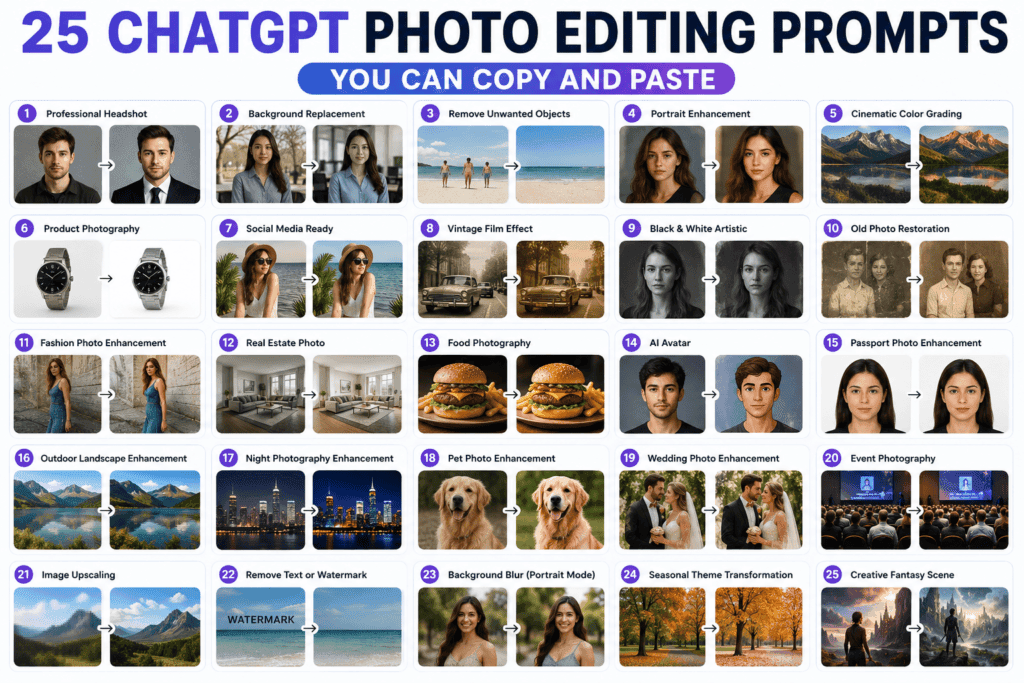
This guide moves beyond superficial lists. It dissects the mechanics of ChatGPT Photo Editing Prompts to provide a modular framework you can apply to any creative workflow.
In this guide, you will master:
- The Architecture: How ChatGPT interprets and executes image-based instructions.
- The Anatomy: A breakdown of effective ChatGPT Photo Editing Prompts.
- The Workflow: Identifying and correcting common prompt engineering mistakes.
- The Framework: A reusable, first-principles approach to writing your own custom prompts.
- The Toolkit: 25 copy-and-paste ChatGPT Photo Editing Prompts categorized for immediate deployment in your production cycle.
Whether you are automating a content pipeline or sharpening your AI technical stack, this guide provides the systematic approach required to produce consistent, professional-grade results.
What Are ChatGPT Photo Editing Prompts?
At their core, ChatGPT Photo Editing Prompts are high-level, natural-language command sets that act as a surrogate for manual image processing. By utilizing these prompts, you move from an operator of complex software interfaces to an architect of visual intent.
Instead of manual layer manipulation, masking, or manual adjustment of histograms, you describe the desired outcome. The AI processes your image and your instruction as a singular vector of intent to execute the transformation.
The Shift in Workflow
Traditional editing is process-oriented: You know the software, you find the tool, and you execute the step-by-step change. ChatGPT Photo Editing Prompts are output-oriented: You define the “before” and “after” state, and the AI handles the technical execution.
Common applications include:
- Artifact Removal: Clean up compositions by removing distracting elements.
- Environmental Synthesis: Seamlessly replacing backgrounds or altering site conditions.
- Lighting/Color Correction: Adjusting tonal balance or applying cinematic color grades.
- Style Transfer: Converting photographic assets into specific artistic mediums like watercolor, vector, or oil.
- Asset Restoration: Algorithmic repair of damaged or low-resolution imagery.
By framing editing through these prompts, you replace technical hurdles with structured language, significantly increasing your iteration speed for content production, design, and digital asset management.
How Does ChatGPT Edit Images?
The mechanism behind ChatGPT Photo Editing Prompts has evolved from simple pixel-diffusion to a sophisticated reasoning-first workflow. When you upload an asset and provide an instruction, the model does not simply “re-draw” the image; it executes a multi-stage cognitive pipeline.
The Internal Processing Pipeline
- Semantic Analysis: Before generating pixels, the model performs a deep scan of the input. It maps the spatial relationships, lighting vectors, object hierarchy, and aesthetic style of your original image.
- Reasoning & Planning: Leveraging “thinking-enabled” integration, the model deconstructs your prompt. It identifies potential ambiguities (e.g., “make it look better”), plans the necessary adjustments to satisfy your constraints, and flags potential conflicts (e.g., “changing the lighting might wash out the subject’s face”).
- Selective Execution: Rather than recreating the image from scratch, the model applies targeted transformations. It preserves the “untouched” segments of your asset while regenerating only the specified areas, which ensures that critical elements like identity, branding, or core composition remain consistent.
- Verification: The model performs a final logic check against your original instructions to ensure the edited output adheres to the required aspect ratio, text rendering, and style parameters.
The Precision Hierarchy
Your success in using ChatGPT Photo Editing Prompts depends on your ability to feed the model’s reasoning engine. Vague commands force the AI to “guess,” which leads to generic or unwanted deviations.
- The “Vague” Input (Low Leverage): “Make this photo look better.”
- Result: The model applies broad, non-specific aesthetic filters that often degrade the original intent.
- The “Architectural” Input (High Leverage): “Increase brightness by 10% in the mid-tones, soften the harsh shadows on the subject’s right side to maintain realism, remove the background clutter, and replace it with a softly blurred modern office interior while keeping the original subject’s proportions and scale.”
- Result: By defining the scope of the edit (mid-tones), the preservation constraint (realism/proportions), and the target output (blurred office), you provide the AI with a structured blueprint.
Pro-Tip for Workflow: Multi-step edits yield superior results when performed sequentially. Instead of stacking five complex changes into one prompt, execute them one by one. This allows the model to “reason” through each edit cleanly, drastically reducing the likelihood of artifacting or hallucination.
Why Prompt Quality Matters: The Case for Determinism
Many users treat AI image editing as a game of chance, accepting “hallucinations” or suboptimal outputs as inherent limitations of the technology. However, in professional environments, inconsistent results are rarely a flaw of the model—they are a failure of the input specification.
Prompt quality functions as constraint management. Every variable you omit is a variable the AI will “fill in” based on its own internal probabilities, which rarely align with your specific strategic objectives.
The Cost of Ambiguity
When you issue a weak prompt (e.g., “Make it professional”), you relinquish control. The AI is forced to interpret “professional” through a generalized, mass-market lens, which often ignores your brand guidelines, existing aesthetic context, or specific project requirements.
The Leverage of Specificity
A strong prompt is a modular blueprint. By explicitly defining the parameters of the transformation, you effectively narrow the AI’s search space for potential outputs. This results in:
- Predictable Output: When you define the Style, Clothing, Lighting, and Background, the AI’s degrees of freedom are restricted to the areas you haven’t constrained, ensuring the final image aligns with your vision.
- Reduced Iteration Cycles: High-quality prompts get it right the first time. This is critical for scaling a content pipeline where you don’t have the time to prompt-engineer a single image ten times.
- Systematization: Once you identify a prompt structure that works for a specific asset type (e.g., corporate headshots), it becomes a reusable asset—a template you can plug new images into instantly.
| Feature | Low-Leverage Input (Weak) | High-Leverage Input (Strong) |
| Logic | Intuitive/Subjective | Architectural/Objective |
| Control | AI decides aesthetic parameters | User dictates aesthetic parameters |
| Outcome | Unpredictable / “Generic” | Consistent / On-Brand |
| Efficiency | High manual revision time | Low manual revision time |
The Principle is Simple: The more granular your instructions, the less room there is for the AI to deviate from your desired outcome. Precision in your prompts directly translates to professional-grade efficiency in your creative workflow.
The Anatomy of an Effective ChatGPT Photo Editing Prompt
To move from “trial-and-error” to a repeatable creative system, you must adopt a modular approach. Every high-leverage prompt is a composite of specific variables. When you standardize these variables, you transform prompt writing from an act of improvisation into an act of engineering.
The Modular Framework
Use this structure to build your prompts. Think of this as your Prompt Architecture—a repeatable blueprint for any editing scenario.
| Component | Purpose | Example Value |
| Subject | Identifies the focus of the edit. | Product bottle on a desk |
| Objective | Defines the primary transformation. | Replace background with clean white |
| Style | Sets the aesthetic baseline. | Minimalist studio photography |
| Lighting | Dictates mood and tonal depth. | Soft, diffuse top-down lighting |
| Color Treatment | Establishes the palette. | Cool, desaturated tones |
| Composition | Defines framing/spatial relationship. | Centered, eye-level |
| Constraints | Protects critical elements from alteration. | Maintain label legibility |
| Quality/Output | Sets the resolution and format. | 8k, sharp focus, professional |
From Components to Command
To create a high-leverage prompt, weave these components into a single, cohesive sentence.
The Formula:
[Objective] + [Subject] + [Style/Lighting/Colors/Composition] + [Constraints/Quality]
Example Execution:
“Replace the background behind the [Subject: wooden watch] with a [Style: blurred forest floor]. Use [Lighting: warm, dappled sunlight] to match the existing [Colors: earthy tones]. Ensure the [Composition: watch face remains centered] and strictly [Constraint: preserve all watch details and metal reflections] at [Quality: high resolution].”
Why This Architecture Works
- Modularity: You can swap out a single variable—such as changing “warm, dappled sunlight” to “dramatic, studio neon lighting”—without rebuilding the entire prompt.
- Reduced Hallucinations: By explicitly stating your Constraints (what must be preserved), you prevent the AI from overwriting the elements that matter most to your brand or project.
- Scalability: Once you have a framework that works for your product photography or personal branding, you can systematize it into a “Prompt Library,” drastically reducing the time required to edit future assets.
The SkillDential Prompt Formula: A Universal Template
To achieve consistent, predictable results, stop treating prompts as free-form essays. Instead, use this modular SkillDential Prompt Formula to architect your instructions.
The Architecture
Use this structure for every edit. If a variable isn’t relevant to your specific image, simply omit it, but keep the sequence consistent to optimize for how the model processes the request.
[Subject] + [Edit Goal] + [Style] + [Lighting] + [Background] + [Composition] + [Quality] + [Constraints]
Field Guide
- Subject: Identify the primary focus (e.g., the product, the portrait).
- Edit Goal: Define the specific transformation (e.g., remove background, adjust exposure).
- Style: Define the aesthetic (e.g., minimalist, cinematic, corporate).
- Lighting: Dictate the tonal source (e.g., soft sunlight, dramatic studio rim light).
- Background: Specify the environment (e.g., blurred home office, solid gray).
- Composition: Direct the framing (e.g., centered, wide-angle, rule of thirds).
- Quality: Define the output expectations (e.g., 4k resolution, sharp texture).
- Constraints: The “Safety Net” (e.g., maintain facial identity, do not alter text, keep original logo).
Real-World Application
Here is how that formula translates into a high-leverage execution:
“Edit this [Subject: corporate portrait] by [Edit Goal: replacing the background with a high-end, blurred skyscraper office]. Use [Lighting: soft, natural side-lighting] and [Style: clean, professional color grading] to match the [Composition: mid-shot framing]. Maintain [Constraints: original facial identity and skin texture] at [Quality: high-resolution output].”
Why Use This Structure?
By following this syntax, you remove the guesswork for the AI. You provide the context (the original image), the intent (the goal), and the boundaries (the constraints), which is the exact triad required for professional-grade AI output.
You can apply this formula across all 25 scenarios detailed in the following sections of this guide.
Why This Framework Produces Better Results: The Logic of Constraint
The effectiveness of the SkillDential Prompt Formula is not just about structure; it is about eliminating the AI’s need to speculate.
When you provide an unstructured prompt, the AI enters a “probabilistic guessing” state. It must analyze your request and predict the most likely aesthetic and technical choices to fill the gaps in your instructions. Every time the AI guesses, the probability of an outcome that deviates from your intent increases.
This framework works because it systematically answers the five core questions the AI’s reasoning engine needs to resolve before it commits to a pixel-level change:
- What is the Subject? (Scope identification)
- What is the Edit Goal? (Primary instruction)
- What are the Constraints? (Safety boundaries—what must stay the same?)
- What is the aesthetic Style? (Visual direction)
- What is the desired Quality? (Output threshold)
The “Gap Analysis” of Prompt Engineering
When you use the framework, you are performing a gap analysis on your own instructions. If your prompt feels like it’s missing “something,” look at the list above. If you haven’t answered one of these questions, you have left a hole in your prompt that the AI will fill with generic data.
| If you skip… | The AI assumes… | Resulting Consequence |
| Constraints | Nothing is off-limits. | The AI may alter the subject’s face or branding. |
| Style | A default “AI-style” filter. | Output looks “synthetic” or over-processed. |
| Lighting | Standard, flat, or mismatched light. | The edit looks “pasted on” rather than integrated. |
By explicitly defining these variables, you move the AI from predictive generation to directed execution. This shift is the difference between an image that looks like a “filter” and an image that looks like a professional-grade adjustment.
Pre-Flight Protocol: Best Practices for Image Editing
Treat every image-editing request as a “patch” to a base file. To minimize artifacting and hallucination, follow this technical checklist before executing your prompt.
The “Base Asset” Standard
- Resolution & Clarity: The model is an interpolator, not a magic restorer. Start with the cleanest possible source. If the source is noisy or blurry, the AI will often interpret that noise as part of the “texture” it needs to reproduce.
- Aspect Ratio Prep: Define your target aspect ratio before the final pass. Regenerating to change dimensions after you’ve already applied complex edits often leads to “drift,” where the AI loses track of previous adjustments.
The “One Change, One Pass” Rule
Avoid “feature creep.” Requesting 10 simultaneous edits forces the model to juggle conflicting spatial and lighting vectors.
- The Protocol: Sequence your edits.
- Pass 1: Composition (cropping/background removal).
- Pass 2: Lighting/Color adjustment.
- Pass 3: Object insertion or texture refinement.
- Why: This limits the “creative surface area” for each generation, keeping the AI’s reasoning focused.
The “Preservation Lock” (Constraint Engineering)
If the AI is “helping too much” (e.g., changing facial features during a background swap), you haven’t locked the identity.
- The Protocol: Always explicitly include a “Preserve” clause.
- Example: “Change the background to a sunset, but preserve the subject’s face, clothing, and posture exactly as they appear in the original.”
The “Final Result” Intent
Do not describe the actions you think the AI should take (e.g., “use a blur tool,” “adjust the histogram”). The model has its own internal logic.
- The Protocol: Describe the visual state of the final output.
- Instead of: “Use a blur tool on the background.”
- Use: “The background should have a shallow depth of field, rendering the office interior as a smooth, bokeh-rich blur.”
Iterative Refinement
Never settle for the first output if it misses the mark.
- The Protocol: Don’t rewrite from scratch. Use delta-prompting: “The lighting is good, but the skin tone is too warm. Retain the current composition and lighting, but shift the skin tones to a more neutral, cooler balance.”
Common Pitfalls: Why Your Edits Are Failing
Most “failed” AI edits are not the result of model limitations; they are the result of input entropy. When you provide a low-signal prompt, you force the AI to fill the gaps with its own probabilistic averages—which rarely align with your specific creative intent.
Avoid these five technical bottlenecks to ensure your outputs remain consistent and professional:
The “Vague” Penalty
- The Error: Using non-descriptive directives like “Make this look professional” or “Fix the colors.”
- The Consequence: The model defaults to its broadest internal dataset for “professionalism,” which often leads to generic, over-processed, or “plasticky” results.
- The Fix: Quantify your intent. Replace “fix” with specific metrics (e.g., “neutralize the color temperature,” “increase contrast in the mid-tones,” or “reduce highlight clipping”).
Instruction Collision
- The Error: Combining mutually exclusive goals in a single prompt (e.g., “Make the image dark, moody, and high-key bright”).
- The Consequence: The AI attempts to satisfy both vectors, resulting in “muddy” lighting or conflicting shadows that lack depth.
- The Fix: Decompose complex requests. If you need both a mood shift and a brightness adjustment, execute them as two distinct, sequential prompts.
Neglecting “Constraint Locks”
- The Error: Failing to specify what should remain static during the transformation.
- The Consequence: The AI “hallucinates” changes to elements you wanted to keep—altering a subject’s face, changing the shape of a product, or modifying brand-critical text.
- The Fix: Always explicitly define your Preservation Anchors. Start your prompt with, “Preserving the [Subject/Logo/Background] exactly as is, please edit [X]…”
The “Context Mismatch”
- The Error: Applying styles that don’t align with the source material (e.g., demanding “cinematic studio lighting” on a low-quality, blurry mobile selfie).
- The Consequence: The model struggles to reconcile the low-fidelity base with the high-fidelity request, creating digital artifacts, “halo” effects around the subject, or strange texture distortion.
- The Fix: Audit your base asset. If the source is compromised, use a restoration prompt (e.g., “Enhance clarity and remove noise”) before applying stylistic edits.
The “One-Shot” Myth
- The Error: Expecting a single prompt to achieve a perfect, production-ready result on the first attempt.
- The Consequence: Users abandon potentially great assets because they didn’t get the result “instantly.”
- The Fix: View prompting as a conversation, not a command line. Use the first output as a “base,” then provide Refinement Prompts (e.g., “The lighting is now perfect, but the skin tone is too warm. Adjust to neutral balance”).
Pro-Tip: The “Audit” Before Execution
Before you hit enter, look at your prompt and ask: “Is there any variable here that the AI has to guess?” If the answer is yes, you have not provided enough context. Explicitly defining the lighting, style, and composition is the fastest way to minimize wasted iterations.
25 ChatGPT Photo Editing Prompts You Can Copy and Paste (Prompts 1–13)
Use these 25 ready-to-run ChatGPT prompts to edit photos fast. Prompts 1–13 cover basic fixes, creative retouches, and batch instructions you can copy and paste and adapt to your image, software, or workflow.
How to use these prompts: Upload your image to ChatGPT, then paste the prompt below. Replace any placeholders (such as [subject] or [background]) with your own requirements. If the first result isn’t exactly what you want, refine the prompt by adding more detail rather than starting over.
Professional Headshot Prompt
Best for: LinkedIn profiles, resumes, company websites, and professional portfolios.
Copy-and-Paste Prompt
“Edit this portrait into a professional corporate headshot. Replace the background with a [clean, blurred modern office]. Apply [soft, flattering studio lighting] to illuminate the subject, enhance image sharpness, and normalize skin tones. Constraint: Preserve the [subject’s unique facial identity] and natural texture; do not alter structural features. Export as a high-resolution, professional-grade image.”
Prompt Architecture

- Subject: Portrait
- Goal: Professional headshot transformation
- Lighting: Soft, flattering studio light
- Background: Blurred modern office
- Quality: High-resolution/Professional-grade
- Constraint: Preserve facial identity/structure
Customization Tips
- Environment: Swap Modern Office for Minimalist Library or Soft-Focus Architectural Backdrop.
- Aesthetic: Change Neutral Gray to Clean White for a high-key studio look.
- Attire: You can prompt the AI to “Change clothing to a dark navy blazer” if the original attire is too casual for your needs.
Background Replacement Prompt
Best for: Content creators, social media managers, and digital marketers needing flexible visual assets.
Copy-and-Paste Prompt
“Replace the current background with a [clean, minimalist workspace]. Ensure the [subject] is cleanly separated from the background with precise edge definition. Match the new background lighting to the subject, preserve [realistic ground shadows], maintain the original pose, and ensure the final output is indistinguishable from a professional studio photograph.”
Prompt Architecture
- Subject: Original subject/product
- Background: Minimalist workspace
- Lighting: Environment-matched lighting
- Realism: Professional photographic fidelity/shadow integration
Customization Tips
- Environment: Change Minimalist workspace to Lush outdoor garden, Urban brick wall, or Abstract geometric studio.
- Shadows: Specify the shadow type for more realism, e.g., “Add a soft-focus drop shadow” or “Maintain the natural light-casting direction from the left.”
- Depth: Add “Apply a shallow depth of field (bokeh effect) to the background” to add more professional separation and focus on the subject.
Remove Unwanted Objects
Best for: Travel photography, e-commerce product shots, and decluttering social media imagery.
Copy-and-Paste Prompt
“Remove all [list specific objects, e.g., trash cans, wires, bystanders] from the background while strictly preserving the original composition. Infill the removed areas with textures and lighting consistent with the surrounding environment to ensure a seamless, artifact-free result. The subject must remain completely unaltered.”
Prompt Architecture
- Subject: Original subject
- Objective: Selective object removal
- Constraint: Maintain composition/texture consistency
- Quality: Artifact-free/Seamless integration
Why This Works: Generic requests like “remove this” often lead to blurred patches or “AI mush.” This prompt forces the model to perform context-aware infilling, using the surrounding pixels to rebuild the environment as if the object were never there.
Customization Tips
- Precision: If the object is complex (e.g., a person in the background), add “Replace the removed area with the existing background texture of the [floor/wall/grass].”
- Complexity: For crowded scenes, add: “Maintain the existing perspective lines of the background while removing [object].”
Portrait Enhancement Prompt
Best for: Personal branding, professional profile pictures, and high-quality social media portraits.
Copy-and-Paste Prompt
“Enhance this portrait by improving the overall lighting, increasing micro-clarity, and balancing skin tones for a natural look. Reduce digital noise, sharpen the eyes, and soften any harsh shadows. Maintain all realistic facial details and textures—do not over-smooth or create an artificial, AI-generated appearance.”
Prompt Architecture
- Subject: Portrait
- Objective: Aesthetic enhancement and tonal balancing
- Correction: Noise reduction and sharpening
- Constraint: Realistic texture preservation (avoiding “plastic” skin)
Customization Tips
- Lighting Mood: Swap natural look for “Warm, golden-hour lighting” or “Cool, professional studio-lighting tones.”
- Style: Add “Apply an editorial magazine finish” for a high-contrast, polished, fashion-forward look.
- Intensity: Use “Increase contrast slightly for a more dramatic, moody effect” if you want the image to stand out in a grid.
Cinematic Color Grading Prompt
Best for: Instagram feeds, YouTube thumbnails, and high-impact visual storytelling.
Copy-and-Paste Prompt
“Transform this image into a cinematic photograph. Apply a professional color grade with [warm highlights and cool teal shadows]. Enhance the contrast for a dramatic look, add [subtle, fine film grain] for texture, and adjust the lighting for depth. Constraint: Preserve realistic skin tones and existing textures; do not wash out the subject’s features.”
Prompt Architecture
- Subject: Original photograph
- Color Grading: Teal and orange/Warm and cool balance
- Lighting: Dramatic depth/High-contrast tonal range
- Texture: Fine film grain integration
- Constraints: Realistic skin tone and texture preservation
Customization Tips
- Mood: For a horror or thriller aesthetic, swap “warm highlights” for “desaturated greens and deep, crushed blacks.”
- Era: Add “Apply a 1970s vintage film stock look” to give the image a specific historical aesthetic.
- Focus: Use “Direct the color grading to emphasize the subject while cooling the background” to create a stronger sense of depth.
Product Photography Prompt
Best for: E-commerce stores (Shopify, Etsy, Amazon, TikTok Shop) and digital product catalogs.
Copy-and-Paste Prompt
“Convert this product image into a professional, high-conversion e-commerce asset. Isolate the product against a [pure white, non-reflective background]. Apply [soft, multi-directional studio lighting] to eliminate harsh glare, add a [natural, soft-focus contact shadow] beneath the base, and enhance sharpness. Ensure color accuracy is perfect and the output is sharp, high-resolution, and marketplace-ready.”
Prompt Architecture
- Subject: Product (e.g., watch, skincare bottle, tech gadget)
- Background: Pure white (high-key)
- Lighting: Studio-grade/Even/Soft
- Shadow: Grounding/Contact shadow for realism
- Quality: High-resolution/Accurate color rendition
Why It Works
- Background Specification: Ensures the model avoids complex environments that clutter the frame.
- Shadow Quality: Explicitly requesting a “contact shadow” prevents the product from looking like it is “floating,” which is a common failure in low-quality AI edits.
- Marketplace Readiness: By emphasizing “color accuracy,” you align the prompt with the strict requirements of major e-commerce platforms.
Customization Tips
- Brand Aesthetic: Swap pure white for “soft pastel-toned background” if you are building a lifestyle brand aesthetic.
- Material Specificity: If the product is reflective (e.g., metal or glass), add: “Preserve high-fidelity metallic reflections and highlights.”
- Angle: Add “Ensure the product is centered and viewed from a 45-degree angle” if you need a specific hero shot orientation.
Social Media Ready Prompt
Best for: Instagram, Facebook, TikTok, Pinterest, and X (Twitter).
Copy-and-Paste Prompt
“Optimize this photo for social media engagement. Improve the overall lighting for clarity, increase color vibrancy moderately to make the image pop, and sharpen essential details. Remove any distracting background clutter and ensure a clean, modern aesthetic. Constraint: Maintain realistic skin tones and textures. Final output should be high-contrast and visually compelling for a mobile-first audience.”
Prompt Architecture
- Subject: Social media asset/personal photo
- Objective: Engagement optimization (clarity/vibrancy)
- Correction: Background decluttering
- Constraint: Realistic skin tones/aesthetic integrity
- Quality: Mobile-optimized high resolution
Customization Tips
- Aesthetic Alignment: Add “Apply an airy, minimalist aesthetic” for lifestyle photography or “Apply a luxury, high-contrast black and gold branding aesthetic” for professional business content.
- Aspect Ratio: You can append specific framing requirements like “Ensure the composition is centered and optimized for a 4:5 Instagram portrait crop.”
- Platform Specificity: If posting to TikTok/Reels, add: “Maintain a bright and crisp feel that remains legible on small mobile screens.”
Vintage Film Effect Prompt
Best for: Creative storytelling, personal blogs, and nostalgic social media campaigns.
Copy-and-Paste Prompt
“Transform this image into an authentic vintage film photograph. Apply [subtle, organic film grain], introduce soft color fading, and utilize warm, glowing highlights with a low-contrast tonal range. Ensure the final result has an authentic analog photography appearance. Constraint: Preserve important subject details and facial features; do not blur or ‘over-smooth’ the original texture.”
Prompt Formula
- Subject: Original image
- Vintage Style: Analog photography/nostalgic aesthetic
- Film Texture: Organic grain/faded color density
- Color Palette: Warm highlights/muted shadows
- Constraints: High-fidelity texture/identity preservation
Customization Tips
- Era Specificity: Add “Apply a 1990s 35mm film aesthetic” for specific color shifts or “Simulate a 1960s Polaroid look” for soft, washed-out tones.
- Lighting Mood: Add “Enhance the nostalgic feel by adding light-leak effects on the edges of the frame.”
- Focus: If the original image is too sharp, add “Apply a slight softness to the lens effect to mimic vintage glass optics.”
Black-and-White Artistic Prompt
Best for: Striking portrait photography, personal branding, and fine-art prints.
Copy-and-Paste Prompt
“Convert this image into a timeless, professional black-and-white fine-art portrait. Utilize strong, dramatic contrast and balanced exposure to highlight depth. Enhance facial textures for clarity and ensure soft, gradual transitions between light and shadow. Constraint: The final output must retain high-fidelity detail and a rich, professional tonal range; avoid flat gray tones.”
Prompt Architecture
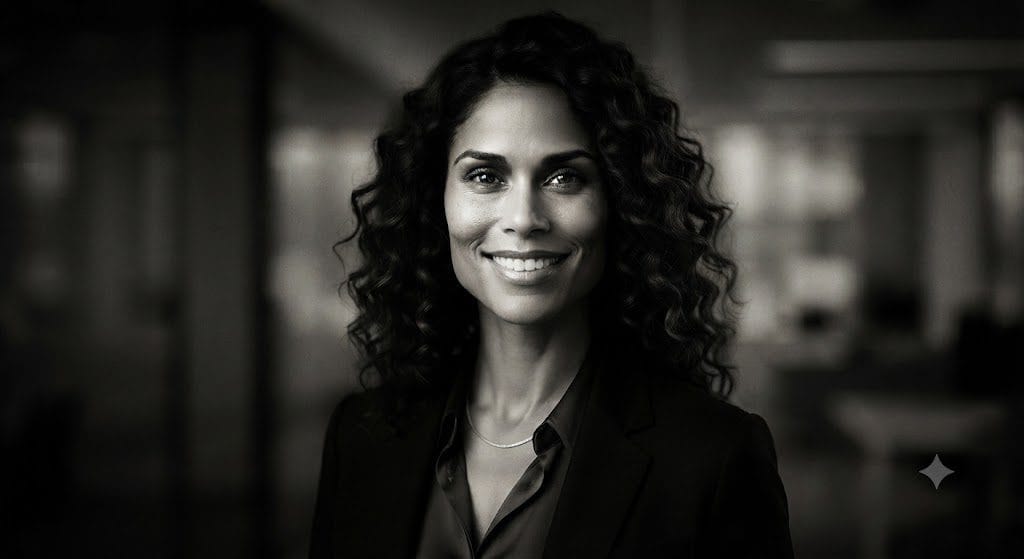
- Subject: Portrait
- Style: Fine-art black-and-white
- Aesthetic: Strong contrast and depth
- Quality: High-fidelity texture/Tonal richness
- Constraint: Avoid “flat” graying (ensure deep blacks and crisp whites)
Pro Tip: Move Beyond “Black and White.” Generic requests for “black and white” often result in washed-out, “muddy” photos. By explicitly defining the contrast, texture, lighting, and style, you force the AI to simulate the behavior of analog film or professional studio printing.
Customization Tips
- Mood: Change “strong contrast” to “soft, ethereal, and low-contrast” for a gentle, dreamy aesthetic.
- Style: Add “Apply a classic silver-gelatin print aesthetic” to get a deeper, more historical photo look.
- Depth: Use “Emphasize the highlights on the subject’s face to create a chiaroscuro lighting effect” for a dramatic, moody portrait.
Old Photo Restoration Prompt
Best for: Archiving family history and restoring damaged physical prints.
Copy-and-Paste Prompt
“Restore this photograph to its original clarity. Systematically remove scratches, dust, and stains while carefully improving edge sharpness. Where colors have faded, restore them to a natural, period-accurate palette. Constraint: Preserve the historical authenticity of the image—maintain realistic textures and facial details; do not over-process or ‘modernize’ the appearance.”
Prompt Architecture
- Objective: Technical repair (scratch/dust removal)
- Enhancement: Clarity and edge sharpness
- Color Logic: Period-accurate tone restoration
- Constraint: Historical authenticity/Texture preservation (avoiding digital “smoothing”)
Why This Works: Aggressive restoration often strips away the “soul” of an old photo. By explicitly prioritizing historical authenticity and texture preservation, you instruct the AI to act as a digital conservator rather than a filter, ensuring the final output looks like a cleaned-up original rather than an AI-generated approximation.
Customization Tips
- Severity: If the damage is extensive, add: “Prioritize structural repair of torn areas while keeping original lighting intensity.”
- Style: If you prefer a B&W look for an old photo, add: “Convert to a high-fidelity, balanced grayscale after restoration to eliminate distracting color-cast issues.”
- Depth: If the original is very blurry, add: “Gently enhance facial feature definition to improve recognizable details without changing the original expression.”
Fashion Photo Enhancement Prompt
Best for: Fashion labels, e-commerce retailers, and lifestyle influencers building a premium brand.
Copy-and-Paste Prompt
“Enhance this fashion photograph to meet high-end editorial standards. Sharpen the fine details in the clothing fabric to emphasize texture, improve lighting to highlight the silhouette, and ensure perfect color accuracy. Soften the background subtly to create depth. Constraint: Maintain natural skin tones and a clean, premium finish; do not over-process or introduce digital artifacts.”
Prompt Architecture
- Subject: Fashion-forward portrait/full-body shot
- Fashion Style: Editorial/Premium
- Texture: High-fidelity fabric/textile enhancement
- Lighting: Subject-contouring/Depth-focused
- Editorial Finish: High-end, magazine-grade visual polish
Customization Tips
- Setting: Add “Apply a high-contrast studio editorial style” for a sharp, modern look or “Apply a soft, airy, natural-light aesthetic” for luxury lifestyle campaigns.
- Focus: If the outfit is the hero, add: “Focus specifically on highlighting the material texture and drape of the clothing.”
- Vibe: To emphasize high-end branding, add: “Apply a subtle, high-fashion color grade with muted, sophisticated tones.”
Real Estate Photo Prompt
Best for: Property listings, real estate agents, and interior design portfolios.
Copy-and-Paste Prompt
“Enhance this property photo into a professional listing asset. Balance the indoor lighting to remove harsh exposure spots, correct vertical perspective distortions, and increase overall sharpness. Brighten the interior to create an inviting atmosphere while maintaining realistic color accuracy. Remove any minor clutter or distractions. Constraint: The final output must look naturally lit and spatially accurate.”
Prompt Architecture

- Subject: Property interior/exterior
- Correction: Perspective and lighting balance
- Enhancement: Clarity and brightness
- Objective: Inviting/Professional listing aesthetic
- Constraint: Spatial accuracy and realism
Customization Tips
- Setting: Easily adapt this for any space by replacing “living room” with Kitchen, Home Office, Backyard Exterior, or Commercial Lobby.
- Time of Day: If the room feels cold, add: “Warm up the color temperature slightly to suggest late-afternoon natural light.”
- Detailing: For luxury listings, add: “Enhance the clarity of high-end finishes like marble, wood grain, or metal fixtures.”
Food Photography Prompt
Best for: Restaurants, cafés, food bloggers, and delivery platforms.
Copy-and-Paste Prompt
“Enhance this food photograph to maximize appetite appeal. Use warm, natural-looking lighting to highlight textures, and ensure perfect color accuracy. Sharpen the fine details of the ingredients, remove any distracting background clutter, and create a clean, inviting focus. Constraint: Preserve the realistic presentation of the dish; do not over-process or introduce synthetic-looking effects.”
Prompt Architecture
- Subject: Culinary dish/beverage
- Lighting: Warm, natural, and inviting
- Texture: High-fidelity detail enhancement
- Objective: Culinary appetite appeal
- Constraint: Realistic, non-synthetic presentation
Why This Works: Food photography is defined by sensory cues. By explicitly calling out Lighting, Color Temperature, Texture, and Natural Appearance, you avoid the “AI-generated” look where food appears overly plastic or geometrically impossible. This structure keeps the dish looking edible and professional, which is critical for conversion on menus and delivery apps.
Customization Tips
- Vibe: For upscale dining, add: “Apply a soft, moody, low-key lighting effect to emphasize the dish’s plating.”
- Vibrancy: If the dish is fruit or vegetable-based, add: “Slightly boost the color saturation of the ingredients to highlight freshness.”
- Focus: Add “Apply a shallow depth of field to blur the background plates, creating a professional food-photography bokeh.”
Prompt Engineering Insight: Why These Prompts Perform Better
You may notice that every prompt follows a similar structure rather than relying on short, generic commands. That’s intentional.
A strong ChatGPT photo editing prompt typically includes these components:
| Component | Purpose | Example |
|---|---|---|
| Subject | Identifies what is being edited | Portrait, product, food, property |
| Editing Goal | Defines the primary transformation | Remove background, restore photo, enhance lighting |
| Style | Sets the visual direction | Cinematic, editorial, vintage, minimalist |
| Lighting | Guides mood and realism | Soft daylight, studio lighting, warm ambient light |
| Quality | Specifies output expectations | High resolution, realistic textures, sharp details |
| Constraints | Protects important elements | Preserve facial identity, maintain realistic proportions |
By consistently following this framework, you’ll get more reliable results and understand why each prompt works—not just what to paste.
AI Avatar Prompt
Best For: Professional profile photos, gaming identities, personal branding, and creative social presence.
Copy-and-Paste Prompt
“Transform this portrait into a high-fidelity, professional digital avatar. While strictly preserving my unique facial identity, apply a clean, modern aesthetic with balanced, soft studio lighting and subtle background depth of field. Use a professional digital art style—ensure high facial detail and natural skin tones. The result should be crisp, polished, and perfectly suited for a profile picture.”
Prompt Architecture
- Subject: Portrait
- Goal: Digital avatar transformation
- Style: Professional digital art
- Lighting: Balanced studio/soft light
- Constraint: Preserve identity/structural features
Customization Ideas
- Aesthetic Pivot: Swap “Professional digital art” for specific sub-genres like:
- Futuristic/Cyberpunk: Add “neon-accented lighting and metallic texture elements.”
- Fantasy: Add “ethereal lighting and subtle, high-fantasy artistic flourishes.”
- Stylized/Comic: Add “clean vector-art style with bold, professional linework.”
- Technical Tuning: If the background is too busy, add: “Apply a solid-colored, minimalist backdrop to ensure the avatar stands out.”
Passport Photo Enhancement Prompt
Best For: Passport, visa, ID card, and other official identification documentation.
Copy-and-Paste Prompt
“Improve this photo for official use by correcting exposure and neutralizing the white balance for a clean, professional finish. Enhance facial clarity by removing digital noise, sharpen features slightly for readability, and ensure accurate, natural skin tones. Constraint: Preserve my facial identity and structural features with 100% accuracy; do not apply artistic filters or aesthetic alterations. The final output must remain strictly compliant with standard neutral-background ID photo requirements.”
Prompt Architecture
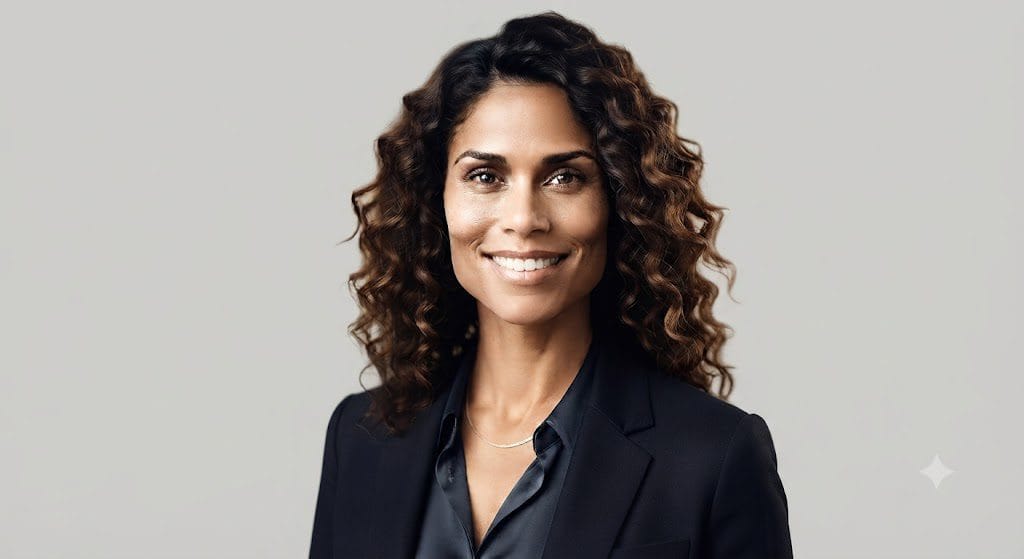
- Subject: Identification portrait
- Correction: Exposure/White balance/Noise reduction
- Enhancement: Clarity/Feature definition
- Constraint: Zero-distortion identity preservation (Mandatory)
- Objective: Regulatory/Documentation compliance
Important Note: Compliance First. While AI can enhance image clarity, official passport and visa agencies (such as those managing State Department or Home Office documents) have strict biometric requirements.
- Always Check Guidelines: Ensure your final result adheres to specific country requirements regarding head position, lighting shadows, and background color.
- Avoid “Over-Editing”: Do not use this prompt to alter facial structure, remove moles/features, or change background colors if the authority requires a specific standard (e.g., plain white). Use this only to enhance existing quality, not to “create” a new look.
Outdoor Landscape Enhancement Prompt
Best For: Travel photography, nature blogs, and outdoor lifestyle content.
Copy-and-Paste Prompt
“Enhance this landscape photograph for maximum visual impact. Improve sky detail and increase dynamic range naturally to recover shadow and highlight information. Enrich colors to appear vibrant but realistic—avoid oversaturation. Sharpen environmental textures (trees, water, rocks), ensure balanced exposure throughout the frame, and maintain a high-fidelity, authentic outdoor appearance.”
Prompt Architecture
- Subject: Natural landscape/scenery
- Correction: Dynamic range recovery (Highlights/Shadows)
- Enhancement: Texture sharpening and sky detailing
- Color Logic: Realistic vibrancy (avoiding “neon” colors)
- Objective: Authenticity and visual impact
Why This Works: General requests to “make it beautiful” often lead to over-processed, unrealistic AI landscapes. By isolating dynamic range, texture sharpening, and natural vibrancy, this prompt instructs the model to treat the image like a high-end RAW photo edit rather than a generic filter.
Customization Tips
- Time of Day: If you want to change the mood, add: “Adjust the lighting to simulate a soft, early-morning mist,” or “Shift the color temperature to mimic a vibrant sunset.”
- Sky Replacement: To fix a dull sky, add: “Enhance the sky by increasing cloud definition and adding soft, warm tones to the horizon.”
- Atmosphere: Add “Introduce a subtle, natural atmospheric haze to the background elements to increase the sense of depth and scale.”
Night Photography Enhancement Prompt
Best For: Low-light photography, city nightlife, and atmospheric event shots.
Copy-and-Paste Prompt
“Improve this nighttime photograph by significantly reducing digital noise while preserving fine detail. Carefully balance the exposure to recover lost details in the shadows without washing out the deep blacks. Enhance color accuracy for any artificial light sources, such as [insert light source, e.g., neon signs or street lamps], and ensure the overall atmosphere remains authentic to the night setting. Avoid ‘brightening’ the scene to the point that it looks like daylight.”
Prompt Architecture
- Subject: Low-light environment
- Correction: Noise reduction/Shadow recovery
- Aesthetic: Atmospheric integrity (keeping “night” feeling like “night”)
- Color Logic: Balancing artificial light sources
- Constraint: Maintain deep blacks (avoiding muddy/gray shadows)
Customization Tips
- Source Lighting: Be specific to help the AI handle color balance better. Add: “Accentuate the warmth of the [street lamps/fireworks]” or “Make the [neon signs] pop against the dark background.”
- Clarity: If the image is blurry, add: “Increase micro-contrast to sharpen edges of buildings and subjects in the low light.”
- Mood: Add: “Apply a slight cinematic cool-tone grade to the shadows to enhance the moody, nocturnal aesthetic.”
Pet Photo Enhancement Prompt
Best For: Pet owners, breeders, animal influencers, and social media pet accounts.
Copy-and-Paste Prompt
“Enhance this pet photograph by focusing on fine detail. Sharpen the [fur texture/feathers/scales] and bring out the clarity in the eyes. Balance the natural lighting to make the subject pop, enrich the colors of the coat subtly, and remove any distracting clutter from the background. Constraint: Ensure the subject’s proportions and facial expressions remain completely authentic and realistic.”
Prompt Architecture
- Subject: Pet (e.g., dog, cat, bird)
- Texture: High-fidelity fur/coat enhancement
- Lighting: Subject-focused natural light
- Background: Clean/De-cluttered
- Realism: Structural and behavioral authenticity
Customization Tips
- Action Focus: If the pet is in motion, add: “Maintain motion blur where natural, but sharpen the pet’s head and eyes for focus.”
- Environment: Change the background for a cleaner look: “Replace the busy background with a soft, natural blurred-green garden setting.”
- Detailing: For specific breeds, add: “Highlight the unique color patterns in the fur,” or “Emphasize the texture of the ears/whiskers for added realism.”
Wedding Photo Prompt
Best For: Wedding photographers, engagement announcements, and couples looking to polish special memories.
Copy-and-Paste Prompt
“Enhance this wedding photograph to reflect a professional, timeless aesthetic. Apply soft, romantic lighting and elegant color grading. Ensure perfect skin tones, balanced contrast, and high-clarity sharpness throughout. Remove any distracting background elements, while maintaining the scene’s emotional integrity. Constraint: Preserve the original atmosphere; the final output should look like a high-end, professionally edited wedding image.”
Prompt Architecture
- Subject: Wedding/Couple portrait
- Aesthetic: Romantic/Timeless/High-end
- Correction: Background cleanup/Sharpness enhancement
- Color Logic: Elegant, polished grading
- Constraint: Emotional and atmospheric integrity
Customization Tips
- Style Shift: Tailor the “feel” by adding specific style tags:
- Golden Hour: “Enhance the warm, glowing light hitting the couple.”
- Editorial: “Apply a high-fashion, high-contrast, clean editorial grade.”
- Documentary: “Keep the lighting natural and candid-focused with minimal, subtle polish.”
- Detailing: For complex shots, add: “Increase the texture and detail of the wedding dress and suit fabrics while keeping skin soft.”
Event Photography Prompt
Best For: Corporate events, conferences, trade shows, graduations, galas, and celebratory recaps.
Copy-and-Paste Prompt
“Improve this event photograph into a polished marketing asset. Correct exposure inconsistencies and balance the ambient lighting across the entire scene to remove harsh shadows. Enhance the clarity of the [key speakers/attendees/stage details] while reducing image noise common in low-light venues. Preserve realistic colors and the authentic energy of the event. The final output must be sharp, vibrant, and professional.”
Prompt Architecture
- Subject: Event scene (dynamic, multi-subject)
- Correction: Exposure balancing/Color correction
- Enhancement: Subject clarity and noise reduction (venue-specific)
- Objective: Polished, professional marketing collateral
- Constraint: Preserve event energy and authenticity
Customization Tips
- Focus: If a specific element is crucial, add: “Sharpen the focus specifically on the main stage branding/logo” or “Brighten the faces of the award recipients in the foreground.”
- Vibe: If the event were a party, add: “Increase the vibrancy of the stage lighting and colors to emphasize the celebratory atmosphere.”
- Crowd: For networking shots, add: “Improve the visibility of attendees while maintaining a shallow depth of field on the speaker.”
Image Upscaling Prompt
Best For: Preparing web-quality images for high-quality printing, large-format posters, or professional presentations.
Copy-and-Paste Prompt
“Increase the resolution of this image to a high-fidelity, high-definition format. Carefully reconstruct detail while preserving realistic textures—avoid the ‘plastic’ or ‘smudged’ look common in standard upscaling. Eliminate existing compression artifacts, sharpen fine edge details, and maintain perfect color accuracy. Constraint: The final output must appear naturally detailed; do not introduce AI-generated artifacts or over-sharpened, jagged lines.”
Prompt Architecture
- Subject: Low-resolution image
- Goal: High-resolution upscale
- Correction: Artifact removal and texture preservation
- Sharpness: Intelligent edge detection (avoiding over-processing)
- Constraint: Natural look/Avoiding AI-typical distortion
Why This Works: Standard AI upscalers often “hallucinate” detail, creating strange patterns or hyper-smoothed skin that looks fake. By explicitly commanding the model to preserve realistic textures and avoid over-processing, you shift the focus from merely “making it bigger” to “intelligently reconstructing detail.”
Customization Tips
- Material-Specific: If the image contains text, add: “Ensure text characters remain crisp and legible after scaling.”
- Style-Specific: For illustrations, add: “Maintain the original brushwork textures and artistic integrity.”
- Density: If the original is very pixelated, add: “Perform a deep-texture recovery to fill in missing high-frequency details realistically.”
Remove Text or Watermark Prompt
Best For: Clearing your own brand imagery, removing distracting captions, or cleaning up stock assets you have licensed.
Copy-and-Paste Prompt
“Remove the visible text/watermark from this image while reconstructing the underlying background using context-aware fill. Ensure the reconstructed area matches the surrounding lighting, textures, and perspective seamlessly. Constraint: The final result must show no signs of ‘ghosting’ or editing artifacts; the area should appear as if the text was never present.”
Prompt Architecture
- Subject: Selective area (text/overlay)
- Objective: Context-aware background reconstruction
- Constraint: Texture, lighting, and perspective continuity
- Quality: Artifact-free/Seamless integration
Important Ethical/Legal Reminder: As a content creator, ensure you have explicit ownership or usage rights for the image. Never use this prompt to strip intellectual property protections, artist watermarks, or copyright notices from work that you do not own. Using this tool for unauthorized removal of protective metadata or branding is a violation of intellectual property standards.
Customization Tips
- Complex Backgrounds: If the text is over a detailed background (like a crowded street or texture-heavy surface), add: “Use adjacent pixels to replicate the specific pattern/texture of the background, ensuring structural continuity.”
- Gradient Areas: If the text is over a gradient (like a sky or sunset), add: “Ensure the color transition in the filled area is smooth and free of banding.”
Background Blur (Portrait Mode) Prompt
Best For: Professional portraits, LinkedIn headshots, and isolating subjects for social media impact.
Copy-and-Paste Prompt
“Create a professional shallow depth-of-field effect on this image. Keep the main subject perfectly sharp and in focus while applying a soft, creamy bokeh blur to the entire background. Ensure natural edge separation between the subject and the background, preserve realistic lighting, and maintain a high-quality portrait photography aesthetic. Do not blur the subject.”
Prompt Architecture
- Subject: Original image (must remain sharp)
- Depth of Field: Shallow/Selective focus (bokeh)
- Realism: Natural edge detection and blur gradient
- Lighting: Preserved ambient light
- Quality: Professional portrait aesthetic
Customization Tips
- Blur Intensity: For a more dramatic effect, add: “Apply a heavy, high-aperture bokeh effect to completely dissolve the background details into soft light orbs.”
- Aesthetic Focus: Add “Emphasize a cinematic, large-format lens look” to give the final result extra depth.
- Background Context: If the background is distracting, you can add: “Render the blurred background in a cool, muted tone to ensure the warm-lit subject pops.”
Seasonal Theme Transformation Prompt
Best For: Seasonal marketing campaigns, holiday greeting cards, e-commerce product updates, and refreshing outdated content libraries.
Copy-and-Paste Prompt
“Transform this image into a cohesive [insert season/holiday, e.g., Winter Wonderland] scene while strictly maintaining the original subject and composition. Integrate realistic seasonal colors (e.g., deep reds, crisp whites, evergreens) and appropriate environmental details ([e.g., falling snow, frost on surfaces]). Adjust the lighting to match the new atmospheric conditions (e.g., soft, cool diffused light) and ensure natural shadows are preserved. Constraint: The subject’s identity and pose must remain unchanged; the transformation applies only to the setting and atmosphere.”
Prompt Architecture
- Subject: Original subject/object (must be preserved)
- Goal: Seasonal atmospheric transformation
- Details: Realistic environmental cues (weather, flora, décor)
- Lighting: Adjusted to fit the new season (e.g., warm summer vs. cool winter)
- Constraint: Subject identity and pose integrity
Seasonal Ideas Library
- Spring: “Transform into a lush Spring garden with soft pastel lighting, blooming cherry blossoms, and fresh green foliage.”
- Summer: “Convert this scene into a bright Summer day with intense, warm sunlight, a clear blue sky, and vibrant, saturated colors.”
- Autumn: “Shift the environment to a crisp Autumn day with warm, golden light, scattered orange and red maple leaves, and a cozy atmosphere.”
- Winter: “Apply a heavy Winter aesthetic with deep snowfall, frost on all surfaces, and soft, cool, diffused daylight.”
- Festive/Holiday: “Reimagine the scene with warm, inviting Christmas décor, including subtle string lights, a decorated tree in the background, and hints of red and gold.”
Creative Fantasy Scene Prompt
Best For: Concept art, storytelling, book covers, and high-end creative marketing.
Copy-and-Paste Prompt (Applied to the visual example):
“Transform this portrait subject into the hero of an epic [insert genre, e.g., high-fantasy concept art] scene. Place the character within a detailed, environmental context, such as [e.g., a moss-covered ancient ruin at sunset]. Apply cinematic, dramatic lighting (e.g., God rays filtering through arches), rich color grading (e.g., deep greens, golds, and purples), and high-fidelity texture work on clothing and props. The final output must strictly preserve the subject’s identity and pose while elevating the image to a high-resolution, professional concept art style.”
Visualization Analysis (Based on the generated image):
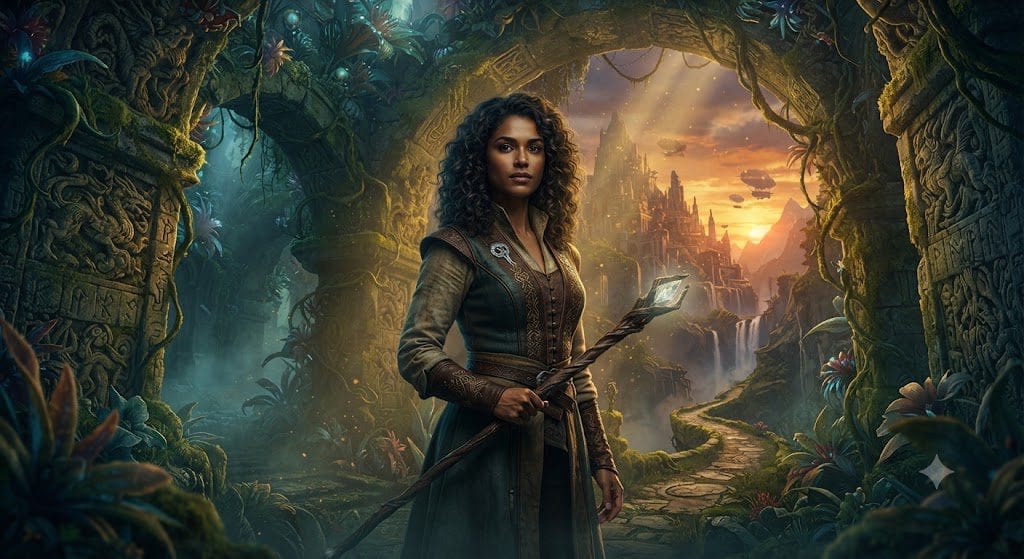
- Subject Preservation: The woman’s identity, facial structure, and pose are perfectly maintained from the original input.
- Genre Shift (Fantasy): The environment is completely reimagined into a magical, overgrown ruin.
- Atmospheric Effects: Dramatic lighting (God rays) and volumetric mist are added to create depth.
- Detailed Elements: The background is filled with specific narrative details (airships, a distant city, bioluminescent flora) that tell a story.
Customization Ideas (How to change the “feel”):
Use these keywords to swap the genre while maintaining the subject’s core look:
- Sci-Fi: Add “neon cityscapes, cybernetic implants, and rain-slicked futuristic streets.”
- Post-Apocalyptic: Add “dusty, desertified landscape, rusted scavenged gear, and a desaturated, harsh light.”
- Steampunk: Add “brass clockwork machinery, steam vents, and Victorian-industrial architecture.”
- Ancient Civilization: Add “sandstone pyramids, hieroglyphics, and strong, unforgiving desert sunlight.”
How to Create Unlimited Variations of These Prompts
When you are building these, you can treat them as a “LEGO” set of parameters. This approach ensures you never miss a technical requirement.
| Component | Strategic Purpose |
| Subject | Establishes the AI’s focus of attention. |
| Action | Defines the “job” the AI needs to perform. |
| Style/Lighting | Sets the artistic direction and mood. |
| Technical Constraint | Protects the output from “hallucinations” or over-processing. |
Pro-Tip: The “Constraint-First” Workflow
Because you prioritize expert-level outputs with no fluff, I recommend always placing your Constraints at the end of the prompt. Large Language Models (LLMs) often prioritize the most recent instructions. By placing your Preserve Identity or Avoid Over-processing Place clauses at the end so they carry the most weight in the generation process.
Refined Formula for your content:
[Action]+[Subject]+[Environmental/Lighting Details]+[Constraint 1]+[Constraint 2]+[Format Specification]
Advanced Prompt Engineering Workflow Summary
- Objective Prioritization: Focus the AI on one primary task per interaction to prevent performance degradation.
- Constraint-Driven Development: Explicitly define “do-not-change” elements, such as facial identity or brand logos, to minimize hallucinatory alterations.
- Iterative Refinement: Rather than starting over, use surgical follow-up commands to adjust specific parameters like saturation, blur intensity, or sharpness.
- Contextual Alignment: Ensure the prompt’s desired aesthetic aligns with the source image’s baseline to maintain realism and avoid unnatural rendering.
- Workflow Standardization: Treat your best-performing prompts as high-value assets by curating them into a structured, reusable library.
This systematic approach effectively bridges the gap between basic prompting and technical mastery. By implementing these practices, you ensure that every image generated aligns with your requirement for “high-signal, expert-level outputs”.
Can ChatGPT edit photos directly?
Yes. If your account and region support image editing, you can upload a file and use natural language to request specific modifications.
What defines a high-performance editing prompt?
An effective prompt is granular. It explicitly defines the subject, the required technical actions, environmental lighting, background preferences, and strict constraints to protect the subject’s identity or structural integrity.
Are these prompts portable to other AI tools?
These prompts serve as an excellent baseline for most generative AI editors. However, because different models (e.g., Midjourney, Meta AI, or proprietary e-commerce tools) interpret language differently, you may need to adjust your wording or include platform-specific parameters to achieve the same result.
Why might the AI output deviate from my instructions?
AI image editing is an iterative process. Results can be influenced by the resolution of the source image, the complexity of your request, or model-specific limitations. If the initial result is imperfect, use “surgical” follow-up prompts to refine specific areas (e.g., “reduce blur,” “increase contrast”) rather than restarting.
What are the ethical and legal risks of removing watermarks?
Removing watermarks, copyright notices, or provenance metadata is a significant legal and reputational risk.
Legal Risks: Stripping “copyright management information” is often restricted under laws like the DMCA if done to conceal infringement.
Platform Policy: Removing AI-generated watermarks or logos often violates the Terms of Service of platforms like OpenAI or Midjourney, which can lead to account suspension.
Brand Trust: For commercial entities, removing provenance signals can be viewed as deceptive, potentially damaging your brand’s reputation with watchdogs and your audience.
Best Practice: Always use assets you own or have explicit permission to edit. If you need a clean version of an asset, request the original master file from the creator rather than attempting to strip markers.
In Conclusion
Learning ChatGPT photo editing is less about memorizing a static list of commands and more about mastering the ability to translate your creative vision into clear, technical instructions. By leveraging a structured approach, you ensure your outputs remain high-signal, professional, and aligned with your brand standards.
The Core Prompt Formula
Effective, high-leverage prompts should consistently incorporate these five pillars:
- Subject Definition: Clearly identify the primary focus of the edit.
- Editing Objective: Specify the exact technical task to be performed.
- Aesthetic Direction: Provide explicit instructions for style, lighting, and color treatment.
- Quality Standards: Define the required resolution and texture fidelity.
- Integrity Constraints: Use explicit “do-not-change” commands to preserve critical details like facial identity or structural proportions.
Key Takeaways
| Takeaway | Why It Matters |
| Better prompts | Clear instructions significantly reduce ambiguity in the output. |
| Structure matters | Utilizing a consistent prompt formula ensures repeatable, reliable results. |
| Iterate, don’t restart | Surgical, incremental refinements almost always outperform complete prompt rewrites. |
| Preserve details | Explicit constraints are the primary defense against losing identity, branding, or realism. |
| Build a library | Curating reusable templates drastically accelerates future editing workflows. |
As AI image editing technology evolves, prompt engineering will continue to be a vital skill for creators, entrepreneurs, and professionals looking to build scalable, high-leverage digital assets. Start by applying these templates to your current projects, experiment with modular refinements, and maintain your personal prompt library to streamline your long-term content strategy.