Most people collect software instead of building capability. They bookmark twenty apps, install five more, and still feel no closer to a employable skill. The problem is not a lack of access; it is the missing bridge between testing a platform and proving competence: a finished piece of work.
Today, free AI and productivity tools have eliminated the financial barrier to entry. You no longer need paid subscriptions to practice copywriting, data analysis, design, or workflow automation.
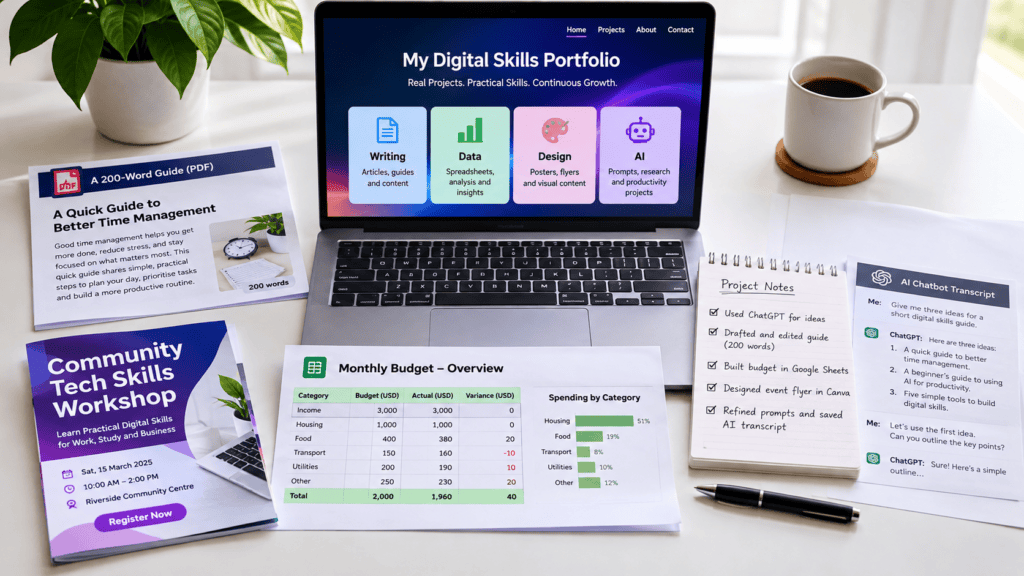
You just need an execution system: pick one skill, choose one platform, and ship one scoped project that proves your ability. This guide breaks down the exact stack and weekly projects to turn passive tool use into measurable digital skills.
The Practice-First Method
A real digital skill is not knowing an interface exists; it is proving you can use that software to ship a tangible outcome. Every skill breakdown below follows a strict execution loop: one tool, one project, one piece of proof.
Three non-negotiable rules keep this system grounded in real-world output:
- Prioritize daily reps over marathon sessions: Practice for twenty minutes every day rather than two hours once a month. Consistent micro-sessions build procedural fluency, while sporadic cramming creates friction and burnout.
- Ship small, complete deliverables: A finished one-page audit, dashboard, or workflow beats an unfinished forty-hour course every time.
- Centralize every output into one repository: Save every completed file in a single dedicated folder. Over time, that directory becomes a verifiable portfolio—and clients or hiring managers hire proof of work, not a list of apps on a resume.
What Are Free AI and Productivity Tools?
Free AI and productivity tools are cloud-based applications and software platforms that help users automate tasks, manage workflows, analyze data, and create content at zero upfront cost. By combining generative artificial intelligence with traditional organization systems, these tools lower the barrier to building job-ready digital skills.
While modern platforms increasingly blend both functions, they serve two distinct core roles:
- Free AI Tools: Software powered by machine learning and natural language processing to handle cognitive and creative tasks. Examples include
- AI chatbots,
- Copywriting assistants,
- Research summarizers,
- Image generators.
- Productivity Tools: Digital workspaces built to organize schedules, manage projects, store files, and streamline collaboration. Examples include
- Task managers,
- Note-taking apps,
- Spreadsheets,
- Document editors.
Understanding the “Free” Tier Landscape
Most modern platforms run on a freemium model, offering permanent access to core features while gating advanced capabilities or higher usage caps behind paid plans. When building your skill stack, separate software into three tiers:
| Tier Type | How It Works | Best For |
| Completely Free / Open-Source | Full core functionality with no paywalls or expiration dates. | Long-term daily practice and portfolio building without budget constraints. |
| Freemium (Usage-Capped) | Permanent free access limited by daily prompts, file sizes, or storage. | Learning core workflows and shipping small, scoped projects. |
| Time-Limited Free Trials | Full pro features unlocked for 7–30 days before requiring a credit card. | Short, intensive sprints—avoid building long-term habits on these alone. |
By strategically pairing free AI and productivity tools, students, freelancers, and career switchers can replicate enterprise-grade workflows and build verifiable proof of work without paying for expensive software licenses.
Writing and Clear Communication
Clear writing is the highest-leverage digital skill you can build. Every modern role relies on crisp emails, SOPs, product copy, and reports—and practicing them requires zero paid software. Using free AI and productivity tools like grammar checkers, readability analyzers, and word counters gives you immediate, objective feedback on your clarity.
How to Practice
Start with a free readability analyzer (like Hemingway Editor) and a word counter. Take an existing product description and rewrite it twice: once in under 100 words, and once at a 6th-grade reading level. The word counter enforces brevity, while the readability score strips away hidden jargon and bloated sentence structures.
Your 7-Day Skill Project
- The Tools: Free readability checker + distraction-free text editor (e.g., Google Docs or Notion).
- The Deliverable: Ship three distinct writing samples in seven days:
- A 200-word product description focused on user benefits.
- A 150-word professional pitch or request email with a clear call to action.
- A 300-word step-by-step how-to guide teaching a workflow you already know.
- The Proof: Export all three as clean PDFs (or publish them on a free portfolio page) and drop them into your master folder. Together, they prove range, structural clarity, and execution speed.
Data Privacy Rule:
Many free web-based writing and AI editors log pasted inputs to train models or improve services. Never paste passwords, personal data, or confidential client documents into browser-based tools—stick strictly to original practice text or anonymized drafts.
Working with Numbers
Many people avoid numbers because they fear complex math, not because the analysis is hard. Using free AI and productivity tools—from percentage calculators to free cloud spreadsheets—handles the arithmetic automatically. Your real skill is choosing the right metrics and explaining what they mean.
How to Practice
Start with a free percentage calculator for everyday math like discounts, tax, tips, and score conversions. Estimate the answer first, then check your work to build number intuition. Next, build a monthly budget in a free spreadsheet using real figures for income, rent, food, transport, and savings. Add a percentage-of-total column so raw rows turn into a clear story.
Your 7-Day Skill Project
- The Tools: Free percentage calculator + free cloud spreadsheet (e.g., Google Sheets).
- The Deliverable: Create a one-page monthly budget plus a one-paragraph takeaway explaining what the numbers show—for example: “Food accounts for 32% of my spending; limiting takeout to twice a week could cut total expenses by roughly 8% a month.” That insight is the skill; the spreadsheet just ran the math.
- The Proof: Export the budget as a clean PDF or keep the organized spreadsheet file in your master portfolio folder. It shows you can structure data and draw practical conclusions.
Leveling Up with Core Formulas
To go deeper without getting overwhelmed, learn one spreadsheet function per week:
- Week 1 — SUM: Totals expenses, hours, or revenue in seconds.
- Week 2 — AVERAGE: Shows typical daily spend, weekly study time, or average order value.
- Week 3 — IF: Flags items over budget or milestones hit.
Those three functions are enough to run a lightweight tracker for expenses, study sessions, or sales. Save the finished workbook in your portfolio folder as proof that you can organize data, not just read it.
Design and Visual Communication
You do not need formal design training to communicate visually. In most roles, visual skill means producing assets that are clean, legible, and properly sized across formats.
Using free AI and productivity tools—like browser-based design editors, image resizers, file compressors, and QR code generators—handles the technical heavy lifting so you can focus on clarity.
How to Practice
Pick one real-world brief: a one-page small-business flyer, an event poster, or a clean service price list. Apply three strict constraints: one clear headline, a maximum of three colors, and text large enough to scan from a distance. Use a free image resizer to export both a print-ready file and a mobile-screen version, then embed a static QR code linking to a booking page or menu. That single code bridges offline print and online action.
Your 7-Day Skill Project
- The Tools: Free layout editor (e.g., Canva or Adobe Express) + image resizer/compressor + static QR code generator (e.g., QRCode Monkey).
- The Deliverable: Produce two sized versions of the same flyer (one print PDF, one mobile PNG) paired with a short design rationale note explaining your choices—why you chose that color palette, why the headline leads with that hook, and how you structured the visual hierarchy.
- The Proof: Save both exported files, the editable source file, and your rationale note in your master folder. The rationale matters more than the graphic itself—it proves intentional decision-making rather than random template clicking.
Free-Tier Export Check:
Always inspect your export settings before committing to a visual tool. Many freemium design and image apps restrict daily downloads, lock high-resolution vector formats, or stamp watermarks on free exports.
Watermarked drafts work for personal reps, but never send them to a client—export a test file early and always archive your editable originals.
Productivity and Organization
Software alone will not make you organized; free AI and productivity tools only create value when they change how you execute daily work. A countdown timer or task board does nothing on its own. The real skill is prioritizing ruthlessly, working in uninterrupted focus blocks, and auditing your own output.
How to Practice
Run a simple daily execution loop for seven days. Each morning, list three high-impact tasks—never ten. Work on task one for 25 minutes using a free Pomodoro timer with your phone out of reach, then take a five-minute break. Each evening, log one single line: what shipped, and what caused friction.
After seven days, you have concrete behavioral data on your energy peaks—worth more than any complex dashboard.
Your 7-Day Skill Project
- The Tools: Free Pomodoro timer (e.g., Pomofocus) + simple daily note or spreadsheet log.
- The Deliverable: Complete a seven-day work log paired with a three-sentence schedule adjustment for week two—for example: “My peak focus for deep writing happens before 11 AM. Next week, I will block mornings exclusively for creative output and batch emails and calls after 2 PM.”
- The Proof: Save the completed log and your week-two operating plan as a PDF in your master folder. It demonstrates self-management backed by real performance data.
Bonus Micro-Skill: Mastering File Conversions
Document formatting and file conversions belong in every organization toolkit. Converting a JPG to a searchable PDF, merging multi-page contracts, or compressing oversized attachments sounds basic, yet clients and colleagues rely on people who can solve format bottlenecks fast.
- Practice three core workflows: Image-to-PDF conversion, multi-PDF merging/splitting, and lossless file compression.
- Document tool limits: Keep a quick reference note listing your preferred browser tools (e.g., iLovePDF, PDF24) alongside their free-tier file-size limits and daily caps so you never stall on a deadline.
Learning with AI: The New Core Skill
AI assistants now sit inside almost every digital workflow, so the career advantage is no longer “using AI.” The real skill is using free AI and productivity tools well: asking sharp questions, checking every claim, and catching confident errors before they ship.
How to Practice
Treat an AI chatbot as a tutor, not an oracle. Ask it to explain an unfamiliar concept in plain language, then ask it to quiz you on what you just read.
When drafting an email or brief, use AI for a rough first pass, rewrite it in your own voice, and verify every specific detail. Language models can state a wrong date, an outdated price, or a fabricated citation with complete certainty. Catching those flaws is the skill.
Your 7-Day Skill Project
- The Tools: Free AI chatbot (e.g., Gemini, ChatGPT, Claude, or Perplexity) + your note-taking app or text editor.
- The Deliverable: Pick one topic you do not know yet—such as how solar panels generate electricity or how small e-commerce stores handle last-mile delivery. Spend seven days learning it with your AI tutor, take handwritten or typed notes, and write a 400-word guide in your own words. Then fact-check three specific claims in your draft against primary or trusted sources.
- The Proof: Save your guide and a short verification log (showing the three claims, what you checked, and whether each held up) as a PDF in your master folder. Passing all three checks proves two high-leverage skills at once: rapid comprehension and disciplined verification.
Limits & Data Privacy Rule:
Free AI tiers often cap message volume or uploads, serve lighter models, and may train on your conversations unless you adjust privacy settings. Models also have fixed knowledge cutoffs unless web search is active. Never paste identity documents, private records, passwords, or confidential client data into a free chatbot.
Your 4-Week Skill-Building Action Plan
Knowledge without execution stays theoretical. To turn free AI and productivity tools into verifiable career assets, follow this 28-day sprint using the 25-minute Pomodoro timer method each day and saving every completed file into one master folder:
| Timeline | Core Skill | Primary Deliverable | Portfolio Artifact |
| Week 1 | Writing & Communication | Three short copy and instructional pieces | 3 clean PDFs (product copy, pitch email, how-to guide) |
| Week 2 | Working with Numbers | One-page monthly budget + analytical takeaway | Budget spreadsheet + PDF summary |
| Week 3 | Design & Visuals | Event or business flyer in print and mobile sizes | 2 exported graphics + source file + design rationale note |
| Week 4 | AI-Assisted Learning | 400-word beginner guide on an unfamiliar topic | Original guide PDF + 3-point fact-check log |
Turning One Folder into Career Leverage
By day 28, that single folder is no longer a practice directory—it is a multi-disciplinary proof-of-work portfolio. It demonstrates four distinct, high-demand digital skills—clear writing, quantitative reasoning, visual communication, and AI-assisted research—backed by tangible deliverables rather than empty resume buzzwords.
Share that folder link directly with hiring managers, prospective clients, or mentors to prove how fast you learn and ship. From there, keep the momentum alive: add one new scoped project every month, and watch a simple practice habit compound into undeniable career leverage.
How to Prove a Digital Skill (Without a Fancy Portfolio)
A skill only creates career leverage when an employer or client can verify it. Listing free AI and productivity tools on a resume proves you can spell the software’s name; showing tangible output proves you can solve problems.
Three formats of proof carry the highest credibility:
- The Finished Deliverable: The clean, export-ready asset itself—a formatted SOP, an automated budget sheet, or a print-ready flyer.
- The Before-and-After Transformation: Place the messy raw input beside the polished final output, paired with a single sentence explaining what you fixed and why. This exposes your judgment, not just your final polish.
- The Measurable Metric: Attach a concrete number to your process—for example, “Cut weekly expense reporting from two hours to forty minutes using spreadsheet formulas.” Specific metrics make competence immediately believable.
Where to Host Your Proof of Work
You do not need an expensive custom website or paid portfolio builder to showcase your projects. Publish your artifacts anywhere a decision-maker can open them in one click:
- A Cleanly Organized Cloud Folder: A shared Google Drive or Dropbox folder named clearly (e.g.,
FirstName-LastName-Digital-Skills-Portfolio) with numbered PDFs and a shortREADMEindex file. - A Free One-Page Site or Wiki: A public Notion page, Carrd site, or GitHub Pages link hosting your four deliverables alongside two-sentence project descriptions.
- A Free Blog or LinkedIn Featured Section: Individual posts walking through how you built each deliverable and what you learned.
Skip the complex web design. Four complete, well-labeled deliverables paired with honest, specific descriptions will outperform a polished resume every time.
Start Today: From Free Tools to Verifiable Skills
You do not need a paid subscription, a certification, or permission to start building career leverage. You only need one platform, twenty focused minutes, and a small project you will actually finish.
Pick the single skill that moves the needle most for your goals, open one of these free AI and productivity tools, and ship your first deliverable today. Tomorrow, repeat the loop. In thirty days, you will hold tangible proof of competence; in six months, you will own a multi-disciplinary portfolio that speaks louder than any resume.
Software alone will never future-proof your career—consistent execution will. Stop collecting bookmarks, pick one project, and build something you can show.
What are the best free AI and productivity tools for beginners?
The best free AI and productivity tools for beginners are cloud-based platforms with generous permanent free tiers and zero setup friction:
Writing & Editing: Google Docs paired with Hemingway Editor for readability and clarity.
Numbers & Data: Google Sheets for budgeting, formulas, and lightweight tracking.
Design & Visuals: Canva or Adobe Express for clean layouts, plus iLovePDF for file conversions.
AI Learning & Research: Free tiers of Gemini, ChatGPT, Claude, or Perplexity for tutoring, drafting, and summarization.
Can you actually build job-ready digital skills using only free tools?
Yes. Employers and clients hire for verifiable outcomes—such as clear copy, organized spreadsheets, clean visuals, and accurate research—rather than paid software licenses.
Practicing daily for 20 minutes and saving finished projects in a shared portfolio folder proves real capability faster than listing unverified software names on a resume.
What is the difference between free AI tools and productivity tools?
Productivity tools help you organize tasks, manage time, edit documents, and structure data (such as spreadsheets, calendars, and note apps).
Free AI tools use machine learning and natural language processing to assist with cognitive tasks like drafting text, summarizing research, and answering questions. Modern platforms increasingly combine both functions inside one workspace.
Are free AI and productivity tools safe to use with sensitive data?
Most free browser-based tools store inputs, log usage data, or use prompts to improve their models unless privacy settings are explicitly adjusted.
Never paste passwords, government IDs, financial account numbers, or confidential client documents into free AI chatbots or online file converters. Always use anonymized or original practice data.
How long does it take to build a digital skills portfolio from scratch?
You can build a foundational, four-project portfolio in 28 days by dedicating 20 to 25 minutes a day to focused practice.
Completing one scoped project per week across writing, spreadsheets, visual design, and AI-assisted research gives you four concrete deliverables to share with employers or clients.
How do I prove my digital skills without paid portfolio hosting?
Host your completed files in a clearly named Google Drive or Dropbox folder with a short README index, publish them on a free Notion page, or add them to your LinkedIn Featured section.
Include three elements for each project: the finished file, a brief before-and-after note explaining your decisions, and a measurable result (such as time saved or errors reduced).
In Conclusion
Access to free AI and productivity tools has permanently leveled the playing field—you no longer need a corporate budget, expensive subscriptions, or formal gatekeepers to build high-leverage digital skills.
What separates self-taught professionals from passive browser collectors is not the size of their bookmark bar, but the discipline to pair one tool with one scoped project and ship finished proof of work.
Start small today: pick one skill from this guide, set a 25-minute timer, and complete your first deliverable. Save it to your portfolio folder, repeat the loop next week, and let a growing body of real work open doors that a resume alone never could.

Mustafa Qazi runs Free Tools World, a collection of 153 free online tools that need no signup — from calculators and converters to writing and productivity tools. He writes practical guides that help people build digital skills with free tools.