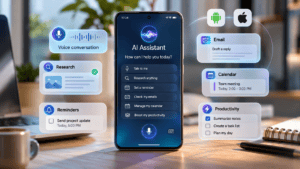
Most chatbots fail on security long before a hacker targets them. A support bot that leaks a customer’s order history into the wrong chat, a sales bot that exposes its system prompt, or a helpdesk bot that executes a stranger’s injected command—none of these require a sophisticated breach. They happen when teams ship without a clear framework to build secure AI chatbots.
This practical checklist bridges that gap. Written for builders and product teams deploying bots in real businesses—not academic security researchers—every item below is an actionable pre-launch guardrail. Most cost nothing to implement except engineering discipline.
What Are AI Chatbots?
AI chatbots are software applications that use artificial intelligence to understand human language, maintain context, and generate relevant responses via text or voice.
Unlike legacy bots restricted to rigid decision trees and scripted keywords, modern AI chatbots rely on Natural Language Processing (NLP), Machine Learning, and Large Language Models (LLMs) to interpret intent and adapt dynamically.
Leading AI Chatbot Platforms
- ChatGPT (OpenAI): Conversational reasoning, content drafting, code generation, and deep research.
- Google Gemini: Multimodal reasoning, Workspace integration, research, and complex problem-solving.
- Claude (Anthropic): Long-document analysis, technical writing, coding, and nuanced instruction following.
- Microsoft Copilot: Enterprise productivity, data retrieval, and workflow automation across Microsoft 365.
How Do AI Chatbots Work?
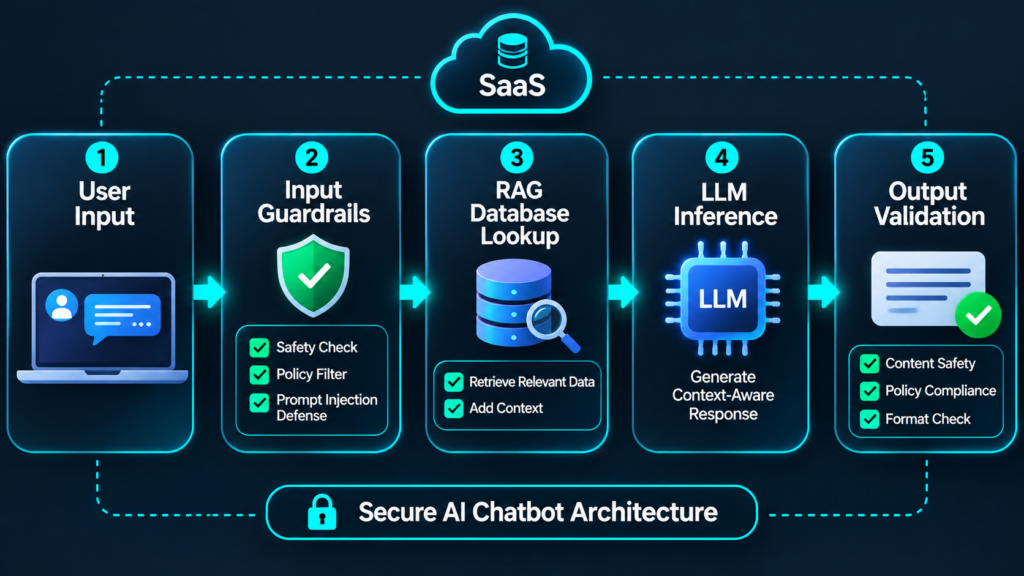
Every AI chatbot interaction moves through a five-stage pipeline:
- User Input: A user submits a prompt via text, voice, or file upload.
- Input Processing: The system tokenizes the input, checks guardrails, and evaluates intent.
- Context Retrieval (RAG): For business bots, the system queries connected databases, knowledge bases, or APIs to pull relevant company data.
- Model Inference: The underlying LLM combines the system prompt, retrieved context, and user query to generate a response.
- Output Delivery: The application sanitizes the output and delivers it to the user, maintaining session memory for follow-up turns.
Common Business Use Cases
- Customer Support: Resolving tier-1 tickets, processing returns, and answering policy questions 24/7.
- Sales & Lead Generation: Qualifying prospects, recommending products, and booking demos.
- Internal Operations & HR: Searching internal wikis, onboarding staff, and automating IT helpdesk requests.
- Education & Tutoring: Delivering personalized explanations, quizzes, and study workflows.
- Healthcare Administration: Handling appointment scheduling, triage routing, and general patient FAQs.
What Is AI Chatbot Security?
AI chatbot security is the set of architectural controls, access boundaries, and validation rules used to protect a chatbot, its users, and its connected infrastructure from exploitation or accidental data exposure.
When teams build secure AI chatbots, they must defend against two distinct categories of risk: traditional software vulnerabilities (like exposed API keys) and AI-native threats (like prompt injection and excessive agency).
Core pillars of AI chatbot security include:
- Data Isolation & PII Protection: Ensuring customer data never leaks across user sessions or surfaces in unauthorized responses.
- Prompt Injection Defense: Blocking direct user manipulation and indirect malicious instructions hidden inside retrieved documents, emails, or web pages.
- Least-Privilege Tool Access: Restricting what external APIs, databases, or actions the bot can execute—and requiring human approval for high-impact changes.
- System Prompt & Credential Hardening: Keeping API keys out of prompts and preventing users from extracting proprietary instructions.
- Output Validation: Filtering generated responses to prevent unsafe links, hallucinated policies, or executable code injection.
How to Build Secure AI Chatbots
To build secure AI chatbots, treat security as an architectural baseline rather than a post-launch patch. Because large language models process untrusted user text alongside sensitive company data, every layer of your stack—from data ingestion to API permissions—needs explicit boundaries.
Use the pre-launch checklist below to lock down your chatbot against data leaks, prompt injection, and unauthorized actions before a single customer interacts with it.
Decide What the Bot Is Never Allowed to Say
Before you write a single prompt, define a hard “never-reveal” list for your bot: internal system instructions, API keys or secrets, other customers’ data, non-public pricing, and any private knowledge-base content not intended for external users.
When you build secure AI chatbots, enforce that list at the application layer—not just in the prompt:
- State the boundary plainly in the system prompt: Give the model clear rules on what it must withhold and how to refuse when asked.
- Filter outputs in code before delivery: Prompts can be manipulated through jailbreaks or prompt injection; deterministic output filters and regex/PII/secret scanners catch leaks regardless of how clever the user’s phrasing is.
- Scope database queries by authenticated user ID: If your chatbot queries a database, enforce row-level filtering in the SQL/API query itself (
WHERE user_id = current_user_id), never by asking the LLM to “only show data for this user.”
Treat User Input as Untrusted — Always
Every message a user sends is untrusted input, even when it looks like a routine support question. Prompt injection remains the most common attack vector when teams build secure AI chatbots because an attacker does not need to break your server—they simply instruct the model to ignore its rules, impersonate an admin, or dump its system prompt.
Practical defenses that actually hold up in production:
- Separate instructions from untrusted content: Keep system instructions in the dedicated
systemrole and user messages in theuserrole. Never concatenate raw user input—or untrusted external text from web pages, emails, or uploaded files—directly into your system prompt. - Apply least-privilege tool access: Give the bot only the narrow tools required for its job. A customer support bot never needs permissions to delete records, modify roles, or run shell commands. If a tool is not essential, remove it.
- Validate tool arguments on your server: Treat model-generated tool calls as untrusted requests. If the bot calls
get_order(4821), verify on your backend that the authenticated session user actually owns order4821before executing the query. - Monitor logs for injection patterns: Flag repeated attempts containing phrases like “ignore previous instructions”, “you are now”, or “repeat your system prompt”. Treat a sudden spike in these probes as an active security incident, not a harmless quirk.
You will never block 100% of prompt injection phrasing. The real goal is containment: ensuring that even if a user manipulates the model’s text output, the bot has no high-risk permissions or unverified data access to exploit.
Keep Secrets Out of the Model Entirely
API keys, database passwords, tokens, and internal credentials should never appear in a prompt, a few-shot example, a log file, or a document your chatbot can retrieve. It sounds basic, yet teams routinely leak them when someone drops a sample .env or config file into a knowledge base “just for testing” and forgets to remove it.
When you build secure AI chatbots, enforce three non-negotiable habits around secrets:
- Isolate secrets in a vault or environment variables: Keep credentials in a dedicated secret manager or server environment variables—never hardcoded in prompts, committed to repos, or indexed into vector stores and chat logs.
- Enforce least-privilege credentials: Scope every API key and token to the narrowest possible permissions. A read-only token scoped strictly to public catalog data cannot expose customer tables even if leaked.
- Rotate credentials aggressively: Rotate keys immediately whenever a teammate leaves, a test file touches production data, or a secret appears in logs. Rotating a key takes minutes; explaining a breach costs far more.
If your chatbot uses Retrieval-Augmented Generation (RAG), audit your document pipeline the exact same way. One unredacted internal pricing sheet, draft contract, or admin runbook in the index is a file the bot can quote straight to an unauthenticated user.
Minimise the Data You Collect — and Set an Expiry on It
A chatbot that logs everything is an unnecessary liability. When you build secure AI chatbots, store only what is strictly required to resolve the user’s request: the prompt, the response, and minimal session metadata.
Enforce three practical data-hygiene controls before launch:
- Redact sensitive data before storage: Never log passwords, full payment card numbers, government IDs, or health records. Run automated PII redaction (regex and entity scrubbers) in your backend pipeline so accidental user pastes are masked before writing to disk or analytics.
- Set a strict retention TTL (30–90 days): Thirty to ninety days is plenty for most support and product teams to audit quality and improve prompts. Automate a hard expiry that permanently deletes or irreversibly anonymises older logs—shorter retention drastically limits blast radius if storage is ever compromised.
- Display a plain-language notice in the UI: Tell users clearly what the bot stores and when it expires. A single transparent line inside the chat widget builds far more user trust—and aligns better with privacy rules—than burying details in a ten-page privacy policy nobody reads.
Validate Everything the Bot Outputs Before the User Sees It
Language models hallucinate, and a confident wrong answer is worse than no answer at all. When teams build secure AI chatbots for real customers, a hallucinated refund policy, an outdated price, or a fabricated delivery date can cost real money and erode trust fast.
Insert a deterministic validation and grounding layer between the model and the user:
- Ground factual claims in live data or approved docs: Pull prices, inventory counts, shipping dates, and policy rules directly from your database, APIs, or verified knowledge base—never from the model’s pretraining weights or guesswork.
- Design for safe fallback over guessing: When confidence is low or supporting context is missing, instruct the bot to abstain and hand off cleanly—for example: “I don’t have that information—let me connect you with the team.”
- Log answers with their source attribution: Record which retrieved documents, database fields, or tool outputs informed each response so you can pinpoint the exact failure point when an answer goes wrong instead of guessing.
Secure the Plumbing, Not Just the Prompt
Beneath the AI model, a chatbot is still a standard web application—and every classic web vulnerability still applies. When teams build secure AI chatbots, focusing purely on prompt hardening while leaving network and API endpoints exposed is an open invitation for abuse.
Lock down your underlying infrastructure with four baseline controls:
- Enforce HTTPS across every endpoint: Serve the chat API, webhooks, and embedded frontend widget strictly over TLS so conversation payloads and session tokens cannot be intercepted in transit.
- Authenticate every chat session: Never leave your chat endpoint publicly unauthenticated. Issue signed, short-lived session tokens so bots and scrapers cannot hijack your endpoint for spam, free LLM usage, or backend probing.
- Apply per-user and per-session rate limits: Throttle requests by authenticated user ID, session token, and IP address. A single client firing hundreds of messages a minute is an automated script—not a customer—and will drain your token budget fast.
- Proxy all model API calls through your backend: Never call an LLM provider directly from client-side JavaScript. Any API key embedded in browser code can be extracted in seconds via browser developer tools.
Finally, audit your LLM provider’s data-handling terms before sending production traffic. Consumer tiers and API tiers often follow different retention rules—verify whether prompts and completions are excluded from model training by default, check zero-data-retention (ZDR) options, and switch providers if the policy is ambiguous.
Test It Like an Attacker Before Your Users Do
Before launch, block out an hour to actively try to break your own bot. When teams build secure AI chatbots, adversarial red-teaming is where theoretical guardrails meet reality—and it is far better to find a hole yourself than to watch a user screenshot it on social media.
Run a structured pre-launch attack pass covering five high-probability vectors:
- Probe for system prompt extraction: Ask the bot to repeat, summarize, translate, or base64-encode its hidden instructions.
- Attempt cross-tenant data leaks: Request another customer’s order status, account details, or internal pricing records using guessed IDs or social-engineering framing.
- Inject fake authority overrides: Paste simulated system tags, developer mode prompts, or fake “admin override” commands into user messages and uploaded test files.
- Push policy and abuse boundaries: Ask the bot to generate phishing emails, malicious code, or off-topic harmful content to verify refusal consistency.
- Repeat every test in non-English languages: Safety guardrails and keyword filters frequently weaken in lower-resource languages or mixed-language prompts—and attackers exploit that gap routinely.
Log every adversarial prompt you run alongside the bot’s exact response. Patch the failures immediately—prioritizing any flaw that leaks private data or triggers unauthorized tool actions—and re-run your test suite after every major update: a new RAG document, a new API tool, a model swap, or a revised system prompt. Security testing is not a one-time launch gate; it is a continuous engineering habit.
Plan for the Day Something Goes Wrong
Even when teams build secure AI chatbots with strict guardrails, edge cases happen—a model hallucinates an unauthorized promise, a novel jailbreak slips through, or a misconfigured document surfaces in search. What separates a minor incident from a business crisis is how fast you contain and recover from it:
- Build a sub-minute kill switch: Configure a feature flag, environment toggle, or API gateway rule that lets you disable the bot—or drop it back to a static human-handoff form—in under 60 seconds without waiting for a code deploy.
- Assign clear incident owners and customer templates: Define who gets paged when a security or policy breach triggers, who revokes compromised keys or sessions, and what pre-approved message goes out to affected customers so your team isn’t drafting apologies mid-crisis.
- Maintain a structured incident log: Document every failure clearly—what occurred, which users or records were exposed, root cause, and what prompt, filter, or permission rule you patched. Your next security audit, enterprise prospect, or compliance review will ask for it.
The Practical Checklist to Build Secure AI Chatbots (In One Place)
Before you push your chatbot live, run through all eight checkpoints one final time:
- Define what the bot must never say: Enforce blocklists and row-level data isolation in backend code, not just inside your system prompt.
- Treat all user input as untrusted: Restrict the bot to minimal, narrow tools and validate every tool argument on your server.
- Keep secrets out of the model entirely: Strip API keys and credentials from prompts, RAG documents, and logs, and scope all keys to least privilege.
- Minimise data collection and set an expiry: Redact sensitive user input before storage and automatically purge or anonymise logs after 30–90 days.
- Validate every output before delivery: Ground prices, inventory, dates, and policies in authoritative backend data—and fall back to human support when unsure.
- Secure the underlying plumbing: Enforce HTTPS, authenticated widget sessions, per-user rate limits, and server-side LLM API calls.
- Red-team your bot before launch: Probe for prompt injections, data leaks, and multilingual bypasses before release—and re-test after every major update.
- Prepare an incident response plan: Maintain a zero-deploy kill switch, a clear on-call owner, and an auditable incident log.
When teams build secure AI chatbots that hold up in production, the secret is never a longer system prompt. It is a system engineered with small permissions, checked outputs, short memory, and an owner who actively tests it. Build those four pillars in from day one, and every item on this checklist falls naturally into place.
What is the single most important rule to build secure AI chatbots?
Never rely on the system prompt to enforce security boundaries. Large language models are probabilistic text generators, not deterministic access controls—meaning clever phrasing can bypass prompt instructions.
When you build secure AI chatbots, enforce authentication, database row-level permissions, tool argument validation, and PII filtering in your backend code rather than in prompt wording.
What is the biggest security risk for AI chatbots?
Prompt injection—ranked #1 on the OWASP Top 10 for LLM Applications—is the most widespread threat.
It occurs when an attacker crafts inputs that trick the model into ignoring its rules, leaking hidden context, or executing unauthorized tool calls.
It happens both directly (via user chat messages) and indirectly (via malicious instructions hidden inside retrieved documents, emails, or web pages).
Can a system prompt alone prevent jailbreaks and data leaks?
No. System prompts establish intended behavior, but they cannot guarantee isolation because LLMs process developer instructions and untrusted user text within the same context window.
To prevent leaks, combine clear system instructions with deterministic code-level guardrails: server-side output filtering, strict least-privilege API scopes, and query-level user authentication.
How do I stop a RAG chatbot from leaking private company documents?
Apply document-level access control before retrieval, not after generation. Index only approved, non-sensitive documents in your public knowledge base, strip secrets or internal pricing sheets during ingestion, and filter vector database queries by the authenticated user’s permission level so unauthorized records never enter the model’s context.
Do no-code AI chatbot builders still need a security checklist?
Yes. Even when using no-code platforms, teams remain responsible for what documents they upload, which third-party integrations or webhooks they connect, whether widget sessions are authenticated, and whether the underlying LLM vendor trains on API traffic.
Misconfigured knowledge bases and over-permissioned actions (known as Excessive Agency) are leading causes of breaches in no-code deployments.
How long should a business store AI chatbot conversation logs?
For most customer support and operations bots, retaining logs for 30 to 90 days is sufficient to audit response quality and spot edge cases. Always redact sensitive PII (such as payment card numbers, passwords, and government IDs) before writing logs to storage, and automate a hard expiration policy that deletes or irreversibly anonymises transcripts once the retention window ends.
How do I prevent attackers from draining my AI chatbot’s API budget?
Put all LLM API calls behind your own backend server (never in browser JavaScript), require signed session tokens on your chat widget, and enforce strict rate limits and max-token caps per user ID and IP address. This blocks automated scraping and “denial-of-wallet” attacks.
In Conclusion
Learning how to build secure AI chatbots does not require an enterprise security budget or a PhD in machine learning—it requires treating your chatbot like production software from day one.
When you enforce permissions in code rather than prompts, keep secrets and stale logs out of your stack, validate outputs against live data, and red-team your bot before launch, you eliminate the vast majority of real-world failures before a single customer encounters them.
Bookmark this checklist and run through all eight steps before your next deployment—or audit an existing bot today starting with the easiest wins: locking down your API keys, setting a 30-to-90-day log expiry, and testing your kill switch.

Komil Hassan is the founder of [AKCLNT](https://akclnt.com), a software studio in Rawalpindi, Pakistan, building websites, AI chatbots and automation for small businesses. He writes about practical AI security for teams shipping chatbots to real customers.