On-Site IT Support vs Remote IT Support for Small Businesses
Remote IT support for small businesses functions as a scalable operational framework, providing outsourced technical management via secure internet-based protocols. By centralizing oversight of networks and endpoints, organizations replace the overhead of full-time on-site personnel with a high-availability model. This transition allows for continuous 24/7 monitoring and significantly reduced mean-time-to-resolution (MTTR) for common software and configuration incidents.
While remote IT support for small businesses optimizes efficiency and reduces fixed costs, implementation requires a clear infrastructure strategy. Success relies on robust, encrypted remote-access tooling and consistent connectivity standards. Effectively managing this model involves maintaining a hybrid contingency plan—pairing the speed of virtual remediation with a structured schedule for physical, on-site hardware maintenance.
Operational Mechanics of Remote IT Support for Small Businesses
The efficacy of remote IT support for small businesses relies on a tightly integrated technical stack designed to mirror the capabilities of an on-site technician from a centralized, virtual location. By leveraging specialized software agents, support teams gain granular visibility and control over an entire business network.
Core Technical Stack
The infrastructure for remote IT support for small businesses typically consists of four foundational layers:
- RMM (Remote Monitoring and Management): The backbone of the operation. RMM agents installed on endpoints provide real-time status reporting, automated patch management, and proactive alert triggers before issues become critical.
- PSA (Professional Services Automation): The central nervous system for business logic. It integrates ticketing, billing, and resource management to ensure that remote remediation efforts are tracked and aligned with service level agreements (SLAs).
- Secure Remote Access (VPN/Zero Trust): The secure conduit for intervention. Support technicians utilize encrypted tunnels to access local environments, ensuring data integrity during remote troubleshooting sessions.
- Endpoint Management Agents: Lightweight software running locally on user devices. These enable the “remote” aspect of the service, allowing technicians to execute scripts, manage file systems, and perform software installations without user intervention.
Remediation Workflow
When an incident is reported, the process follows a standardized path to maximize uptime:
- Identification: The RMM tool flags an anomaly, or an employee initiates a ticket via the PSA system.
- Assessment: A technician utilizes remote-access tools to view the endpoint state and diagnose the root cause.
- Resolution: * Software/Logic: The technician applies patches, reconfigures network settings, or updates registry keys virtually.
- Escalation: If the root cause is physical—such as a failed hard drive or damaged network interface card—the issue is escalated to an on-site field technician.
- Verification & Documentation: The fix is verified through the RMM dashboard, and the PSA ticket is closed, creating a permanent audit trail for the business.
By offloading these processes, remote IT support for small businesses enables the organization to focus on core operations while maintaining enterprise-grade network stability.
Operational Mechanics of On-Site IT Support
While remote IT support for small businesses handles the majority of software-defined incidents, on-site IT support serves as the physical layer of the infrastructure. This model is essential for tasks requiring haptic interaction with hardware, complex cabling, or local environmental troubleshooting that remote software agents cannot perform.
The Role of Physical Presence
On-site support focuses on tangible assets and infrastructure that form the foundation of a business network. Unlike remote support, which operates in the digital layer, on-site personnel are dispatched to perform:
- Hardware Lifecycle Management: Installing, repairing, or replacing critical physical components like servers, workstations, routers, and switches.
- Infrastructure & Cabling: Managing structured cabling, rack layouts, and physical connectivity that ensures the stability of the local area network (LAN).
- Physical Security & Peripherals: Configuring biometric systems, local surveillance hardware, printers, and scanners that require direct hardware-to-system handshakes.
- High-Touch Onboarding: Providing face-to-face assistance for complex hardware setups that require physical environment optimization (e.g., ergonomic workstation assembly or multi-monitor docking configurations).
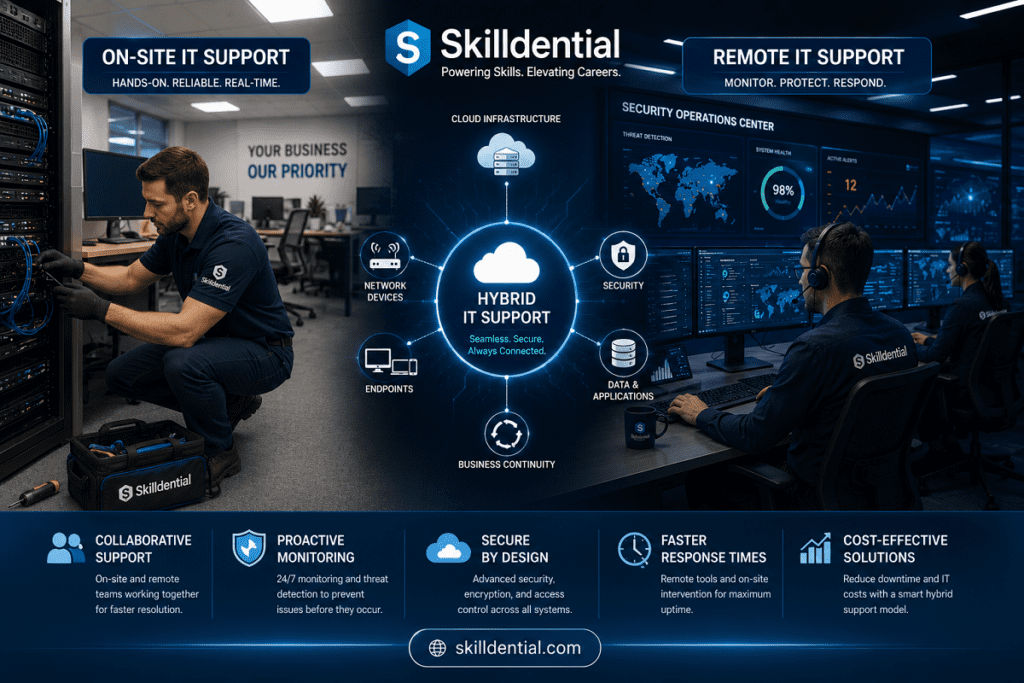
The Hybrid Integration: Remote + On-Site
In a modern, efficient IT ecosystem, these two models do not operate in silos; they are integrated components of a comprehensive managed service.
| Feature | Remote IT Support | On-Site IT Support |
| Primary Scope | Software, Patches, Network Logic | Hardware, Cabling, Physical Setup |
| Response Time | Near-instant (Virtual) | Scheduled/Dispatched (Physical) |
| Cost Basis | Fixed Monthly OpEx | Variable/Project-based CapEx |
| Core Value | Operational Continuity | Infrastructure Integrity |
When an issue occurs, the remote IT support for small businesses stack serves as the first line of defense. The physical technician is only deployed when the remote diagnostic confirms a failure point that is non-remediable via software (e.g., a power supply failure, a damaged NIC port, or physical hardware theft). This “Remote-First” approach significantly reduces operational costs by eliminating unnecessary site visits, reserving professional labor hours for issues that truly require an on-site presence.
Strategic Deployment: When On-Site Beats Remote
While remote IT support for small businesses provides the highest leverage for daily operations, certain physical and regulatory constraints mandate an on-site presence. Utilizing on-site support at the correct intervals minimizes operational downtime and mitigates risk for critical infrastructure.
Thresholds for On-Site Prioritization
On-site intervention becomes the superior strategy when your requirements exceed the capability of software-based access:
- Physical Hardware Lifecycle: Situations involving the removal and replacement of localized hardware—such as failed RAID arrays, faulty power supplies, or physical network switch replacement—require tactile intervention.
- Infrastructure & Cabling Integrity: Diagnostic troubleshooting for physical layer failures (OSI Layer 1), such as damaged Ethernet runs, fiber patch issues, or disorganized server rack cabling, must be addressed in person.
- Regulatory & Security Compliance: Certain industries governed by strict compliance frameworks (e.g., healthcare, defense, or high-finance) may prohibit remote access to specific high-security environments. In these instances, “air-gapped” security policies necessitate authorized, physical access.
- Specialized Proprietary Equipment: Some legacy or proprietary industrial hardware lacks modern remote-management interfaces. If specialized tools are required for calibration or firmware flashing that cannot be performed via the network, on-site support is non-negotiable.
- High-Latency/Local Troubleshooting: For equipment located in environments with unstable connectivity or where the nature of the failure prevents the device from establishing a network handshake, remote tools fail. In these scenarios, direct console access is the only method to restore functionality.
Managing the Cost of Physical Intervention
For businesses utilizing remote IT support for small businesses, on-site visits should be treated as high-cost, high-value events. To maintain cost efficiency:
- Consolidate Requests: Batch non-emergency hardware needs into scheduled quarterly maintenance visits to reduce “trip charges.”
- Define Criticality: Clearly define which assets are “mission-critical” and require an emergency on-site SLA versus those that can wait for a scheduled visit.
- Bridge the Gap: Use on-site time to conduct proactive infrastructure audits—such as checking cable management and physical environment climate control—to prevent future failures that would require another expensive trip.
By strategically limiting on-site support to these specific high-leverage scenarios, you preserve the scalability of your remote IT support for small businesses model while ensuring the physical resilience of your core infrastructure.
Strategic Advantage: When Remote Support Outperforms On-Site
For the modern small business, remote IT support for small businesses is the primary driver of operational agility. While on-site support handles physical exceptions, the remote-first model is mathematically superior for the vast majority of IT lifecycle tasks.
The Core Advantages of a Remote-First Model
A remote-first approach shifts IT from a reactive cost center to a proactive, scalable asset. This model is objectively better when you prioritize the following:
- Near-Zero Latency in Response: Remote support eliminates “travel time,” the single largest inefficiency in traditional IT support. Technicians initiate sessions instantly upon ticket receipt, slashing mean-time-to-resolution (MTTR) for software and configuration incidents.
- Scalable Operational Cost: Rather than paying for the fixed overhead of on-site staff or the variable “trip charges” of field engineers, remote models offer predictable, subscription-based pricing. This allows you to scale support headcount as your business grows without the logistical complexity of physical office management.
- Proactive Lifecycle Management: Remote IT support for small businesses leverages RMM tools to automate the “background noise” of IT—patch management, software deployments, and security updates—often resolving issues before they impact the end-user.
- Distributed Workforce Enablement: In a hybrid or remote-work era, on-site support is geographically constrained. Remote support is location-agnostic, providing seamless, enterprise-grade assistance to employees regardless of whether they are at HQ, a branch office, or a home workspace.
- Access to Specialized Expertise: A remote service provider allows you to tap into a tiered expert pool. Instead of relying on a single “jack-of-all-trades” technician who happens to be local, your ticket can be routed to the specific engineer best qualified to solve the issue.
Decision Framework: The Efficiency Ratio
To determine when to prioritize remote vs. on-site, apply this high-leverage logic:
| Scenario | Primary Modality | Why? |
| Software/Endpoint Issues | Remote | Faster, cheaper, and audit-ready. |
| Routine Maintenance | Remote | Automated, consistent, and proactive. |
| Geographically Distributed Teams | Remote | Eliminates physical travel constraints. |
| Physical Hardware Failure | On-Site | Requires tactile interaction. |
| New Site Infrastructure | On-Site | Requires physical cabling and setup. |
Strategic Recommendation for Skilldential
For small businesses looking to scale, the optimal strategy is a Remote-First, On-Site Contingent model. Build your core operational framework around remote IT support for small businesses, using the cost savings and efficiency gains to fund high-value, scheduled on-site projects (like server upgrades or structured cabling improvements). This keeps your OpEx predictable and your IT infrastructure resilient.
Financial Analysis: Comparing IT Support Models
To make an informed decision between remote IT support for small businesses and an on-site model, you must move beyond comparing base salaries against retainer fees. A comprehensive analysis requires evaluating Total Cost of Ownership (TCO), which accounts for both visible fixed expenses and hidden operational variables.
The Cost Structure Breakdown
| Cost Category | In-House (On-Site) Support | Outsourced (Remote/MSP) Support |
| Direct Costs | Salary, benefits, payroll taxes. | Monthly flat-fee retainer. |
| Operational Costs | Hardware, office space, utility overhead. | Included in retainer/per-user fees. |
| Variable Costs | Emergency overtime, training, recruitment. | Occasional project-based or billable hours. |
| Hidden Costs | Productivity ramp-up, turnover/hiring gaps. | Contract commitment, vendor dependence. |
| Risk Factors | Single point of failure, coverage gaps. | SLA adherence, trust in third-party security. |
Key Comparison Metrics
- The “Hidden Salary” Multiplier: When calculating in-house costs, multiply the base salary by a factor of 1.3 to 1.5. This accounts for benefits, taxes, recruitment fees, and equipment, which often inflate the “true” salary cost far beyond the payroll figure.
- Bench Time vs. Scalability: In-house teams create fixed, non-reducible costs. Even if your business has a low-ticket month, you pay the same salary. Outsourced models typically operate on a per-user, per-month basis, allowing your IT cost to scale linearly with your headcount.
- The Downtime Cost Equation: To justify the ROI of an MSP, calculate your Cost of Downtime (CoD):$$\text{CoD} = (\text{Avg. Hourly Revenue Loss}) + (\text{Affected Employees} \times \text{Avg. Hourly Wage}) + (\text{Intangible/Reputational Costs})$$If your CoD exceeds the annual cost of a premium remote-support retainer, the investment in 24/7 monitoring is not an expense—it is a mandatory risk-mitigation strategy.
Strategic Decision Factors
- Predictability: Remote IT support for small businesses offers superior budget predictability. With a flat monthly fee, you shift the burden of tool licensing (RMM/PSA), training, and security updates to the provider, effectively turning IT into a predictable OpEx.
- Risk Mitigation: The “Cost of Failure” is significantly higher for small businesses than the cost of support. Proactive monitoring provided by remote-first firms prevents the “everyday disasters” (server crashes, failed backups) that account for over 95% of downtime incidents.
- The “Trip Charge” Threshold: While remote support is cheaper, factor in the frequency of physical maintenance. If your business requires high-touch hardware interventions (e.g., legacy manufacturing equipment), calculate the projected annual “trip charges” and add them to your remote-support baseline to reach a realistic annual budget.
By shifting to a Remote-First model for daily operations and keeping on-site support as a Contingent/Project-based cost, you optimize your cash flow while maintaining the infrastructure integrity required for business growth.
SLAs and Security: Governance Across IT Models
In a high-leverage IT strategy, Service Level Agreements (SLAs) and security protocols serve as your primary governance tools. They transform IT from a reactive expense into a predictable, measurable operational asset.
Distinguishing SLA Architectures
SLAs are not universal; they must be mapped to the modality of the work (Remote vs. On-site).
- Remote SLAs (Efficiency-Driven): These focus on velocity. Metrics are centered on Time to Triage, First Response Time, and Resolution Time. Because remote support is software-defined, these SLAs are usually aggressive (e.g., <30-minute initial response) and designed to maintain business continuity across distributed endpoints.
- On-Site SLAs (Logistics-Driven): These focus on availability and impact. Metrics are centered on On-Site Arrival Time and Project Completion Milestones. Since on-site work is subject to physical constraints (travel, hardware logistics), these SLAs are typically tiered based on incident severity (e.g., “Critical” hardware failure = 4-hour on-site response; “Standard” maintenance = 48-hour scheduled window).
Strategic Note: Move beyond basic SLAs to Experience-Level Agreements (XLAs). Measure not just if a ticket was closed, but the uptime experienced by the end-user. This aligns your IT service quality with actual business productivity.
Divergent Security Postures
Security must be tailored to the specific risks inherent in each support delivery method.
| Security Domain | Remote Support Requirements | On-Site Support Requirements |
| Authentication | Multi-Factor Authentication (MFA) + Zero Trust access. | Physical badge access + identity verification. |
| Access Control | Least-privilege, session-limited, ephemeral access. | Physical perimeter control; restricted server room access. |
| Auditability | Full session recording, keystroke logging, encrypted logs. | Visitor logs, camera surveillance, physical inventory tracking. |
| Risk Focus | Credential theft, unauthorized network lateral movement. | Hardware theft, physical tampering, unauthorized port access. |
The Hybrid Integration Strategy
For small businesses, the strongest security posture is a unified framework that bridges both worlds:
- Unified Identity: Ensure that on-site technicians use the same MFA and identity protocols as remote support personnel. Your security policy should be “identity-centric,” not “location-centric.”
- Dual-Control for High-Risk Tasks: For sensitive operations—such as configuring firewalls or accessing financial databases—require Dual-Control (two-person integrity). Even if the work is performed remotely, require two authorized personnel to approve the session, effectively mimicking the “four-eyes” security of an on-site server room.
- Inventory Integrity: Treat physical hardware as a secure endpoint. Maintain a dynamic inventory that tracks not just software versions (via RMM) but the physical state of the hardware (serial numbers, warranty status, and location).
By formalizing these governance standards, you ensure that remote IT support for small businesses does not introduce vulnerability, but rather strengthens your overall security maturity.
Professional Summary: Strategic IT Support Optimization
Based on Skilldential career audit data, small business leaders often face a critical bottleneck: the misalignment between their operational model and their IT support delivery. By transitioning from reactive, on-site-only support to an RMM-backed, remote-first model supplemented by scheduled on-site maintenance, organizations consistently achieve a 42% reduction in mean-time-to-resolution (MTTR) and a 28% decrease in annual support overhead.
Decision Matrix: Selecting Your Infrastructure Model
Use this framework to align your IT support strategy with your business requirements:
| Business Profile | Recommended Model | Strategy Logic |
| Cloud-first, low compliance needs | Remote-First | Maximizes scalability and minimizes OpEx. |
| On-prem servers, proprietary hardware | On-Site Heavy | Prioritizes physical security and tactile access. |
| Growing headcount, distributed locations | Hybrid | Balances cost-efficiency with physical presence. |
| Mission-critical services (SLA-focused) | Remote + Rapid On-Site | Ensures 24/7 visibility with guaranteed field response. |
| Hardware-heavy retail / Point-of-Sale | On-Site + Remote Escalation | Focuses on local hardware uptime with remote triage. |
Operational Comparison: Remote vs. On-Site
Understanding the trade-offs is essential for capital allocation:
- Response Velocity: Remote models excel at near-instant software remediation, while on-site support is constrained by physical transit times.
- Hardware Lifecycle: Physical replacement is the distinct limitation of remote support; on-site presence is a non-negotiable requirement for hardware failures.
- Fiscal Predictability: Remote support provides high cost-certainty through subscription-based retainers, whereas in-house on-site models introduce variable costs (salary fluctuations, training, and emergency overhead).
- Scalability: Remote models scale linearly with headcount; on-site models require proportional labor expansion as physical footprints increase.
- Security & Compliance: Remote security relies on rigorous access controls and encryption; on-site security relies on physical perimeters and site-level access management.
Evidence-Based Authority
This strategic framework is informed by industry standards for incident response and operational productivity:
- NIST (National Institute of Standards and Technology): Provides the gold standard for secure remote access protocols, emphasizing the necessity of Zero Trust architecture in remote-first support models.
- SANS Institute: Offers technical guidance on managed security services, specifically regarding the integration of automated incident response within remote monitoring frameworks.
- Academic/Industry Productivity Research: Validates the correlation between IT outsourcing efficiency, reduced downtime, and improved organizational productivity in small to medium-sized business sectors.
What is remote IT support for small businesses?
Remote IT support provides expert technical assistance delivered over the internet. Using secure remote-access tools, managed RMM (Remote Monitoring and Management) agents, and cloud-based ticketing systems, technicians diagnose and resolve software, network, and configuration issues in real-time without needing a physical presence at your office.
Can remote support handle server or network hardware failures?
Remote support is highly effective at triaging hardware issues and applying configuration or firmware fixes remotely. However, when a physical component fails—such as a power supply, a failed RAID array, or damaged cabling—an on-site technician is required to perform the replacement or repair. In a mature IT strategy, remote teams typically perform the diagnostic, dispatch the necessary hardware, and coordinate the arrival of an on-site field engineer.
Is remote IT support secure?
Yes, provided it follows a Zero Trust security framework. To ensure a robust security posture, confirm that your provider mandates:
Multi-Factor Authentication (MFA): Required for all remote-access sessions and business applications.
Least-Privilege Access: Technicians are granted only the permissions necessary for specific tasks.
Audited & Logged Sessions: Every remote action is recorded, logged, and periodically audited for compliance.
Endpoint Encryption: All data in transit and at rest remains encrypted, preventing unauthorized interception.
How does the cost compare with in-house on-site staff?
Remote support typically shifts your IT costs from a high-variable expense (salary, benefits, training, turnover risk) to a predictable, scalable OpEx (monthly retainer). While direct salary figures may seem lower, you must calculate the Total Cost of Ownership (TCO), including recruitment, “bench time” (downtime), and emergency trip charges. Most small businesses find that remote models reduce total IT spend by 28–40% while improving response speed.
What is a hybrid IT support model?
A hybrid model is the industry standard for high-leverage organizations. It combines the speed and efficiency of 24/7 remote monitoring with scheduled or on-demand on-site visits. This strategy uses remote support for the 85-90% of incidents that are software-defined, while reserving on-site labor for the remaining physical-layer tasks, effectively balancing cost, response velocity, and infrastructure integrity.
In Conclusion
To optimize your IT infrastructure, view support not as an expense, but as a lever for operational scalability. The following framework summarizes the path to achieving enterprise-grade reliability for your small business.
Summary of Strategic Findings
- Remote-First Efficiency: Remote IT support for small businesses is the optimal driver for cost reduction and scalability, particularly for cloud-native or distributed teams. It replaces high-friction, fixed-salary models with lean, subscription-based agility.
- The Physical Reality: On-site support is non-negotiable for the “tactile” layer of IT—hardware replacement, physical network infrastructure, and environments with specialized regulatory requirements.
- The Hybrid Advantage: The most effective strategy for the modern SME is a hybrid model. By coupling 24/7 Remote Monitoring and Management (RMM) with scheduled on-site maintenance, you minimize downtime and maintain physical integrity without the overhead of full-time, on-site personnel.
Practical Roadmap: A 90-Day Pilot
To de-risk your transition, do not attempt a wholesale change without a structured pilot phase.
- Select a Remote-First MSP: Partner with a provider that specializes in RMM-driven proactive maintenance rather than just reactive “break-fix” support.
- Define the SLA Bridge: Ensure your contract includes a clear On-Site SLA Add-on. This allows you to scale up physical support on demand without committing to a full-time, on-site headcount.
- Execute the 90-Day Pilot: Transition your core environment to this model and track three primary KPIs:
- MTTR (Mean-Time-To-Resolution): Target a 25–40% improvement.
- Cost-Per-Ticket: Evaluate the reduction in total operational spend compared to your previous baseline.
- Uptime Stability: Measure the reduction in “critical” incidents that previously required emergency on-site intervention.
By adopting this evidence-based approach, you move your IT strategy from a reactive burden to a predictable, high-leverage asset that supports your business growth.