How to Find Legit IT Technician Remote Jobs for Graduates
To find legitimate IT technician remote jobs, recent graduates should target entry-level help desk, IT support, and technical service roles on vetted platforms and thoroughly verify potential employers. Navigating the modern remote job market requires knowing where real vacancies live, what core competencies employers expect, and how to protect yourself from recruitment scams.
This guide provides an actionable roadmap to help you locate authentic remote opportunities, align your technical skills, and tailor your application to get shortlisted.
Who This Guide Is For
- Technical Graduates: Recent graduates with degrees in IT, Computer Science, Information Systems, Networking, Cybersecurity, or related technical disciplines seeking entry-level remote positions.
- Certified Job Seekers: Early-career candidates holding foundational certifications (such as CompTIA A+ or Google IT Support) who want to translate their knowledge into virtual help desk roles.
- Early-Career Professionals: Candidates with practical troubleshooting skills who need a reliable strategy to find legit IT technician remote jobs, spot employment scams, and build an ATS-optimized application that hiring managers notice.
What Remote IT Technician Jobs Involve
When you find legit IT technician remote jobs, entry-level positions generally carry titles such as Help Desk Technician (Tier 1), Service Desk Analyst, Technical Support Representative, or Desktop Support Specialist.
In these roles, you act as the primary interface between users and the IT organization. Day-to-day responsibilities focus on initial triage, issue resolution, and system maintenance:
- Multichannel Support & Communication: Responding promptly to inbound support requests via live chat, ticketing software, phone, or email while maintaining clear, professional communication with non-technical users.
- Core Systems Troubleshooting: Resolving common operating system issues (Windows 10/11, macOS), desktop application errors, browser bugs, basic Wi-Fi connectivity, and VPN connection drops.
- Access & Identity Management: Performing routine identity tasks, such as handling password resets, setting up multi-factor authentication (MFA), and managing basic account provisioning via Entra ID (Azure AD) or Active Directory.
- Software Maintenance & Endpoint Remote Management: Remotely accessing user workstations via tools like AnyDesk, TeamViewer, or LogMeIn to push software patches, update application configurations, and run diagnostic checks.
- Ticket Logging & Knowledge Base Operations: Logging detailed notes for every interaction inside IT service management (ITSM) platforms (such as ServiceNow, Zendesk, or Jira) and documenting repeat solutions for internal knowledge bases.
- Structured Escalation: Recognizing complex infrastructure, server, or security issues outside Tier 1 scope and escalating them to Tier 2/3 systems administrators with thorough background notes.
What “Entry-Level” Really Means to Employers
Understanding what employers expect at the entry level makes it far easier to find legit IT technician remote jobs and position yourself to get hired:
- Demonstrated Technical Logic Over Years of Experience: Entry-level typically implies 0 to 2 years of professional experience. Employers do not expect you to know complex enterprise architectures immediately; they look for a structured troubleshooting methodology (e.g., isolating variables, checking physical layers first, reading event logs).
- Degree Alternatives Are Standard: A four-year computer science degree is rarely mandatory for Tier 1 roles. Practical experience, home labs, bootcamps, or industry certifications (e.g., CompTIA A+, Network+, Microsoft 365 Fundamentals, or Google IT Support) frequently substitute for formal degrees.
- Emphasis on Soft Skills & Documentation: Because remote teams rely heavily on written updates, hiring managers prioritize candidates with strong customer service skills, empathy, patience, and clear written documentation.
- Willingness to Learn On the Job: Companies treat Tier 1 as an incubator role. They expect candidates to bring baseline fundamentals so senior engineers can train them on company-specific tech stacks and workflows.
Skills and Qualifications Employers Look For (Without Over-Requiring)
To find legit IT technician remote jobs, you do not need to master high-level systems architecture or possess years of enterprise experience. Employers hiring for entry-level remote help desk and L1 technical support positions look for a balanced blend of foundational technical literacy, clear documentation habits, and proven remote-work reliability.
Core Skills Breakdown
- Technical Basics:
- Operating Systems: Comfortable navigating and troubleshooting Windows 10/11 and macOS environments (managing updates, device managers, control panels).
- Identity & Access Management: Basic Active Directory or Entra ID user management (creating accounts, resetting passwords, managing security groups).
- Productivity Suites: Supporting Microsoft 365 or Google Workspace administration (configuring email clients, shared drives, and licensing).
- Networking Fundamentals: Diagnosing basic TCP/IP, DNS, DHCP, Wi-Fi, and VPN connectivity issues remotely.
- Support Tools & Workflows: Familiarity with remote desktop software (TeamViewer, AnyDesk, Quick Assist) and standard ticketing systems (ServiceNow, Zendesk, Jira Service Management).
- Customer Support & Communication:
- Ability to translate technical jargon into clear, patient instructions for non-technical users.
- Active listening, empathy, and maintaining composure during high-stress outages or difficult user interactions.
- Documentation & Process Adherence:
- Writing clear, step-by-step internal resolution notes and user-facing Knowledge Base (KB) articles.
- Strictly following Standard Operating Procedures (SOPs) and ITIL-aligned ticket handling workflows.
- Security Awareness:
- Recognizing phishing indicators, enforcing Multi-Factor Authentication (MFA), applying the principle of least privilege, and handling sensitive user data compliant with privacy standards.
- Remote-Work Readiness:
- Dedicated home workspace with reliable high-speed broadband, time-zone flexibility, and seamless daily operation using team collaboration platforms (Slack, Microsoft Teams, Zoom).
Entry-Friendly Certifications
While hands-on troubleshooting and problem-solving take priority, holding an industry-recognized credential helps validate your skills when you find legit IT technician remote jobs:
| Certification | Focus & Target Audience | Ideal For |
| CompTIA A+ | Hardware, operating systems, networking, and software troubleshooting (Core 1 & Core 2). | Gold-standard baseline for help desk & desktop support. |
| Google IT Support Professional Certificate | Fundamentals of networking, OS power usage, systems administration, and security. | Absolute beginners building practical lab skills online. |
| Microsoft 365 Fundamentals (MS-900) | Cloud concepts, M365 core services, security, compliance, and trust. | Positions targeting enterprise Microsoft environments. |
| CompTIA Network+ | Essential networking concepts, infrastructure, operations, and security. | Standout qualification for candidates aiming for L1/L2 network support. |
Where to Find Legitimate Remote IT Technician Vacancies
When you attempt to find legit IT technician remote jobs, avoiding non-vetted job portals is critical to filter out spam and ghost listings. A high-signal job search relies on curated remote boards, direct enterprise career portals, and highly specific search queries.
Reputable Job Boards and Remote-First Platforms
- FlexJobs: A fully vetted database that manually verifies companies and listings. Excellent for identifying screened, entry-level remote help desk and desktop support roles without recruitment scams.
- We Work Remotely & Remote OK: High-traffic remote job boards with dedicated “Customer Support” and “IT/DevOps” categories where tech companies post Tier 1 support roles.
- Working Nomads & Remotive: Platforms specializing in global and entry-level technical support positions, filtering out location-bound hybrid roles.
- HiringCafe & Dynamite Jobs: Modern search aggregators focused on direct-to-employer listings and profile-based matching, eliminating third-party recruiter spam.
- Indeed & LinkedIn: High-volume mainstream platforms. To find legit IT technician remote jobs here, always toggle filters for “Remote” and “Entry Level”, and filter by postings within the last 7 to 14 days.
Company Career Pages and Graduate Programs
Bypassing job boards entirely and applying directly on corporate ATS portals yields higher response rates. Frequently target these employer categories:
- Enterprise Tech & Government Contractors: Companies like General Dynamics IT, SAIC, Microsoft, and Fidelity Investments maintain large-scale, 24/7 remote service desk operations and frequently hire entry-level analysts.
- Managed Service Providers (MSPs): Regional and international MSPs (e.g., ConnectWise partners, Support Adventure) continuously hire Tier 1 help desk staff to handle client ticketing queues.
- Higher Education & Healthcare: Universities, public school districts, and hospital networks hire remote/hybrid L1 support staff to assist faculty, medical workers, and students with identity management and software setups.
High-Precision Search Terms and Filter Strategy
To surface authentic graduate-friendly vacancies, avoid generic queries like “remote IT job.” Instead, execute exact-match phrases across job portals:
| High-Intent Search Phrases | Recommended Search Filters |
"remote IT support technician no experience" | Location: Remote / Work from Home |
"entry level remote help desk" | Experience Level: Entry Level / Associate (0–2 years) |
"junior technical support remote" | Date Posted: Past 7 days (prevents stale listings) |
"remote service desk analyst tier 1" | Job Type: Full-time / Direct Hire |
"graduate IT support analyst remote" | Security/Clearance: Public Trust / None (for civilian roles) |
How to Verify an Employer and Avoid Recruitment Scams
When trying to find legit IT technician remote jobs, navigating the entry-level hiring landscape requires strict due diligence. Because remote help desk and L1 technical support roles are in high demand, malicious actors frequently impersonate real companies or create fake job postings to steal personal data or extract money through equipment fraud.
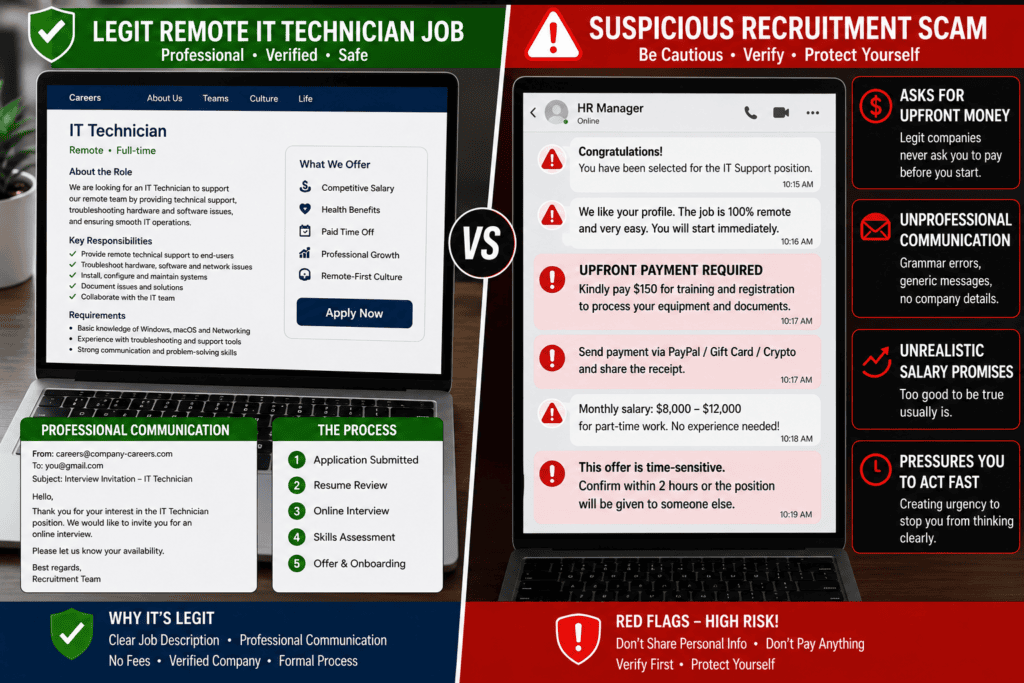
Red Flags of Fake Remote IT Jobs
Be immediately suspicious if you encounter any of the following tactics during your job search:
- Upfront Money Demands or Equipment Purchase “Checks”: Scammers send a fraudulent check for “home lab/office equipment” and instruct you to wire money or buy hardware through a specific vendor. Real employers never ask you to buy equipment from third-party sites or pay for onboarding, training, or background checks.
- Text-Only or Messaging App Interviews: Hiring managers at legitimate companies do not conduct entire interviews via text on platforms like WhatsApp, Telegram, or Signal. Refusal to do a live video call or phone interview is a major red flag.
- Free or Mismatched Email Domains: Emails coming from standard
@gmail.comor@yahoo.comaccounts, or domains with subtle typos (e.g.,@microsoft-careers-tech.cominstead of@microsoft.com), indicate an impersonation attempt. - Vague Job Descriptions & Instant Offers: Postings that list generic, repetitive tasks without clear reporting lines, software stack specifics, or technical metrics—followed by an instant “you’re hired” email within hours—are designed to rush candidates into sharing sensitive info.
- Unrealistic Compensation: Entry-level Tier 1 support roles offering extreme salaries (e.g., $60–$80/hour for basic password resets) serve as clickbait hooks for scams.
Employer Verification Checklist
Before you submit an application, share a resume containing personal contact details, or attend an interview, run through this verification checklist to ensure you find legit IT technician remote jobs:
[ ] Cross-Reference Official Careers Pages
    └─ Search the employer's official website (https://) to ensure the exact job listing
       exists under their active openings.

[ ] Inspect Email Domains & Recruiter Identities
    └─ Verify that the email sender matches the exact domain of the parent company.
    └─ Search LinkedIn to confirm the recruiter works in Talent Acquisition at that firm.

[ ] Check Company Reputation & Business Registrations
    └─ Search "[Company Name] + recruitment scam" or "fraud" on Google, Glassdoor,
       and BBB/local business registries.

[ ] Mandate a Formal Video/Phone Interview
    └─ Insist on a formal interview via calendar invite with a corporate video meeting
       link (Microsoft Teams, Zoom, Google Meet).

[ ] Protect Sensitive Data Until Onboarding
    └─ Never provide bank details, government ID numbers, or SSN/tax IDs until you have
       a signed, verified offer letter and access to an official HR portal.
How to Tailor Your CV/Resume and Application for Remote IT Technician Roles
To successfully find legit IT technician remote jobs and secure interviews, your application must clearly signal three things to hiring managers and Applicant Tracking Systems (ATS): baseline technical competency, structured troubleshooting logic, and remote-work reliability.
CV/Resume Essentials
- Header:
- Clean layout with Name, City/Country, Phone Number, Professional Email (e.g.,
first.last@email.com), LinkedIn Profile URL, and a link to a portfolio, technical blog, or GitHub.
- Clean layout with Name, City/Country, Phone Number, Professional Email (e.g.,
- Professional Summary (2–3 Lines):
- Concise position statement stating your targeted role, key stack capabilities, and foundational credentials.
- Example: “Detail-oriented Information Technology graduate with CompTIA A+ certification seeking a Tier 1 Remote Help Desk position. Experienced in Active Directory administration, Windows 11/macOS troubleshooting, and ticket resolution via hands-on home lab environments.”
- Skills Section (Categorized & ATS-Friendly):
- Group skills clearly so recruiters and automated ATS scanners parse them instantly:
- Operating Systems & Cloud: Windows 10/11, macOS, Microsoft 365 Admin, Google Workspace.
- Identity & Security: Active Directory, Entra ID (Azure AD), MFA configuration, Phishing awareness, Least Privilege Access.
- Networking & Protocols: TCP/IP, DNS, DHCP, VPN client troubleshooting, Wi-Fi diagnostics.
- ITSM & Support Tools: ServiceNow, Zendesk, Jira Service Management, TeamViewer, AnyDesk, Remote Desktop (RDP).
- Group skills clearly so recruiters and automated ATS scanners parse them instantly:
- Work Experience (Quantified & Action-Oriented):
- Include formal internships, student help desk roles, freelance IT support, or retail/customer service positions.
- Use active verbs and quantify results: “Resolved 30+ technical support tickets weekly with a 95% first-contact resolution rate, maintaining clear documentation inside Jira.”
- Home Lab & Practical Projects:
- If you lack extensive work experience, create a dedicated Projects section detailing home lab setups (e.g., “Configured a Windows Server 2022 domain controller in VirtualBox, managing OU structures, group policies, and automated user provisioning scripts”).
- Education & Certifications:
- Place entry-friendly certifications (CompTIA A+, Google IT Support, MS-900, Network+) near the top if you have minimal formal experience, followed by your university degree or diploma.
Cover Letter and Application Strategy
1. Target Specific Job Requirements
   └─ Reference the exact job title and explicitly match 2–3 specific tools or
      responsibilities listed in the job description to your background.

2. Explicitly Confirm Remote Readiness
   └─ Reassure the employer by noting your dedicated, quiet home workspace, high-speed
      broadband connection, time-zone flexibility, and mastery of Slack/Teams.

3. Keep It High-Signal and Concise
   └─ Limit your cover letter to 150–250 words focused entirely on problem-solving
      methodology, customer patience, and willingness to follow SOPs.
Remote-Work Requirements and Practical Considerations
To successfully find legit IT technician remote jobs and retain your position, you must maintain a professional, secure, and resilient home infrastructure. Remote L1/Tier 1 support engineers are expected to operate with minimal supervision while maintaining operational security and strict service level agreements (SLAs).
Workspace Infrastructure & Hardware Essentials
- Dedicated High-Speed Broadband: Aim for a minimum of 25–50 Mbps download and 10+ Mbps upload speed (preferably fiber or cable). For technical support roles handling remote desktop takeovers (RDP/AnyDesk), low latency (<50 ms ping) is critical to prevent screen lag. Always maintain a backup connection, such as a mobile 4G/5G hotspot or secondary ISP connection.
- Wired Ethernet Setup: Avoid relying solely on home Wi-Fi. Connecting via an Ethernet cable guarantees packet stability during live remote sessions, VoIP user calls, and large patch deployments.
- Dual-Monitor Setup & Workstation: A dual-screen configuration allows you to keep your ticketing queue (e.g., ServiceNow, Zendesk) open on one display while managing remote access tools or documentation on the other.
- Noise-Canceling Audio: Invest in a dedicated USB/3.5mm headset with a noise-canceling directional microphone for high-quality audio during VoIP customer calls and internal team huddles.
Endpoint Security & Data Protection Standard Operating Procedures
When working in remote IT environments, you are responsible for maintaining clean security hygiene on work-issued or approved BYOD endpoints:
[ Security Hygiene Checklist ]
 ├── Authentication: Enforce Multi-Factor Authentication (MFA) on all corporate portals (Duo, Okta, Microsoft Authenticator).
 ├── Endpoint Defense: Keep OS security updates, EDR agents (e.g., CrowdStrike, Defender for Endpoint), and software patches current.
 ├── Network Isolation: Never conduct IT support tasks over public Wi-Fi without an active corporate VPN tunnel.
 └── Data Minimization: Store all customer data, logs, and system credentials strictly inside authorized cloud repositories (OneDrive, SharePoint)—never on local personal drives.
Code language: CSS (css)
Time Zones, Shift Work, and On-Call Availability
- Coverage Hours & Shift Rotations: Service desks often provide 24/7/365 coverage. Clarify early whether the position involves fixed business hours, rotating night shifts, or weekend/holiday duty rosters.
- Time Zone Alignment: Ensure your local working hours align precisely with the employer’s core customer base (e.g., US EST, GMT, or APAC shifts) and account for daylight saving time adjustments.
- Overtime & On-Call Policies: Understand how “on-call” rotations work, including response SLAs for urgent high-priority (P1/P2) system outages outside standard operating hours.
Proactive Asynchronous & Synchronous Communication
Because remote teams lack in-person visibility, communication directly reflects your performance:
- Slack/Teams Availability: Maintain clear status indicators (e.g., In a call, Investigating Ticket #1042, Away on lunch) and respond promptly during your active shift.
- Detailed Ticket Notes: Document every troubleshooting step clearly inside support tickets so colleagues can seamlessly take over issues without context loss.
- Clear Escalations: When escalating issues to Tier 2 or network engineers, format your handoffs logically: include user details, problem description, troubleshooting steps already attempted, and relevant error logs.
Salary Expectations (Region-Dependent)
Compensation for remote technical support roles varies significantly based on geography, shift requirements, employer size, and specific Tier 1 responsibilities. When searching for legit remote IT technician jobs, use regional benchmarks to evaluate job postings and negotiate offers realistically.
Key Regional Breakdown
- United States:
- Tier 1 / Entry Level: Typically ranges between $41,000 and $56,500 annually ($20–$27/hour).
- Mid-Level (Tier 2 / Desktop Support): Averages $48,000 to $67,000 annually.
- Note: Total compensation at enterprise platforms or tech firms in high-cost-of-living areas (e.g., NYC, SF) can reach $60,000–$75,000+ when factoring in overtime, shift differentials, and bonuses.
- United Kingdom:
- 1st Line Support (Entry Level): Ranges from £20,000 to £28,000 annually, with the median market rate hovering around £25,000–£28,000.
- 2nd Line / Specialist Support: Generally commands £28,000 to £38,000 annually.
- International & Developing Markets (e.g., Nigeria, Kenya, India):
- Entry-Level Virtual Help Desk & Customer Support: Global remote roles offered by international MSPs or offshore staffing platforms typically pay $800 to $2,000 USD per month ($9,600–$24,000/year) for Tier 1 support.
- Intermediate / Advanced Remote IT: Experienced global contractors or specialized L2 technical engineers can command $2,500 to $4,500+ USD per month.
Factors Influencing Salary Offers
| Influencing Factor | Impact on Base Pay |
| Certifications | Holding recognized credentials like CompTIA A+ or Microsoft 365 Fundamentals adds a 5% to 15% premium to entry-level offers. |
| Shift Requirements | Overnight (graveyard) shifts, 24/7 rotating rosters, or weekend coverage often include a 10%–20% shift differential pay bump. |
| Employer Type | Direct-hire roles at tech/financial firms pay higher base salaries than agency contract or contract-to-hire positions. |
Always treat salary figures as baseline estimates; cross-reference active job postings on verified platforms like Glassdoor, Payscale, or local job boards before submitting salary expectations.
Common Mistakes Graduates Make (and How to Avoid Them)
Navigating the entry-level job market requires a targeted strategy. Many qualified candidates struggle to find legit IT technician remote jobs simply because they fall into predictable application traps.
Key Application Pitfalls & Remediation Strategies
- Spraying Generic Applications Across Platforms
- The Mistake: Firing off hundreds of identical, un-customized resumes via one-click application portals. Recruiters and ATS scanners instantly drop generic resumes that lack job-specific keywords.
- How to Avoid It: Tailor your CV for every role. Align your bullet points with the exact wording in the job description (e.g., matching “Active Directory account management” or “Zendesk ticket triage”). Quality beats volume every time.
- Skipping Due Diligence & Falling for Scams
- The Mistake: Failing to verify recruiters or company domains, resulting in lost time, stolen personal data, or equipment check fraud.
- How to Avoid It: Always cross-reference job postings on the employer’s official careers site before applying. Never participate in text-only interviews or wire money for “home office setup packages”.
- Ignoring Hybrid & On-Site L1 Support Opportunities
- The Mistake: Filtering search results exclusively by “100% Remote,” which drastically increases competition for entry-level roles.
- How to Avoid It: Consider applying for local hybrid help desk roles. Hybrid IT positions generally have smaller applicant pools, higher hiring success rates, and often transition into fully remote status after 3 to 6 months of proven reliability.
- Relying Solely on a Degree Without Practical Evidence
- The Mistake: Assuming a computer science or IT degree is enough, while presenting no certifications, home lab builds, or tangible troubleshooting proof.
- How to Avoid It: Build and document a hands-on home lab using VirtualBox, VMware, or Microsoft 365 developer tenants. Obtaining even one foundational credential—such as CompTIA A+ or MS-900—instantly differentiates you from other graduates.
- Overlooking Remote-Specific Soft Skills
- The Mistake: Focusing purely on technical specs on your resume while failing to demonstrate asynchronous communication, written clarity, or customer empathy.
- How to Avoid It: Highlight specific instances of customer service, ticket documentation, and written collaboration in your summary and experience bullet points.
Do I need a degree to get a remote IT technician job?
No. While a degree in Information Technology, Computer Science, or Information Systems can give you a competitive edge, many Tier 1 help desk and desktop support positions prioritize practical troubleshooting skills, customer service ability, home lab experience, and entry-level certifications over a formal four-year degree.
Which job titles should I search for?
To find legit IT technician remote jobs at the entry level, focus your search on these specific titles across job portals:
Help Desk Technician (Tier 1 / L1)
Service Desk Analyst
Technical Support Representative
Remote IT Support Specialist
Junior Desktop Support Specialist
Graduate IT Support Engineer
How can I tell if a remote IT job is legitimate?
Verify the opening by checking the employer’s official website under their active careers page. Confirm that the recruiter’s email matches the company’s exact domain name, insist on a live video or phone interview, and never accept job offers conducted solely over text apps (such as Telegram or WhatsApp). Legitimate employers will never ask for money for training, background checks, or home lab equipment purchase checks.
What skills matter most for entry-level remote IT support?
Employers look for a balance of foundational technical literacy, soft skills, and remote readiness:
Technical: Operating systems (Windows 10/11, macOS), Active Directory/Entra ID account resets, Microsoft 365 administration, basic networking (TCP/IP, DNS, VPN troubleshooting), and ticketing software (Zendesk, Jira, ServiceNow).
Communication: Clear written communication for logging ticket updates and patient, empathetic user support over phone/chat.
Security: MFA configuration, basic phishing detection, and strict adherence to data protection procedures.
Are there remote IT technician jobs for Nigerians?
Yes. Nigerian graduates can find legit IT technician remote jobs through global remote platforms like Turing, We Work Remotely, Remote OK, and SupportYourApp, as well as local platforms like MyJobMag and Indeed Nigeria. Key factors for success include:
Time Zone Alignment: Ensuring you can commit to specific shifts (e.g., EST, GMT, or WAT).
Reliable Power & Broadband: Maintaining an uninterrupted power supply (UPS/generator) and a low-latency internet connection for remote desktop takeovers and VoIP customer calls.
Payment Infrastructure: Having verified cross-border payment accounts (such as Payoneer, Grey, or Geegpay) or working through Employer of Record (EOR) providers like Deel or Remote.com.
In Conclusion
To find legit IT technician remote jobs and secure interviews this week, execute this streamlined 4-step action plan:
- Target Curated Platforms: Select two verified remote job portals—such as Working Nomads and FlexJobs—or direct company portals (e.g., General Dynamics IT, SAIC, or regional MSPs).
- Apply High-Intent Filters: Search using exact-match queries like
"entry level remote help desk"or"remote IT support technician no experience". Toggle filters for Remote, Entry-Level (0–2 years), and Posted in the last 14 days. - Run Verification Protocol: Shortlist 5 active openings. Before applying, verify each posting against the employer’s official website, check the recruiter’s email domain, and confirm there are no upfront money or equipment demands.
- Submit Tailored Applications: Customize your CV header, summary, and skills list for each role to highlight Active Directory administration, ticketing software (Jira/Zendesk), and home lab projects.