Your smartphone is no longer just a communication tool—with the right AI phone assistant, it functions as an intelligent agent capable of streamlining your daily workflow. Beyond making calls and browsing the web, a capable AI phone assistant allows you to research complex topics, draft professional emails, summarize dense documents, and manage your schedule without friction across applications.
However, selecting the optimal AI phone assistant depends entirely on your ecosystem and specific use case:
- Google Gemini excels for Android and Google Workspace power users.
- ChatGPT provides unmatched versatility for advanced reasoning, coding, and long-form writing.
- Perplexity focuses on real-time search with inline source citations.
- Alternative tools offer specialized device integration or productivity workflows.
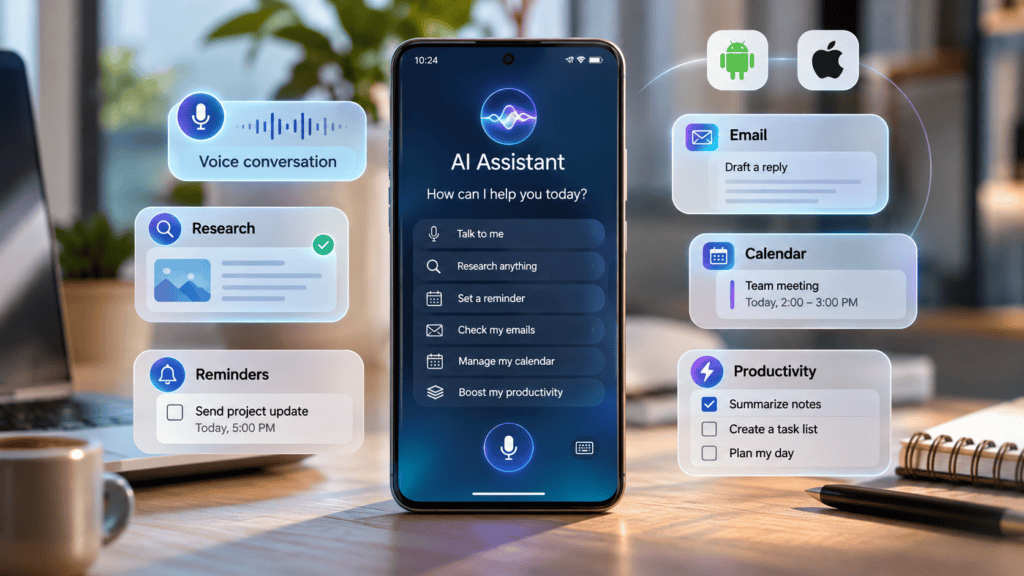
In this guide, we evaluate seven leading AI phone assistants—breaking down their core features, cross-platform compatibility, pros, and limitations—to help you select the ideal AI phone assistant for your productivity needs and budget.
What Is an AI Phone Assistant?
An AI phone assistant is a mobile application or a built-in smartphone operating system layer powered by generative artificial intelligence. It interprets natural language requests, answers complex questions, and automates multi-step workflows.
Unlike legacy voice assistants (such as traditional Siri or early Google Assistant iterations) that relied on rigid, predefined command strings, a modern AI phone assistant leverages large language models to understand conversational instructions, process unstructured data, generate creative or technical content, and—where supported—execute actions across connected applications.
Core Use Cases for an AI Phone Assistant
With the right AI phone assistant, you can execute high-leverage digital tasks directly from your mobile device:
- Draft professional emails or messages to colleagues and clients.
- Summarize lengthy PDFs, articles, or reports on the go.
- Break down complex technical or academic topics into plain language.
- Conduct real-time market and product research before making a purchase.
- Plan and organize daily tasks, schedules, and itineraries.
- Translate multi-lingual text or speech instantaneously.
- Brainstorm high-level concepts for presentations, content strategies, or marketing campaigns.
Understanding Capabilities and Limitations
While advanced capabilities allow an AI phone assistant to interact with smartphone settings and personal data, actual performance depends heavily on the device, operating system, security permissions, and native integrations.
Key Distinction
Differentiate between a conversational AI application and a true device assistant. An app capable of writing an email for you does not automatically possess system-level permissions to send it, access your contacts, or modify your device settings unless explicitly integrated and authorized.
Quick Comparison: Best AI Phone Assistants
| AI Phone Assistant | Best For | Primary Platforms |
| Google Gemini | Android and Google Workspace ecosystem integration | Android, iOS |
| ChatGPT | Advanced writing, brainstorming, and complex problem-solving | Android, iOS, Web |
| Perplexity AI | Real-time web research, factual queries, and sourced answers | Android, iOS, Web |
| Microsoft Copilot | Microsoft 365 workflow productivity and document generation | Android, iOS, Windows |
| Apple Siri | Native iPhone control and hardware-level device integration | Apple Ecosystem (iOS, iPadOS, macOS) |
| Samsung Bixby | Deep system-level control on Samsung Galaxy hardware | Supported Samsung Galaxy Devices |
| Saner.AI | Knowledge management, smart notes, email, and task organization | Web and Mobile App |
Note:
This comparison highlights each assistant’s core strengths, recognizing that standalone conversational apps and system-level device integrations serve different operational functions.
Google Gemini – Best AI Phone Assistant for Android Users
Google Gemini is the definitive choice for smartphone users who live inside the Google ecosystem. The Google Gemini mobile app combines native multimodal intelligence—handling text, voice, image, and camera-based interactions—to help users write messages, brainstorm ideas, analyze data, and coordinate activities.
On compatible Android devices, Gemini can replace traditional triggers as your primary mobile assistant, embedding itself smoothly into the core operating system.
- Best for:
- Android users,
- Google Workspace power users,
- Anyone seeking deep system-level integration with everyday productivity tools.
Key Features of this AI Phone Assistant
- Gemini Live & Voice Conversations: Engage in natural, flowing voice interactions to talk through complex ideas or quickly query information on the go.
- Google Workspace & App Integrations: Connect directly with tools like Gmail, Google Docs, Drive, YouTube Music, and Maps to streamline daily workflows.
- Advanced Writing & Structuring Assistance: Draft emails, organize notes, rewrite drafts, and format content into tables or clean summaries.
- Multimodal Camera & Image Search: Use your camera or upload photos to ask questions about your physical surroundings or local objects.
- Screen-Aware Context (Android): Invoke Gemini over active apps (such as Chrome) to summarize what is currently on your screen or extract page details instantly.
Why This AI Phone Assistant Stands Out
Gemini’s core advantage lies in its seamless native relationship with Google’s broader software suite. Students can use it to break down difficult concepts with integrated visual aids, while professionals can pull context straight from personal cloud storage or email threads.
Limitations
While powerful, Gemini is not a universal remote control for every third-party mobile application. Certain connected-app features require specific account types, active data permissions, or exact device configurations. Feature availability can also vary by geographic region and language.
- Pricing: Free access is available; expanded capabilities, extended context limits, and advanced agentic features are accessible via paid Google AI subscription tiers.
- Compatibility: Available on Android and iOS (with deeper system-level assistant replacement natively prioritized on Android).
Verdict:
Google Gemini serves as an exceptional starting point for Android users who want a conversational AI phone assistant deeply tied to Google’s productivity stack.
ChatGPT – Best AI Phone Assistant for Writing and Problem-Solving
ChatGPT is a versatile and powerful AI phone assistant designed to handle complex cognitive workloads, from structured creative writing to deep technical troubleshooting.
Its cross-platform mobile application allows smartphone users to interact seamlessly via text and advanced voice modes, moving far beyond traditional keyword search toward fluid, multi-turn collaboration.
- Best for:
- Students,
- Professionals,
- Freelancers,
- Entrepreneurs,
- Content creators who need an advanced conversational partner for reasoning, text generation, and multi-step problem solving.
Key Features of this AI Phone Assistant
- Advanced Voice Conversations: Engage in real-time, low-latency spoken conversations with natural pacing, interruptions, and tone awareness.
- High-Level Writing Assistance: Draft comprehensive emails, formal reports, blog posts, video scripts, and professional documentation on the go.
- Brainstorming & Strategic Ideation: Rapidly generate business models, marketing frameworks, content outlines, and creative concepts.
- Complex Problem-Solving & Learning: Break down dense academic or technical subjects into clear, tiered explanations.
- Multimodal Image & Document Analysis: Upload photographs, whiteboard text, screenshots, or PDF receipts for instant scanning, debugging, or summarization.
- Web Search Integration: Retrieve up-to-date facts, current events, and references directly within mobile chat threads.
Why This AI Phone Assistant Stands Out
ChatGPT excels when handling instructions that require context, logical depth, or iterative refinement. For instance, if you are preparing for a high-stakes client meeting while traveling, you can use voice mode to rehearse your pitch, ask for critical counter-arguments, and instantly generate a formatted meeting agenda.
Limitations
Unlike native operating system layers, ChatGPT is not automatically embedded as a deep remote control for third-party device settings or local mobile applications. Its performance relies on the open app interface and active internet connection. Additionally, users should cross-reference crucial data against verified sources to mitigate occasional hallucinations.
- Pricing: A robust free tier is available. ChatGPT Plus is priced at $20 per month, unlocking expanded access to advanced reasoning models, higher message caps, and deeper feature sets.
- Compatibility: Available on iOS and Android.
Verdict:
ChatGPT remains the premier AI phone assistant for users prioritizing top-tier language intelligence, writing versatility, and flexible problem-solving on mobile.
Perplexity AI – Best AI Phone Assistant for Research
Perplexity AI is a powerful conversational answer engine designed to streamline how smartphone users search, synthesize data, and explore complex topics.
Unlike legacy search engines that simply return a long list of blue links, Perplexity aggregates real-time web content into clear, direct prose while attaching numbered citations to every core claim.
- Best for:
- Students,
- Researchers,
- Professionals,
- Anyone who relies heavily on fast, verified information supported by live web sources.
Key Features of this AI Phone Assistant
- Conversational Web Search: Formulate natural-language queries to investigate current news, products, companies, or niche subjects.
- Inline Source Citations: Instantly inspect the exact references and web pages backing up data points to verify accuracy.
- Contextual Follow-Up Threads: Deepen your investigation with targeted follow-up prompts without restarting a search session.
- Document & File Analysis: Upload PDFs, text files, or screenshots directly into the mobile app to extract insights or summarize pages.
- Pro Search Capabilities: Trigger deep reasoning loops that perform multi-step search queries to solve intricate questions.
Why This AI Phone Assistant Stands Out
Perplexity’s core superpower is research efficiency. For example, if you are shopping for hardware upgrades or studying a new industry framework while traveling, you can ask Perplexity to cross-reference specifications, compare competitors, and list transparent source links for instant verification.
Limitations
Perplexity is fundamentally research-centric rather than device-centric. It is not designed to control your local smartphone hardware, toggle system settings, or automate actions across native mobile applications.
- Pricing: A robust free tier is available. Perplexity Pro is available as a paid subscription ($20/month or approximately $17/month when billed annually), unlocking advanced search models, expanded file uploads, and deeper research modes.
- Compatibility: Available on iOS and Android.
Verdict:
Choose Perplexity if your smartphone serves as a mobile research hub and you require transparent, citation-backed answers over generic web summaries.
Microsoft Copilot – Best AI Phone Assistant for Microsoft Productivity
Microsoft Copilot brings enterprise-grade intelligence directly to mobile devices, helping users draft content, brainstorm strategies, and manage daily productivity.
It is exceptionally valuable for individuals and teams who rely on Word, Excel, PowerPoint, Outlook, and other Microsoft cloud services for their day-to-day operations.
- Best for:
- Office workers,
- Business professionals,
- Enterprise teams,
- Students,
- Anyone embedded in the Microsoft 365 ecosystem.
Key Features of this AI Phone Assistant
- Professional Writing Assistance: Draft formal emails, business proposals, meeting summaries, and reports on the go.
- Content Generation & Structuring: Rapidly build document outlines, presentation structures, and data tables.
- Natural Voice Interaction: Speak directly to Copilot to query information, issue prompts, or dictate text.
- Document & Data Summarization: Condense lengthy research papers, spreadsheets, or corporate PDFs into clear insights.
- Microsoft 365 Ecosystem Connectivity: Connect mobile queries with supported cloud tools and workplace infrastructure.
Why This AI Phone Assistant Stands Out
Imagine you are traveling and need to prepare a client presentation before landing. Copilot can help you generate talking points, build an outline, and refine your messaging. For professionals operating within corporate or academic environments, it bridges the gap between desktop workstations and mobile responsiveness.
Limitations
Standalone mobile app users have different capabilities compared to users with licensed enterprise Microsoft 365 Copilot accounts. Access to corporate documents, internal emails, and granular organizational data depends entirely on your active subscription type, tenant permissions, and IT administrator settings.
- Pricing: A free base version is available via mobile apps and the web. Advanced enterprise and Microsoft 365 integrated features require a qualifying subscription or organizational license (such as Copilot Pro or Microsoft 365 Business/Enterprise plans).
- Compatibility: Available on iOS and Android.
Verdict:
Microsoft Copilot is the ideal AI phone assistant for professionals who want mobile AI capabilities that align directly with their Microsoft workplace software and document infrastructure.
Apple Siri – Best AI Phone Assistant for Compatible iPhones
Siri is Apple’s built-in voice and intelligent agent. Powered by Apple Intelligence and newer Siri architectural upgrades on supported devices, Siri offers advanced conversational awareness, personal context retrieval, and fluid cross-app actions.
Unlike standalone third-party applications, Siri operates as a core layer of the mobile operating system, allowing users to interact with hardware settings, native apps, and personal notifications through natural voice and touch.
- Best for:
- iPhone users who want a native, system-level assistant deeply integrated with Apple’s operating system and hardware ecosystem.
Key Features of this AI Phone Assistant
- Natural Voice Commands: Issue queries and system commands using conversational speech without rigid keyword phrasing.
- Personal Context Understanding: Retrieve relevant information securely across messages, emails, calendar events, and notes.
- System-Wide Writing Tools: Rewrite, proofread, summarize, and format text inside native apps and supported third-party applications.
- Onscreen Awareness: Ask Siri questions about active content displayed directly on your screen (such as photos, maps, or messages).
- Granular App Actions: Execute specific multi-step tasks across native Apple applications.
- Visual Intelligence: Use your device camera to analyze surroundings, translate text, or look up objects in real time.
Why This AI Phone Assistant Stands Out
Siri’s primary advantage is its native home within iOS. For example, an iPhone user can ask Siri to find a flight confirmation email sent by a friend, cross-reference it with calendar availability, and text the ETA—all without switching between separate applications.
Important Compatibility Considerations
Apple Intelligence and advanced Siri features require compatible hardware. Supported models include the iPhone 15 Pro, iPhone 15 Pro Max, iPhone 16 lineup, and newer iterations, subject to specific software updates and regional guidelines. Ensure your device meets Apple’s hardware thresholds before expecting full AI feature availability.
Limitations
Advanced conversational capabilities and personal context awareness require compatible hardware and up-to-date software. Certain features may also face regional or language roll-out restrictions.
- Pricing: Included at no extra cost with eligible Apple hardware and software updates.
- Compatibility: Supported Apple devices (iOS, iPadOS, macOS), with advanced AI features requiring specific newer chipsets (such as the A17 Pro or A18 series).
Verdict:
Siri is the optimal choice for iPhone users who prioritize seamless, hardware-level integration and native privacy controls over standalone third-party AI applications.
Samsung Bixby – Best AI Phone Assistant for Samsung Galaxy Users
Samsung Bixby is Samsung’s built-in digital assistant engineered specifically for Galaxy smartphones, tablets, and ecosystem appliances.
Unlike general-purpose conversational chatbots that live primarily inside app windows, Bixby is deeply embedded in the device firmware, giving it robust oversight of system settings and hardware actions.
- Best for:
- Samsung Galaxy owners who want direct system-level control over their phone functions, hardware settings, and device-specific automation.
Key Features of this AI Phone Assistant
- Deep Device Control: Instantly toggle settings, adjust display parameters, manage connectivity, and configure phone features using voice or text.
- Natural-Language Understanding: Issue conversational requests to execute multi-step routines or find hidden settings without digging through menus.
- Smart Reminders & Automation: Create context-aware reminders, set alarms, and schedule daily routines.
- Native App Interaction: Launch supported third-party and native Samsung applications, split screens, and execute specific in-app workflows.
- Galaxy AI Synergy: On newer flagship devices, Bixby works alongside broader Galaxy AI features (such as live translation and note assistance) to streamline mobile operations.
Why This AI Phone Assistant Stands Out
Bixby shines when you need hands-free hardware manipulation. For instance, if you are driving or have your hands full, you can tell Bixby to adjust screen brightness, turn on Wi-Fi tethering, or find a specific photo in your gallery without manually touching your screen.
Limitations
Bixby is tightly proprietary to the Samsung hardware ecosystem. It is not designed to function as an open-ended research model or a cross-platform writer. Furthermore, feature availability varies significantly depending on your specific Galaxy model, One UI software version, and geographic region.
- Pricing: Free and built directly into supported Samsung devices.
- Compatibility: Exclusive to supported Samsung Galaxy smartphones, tablets, and select ecosystem hardware.
Verdict:
Bixby is the ideal AI phone assistant for Samsung Galaxy users whose primary goal is hardware control and system automation rather than generalized writing or complex cloud research.
Saner.AI – Best AI Phone Assistant for Notes, Email, and Task Organization
Saner.AI is a productivity-focused AI phone assistant and second-brain platform designed to help users capture, organize, and retrieve information across fragmented workflows.
Unlike traditional voice assistants built for hardware control, Saner.AI targets the cognitive friction of information management—consolidating notes, emails, documents, and action items into a searchable, intelligent assistant.
- Best for:
- Entrepreneurs,
- Freelancers,
- Busy professionals,
- Knowledge workers who juggle multiple information sources, notes, emails, and daily tasks.
Key Features of this AI Phone Assistant
- AI-Powered Knowledge Retrieval: Query your personal database of notes and documents using natural language to surface past ideas or meeting details instantly.
- Intelligent Task Management: Automatically capture, tag, and structure action items from your daily notes and messages.
- Email & Calendar Connectivity: Sync supported email accounts and calendars to manage communication and schedules in one interface.
- Document Synthesis: Upload files, PDFs, and text snippets to extract key takeaways without manual skimming.
- Cross-Platform Mobile Access: Capture thoughts, review tasks, and query your knowledge base seamlessly on the go via mobile applications.
Why This AI Phone Assistant Stands Out
Imagine a freelance consultant who receives client briefs via email, drafts project notes in separate documents, and tracks deadlines across calendars. Instead of context-switching between a half-dozen apps, Saner.AI connects these workflows, allowing you to query your own project history and surface vital information in seconds.
Limitations
Saner.AI is an information and productivity layer, not a device-native assistant. It cannot toggle your phone’s hardware settings, answer system calls, or replace operating system layers like Siri or Bixby. Its value scales directly with how consistently you feed it data and connect your accounts.
- Pricing: Offers a free tier alongside paid options (Starter plan listed around $8/month and Standard at $16/month; check their official site for current billing structures).
- Compatibility: Web-based platform supported by dedicated mobile apps.
Verdict:
Saner.AI is an essential AI phone assistant if your primary daily bottleneck is managing disorganized notes, emails, and tasks rather than controlling your smartphone hardware.
Gemini vs. ChatGPT vs. Perplexity: Which AI Phone Assistant Should You Choose?
While Google Gemini, ChatGPT, and Perplexity all offer powerful conversational AI experiences on mobile devices, their core architectures and primary use cases differ significantly.
Direct Comparison: The Big Three AI Phone Assistants
| Feature | Google Gemini | ChatGPT | Perplexity AI |
| Main Strength | Google ecosystem & Android integration | Versatile writing, brainstorming, & reasoning | Real-time web research & sourced answers |
| Voice Interaction | Yes (Gemini Live & Voice) | Yes (Advanced Voice Mode) | Yes (Voice-to-text & audio search) |
| Image Understanding | Yes (Multimodal camera & gallery) | Yes (Screenshot & photo analysis) | Yes (File & image uploads) |
| Web Research | Yes (Google Search backed) | Yes (Built-in web search) | Yes (Core answer engine mechanism) |
| Device Integration | Deep (Native Android assistant replacement) | App-based interface | App-based interface |
| Best Suited For | Android & Google Workspace power users | Creators, writers, and problem-solvers | Researchers, students, and fact-checkers |
Which One Should You Choose?
- Choose Gemini if you live inside the Google ecosystem (Gmail, Drive, Docs, Calendar) and want an AI phone assistant that integrates directly with your Android operating system and everyday Google workflows.
- Choose ChatGPT if your daily smartphone tasks involve heavy writing, drafting emails, creative brainstorming, coding, or working through complex logical problems.
- Choose Perplexity if your mobile device serves primarily as a research hub and you need fast, accurate, citation-backed answers rather than general-purpose chat or device control.
You do not need to install all three. Evaluate your most frequent mobile workflows—whether it is managing Google tools, writing content, or researching facts—and start with the AI phone assistant tailored directly to that need.
Best AI Phone Assistant for Android vs. iPhone
The ideal AI phone assistant depends heavily on your mobile operating system. While Android offers deep system-level flexibility and app-switching freedom, iOS provides a tightly controlled, hardware-integrated environment centered around native tools.
Best AI Phone Assistants for Android
Android’s open architecture allows you to run multiple AI platforms concurrently and even replace default triggers with a preferred assistant.
- Google Gemini: The premier choice for Android users. It integrates natively with Google Workspace, Gmail, Docs, and device settings on supported hardware.
- Samsung Bixby: The go-to option for Samsung Galaxy owners who need deep hardware-level control, system toggles, and device automation.
- ChatGPT: Exceptional for mobile writing, creative brainstorming, coding, and complex problem-solving outside the Google ecosystem.
- Perplexity AI: The top pick for mobile research, real-time web discovery, and fact-checking on the go.
- Microsoft Copilot: Ideal for users whose daily work involves Word, Excel, Outlook, and Microsoft cloud infrastructure.
Android Advantage:
You can easily set Gemini or Bixby as your primary operating system assistant while keeping ChatGPT or Perplexity installed as dedicated apps for specialized tasks.
Best AI Phone Assistants for iPhone
iPhone users must balance Apple’s native ecosystem security with the convenience of standalone third-party app experiences.
- Apple Siri: The definitive choice for iPhone users. On supported models (iPhone 15 Pro and newer), Siri leverages Apple Intelligence for personal context awareness and system-wide writing tools.
- ChatGPT: A versatile alternative for conversational voice interactions, complex writing, and deep problem-solving on iOS.
- Google Gemini: A strong cross-platform choice for users who prefer Google’s ecosystem and cloud services over Apple’s native apps.
- Perplexity AI: Essential for quick, citation-backed research and information gathering directly from an iPhone or iPad.
- Microsoft Copilot: Suited for professionals who need mobile access to Microsoft 365 workflows while operating within the Apple ecosystem.
iOS Consideration:
While third-party apps like ChatGPT and Gemini offer incredible intelligence, they operate within standard application windows rather than serving as native replacements for Siri at the hardware level.
Summary Checklist
- Choose Android if you want freedom to configure your default assistant, toggle system hardware via voice, and mix-and-match multiple AI platforms.
- Choose iPhone if you prioritize native system integration, stringent device-level privacy, and hands-free control via Siri alongside optional third-party apps.
How to Choose the Right AI Phone Assistant
Before downloading or enabling an AI phone assistant, evaluate your actual daily workflows rather than relying on marketing feature lists.
Identify Your Primary Use Case
Pinpoint the specific bottleneck you want to solve.
- If you need deep research and sourced verification, choose a dedicated answer engine like Perplexity AI.
- If you need advanced content creation, coding, or long-form reasoning, opt for ChatGPT.
- If you want hardware control and system automation, lean toward Apple Siri or Samsung Bixby.
- If your goal is managing Google or Microsoft workplace productivity, stick to Google Gemini or Microsoft Copilot.
Rule of Thumb:
A research-focused tool will not control your phone settings, and a device assistant will not match the reasoning depth of an advanced language model.
Check Smartphone Compatibility & Hardware Thresholds
Verify that the AI phone assistant supports your exact device and operating system version.
- Advanced native features—such as Apple Intelligence or cutting-edge Galaxy AI capabilities—often require specific flagship chipsets (like the Apple A17 Pro/A18 or recent Snapdragon processors).
- Ensure your operating system is fully updated to prevent compatibility errors with newer app features.
Evaluate Free vs. Paid Feature Tiers
Most AI phone assistants operate on a freemium model. Before committing to a monthly subscription, test the free tier to see if it satisfies your requirements. Review these factors carefully:
- Usage Caps: Daily limits on advanced reasoning models or deep searches.
- Voice Capabilities: Access to real-time voice modes (like Gemini Live or ChatGPT Advanced Voice).
- File Uploads: Limitations on PDF size, image analysis, and document parsing.
- Integrations: Access to connected apps, cloud storage, or workspace APIs.
Examine Privacy Settings & Permissions
An AI phone assistant often requests broad permissions to function effectively, including access to your microphone, camera, photo gallery, contacts, email, and calendar.
- Grant Minimum Necessary Access: Only authorize permissions required for your immediate tasks.
- Protect Sensitive Data: Avoid uploading confidential financial records, proprietary work documents, or sensitive personal information unless you are operating within a verified enterprise tier with strict data-privacy guarantees.
Test the Assistant with a Real-World Task
Do not rely on theoretical benchmarks. Run a live test that mirrors your actual mobile workflow:
- Ask the assistant to draft a formal email to a client while you are away from your desk.
- Request a structured summary of a complex 10-page PDF document.
- Use voice interaction to plan a travel itinerary or check real-time facts.
Evaluate the output for accuracy, speed, and how much manual editing or correction is required to get a finished result.
How to Get Started with an AI Phone Assistant
Once you have selected the ideal AI phone assistant for your workflow, follow this step-by-year-proven framework to transition from installation to full operational productivity:
Download the Official Application: Security first: verify the publisher.
Visit the Apple App Store or Google Play Store. Search for the official application and always verify the developer name (e.g., Google LLC, OpenAI, Perplexity AI, Microsoft Corporation) to avoid third-party clones or unauthorized wrappers.
Create Your Account and Configure Settings: Unlock cloud syncing and personalized history.
Sign in or create a user account. While some assistants offer basic guest modes, signing in is typically required to unlock advanced features, chat history syncing, and ecosystem integrations.
Audit and Grant App Permissions: Maintain strict privacy and data boundaries.
Carefully review permission requests. Only authorize microphone, camera, storage, and notification access when strictly necessary for the workflows you intend to use. Avoid granting blanket permissions to untested apps.
Explore Core Features and Voice Modes: Test multimodal capabilities early.
Familiarize yourself with the interface. Test voice interaction modes, document upload limits, image analysis via your camera, and web search toggles so you know what the assistant can handle natively.
Run a Real-World Pilot Task: Test output quality against a genuine bottleneck.
Do not test with trivial prompts. Execute a high-friction daily task immediately—such as drafting a complex client email, summarizing a dense 10-page PDF, or structuring a project outline.
Evaluate Efficiency and Iterate: Measure time saved versus manual friction.
Assess the results objectively. If the assistant genuinely accelerates your workflow, integrate it into your daily routine. If it requires excessive editing or lacks necessary integrations, switch to an alternative platform from our top picks.
What is the best AI phone assistant?
There is no single best AI phone assistant for every user. Google Gemini is ideal for Android and Google ecosystem users; ChatGPT offers unmatched versatility for writing and problem-solving; Perplexity excels at real-time research; and native options like Apple Siri or Samsung Bixby are tailored for hardware-level device control.
Are there free AI phone assistants?
Yes. Google Gemini, ChatGPT, Perplexity AI, and Microsoft Copilot all offer robust free tiers, though advanced reasoning models, extended file uploads, and higher usage limits require paid subscriptions. Built-in assistants like Siri and Bixby are also free on supported hardware.
Which AI phone assistant is best for Android?
Google Gemini is the top choice for Android users, especially those embedded in Google Workspace. Samsung Galaxy owners can also leverage Samsung Bixby for deep system-level hardware control and device automation.
Which AI phone assistant is best for iPhone?
Apple Siri is the native choice for iPhone users, offering advanced contextual awareness and system tools on compatible devices (iPhone 15 Pro and newer). ChatGPT, Gemini, and Perplexity serve as powerful third-party alternatives.
Can an AI phone assistant make telephone calls?
Device-native assistants (Siri and Bixby) can initiate phone calls using voice commands. Standalone AI chat applications generally cannot make cellular phone calls independently, though some integrations or voice modes support internet-based communication depending on regional permissions.
Can AI phone assistants send text messages?
Built-in device assistants can send messages through native messaging apps once granted appropriate permissions. General-purpose AI apps (like ChatGPT or Gemini) can draft messages, but transmitting them typically requires user confirmation or a supported system integration.
Are AI phone assistants safe to use?
Yes, provided you manage privacy settings prudently. Only grant permissions necessary for your workflows (such as microphone or camera access), review data-handling policies before connecting personal accounts, and avoid uploading confidential corporate data or sensitive financial information to free-tier consumer apps.
Can I use more than one AI phone assistant?
Yes. You can install multiple applications on the same device—such as using Gemini for Google tasks, Perplexity for research, and ChatGPT for writing. However, to avoid unnecessary app clutter, select one primary assistant and add others only when they serve a distinct operational purpose.
In Conclusion
AI phone assistants have fundamentally transformed how we interact with mobile technology. By moving beyond rigid manual searches, slow typing, and constant app-switching, you can now leverage conversational intelligence to handle everyday workflows with unprecedented speed.
However, utility is driven by alignment, not volume. The optimal tool depends entirely on your ecosystem and primary bottlenecks:
- Google Gemini for Android and Google Workspace power users.
- ChatGPT for advanced writing, brainstorming, and problem-solving.
- Perplexity AI for real-time, citation-backed web research.
- Microsoft Copilot for enterprise productivity and Microsoft 365 integration.
- Apple Siri for native, hardware-level iPhone assistance.
- Samsung Bixby for deep system control on Galaxy devices.
- Saner.AI for unified notes, email, and task organization.
You do not need to clutter your home screen with every available application. Identify the single mobile task that consumes the most of your time, select the specialized AI phone assistant engineered for that exact workflow, and let it turn your smartphone into a truly intelligent agent.