How to Build a Technology Portfolio Even With No Experience
You can build a technology portfolio without formal employment by documenting carefully chosen personal, academic, volunteer, freelance, or practice projects. Select two to four projects that match your target role, publish the work in an accessible format, and explain the problem, your contribution, tools, decisions, results, and lessons learned.
A portfolio should provide evidence of how you think and work—not simply list technologies you have studied. A technology portfolio is a curated collection of work that demonstrates what you can create, analyse, design, troubleshoot, or improve.

It may include source code, live websites, dashboards, design mock-ups, technical documentation, research, automation scripts, security reports, or videos showing a project in use. Portfolios are useful because they give employers, clients, internship coordinators, and collaborators evidence beyond a CV.
The University of Georgia Career Center describes a portfolio as a visual showcase of professional or academic work samples, which may be digital or physical and can include individual or team work.
You do not need a previous employer to get started. When you build a technology portfolio, a well-documented personal project can show technical ability, communication, critical thinking, professionalism, and learning progress.
What Should a Technology Portfolio Prove?
When you build a technology portfolio, it must answer five questions quickly:
- What type of technology work do you want to do?
- What problem did you work on?
- What did you personally contribute?
- How did you approach the problem?
- What evidence shows the result?
Avoid treating the portfolio as a storage folder for everything you have ever made. When you build a technology portfolio, it is far better to show three relevant, finished projects than fifteen incomplete tutorials.
For example, instead of writing:
Skills: Python, SQL, Docker, AWS, and GitHub Actions.
Show a project in which you used Python to process a dataset, wrote tests, containerised the application, and created a deployment workflow. The project gives necessary context to the skill list.
A well-structured project can also demonstrate broader career-readiness capabilities. The National Association of Colleges and Employers (NACE) lists competencies including communication, critical thinking, professionalism, teamwork, career development, and technology.
Its technology competency includes using technology ethically, adapting to unfamiliar tools, improving efficiency, and supporting effective decisions—all of which are vital when you build a technology portfolio to showcase your value.
Choose a Target Role First
Start with one target role rather than trying to appear qualified for every technology career at once. To build a technology portfolio that captures employer attention, align your projects directly with specific job market requirements.
Possible directions include:
- Front-end or back-end development
- DevOps, cloud engineering, or site reliability engineering
- Data analysis or machine learning
- UI/UX or product design
- Cybersecurity
- Technical writing or developer relations
- Quality assurance and test automation
- Digital marketing technology and analytics
Read several entry-level job descriptions for your chosen direction. Look for repeated responsibilities, tools, and outcomes. Then select projects that provide evidence for those exact requirements when you build a technology portfolio.
For example, an aspiring DevOps engineer should prioritise:
- A small application deployed through a CI/CD pipeline
- Infrastructure defined with a configuration tool
- Automated tests and security checks
- Monitoring or logging documentation
- A clear explanation of deployment decisions and limitations
A beginner data analyst, by contrast, should prioritise:
- A cleaned dataset
- A dashboard answering a specific business question
- A short data-analysis report
- Documentation explaining assumptions and limitations
- A link to reproducible queries or notebooks
Create Projects Without Employment
You can create credible portfolio evidence from situations that do not involve a formal job. The important distinction is whether the work demonstrates relevant ability and whether you describe it honestly as you build a technology portfolio.
Personal Projects
Build something that solves a real or realistic problem. When you build a technology portfolio, your best projects will feature a user, purpose, constraint, or clear question.
Examples include:
- A personal expense tracker with data visualisation
- A local business landing page with an accessible contact form
- A stock or inventory API with authentication and tests
- A deployment pipeline for a containerised web application
- A study planner that sends reminders
- A public transport or weather dashboard using an approved API
- A document-search prototype using a small, lawful dataset
- A password-security education page explaining safe practices
Do not simply copy a tutorial and publish the final screen. If you follow a tutorial to build a technology portfolio, always extend it: add tests, improve the interface, introduce error handling, document a design decision, or solve a completely different use case.
Academic and Course Projects
Coursework can belong in a portfolio when it is relevant, and you can share it lawfully. As you build a technology portfolio, explain the assignment briefly, then focus on your decisions and contribution.
Include:
- The original objective
- Your individual role in a group project
- The tools and methods used
- A representative output
- Feedback received
- What you would improve
Do not upload copyrighted course material, private grading information, or another student’s work without permission when choosing coursework to build a technology portfolio.
Volunteer and Community Work
Volunteer projects can demonstrate requirements gathering, teamwork, reliability, and communication. They offer practical real-world contexts that strengthen your profile as you build a technology portfolio.
Examples include:
- Creating a website for a community organisation
- Automating a repetitive spreadsheet task
- Designing an event registration flow
- Analysing survey responses for a student group
- Writing documentation for an open-source project
- Helping a small organisation improve its online reporting
Obtain permission before publishing names, data, screenshots, logos, or internal processes. When confidentiality matters, anonymise the project and explain the work at a high level while using the experience to build a technology portfolio that reflects your practical skills.
Practice Projects and Realistic Simulations
A practice project is an excellent asset when you build a technology portfolio, provided you label it clearly. You can write:
Hypothetical project: Designing a ticket-booking API for a small events platform.
This approach is far more credible than presenting an imagined client as a real one.
When you build a technology portfolio around simulated work, always use realistic constraints—such as a limited budget, slow network connections, small team capacity, strict accessibility requirements, or mobile-first performance needs. Constraints make your engineering and design decisions much easier for hiring managers to evaluate.
Open-Source Contributions
Open-source work can show that you understand collaboration beyond your own computer. When you build a technology portfolio, open-source contributions serve as tangible proof of your ability to work within established codebases and team workflows.
Suitable contributions include:
- Fixing documentation
- Reproducing and clarifying an issue
- Adding or improving tests
- Correcting a small bug
- Reviewing examples
- Improving accessibility or error messages
Link to the issue, pull request, or commit where appropriate. Explain exactly what you contributed so hiring managers understand your specific role. Never claim ownership of a project maintained by someone else when using open-source work to build a technology portfolio.
Select the Right Portfolio Format
The best format depends on your role, audience, technical comfort, and maintenance capacity as you build a technology portfolio.
| Format | Best for | Advantages | Trade-offs |
| Personal website | Developers, designers, analysts, consultants | Flexible, professional, easy to customise | Requires maintenance and deployment |
| GitHub profile & repositories | Developers, DevOps engineers, data professionals | Shows code, history, documentation, and collaboration | Code alone may be difficult for non-technical readers |
| PDF portfolio | Designers, analysts, applicants with limited connectivity | Easy to attach to applications and review offline | Can become outdated and may hide interactive work |
| Notion, Google Sites, or no-code tool | Beginners who need to publish quickly | Simple setup and low technical overhead | Less control over performance, design, and long-term portability |
| Video or screen recording | UI/UX, automation, data, and app projects | Demonstrates a workflow quickly | Must include captions or a written explanation |
A simple combination often works best when you build a technology portfolio:
- A one-page portfolio website
- A GitHub profile or equivalent code repository
- A downloadable CV
- Two to four detailed project pages
- A clear contact method
GitHub Pages can turn a GitHub repository into a live website without separate hosting, according to GitHub’s documentation. GitHub also supports publishing directly from a branch or through a GitHub Actions workflow. This makes it a practical, high-value option for beginners who want to demonstrate both development and deployment skills as they build a technology portfolio.
Choose a simpler platform if building the site would delay documenting your projects. When you build a technology portfolio, the content and clarity of your problem-solving matter far more than elaborate animations or complex frameworks.
Recommended Portfolio Structure
Keep the structure predictable so hiring managers can navigate your work effortlessly as you build a technology portfolio:
- Home: Target role, short value statement, and your strongest projects.
- Projects: Individual case studies with direct links to evidence.
- About: Background, core interests, working methods, and current learning goals.
- Skills: Grouped technologies linked directly to relevant project implementations.
- Resume/CV: Current CV available in an accessible format.
- Contact: Professional email or approved contact channel.
Do not make visitors search through a complicated menu to evaluate your capabilities. The University of Georgia recommends clear sections such as About, Work, and Contact, along with simple navigation and informative descriptions for each work example—an essential guideline when you build a technology portfolio designed to convert visits into interviews.
Write Project Case Studies
A project case study is a short explanation of how you approached a piece of work. When you build a technology portfolio, a well-written case study turns a simple output into compelling evidence of your technical reasoning.
Use this structured format for each project:
Project Overview
State what you built and who it was for.
A responsive expense-tracking dashboard that helps students categorise monthly spending and identify recurring costs.
Problem or Goal
Explain the need in one or two sentences.
The original spreadsheet made it difficult to compare spending categories over time and offered no visual summary.
Your Role
Be precise, particularly when the project involved other people.
I designed the data model, wrote the API, built the dashboard, and configured the deployment workflow. A teammate created the visual identity.
Tools and Methods
List only technologies that you actually used.
Python, FastAPI, PostgreSQL, Docker, GitHub Actions, and a cloud-hosted Linux environment.
If artificial intelligence tools supported your work, describe how you used them and what you verified yourself. For example, you might state that an AI assistant helped generate test-case ideas, while you reviewed, edited, and ran the tests yourself—a transparency standard that builds trust as you build a technology portfolio.
Process and Key Decisions
Describe two or three meaningful decisions:
- Why you selected a particular database
- How you handled invalid input
- Why you chose a specific deployment pattern
- How you reduced page load or query time
- How user feedback changed the design
- What security or accessibility considerations influenced the implementation
This section is often more valuable than a long list of features.
Result and Evidence
Use measurable evidence where it is genuine:
- Number of completed features
- Test coverage (if measured consistently)
- Response time under a defined test condition
- Number of sample records processed
- Feedback from a user or reviewer
- Successful deployment status
- Before-and-after performance metrics
Do not invent business results for a personal project. If you have not measured an outcome, write:
The project is a prototype and has not been used in production. I validated the main workflow with three peers and documented the remaining limitations.
Reflection
Mention what you learned and what you would change.
I initially stored all filtering logic in the front end. After testing larger datasets, I moved filtering to the API and added validation for empty and malformed queries.
Reflection demonstrates professional growth without pretending that the project was perfect.
Links and Evidence
Include the most useful evidence:
- Live demo
- Source repository
- Technical documentation
- Design file or prototype
- Test report
- Short demonstration video
- Screenshots with captions
Make sure each link works when viewed by someone who is not logged into your account. Verifying accessibility across all showcase links is vital when you build a technology portfolio to ensure recruiters have seamless access to your work.
Make the Portfolio Credible
Credibility comes from clarity, evidence, and maintenance—not from claiming mastery. When you build a technology portfolio, demonstrating engineering discipline and security awareness holds far more weight than flashy design.
Show Your Work Openly
Use a comprehensive README in your repositories that explains:
- What the project does
- How to run it locally
- Which technologies it uses
- How it is tested
- Known limitations
- Planned future improvements
- How to report an issue
A small project with a reliable setup guide communicates significantly more professionalism than a large, complex repository that fails to run.
Keep a Visible Development History
Use clear, meaningful commit messages to show your progress:
Add validation for empty search termsCreate responsive project card layoutAdd integration tests for login flow
Avoid relying on a single, massive commit pushed immediately before an application deadline. A transparent commit history makes your development workflow easier for technical reviewers to evaluate when you build a technology portfolio.
Add Feedback and Iteration
Ask a classmate, mentor, developer, designer, or prospective user to review your project. Record their input and make at least one documented improvement:
Feedback: Users could not tell whether the form had submitted successfully.
Change: Added a visible success banner and keyboard-focus management.
Result: Subsequent testing showed the submission workflow was clear and seamless.
Build for Accessibility
Accessibility means designing tools so everyone can perceive, navigate, and interact with them effectively. The World Wide Web Consortium (W3C) recommends integrating accessibility considerations from project inception rather than treating them as an afterthought.
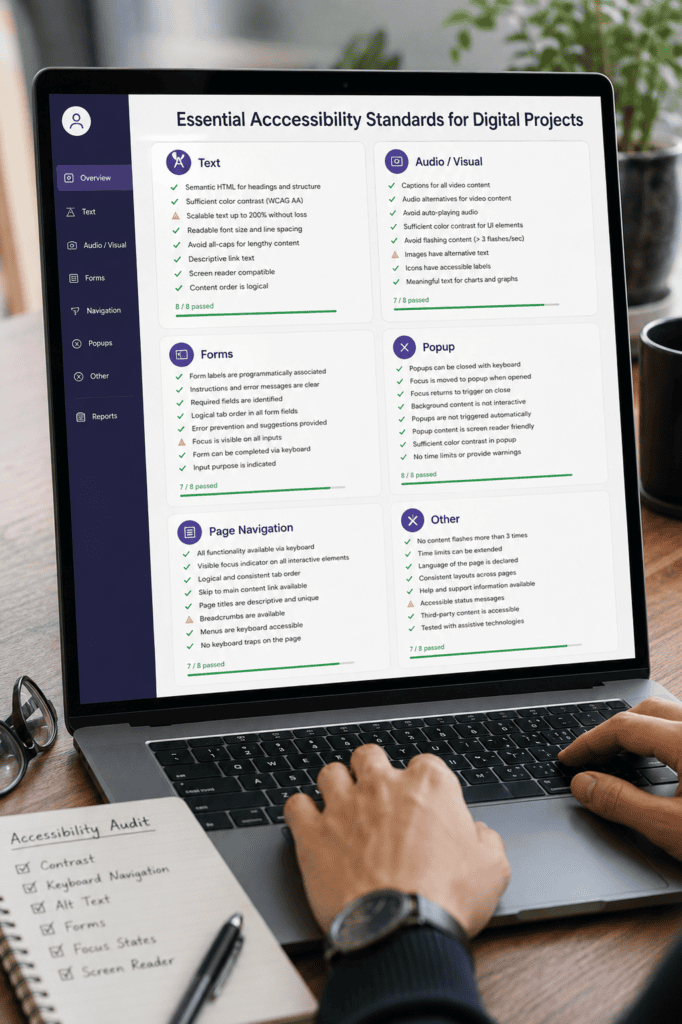
At minimum, ensure your projects include:
- Meaningful HTML headings and document structures
- Alternative text (
alttags) for informative images - Full keyboard access for links, buttons, and form controls
- Readable colour contrast ratios
- Explicitly labeled form inputs
- Captions or transcripts for audio and video media
- Mobile responsiveness and cross-browser testing
- Avoidance of conveying information through colour alone
The W3C notes that accessible design also benefits users without disabilities, including individuals using small screens, low-bandwidth connections, or situational limitations.
Protect Private Information and Credentials
Never publish sensitive data to public repositories:
- API keys
- Passwords or authentication tokens
- Private client or user data
- Personal addresses or phone numbers
- Unredacted screenshots of internal systems
- Confidential reports or academic records
GitHub’s secret-scanning documentation highlights that hardcoded API keys and tokens are frequent targets for automated unauthorized access. Secret scanning automatically searches Git histories for compromised credentials.
Prevention is always better than remediation. Store configuration secrets in environment variables, add local credential files to .gitignore, mock fake datasets for public demonstrations, and rotate any exposed keys immediately if a leak occurs. Taking security seriously is essential when building a technology portfolio that reflects professional standards.
Make It Discoverable Without Keyword Stuffing
Use a descriptive page title, readable headings, clear URLs, and contextual link text. Google’s SEO Starter Guide recommends unique, descriptive titles and concise, page-specific meta descriptions, while explicitly warning against keyword stuffing.
For example:
- Better URL:
/projects/python-expense-dashboard/ - Weak URL:
/project-2-final-new/
When you build a technology portfolio, your site does not need to rank for every high-volume technology keyword on the internet. Instead, your goal is targeted discoverability: helping the right employer, recruiter, or client find and evaluate your work quickly.
Avoid Common Beginner Mistakes
A portfolio is not a substitute for experience; it is a way to create credible evidence while you build it. When you build a technology portfolio, avoiding these common missteps will keep your work professional, honest, and high-impact:
- Listing tools without evidence: Link every key technology directly to a project, case study, or contribution.
- Publishing tutorial clones: Always extend tutorial code by adding new features, improving tests, or adapting the logic to a different use case.
- Showing too many weak projects: Remove unfinished, outdated, or low-quality work from your main showcase. Focus on quality over quantity.
- Hiding your role in group work: State your precise individual responsibilities within multi-person projects.
- Using vague self-descriptions: Replace generic phrases like “passionate developer” with specific, verifiable examples of your technical work.
- Ignoring the end-user: Clearly explain who benefits from your project and why it addresses a real problem.
- Overdesigning the website: Keep layout animations simple. Do not let complex visual design distract from your project evidence.
- Leaving broken links: Regularly test live demos, repositories, downloadable CVs, and contact forms.
- Exposing secrets or private data: Always redact sensitive information and use synthetic data for public demonstrations.
- Failing to update the portfolio: Periodically review project links, skill lists, and contact information to ensure accuracy.
- Claiming production experience: Label prototypes, simulations, and coursework honestly to preserve credibility.
- Writing only about the final result: Document your technical decisions, engineering trade-offs, testing strategies, and lessons learned.
A well-structured project collection can help you secure an internship, volunteer opportunity, freelance contract, or entry-level job—provided you build a technology portfolio centered on evidence, transparency, and problem-solving capability.
A Practical 30-Day Plan
You can create a first version without waiting until you feel completely ready. Follow this structured roadmap to build a technology portfolio in four weeks:
- Days 1–3: Define Your Direction. Choose one target role and collect five relevant job descriptions. Note the recurring skills, required tools, and key responsibilities.
- Days 4–7: Select Your Projects. Choose two projects you can finish or improve within a month. Prioritise projects that solve distinct problems and demonstrate complementary skills.
- Week 2: Complete Your Strongest Project. Add a clear README, write automated tests where appropriate, include screenshots, implement error handling, and document known limitations. Trim unnecessary features that prevent completion.
- Week 3: Publish and Document. Write a clear project case study. Add a live demo or video walkthrough if applicable. Ask at least two people for constructive feedback and document the design or code improvements you make.
- Week 4: Build the Portfolio Shell. Set up your Home, Projects, About, Resume, and Contact sections. Test your portfolio on a mobile device, verify keyboard accessibility, check for broken links, and proofread all text carefully.
Finish by adding your published link to your CV, professional profiles, application forms, and email signature as you build a technology portfolio designed to land your next opportunity.
How many projects should a beginner include?
Start with two to four strong, relevant projects. When you build a technology portfolio, add more projects only if they demonstrate a distinct capability or a substantially higher level of engineering quality.
Can coursework count as a technology portfolio project?
Yes, provided you have permission to share it. Clearly identify the original assignment, your individual contribution, and any group collaboration. Never present academic work as paid client employment as you build a technology portfolio.
Do I need a personal website?
No. A well-organised repository, PDF, or GitHub profile is often sufficient to get started. A dedicated website becomes useful when you need to help visitors navigate multiple complex projects and understand your broader professional direction.
What if my projects have no real users?
Describe them honestly as prototypes or practice projects. Use realistic constraints, gather feedback from peers, and report what you measured without inventing adoption numbers or revenue metrics.
Should I include certificates?
Include certificates only when they directly support your target role. Always pair them with practical work, because a certificate shows completed learning activity, whereas a project proves practical application.
What should I do first?
Choose one target role and refine a single small project until an external reviewer can easily run, understand, or evaluate it strictly from your documentation. This is the most effective first step to build a technology portfolio that gets results.
In Conclusion
A technology portfolio built without formal experience should:
- Focus on a single, well-defined target role.
- Showcase two to four relevant, high-quality projects.
- Clearly explain the problem, your exact role, the technical process, measurable results, and key reflections.
- Provide verifiable evidence such as source code, live demos, system designs, dashboards, or documentation.
- Demonstrate core competencies, including clear communication, testing, accessibility, security best practices, and responsible technology use.
- Present personal, academic, volunteer, and practice work with absolute honesty.
- Remain simple, accessible, easy to navigate, and up to date.
When you build a technology portfolio, progress starts with clarity. Take your immediate next step today by completing this one-sentence project brief:
“I will build [thing] for [user] to solve [problem], using [tools], and I will demonstrate success by [evidence].