Claude Artifacts vs ChatGPT Work: Practical Ways to Use Both
Claude Artifacts and ChatGPT Work represent two fundamentally different paradigms for executing tasks with generative AI. While both push workflows past basic conversational prompts, they approach production through distinct lenses. Claude Artifacts provides a dedicated, side-by-side workspace optimized for creating, iterating on, and sharing self-contained digital outputs—such as code, technical diagrams, live web components, and structured documents.
ChatGPT Work focuses on broader, multi-step orchestration, handling deep research, data synthesis across varied file types, and connected applications. For modern professionals, maximizing productivity requires understanding where these environments diverge and deploying each for its core strengths.
Generative AI is shifting rapidly from static question-and-answer interactions toward execution-driven workflows. Claude Artifacts and ChatGPT Work illustrate two divergent solutions to that transition:
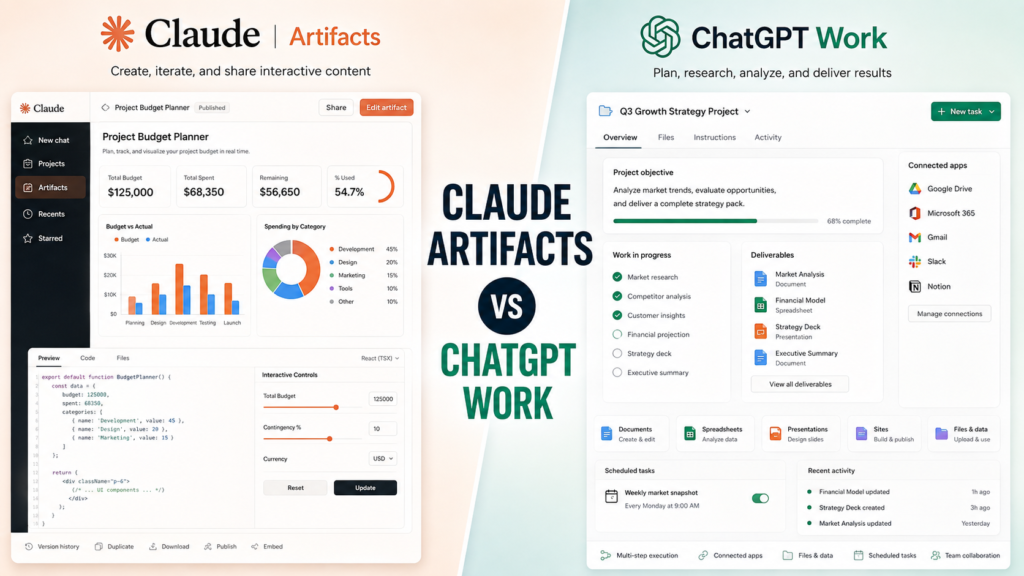
- Claude Artifacts gives Claude a dedicated environment for substantial, modular outputs that exist separately from the surrounding chat stream, allowing users to preview, test, and export assets instantly.
- ChatGPT Work serves as an execution engine for longer, multi-step tasks that synthesize data across files, apps, and complex analytical pipelines.
For product managers, developers, founders, strategists, and analysts, leveraging Claude Artifacts alongside workspace tools is essential for building high-leverage operational systems.
Claude Artifacts vs ChatGPT Work at a Glance
The simplest distinction is this: Claude Artifacts is centered on the asset you are creating, while ChatGPT Work is centered on the multi-step work you want completed. This serves as a practical mental model rather than an absolute technical boundary, as both ecosystems possess overlapping capabilities.
| Area | Claude Artifacts | ChatGPT Work |
| Primary concept | Persistent, self-contained creations | Multi-step work and finished deliverables |
| Best starting point | “Build/create this” | “Complete this project/task” |
| Documents | Yes | Yes |
| Code | Yes | Possible, alongside OpenAI’s developer experiences |
| Interactive components | Strong use case via Claude Artifacts | Can create Sites and web apps |
| Websites | Single-page HTML and interactive experiences | Sites and web apps |
| Diagrams/flowcharts | Yes | Can produce visual/project outputs depending on task |
| Spreadsheets | Not the defining Claude Artifacts format | Native Work deliverable |
| Presentations | Not a core Claude Artifacts format | Native Work deliverable |
| Research | Supports creation through broader capabilities | Core Work use case |
| Connected apps | Depends on surrounding configuration | Important part of Work |
| Scheduled work | Not a defining Claude Artifacts capability | Supported through Scheduled Tasks |
| Public publishing | Supported for eligible Claude plans | Different sharing/output model |
| Interactive AI apps | Supported via Claude Artifacts | Can create web apps and Sites |
| Best suited to | Building and iterating on standalone outputs | Executing broader workflows |
The key point is that Claude Artifacts and ChatGPT Work are not exact equivalents. Comparing them purely feature by feature can therefore be misleading.
What Is Claude Artifacts?
Claude Artifacts is an Anthropic feature that isolates substantial, self-contained digital outputs into a dedicated, side-by-side workspace separate from the main chat stream. Anthropic defines standard Claude Artifacts outputs to include:
- Markdown and plain-text documents
- Code snippets
- Single-page HTML websites
- SVG graphics
- Diagrams and flowcharts
- Interactive React components
An Artifact is engineered for assets that require future editing, reuse, collaborative sharing, or iterative expansion. Rather than burying long blocks of code or functional application interfaces inside a scrolling chat history, Claude Artifacts renders them in an interactive viewer. This design allows users to inspect and test outputs in real time while using the main conversation as the control layer for continuous refinement.
This architecture streamlines iterative production. For example, a product manager can prompt:
“Build an interactive project-priority matrix where I can score projects according to impact, cost, risk, and implementation difficulty.”
Claude generates the tool as an Artifact, allowing the user to issue continuous modifications such as:
- “Add a fifth criterion for strategic alignment.”
- “Change the scoring system from 5 points to 10.”
- “Add a chart showing the highest-priority projects.”
As the Artifact evolves, Anthropic’s built-in version control enables users to track changes, revert to previous iterations, and safely manage the asset’s development lifecycle.
Claude Artifacts Can Be Interactive
Claude Artifacts transcend static document generation by supporting interactive React components and functional web experiences. Through Anthropic’s support for AI-powered Artifacts, creators can build applications that directly embed Claude’s intelligence.
These applications utilize a constrained text-based completion API. Users authenticate securely via their own Claude accounts, routing any AI token consumption directly against their personal usage limits rather than requiring the creator to distribute API keys or subsidize external usage.
This architecture enables developers, product managers, and founders to rapidly prototype lightweight AI tools such as:
- Writing assistants
- Interactive learning tools
- Question-answering interfaces
- Coaching applications
- Specialized content generators
- Decision-support tools
- Browser-based games
- File-processing interfaces
Technical Limitations and Boundaries
While powerful for rapid prototyping, AI-powered Claude Artifacts operate under strict technical constraints that separate them from enterprise production software:
- No Third-Party External API Calls: Artifacts cannot natively make outbound calls to external third-party APIs or external backend servers, limiting complex external integrations.
- API Scope Restrictions: Access is restricted to a streamlined completion API rather than the full feature set of Anthropic’s developer platform.
Recognizing these boundaries ensures teams deploy Claude Artifacts for their ideal use case: high-speed, interactive prototyping, internal tools, and collaborative design.
What Is ChatGPT Work?
ChatGPT Work is OpenAI’s agentic environment engineered for long-horizon, multi-step professional tasks. OpenAI segments its core product tiers to delineate operational focus:
- Chat: Optimized for rapid conversational assistance, brainstorming, and everyday queries.
- Work: Designed for deep research, data analysis, multi-step execution, and the production of finished deliverables.
- Codex: Specialized for software development, including code generation, debugging, testing, repository management, and code review.
This architecture creates a sharp contrast when evaluating ChatGPT Work against Claude Artifacts. While Claude Artifacts provides a side-by-side workspace focused primarily on isolated asset creation and real-time iteration, ChatGPT Work operates as a task-orchestration engine. OpenAI positions Work to autonomously decompose complex goals into discrete sub-tasks, gather contextual data across integrated files and connected apps, and synthesize finished multi-format deliverables.
Core Deliverables and Capabilities
ChatGPT Work supports end-to-end production across a wide array of professional formats, including:
- Formatted documents and long-form reports
- Complex spreadsheets and quantitative analyses
- Polished presentations and strategic summaries
- Fully realized sites and functional web applications
Integration and Operational Scope
ChatGPT Work integrates deeply with broader OpenAI capabilities to streamline execution:
- ChatGPT Projects Integration: Work operates natively within existing Project containers, inheriting established project instructions, reference files, custom instructions, and historical chat context.
- Connected Apps and External Context: Depending on workspace configuration, administrative permissions, and subscription tier, Work connects with external software tools. This integration allows the agent to query external data sources, import real-time context, or execute approved multi-step actions across connected enterprise applications.
This comprehensive execution model makes ChatGPT Work the preferred environment when a project demands extensive cross-system orchestration rather than single-asset refinement—setting up a clear strategic division between OpenAI’s task runner and Claude Artifacts.
The Biggest Difference: Artifact Creation vs Work Orchestration
Understanding the strategic divide between Claude Artifacts and ChatGPT Work requires examining where operational complexity resides within each ecosystem.
- Claude Artifacts (Complexity in the Output): Complexity lives within the self-contained asset itself. Users build single, highly detailed digital creations—such as a fully functioning interactive calculator containing custom inputs, conditional logic, embedded visualizations, and a responsive user interface.
- ChatGPT Work (Complexity in the Workflow): Complexity lives within the execution pipeline. Users deploy an AI agent to orchestrate multi-step processes—collecting raw data across fragmented sources, analyzing quantitative metrics, synthesizing insights, and generating multiple finished deliverables across separate formats.
Scenario 1: Building a Product Prioritization Tool
- The Goal: Build an interactive application where product managers input proposed features and score them dynamically using custom frameworks like RICE (Reach, Impact, Confidence, Effort).
- The Platform Fit: Claude Artifacts excels here because the primary objective is generating, testing, and refining an interactive application. Claude Artifacts serves as the container where the product lives, allowing users to make real-time code modifications while keeping the main conversation as the control layer.
Scenario 2: Preparing a Quarterly Product Review
- The Goal: Aggregate raw meeting transcripts, messy spreadsheets, product telemetry metrics, user research, and legacy documents to produce an executive report, supporting charts, and a polished presentation deck.
- The Platform Fit: This aligns naturally with ChatGPT Work. The project requires managing multiple inputs, executing deep reasoning chains, and producing diverse deliverable types across an extended workflow.
While neither platform is technically locked out of handling adjacent tasks, their native architectures prioritize fundamentally different operational outcomes.
Practical Ways to Use Claude Artifacts
Claude Artifacts help you turn conversations into practical, reusable outputs such as interactive tools, documents, visualizations, prototypes, and code. Here are some of the most useful ways professionals can apply them to real work.
Build Interactive Prototypes
Rapid prototyping represents one of the strongest operational uses for Claude Artifacts. Product managers and technical founders can describe an interface and command Claude to generate an interactive mockup before committing valuable engineering resources.
- Example Prompt: “Create an interactive onboarding dashboard for a project-management application. Include progress tracking, outstanding tasks, team invitations, and a completion percentage.”
Iterating conversationally allows teams to explore concepts visually and validate product hypotheses early. However, AI-generated prototypes should never be treated as production-ready software. Security, accessibility, maintainability, data handling, performance, and code architecture still require rigorous human engineering review.
Create Internal Calculators and Decision Tools
Many professional decisions rely on repeatable formulas, evaluation frameworks, or quantitative scoring systems. Instead of burying business logic inside a static spreadsheet, professionals can use Claude Artifacts to build functional, reusable web-based interfaces for:
- ROI calculations
- Project prioritization matrices
- Hiring and interview scorecards
- Marketing budget allocations
- Pricing and tier comparisons
- Risk assessments
- Resource capacity planning
The primary advantage lies in transforming static calculations into accessible, interactive tools that team members can use on demand.
Visualize Complex Systems
Claude Artifacts support SVGs, HTML, Mermaid diagrams, and flowcharts, making them ideal for rendering intricate system designs. Software architects, technical leads, and product strategists can use Claude Artifacts to map out and explain:
- System architecture topologies
- Data pipelines and synchronization flows
- Authentication and authorization lifecycles
- API relationships and payloads
- Multi-step user journeys
- Deployment and CI/CD processes
These visual assets are significantly easier to review and interrogate than long, text-heavy system documentation.
Develop and Refine Code
Claude Artifacts provide an isolated, convenient environment for inspecting, testing, and iterating on generated code. This shines brightest when code produces an immediate visual output—such as single-page landing pages, dashboards, or React components.
For heavy, repository-level software engineering, however, developers should rely on dedicated coding agents and IDE environments rather than treating Claude Artifacts as a full-scale replacement for professional development workflows.
Create Shareable AI Tools
AI-powered Claude Artifacts allow creators to transition from static prompts to functional, interactive applications that others can use directly. Use cases span multiple disciplines:
- Learning Designers: Build interactive study assistants and quizzes.
- Marketers: Create live headline evaluators and SEO auditing widgets.
- Product Teams: Build lightweight feature requirements assistants.
- Consultants: Prototype client-facing decision-support calculators.
Because user interaction routes through each individual’s authenticated Claude account, creators do not need to distribute private API keys or pay for external user consumption. While this architecture significantly lowers the barrier for internal experimentation and lightweight tooling, technical constraints (such as limited API scopes and restricted external calls) mean it should not replace conventional cloud application development for production software.
Practical Ways to Use ChatGPT Work
ChatGPT Work helps you move beyond conversation and complete real tasks in a shared workspace—researching information, working with files, creating documents, analyzing data, building presentations, generating visuals, and developing project-ready outputs. Here are practical ways to use it in everyday professional work.
Turn Source Material Into Finished Deliverables
ChatGPT Work shines when the foundational context required for an output already exists across fragmented files, documents, and digital repositories. Rather than manually synthesizing scattered materials, teams can feed the relevant context into the agent and request finished business deliverables.
- Example Context: A strategy team provides raw research reports, meeting transcripts, financial spreadsheets, customer feedback logs, and legacy presentation decks.
- The Output: ChatGPT Work synthesizes the data to generate a cohesive decision memo, comprehensive market analysis, or presentation deck.
The core objective moves beyond generating raw text into transforming existing institutional context into polished, usable business assets.
Conduct Multi-Step Research
Comprehensive professional research is rarely a single-prompt task. It requires a dynamic chain of execution: identifying credible sources, cross-referencing claims, analyzing complex documents, resolving contradictions, organizing findings into frameworks, and synthesizing a final report.
ChatGPT Work is engineered to handle these multi-step execution pipelines autonomously. However, professionals must remember that agentic execution reduces manual friction—it does not eliminate the human responsibility to verify consequential claims, audit cited sources, and ensure analytical accuracy.
Build Documents, Spreadsheets, and Presentations
Producing conventional business deliverables is one of Work’s most practical advantages. Because OpenAI designed Work to generate and edit formal file formats, prompts can be framed around the final consumption format:
- Example Prompt: “Analyze these monthly sales files, identify the three most important revenue drivers, create a detailed executive report, and prepare a supporting slide presentation for management.”
The resulting output matches the standard document formats used in corporate environments. Because availability, native editing capabilities, and file-type support vary by subscription tier, workspace policy, and connected app permissions, users should always verify what is enabled in their specific environment.
Work Across Connected Apps and Files
Connected context becomes indispensable when required data lives across siloed enterprise systems. Depending on workspace configurations, administrative permissions, and supported app integrations, ChatGPT Work can search external databases, pull live context into a conversation, or execute approved actions.
This eliminates the friction of manually copying and pasting information into prompts. However, expanding an AI agent’s operational scope introduces critical security considerations: broader data access requires strict adherence to organizational data governance, access permissions, and compliance policies regarding what information an AI system is authorized to read, retrieve, or modify.
Automate Recurring Knowledge Work
ChatGPT Work can execute tasks using Scheduled Tasks. Depending on workspace settings, Work tasks can run on a one-time basis, repeat according to a defined cron schedule, or monitor specific sources for changes.
This capability unlocks continuous operational workflows such as:
- Automated weekly market summaries
- Periodic project progress reports
- Regular competitive intelligence tracking
- Ongoing monitoring of defined data sources
- Repeated administrative workflows
- Scheduled quantitative analysis
This represents a key architectural distinction from Claude Artifacts. While a Claude Artifact is primarily an isolated asset you build, inspect, and interact with dynamically, a ChatGPT Work task represents ongoing operational labor designed to happen automatically over time.
Where Claude Artifacts Has an Advantage
Claude Artifacts excels when direct interaction with the output is central to the workflow. Rather than simply generating a static document or file, Claude constructs a functional, interactive experience.
This enables professionals to rapidly cycle through a high-leverage production pipeline:
$$\text{Idea} \longrightarrow \text{Prototype} \longrightarrow \text{Interaction} \longrightarrow \text{Refinement} \longrightarrow \text{Sharing}$$
Publishing and Distribution Models
Anthropic supports flexible distribution models tailored to account types, expanding how generated assets are shared:
- Free, Pro, and Max Tiers: Eligible users can publish Artifacts publicly, generating shareable links that allow external users to view and interact with the application directly. Published Artifacts can also be embedded seamlessly on allowed external websites.
- Team and Enterprise Accounts: Anthropic implements an organization-oriented sharing model designed for internal security and collaboration, restricting public distribution while facilitating secure workspace sharing.
This architectural flexibility makes Claude Artifacts uniquely valuable for building lightweight internal tools, interactive explainers, client-facing demonstrations, rapid prototypes, and educational applications without requiring a separate hosting infrastructure.
Where ChatGPT Work Has an Advantage
ChatGPT Work excels when operational execution across distributed context is required. Its fundamental design question is not centered on how a single isolated asset should look, but rather on what sequence of actions needs to happen to accomplish a complex goal.
A single Work task can ingest raw data, research external sources, analyze internal files, integrate connected business tools, produce multiple cross-format deliverables, and execute recurring or monitored workflows over time.
For knowledge workers whose daily operations revolve around multi-step reports, dense spreadsheets, slide decks, communication threads, files, and integrated business systems, this orchestration-first model eliminates the friction of manual task switching and pipeline management.
Claude Artifacts vs ChatGPT Work for Developers
Developers should avoid reducing this comparison to simple code generation, as each ecosystem serves a distinct phase of the engineering lifecycle.
Claude Artifacts excels at rapid front-end prototyping, allowing engineers to instantly generate, preview, and interact with web components, visual UI layouts, system diagrams, and documentation pages. Furthermore, Anthropic extends this capability through Claude Code for eligible Team and Enterprise organizations, where development-session context can be transformed into live, shareable assets such as pull-request walkthroughs, engineering dashboards, architecture explanations, and release checklists.
OpenAI, by contrast, positions Codex rather than Work as its dedicated software-development environment for repository-level engineering, debugging, testing, and command execution.
When evaluating serious, end-to-end software engineering workflows, the appropriate technical comparison shifts from Claude Artifacts vs ChatGPT Work to Claude Code vs OpenAI Codex. Within the scope of this comparison, Claude Artifacts remains the premier choice for what you want to create and interact with, while ChatGPT Work is uniquely valuable for the broader multi-step project you want executed.
Claude Artifacts vs ChatGPT Work for Product Managers
Product managers operate at the intersection of strategic discovery and tactile execution, making a dual-platform strategy essential for modern product work.
Where Claude Artifacts Empowers Product Managers
Claude Artifacts provides an interactive playground for exploring concepts and aligning cross-functional teams through tangible outputs. Product managers can use Claude Artifacts to build and refine:
- Interactive product concepts and minimum viable wireframes
- Dynamic feature-prioritization matrices (e.g., RICE or MoSCoW scoring tools)
- User-flow visualizations and state-machine diagrams
- Front-end interface prototypes for early user testing
- Structured requirements visualizations
- Reusable decision frameworks
Where ChatGPT Work Empowers Product Managers
ChatGPT Work handles the heavy lifting of operational synthesis and multi-step project coordination across fragmented documents. Product managers can deploy ChatGPT Work to manage:
- Large-scale synthesis of customer interview transcripts and qualitative user research
- Deep analysis of complex product documentation and technical specs
- Preparation of comprehensive product-review materials
- Automated generation of executive slide presentations
- Complex analytical spreadsheets and feature cost-benefit models
- Formal product requirement decision memos
- Coordination of recurring market research and competitive reporting
High-Leverage Product Workflows
Combining both ecosystems unlocks powerful operational loops:
- The Discovery-to-Prototype Loop: Use ChatGPT Work for synthesis and project execution, then port the structured findings into Claude Artifacts for interactive exploration and prototyping.
- The Prototype-to-Delivery Loop: Use Claude Artifacts to rapidly explore, test, and validate an idea with stakeholders, then feed the resulting decisions and refined parameters into ChatGPT Work to generate formal deliverables, rollout plans, and tracking schedules.
Claude Artifacts vs ChatGPT Work for Founders and Strategists
Founders and digital strategists operate in a continuous loop between high-level ideation and rigorous operational execution, making a hybrid approach between both platforms essential.
Where Claude Artifacts Empowers Founders and Strategists
Claude Artifacts acts as a rapid translation engine for raw concepts, turning abstract ideas into tangible, visible assets in minutes. Founders can leverage Claude Artifacts to build:
- Interactive financial and unit-economics calculators
- Functional mock interfaces and front-end product wireframes
- Dynamic pricing models and tier-comparison tools
- Lightweight, shareable AI applications for early user testing
Where ChatGPT Work Empowers Founders and Strategists
ChatGPT Work manages the heavy operational machinery required to turn scattered business context into formal execution materials. Strategists can deploy ChatGPT Work to generate:
- Comprehensive market and competitive analysis reports
- Board decks and investor presentations
- Complex financial and operating model spreadsheets
- Strategic business plans and execution roadmaps
- Automated, recurring market research and monitoring workflows
The Combined Strategy
Rather than competing, these platforms serve complementary roles across the entrepreneurial lifecycle. A founder evaluating a new SaaS venture can use Claude Artifacts to prototype the customer-facing experience and validate user interaction, while simultaneously using ChatGPT Work to organize the surrounding market research, operational data, and business documentation.
Should You Use Claude Artifacts or ChatGPT Work?
Choosing between these two environments comes down to diagnosing the structural nature of your task—distinguishing whether you need isolated asset creation or multi-step execution.
Use Claude Artifacts When:
- The primary output needs to be interactive or visual.
- You are rapidly prototyping a user interface, calculator, or tool.
- You want to iterate conversationally on code, SVG diagrams, or web components.
- You need a self-contained creation that can be easily inspected, versioned, or reused.
- You want to publish or embed an interactive Claude Artifact for stakeholders or external users.
- You want to build and experiment with a lightweight, AI-powered application backed by Claude.
Use ChatGPT Work When:
- Your task spans multiple complex execution steps.
- You need to synthesize disparate files, datasets, and research sources.
- The final deliverable is a formal business document, spreadsheet, slide presentation, report, Site, or data analysis.
- Connected apps and external enterprise integrations are central to your workflow.
- You want an AI agent to manage an entire project rather than just generate an isolated asset.
- The operational task needs to run automatically on a schedule, trigger, or monitoring condition.
Use Both When:
- Your workflow requires solving both an execution problem (data synthesis, research, and project coordination) and a creation problem (prototyping, interactive visualization, and asset generation).
For modern knowledge workers, strategists, and founders, combining the orchestration power of ChatGPT Work with the creative precision of Claude Artifacts provides a complete operational stack for the future of AI-driven work.
A Practical Workflow Using Both
To see how these systems integrate in a real-world environment, consider a hypothetical software company preparing to launch a new subscription tier. The project requires extensive customer research, competitive analysis, strategic pricing decisions, a customer-facing pricing calculator, management sign-off, and formal launch materials.
Step 1: Use ChatGPT Work for Research Synthesis
Begin by feeding all foundational context—customer interview transcripts, competitive research reports, internal pricing spreadsheets, and historical product logs—into ChatGPT Work. Direct the agent to synthesize the data and identify:
- Core customer segments and willingness-to-pay thresholds
- Most requested tier-specific features
- Competitive positioning gaps and market risks
Step 2: Use Claude Artifacts to Prototype the Pricing Experience
Take the strategic insights from Step 1 and transition to Claude Artifacts to build a tactile, interactive pricing calculator and plan-comparison matrix. Iterate conversationally with Claude to refine the UI layout, adjust discount logic, and embed visual tiers. This gives stakeholders a functional, clickable prototype to test instead of a static spreadsheet.
Step 3: Gather Stakeholder Feedback
Share the Claude Artifact link or export with cross-functional team members (product, sales, and finance) so they can interact directly with the pricing model. Document their feedback, adjust the component logic in real time, and lock in the final tier parameters.
Step 4: Return to ChatGPT Work for Deliverables
Feed the finalized pricing decisions and stakeholder notes back into ChatGPT Work to orchestrate the creation of formal execution assets, such as:
- Comprehensive strategy memos
- Detailed financial and revenue models
- Executive slide decks and launch presentations
- Step-by-step cross-functional implementation plans
Step 5: Automate Recurring Follow-Up
Once the tier is live, configure an eligible ChatGPT Work task to monitor incoming customer feedback files, run periodic revenue analyses, or generate automated weekly performance summaries.
The underlying principle remains simple: assign each platform according to the structural shape of the work—deploying ChatGPT Work for orchestration and synthesis, and Claude Artifacts for interactive creation and prototyping.
Important Limitations and Trade-Offs
Neither system should be treated as an autonomous replacement for professional human judgment. Evaluating these tools effectively requires understanding their inherent operational risks:
- AI-Generated Code Requires Rigorous Review: An interactive Claude Artifact can look polished and function smoothly on the surface while containing hidden security vulnerabilities, accessibility flaws, logic errors, or technical debt. Anything slated for production deployment demands thorough human code review and testing.
- Connected Applications Expand the Permission Surface: Granting an AI system access to enterprise files and business tools dramatically increases workflow leverage, but it simultaneously magnifies the need for strict data governance. Organizations must carefully audit:
- Which external applications are connected
- What exact permission scopes have been granted
- What organizational data users can access
- Whether sensitive corporate material belongs in the workflow
- Whether mandatory human-in-the-loop approval gates are required before executing consequential actions
- Artifact Sharing Can Expose Underlying Context: Anthropic specifically warns that when an Artifact is shared within an organization, viewers may also gain access to attachments, files, and chat history from the source conversation used to create it. This makes it vital to audit and clean up the underlying conversation before sharing an Artifact containing sensitive business data.
- Capabilities Depend on Plans and Configurations: Neither Claude Artifacts nor ChatGPT Work represents a static, identical experience for every user. Feature availability fluctuates based on subscription tiers, platform interfaces, workspace settings, organizational security permissions, connected services, and rapid product rollout schedules. Verifying what is actively enabled in your specific environment is essential.
Common Misconceptions
Claude Artifacts and ChatGPT Work are often treated as interchangeable tools, but they are designed for different workflows and types of output. Clearing up these common misconceptions will help you understand what each tool does well—and choose the right one for the task.
- “Claude Artifacts is just a document editor.”
- The Reality: While documents are supported, Claude Artifacts is designed for self-contained, persistent digital creations—including code snippets, single-page HTML websites, SVG graphics, Mermaid diagrams, interactive React components, and functional, AI-powered applications.
- “ChatGPT Work is just ChatGPT with a larger context window.”
- The Reality: This view overlooks agentic execution. OpenAI positions Work as a multi-step orchestration engine capable of researching data sources, analyzing complex files, integrating connected apps, and autonomously building multi-format finished deliverables.
- “Artifacts and Work are direct competitors.”
- The Reality: They overlap in content generation, but their architectural abstractions differ fundamentally. Claude Artifacts prioritizes persistent, side-by-side asset creation and interaction, whereas ChatGPT Work prioritizes multi-step workflow execution and project orchestration.
- “Using AI agents means I no longer need to review the result.”
- The Reality: Agentic execution compresses time-to-deliverable, but it does not transfer human accountability. The more consequential the output—whether code, financial models, or strategic memos—the more rigorous the required human verification and validation.
Is Claude Artifacts better than ChatGPT Work?
Neither is universally superior; they serve different phases of professional execution. Claude Artifacts is optimized for building, previewing, and iterating on self-contained, interactive digital assets. ChatGPT Work is engineered for long-horizon, multi-step projects involving deep research, cross-file synthesis, connected application integration, and finished business deliverables.
Can Claude Artifacts create websites?
Yes. Anthropic explicitly supports single-page HTML websites, SVG graphics, and interactive React components as native Claude Artifacts outputs, allowing users to test and view web experiences side-by-side with the chat stream.
Can ChatGPT Work create websites?
Yes. OpenAI states that ChatGPT Work can generate fully realized Sites and web apps alongside traditional business formats like documents, spreadsheets, presentations, and reports.
Can Claude Artifacts create AI apps?
Yes. Anthropic supports AI-powered Claude Artifacts that embed Claude’s intelligence directly into the application. These tools use a constrained completion API where users authenticate through their own Claude accounts, routing token consumption against personal limits rather than requiring the creator to distribute API keys.
Does ChatGPT Work work with other apps?
Yes. Depending on subscription tiers, workspace configurations, administrative permissions, and regional availability, ChatGPT’s connected apps system allows the agent to query external data sources, import contextual information, and execute approved multi-step actions across integrated enterprise software.
Can ChatGPT Work automate recurring tasks?
Yes. ChatGPT Work supports Scheduled Tasks that can execute on a one-time basis, run on a defined cron schedule, or monitor specific data sources for changes—enabling automated market research, periodic reporting, and recurring operational analysis.
Are Claude Artifacts public?
Claude Artifacts remain private by default. Anthropic allows public publishing for eligible Free, Pro, and Max accounts, generating shareable links and embeddable options. Team and Enterprise accounts rely on secure, organization-level sharing controls instead of public distribution.
Is Claude Artifacts suitable for production applications?
While powerful for rapid prototyping, internal tools, and shareable calculators, Claude Artifacts should not replace traditional production software development. AI-generated code requires rigorous human engineering review for security, accessibility, and maintainability, and technical boundaries (such as limited API scopes and restricted external calls) apply to AI-powered Artifacts.
In Conclusion
The most useful way to think about Claude Artifacts versus ChatGPT Work is not as another AI-versus-AI contest.
They represent fundamentally different ways of turning generative AI into productive work. Claude Artifacts shines when the output itself needs to become something you can interact with, refine, reuse, or share. ChatGPT Work shines when the job involves a broader sequence of research, analysis, files, apps, decisions, and finished deliverables.
For professionals who have access to both, the most powerful approach is to stop asking which platform should replace the other. Instead, ask two guiding questions:
- Do I need to build something? Claude Artifacts is likely the better starting point.
- Do I need to get a body of work completed? ChatGPT Work is likely the better starting point.
When a project requires both tactile creation and end-to-end execution, combining both environments into a single, cohesive workflow provides the ultimate operational edge.