Artificial intelligence is rapidly transforming how people work, research, communicate, and learn. However, you do not always need to open a separate web app or chatbot to tap into these capabilities. By leveraging the right AI Chrome extensions, you can embed advanced machine learning assistance directly into your browser workflow.
Modern AI Chrome extensions empower you to draft emails, summarize lengthy articles in seconds, conduct lightning-fast research, transcribe live meetings, refine content, and automate repetitive browser tasks without breaking your focus.
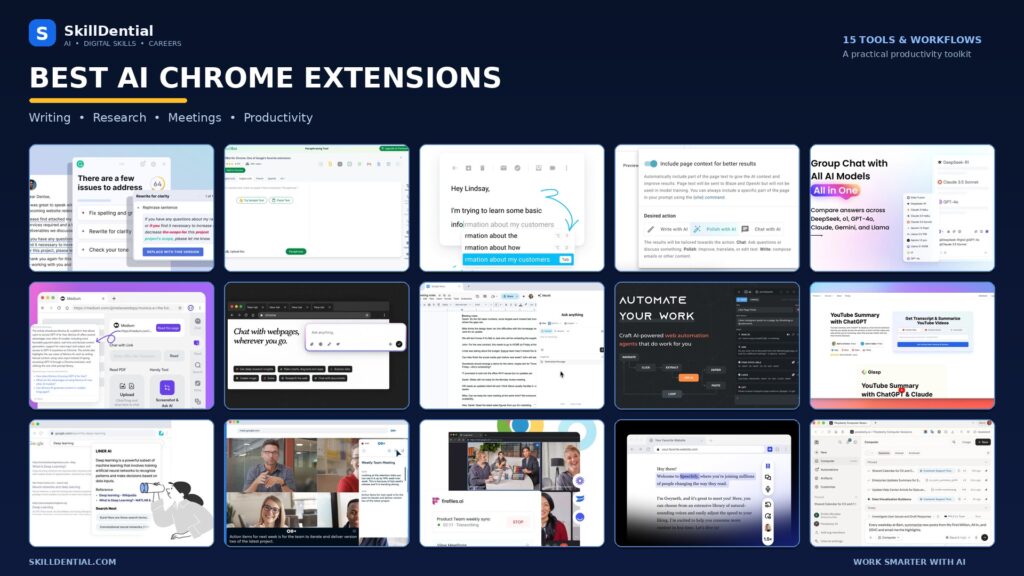
Whether you are a student, freelancer, content creator, or enterprise professional, integrating top-tier AI Chrome extensions into your daily routine helps minimize friction on low-leverage chores so you can focus on high-impact work.
In this comprehensive guide, we examine 15 of the best AI Chrome extensions available today, breaking down their core functionalities, standout features, pricing models, and the specific user profiles that stand to gain the most from each tool.
What Are AI Chrome Extensions?
AI Chrome extensions are lightweight browser add-ons that embed machine learning and large language models directly into your everyday web browsing experience.
Instead of forcing you to constantly context-switch between browser tabs, separate web apps, and external chat interfaces, these tools let you deploy AI capabilities natively while working inside emails, documents, learning management systems, web applications, and media players.
For instance, an AI writing extension allows you to instantly polish an outgoing email or Slack message without opening a separate window, while an AI research extension can summarize a 50-page PDF or a 2-hour YouTube lecture in seconds.
Depending on the specific tool, the core capabilities of AI Chrome extensions typically include:
- Content Generation & Iteration: Writing, rewriting, expanding, or condensing text across any web text box.
- Linguistic Optimization: Performing advanced grammar checks, tone adjustments, and readability enhancements.
- Multimodal Summarization: Distilling complex webpages, research papers, PDFs, and video transcripts into concise key takeaways.
- Contextual Q&A: Querying live web pages or documents to extract exact answers without manual searching.
- Deep Research & Comparison: Cross-referencing data sources, extracting tables, and synthesizing online information on the fly.
- Meeting Intelligence: Recording, transcribing, and auto-summarizing virtual meetings directly from browser-based conferencing tools.
- Workflow Automation: Streamlining repetitive data entry, scraping, and browser-based operational tasks.
- Text-to-Speech & Accessibility: Reading dense online content aloud with natural-sounding AI voices.
It is important to note that functionality varies widely across the ecosystem: some AI Chrome extensions are hyper-specialized utility plugins designed to execute a single task with maximum efficiency, whereas others function as all-in-one AI sidebars packing multiple capabilities into a single interface.
The 15 Best AI Chrome Extensions for Productivity
Navigating today’s digital landscape requires balancing multiple tools, tabs, and workflows, which can severely fragment your attention and slow down execution. To help you reclaim valuable time and streamline your daily operations, we have evaluated and curated 15 of the absolute best AI Chrome extensions available on the market today.
Rather than listing them at random, these solutions have been strategically organized around the specific tasks, operational bottlenecks, and high-leverage workflows they are designed to help you master.
Whether your goal is to accelerate content creation, automate tedious research, or optimize your communication, exploring the detailed breakdowns below will help you identify the ideal AI Chrome extensions to elevate your personal and professional productivity.
Grammarly
- Best for: Writing and communication optimization
- Official website: Grammarly
Grammarly is an industry-leading, AI-powered writing assistant designed to elevate your written communication seamlessly across virtually any website, email client, document editor, and social media platform.
What Can You Do With It?
- Identify and correct spelling, punctuation, and advanced grammar mistakes in real time.
- Enhance sentence structure, flow, and overall clarity.
- Adjust the tone, formality, and attitude of your writing to match your target audience.
- Generate full drafts, context-aware email replies, and brainstorming ideas.
- Rewrite sentences instantly to sound more professional, concise, or persuasive.
Practical Use Case
If you are applying for a remote position and drafting an outreach email to a hiring manager, Grammarly scans your text as you type, ensuring zero typos while refining the tone to strike the ideal balance of professionalism and confidence before you hit send.
Pricing & Plans
- Free Plan: Available with core spelling, grammar, and basic clarity checks.
- Grammarly Pro: Unlocks advanced full-sentence rewrites, tone adjustments, vocabulary enhancements, and extended generative AI capabilities. Published individual Pro pricing starts at $12 per month when billed annually (monthly billing options vary).
Best Suited For
Students, job seekers, enterprise professionals, copywriters, bloggers, and content creators looking to maintain immaculate written standards with minimal friction.
QuillBot
- Best for: Paraphrasing and content rewriting
- Official website: QuillBot
QuillBot is a popular AI-powered writing and paraphrasing platform designed to help users rephrase sentences, condense information, and polish written drafts. Its browser extension brings these capabilities directly into your everyday web workflow, allowing you to refine text wherever you write online.
What Can You Do With It?
- Paraphrase sentences, paragraphs, and full sections of text instantly using multiple mode options (such as Standard, Fluency, and Formal).
- Rewrite content dynamically to adapt to different tones and styles.
- Check grammar and spelling errors on the fly.
- Summarize lengthy articles, research papers, or passages into key takeaways.
- Enhance the readability and flow of existing drafts with synonym sliders and vocabulary controls.
Practical Use Case
A student or researcher analyzing complex source material can use QuillBot to simplify dense paragraphs or improve the phrasing of their own working notes. (Note: Users should always properly cite original sources and avoid academic misconduct or passing off generated text as original thought.)
Pricing & Plans
- Free Plan: Available with limited word counts for paraphrasing, basic summarization, and standard features.
- QuillBot Premium: Unlocks unlimited paraphrasing word limits, advanced rewriting modes, deeper sentence analysis, and faster processing speeds. The published annual-equivalent Premium price starts at approximately $8.33 per month (subject to billing terms).
Best Suited For
Students, academic researchers, copywriters, non-native English speakers, and bloggers looking to overcome writer’s block and restructure sentences quickly.
Compose AI
- Best for: Faster typing and automated drafting
- Official website: Compose AI
Compose AI is a productivity-focused browser extension designed to accelerate your day-to-day communication by harnessing generative AI for real-time autocomplete, predictive text generation, and fast-tracked email drafting.
What Can You Do With It?
- Complete sentences automatically as you type across any web input field.
- Generate full blocks of text, paragraphs, and documents directly from simple text prompts.
- Draft, reply to, and polish emails in a fraction of the usual time.
- Access instant AI writing suggestions to keep your communication flowing without friction.
- Significantly reduce the physical strain and time spent on repetitive typing tasks.
Practical Use Case
If you are a freelancer or customer support professional who frequently answers similar client inquiries, Compose AI allows you to generate contextual responses and complete full sentences with single keystrokes, eliminating the need to type out standard templates from scratch.
Pricing & Plans
- Free Tier: The developer offers the core Chrome plugin capabilities for free.
- Paid Plans: Premium tiers are available for advanced generative features and higher usage limits. (It is recommended to verify current plan tiers and exact pricing structures directly on their site before subscribing).
Best Suited For
Freelancers, customer support representatives, startup founders, sales professionals, and anyone who spends a significant portion of their workday writing emails and web messages.
AI Blaze
- Best for: Reusable AI prompts and page-wide workflow automation
- Official website / Chrome listing: AI Blaze
AI Blaze is a versatile browser assistant designed to turn any web page into an AI-powered workspace. It allows users to design, save, and instantly redeploy custom AI prompts across different web platforms using keyboard shortcuts or sidebars without context-switching.
What Can You Do With It?
- Summarize online articles, legal text, or lengthy web pages on command.
- Correct grammar, spelling, and phrasing directly inside active web text fields.
- Generate contextual email responses and draft messages across platforms like Gmail and LinkedIn.
- Translate selected text dynamically into multiple languages.
- Create, save, and organize a centralized library of custom, dynamic AI prompts.
- Expand, shorten, or change the tone of existing content using customizable prompt templates.
Practical Use Case
A digital marketer can build a reusable prompt template for crafting social media captions or outreach emails. Instead of repeatedly typing the same instructions into a chatbot, they can trigger the custom prompt with a keyboard shortcut inside any text box, instantly generating brand-aligned content.
Pricing & Plans
- Free Plan: Available for core browser-based prompt execution and writing assistance.
- Paid Plans: Advanced team sharing features and higher limits start at economical rates (with Pro plans frequently structured around low-cost monthly or annual commitments).
Best Suited For
Digital marketers, content creators, customer support teams, freelancers, and professionals who want to standardize and accelerate repetitive AI tasks across their daily browser activities.
Sider AI
- Best for: Accessing multiple AI models in one sidebar
- Official website: Sider AI
Sider AI is a robust, all-in-one AI browser assistant that integrates multiple leading AI models (such as GPT-4o, Claude, and Gemini) into a unified sidebar interface, eliminating the need to juggle separate chat tabs or web apps.
What Can You Do With It?
- Interact with and compare outputs from different LLMs simultaneously within your browser.
- Summarize lengthy webpages, research papers, and PDF documents in seconds.
- Translate, explain, and contextualize online text instantly.
- Conduct deep web research across multiple websites without leaving your current tab.
- Utilize its built-in browser agent capabilities to handle supported multi-step automated tasks.
Practical Use Case
A researcher comparing complex technical explanations can use Sider to query multiple top-tier models side-by-side on the same page, verifying facts and contrasting angles without constantly switching between external AI platforms.
Pricing & Plans
- Free Plan: Offers essential multi-model access subject to daily usage limits.
- Pro/Unlimited Plans: Paid tiers scale up your monthly query volume, unlock advanced models, and provide expanded document processing capabilities.
Best Suited For
Researchers, technical professionals, students, power users, and anyone who relies on multiple AI systems and wants a centralized browser workflow.
Monica AI
- Best for: All-in-one browser assistance (The “second brain” sidebar)
- Official website: Monica
Monica is a feature-rich, all-in-one AI browser assistant designed to act as a centralized co-pilot for your daily workflow, combining research, writing, document summarization, and task automation into a single accessible interface.
What Can You Do With It?
- Summarize dense webpages, PDFs, books, and YouTube videos instantly.
- Rewrite, polish, and generate high-quality content across any website input.
- Translate text fluidly across languages with contextual accuracy.
- Query online information directly using interactive chat overlays.
- Generate text and images on the fly.
- Leverage built-in browser-agent features to help streamline multi-step web tasks.
Practical Use Case
A freelancer researching a prospective client can deploy Monica to analyze the client’s website, summarize their key service offerings, and extract relevant company data to prepare a tailored business overview in a fraction of the time.
Pricing & Plans
- Free Plan: Available with basic daily query allowances and standard features.
- Pro Plan: Unlocks higher message caps, advanced model access, and expanded features. Published Pro pricing starts at approximately $8.30 per month when billed annually.
Best Suited For
Freelancers, entrepreneurs, students, and digital professionals who want a comprehensive, multi-tool AI suite bundled into one sidebar.
Merlin AI
- Best for: Browser-based research and multi-model processing
- Official website: Merlin AI
Merlin AI is a powerful browser assistant engineered to help users research, synthesize information, and generate content directly inside their web browser without the friction of context-switching between separate applications.
What Can You Do With It?
- Summarize lengthy articles, web pages, and documents instantly.
- Interact with online documents and extract core arguments or data points.
- Generate automated summaries of YouTube videos and long-form media.
- Rewrite, draft, and polish content across social platforms and email clients.
- Translate text fluidly into multiple languages.
- Access and switch between multiple top-tier AI models from a single interface.
Practical Use Case
If you are conducting market research or exploring remote career opportunities, you can use Merlin to quickly review and summarize dense job listings, extract core requirements, and organize key role criteria for future review.
Pricing & Plans
- Free Plan: Available with limited daily usage across basic AI models and standard tools.
- Pro Plan: Unlocks expanded monthly allowances for advanced models, higher limits, and exclusive features. Published Pro pricing starts around $19 per month when billed annually, or $29 on a monthly billing cycle.
Best Suited For
Students, academic researchers, content creators, and knowledge workers who juggle heavy information intake and require multi-model AI versatility inside their browser.
MaxAI
- Best for: Webpage assistance and multi-model in-browser execution
- Official website: MaxAI
MaxAI is a comprehensive browser extension and sidebar assistant designed to streamline reading, writing, research, and data extraction directly on any web page. It embeds top-tier AI models directly into your browser workflow to eliminate the friction of manual copy-pasting.
What Can You Do With It?
- Summarize long-form web pages, PDFs, and YouTube videos instantly.
- Ask contextual questions about online text or documents without switching tabs.
- Rewrite, fix spelling and grammar, shorten, expand, or alter the tone of selected text.
- Draft fast, context-aware email replies and social media messages across web clients.
- Translate content side-by-side in real time.
- Interact with supported documents, files, and images.
Practical Use Case
If you are reading an extensive, text-heavy industry report or technical guide, you can use MaxAI’s sidebar to instantly pull core takeaways, summarize complex arguments, and break down unfamiliar concepts without leaving the page.
Pricing & Plans
- Free Plan: Includes unlimited basic chat alongside restricted daily allowances for advanced Pro model requests.
- Pro & Elite Plans: Paid tiers unlock advanced models (OpenAI, Anthropic, Gemini, DeepSeek, etc.), higher or unlimited request caps, and extended search depth. Individual Pro plans typically start around $20/month, with higher tiers or annual discounts scaling accordingly.
Best Suited For
Professionals, researchers, students, and avid knowledge workers who regularly ingest long-form digital content and want a unified, model-agnostic assistant inside their browser.
HARPA AI
- Best for: Browser automation, page monitoring, and multi-model workflow integration
- Official website: HARPA AI
HARPA AI is an advanced, hybrid browser extension that merges heavy-duty AI chat capabilities with sophisticated web automation. Rather than simply acting as a passive sidebar, HARPA understands the layout and structure of active webpages, allowing you to execute complex, repetitive workflows directly in your browser.
What Can You Do With It?
- Summarize dense articles, long-form PDF documents, and hours-long YouTube videos on the fly.
- Monitor webpage content for changes, tracking price drops or product stock updates automatically across e-commerce platforms like Amazon.
- Extract data elements from web pages and export them into structured formats like CSV or JSON.
- Trigger automated workflows and connect data via webhooks to automation platforms like Zapier, Make.com, or n8n.
- Access and toggle between multiple leading LLMs (such as GPT, Claude, Gemini, and DeepSeek) from a single sidebar.
- Utilize over 100+ predefined, page-aware commands tailored for SEO audits, competitive analysis, copywriting, and email sorting.
Practical Use Case
If you are a digital marketer, e-commerce manager, or SEO professional monitoring competitor changes, you can configure HARPA to periodically check selected competitor pricing or landing page updates, notifying you immediately when changes occur and organizing the extracted insights.
Pricing & Plans
- Free Plan: Offers a demo tier with daily message limits for basic chat, web summaries, and manual commands.
- Paid Plans: Pro options (such as the S1 and S2 tiers) unlock increased monthly cloud token allowances, advanced automation triggers, and scheduled tasks. Published annual plans start at approximately $12 per month, with higher tiers offering expanded capabilities.
Best Suited For
Business owners, digital marketers, SEO specialists, developers, and power users who want to transition from basic AI chat to active browser automation and data extraction.
Glasp
- Best for: Web reading, PDF annotation, YouTube video summarizing, and knowledge management
- Official website: Glasp
Glasp (Greatest Learner Applied Social Platform) is an interactive, AI-enhanced web highlighter and social knowledge management tool. It allows you to highlight, curate, and extract key insights from digital resources without disrupting your reading flow.
What Can You Do With It?
- Highlight important text across webpages, PDF documents, and images using multiple color codes.
- Highlight and save key moments from YouTube video transcripts with direct timestamp links.
- Build a centralized, searchable digital library of your reading notes and research clips.
- Generate instant AI summaries of articles, papers, and videos.
- Export your collected notes seamlessly into popular productivity apps like Notion, Obsidian, Roam Research, or markdown files.
Practical Use Case
If you are a student or researcher investigating artificial intelligence trends, you can use Glasp to highlight crucial sections across multiple web articles and YouTube tutorials, automatically organize them by tags, and export them into your study vault for seamless essay drafting.
Pricing & Plans
- Free Plan: Offers unlimited web, PDF, and YouTube highlighting, basic note-taking, export options, and a monthly AI generation quota.
- Glasp Pro: Unlocks heavier AI chat limits, advanced synthesis features, and extended cloud capabilities for power researchers.
Best Suited For
Students, academic researchers, writers, and lifelong learners who want to capture online knowledge and convert it into a structured personal database.
Liner
- Best for: Sourced research, academic discovery, and citation-backed web searches
- Official website: Liner
Liner is an advanced AI-powered research and discovery tool designed to help users find reliable information, surface credible academic sources, and cut through search engine clutter. By embedding directly into your browser, Liner enhances your standard Google searches with verified citations and contextual answers.
What Can You Do With It?
- Conduct AI-driven searches that synthesize answers directly from trusted web sources.
- Discover and filter relevant academic papers, journals, and peer-reviewed studies.
- Summarize lengthy articles, PDF documents, and online videos in seconds.
- Generate AI answers backed by clear, trackable inline citations to prevent hallucination.
- Highlight, save, and organize important web snippets across multiple pages.
- Streamline literature reviews and deep-dive investigations efficiently.
Practical Use Case
If you are a student or academic researcher writing a thesis, you can use Liner to comb through search results, instantly locate peer-reviewed papers matching your exact topic, and extract verified citations without wasting hours on manual database searches.
Pricing & Plans
- Free Plan: Offers basic AI search capabilities, web highlighting, and limited document summarization.
- Paid Plans: Professional and Advanced tiers unlock higher query caps, access to advanced AI models, deep-research modes, and expanded PDF analysis. (Pricing starts around $15–$20/month depending on annual commitments).
Best Suited For
Students, academic researchers, market analysts, and professionals who require rigorous, source-backed information and fast research synthesis.
Otter.ai
- Best for: Live meeting transcription and automated conversational notes
- Official website: Otter.ai
Otter.ai is an industry-leading AI meeting assistant and transcription platform. Its browser extension bridges your web-based conferencing tools directly into Otter’s ecosystem, enabling real-time audio capture, automated note-taking, and searchable meeting transcripts.
What Can You Do With It?
- Transcribe live online meetings in real time across supported web platforms like Google Meet and Zoom.
- Generate comprehensive meeting summaries and identify key agenda items automatically.
- Highlight important discussion points and capture action items while the conversation unfolds.
- Review full meeting transcripts post-call with speaker identification tags.
- Extract crucial takeaways and share automated notes with team members who missed the call.
- Centralize all meeting notes, audio files, and searchable text in a secure cloud account.
Practical Use Case
If you are a project manager or team lead juggling back-to-back video calls, you can use Otter’s extension to automatically record and transcribe your Google Meet discussions, saving you from manual note-taking and letting you focus fully on the conversation.
Pricing & Plans
- Free Plan: Offers basic transcription minutes per month and standard automated note-taking features.
- Pro & Business Plans: Paid tiers unlock extended monthly transcription limits, advanced keyword spotting, custom vocabulary, and automated action-item extraction. Published Pro pricing starts around $10–$17 per month when billed annually.
Best Suited For
Project managers, remote workers, recruiters, sales professionals, and students who participate in frequent virtual meetings and need accurate, searchable records of every conversation.
Fireflies.ai
- Best for: Automated meeting notes, conversation analytics, and CRM integration
- Official website: Fireflies.ai
Fireflies.ai is a comprehensive AI meeting assistant designed to record, transcribe, search, and summarize spoken conversations. Its browser extension enables seamless meeting capture across supported web conferencing tools, ensuring your team never misses a critical detail.
What Can You Do With It?
- Capture and record supported browser-based meetings (such as Google Meet and web conferencing sessions) automatically.
- Generate precise, timestamped meeting transcripts in minutes.
- Create AI-powered meeting summaries, bulleted overviews, and thematic highlights.
- Automatically extract actionable tasks and follow-up commitments.
- Search across past meeting transcripts using voice commands or keyword queries.
- Integrate conversational data smoothly into customer relationship management (CRM) workflows.
Practical Use Case
If you are a sales professional handling multiple client pitches each week, you can use Fireflies to record and review customer calls, extract specific objection-handling points, and instantly pull follow-up tasks to prepare for your next touchpoint.
Pricing & Plans
- Free Plan: Offers limited transcription storage and core meeting summaries.
- Pro & Business Plans: Paid tiers unlock unlimited transcription minutes, advanced AI summaries, custom trackers, and robust team workspace features. Published Pro plans typically start around $10–$18 per user per month when billed annually.
Best Suited For
Sales teams, recruiters, project managers, remote organizations, and client-facing professionals who need reliable conversational records and automated follow-ups.
Speechify
- Best for: Listening to online content and text-to-speech audio conversion
- Official website: Speechify
Speechify is a leading text-to-speech (TTS) platform designed to convert written digital content into natural-sounding spoken audio. Its Chrome extension brings high-quality voice synthesis directly to your browser, turning any webpage, document, or email into an audible experience.
What Can You Do With It?
- Listen to web pages, blog posts, and online articles instead of reading manually from a screen.
- Convert supported documents, PDFs, and e-books into smooth audio streams.
- Listen to long-form emails and digital correspondence on the go.
- Adjust playback speed dynamically (up to several times faster than normal reading speeds).
- Access a diverse library of natural-sounding AI and celebrity voice options.
Practical Use Case
If you are a professional or student with a massive backlog of industry research, long reports, or news articles to review, you can use Speechify to listen to the text at an accelerated speed while commuting, exercising, or handling routine offline tasks.
Pricing & Plans
- Free Plan: Offers basic text-to-speech playback using standard voices.
- Speechify Premium: Unlocks advanced human-like AI voices, higher speed capabilities, document uploads, and cross-device synchronization. Annual premium subscriptions typically range between $139 and $199 per year.
Best Suited For
Students, busy professionals, researchers, individuals with dyslexia or visual impairments, and anyone who prefers audio-based learning and multitasking.
Perplexity (Computer Browser Extension)
- Best for: Agentic browser tasks and autonomous web execution
- Official website: Perplexity
The Perplexity browser extension connects Perplexity’s advanced autonomous agent capabilities directly to your active browser session. Rather than acting as a static search or chat box, it empowers an AI agent to take direct actions across web pages on your behalf.
What Can You Do With It?
- Navigate autonomously between websites and follow multi-step instructions.
- Read and synthesize information dynamically from open webpages.
- Interact with websites that require secure logins and sign-ins using your authenticated session.
- Fill out supported online forms and input data automatically.
- Collect, cross-reference, and compare information across multiple open browser tabs.
- Complete complex, multi-step browser-based workflows without manual clicking.
Practical Use Case
If you are actively hunting for new career opportunities, you can task the Perplexity agent to visit specified job boards, navigate search results, filter listings based on your criteria, and organize relevant job openings for your review.
Pricing & Plans
- Availability & Access: This extension ties into Perplexity’s advanced agent ecosystem and desktop experience. Access typically depends on specific product rollout phases, platform eligibility, and Pro account tiers. (Note: This is distinct from a basic free search extension).
Best Suited For
Advanced users, power professionals, researchers, and early adopters who want AI to execute complex, multi-step browser activities autonomously.
Comparison: Which AI Chrome Extension Should You Choose?
To make it easier to shortlist the right tool for your specific workflow, use the quick-reference comparison table below.
| Extension | Best Use Case | Free Tier Availability |
| Grammarly | Writing, grammar, and tone polish | Yes (Core grammar & spelling) |
| QuillBot | Paraphrasing and rewriting | Yes (Limited word counts) |
| Compose AI | Real-time autocomplete and email drafting | Yes (Free Chrome plugin tier) |
| AI Blaze | Reusable custom prompts and macros | Check developer terms |
| Sider | Multi-model AI sidebar (GPT, Claude, etc.) | Yes (Daily usage limits) |
| Monica | All-in-one assistant (“second brain”) | Yes (Limited daily credits) |
| Merlin AI | Multi-model research and web summaries | Yes (Limited daily credits) |
| MaxAI | Comprehensive in-page reading and chat | Yes (Basic chat / limited Pro queries) |
| HARPA AI | Browser automation and web monitoring | Yes (Basic tier / message caps) |
| Glasp | Web/PDF highlighting and knowledge capture | Yes (Core highlighting free) |
| Liner | Sourced research and academic discovery | Yes (Limited research queries) |
| Otter.ai | Live meeting transcription (Google Meet/Zoom) | Yes (Limited monthly minutes) |
| Fireflies.ai | Automated meeting notes and CRM logging | Yes (Limited summary storage) |
| Speechify | Text-to-speech audio conversion | Yes (Standard voices free) |
| Perplexity Computer | Autonomous agentic browser tasks | Account and tier dependent |
Note:
A “Yes” for free access does not mean unlimited usage. Most platforms implement daily token caps, word restrictions, or feature locks that require upgrading to a paid subscription for heavy, professional workloads. Always verify current terms directly with the provider before committing to a paid plan.
How to Choose the Right AI Chrome Extension
You do not need to install all 15 extensions to boost your productivity. In fact, cluttering your browser with too many competing plugins can slow down your system and fragment your workflow. A much better approach is to pinpoint the exact tasks that consume the majority of your time and select specialized tools tailored to solve those specific bottlenecks.
Use the tailored recommendations below, followed by a four-step selection framework, to find the ideal additions for your toolkit.
Recommended Tools by Professional Role
Depending on your daily responsibilities, certain AI Chrome extensions offer a much higher return on investment than others:
- Students: Consider starting with QuillBot (for paraphrasing and drafting help), Glasp (for highlighting and capturing web notes), or Liner (for academic source discovery).
- Bloggers & Content Creators: Consider starting with Grammarly (for error-free writing), AI Blaze (for reusable content prompts), or Compose AI (for rapid email and text generation).
- Digital Marketers: Consider starting with HARPA AI (for workflow automation and monitoring), Sider (for multi-model access), or Monica (for all-in-one marketing research).
- Remote Workers: Consider starting with Otter.ai or Fireflies.ai (for live meeting transcription and automated summaries).
- Business Owners: Consider starting with Monica or HARPA AI to manage operational tasks, lead research, and monitor competitor pages.
- Researchers: Consider starting with Liner (for verified source tracking), Glasp (for knowledge base building), or Merlin AI (for fast literature summaries).
- Professionals Who Read Extensively: Consider starting with Speechify (to convert text to audio on the go) or MaxAI (for deep in-page article analysis).
- Advanced Browser Users: Consider starting with Perplexity Computer for agentic, multi-step browser tasks.
A 4-Step Framework for Selection
Identify Your Biggest Productivity Challenge
Before installing any new extension, audit your daily friction points:
- Spending too much time writing emails or messages? Look into Grammarly or Compose AI.
- Drowning in lengthy research articles or documentation? Look into Glasp or MaxAI.
- Struggling to capture and organize virtual meeting discussions? Look into Otter.ai or Fireflies.ai.
- Repeating the same manual browser activities? Explore HARPA AI.
- Cross-referencing data across multiple open sources? Consider Liner or Sider.
Check Compatibility With Your Existing Tech Stack
Some extensions operate globally across any website, while others rely on deep integrations with specific platforms. Verify that the tool integrates smoothly with the daily software you already rely on, such as Gmail, Google Docs, Google Meet, Microsoft Office Online, or project management boards.
Compare Free Tiers and Paid Limitations
Do not rush into a paid subscription just because an extension advertises advanced AI features. Always test the free offering first. Monitor whether daily token caps, word counts, or query limits constrain your actual workflow before committing to a monthly or annual plan.
Test the Extension With a Real Task
The ultimate test of any productivity tool is practical execution. Run a real-world trial by giving the extension a routine task you perform weekly—such as summarizing a 20-page industry report or drafting a client outreach sequence. Measure whether it genuinely reduces the time and mental effort required to complete the job.
Are AI Chrome Extensions Safe to Use?
While AI Chrome extensions offer massive productivity gains, installing them blindly without auditing their permissions and privacy policies can expose your personal data, browsing activity, and sensitive information to unnecessary security risks.
Because these tools need to analyze, summarize, or modify web content in real time, many require broad host permissions. According to Google’s developer guidelines, these permissions can grant extensions deep access to your active browsing data and the text displayed on the pages you visit.
To protect your privacy and security, keep these best practices in mind before adding any tool to your browser:
- Verify the Developer: Stick strictly to the official Chrome Web Store and check the publisher’s reputation, user ratings, and historical update frequency.
- Scrutinize Permissions: Pay close attention to what the extension requests access to (e.g., “Read and change all your data on all websites”). Ensure the access level aligns logically with the tool’s core function.
- Read the Privacy Policy: Check how your data is handled, whether your inputs are used to train public LLMs, and where your data is stored.
- Protect Confidential Data: Never paste passwords, banking information, proprietary source code, confidential client documents, or sensitive workplace data into a third-party AI extension unless your organization explicitly authorizes it.
- Prune Unused Extensions: Regularly audit your browser and uninstall or disable any AI extensions you no longer actively use to minimize your digital footprint.
- Cross-Check AI Outputs: AI models are prone to hallucinations and errors. Always verify critical facts, figures, and citations against original primary sources.
Note:
Appearing in the Chrome Web Store provides a baseline security check, but it does not automatically guarantee that an extension is secure, private, or compliant enough to handle confidential enterprise or personal data.
What are the best free AI Chrome extensions?
Some of the most popular options with functional free tiers include Grammarly, QuillBot, Glasp, Compose AI, Sider, and Merlin AI. However, keep in mind that their free plans typically enforce daily usage caps, token limits, or feature restrictions.
Which AI Chrome extension is best for students?
Glasp and Liner are exceptional for online research and organizing study notes. QuillBot helps students refine their writing and paraphrasing, while Speechify offers a great way to listen to dense reading materials on the go. (Students should always cross-verify research findings and adhere to their institution’s academic integrity guidelines).
Which AI Chrome extension is best for writing emails?
Grammarly is the premier choice for polishing grammar, tone, and professional clarity. Compose AI is also fantastic for speeding up communication through real-time autocomplete and fast email drafting.
Can AI Chrome extensions summarize webpages?
Yes. Tools such as Sider, Monica, Merlin AI, MaxAI, Glasp, and Liner feature built-in webpage summarization and contextual reading assistance. Advanced summarization features may require a paid subscription or token credits.
Can AI Chrome extensions help with remote work?
Yes. They streamline many remote work tasks, including writing emails, researching online, summarizing documents, and automating browser tasks.
For instance, Otter.ai and Fireflies.ai excel at recording and transcribing virtual meetings, while Grammarly ensures professional communication across team chat channels.
Do AI Chrome extensions work on Microsoft Edge?
Yes, you can install many AI Chrome extensions directly from the Chrome Web Store on Microsoft Edge and other Chromium-based browsers. However, compatibility depends entirely on the developer, so you should always check the publisher’s supported platforms first.
Can I install multiple AI Chrome extensions?
Technically yes, but installing too many competing extensions can lead to overlapping sidebar interfaces, redundant features, broad permission requests, and unnecessary browser slowdowns. It is best to curate a lean toolkit tailored to your specific workflows.
Do AI Chrome extensions require an internet connection?
Yes. Because most AI Chrome extensions rely on cloud-hosted large language models (like GPT-4 or Claude) to process text and analyze web data, an active internet connection is required for their core intelligence features to function.
In Conclusion
AI Chrome extensions are fundamentally redefining how professionals, students, and creators interact with information, communicate, and execute everyday digital tasks.
Rather than forcing you to constantly context-switch between disparate browser tabs and separate web applications, these tools embed advanced machine learning capabilities directly into your native workflow.
However, maximizing productivity is never about installing as many extensions as possible. In fact, cluttering your browser with redundant plugins can introduce security vulnerabilities and slow down your system. True efficiency comes from intentional curation—choosing the exact tools that solve your unique operational bottlenecks:
- If your work involves heavy writing and communication, start with Grammarly or QuillBot.
- If you spend hours conducting web research or ingesting long-form content, consider Liner, Glasp, or MaxAI.
- If you manage multiple virtual meetings and team calls, explore Otter.ai or Fireflies.ai.
- If you want to streamline data entry or browser tasks, look into HARPA AI or Perplexity Computer.
Your Next Step:
Audit your daily workflow today. Choose two or three AI Chrome extensions that directly address your biggest productivity challenges, test them against real-world tasks, and keep only the ones that genuinely save you time and reduce friction.