Cloud Engineer Roadmap for Beginners: A Step-by-Step Guide
Starting a career in cloud engineering can feel overwhelming, especially when you are faced with countless tools, platforms, certifications, and technical skills to learn. A practical cloud engineer roadmap removes that confusion by giving you a clear, structured path—from mastering essential IT fundamentals to developing skills in Linux, networking, security, automation, containers, monitoring, and Infrastructure as Code (IaC).
Rather than trying to learn everything at once, beginners should focus on one major cloud platform, such as AWS, Microsoft Azure, or Google Cloud, and strengthen their knowledge through hands-on practice. Certifications can support your progress, but executing and documenting real-world projects is what builds genuine technical capability and demonstrates your value to employers.

This step-by-step cloud engineer roadmap explains what cloud engineers actually do, how to choose the right cloud ecosystem, which skills to learn and in what order, and how to prepare yourself for internships and entry-level cloud engineering roles.
What Does a Cloud Engineer Do?
A cloud engineer designs, deploys, secures, automates, monitors, and maintains computing infrastructure hosted on public or hybrid cloud platforms. Rather than managing physical servers in a local data center, they build scalable, resilient, and cost-effective digital infrastructure using services provided by cloud vendors like AWS, Microsoft Azure, or Google Cloud Platform (GCP).
A core phase of any effective cloud engineer roadmap is understanding that this role extends far beyond manually spinning up virtual machines in a web console. Cloud engineers must understand how applications operate end-to-end, how network traffic flows, how identity is enforced, and how to execute infrastructure changes safely without causing downtime.
Core Responsibilities
                                      ┌──────────────────────────────────────────────────────────┐
                                      │              CORE CLOUD ENGINEER WORKFLOW                │
                                      └────────────────────────────┬─────────────────────────────┘
                                                                   │
               ┌───────────────────────────┬───────────────────────┼───────────────────────┬───────────────────────────┐
               ▼                           ▼                       ▼                       ▼                           ▼
     ┌───────────────────┐       ┌───────────────────┐   ┌───────────────────┐   ┌───────────────────┐       ┌───────────────────┐
     │    NETWORKING     │       │     SECURITY      │   │    AUTOMATION     │   │    OPERATIONS     │       │  COST CONTROL &   │
     │   & COMPUTING     │       │     & IDENTITY    │   │      (IaC)        │   │   & MONITORING    │       │    GOVERNANCE     │
     └─────────┬─────────┘       └─────────┬─────────┘   └─────────┬─────────┘   └─────────┬─────────┘       └─────────┬─────────┘
               │                           │                       │                       │                           │
     • VPCs & Subnets            • IAM Roles & Policies  • Terraform / Bicep     • Observability & Logs      • Budget Alerts
     • Route Tables              • Encryption & Secrets  • CI/CD Pipelines       • Incident Response         • Resource Tagging
     • Load Balancers            • Zero-Trust Access     • Scripting (Python)    • Disaster Recovery         • Right-Sizing
- Network Architecture: Designing Virtual Private Clouds (VPCs), configuring subnets, establishing routing tables, setting up firewalls, and managing load balancers.
- Compute & Application Deployment: Deploying workloads across virtual machines, managed platforms, containerized environments (Kubernetes/Docker), and serverless architectures.
- Security & Access Control: Enforcing Principle of Least Privilege through Identity and Access Management (IAM) roles, managing secret vaults, and configuring data encryption at rest and in transit.
- Infrastructure Automation: Provisions and updating environment architectures programmatically using Infrastructure as Code (IaC) tools like Terraform or CloudFormation.
- Observability & Incident Response: Monitoring logs, configuring metric alerts, maintaining uptime, and handling system recoveries or automated scaling during traffic spikes.
- Cloud Financial Operations (FinOps): Controlling cloud expenditure using tagging strategies, automated budget thresholds, resource right-sizing, and idle asset cleanup.
- Cross-Functional Alignment: Collaborating directly with software developers, cybersecurity experts, data engineers, and business leaders to align infrastructure with company goals.
How Cloud Engineering Relates to Adjacent Roles
As you progress through your cloud engineer roadmap, you will notice significant overlap with neighboring technical disciplines. While a beginner does not need to master all of these specialized domains immediately, understanding where cloud engineering sits relative to them provides critical career context:
| Role | Primary Focus | Key Difference from Cloud Engineering |
| System Administrator | On-premise servers, OS patching, local hardware | Cloud Engineers focus on virtualized API-driven cloud infrastructure rather than physical hardware. |
| DevOps Engineer | CI/CD pipelines, release automation, developer velocity | DevOps focuses on the software delivery lifecycle; Cloud Engineers focus on the underlying cloud environment. |
| Site Reliability Engineer (SRE) | System resilience, uptime, error budgets, automation | SRE applies software engineering principles specifically to solve operational and scalability problems. |
| Platform Engineer | Building internal developer platforms (IDPs) | Platform engineers curate internal tools/templates built on top of cloud infrastructure for in-house developers. |
| Cybersecurity Engineer | Threat modeling, compliance, penetration testing | Security engineers establish overall risk strategies, which cloud engineers then implement in the cloud environment. |
The Cloud Engineer Roadmap at a Glance
The most reliable strategy when following a cloud engineer roadmap is to master one technical layer at a time. Attempting to memorize hundreds of cloud-native service names on day one leads to rapid burnout. Focus on foundational concepts first—cloud platforms are simply abstractions of underlying networks, operating systems, and servers.
Sequential Mastery Path
 [Stage 1-3]           [Stage 4-6]           [Stage 7-8]            [Stage 9-10]
FOUNDATIONS  ───────►   CORE CLOUD   ───────►   AUTOMATION   ───────►   DELIVERY &
IT, Linux &             Python, Git &         Security, IaC          Containers &
Networking              AWS/Azure/GCP         & Reliability          Job Portfolio
Roadmap Strategy: These stages are not rigid, isolated semesters. Overlapping them is expected, but every hands-on project you build should combine and reinforce skills acquired from preceding stages.
Step-by-Step Skill Progression
| Stage | Main Outcome | Recommended Focus |
| 1. IT Fundamentals | Understand how computers and applications work under the hood. | Computer hardware, operating system architectures, system processes, file systems, and structured troubleshooting. |
| 2. Linux & Command Line | Manage, configure, and troubleshoot servers without a graphical interface (GUI). | Bash shell navigation, user/group administration, file permissions, systemd services, and log analysis (journalctl, grep). |
| 3. Networking | Understand how distributed systems communicate securely across networks. | IPv4/IPv6 subnetting, DNS, HTTP/HTTPS, TLS encryption, routing protocols, open ports, and local firewalls. |
| 4. Programming Basics | Automate repetitive tasks and interact with cloud service APIs. | Python or JavaScript fundamentals, working with REST APIs, parsing JSON data, and version control using Git/GitHub. |
| 5. Cloud Fundamentals | Master core cloud service models and global infrastructure concepts. | Public vs. hybrid cloud, compute, object/block storage, cloud databases, IAM concepts, regions, and Availability Zones (AZs). |
| 6. Primary Cloud Platform | Deploy, interconnect, and manage production-ready workloads. | Deep dive into one provider (AWS, Azure, or GCP) and its core ecosystem (e.g., EC2/VMs, VPC, S3/Blob, IAM, CloudWatch). |
| 7. Security & Reliability | Build safer, fault-tolerant, and resilient cloud architectures. | Principle of Least Privilege (PoLP), KMS encryption, automated backups, health checks, monitoring alerts, and incident recovery. |
| 8. Infrastructure as Code (IaC) | Provision, modify, and destroy cloud infrastructure programmatically. | Declarative configuration using Terraform (recommended multi-cloud standard) or native tools (AWS CloudFormation, Azure Bicep). |
| 9. Containers & Delivery | Package, ship, and orchestrate modern microservice applications. | Docker containerization, container registries, basic CI/CD pipeline automation (GitHub Actions/GitLab CI), and Kubernetes basics. |
| 10. Portfolio & Career Prep | Prove practical competence to recruiters and technical hiring managers. | Architectural documentation, GitHub project repos, architectural diagrams, scenario-based interview prep, and targeted applications. |
Step 1: Learn IT Fundamentals
Every effective cloud engineer roadmap begins with core IT fundamentals. Cloud platforms like AWS, Azure, and Google Cloud do not eliminate the need to understand operating systems, hardware, networks, and applications—they simply abstract and automate them. If you do not understand how a virtual machine functions, you cannot debug a failing cloud instance.
Core Compute Abstractions
To make intelligent architectural choices, you must understand how compute resources have evolved from bare metal to event-driven execution:
| Abstraction | What It Is | Primary Use Case | Management Overhead |
| Physical Server | Dedicated hardware (CPU, RAM, Disk) in a rack. | High-performance DBs, legacy systems. | Very High (Hardware + OS) |
| Virtual Machine (VM) | Hypervisor-isolated virtual computer running its own OS. | General-purpose applications, legacy shifts. | Medium (OS + App) |
| Container | OS-level virtualization sharing the host OS kernel. | Microservices, portable cloud apps. | Low (App + Dependencies) |
| Serverless Function | Event-triggered code block executed on demand. | API endpoints, background jobs, webhooks. | Minimal (Code only) |
Key Operational Concepts
- Application Mechanics: Understand how modern software consumes resources—specifically how applications read/write files, store state in databases, retrieve configuration parameters via environment variables, and open network sockets on specific ports.
- Non-Functional Requirements (NFRs): Master the distinct definitions of core system metrics:
- Availability: Percentage of time a system remains operational and accessible ($Uptime / Total Time$).
- Scalability: The ability of a system to handle increased workload by adding resources (vertically or horizontally).
- Durability: The assurance that stored data will remain intact without corruption or loss over time.
- Performance: How quickly a system responds to requests under specific load conditions (latency/throughput).
- Reliability: The probability that a system performs its intended function without failure over a given time interval.
- Structured Troubleshooting: Apply a systematic method to resolve incidents:
- Reproduce: Isolate and reliably recreate the error condition.
- Inspect: Analyze logs, metric spikes, and system resource utilization.
- Hypothesize: Identify the root cause based on evidence rather than guessing.
- Test & Verify: Apply a targeted fix in isolation and test the outcome.
- Document: Record the incident cause, solution, and preventative measures.
Hands-On Exercise: Local Server Sandbox
Do not just read theory. Validate these concepts on your local machine:
- Spin Up a Sandbox: Install VirtualBox or UTM and deploy a lightweight Linux distribution (such as Ubuntu Server or Debian). Alternatively, launch a micro-instance in a cloud free-tier.
- Deploy a Web Server: Install and start Nginx or Apache via the command line.
- Inspect and Modify: Locate and tail the access and error log files (
/var/log/nginx/). Alter the default configuration to listen on a different port (e.g., port8080), reload the service, and verify the change usingcurl. - Simulate a Failure: Stop the web server process abruptly, attempt to access the site, inspect the system logs (
journalctl), and restore the service.
🚫 What to Avoid in Step 1
The Hardware Rabbit Hole: Do not waste weeks studying physical PC assembly, hardware component specs, or low-level electrical engineering concepts. You only need to understand hardware resource constraints (CPU throttling, RAM exhaustion, disk I/O bottlenecks) and failure modes before moving directly to Linux, networking, and deployment.
Step 2: Master Linux & the Command Line
Linux powers the vast majority of modern cloud workloads. A critical milestone on any cloud engineer roadmap is transitioning from a graphical interface to operating confidently inside a headless command-line interface (CLI). You do not need to memorize hundreds of obscure flags; you need to quickly inspect system state, modify configurations safely, and resolve server issues remotely.
Essential Command Matrix
Organize your Linux practice around five core operational domains:
| Category | Primary Commands | Operational Purpose |
| Navigation & Files | pwd, cd, ls -la, find, cp, mv, rm | Locate files, inspect hidden directories, and manipulate filesystem assets. |
| Log & Text Analysis | cat, less, head, tail -f, grep | Filter error outputs and tail real-time application and system logs. |
| Permissions & Users | chmod, chown, umask, useradd, sudo | Enforce file security boundaries and manage user execution rights. |
| Process & Services | ps aux, top/htop, systemctl, cron | Monitor resource consumption, manage background daemons, and schedule tasks. |
| Networking & Remote | ssh, curl, ss/netstat, df -h, free -m | Access remote machines, check listening ports, verify API responses, and monitor disk/RAM usage. |
Standard Linux Troubleshooting Workflow
When a cloud instance or containerized application fails, follow a methodical triage process to isolate the root cause without making blind configuration changes:
Verify Service Status: Step 1: Process isolation.
Check whether the target daemon is running, stopped, or cycling in a crash loop using systemctl status <service>.
Inspect System & Application Logs: Step 2: Evidence gathering.
Review recent log entries with journalctl -u <service> -n 50 --no-pager or tail the application’s dedicated log file under /var/log/ to pinpoint explicit error messages.
Audit Network Sockets & Connectivity: Step 3: Network verification.
Confirm that the service is listening on the expected port using ss -tulpn. Test local access with curl -v http://localhost:<port> before testing remote connection paths.
Verify Permissions & Resource Limits: Step 4: Constraint checks.
Ensure the process user has read/write permissions to its working directories (ls -l). Verify the server has not exhausted disk space (df -h) or memory (free -m).
Apply & Document a Targeted Fix: Step 5: Resolution.
Apply one configuration change at a time, restart the daemon (systemctl reload/restart), and re-test. Record the root cause and resolution steps.
Hands-On Project: Hardened Nginx Web Server
To solidify your Linux foundation before advancing on your cloud engineer roadmap, execute this practical deployment project:
- Provision & Connect: Launch an Ubuntu or Debian Linux instance (locally or via a cloud free tier) and establish an SSH connection using SSH key authentication.
- Harden User Access: Create a dedicated, non-root user with
sudoprivileges. Disable password authentication and root SSH login in/etc/ssh/sshd_config. - Deploy & Configure: Install the Nginx web server using the distribution’s package manager (
apt). Host a custom static HTML site under/var/www/. - Configure Firewall Rules: Enable the uncomplicated firewall (
ufw), block all incoming traffic by default, and explicitly allow SSH (port 22) and HTTP (port 80). - Simulate an Incident: Intentionally introduce a syntax error in
/etc/nginx/nginx.confor change file permissions on/var/www/html/index.htmlto break access. Use your troubleshooting workflow to diagnose the error, fix it, and write a brief Post-Mortem incident report detailing what broke and why.
🚫 What to Avoid in Step 2
GUI Dependency & Arch/Gentoo Distro Rabbit Holes: Avoid installing desktop environments (GUIs) on server distributions—production cloud servers are strictly headless. Furthermore, do not spend weeks trying to compile custom Linux kernels or install hyper-complex distributions. Stick to industry standards like Ubuntu Server, Debian, or Rocky Linux/Red Hat (RHEL).
Step 3: Master Networking Fundamentals Before Cloud Services
Networking is the single most critical discipline on a cloud engineer roadmap. While cloud management consoles provide slick graphical interfaces that make provisioning networks feel trivial, cloud platforms are fundamentally software-defined networks ($SDN$). If you do not understand traffic routing, subnetting, and port filtering, you will inevitably build exposed, insecure, or unreachable architectures.
Core Networking Domain Matrix
Before configuring VPCs in AWS, Azure, or GCP, master these core networking layers and abstractions:
| Network Domain | Core Concepts | Operational Impact |
| IP Addressing & Routing | IPv4/IPv6, CIDR Notation (/24, /16), Public vs. Private IPs (RFC 1918), Subnets, Route Tables, NAT Gateways | Determines how many devices can exist in a network and how traffic routes internally vs. out to the internet. |
| Transport & Application Protocols | TCP vs. UDP, Sockets, Listening Ports (80, 443, 22, 3306), DNS Records (A, CNAME, TXT, MX), HTTP/HTTPS, TLS Handshakes | Governs how applications establish sessions, resolve domain names, and encrypt data in transit. |
| Perimeter & In-Host Security | Firewalls, Security Groups (Stateful), NACLs (Stateless), Reverse Proxies (Nginx), Bastion Hosts | Controls exactly which IP ranges and ports are permitted to enter or exit your virtual networks. |
| Traffic Distribution & Health | Layer 4 vs. Layer 7 Load Balancers, Target Groups, Active Health Checks, Latency, Throughput | Distributes incoming user traffic across multiple server instances to ensure high availability and automatic failover. |
5 Scenarios Every Cloud Engineer Must Understand
A key indicator that you have mastered this stage of your cloud engineer roadmap is the ability to diagnose real-world connectivity failures. You should be able to answer these five standard technical scenarios:
Why can a server access the internet but fail to receive inbound traffic?
Root Cause: The server resides in a private subnet routed through a Network Address Translation (NAT) Gateway or Egress-Only Internet Gateway. The NAT allows outbound traffic requests and tracks state to allow returning response packets, but blocks uninitiated inbound connection attempts from the public internet.
Why does a domain name resolve to the wrong address or fail to update?
Root Cause: Time-to-Live (TTL) caching or misconfigured DNS records. Local machine DNS caches, recursive resolvers, or stale
A/CNAMErecord configurations prevent new IP address mappings from propagating immediately across the internet.
Why does a load balancer mark an operating application as “Unhealthy”?
Root Cause: Health check mismatch or security group blocking. The load balancer sends HTTP/TCP probes to a specific path (e.g.,
/health) on a specific port. If the app returns a non-200 status code, responds too slowly, or if a local firewall/security group blocks the load balancer’s internal IP range, the health check fails.
Why does an application work locally but fail immediately when deployed to the cloud?
Root Cause: Environmental hardcoding or port binding errors. Applications configured to bind strictly to
127.0.0.1(localhost) rather than0.0.0.0(all interfaces) will reject external network requests. Missing environment variables, database connection string mismatches, or closed security group ports are also primary culprits.
Why should database instances always be placed in a private network?
Root Cause: Defense in depth and attack surface reduction. Databases contain critical state and should never possess public IP addresses. Placing them in private subnets ensures they can only be queried by backend application tiers within the same VPC or via secured internal endpoints.
Hands-On Project: Two-Tier Isolated Architecture
To demonstrate practical networking competency, design and document a secure two-tier cloud architecture:
                  ┌─────────────────────────────────────────────────────────────┐
                  │                      VPC (10.0.0.0/16)                      │
                  │                                                             │
                  │   ┌─────────────────────────────────────────────────────┐   │
  Public Traffic  │   │              PUBLIC SUBNET (10.0.1.0/24)            │   │
  ───────────────►│──►│  ┌──────────────────┐     ┌──────────────────────┐  │   │
  (HTTP/HTTPS)    │   │  │  Internet Gtwy   │     │ Frontend App / Proxy │  │   │
                  │   │  └──────────────────┘     └──────────┬───────────┘  │   │
                  │   └──────────────────────────────────────│──────────────┘   │
                  │                                          │ Internal Traffic │
                  │   ┌──────────────────────────────────────│──────────────┐   │
                  │   │             PRIVATE SUBNET (10.0.2.0/24)   │            │   │
                  │   │                                      ▼              │   │
                  │   │                           ┌──────────────────────┐  │   │
                  │   │                           │ Database Instance    │  │   │
                  │   │                           │ (No Public IP)       │  │   │
                  │   │                           └──────────────────────┘  │   │
                  │   └─────────────────────────────────────────────────────┘   │
                  └─────────────────────────────────────────────────────────────┘
Code language: PHP (php)- Segment the Network: Define a Virtual Private Cloud (VPC) with a
/16CIDR block. Subdivide it into a Public Subnet (routable to an Internet Gateway) and a Private Subnet (no direct internet route). - Deploy the Web Tier: Place a web server in the public subnet to accept incoming user traffic on ports 80/443.
- Deploy the Data Tier: Place a relational database engine in the private subnet without assigning a public IP address.
- Configure Security Rules: Create stateful security groups enforcing strict communication boundaries:
- Web Security Group: Allow HTTP/HTTPS traffic from
0.0.0.0/0. - Database Security Group: Allow database traffic (e.g., port 3306 for MySQL or 5423 for PostgreSQL) only if the source is the Web Security Group.
- Web Security Group: Allow HTTP/HTTPS traffic from
- Document Traffic Flow: Write a brief architectural breakdown mapping the packet lifecycle from the user’s browser, through the Internet Gateway and frontend proxy, to the private database query and back.
🚫 What to Avoid in Step 3
Console Click-Ops Without Conceptual Understanding: Avoid relying blindly on cloud console “default VPCs” or wizards without understanding what they construct behind the scenes. If you cannot draw the subnet boundaries, route table targets, and traffic rules on a whiteboard, you do not truly understand the architecture.
Step 4: Learn Programming & Automation Basics
Cloud engineering is fundamentally about managing infrastructure at scale, which renders manual console clicks unsustainable. A pivotal milestone on your cloud engineer roadmap is moving from running commands manually to writing code that communicates with cloud APIs and automates operational workflows.
Language Selection: Where to Start
You do not need to become a full-time software developer, but you must write readable, maintainable operational scripts:
| Language | Industry Ecosystem Fit | Recommendation |
| Python | Industry Standard for cloud scripting, SDK integrations (boto3, azure-mgmt), API handling, and serverless execution (AWS Lambda / Azure Functions). | Primary Recommendation. High readability, extensive cloud library support, and shallow learning curve. |
| JavaScript / TypeScript | Strong fit if building serverless APIs, working with Node.js backends, or managing full-stack cloud projects. | Solid alternative if you already have a background in web development. |
| Go (Golang) | The core language powering modern cloud infrastructure tools (Docker, Kubernetes, Terraform). | Highly valuable later in your career, but unnecessary overhead for beginners. |
Core Automation Competencies
Focus on operational coding skills and configuration data rather than abstract computer science theory:
- Control Flow & Error Handling: Master variables, conditions (
if/else), loops (for/while), modular functions, and exception handling (try/except). - Data Formats (JSON & YAML): Learn to read, parse, and write JSON and YAML files—the universal data formats used across cloud APIs, Kubernetes manifests, and CI/CD pipelines.
- REST APIs & HTTP: Practice calling external REST endpoints programmatically using libraries like Python’s
requests. Learn to handle headers, authentication tokens, query parameters, and HTTP response codes. - Secrets Management: Never hardcode credentials or API keys directly in source code. Practice retrieving secrets dynamically using environment variables (
os.environ) or dedicated secret storage systems. - Version Control (Git & GitHub): Master foundational Git workflows:
- Initializing repositories, tracking files, and writing descriptive commit messages.
- Branching (
git checkout -b), merging, and resolving merge conflicts. - Pushing code to GitHub and opening Pull Requests (PRs) for review.
Hands-On Project: Cloud Audit & Reporting Script
Build a command-line Python automation tool that audits cloud assets and generates an operational summary report to solidify API interaction skills.
       ┌────────────────────────────────────────────────────────────────────────┐
       │                        PYTHON AUDIT SCRIPT                             │
       └──────────────────────────────────┬─────────────────────────────────────┘
                                          │
                  ┌───────────────────────┴───────────────────────┐
                  ▼                                               ▼
      [Dry-Run / Read-Only Mode]                      [Structured Output]
      1. Query compute instances via SDK              1. Identify un-tagged resources
      2. Check instance operational status            2. Highlight stopped/idle instances
      3. Inspect metadata tags                        3. Export summary to JSON / Markdown
Code language: JavaScript (javascript)
Key Implementation Steps:
- Enforce Read-Only Safety: Configure the script to execute in a strict, non-destructive dry-run mode by default. It should read resource states without altering or deleting live infrastructure.
- Resource Inspection: Use a vendor SDK (such as Python’s
boto3for AWS or Azure SDK for Python) to query compute instances in a target region. - Audit Rules: Scan instance metadata for required tagging compliance (e.g., verifying if tags like
OwnerorEnvironmentexist). Identify instances that have been in astoppedstate for over 7 days. - Summary Export: Generate a structured
summary.jsonfile detailing non-compliant assets, total running vs. stopped instances, and potential cost-saving targets. Commit your completed script to a public GitHub repository.
🚫 What to Avoid in Step 4
LeetCode & Complex Algorithm Puzzles: Do not get bogged down solving complex algorithmic puzzles (e.g., dynamic programming, reversing binary trees). Cloud engineers need practical automation and API interaction skills, not computer science algorithm proofs. Additionally, avoid pushing any code to GitHub without first checking that
.gitignoreis configured to prevent accidental credential leaks.
Step 5: Understand Cloud Computing Fundamentals
Before diving into vendor-specific consoles, a crucial phase of your cloud engineer roadmap is mastering cloud service models and operational ownership. Cloud providers give you on-demand access to virtualized infrastructure via web consoles and APIs. However, moving to the cloud does not automatically make your application secure, scalable, or resilient—it simply changes which layer of the technology stack you manage.
Cloud Service Delivery Models
Understanding where your management responsibility ends and the provider’s begins dictates how you build and maintain applications:
| Service Model | What You Manage | What the Cloud Provider Manages | Common Examples |
| IaaS (Infrastructure as a Service) | Operating System, runtime, middleware, application code, data, firewall rules, and updates. | Physical hardware, data center facilities, hypervisors, and physical networking. | AWS EC2, Azure VMs, GCP Compute Engine |
| PaaS (Platform as a Service) | Application code, application dependencies, data, and environment configurations. | Operating system, OS patching, runtime environment, server provisioning, and physical hardware. | AWS Elastic Beanstalk, Azure App Service, Heroku |
| SaaS (Software as a Service) | User access permissions, data governance, and application configuration parameters. | The entire application stack, backend infrastructure, uptime, patching, and code maintenance. | Google Workspace, Microsoft 365, Salesforce |
| Managed Services | Database schemas, IAM access, query performance, and data security. | Database engine provisioning, automated backups, hardware failures, and OS patches. | AWS RDS, Azure SQL Database, GCP Cloud Spanner |
Core Cloud Infrastructure Building Blocks
Cloud providers bundle their offerings into hundreds of branded services, but every public cloud relies on seven fundamental capability pillars:
  ┌─────────────────────────────────────────────────────────────────────────────────┐
  │                            CORE CLOUD CAPABILITIES                              │
  ├───────────────┬───────────────┬───────────────┬────────────────┬────────────────┤
  │    COMPUTE    │    STORAGE    │   DATABASES   │   NETWORKING   │    IDENTITY    │
  ├───────────────┼───────────────┼───────────────┼────────────────┼────────────────┤
  │ • Virtual VMs │ • Object (S3) │ • Relational  │ • VPCs         │ • IAM Users    │
  │ • Containers  │ • Block (EBS) │ • Key-Value   │ • Subnets      │ • Roles        │
  │ • Serverless  │ • File (EFS)  │ • Document    │ • Gateways     │ • SSO / IdP    │
  └───────────────┴───────────────┴───────────────┴────────────────┴────────────────┘
Code language: JavaScript (javascript)- Compute: Virtual machines (EC2/VMs), container orchestration services (ECS/EKS), managed app platforms, and event-driven serverless functions (AWS Lambda/Azure Functions).
- Storage: Unstructured object storage (AWS S3/Azure Blob), persistent block storage attached to instances (AWS EBS), and shared network file systems (AWS EFS/NFS).
- Databases: Managed relational systems (PostgreSQL/MySQL), low-latency key-value stores (DynamoDB/Redis), and document databases (MongoDB).
- Networking: Software-defined Virtual Private Clouds (VPCs), subnets, NAT gateways, route tables, managed DNS (Route 53), and Application Load Balancers.
- Identity & Access Management (IAM): Users, groups, policy documents, cross-account roles, service accounts, and federated Single Sign-On (SSO).
- Observability: Centralized logging aggregators, metric streams, execution traces, alerting engines, and operational dashboards.
- Governance & Cost Management: Resource tagging standards, organization policies, automated budget thresholds, and audit trails (AWS CloudTrail).
The Shared Responsibility Model
A critical rule on any cloud engineer roadmap is acknowledging that security is never automatically handled entirely by the vendor. Cloud providers operate under a strict division of labor:
Security OF the Cloud (Provider Responsibility): The cloud vendor protects the physical facilities, host hardware, disk destruction, network infrastructure, and hypervisor software running the services.
Security IN the Cloud (Customer Responsibility): You are strictly responsible for OS patching on virtual instances, firewall configurations (Security Groups/NACLs), Identity Access Management (IAM policies), database access controls, network traffic encryption, and customer data integrity.
🚫 What to Avoid in Step 5
Chasing Marketing Names Over Core Mechanics: Do not spend time trying to memorize proprietary cloud product names across all three major clouds at once. Focus on learning the underlying technology (e.g., understanding Object Storage mechanics rather than memorizing AWS S3 vs. Azure Blob vs. GCP Cloud Storage feature matrices).
Step 6: Choose One Primary Cloud Platform
A common pitfall on any cloud engineer roadmap is trying to learn AWS, Azure, and Google Cloud simultaneously. Attempting to master all three at once leads to surface-level memorization rather than operational depth. The fundamental architectural concepts—networking, identity, storage, and compute—are highly transferable. Choose one primary provider to build your first end-to-end production-style project.
Platform Options & Target Ecosystems
Amazon Web Services (AWS)
- Best For: Broad market reach, startup ecosystems, modern DevOps teams, and tech-first enterprises.
- Core Starter Ecosystem:
- Identity & Access: IAM (Users, Roles, Policies)
- Networking & Compute: VPC, EC2, Elastic Load Balancing (ELB)
- Storage & Databases: S3, Relational Database Service (RDS)
- Management & Automation: CloudWatch, Lambda, CloudFormation (or Terraform)
- Entry Certification: AWS Certified Cloud Practitioner (CLF-C02) validates broad, non-role-specific knowledge of AWS Cloud architecture, security models, billing, and core services.
Microsoft Azure
- Best For: Enterprise organizations, Microsoft-heavy IT environments, hybrid cloud deployments, and teams working extensively with Windows Server, .NET, or Active Directory.
- Core Starter Ecosystem:
- Identity & Access: Microsoft Entra ID (formerly Azure AD) & Azure RBAC
- Networking & Compute: Virtual Network (VNet), Virtual Machines, App Service
- Storage & Databases: Azure Storage accounts (Blob), Azure SQL Database
- Management & Automation: Azure Monitor, Azure Resource Manager (ARM) / Bicep
- Entry Certification: Microsoft Azure Fundamentals (AZ-900) validates foundational understanding of Azure cloud services, security policies, governance, and workload management.
Google Cloud Platform (GCP)
- Best For: Data engineering, machine learning pipelines, analytics workloads, container-native applications, and organizations heavily invested in modern Kubernetes infrastructure.
- Core Starter Ecosystem:
- Identity & Access: Cloud IAM
- Networking & Compute: Virtual Private Cloud (VPC), Compute Engine, Cloud Run
- Storage & Databases: Cloud Storage, Cloud SQL
- Management & Automation: Cloud Monitoring, Cloud Logging, Deployment Manager
- Entry Certification: Cloud Digital Leader covers foundational cloud awareness, while the Associate Cloud Engineer (ACE) track focuses on technical provisioning, operations, and management.
How to Make Your Decision
When deciding which path to follow on your cloud engineer roadmap, use this straightforward rule:
- Target Employer / Local Job Market: Choose the platform most frequently listed in job postings by local companies, target remote employers, or internship programs in your area.
- Default Preference: If you have no regional or market preference, default to AWS due to its market dominance, or Azure if you have an enterprise IT background.
- Avoid Service-Count Traps: Do not select a provider simply because it lists more total service catalog items.
- The One-Platform Rule: Revisit a second cloud vendor only after you can provision, secure, monitor, and automate a small production-style workload on your primary platform using Infrastructure as Code (IaC).
Cross-Platform Service Equivalent Mapping
| Core Concept | Amazon Web Services (AWS) | Microsoft Azure | Google Cloud (GCP) |
| Virtual Machine | EC2 (Elastic Compute Cloud) | Azure Virtual Machines | Compute Engine |
| Object Storage | S3 (Simple Storage Service) | Blob Storage | Cloud Storage |
| Virtual Network | VPC (Virtual Private Cloud) | Virtual Network (VNet) | VPC (Virtual Private Cloud) |
| Identity & Access | AWS IAM | Microsoft Entra ID & Azure RBAC | Cloud IAM |
| Managed Kubernetes | EKS (Elastic Kubernetes Service) | AKS (Azure Kubernetes Service) | GKE (Google Kubernetes Engine) |
| Monitoring & Logs | Amazon CloudWatch | Azure Monitor | Cloud Monitoring & Logging |
| Serverless Compute | AWS Lambda | Azure Functions | Cloud Functions / Cloud Run |
🚫 What to Avoid in Step 6
Vendor Hopping: Switching platforms halfway through your learning process because of a new trend or job post will delay your progress. Mastering the operational lifecycle of an application on one platform gives you 80% of the mental model needed to manage any other cloud provider later.
For a comprehensive walkthrough covering foundational cloud architecture, security, and core networking services on Azure, check out this full AZ-900 Microsoft Azure Fundamentals Training Course. The video above provides a structured dive into core cloud service models and cloud governance strategies that align directly with this stage of the roadmap.
Step 7: Build Security into Every Project
Security is not a feature you add right before launching to production—it is a foundational discipline on any cloud engineer roadmap. Practicing “Shift-Left Security” means embedding secure defaults, strict identity controls, and network boundaries into your cloud infrastructure from your very first deployment.
The Core Pillars of Cloud Defense
Implement these foundational security mechanisms across all cloud environments:
| Security Pillar | Technical Implementation | Operational Goal |
| Least Privilege (PoLP) | Scoped IAM policies, temporary session tokens, short-lived workload identities (OIDC/IAM Roles). | Ensure users and services possess only the exact permissions needed for their active tasks—nothing more. |
| Identity Protection | Mandatory Multi-Factor Authentication (MFA), separation of admin/daily accounts, SSO federation. | Eliminate single points of compromise and secure human access vectors against credential stuffing. |
| Network Isolation | Private subnets, stateful Security Groups, stateless NACLs, Bastion hosts/SSM Session Manager. | Prevent direct public access to sensitive backend assets like databases and internal microservices. |
| Data Encryption | Enforced TLS 1.3 for data in transit; KMS (Key Management Service) customer-managed keys for data at rest. | Protect sensitive data payload integrity across network wires and persistent storage volumes. |
| Secrets Management | AWS Secrets Manager, Azure Key Vault, or HashiCorp Vault paired with dynamic retrieval. | Remove static passwords, database strings, and API tokens entirely from source code. |
| Continuous Audit | Centralized audit trails (AWS CloudTrail / Azure Activity Logs), vulnerability/container scanning. | Maintain an immutable record of all API calls and automatically detect unpatched software dependencies. |
Architecture Breakdown: Insecure vs. Secure Portfolio Design
When building portfolio projects to showcase on your cloud engineer roadmap, hiring managers evaluate how you handle security trade-offs. Compare these two architectural patterns:
                  ┌─────────────────────────────────────────────────────────────┐
                  │                 INSECURE PATTERN (ANTIPATTERN)              │
                  │  Public Internet ──► Database Instance (Public IP)          │
                  │  • DB directly exposed to brute-force attacks               │
                  │  • Hardcoded credentials inside app code / GitHub           │
                  └─────────────────────────────────────────────────────────────┘

                                                │
                                                ▼

                  ┌─────────────────────────────────────────────────────────────┐
                  │              SECURE PRODUCTION-READY PATTERN                │
                  │                                                             │
                  │  Public Internet                                            │
                  │         │                                                   │
                  │         ▼                                                   │
                  │  ┌───────────────┐     Internal TLS     ┌────────────────┐  │
                  │  │ Public Subnet │ ───────────────────► │ Private Subnet │  │
                  │  │ App / Web Tier│                      │ Database Engine│  │
                  │  └───────────────┘                      └────────────────┘  │
                  │   (Scoped IAM)                           (No Public IP)     │
                  └─────────────────────────────────────────────────────────────┘
Code language: PHP (php)
AWS IAM Guidance: AWS defines Least Privilege as granting strictly the permissions required to perform a specific task and no additional access. Never attach blanket
AdministratorAccesspolicies to application execution roles.
DevSecOps Hygiene: Protecting Secrets in Source Code
Exposing cloud access keys or secrets in public repositories is the #1 mistake made by beginners. Enforce these safeguards in your local development workflow:
- Use
.gitignoreFiles: Always add.env,*.pem,id_rsa,terraform.tfstate, and cloud credential config files to your global.gitignorebefore initializing a Git repository. - Implement Secret Scanners: Install pre-commit hooks using open-source tools like
gitleaksortrufflehogto scan local commits for API keys before code is pushed to GitHub. - Use Environment Variables or Secrets Managers: Inject credentials dynamically at runtime via environment variables or pull them securely from a secrets vault.
🚫 What to Avoid in Step 7
Using Real Data & Hardcoded Master Keys: Never use real customer data or personally identifiable information (PII) in learning environments. Furthermore, avoid creating long-lived IAM user access keys for application code—use IAM Roles (for EC2/EKS/Lambda) or Managed Identities (in Azure) to eliminate static credentials entirely.
Step 8: Learn Infrastructure as Code (IaC)
Clicking through a web console to provision cloud resources (“Click-Ops”) is fine for initial experimentation, but unusable for enterprise production environments. A core milestone on your cloud engineer roadmap is mastering Infrastructure as Code (IaC)—defining your servers, networks, and storage declaratively in version-controlled configuration files.
Using IaC allows you to review infrastructure changes via Pull Requests, replicate environments (e.g., Staging vs. Production) in minutes, and eliminate configuration drift.
Tool Selection: Declarative vs. Imperative IaC
| IaC Tool | Model | Ecosystem Fit |
| Terraform (HashiCorp) | Declarative (HCL – HashiCorp Configuration Language) | Industry Standard. Multi-cloud support (AWS, Azure, GCP), massive module ecosystem, explicit state management. |
| OpenTofu | Declarative (HCL) | Open-source, community-driven fork of Terraform. Fully compatible with Terraform 1.5+ syntax. |
| AWS CloudFormation / Azure Bicep | Declarative (YAML/JSON/Bicep) | Native cloud vendor tools. Excellent for single-cloud environments, but lacks multi-cloud portability. |
| AWS CDK / Pulumi | Imperative (Python, TypeScript, Go) | Define infrastructure using real programming languages. Powerful for software developers transitioning to cloud engineering. |
HashiCorp Definition: HashiCorp defines Terraform as an open-source tool for provisioning infrastructure using human-readable, declarative configuration files—enabling infrastructure to be versioned, reused, and managed consistently across teams.
Core Terraform Concepts & Execution Workflow
To build IaC competence, master the core building blocks and standard lifecycle commands:
Foundational HCL Building Blocks
- Providers: Plugins that tell Terraform how to translate HCL code into cloud vendor API calls (e.g.,
hashicorp/aws,azurerm). - Resources: Declares the infrastructure components you want to create (e.g.,
aws_vpc,aws_instance). - Variables & Outputs:
variables.tfparameterizes your configurations;outputs.tfextracts critical data (e.g., instance public IPs) after provisioning. - Data Sources: Allows Terraform to query and fetch information from existing cloud resources not managed by your current configuration.
- State File (
terraform.tfstate): A JSON database mapping your HCL code to real-world cloud resource IDs. State must be secured, backed up remotely (e.g., in an S3 bucket with state locking via DynamoDB), and kept out of Git.
The Terraform Execution Lifecycle
Validate & Format Code:Step 1: Configuration & Linting.
Run terraform fmt to automatically format your HCL files according to standard syntax guidelines, followed by terraform validate to check for internal consistency and syntax errors.
Initialize Providers & Modules: Step 2: Environment Initialization.
Run terraform init to download the required vendor plugins, provider drivers, and remote module sources specified in your configuration files.
Generate an Execution Plan: Step 3: Execution Preview.
Run terraform plan to inspect the exact set of changes Terraform intends to perform. Always review this output line-by-line to confirm which resources will be created (+), modified (~), or destroyed (-).
Apply Infrastructure Changes: Step 4: Provisioning.
Run terraform apply to execute the API calls necessary to build or update your resources. State files are updated upon completion.
Clean Up Infrastructure: Step 5: Teardown.
Run terraform destroy when testing is complete to remove all provisioned cloud resources and prevent unexpected billing charges.
Hands-On Project: Complete Modular VPC & Workload
Build a lightweight, clean IaC project on your primary cloud platform using Terraform:
                          ROOT TERRAFORM MODULE
                                   │
       ┌───────────────────────────┼───────────────────────────┐
       ▼                           ▼                           ▼
 ┌───────────┐               ┌───────────┐               ┌───────────┐
 │  NETWORK  │               │  SECURITY │               │   COMPUTE │
 │  MODULE   │               │  MODULE   │               │   MODULE  │
 ├───────────┤               ├───────────┤               ├───────────┤
 │ • VPC     │               │ • Sec Grp │               │ • EC2 / VM│
 │ • Subnets │               │ • Rules   │               │ • S3 Bucket│
└───────────┘ └───────────┘ └───────────┘- Network Provisioning: Define a custom VPC/VNet with one Public Subnet and one Private Subnet using dynamic variable mappings.
- Security Rules: Configure a Security Group that allows inbound HTTP traffic (port 80) only to the public subnet.
- Compute & Storage: Provision a single micro instance running a web server (
user_databoot script) and attach an encrypted object storage bucket. - Cost Safeguard: Include a cloud budget alert resource (e.g.,
aws_budgets_budget) to send an email notification if monthly spending exceeds $5. - Teardown & Verification: Verify the deployment, test the web server endpoint, and then execute
terraform destroyto ensure every resource is torn down cleanly without leaving orphaned assets behind.
🚫 What to Avoid in Step 8
Committing Unencrypted State Files: Never push
terraform.tfstateor*.tfvarsfiles containing passwords to GitHub. Terraform state files store every configuration parameter in plain text, including sensitive database passwords, private keys, and API tokens. Add*.tfstate,*.tfstate.backup, and.terraform/directly to your.gitignorefile.
Step 9: Add Containers & CI/CD Pipelines
Modern cloud deployment relies heavily on containerization and automated continuous delivery. Rather than deploying code directly onto bare virtual machines, cloud engineers package applications into portable runtime units that operate consistently across local development, testing, and production cloud environments.
Containerization Fundamentals with Docker
Docker containers isolate applications at the process level while sharing the host operating system kernel, making them significantly lighter and faster than traditional virtual machines.
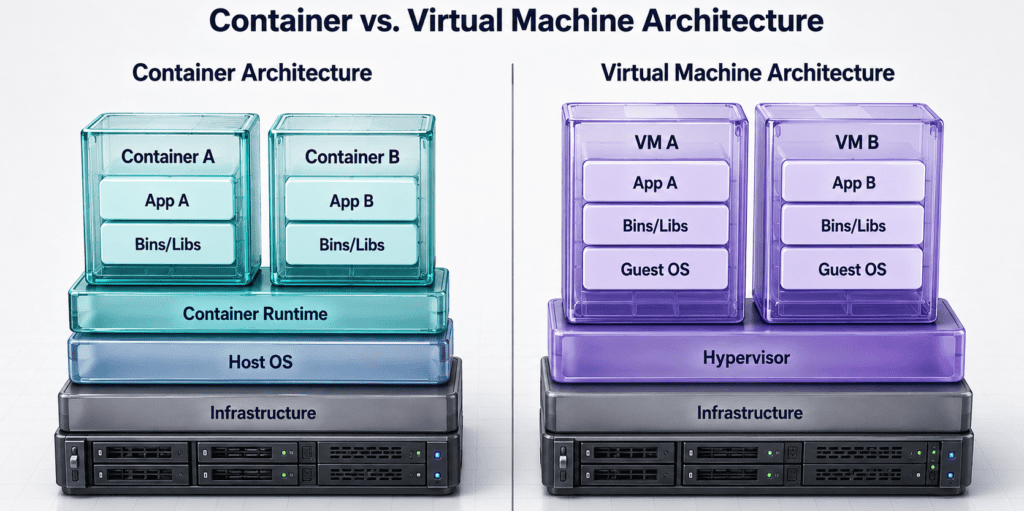
Core Docker Building Blocks
| Component | Definition | Operational Function |
| Dockerfile | Declarative configuration blueprint | Specifies base images, system dependencies, environment variables, and startup commands. |
| Image | Immutable, read-only template | Packages application code, runtime libraries, and dependencies into a single deployable asset. |
| Container | Active runtime instance | A lightweight, isolated process running an instantiated Docker image. |
| Container Registry | Centralized artifact repository | Stores and versions container images (e.g., Docker Hub, AWS ECR, Azure ACR, GCP Artifact Registry). |
| Docker Compose | Multi-container orchestration tool | Defines and runs local multi-container environments using a unified docker-compose.yml file. |
Production Image Best Practices: Build with minimal base images (such as
python:3.11-slimor Alpine Linux) to reduce security vulnerabilities. Use multi-stage builds to exclude compile-time dependencies from final production images, explicitly specify non-root execution users (USER appuser), and configureHEALTHCHECKinstructions.
Automated Continuous Integration & Delivery (CI/CD)
Once code is version-controlled and containerized, automate testing, security scanning, image building, and deployment using a dedicated CI/CD platform (e.g., GitHub Actions, GitLab CI/CD, Azure Pipelines).
 [Code Push / PR] ──► [ Lint & Test ] ──► [ Security Scan ] ──► [ Build Container ]
                                                                        │
 [ Production ] ◄── [ Manual Approval ] ◄── [ Test Deploy ] ◄── [ Push to Registry ]
Code language: CSS (css)
Linting & Automated Unit Testing: Phase 1: Validation.
Upon opening a Pull Request, the pipeline checks out source code, executes linters to verify formatting, and runs automated unit tests.
Vulnerability & Secret Scanning: Phase 2: Security Gate.
Run static application security testing (SAST) and scan dependencies/base images for known vulnerabilities (CVEs) using scanners like Trivy, Snyk, or Gitleaks.
Compile Container Image: Phase 3: Build & Versioning.
Build the container image and tag it dynamically using the Git commit SHA (e.g., app:v1.0.4-a8f3b2) rather than relying on mutable latest tags.
Push Image to Cloud Registry: Phase 4: Artifact Publishing.
Authenticate to your cloud container registry using short-lived OpenID Connect (OIDC) tokens and push the validated container image.
Deploy to Staging & Production: Phase 5: Release Control.
Deploy automatically to a staging environment. Require a mandatory human approval gate before releasing changes to production, with a clear rollback strategy for failed releases.
Should Beginners Learn Kubernetes?
No—not at the start of your journey.
While Kubernetes ($K8s$) is an essential tool for enterprise cloud orchestration, introducing it too early is one of the most common pitfalls on a cloud engineer roadmap. Attempting to learn Kubernetes before mastering Linux, networking, Docker, and core cloud infrastructure turns container orchestration into abstract memorization rather than true technical comprehension.
If you cannot confidently explain how a Docker container runs, how a reverse proxy routes traffic to a service port, how health checks function, or how DNS resolution operates within a private network, Kubernetes will only add unnecessary complexity.
The Kubernetes Readiness Checklist
Before adding Kubernetes to your learning path, ensure you have checked off these foundational competencies:
| Prerequisite Skill | Operational Necessity in Kubernetes |
| Linux Administration | Kubernetes nodes run Linux; debugging pods requires inspecting processes, system logs, and network sockets. |
| Networking & DNS | K8s uses complex container network interfaces (CNIs), virtual IPs, and cluster-internal DNS (CoreDNS) for service discovery. |
| Docker & Containers | Pods wrap container images; broken Docker configurations directly cause CrashLoopBackOff errors. |
| Declarative YAML | All Kubernetes objects are defined using declarative YAML manifests, similar to Infrastructure as Code. |
| Observability & Probes | K8s relies on explicit liveness and readiness probes to determine when to route traffic or restart failing instances. |
Core Kubernetes Concepts to Master (When Ready)
Once you can comfortably build, run, and automate containerized deployments using Docker and CI/CD pipelines, begin your Kubernetes learning with these core abstractions:
                                  KUBERNETES CLUSTER
 ┌────────────────────────────────────────────────────────────────────────────────────────┐
 │                                                                                        │
 │  ┌───────────────────────────────── INGRESS ────────────────────────────────────────┐  │
 │  │ External HTTP/HTTPS load balancer & routing rule layer                              │  │
 │  └────────────────────────────────────┬─────────────────────────────────────────────┘  │
 │                                       │                                                │
 │                                       ▼                                                │
 │  ┌───────────────────────────────── SERVICE ────────────────────────────────────────┐  │
 │  │ Persistent virtual IP and DNS entry routing traffic to dynamic pods                 │  │
 │  └────────────────────────────────────┬─────────────────────────────────────────────┘  │
 │                                       │                                                │
 │                                       ▼                                                │
 │  ┌────────────────────────────── DEPLOYMENT ────────────────────────────────────────┐  │
 │  │ Manages pod lifecycle, self-healing, rolling updates, and scaling replicas       │  │
 │  │                                                                                  │  │
 │  │   ┌─────────────────────┐   ┌─────────────────────┐   ┌─────────────────────┐    │  │
 │  │   │     POD (App)       │   │     POD (App)       │   │     POD (App)       │    │  │
 │  │   │ ┌─────────────────┐ │   │ ┌─────────────────┐ │   │ ┌─────────────────┐ │    │  │
 │  │   │ │ Container(s)    │ │   │ │ Container(s)    │ │   │ │ Container(s)    │ │    │  │
 │  │   │ └─────────────────┘ │   │ └─────────────────┘ │   │ └─────────────────┘ │    │  │
 │  │   └─────────────────────┘   └─────────────────────┘   └─────────────────────┘    │  │
 │  └──────────────────────────────────────────────────────────────────────────────────┘  │
 │                                                                                        │
 │  ┌───────────────────────────── CONFIGURATION ──────────────────────────────────────┐  │
 │  │ ConfigMaps (non-sensitive app settings)  |  Secrets (encrypted credentials/keys) │  │
 │  └──────────────────────────────────────────────────────────────────────────────────┘  │
 └────────────────────────────────────────────────────────────────────────────────────────┘
Code language: PHP (php)- Pods: The smallest deployable computing unit in Kubernetes, hosting one or more tightly coupled containers.
- Deployments: Controllers that manage application scaling, self-healing, and zero-downtime rolling updates.
- Services: Stable network abstractions providing a fixed IP and DNS name to route traffic across dynamic pod replicas.
- Ingress: Manages external HTTP/HTTPS traffic entering the cluster, serving as an entry point load balancer and reverse proxy.
- ConfigMaps & Secrets: Separate environment variables and sensitive keys from application container code.
- Namespaces: Virtual partitions that isolate environments (e.g.,
dev,staging,prod) within a single cluster. - Resource Requests & Limits: Explicit CPU and memory boundaries that prevent workloads from starving cluster nodes.
- Liveness & Readiness Probes: Automated health probes that determine whether a container is ready to accept traffic or needs to be restarted.
🚫 What to Avoid in Step 9
Deep Kubernetes Certifications Early On: Avoid chasing performance-based certifications like the Certified Kubernetes Administrator (CKA) at the start of your career transition. Start local with lightweight tools like Minikube, k3s, or Kind, and postpone advanced cluster administration until you are actively managing production cloud workloads.
Step 10: Practise Monitoring, Reliability, and Cost Control
Deploying an application to the cloud is only the beginning. A core competency on any cloud engineer roadmap is maintaining system health, ensuring high availability, recovering quickly from failures, and keeping cloud expenditure strictly under control. Observability goes far beyond adding a few default CPU graphs to a dashboard—it requires defining proactive metrics, health probes, incident runbooks, and financial guardrails.
The Four Golden Signals of Observability
When monitoring production cloud workloads, structure your telemetry data around Google’s Four Golden Signals of SRE:
| Golden Signal | Metric Definition | Operational Impact |
| Latency | The time it takes to service a request (e.g., HTTP response time). | Distinguish between successful request latency and failed request latency (e.g., fast 500 errors vs. slow 200 OKs). |
| Traffic | A measure of how much demand is being placed on your system. | Tracked via HTTP requests per second (RPS), network I/O bytes, or database transactions. |
| Errors | The rate of requests that fail, either explicitly (5xx errors) or implicitly (e.g., 200 OK with incorrect payload content). | Triggers immediate metric alerts when error rates exceed defined thresholds (e.g., error rate $> 1\%$). |
| Saturation | How “full” your service is, measuring high-overhead constrained resources. | Tracks CPU utilization, RAM usage, disk I/O, and database connection pool exhaustion before outages occur. |
Incident Response Simulation: Handling a 500 Outage
To prove practical reliability skills, practice diagnosing and resolving production incidents using structured runbooks:
 [1. Detection]            [2. Triage]               [3. Mitigation]           [4. Post-Mortem]
 Automated Alert ────►  Inspect Logs &      ────►  Roll Back to Last   ────►  Fix Root Cause &
 (5xx Spikes)           Recent Commits             Known-Good Image           Document Runbook
Code language: CSS (css)
Alert Triggering & Notification: Phase 1: Automated Detection.
A metric alert or synthetic health check detects that application 5xx error rates have exceeded 2% over a 5-minute window. An automated notification triggers via PagerDuty, email, or Slack.
Log Inspection & Diff Analysis: Phase 2: Root Cause Triage.
The engineer inspects centralized log aggregators (e.g., AWS CloudWatch Logs or Azure Monitor) to pinpoint the stack trace. Correlate the outage timestamp with the CI/CD deployment history to isolate the recent code or infrastructure change.
Execute Deployment Rollback: Phase 3: Fast Mitigation.
Prioritize restoring application uptime over immediate code debugging. Execute a single-command rollback to redeploy the previous stable container image or Terraform state version.
Verification & Post-Mortem: Phase 4: Recovery & Documentation.
Verify that health checks return to 200 OK across all load balancer target groups. Conduct a Post-Mortem write-up detailing the root cause, timeline, impact, and permanent code/process fix.
Cloud Financial Operations (FinOps) & Cost Safeguards
Unmonitored cloud spending is the fastest way to incur unexpected charges. Cloud provider “Free Tiers” have explicit usage caps, expiration windows, and region constraints.
Official Vendor Guidance: AWS recommends creating billing alarms and custom budgets early to receive notifications as spending approaches or exceeds threshold limits. Azure provides built-in budget alerts that issue notifications via action groups before cost caps are breached.
Essential FinOps Rules for Learning Environments
- Set Up Budget Alerts Before Deploying Resources: Create a monthly budget (e.g., $5.00/month limit) in AWS Billing or Azure Cost Management on day one. Set multi-tiered alerts at 50%, 80%, and 100% of actual and forecasted spend.
- Enforce Mandatory Tags: Tag every provisioned asset with
ProjectandOwnermetadata keys. This allows you to group costs and identify rogue resources immediately in cost explorer dashboards. - Clean Up Unused Zombie Assets: Unattached Elastic IPs, unattached EBS/Managed Disks, idle Load Balancers, and orphaned snapshots continue incurring hourly charges even if no virtual machine is running.
- Leverage Local Emulators First: Use local emulators (such as LocalStack for AWS services, Azurite for Azure Storage, or Docker Compose for local databases) to build and test code locally before deploying to live cloud infrastructure.
🚫 What to Avoid in Step 10
Assuming “Free Tier” Means Unrestricted: Never assume an account labelled “Free Tier” cannot incur charges. Setting up high-resolution monitoring, failing to destroy public NAT Gateways, or leaving multi-AZ databases running continuously will quickly generate real costs. Make
terraform destroyor automated cleanup scripts standard practice at the end of every study session.
Portfolio Projects That Demonstrate Practical Ability
A portfolio consisting of 3 to 4 well-documented, production-grade projects carries significantly more weight with hiring managers than dozens of unfinished tutorial repositories.
To turn a simple lab into a credible hiring asset, every project in your portfolio must include six core documentation elements:
- Architecture Diagram: Visual map of network traffic, subnets, and security boundaries.
- Setup Instructions: Reproducible deployment steps or Infrastructure as Code templates.
- Security Decisions: Explicit justification for identity roles, encryption, and network isolation.
- Cost Controls: Proof of budget limits, resource tagging, and estimated running costs.
- Test Evidence: Screenshots, API responses (
curl), logs, or test suite outputs proving functionality. - Troubleshooting Log: Documentation of at least one issue encountered, how it was diagnosed, and the fix.
Project 1: Secure Static Website
Primary Focus: Web Delivery, Edge Caching, DNS, HTTPS, and Storage Security.
 [User Browser] ──► [ Custom Domain (DNS) ] ──► [ CDN / Edge Cache (TLS 1.3) ]
                                                            │
                                                     Enforced OAC/OAI
                                                            │
                                                            ▼
                                                [ Private Storage Bucket ]
                                                (Public Access Blocked)
Code language: PHP (php)| Component | Technical Implementation | Demonstration Objective |
| Storage & Edge | AWS S3 / Azure Blob + CloudFront / Azure CDN | Restrict direct public access to the storage bucket. Serve content exclusively through the Content Delivery Network (CDN) using Origin Access Control (OAC/OAI). |
| DNS & SSL/TLS | Route 53 / Azure DNS + ACM / Key Vault | Provision a custom domain, issue an automated SSL/TLS certificate, and enforce HTTP-to-HTTPS redirection. |
| Deployment Pipeline | GitHub Actions / GitLab CI | Automate deployment so pushing to main syncs updated static web assets to the storage bucket and triggers a CDN cache invalidation. |
| Cost Safeguards | CloudWatch Budget / Azure Cost Alert | Set a strict $1.00/month budget alert and document teardown/invalidation costs. |
Deliverables & GitHub Repository Checklist
- [ ]
README.md: Complete architecture diagram and traffic flow documentation. - [ ]
src/: Static HTML/CSS/JS frontend files. - [ ]
.github/workflows/deploy.yml: CI/CD pipeline script handling bucket sync and CDN invalidation using OIDC authentication. - [ ]
security.md: Explanation of why the storage bucket remains private and how public access is strictly restricted to the CDN edge.
Project 2: Containerized API
Primary Focus: Microservice Packaging, Managed Container Runtime, Observability, and CI/CD Automation.
 [Client Requests] ──► [ Managed Container Service ] ───► [ Health Probe (/health) ]
                                 │                               │
                      Injected Environment               Structured JSON
                            Variables                          Logs
                                 │                               │
                                 ▼                               ▼
                      [ Managed Database / Vault ]      [ CloudWatch / Azure Monitor ]
Code language: CSS (css)| Component | Technical Implementation | Demonstration Objective |
| Application Layer | Python (FastAPI/Flask) or Node.js (Express) | Build a lightweight REST API with structured JSON logging, explicit error handling, and health check endpoints (/health). |
| Containerization | Docker (Multi-stage build) | Create an optimized, non-root Dockerfile leveraging a minimal base image (e.g., python:3.11-slim). |
| Execution Platform | AWS App Runner / ECS Fargate or Azure Container Apps | Deploy the container to a serverless/managed container runtime with environment variables injected securely at startup. |
| Deployment & Rollback | GitHub Actions | Pipeline that lint-checks, builds, scans dependencies (via Trivy or Snyk), pushes to ECR/ACR, and deploys. Document a manual or automated rollback execution path. |
Deliverables & GitHub Repository Checklist
- [ ]
Dockerfile: Multi-stage, security-hardened container blueprint. - [ ]
app/: API source code, dependency specifications (requirements.txt), and unit test suite. - [ ]
rollback.md: Step-by-step operational guide detailing how to roll back to a previous container image tag in the event of an application error.
Project 3: Infrastructure-as-Code Environment
Primary Focus: Automated Infrastructure Provisioning, Network Segmentation, and Security Baselines.
                          TERRAFORM WORKSPACE
                                   │
                  ┌────────────────┴────────────────┐
                  ▼                                 ▼
     ┌─────────────────────────┐       ┌─────────────────────────┐
     │  PUBLIC SUBNET (10.0.1.0/24) │   │ PRIVATE SUBNET (10.0.2.0/24)│
     │  • Public NAT Gateway   │   │  • Compute / App Workload│
     │  • Bastion / Proxy      │   │  • Private Database     │
└─────────────────────────┘ └─────────────────────────┘Code language: PHP (php)| Component | Technical Implementation | Demonstration Objective |
| Network Isolation | Terraform HCL (aws_vpc, azurerm_virtual_network) | Provision a custom VPC with isolated Public and Private subnets, Route Tables, and a NAT Gateway. |
| Security Groups | Stateful Firewall Rules | Define strict ingress/egress rules: allow inbound HTTP/HTTPS to application instances; allow database ingress only from application security groups. |
| Managed Data Tier | AWS RDS / Azure SQL Database | Deploy a relational database into private subnets with encryption at rest enabled and no assigned public IP. |
| State Management | Remote State Bucket + Table Locking | Store Terraform state remotely (S3/Azure Storage) with DynamoDB/blob lease locking to prevent state corruption. |
Threat Model & Cost Analysis Matrix
Include a dedicated section in your project repository outlining security boundaries and running costs:
| System Layer | Identified Threat | Mitigating IaC Configuration | Estimated Cost |
| Database | Unauthorized internet access | Placed in private subnet; publicly_accessible = false | ~$15/mo (db.t4g.micro) |
| Network | Unrestricted port exposure | Security Group permits ingress strictly on port 443 | Free (VPC resources) |
| Secrets | Plaintext password leak | Database password fetched dynamically from Vault/Secrets Manager | ~$0.40/mo per secret |
Project 4: Incident-Response Exercise
Primary Focus: Operational Diagnostics, Log Analysis, Outage Triage, and Post-Mortem Documentation.
Operational Context: This project demonstrates real-world troubleshooting capability rather than simple deployment. You will deliberately inject a fault into an environment and document the operational recovery lifecycle.
Simulated Outage Scenario
A bad configuration change is deployed to production, resulting in elevated HTTP 500 Internal Server Errors and failing health checks.
 [Incident Triggered] ──► [ 1. Symptom & Alert ] ──► [ 2. Evidence Gathering ]
                                                             │
 [ 5. Post-Mortem ]  ◄── [ 4. Mitigation & Fix ] ◄── [ 3. Root Cause Isolation ]
Code language: CSS (css)
Documented Incident Lifecycle Template
- The Symptom: Alert triggers notifying that the application health check endpoint (
/health) is returning500 Internal Server Errorwith an error rate exceeding 15%. - First Observable Evidence: Application load balancer marks 2 out of 3 target instances as “Unhealthy.” CloudWatch/Azure Monitor metrics show a sharp spike in HTTP 5xx responses.
- Diagnostic Commands & Tools Used:Bash
# 1. Query recent application logs for explicit error traces journalctl -u app-service -n 100 --no-pager | grep "ERROR" # 2. Inspect active network bindings ss -tulpn | grep :8080 # 3. Verify environment variable injection systemctl show-environment | grep DB_HOST - Root Cause Identification: The recent deployment updated the application database connection string environment variable (
DB_HOST) to an invalid hostname, causing API database connection timeouts. - Mitigation & Verification: Updated the configuration variable to the correct internal private DNS record, reloaded the service daemon (
systemctl reload app-service), and verified that load balancer health checks returned to200 OK. - Preventative Measures: Added a pre-deployment integration test step to the CI/CD pipeline to validate database connectivity strings before updating live production instances.
Recommended Portfolio Repository Structure
Maintain a clean, standardized folder structure across all public GitHub portfolio projects:
Plaintext
cloud-portfolio-project/
├── .github/
│   └── workflows/          # Automated CI/CD deployment pipelines
├── docs/
│   ├── architecture.png    # Visual architecture diagram
│   └── threat-model.md     # Security decisions & cost breakdown
├── terraform/              # Infrastructure as Code configuration files
│   ├── main.tf
│   ├── variables.tf
│   ├── outputs.tf
│   └── terraform.tfvars.example
├── src/                    # Application source code
├── tests/                  # Unit and integration test scripts
├── .gitignore              # Enforces exclusion of secrets & state files
├── LICENSE
└── README.md               # Executive summary, setup guide, & evidenceCode language: PHP (php)
Strategic Guide to Beginner Cloud Certifications
Certifications can provide structure and validate foundational vocabulary, but they do not replace hands-on operational capability. In the cloud engineering market, hiring managers prioritize technical evidence—such as version-controlled code, architectural diagrams, and troubleshooting post-mortems—over badge collection.
When leveraging certifications, select a path based on current official exam objectives rather than course popularity or search trends.
Certification Landscape & Positioning
Cloud vendors position their entry-level credentials differently depending on technical depth and intended career paths:
| Goal | Possible Certification | Scope & Ideal Target Audience |
| Learn General AWS Concepts | AWS Certified Cloud Practitioner (CLF-C02) | High-level overview of AWS services, shared responsibility, billing, and global infrastructure. Designed for non-engineering stakeholders, sales, or total beginners needing vocabulary. |
| Build Azure Foundations | Microsoft Certified: Azure Fundamentals (AZ-900) | Core cloud concepts, primary Azure services (VNet, VMs, Blob), management, and governance. Ideal for establishing an enterprise IT baseline. |
| Learn Google Cloud Business Concepts | GCP Cloud Digital Leader | Foundational Google Cloud terminology, business transformations, and cloud product capabilities aimed at non-technical roles. |
| Move Toward Technical GCP Work | GCP Associate Cloud Engineer (ACE) | Practitioner-focused. Covers command-line operations (gcloud), setting up projects, deploying Kubernetes clusters (GKE), and managing IAM policies. |
| Demonstrate Platform Administration | Vendor Associate / Administrator (e.g., AWS SAA-C03, Azure AZ-104) | Deep technical implementation, scenario-based architecture, and administrative troubleshooting. Requires hands-on project experience. |
Understanding Official Exam Scopes
Vendor guidelines explicitly define the boundaries between foundational badges and hands-on engineering roles:
- AWS Cloud Practitioner: Positioned strictly as an overall AWS Cloud knowledge validation independent of a specific technical job role. The official exam guide explicitly notes that hands-on tasks like coding, architectural design, implementation, and troubleshooting are out of scope.
- Azure Fundamentals (AZ-900): Emphasizes architectural components, cost models, and security governance tools without requiring complex technical implementation or coding skills.
- Google Cloud Associate Cloud Engineer: Unlike the Cloud Digital Leader, the ACE exam measures real administrative tasks—such as deploying workloads, configuring service accounts, running CLI tools, and managing project infrastructure.
A High-Signal Certification Strategy
To maximize the return on time and money spent preparing for exams, follow this 6-step framework:
  [1. Pick One Cloud] ────► [2. Review Exam Guide] ────► [3. Study Core Concepts]
                                                                  │
  [6. Pass Exam]      ◄──── [5. Gap Analysis]      ◄──── [4. Build 1+ Project]
Code language: CSS (css)
Choose One Primary Platform: Focus Strategy.
Select the provider dominant in your regional job market or aligned with target employers (e.g., AWS for startups/DevOps, Azure for enterprise IT). Avoid studying multiple vendors simultaneously.
Review Current Official Exam Guides: Syllabus Audit.
Download the latest exam blueprint directly from the vendor. Audit the exact content domain weightings (e.g., Security, Billing, Compute) rather than relying exclusively on third-party course outlines.
Master Core Services & Architectural Patterns: Conceptual Depth.
Learn how core services function, communicate, and fail. Understand identity models, subnets, encryption, and billing safeguards before attempting practice questions.
Complete at Least One Portfolio Project: Practical Application.
Deploy a real workload (e.g., a static site behind a CDN, or a containerized API with Infrastructure as Code). Hands-on troubleshooting bridges the gap between memorizing service definitions and understanding real-world behavior.
Use Practice Questions for Gap Analysis: Assessment.
Take practice tests under timed conditions to identify weak domains. Focus on understanding why wrong options (distractors) are incorrect rather than memorizing question patterns.
Take the Exam with Conceptual Clarity: Validation.
Schedule the exam when you can clearly explain the architectural trade-offs behind each scenario, not just recognize keyword patterns.
🚫 The “Badge Collection” Trap
Avoid Duplicate Foundational Badges: Do not earn Cloud Practitioner, Azure Fundamentals, and Cloud Digital Leader simultaneously. Possessing three introductory certifications simply indicates an ability to pass entry-level vocabulary tests across vendors without demonstrating real engineering capabilities.
The Optimal Progression: Earn one foundational or associate-level certification on your primary platform, build and document 3 to 4 production-ready portfolio projects, and then advance directly toward a hands-on technical certification (such as the AWS Solutions Architect Associate or Azure Administrator AZ-104).
A Realistic & Sustainable Study Routine
An overly ambitious, 4-hour daily study schedule usually leads to burnout within two weeks. A sustainable cloud engineer roadmap relies on consistency over intensity—focusing on small, weekly learning loops that combine theory, hands-on practice, and documentation.
The 5-Day Weekly Learning Cycle
Structure your study routine around a single technical topic per week (e.g., Week 1: Subnetting, Week 2: IAM Policies, Week 3: S3 & Bucket Policies, Week 4: Terraform Variables):
 [Mon: Theory] ──► [Tue-Wed: Lab] ──► [Thu: Document & Automate] ──► [Fri: Review]
Code language: CSS (css)
Theory & Problem Definition: Day 1: Conceptual Foundation.
Spend 60–90 minutes reading official documentation or watching targeted video modules. Focus on understanding what problem the service solves and where it sits in a web architecture.
Lab & Local Sandbox Execution: Days 2 & 3: Hands-On Implementation.
Build the concept in a sandbox environment (e.g., LocalStack, Docker Compose, or a cloud free-tier account). Click through the console or use CLI commands to verify how the components interact.
Automate & Write It Down: Day 4: Codification & Documentation.
Recreate the infrastructure using a script (Python/Bash) or Infrastructure as Code (Terraform). Write a brief summary explaining what was built, why specific security choices were made, and what broke during deployment.
Feynman Technique & Scenario Testing: Day 5: Synthesis & Review.
Explain the design aloud as if teaching a junior peer, or answer scenario-based interview questions. If you struggle to explain a component’s failure mode, revisit the documentation.
The 7 Critical Engineering Questions
For every service or architectural pattern you study, force yourself to answer these seven questions before moving to the next topic:
| # | Diagnostic Question | What It Proves |
| 1 | What specific problem does this service solve? | Prevents memorizing product names without understanding utility. |
| 2 | What legacy approach or hardware does it replace or simplify? | Builds foundational mental models (e.g., AWS S3 replaces NFS/NAS file servers). |
| 3 | What are its primary failure modes? | Prepares you for real-world operational troubleshooting. |
| 4 | Who (or what identity) is allowed to access it by default? | Enforces a security-first mindset (Least Privilege). |
| 5 | How is its performance and health monitored? | Connects infrastructure provisioning to observability. |
| 6 | How does it affect cloud billing and cost? | Prevents surprise cloud bills and demonstrates FinOps awareness. |
| 7 | How do I safely tear down or recover this resource? | Teaches lifecycle management and disaster recovery. |
Low-Cost & Free Learning Ecosystem
You do not need an enterprise budget to execute a cloud engineer roadmap. Combine free learning tiers with strict cost controls:
- Local Emulators First: Use LocalStack (to emulate AWS APIs like S3, DynamoDB, and SQS locally) or Docker Compose (to run local PostgreSQL or Nginx instances) before deploying to live cloud accounts.
- Official Free Tiers:
- AWS Free Tier: Offers a 12-month free trial (e.g., 750 hours/month of
t2.micro/t3.microEC2 instances, 5 GB S3 storage) alongside Always Free quotas (1 million Lambda requests/month, 25 GB DynamoDB). - Azure Free Account: Provides $200 in initial credits (valid for 30 days) plus 12 months of popular free services (such as Linux/Windows VMs and Blob Storage) and 55+ always-free services.
- AWS Free Tier: Offers a 12-month free trial (e.g., 750 hours/month of
- Safety First: Always create budget alerts (e.g., a $1.00 threshold) on day one, check your billing dashboard weekly, and run
terraform destroyat the end of every study session.
Preparing for Internships & Entry-Level Roles
Getting hired in cloud engineering does not require memorizing every service in a vendor’s catalog. Technical hiring managers evaluate candidates based on coherent architectural foundations, structured troubleshooting capabilities, and operational transparency.
Key Technical Expectations & Interview Focus Areas
When interviewing for entry-level cloud positions, be prepared to answer deep scenario-based questions about your portfolio architecture:
                  TECHNICAL INTERVIEW DEFENSE AREAS
 ┌─────────────────────────────────────────────────────────────────┐
 │                                                                 │
 │   1. COMPUTE & STORAGE   ────► Why EC2 over Lambda / S3 vs EBS  │
 │   2. TRAFFIC FLOW        ────► Packet lifecycle from DNS to DB  │
 │   3. IDENTITY & ACCESS   ────► Least privilege & IAM roles      │
 │   4. SECRETS MANAGEMENT  ────► Preventing code leaks (Vault)    │
 │   5. OBSERVABILITY       ────► Metrics, logs, & error triage    │
 │   6. DISASTER RECOVERY   ────► Zone failure & deployment rollback│
 │   7. FINOPS & COSTING    ────► Budgeting & resource cleanup     │
 │                                                                 │
└─────────────────────────────────────────────────────────────────┘Code language: JavaScript (javascript)| Technical Defense Area | Key Question to Prepare | What Hiring Managers Evaluate |
| Architectural Trade-Offs | “Why did you select EC2 / Containers over Serverless for Project 2?” | Ability to evaluate operational overhead versus cost and application complexity. |
| Traffic Routing & Isolation | “Trace a packet from the browser DNS query down to the private database query.” | Understanding of DNS, load balancers, public/private subnets, NAT gateways, and Security Groups. |
| Identity & Least Privilege | “How do your backend application instances authenticate to object storage or database secrets?” | Elimination of hardcoded static keys in favor of IAM Roles, Managed Identities, and secret vaults. |
| Fault Tolerance & Failover | “What happens if an Availability Zone fails, or a deployment introduces 500 errors?” | Design resiliency, health check configurations, and zero-downtime rollback strategies. |
| Financial Control | “How did you ensure your test environments didn’t incur accidental charges?” | Practical knowledge of cloud budgeting, resource tagging, and automated infrastructure destruction (terraform destroy). |
Expanding Your Job Search: Target Job Titles
Companies use vastly different titles for entry-level cloud responsibilities. Search for these related role titles during your job hunt:
- Cloud Support Associate / Support Engineer (e.g., AWS CSA / Azure Support)
- Junior Cloud Engineer / Cloud Associate
- Junior DevOps Engineer / DevOps Intern
- Cloud Operations Analyst / Infrastructure Analyst
- Junior Systems Administrator (with cloud migration/management focus)
- Site Reliability Engineering (SRE) Intern
- Platform Support Engineer
- Technical Support Engineer (with Linux, Networking, or Cloud focus)
Application Optimization & Portfolio Presentation
When submitting applications, direct hiring managers directly to tangible evidence rather than a list of generic skills:
- Include Direct Asset Links: Include prominent links to your GitHub profile, architecture diagrams, and live application endpoints on your resume and LinkedIn header.
- Value “Failed Deployment” Documentation: A
README.mdthat explicitly details an outage or configuration error, the diagnostic commands used, the root cause, and how you permanently fixed it is significantly more persuasive than a clean repo containing copied tutorial code. - Keep Repositories Reproducible: Ensure your Terraform code or Docker scripts can be cloned and executed with a single command without failing due to missing variable files or broken dependencies.
Common Anti-Patterns & Mistakes to Avoid
Navigating a cloud engineer roadmap effectively is as much about avoiding strategic mistakes as it is about learning new technical skills. The table below highlights the most frequent traps beginners fall into, paired with the operational corrections required to build genuine technical capability.
Anti-Pattern vs. Operational Reality
| Common Anti-Pattern | Root Cause / Pitfall | High-Signal Correction |
| Learning 3 Clouds at Once | Chasing job descriptions rather than deep technical mental models. | Master One First. Build depth on a single cloud (AWS, Azure, or GCP). Core networking, compute, and IAM principles transfer seamlessly later. |
| Certifications = Job Experience | Treating multiple choice exams as proof of operational ability. | Show Code & Evidence. Employers hire candidates who can write IaC, troubleshoot failed deployments, and write post-mortems over badge collectors. |
| Skipping Networking | Relying on default wizard setups without understanding packet paths. | Learn Traffic Flow. Master CIDR blocks, subnets, route tables, and firewalls (NACLs/Security Groups) before building cloud architectures. |
| Copy-Pasting Code / Tutorial Luck | Running scripts without reading documentation or auditing output. | Inspect Every Line. Blindly running commands exposes services publicly, applies over-privileged IAM rights, or spawns unexpected billing costs. |
| Hardcoding API Secrets | Convenience over security during local development. | Use Managed Identities. Never commit static access keys. Use temporary workload credentials (AWS IAM Roles, Azure Managed Identity) and secret stores. |
| Starting with Kubernetes ($K8s$) | Overwhelmed by abstraction layers before mastering fundamental units. | Containers First. Learn Linux, networking, Docker, and CI/CD pipelines thoroughly before introducing container orchestration systems. |
| Building Only Toy Projects | Stopping at “Hello World” tutorials without real-world constraints. | Add Production Engineering. Enhance projects with custom DNS, SSL/TLS, structured logs, metric alerts, unit tests, and automated teardowns. |
| Forgetting Asset Cleanup | Treating cloud labs like local desktop environments. | Automate Teardown. Use terraform destroy, write cleanup scripts, and check billing dashboards daily to prevent unexpected background charges. |
| Chasing Trendy Services | Shiny object syndrome with proprietary vendor offerings. | Master Durable Fundamentals. Platforms evolve constantly. Fundamentals—Linux, Bash, TCP/IP, Python, Git, and IaC—remain valid for decades. |
The Anatomy of a Credible Portfolio Project
When building projects on your cloud engineer roadmap, avoid “toy tutorial” status by ensuring every project incorporates production-grade engineering principles:
                            CREATION & DEPLOYMENT
 ┌──────────────────────────────────────────────────────────────────────────┐
 │                                                                          │
 │   1. Infrastructure as Code  ──► Defined via Terraform / Bicep           │
 │   2. Network Isolation       ──► Private Subnets & Stateful Firewalls    │
 │   3. Zero Static Credentials ──► Injected Runtime Secrets / IAM Roles    │
 │                                                                          │
 └────────────────────────────────────┬─────────────────────────────────────┘
                                      │
                                      ▼
                            OPERATIONAL VALIDATION
 ┌──────────────────────────────────────────────────────────────────────────┐
 │                                                                          │
 │   4. Automated CI/CD         ──► GitHub Actions with Linting & Scanning │
 │   5. Observability           ──► Metric Alerts & Centralized Log Tracing │
 │   6. Failure Handling        ──► Simulated Outage & Documented Rollback  │
 │   7. Clean Teardown          ──► One-command `terraform destroy`         │
 │                                                                          │
 └──────────────────────────────────────────────────────────────────────────┘Code language: JavaScript (javascript)
By focusing on durable fundamentals, automating infrastructure lifecycle management, and documenting your troubleshooting process, you position yourself as a capable, operational engineer ready for entry-level cloud roles.
Can I become a cloud engineer without a computer science degree?
Yes. While a degree can help pass initial HR filters at traditional enterprise organizations, cloud engineering is overwhelmingly a demonstrated capability discipline. Hiring managers prioritize candidates who can construct infrastructure using code, troubleshoot live outage scenarios, and explain architectural trade-offs.
You can bridge the educational gap by providing technical evidence:
Public GitHub repositories containing clean, modular Infrastructure as Code (IaC) templates.
A portfolio showcasing end-to-end deployments, networking topologies, and CI/CD pipelines.
A relevant associate-level certification (e.g., AWS Solutions Architect Associate or Azure Administrator AZ-104) to validate baseline domain competency.
How long does a cloud engineer roadmap take?
There is no universal calendar timeline. Total duration varies based on your existing baseline in Linux, networking, and programming, as well as weekly study hours.
NO PRIOR IT BASELINE SOME IT / SYSADMIN BACKGROUND ┌──────────────────────────────┐ ┌──────────────────────────────┐ │ 6 to 12 Months │ │ 3 to 6 Months │ │ (15-20 hours / week) │ │ (10-15 hours / week) │ └──────────────────────────────┘ └──────────────────────────────┘
Rather than tracking calendar days, measure progress using demonstrated outcomes. You are job-ready when you can independently:
Provision a segmented, secure cloud network (VPC/VNet) using Terraform.
Package an application into a non-root container image and build an automated CI/CD pipeline.
Diagnose and resolve a simulated outage using centralized logs, metrics, and CLI commands.
Explain the financial cost structure and security decisions behind your deployment.
Is AWS better than Azure or Google Cloud?
No single platform is universally superior. Each provider dominates distinct market segments:
Amazon Web Services (AWS): Market leader with the largest ecosystem; dominant among startups, tech-first companies, and modern DevOps organizations.
Microsoft Azure: Strongly preferred by traditional enterprise organizations, government bodies, and businesses integrated into Microsoft 365, .NET, and Windows Server ecosystems.
Google Cloud Platform (GCP): Industry favourite for data engineering, big data analytics, machine learning pipelines, and native Kubernetes implementations.
Decision Rule: Choose the platform used by your target local employers, internship programs, or tech community. The underlying core mental models—virtual networks, identity access policies, object storage, and compute instances—transfer easily between providers.
Is Python required?
Python is not strictly mandatory, but scripting skills are required. Cloud engineering relies on automation; you cannot operate efficiently by manually clicking through web consoles.
Python is the recommended starting language because:
It has shallow syntax overhead and high readability.
Vendor SDKs (such as AWS boto3 or Azure SDK for Python) are mature and widely documented.
It is widely used for writing infrastructure automation, API integrations, and CLI utilities.
Alternatives: If you already know JavaScript/TypeScript, you can leverage it for serverless runtimes (Node.js) or infrastructure development tools (such as AWS CDK or Pulumi). Bash scripting is universally required across all platforms for Linux system administration.
Should I learn DevOps before cloud engineering?
No. You do not need to master the entire DevOps discipline before beginning cloud engineering. Instead, treat core DevOps practices as integral steps inside your cloud learning path.
FOUNDATIONAL CLOUD LAYER (Linux Administration, Networking, Cloud Core, Security) │ ▼ PRACTICAL DEVOPS LAYER (Git, Python Scripting, CI/CD, Terraform IaC, Docker Containers)
Focus on foundational computing concepts first. Learning CI/CD pipelines, containerization, and Infrastructure as Code becomes significantly easier once you understand how underlying operating systems, networks, and cloud platforms operate.
Can I learn cloud engineering for free?
Yes, the majority of the learning path can be completed at minimal or zero cost.
Zero-Cost Local Tools: You can learn Linux, Bash, networking, Python, Git, Docker, and Terraform entirely on your local machine using virtual machines (UTM/VirtualBox), local emulators (e.g., LocalStack for AWS APIs), and open-source software.
Official Free Tiers: Cloud vendors provide introductory free tiers for new accounts:
AWS Free Tier: Includes 12 months of free access to select services (such as 750 hours/month of t2.micro/t3.micro EC2 compute instances) alongside “Always Free” quotas like 1 million AWS Lambda requests per month.
Azure Free Account: Offers $200 in initial credits valid for the first 30 days, alongside 12 months of popular free services and 25+ always-free services.
Financial Safety Rule: Public cloud environments are pay-as-you-go. Always configure billing alerts and hard budget limits on day one, and execute terraform destroy or manual resource cleanups at the end of every study session.
In Conclusion
A high-signal cloud engineer roadmap follows a logical, compounding order:
  1. IT Fundamentals ────► 2. Linux & Command Line ────► 3. Networking & DNS
                                                               │
  6. Secure Design   ◄──── 5. Primary Cloud        ◄──── 4. Programming & Git
        │
        ▼
  7. IaC Automation  ────► 8. Containers & CI/CD   ────► 9. Portfolio & Evidence
- IT Fundamentals: Understand system resources, process lifecycles, and core failure modes.
- Linux & CLI: Navigate headless environments, manage system permissions, and inspect live logs (
journalctl). - Networking & DNS: Master IP routing, CIDR subnetting, ports, and firewall rules (
NACLs/Security Groups). - Programming & Version Control: Write Python/Bash automation scripts and maintain clean Git branches.
- Primary Cloud Platform: Build deep operational capability in one ecosystem (AWS, Azure, or GCP).
- Secure Design: Enforce Least Privilege (PoLP), identity boundaries, and end-to-end data encryption.
- Infrastructure as Code (IaC): Provision and destroy environments declaratively using Terraform or OpenTofu.
- Delivery & Observability: Package applications with Docker, automate deployments via CI/CD pipelines, configure metrics, and manage cloud spending.
- Documented Projects: Showcase public GitHub repositories featuring real architectural trade-offs, threat models, and post-mortem logs.
- Targeted Validation: Use certifications to confirm baseline domain knowledge rather than replace hands-on engineering.
Actionable Next Step: Your Initial Deployable Workload
To put this roadmap into immediate practice, create a public GitHub repository named cloud-engineer-bootstrap and execute this initial hands-on deployment:
                          GITHUB REPOSITORY BOOTSTRAP
 ┌──────────────────────────────────────────────────────────────────────────┐
 │                                                                          │
 │   1. Target Platform  ──► Select AWS, Azure, or GCP (Default: AWS)       │
 │   2. IaC Provisioning ──► Terraform config for a isolated VPC + Subnet   │
 │   3. Compute Asset    ──► Provision 1 Micro Instance + Nginx Web Server  │
 │   4. Cost Safeguard   ──► Set a hard $5.00/month Budget Alert             │
 │                                                                          │
 └────────────────────────────────────┬─────────────────────────────────────┘
                                      │
                                      ▼
                            DOCUMENTATION & EVIDENCE
 ┌──────────────────────────────────────────────────────────────────────────┐
 │                                                                          │
 │   • Architecture Diagram (ASCII or PNG flow mapping traffic)            │
 │   • Security Checklist (No public DB access, restricted SSH)            │
 │   • Teardown Verification (`terraform destroy` execution log)           │
 │                                                                          │
 └──────────────────────────────────────────────────────────────────────────┘Code language: JavaScript (javascript)
By completing this single initial project—with an architecture diagram, security controls, budget notifications, and an automated teardown—you establish the exact engineering habits required to successfully transition into a cloud engineering role.