Google Analytics 4 vs. Google Search Console: The Difference
Understanding website performance requires looking at two distinct phases of the user journey: how users find your site and what they do once they arrive. While both platforms are foundational for digital optimization, Google Search Console and Google Analytics 4 serve entirely different analytical functions.
Core Distinctions
- Pre-Click Visibility (Google Search Console): Focuses exclusively on organic search performance. It tracks keyword rankings, impressions, click-through rates (CTR), and technical indexation issues before a user ever reaches your domain.
- Post-Click Behavior (Google Analytics 4): Measures on-site engagement, user journeys, event tracking, and conversion paths once visitors land on your web pages or application from any traffic source.
Strategic Value
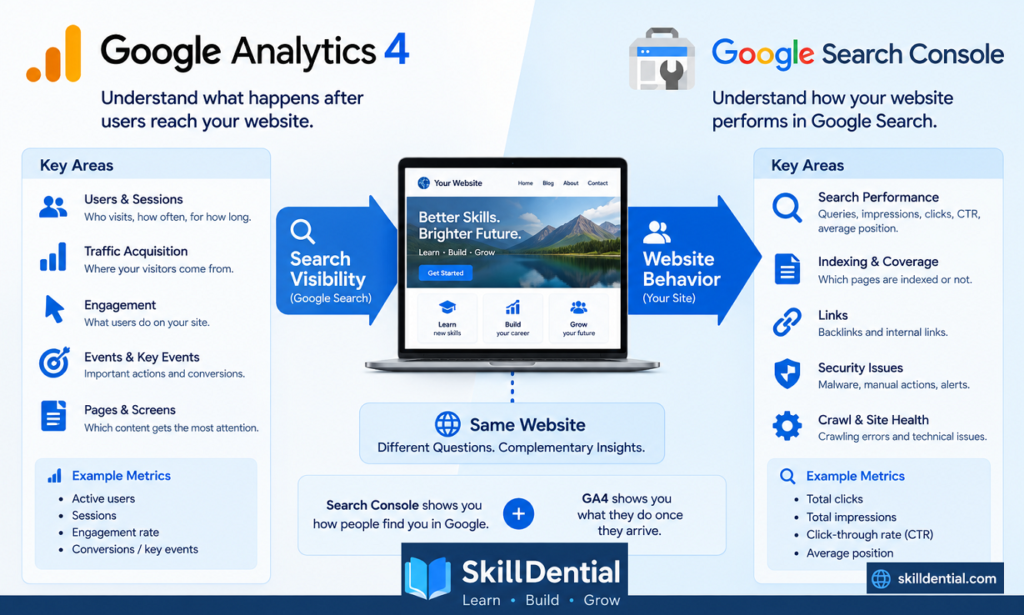
Relying on a single platform leaves critical blind spots in your data architecture. Integrating insights from Google Search Console with behavioral metrics in GA4 enables digital marketers, site owners, and SEO professionals to accurately diagnose traffic fluctuations, align content relevance with actual search intent, and maximize organic growth potential.
What Is Google Search Console?
Google Search Console is a complimentary platform provided by Google designed to monitor, maintain, and optimize a website’s technical health and organic visibility within search engine results pages (SERPs).
Unlike analytics tools focused on user behavior, Search Console operates entirely at the pre-click level, providing raw data regarding how Google’s crawler interacts with and ranks your web architecture.
Core Capabilities & Metrics
- Organic Performance Data: Tracks core visibility indicators including search queries, total clicks, impressions, click-through rate (CTR), and average keyword position.
- Technical Indexation & Crawling: Identifies server errors, robots.txt blocks, sitemap issues, and page indexing status to ensure maximum crawl efficiency.
- Security & Manual Actions: Alerts site administrators to malware, security vulnerabilities, or algorithmic penalties affecting search placement.
- Link Profiling: Analyzes internal and external backlink structures passing authority to your domain.
Key Questions Answered by Search Console
Digital marketers and site owners use Google Search Console to resolve strategic and tactical questions, such as:
- Which specific search queries trigger impressions for my content?
- What is the exact distribution of clicks, impressions, and CTR across specific landing pages?
- Which queries exhibit high impression volume but low CTR, signaling an opportunity for meta-title and description optimization?
- What is my site’s average ranking position for target keywords?
- Are technical indexation errors preventing specific URLs from appearing in SERPs?
What Is Google Analytics 4 (GA4)?
Google Analytics 4 (GA4) is Google’s flagship measurement platform designed to track and analyze how users interact with websites and applications across multiple devices and touchpoints.
Unlike Google Search Console, which measures pre-click visibility in search engine results, GA4 operates entirely at the post-click level, focusing on user journeys, engagement, and conversion pathways once traffic arrives on your property.
Core Capabilities & Metrics
- User Acquisition: Identifies traffic sources, mediums, and marketing channels driving visitors to your site.
- Engagement & Interaction: Tracks active users, session durations, page views, and custom user events.
- Conversion Tracking: Measures “key events” to evaluate macro and micro conversion rates.
- Cross-Platform Mapping: Unifies web and mobile app data into a single event-based data model.
Key Questions Answered by GA4
Digital analysts and marketers use GA4 to answer fundamental behavioral and attribution questions, such as:
- How many total users and sessions are visiting the website over a given timeframe?
- Which acquisition channels (organic search, paid, social, direct) are driving the highest volume and quality of traffic?
- Which specific landing pages and content paths hold user attention the longest?
- What specific actions or on-site interactions do users take before converting?
- How many visitors successfully trigger important key events?
Core Comparison: Pre-Click vs. Post-Click Metrics
The fundamental distinction between Google Search Console and GA4 lies in where they sit on the user’s journey from discovery to conversion.
Comparative Feature Matrix
| Analytical Metric / Objective | Google Search Console | Google Analytics 4 (GA4) |
| How often did my site appear in Google Search? | Yes | No |
| Which Google searches showed my site? | Yes | No |
| How many clicks came from Google Search? | Yes | Yes (measured as traffic sessions from organic search) |
| Search impressions | Yes | No |
| Search Click-Through Rate (CTR) | Yes | No |
| Average search ranking position | Yes | No |
| How users arrived at the website | Limited to organic search context | Yes (comprehensive multi-channel attribution) |
| Specific pages users viewed | Yes (tied to search query performance) | Yes (comprehensive across all traffic sources) |
| User engagement metrics | No | Yes |
| Custom events and user interactions | No | Yes |
| Key events (conversions) | No | Yes |
| Technical indexation and crawling data | Yes | No |
| Search-related technical issues & manual actions | Yes | No |
Strategic Takeaway
While both platforms track aspects of organic search traffic, Google Search Console and GA4 serve distinct, complementary functions. Treating them as interchangeable leads to major blind spots: Search Console optimizes how you attract visitors from the SERP, while GA4 optimizes what those visitors experience and accomplish once they arrive.
The Core Divergence: Search Visibility vs. User Behavior
The foundational distinction between Google Search Console and GA4 comes down to data origin and analytical intent.
- Search Console (The Ecosystem Lens): Measures the pre-click journey entirely within Google’s search environment. It tracks how algorithms and human searchers interact with your domain before a visit occurs.
- GA4 (The On-Site Lens): Measures the post-click journey across your digital properties. It tracks what visitors actually do once they cross the threshold from any acquisition channel.
The Journey in Action: A Practical Example
To see how these tools work in tandem, consider a scenario where an article ranks in the SERPs:
- The Pre-Click Phase (Google Search Console): Your article appears in Google Search 10,000 times (impressions) and generates 150 clicks (a 1.5% CTR at an average position of 8.4). Google Search Console flags this gap, showing you that while search visibility is high, the low CTR signals an underperforming meta-title or description that needs refinement.
- The Post-Click Phase (GA4): Once those 150 visitors land on the page, GA4 takes over. It reveals that visitors spent an average of 42 seconds reading the content, only 12% scrolled to the bottom, and none triggered your primary newsletter signup event.
Strategic Synergy
Analyzing these datasets together transforms raw metrics into a cohesive growth strategy. Google Search Console tells you if your content is visible and attractive in search results, while GA4 tells you if it satisfies user intent and drives business value once found.
Deciding When to Use Google Search Console for SEO
For any task involving organic search performance, technical indexation, or SERP visibility, Google Search Console is the indispensable starting point.
Core SEO Use Cases for Search Console
Rely on Google Search Console when your primary objective is to diagnose, monitor, or improve how search engines interact with your content:
- Query & Keyword Discovery: Identify the exact terms driving impressions and traffic to your pages.
- SERP Performance Diagnostics: Isolate underperforming content by analyzing high-impression, low-CTR queries to refine meta tags and snippets.
- Technical Health Checks: Detect and resolve crawling errors, robots.txt blocks, and indexing failures that prevent pages from ranking.
- Longitudinal Trend Analysis: Track changes in clicks, impressions, and algorithmic positioning over weeks and months.
Tactical SEO Workflow Example
- Identify the Gap: Google Search Console shows an article generating 5,000 impressions but only 30 clicks (0.6% CTR).
- Diagnose the SERP Issue: Recognize that while search visibility is strong, the snippet fails to capture user attention.
- Optimize: Revise the meta title, meta description, or content framing to better match actual user search intent, then monitor subsequent impression-to-click improvements in Search Console.
Critical Analytical Warning
When evaluating organic rankings in Google Search Console, avoid treating the Average Position metric as a fixed, absolute position for every individual query. Position is an aggregated average influenced by personalization, user location, and fluctuating search features. Prioritize macro-trends in clicks and impressions over micro-fluctuations in ranking position.
Deciding When to Use GA4 for Website Behavior
For any analytical objective focused on user engagement, on-site navigation, and conversion tracking, Google Analytics 4 (GA4) is the definitive platform.
Core Behavioral Use Cases for GA4
Turn to GA4 when your primary objective is to evaluate how visitors interact with your web architecture post-click:
- Traffic Acquisition Attribution: Determine precisely which channels (organic search, paid ads, social media, or direct traffic) drive the highest volume and quality of visitors.
- On-Site Engagement Analysis: Track active user counts, session durations, screen views, and content interaction patterns.
- Conversion and Key Event Tracking: Measure macro and micro conversions, such as form submissions, purchases, or newsletter sign-ups.
- User Journey Mapping: Analyze the behavioral pathways visitors take through your site, identifying drop-off points and high-value navigation flows.
Practical Behavioral Workflow Example
- Verify Organic Arrival: Google Search Console confirms that an article is successfully pulling in search traffic.
- Investigate Post-Click Action (GA4): Use GA4 to examine the behavior of those specific organic visitors:
- Do they read the content and immediately bounce, or do they explore secondary pages?
- Are visitors arriving via organic search exhibiting higher engagement rates than those coming from social media?
- Did any of those search visitors trigger a primary conversion event, such as downloading a resource or signing up for a newsletter?
Strategic Takeaway
While Google Search Console measures how successfully you capture audience attention on the SERP, GA4 evaluates whether your digital property successfully converts that attention into engagement, retention, and business value.
Integrating Google Search Console and GA4
Maximizing organic growth requires breaking down silos between pre-click visibility and post-click behavior. Because Google Search Console and GA4 cover opposite ends of the user journey, Google allows site owners to link their properties directly, merging valuable search data with on-site analytics reporting.
Key Benefits of the Integration
- Unified Reporting: Pulls Google Search Console dimensions and metrics directly into GA4 (typically found under the “Google Search Console” report collection), allowing you to evaluate landing page performance alongside user engagement metrics.
- Query-to-Behavior Mapping: Connects specific organic search queries to downstream user actions, showing you not just which keywords drove traffic, but how those users actually behaved once they landed.
- Streamlined Workflows: Eliminates the need to constantly switch between platforms when analyzing organic search effectiveness and content retention.
Core Integration Requirements
Before establishing the connection, ensure your setup meets these foundational criteria:
- Domain Alignment: The GA4 web data stream and the Google Search Console property must correspond to the exact same set of web pages and domain structure.
- Permission Requirements: The user setting up the link must possess Editor permissions in the corresponding GA4 property and Owner (or verified) permissions in Google Search Console.
The Complete Analytical Picture
Linking these two systems unites the two halves of the organic search lifecycle:
- Google Search Console answers: What happened on the search results page? (Queries, impressions, clicks, CTR, and average position).
- GA4 answers: What happened after the click? (Engagement, page depth, user journeys, and key conversion events).
Analyzing these insights in tandem transforms fragmented data into a clear, actionable growth strategy.
A Practical SEO Workflow Using Both Tools
Combining Google Search Console and GA4 transforms isolated data into an actionable optimization loop. This four-step framework allows bloggers, webmasters, and SEO professionals to systematically diagnose and fix organic performance bottlenecks.
Step 1: Find Opportunities in Search Console
Open the Google Search Console Performance report and evaluate your pages and queries based on impressions and clicks:
- Filter for queries that generate a high volume of impressions but suffer from low clicks or a weak click-through rate (CTR).
- Identify ranking pages sitting in positions 5 through 15 that represent quick-win opportunities for traffic expansion.
Step 2: Examine the Page & Search Intent
Analyze the URL tied to those underperforming queries and assess content alignment:
- Intent Match: Does the page directly satisfy the explicit user intent behind the search query?
- SERP Appeal: Are the title tag and meta description compelling enough to earn clicks against competing results?
- Content Depth: Does the introduction immediately answer the core question, and does the body provide comprehensive, high-signal information?
- Architecture: Are there clear internal links and logical next steps for the reader?
Step 3: Move to GA4 for Behavioral Analysis
Transition from the search results to on-site user dynamics by opening GA4:
- Navigate to your page reports or use the linked Google Search Console landing page report.
- Review key behavioral metrics:
- Do organic visitors bounce immediately, or do they exhibit healthy engagement times?
- Are users scrolling through the content or abandoning it early?
- Are visitors triggering key events (such as newsletter sign-ups, resource downloads, or outbound conversions)?
- Shift your perspective from “People are finding this page” to “What are people actually accomplishing after they arrive?”
Step 4: Make Targeted Improvements & Monitor
Synthesize your findings from both tools to execute precise updates:
- If CTR is low: Revise your meta-titles and descriptions in Google Search Console or on your CMS to better capture search intent.
- If engagement is low: Restructure your content, improve formatting, add internal links, or sharpen your calls to action based on GA4 insights.
- Track Results: Monitor changes over a 30-to-60-day window in both platforms to measure improvements in search visibility and user retention.
A Real-World Example for Content Creators and Bloggers
To see how this dual-platform workflow plays out in practice, consider a blog post titled: “How to Use Google Search Console for Beginners.”
After indexing and ranking for a few weeks, the data across both platforms tells a complete, interconnected story:
Step 1: Diagnosing Search Visibility (Google Search Console)
You open your Google Search Console Performance report and spot a specific query driving traffic to your guide:
- High Impressions & Low CTR: The article appears thousands of times when users search for beginner-level SEO queries, but the click-through rate is stubbornly low.
- Mid-Tier Ranking Position: The average position sits around 8 to 12, indicating solid visibility on page one or the top of page two, but leaving substantial traffic untapped at the very top.
Takeaway: Your content is visible to the right audience, but your SERP snippet (title tag and meta description) fails to compel users to click over competing results.
Step 2: Evaluating On-Site Impact (GA4)
Next, you pivot to GA4 to see how those organic visitors behave once they land on the guide:
- Positive Downstream Engagement: GA4 reveals that readers don’t just bounce immediately; a significant percentage of organic visitors navigate directly to a related tutorial on technical SEO or keyword research.
- Content Discovery: The article is successfully acting as a top-of-funnel gateway, helping readers discover deeper educational content on your site.
Takeaway: The content itself satisfies user intent and drives internal exploration, validating the value of the post despite the initial click-through friction on the SERP.
Step 3: Executing a Strategic Action Plan
Armed with insights from both platforms, you can make high-leverage updates:
- Optimize for CTR: Rewrite your meta-title and introduction in Google Search Console / your CMS to more aggressively address beginner pain points.
- Strengthen Internal Architecture: Because GA4 proves that readers naturally move on to related tutorials, proactively embed high-context internal links within the article body to capture and guide that momentum even more efficiently.
Neither platform tells the whole story on its own. Google Search Console explains how successfully you capture audience attention on the search results page, while GA4 explains how effectively your content engages and guides visitors once they arrive.
Common Misconceptions About GA4 and Search Console
When managing organic performance, relying on flawed assumptions can lead to misallocated optimization efforts. Clarifying these frequent misconceptions ensures you use each platform for its intended purpose.
“GA4 and Search Console show the same traffic numbers.”
- The Reality: Their metrics will never match perfectly due to fundamentally different collection architectures.
- Why: Google Search Console records an impression or click the moment a user interacts with a search result (measured pre-click). GA4 records a session only after the tracking code successfully executes in the browser after the user arrives. Factors like tracking blocks, page load latency, bot filtering, and differing attribution windows cause natural data divergence between the two tools.
“Search Console tells me where every visitor came from.”
- The Reality: Google Search Console provides visibility exclusively into traffic originating from Google’s search ecosystem.
- Why: While it gives granular detail on organic search queries, it completely misses traffic from direct entry, social media networks, paid advertising, email campaigns, or referral sites. For multi-channel acquisition tracking, GA4 remains essential.
“Average position means my website ranks exactly there for everyone.”
- The Reality: Google Search Console’s Average Position metric is a broad aggregate, not a fixed, universal rank.
- Why: Rankings fluctuate constantly based on user location, personalized search history, device type, and dynamic SERP features (like local packs or video carousels). Google explicitly advises marketers to focus on macro-trends in clicks and impressions rather than obsessing over daily shifts in average position.
“GA4 replaces Search Console (or vice versa).”
- The Reality: The two platforms are mutually exclusive in their core capabilities and cannot replace one another.
- Why: GA4 cannot inspect server errors, robot.txt blocks, sitemap indexing status, or query-level search visibility. Conversely, Google Search Console cannot track on-site user behavior, custom events, or conversion pathways. True optimization requires leveraging both systems in tandem.
Which Platform Should You Check First?
Determining where to begin your analysis depends entirely on the specific diagnostic or strategic question you need to answer.
Diagnostic Starting-Point Matrix
| Analytical Question | Recommended Starting Point | Core Focus |
| Why did my Google Search clicks change? | Google Search Console | Pre-click SERP visibility & impressions |
| Which queries drive impressions? | Google Search Console | Organic keyword discovery |
| Which pages appear in Google Search? | Google Search Console | Indexation & search presence |
| Are my pages being successfully indexed? | Google Search Console | Technical SEO & crawling health |
| Where are website users coming from? | GA4 | Multi-channel acquisition attribution |
| Which pages are users viewing? | GA4 | On-site navigation & content reach |
| How engaged are visitors with my content? | GA4 | Session duration & user interaction |
| What actions are users taking on-site? | GA4 | Event tracking & behavioral flow |
| Which actions function as key events? | GA4 | Conversion tracking & goal completion |
| What happens after organic visitors arrive? | Both Linked | Complete pre-click to post-click lifecycle |
Strategic Summary
- Start with Google Search Console when you are investigating visibility, search rankings, indexing health, or top-of-funnel acquisition from Google Search.
- Start with GA4 when you are auditing user behavior, conversion pathways, content engagement, or cross-channel marketing performance.
- Combine both when you want to bridge the gap between how users find your content and how effectively that content delivers business value once they arrive.
What is the core difference between Google Analytics 4 and Google Search Console?
The fundamental difference lies in where they measure the user journey. Google Search Console operates entirely at the pre-click level, tracking how your website appears, ranks, and performs within Google Search results pages (SERPs). Google Analytics 4 (GA4) operates at the post-click level, measuring what users actually do once they arrive on your website or application across all traffic sources.
Why don’t the clicks in Search Console match the organic traffic sessions in GA4?
Their data collection architectures are completely different, meaning their numbers will never match perfectly. Google Search Console records an impression or click the moment a user interacts with a search result. GA4 records a session only after the tracking code successfully executes in the browser after the page loads. Discrepancies are normal and caused by factors such as ad blockers, page load latency, bot filtering, and differing attribution models.
Can GA4 completely replace Google Search Console?
No. GA4 cannot replace Google Search Console, and Search Console cannot replace GA4. Search Console provides critical technical SEO capabilities that GA4 lacks, including indexation status, crawling errors, robots.txt blocks, and exact search query data. Conversely, GA4 tracks on-site user behavior, custom events, multi-channel acquisition, and conversion paths that Search Console cannot see.
Should I link my Google Search Console property to GA4?
Yes. Linking the two platforms bridges the gap between pre-click visibility and post-click behavior. The integration brings Search Console queries and landing page data directly into GA4 reports, allowing you to analyze which specific search queries drive high-value user engagement and conversions on your site.
How should I use both tools together for an SEO audit?
Use a combined workflow: start in Google Search Console to identify top-of-funnel opportunities, such as high-impression queries with low click-through rates (CTR) or underperforming landing pages. Then, transition to GA4 to evaluate what those visitors do post-click—checking metrics like engagement time, scroll depth, and key conversion events—allowing you to optimize both your SERP snippets and your on-site user experience.
In Conclusion
Google Search Console and Google Analytics 4 serve distinct, non-overlapping functions within a modern digital stack:
- Google Search Console monitors pre-click visibility, keyword rankings, indexing health, and SERP performance.
- GA4 measures post-click user engagement, multi-channel acquisition, and conversion behavior.
Neither platform can replace the other. True optimization relies on connecting the entire journey:
$$\text{Search Console} \rightarrow \text{Search Visibility} \rightarrow \text{Clicks} \rightarrow \text{Website Visit} \rightarrow \text{GA4} \rightarrow \text{User Behavior} \rightarrow \text{Events \& Key Events}$$
Actionable Next Step
Open both platforms today and select a single URL that currently generates organic traffic. Use Google Search Console to audit how users discover the page on the SERP, and transition to GA4 to analyze how effectively that content satisfies user intent once they arrive.