GitHub Project Management: 9 Practices for MLOps Beginners
GitHub project management helps machine learning beginners organise code, track tasks, collaborate with others, and make their experiments easier to reproduce. By combining Git repositories, branches, issues, pull requests, and project boards, you can build a more reliable workflow for machine learning projects. This guide explains nine practical GitHub project management practices that help MLOps beginners move from notebook-based experimentation towards structured, maintainable ML projects.
Machine learning projects involve more than writing Python code and training a model. You also need to manage datasets, document experiments, track changes, collaborate with other developers, and prepare your work for future deployment.
Without a clear workflow, even a promising machine learning project can become difficult to maintain. You might forget which dataset produced a particular result, overwrite useful code, lose track of unfinished tasks, or struggle to explain your work to another developer.
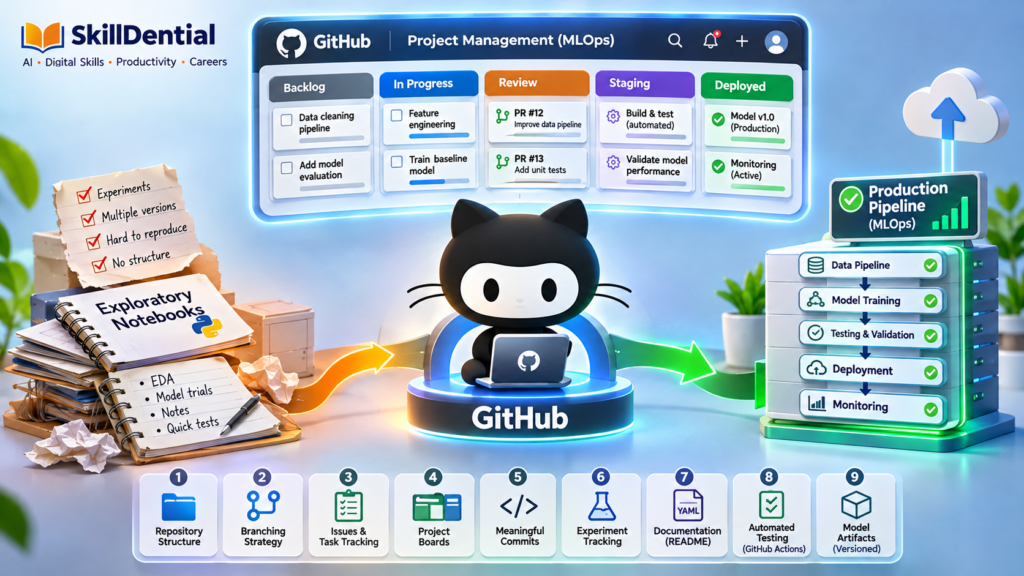
This is where GitHub project management becomes valuable. GitHub provides tools for storing code, reviewing changes, tracking issues, organising tasks, and automating development workflows. Through structured GitHub project management, you can establish a repeatable process before introducing more advanced MLOps platforms.
In this guide, you will learn nine practices for managing machine learning projects on GitHub, including how to structure repositories, organise experiments, use pull requests, and leverage GitHub project management to prepare your workflows for automation.
What Is GitHub Project Management?
GitHub project management is the systematic practice of leveraging GitHub’s native planning, version control, and collaboration toolsets to coordinate software and machine learning engineering workflows.
For machine learning initiatives, it involves structuring codebases, tracking tracking-related tasks, maintaining documentation, managing configuration states, and standardizing development lifecycles.
GitHub provides several integrated features that power this workflow:
| GitHub Feature | Project Management Purpose |
| Repositories | Centralized storage and hierarchical organisation of project assets. |
| Branches | Isolation layers for feature development, experimentation, and bug fixes. |
| Commits | Immutable snapshots recording exact historical changes to code and configs. |
| Issues | Granular tracking mechanisms for bugs, feature requests, and granular tasks. |
| GitHub Projects | Flexible workspace visualisations (kanban boards, tables, roadmaps) for task management. |
| Pull Requests | Code review gates for discussing, testing, and merging proposed changes. |
| GitHub Actions | CI/CD automation engines for testing, linting, and deployment pipelines. |
As GitHub’s official documentation notes, Projects offer adaptive planning layers, while Issues capture actionable work items. For MLOps beginners, these native features establish a reliable starting baseline for the software engineering side of machine learning.
Core Scope and Limitations
Effective GitHub project management builds a solid foundation, but it is critical to recognize its boundaries: GitHub does not natively handle every layer of the ML lifecycle. Specialized operations—such as heavy dataset versioning (e.g., DVC), hyperparameter/experiment tracking (e.g., MLflow, WandB), model registries, and production monitoring—will eventually require complementary tooling.
Mastering GitHub project management early ensures you have a clean, repeatable structure capable of scaling alongside your MLOps maturity.
Practice 1: Establish a Clear Repository Structure
A well-organised repository is the foundational building block of effective GitHub project management in machine learning. It makes your project intuitive, maintainable, and scalable for collaborators or future audits.
Instead of dumping every script and dataset into a single root folder, enforce a clean separation of concerns across code, notebooks, configurations, tests, and documentation.
Standard Beginner MLOps Repository Template
customer-churn-mlops/
│
├── data/
│   ├── raw/
│   └── processed/
│
├── notebooks/
│   ├── 01_exploration.ipynb
│   └── 02_model_experiments.ipynb
│
├── src/
│   ├── data/
│   │   └── preprocess.py
│   ├── features/
│   │   └── build_features.py
│   └── models/
│       └── train.py
│
├── tests/
│   └── test_preprocessing.py
│
├── configs/
│   └── model_config.yaml
│
├── docs/
│   └── experiment_notes.md
│
├── .gitignore
├── requirements.txt
├── README.md
└── LICENSE
Anatomy of the Structure
notebooks/vs.src/: Isolate exploratory work from production logic. Use notebooks (e.g., Jupyter) strictly for exploratory data analysis and rapid prototyping, then refactor stable, reusable functions into modular Python scripts insidesrc/.tests/: Contain unit tests and assertions to verify that data transformations and pipeline scripts execute without errors.configs/: Centralise non-sensitive configurations (hyperparameters, file paths, feature lists) using structured formats like YAML, keeping them separate from source code.- Root Files: Maintain clean hygiene with a strict
.gitignore(ignoring raw data and model artifacts), a comprehensiverequirements.txtfor dependency pinning, and aREADME.mddefining project scope.
Engineering Principle
This layout serves as a pragmatic guideline rather than a rigid framework. Scale your directory complexity to fit the project scope—avoid creating empty or speculative folders simply to make a repository look advanced. Every directory must serve a distinct execution purpose.
Practice 2: Use Branches to Isolate Your Work
Branches are essential for isolating changes without destabilizing your primary codebase. In machine learning workflows, this separation is vital because you frequently need to test competing ideas—such as alternative feature engineering strategies, hyperparameter tuning runs, or different model architectures—without breaking stable baseline code.
For example, when building a customer churn prediction model, you can segment your development across dedicated branches:
feature/data-cleaningexperiment/random-forestexperiment/xgboostfix/missing-values
A typical isolated workflow starts by creating and switching to a new working branch:
Bash
git checkout -b experiment/random-forestOnce on the branch, you can modify scripts, execute training loops, and commit your snapshots safely. When the experiment is complete and evaluated, you propose merging it back into the main branch.
As GitHub’s documentation outlines, branching isolates development, while pull requests safely gate proposed changes for review.
Why Branching Matters in MLOps
Disciplined branch management within your GitHub project management strategy provides critical operational benefits:
- Alternative Comparisons: Test and benchmark different ML algorithms side-by-side without polluting stable code.
- Separation of Concerns: Keep messy experimental notebooks and draft scripts separate from production-ready modules.
- Streamlined Collaboration: Allow multiple contributors to work on independent components concurrently.
- Controlled Reviews: Inspect all code changes and experiment outputs before merging them into the core repository.
Execution Tip
Avoid the trap of opening a new branch for every trivial tweak or single-line edit. Reserve branches for cohesive, meaningful changes, distinct experiments, or scoped tasks that genuinely require isolation. For beginners, a clean branching model featuring a stable
mainbranch paired with short-lived feature or experiment branches provides the ideal balance of speed and structure.
Practice 3: Track Tasks With GitHub Issues
GitHub Issues serve as the foundational tracking layer of effective GitHub project management. Instead of managing machine learning tasks through scattered sticky notes, mental checklists, or ad-hoc chats, issues provide a persistent, programmatic registry for bugs, engineering tasks, and experimental objectives.
For an MLOps project, breaking down development into discrete issues keeps your backlog transparent and structured:
| Issue | Task Title | Description / Objective |
| #1 | Investigate missing values | Audit the raw dataset for null distributions and imputation impact. |
| #2 | Build preprocessing pipeline | Encapsulate feature cleaning and encoding into a reusable Python module. |
| #3 | Train baseline model | Establish initial performance metrics using a standard model framework. |
| #4 | Compare model performance | Benchmark alternative algorithms (e.g., Random Forest vs. XGBoost). |
| #5 | Add preprocessing tests | Write unit tests in tests/ to verify pipeline transformation behavior. |
| #6 | Document model results | Record final evaluation metrics and artifact paths in project docs. |
Anatomy of a Well-Defined Issue
An effective issue specifies both the implementation objective and the exact definition of “done.” Vague task descriptions lead to scope creep and untracked technical debt.
Consider how a structured issue looks in practice:
Issue: Build a reusable preprocessing pipeline
Description: Create a modular preprocessing function inside
src/data/preprocess.pythat handles missing numerical values, encodes categorical features, and outputs a consistent feature matrix.Acceptance Criteria:
- Missing numerical values are imputed deterministically.
- Categorical variables are encoded without data leakage.
- The transformation function can be seamlessly applied during both training and inference.
- Unit tests under
tests/cover core transformation edge cases.
Connecting Planning to Execution
A key advantage of integrating Issues into your GitHub project management workflow is traceability. By referencing issue numbers directly inside your commit messages or pull requests (e.g., closes #2), GitHub automatically links planning artifacts directly to the code changes that implement them. This creates an unshakeable audit trail for every feature, experiment, and bug fix in your MLOps lifecycle.
Practice 4: Organise Your Workflow With GitHub Projects
While GitHub Issues track individual tasks, comprehensive GitHub project management extends to macro-level workflow visualization using GitHub Projects. A centralized project board prevents tasks from getting lost and gives you an instant, high-level view of your development pipeline.
For a beginner MLOps project, a streamlined Kanban board featuring five core columns provides optimal visibility without unnecessary overhead:
| Column | Purpose / State | Sample Tasks |
| Backlog | Unscheduled or future ideas. | Model monitoring, Documentation |
| Ready | Fully defined tasks ready to be picked up. | Data cleaning, Feature engineering |
| In progress | Active development or experimentation. | Baseline model, Repository setup |
| Review | Code or experiment results awaiting validation. | Unit tests, README |
| Done | Fully completed, tested, and merged tasks. | Deployment plan |
GitHub Projects supports adaptive views—including traditional Kanban boards, data-dense spreadsheets, and roadmaps—allowing you to inspect your workflow from multiple angles.
A Practical Project Management Routine
To keep your MLOps workflow moving smoothly without administrative drag, establish a lightweight operational rhythm:
- Populate Backlog: Convert your development plan into discrete GitHub Issues.
- Populate Board: Add active issues to your GitHub Projects board under the Backlog or Ready columns.
- Limit Work in Progress (WIP): Select one or two focused tasks to tackle at a time to maintain deep focus.
- Update Status: Dynamically drag tasks across columns (In progress $\rightarrow$ Review $\rightarrow$ Done) as your code evolves.
- Weekly Retrospective: Review completed milestones and adjust your priorities at the end of each development sprint.
For team projects, this board clarifies ownership, highlights blocked items, and prevents duplicate effort.
Execution Principle
Keep your project board lean and functional. A beginner setup does not require a dozen status columns, complex custom fields, or elaborate automation rules. Focus execution speed on the code, using your project board purely to maintain directional clarity.
Practice 5: Write Meaningful Commits
A Git commit captures an immutable snapshot of changes within your repository. Within a disciplined GitHub project management workflow, writing meaningful commit messages is critical for tracking how your project evolves, auditing codebase history, and understanding why specific architectural or pipeline decisions were made.
Commit Message Contrast
Vague messages destroy auditability. Contrast weak habits with professional naming conventions:
| Weak Commit Message | Better Commit Message |
update | Add missing-value preprocessing |
changes | Add baseline logistic regression model |
fix | Fix categorical feature encoding |
final version | Add model evaluation metrics |
Atomic Commits in Practice
Always stage related changes together and write descriptive imperative messages:
Bash
git add src/data/preprocess.py
git commit -m "Add missing-value preprocessing"Code language: JavaScript (javascript)
Avoid combining unrelated modifications—such as updating preprocessing logic, editing the README.md, and tweaking model configurations—into a single massive commit. If a regression occurs later, atomicity ensures you can pinpoint the exact code change responsible.
Why Clear Commits Matter for MLOps
Suppose a model’s accuracy shifts unexpectedly after a code update. A clean commit history empowers your GitHub project management workflow by letting you isolate which exact code changes occurred between two experimental runs.
Execution Boundary
While structured commit histories are vital for software reproducibility, Git alone is not a complete MLOps experiment tracker. Dataset variations, random seeds, software dependencies, and hyperparameter configurations must still be logged alongside your commit hashes using complementary tools.
Practice 6: Make Your ML Experiments Reproducible
Reproducibility is a foundational tenet of MLOps. A truly reproducible experiment is one where another engineer can independently review the environmental conditions, rerun the pipeline, and obtain comparable results.
Within a robust GitHub project management framework, tracking raw Python code is only the starting point. True machine learning reproducibility requires capturing the entire operational context surrounding an execution.
Anatomical Checklist of an Experiment
To ensure an experiment can be audited or replicated, document the following attributes:
- The exact dataset or dataset version used.
- Training and evaluation procedures.
- Model hyperparameters and configuration settings.
- Exact software and library dependency versions.
- Random seeds to guarantee stochastic parity.
- Quantitative evaluation metrics.
- The specific storage location of the resulting model artifact.
Consider this structured experiment record:
| Experiment Detail | Example Record |
| Experiment ID | exp-003 |
| Model Architecture | Random Forest Classifier |
| Dataset Version | Customer churn dataset, version 2 (v2.1) |
| Random Seed | 42 |
| Test Accuracy | 0.84 |
| Python Version | 3.12 |
| Configuration File | configs/model_config.yaml |
| Code Reference | Git commit abc1234 |
Note: The metrics above are illustrative templates rather than production benchmarks.
What to Store in GitHub vs. External Storage
A common pitfall for beginners is turning their repository into a dumping ground for large binary assets. Effective GitHub project management requires a clear division between what lives inside Git and what belongs in external object storage.
- What belongs in GitHub:
- Training and inference scripts.
- Configuration and schema files (
configs/). - Experiment documentation and notes (
docs/). - Evaluation scripts and tests.
- Dataset references, schema definitions, and small, non-sensitive sample datasets.
- What stays out of GitHub:
- Massive production datasets.
- Generated model weights, checkpoints, and binary artifacts.
For lightweight versioning of moderately large files, Git Large File Storage (Git LFS) can bridge the gap, though it carries its own storage and bandwidth constraints. For enterprise-grade MLOps, complement your GitHub workflow with dedicated experiment tracking and artifact registries (e.g., DVC, MLflow, Weights & Biases).
Engineering Objective
Leverage your repository to make code, configs, and experiment parameters entirely traceable, maintaining a clean codebase without bloating your repository history with heavy binary files.
Practice 7: Document Your Project With a Useful README
A README.md file is the entry point of your GitHub repository. In a professional GitHub project management workflow, a strong README acts as your project’s executive summary, explaining its purpose, how to configure the environment, and how to execute the core machine learning pipeline.
For an MLOps repository, a comprehensive README should cover ten core sections:
- Project Title and Summary: High-level overview of the use case.
- Problem Statement: The business or engineering challenge being addressed.
- Dataset Description & Source: Origin, schema, and versioning details of the data.
- Repository Structure: A visual directory tree mapping out the project layout.
- Installation Instructions: Step-by-step setup guide for dependencies and virtual environments.
- Training Instructions: Exact command-line commands to execute training scripts.
- Evaluation Procedure: How performance metrics are calculated and verified.
- Results & Limitations: Quantitative outcomes coupled with known model boundaries.
- Reproducibility Information: Random seeds, library versions, and configuration references.
- Future Improvements: Roadmap items or architectural enhancements.
Minimalist README Template in Practice
Markdown
# Customer Churn Prediction

## Overview
A machine learning project that predicts customer churn using historical customer activity data, structured according to modern MLOps best practices.

## Installation
Clone the repository and install required dependencies:
```bash
pip install -r requirements.txt
Code language: PHP (php)
Training
Run the training script using default configurations:
Bash
python src/models/train.pyEvaluation
Evaluate model performance on the test split:
Bash
python src/models/evaluate.pyLimitations
- The model has only been evaluated on a static historical test dataset.
- The dataset may not fully represent shifting macroeconomic customer behaviors.
- The current pipeline has not been stress-tested under high-throughput production traffic.
---

#### **Document Limitations, Not Just Success**

Portfolio projects and junior MLOps repositories gain instant credibility when they transparently outline model boundaries and operational constraints. Never hide shortcomings; explicitly stating that a model lacks edge-case validation or production traffic testing demonstrates engineering maturity.

A clear, well-structured README ensures that collaborators, reviewers, and hiring managers can grasp your project’s value and technical depth without having to dig through your codebase or raw Jupyter notebooks.
Code language: PHP (php)
Practice 8: Use Pull Requests for Review and Collaboration
A pull request (PR) is a formal proposal to merge code changes from a working branch into your primary development branch. Within a structured GitHub project management workflow, pull requests provide a centralized space to explain modifications, discuss code implementation, review diffs, and run automated validation checks before code hits production.
Even when working as a solo beginner, introducing a pull request phase forces a deliberate review step rather than rushing code directly into main.
A Disciplined Pull Request Workflow
A standard development cycle using PRs follows a clean, repeatable sequence:
- Branch Creation: Open a dedicated branch for a specific task (e.g.,
feature/preprocessing-pipeline). - Implementation: Write code, configuration updates, and accompanying unit tests.
- PR Creation: Open a pull request targeting the main branch.
- Self-Review or Peer Review: Inspect the code diff, verify test coverage, and assess potential downstream effects.
- Merge: Integrate the code only after validation checks pass.
Anatomy of a Machine Learning Pull Request
Standard software pull requests focus primarily on logic and syntax. Machine learning pull requests, however, require additional context because code modifications can subtly alter data distributions or model behavior.
A thorough MLOps pull request description should outline:
| PR Section | Description & Objective |
| Purpose | Explain the specific machine learning or engineering problem being solved. |
| Changes | Summarize key code modifications across scripts, configs, or notebooks. |
| Testing | Detail the unit tests, integration checks, or sanity scripts executed. |
| ML Impact | Describe whether the change alters data preparation, feature engineering, training loops, evaluation metrics, or inference pipelines. |
| Limitations | Note any known edge cases, performance trade-offs, or unaddressed risks. |
Example Impact
Altering a feature engineering function modifies the input distribution fed into your model. Documenting this change inside the pull request ensures that any future reviewer (or your future self) understands why downstream model performance might shift.
Balancing Rigor and Agility
While pull requests are essential for multi-developer teams managing distinct roles—such as data engineering, model development, and deployment—they provide equal value for solo beginners.
Execution Principle
Keep your review process lightweight. The goal of integrating pull requests into your GitHub project management routine is to make code evolution deliberate and traceable, avoiding unnecessary bureaucracy while maintaining high engineering standards.
Practice 9: Introduce GitHub Actions for Automated Checks
GitHub Actions is a native CI/CD engine that allows you to automate workflows directly inside your repository. Within a comprehensive GitHub project management strategy, automation bridges the gap between basic version control and advanced MLOps pipelines by executing tests, checking code quality, and validating builds upon specific repository events.
For MLOps beginners, setting up automated checks ensures that your code remains stable and your tests pass automatically whenever changes are introduced.
Sample GitHub Actions Workflow for Testing
A standard workflow file (saved under .github/workflows/test.yml) triggers automated unit testing on every push or pull request:
YAML
name: Python Tests

on:
  push:
    branches: [main]
  pull_request:

jobs:
  test:
    runs-on: ubuntu-latest

    steps:
      - name: Checkout repository
        uses: actions/checkout@v4

      - name: Set up Python
        uses: actions/setup-python@v5
        with:
          python-version: "3.12"

      - name: Install dependencies
        run: |
          python -m pip install --upgrade pip
          pip install -r requirements.txt

      - name: Run tests
        run: pytestCode language: JavaScript (javascript)
Note: Ensure action versions, Python runtimes, and test commands match your project’s specific dependency requirements.
What Can You Automate in an MLOps Project?
While full-scale model training often requires external infrastructure, GitHub Actions can handle a wide variety of lightweight validation tasks:
| Automation Target | Core Purpose |
| Unit Tests | Verify that individual Python functions and data pipelines execute correctly. |
| Data Validation | Scan incoming datasets for missing schemas, anomalous distributions, or null values. |
| Code Linting | Enforce consistent code style, formatting, and syntax rules (e.g., Flake8, Black). |
| Dependency Checks | Scan requirements files for known vulnerabilities or packaging conflicts. |
| Model Evaluation | Run automated sanity checks or lightweight benchmark validations against regression metrics. |
| Package Building | Verify that the repository can be successfully packaged and installed. |
Understanding Automation Boundaries
Not every machine learning task belongs in a standard GitHub Actions runner. Training heavy deep learning models or processing massive datasets requires specialized compute resources, accelerators (GPUs/TPUs), and secure data access not available in default hosted runners.
Engineering Principle
Start with lightweight code and dependency checks. Expand your automation complexity incrementally as your MLOps requirements and infrastructure mature.
Common GitHub Project Management Mistakes to Avoid
Mastering core engineering practices is essential, but avoiding common operational pitfalls is equally critical. MLOps beginners frequently encounter recurring roadblocks that can undermine reproducibility, security, and workflow efficiency.
| Common Mistake | Better Professional Approach |
| Storing everything in notebooks | Refactor stable, reusable data processing and training logic into modular Python scripts inside src/. |
| Committing large datasets | Keep heavy binary files and massive datasets out of Git; utilize external object storage, Git LFS, or data versioning tools (e.g., DVC). |
| Working directly on the main branch | Isolate new features, bug fixes, and experiments using dedicated, short-lived branches. |
| Writing vague commit messages | Write concise, imperative commit descriptions that clearly state what changed and why. |
| Tracking experiments in memory | Systematically log configurations, random seeds, software versions, and evaluation metrics in documentation or tracking logs. |
| Ignoring testing altogether | Write lightweight unit tests for core data transformations and pipeline scripts from day one. |
| Committing API keys or credentials | Utilize strict .gitignore filters and secure environment secrets management for credentials and tokens. |
| Building overly complex project boards | Start with a lean, streamlined Kanban board and scale complexity only as project scope demands. |
| Treating GitHub as a full MLOps platform | Recognize GitHub’s operational boundaries and layer on specialized tools (e.g., MLflow, WandB) when the project requires advanced tracking. |
Protect Your Data, Code, and Credentials
Machine learning projects frequently handle sensitive assets, including proprietary customer records, database credentials, API access tokens, and private datasets. Accidentally exposing these items can compromise infrastructure or violate data privacy standards.
- Enforce Strict Ignores: Always configure a comprehensive
.gitignorefile at your repository root to exclude local environment files, credential caches, and raw data splits. - Understand Git History: Remember that adding a file to
.gitignoreonly prevents future tracking. If a sensitive API key or dataset is accidentally committed, it remains embedded in your Git history even if deleted in a later commit. - Immediate Remediation: If a secret is ever exposed, revoke or rotate the credential immediately rather than relying solely on rewriting repository history.
Security Principle
Treat security and access hygiene as core components of your GitHub project management workflow from your very first commit.
Is GitHub project management useful for MLOps beginners?
Yes. Effective GitHub project management provides practical, native infrastructure for controlling code, tracking tasks, organizing documentation, and coordinating collaboration. It establishes essential engineering habits before introducing heavier, specialized MLOps platforms.
Is GitHub enough to manage an entire machine learning project?
Not entirely. While GitHub excels at source code control, task planning, and CI/CD automation, production ML systems also require dedicated tooling for experiment tracking, data versioning, model registries, pipeline orchestration, and monitoring.
Should I use GitHub Projects or GitHub Issues?
They serve complementary functions. GitHub Issues capture granular tasks, bugs, and requirements, while GitHub Projects organizes those tasks into macro-level workflows (such as Kanban boards and tables). Combining both creates a complete tracking loop.
Should I commit machine learning datasets to GitHub?
Only for small, non-sensitive sample datasets that are explicitly cleared for distribution. Massive production datasets and restricted records should be routed through dedicated object storage or data versioning systems.
Can I use GitHub Actions for machine learning?
Yes. GitHub Actions easily handles lightweight automation like unit tests, code linting, dependency checks, and validation scripts. However, heavy model training and large-scale data processing require specialized external compute resources.
How can GitHub project management help my MLOps career?
A polished, well-structured repository demonstrates professional engineering rigor. Showcasing clean documentation, atomic commits, reproducible experiments, and a disciplined workflow gives reviewers tangible proof of your technical execution capabilities.
In Conclusion
Effective GitHub project management serves as the practical bedrock for any practitioner transitioning from loose, notebook-based experimentation to structured engineering workflows.
By structuring your repository, leveraging isolated branches, tracking tasks with issues, documenting experiment configurations, and introducing pull requests alongside automated checks, you transform ad-hoc code into a maintainable, reproducible ML system.
The core takeaway is simple: establish disciplined engineering habits early. You do not need a complex, heavy MLOps platform to begin building production-grade instincts. A clean GitHub repository and a repeatable development workflow provide the exact foundation required for future automation, scaling, and deployment.
Your Next Step
Select an existing machine learning project or portfolio piece today and systematically apply these practices:
- Establish a clean repository structure separating code, configs, and notebooks.
- Write or refine your
README.mdto clearly define project scope and limitations. - Populate GitHub Issues for remaining tasks and map them to a project board.
- Systematically record your experiment configurations and evaluation metrics.
- Route your next meaningful change through a dedicated branch and pull request.
- Implement at least one automated test via GitHub Actions.
Start with these foundational upgrades, then scale up as your machine learning projects grow. For more practical guides on AI and digital skills, explore SkillDential.