AI for Employees: 11 Things Every Employee Should Understand
Artificial intelligence is changing how work gets done. From writing and research to data analysis, customer service and everyday administration, AI is becoming part of the modern workplace. But understanding AI for employees is not simply about learning how to use the latest AI tools. It is about knowing where AI can help, where human judgement is still essential, and how to use these technologies responsibly.
Employees who learn to work effectively with AI can automate routine tasks, improve productivity, save time and make better use of their professional expertise. At the same time, they need to understand the limitations of AI, verify its output, protect confidential information and follow their organisation’s policies.
The rise of workplace AI does not mean that human skills have become irrelevant. Critical thinking, creativity, communication, problem-solving, emotional intelligence and professional judgement remain valuable. In many roles, the advantage may increasingly go to people who can combine these human capabilities with practical AI skills.
In this guide to AI for employees, we explore 11 important things every employee should understand about artificial intelligence in the workplace—from its benefits and limitations to responsible use, data privacy, productivity, and career development. The goal is not to create fear or hype. It is to help you understand how AI is changing work and give you a practical foundation for adapting, learning, and staying competitive as workplace expectations evolve.
Workplace AI is more than chatbots
AI is transforming the modern corporate landscape, but AI for employees goes far beyond simple chatbot interactions. Artificial intelligence encompasses a broad suite of software designed to perform tasks traditionally requiring human cognition—such as recognising patterns, generating text, analysing data, making predictions, and interpreting visual information.
For modern professionals, AI for employees spans multiple applications:
- Generative AI Tools: Systems that rapidly draft text, code, presentations, images, or comprehensive summaries.
- Embedded Software Features: AI capabilities natively integrated into email clients, word processors, spreadsheets, project management software, and customer support desks.
- Predictive Systems: Analytics that flag emerging trends, operational risks, demand shifts, or anomalies.
- Automation Tools: Workflows that seamlessly move data between disconnected systems or trigger repetitive processes.
- Recommendation Engines: Algorithms that surface relevant documents, recommended next actions, or suggested replies.
Crucially, AI for employees functions as a task-level accelerator rather than an entire job replacement. A customer support specialist might use AI to draft rapid responses while retaining ownership of sensitive conflict resolution. Similarly, an analyst can deploy AI to prepare a baseline summary while keeping complete control over strategic interpretation and recommendations.
Reinforcing this perspective, the International Labour Organization’s research highlights that one in four workers globally operate in occupations exposed to generative AI, concluding that job transformation remains far more probable than total replacement since the vast majority of roles rely heavily on distinct human input.
AI is already changing everyday work
AI adoption is no longer exclusive to Silicon Valley or tech-first enterprises; AI for employees is actively reshaping ordinary tasks across every industry. Professionals encounter intelligent systems in their daily routines through activities such as:
- Drafting and Refining Communications: Polishing professional emails and internal memos.
- Knowledge Synthesis: Summarising long meeting transcripts, policy documents, and research reports.
- Content Creation: Generating baseline drafts for client reports, presentations, and proposals.
- Information Translation: Simplifying dense technical specifications or translating content for international teams.
- Data Analysis: Quickly querying spreadsheets and extracting insights from business datasets.
- Internal Search: Navigating massive company knowledge bases via natural language queries.
- Development Support: Writing, debugging, and testing software code or use cases.
- Service Management: Triage, routing, and categorising customer support tickets.
- HR and Operations: Preparing structured interview questions, role-playing scenarios, or onboarding training materials.
- Risk Monitoring: Flagging anomalous transactions, cybersecurity threats, or operational bottlenecks.
Reinforcing this workplace shift, the World Economic Forum’s Future of Jobs Report highlighted artificial intelligence and information processing as major drivers of business transformation, ranking AI, big data, networks, cybersecurity, and technological literacy among the fastest-growing core skills.
For AI for employees, this does not imply that every professional needs to retrain as a machine-learning engineer or data scientist. Instead, modern roles demand that staff understand where intelligent tools fit into existing workflows and how to deploy them safely and effectively.
AI Augments Work Before It Replaces It
The most effective mental model for AI for employees is viewing artificial intelligence as an augmentation system rather than an outright replacement. Augmentation means the software performs or accelerates specific sub-tasks while the human retains full responsibility for context, strategic decisions, communication, and overall accountability.
| AI May Help With | The Employee Still Provides |
| Producing a first draft | Purpose, tone, and final approval |
| Summarising information | Context and critical interpretation |
| Finding patterns in data | Business judgment and strategic intent |
| Generating code | Architecture, testing, security, and maintenance |
| Suggesting customer responses | Empathy, nuance, and relationship management |
| Creating options | Prioritisation and final decision-making |
| Automating repetitive steps | Human oversight and exception handling |
The International Labour Organization’s research strongly supports this task-based perspective, explicitly distinguishing routine AI exposure from actual job displacement. Their analysis concludes that the transformation of existing roles is the most probable outcome for the vast majority of occupations.
However, workplace augmentation is not automatically beneficial on its own. Poorly implemented AI for employees can increase surveillance, erode staff autonomy, introduce subtle errors, or pressure teams to speed up without enhancing actual job quality. Consequently, both employees and leadership must critically evaluate productivity gains against broader workplace consequences.
AI works best on suitable tasks
Artificial intelligence delivers the highest value when applied to tasks that are information-heavy, repetitive, clearly defined, and straightforward for a human to review. Understanding where to deploy AI for employees ensures maximum productivity without sacrificing quality or security.
High-Yield Starting Tasks
Professionals can safely leverage AI for employees to accelerate everyday workflows such as:
- Drafting routine communications and internal announcements.
- Converting rough meeting notes into actionable task lists.
- Creating structured outlines for reports, memos, or presentations.
- Comparing documents to quickly highlight differences or missing clauses.
- Explaining unfamiliar technical terms or complex industry concepts.
- Generating spreadsheet formulas for subsequent human verification.
- Developing operational checklists and standard operating procedures (SOPs).
- Brainstorming alternative headlines, angles, or creative concepts.
- Preparing targeted questions for upcoming team meetings or stakeholder reviews.
- Synthesizing lengthy documents into clear, structured summaries.
High-Risk Tasks Requiring Caution
Conversely, AI for employees demands rigorous human oversight, validation, and restriction when applied to sensitive workflows, including:
- High-stakes decisions: Making legal, financial, medical, safety, or compliance determinations.
- People operations: Handling hiring, promotions, performance evaluations, or termination decisions.
- Data handling: Processing confidential, proprietary, or sensitive personal data.
- External publishing: Producing public-facing claims, marketing assertions, or verified research findings.
- Impactful judgments: Making decisions that directly affect customers, colleagues, or vulnerable groups.
- Technical infrastructure: Generating production-level software code or security-sensitive configurations.
A Practical Rule for the Workplace: Use AI freely for drafts and creative options. Use it cautiously for analysis and decisions. Never outsource human accountability.
AI literacy is becoming a workplace skill
AI literacy has quickly evolved from a technical specialty into an essential baseline skill for modern professionals. It represents the practical ability to understand what an artificial intelligence system can achieve, recognize its operational limitations, apply it effectively, and know precisely when strict human review is required.
True workplace literacy goes far beyond crafting clever prompts. A professionally competent employee practicing AI for employees can systematically:
- Define the objective: Clearly scope the task and outline the desired outcome before engaging the tool.
- Select the optimal tool: Choose the most appropriate model or platform for the specific workload.
- Provide secure context: Supply necessary background data without violating company policies or exposing restricted information.
- Set precise boundaries: Issue clear instructions, constraints, and formatting rules.
- Critically evaluate outputs: Rigorously check responses for factual accuracy, hallucinations, and practical utility.
- Refine and iterate: Correct errors, adjust parameters, and polish the final result.
- Maintain transparency: Document critical decisions, prompt configurations, and source material.
- Escalate safely: Hand off uncertain, sensitive, or high-risk cases to qualified human managers or compliance teams.
Reinforcing this shift, World Economic Forum findings emphasize that analytical thinking remains a dominant core skill, while artificial intelligence, big data, technological literacy, and cybersecurity represent the fastest-growing professional competencies. Simultaneously, the WEF highlights that human-centric capabilities—such as creative thinking, resilience, flexibility, and a commitment to lifelong learning—remain indispensable.
This combination is vital for the modern workforce. Professionals must cultivate technical confidence and fluency in AI for employees without ever neglecting traditional strengths like critical communication, strategic reasoning, and deep domain expertise.
AI output can be wrong and convincing
Generative artificial intelligence is uniquely capable of producing fluent, authoritative answers that contain entirely inaccurate, incomplete, outdated, or completely fabricated information—a phenomenon commonly referred to as a hallucination. A polished, professional tone is never proof that an underlying claim is true.
When practicing effective AI for employees, professionals must maintain rigorous skepticism and verify outputs before implementation.
Essential Pre-Use Verification Checklist
Before relying on any AI-generated asset, professionals should cross-examine:
- Factual accuracy: Names, dates, numerical figures, direct quotations, and hyperlink destinations.
- Calculations: Mathematical logic, financial totals, and spreadsheet formulas.
- Compliance standards: Legal, regulatory, medical, or financial claims.
- Technical details: Software instructions, syntax, and security configurations.
- Relevance: Whether the output genuinely addresses the original objective.
- Completeness: Whether critical contextual caveats or operational exceptions were omitted.
- Audience alignment: Tone, style, and professional appropriateness.
- Policy compliance: Alignment with current internal company guidelines and governance frameworks.
A Simple 4-Step Verification Workflow
For mission-critical tasks, employees should apply a disciplined operational framework:
Draft $\rightarrow$ Inspect $\rightarrow$ Verify $\rightarrow$ Approve
- Draft: Task the AI system with generating a baseline first version or set of options.
- Inspect: Audit the output to identify core claims, underlying assumptions, logical gaps, and operational risks.
- Verify: Check all critical information against verified authoritative sources, primary data, or original documents.
- Approve: Apply your own expert professional judgment and sign off before publishing, sharing, or acting.
Core Principle for the Modern Workforce: Never describe an AI-generated answer as “verified” merely because it sounds confident.
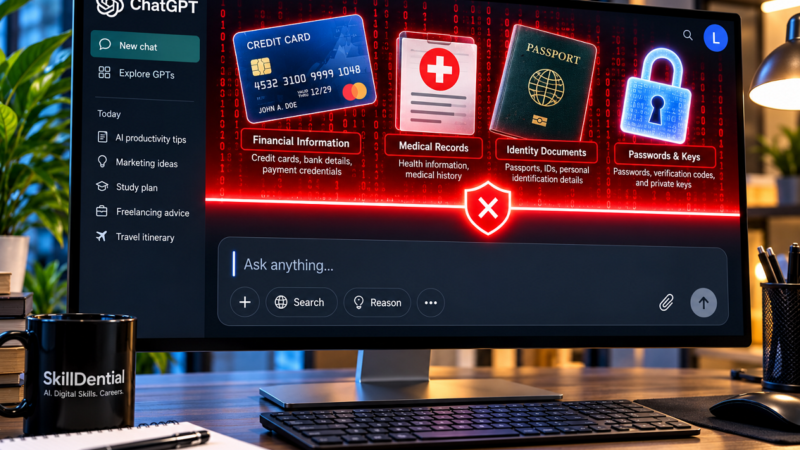
Confidential data should not be pasted into unapproved tools
Employees must operate under a strict baseline assumption: any information entered into an external or consumer-grade artificial intelligence system may be stored, processed, reviewed, or utilized by the provider according to their terms of service.
When practicing responsible AI for employees, professionals should never paste proprietary, confidential, or personal information into an unapproved AI tool unless the organization has sanctioned the platform and established rigorous security controls.
Categories of Data to Exclude from Public AI Tools
- Customer Data: Names, physical addresses, identification numbers, and account details.
- Security Credentials: Passwords, API keys, access tokens, and private security certificates.
- Financial Data: Unreleased financial results, budgets, and earnings reports.
- Corporate Strategy: Internal strategic plans, signed contracts, or pricing models.
- Proprietary Software: Source code and internal tooling treated as confidential assets.
- Personnel Files: Employee records, compensation data, and performance evaluations.
- Regulated Records: Patient, student, or client records subject to privacy laws.
- Protected Agreements: Information legally covered by non-disclosure agreements (NDAs).
Safer Data-Handling Practices for the Workplace
To maximize productivity while maintaining security standards, professionals should adhere to these operational guidelines:
- Use Approved Systems: Rely exclusively on enterprise-grade, employer-sanctioned AI tools configured for workplace data governance.
- Anonymize Inputs: Strip away names, account identifiers, and company-specific markers before querying AI tools.
- Use Placeholders: Substitute sensitive numerical values or proprietary names with generic variables (e.g., using
Client Ainstead of a real corporate client). - Never Share Secrets: Keep all credentials, passwords, and private cryptographic keys completely out of text prompts.
- Review Policies: Read and comply with the organization’s explicit AI usage and data-handling policies.
- Consult Security Teams: When in doubt, check with your manager, internal security team, or data-protection officer.
- Enforce Human Oversight: Maintain a mandatory human review and approval step for all high-impact outputs.
Highlighting the growing urgency for institutional structure, the NIST Generative AI Profile provides a comprehensive framework for identifying and managing risks associated with generative AI systems, specifically addressing dimensions of trust, data security, privacy, and continuous evaluation.
Responsible AI includes fairness and accountability
Artificial intelligence systems can unintentionally inherit, amplify, or reflect historical errors and demographic biases embedded within their training data, architecture, instructions, or operational contexts. Consequently, an AI-generated recommendation can easily appear completely objective while quietly producing unfair, discriminatory, or inappropriate outcomes.
When practicing responsible AI for employees, professionals must exercise heightened caution whenever artificial intelligence influences sensitive domains such as:
- People Operations: Recruitment screening, candidate shortlisting, employee performance reviews, and termination determinations.
- Service Access: Determining customer access to essential services, perks, or priority benefits.
- Financial Eligibility: Credit scoring, insurance underwriting, and financial eligibility evaluations.
- Customer Support: Resolving formal customer complaints and high-stakes dispute escalations.
- Regulated Services: Guiding decisions in education, healthcare delivery, or public-service administration.
Establishing Clear Organizational Accountability
Responsible deployment of AI for employees requires transparent governance structures. For every AI tool or workflow utilized within a team, designated stakeholders must clearly understand and document:
- The Purpose: What exact operational problem the system is solving.
- The Inputs: What categories of data and contextual variables the system receives.
- The Constraints: What operational boundaries and technical limitations apply.
- The Reviewer: Exactly who is responsible for inspecting and validating the output.
- The Correction Path: How identified errors, biases, or hallucinations are reported and corrected.
- The Prohibitions: Under what exact conditions the system must not be used.
Core Ethical Principle
Artificial intelligence should always support and accelerate human decision-making processes—it must never be used to conceal or dilute personal accountability for the final decision.
Human skills still create professional value
While artificial intelligence can rapidly generate content, process data, and automate repetitive workflows, it cannot replace the human capacity to understand strategic goals, weigh real-world consequences, build authentic relationships, and navigate complex contextual nuances.
The integration of AI for employees amplifies the importance of uniquely human capabilities rather than diminishing them.
Essential Human Skills in the AI Era
As intelligent tools take over routine execution, professionals add the highest value through enduring competencies such as:
- Critical and Analytical Thinking: Questioning underlying assumptions and evaluating information against reality.
- Effective Communication: Expressing ideas clearly across written, verbal, and visual mediums.
- Empathy and Active Listening: Understanding customer needs, team dynamics, and stakeholder concerns.
- Negotiation and Conflict Resolution: Bridging divergent interests to reach mutually beneficial agreements.
- Ethical Reasoning: Making principled judgments when faced with ambiguous or competing moral dilemmas.
- Creativity and Problem Framing: Defining the right problems to solve and imagining original solutions.
- Leadership and Collaboration: Inspiring cross-functional teams and aligning groups toward shared objectives.
- Domain Expertise: Applying deep, specialized knowledge acquired through professional experience.
- Quality Control and Risk Awareness: Exercising vigilant oversight over automated outputs.
- Decision-Making Under Uncertainty: Making confident choices when data is incomplete or volatile.
The Modern Professional Advantage: Expertise Plus AI
The winning career profile is never “human versus AI.” Instead, the highest-performing professionals are those who seamlessly combine deep domain expertise with practical AI literacy.
Practical Example
An experienced corporate finance professional might deploy AI to rapidly scan a sprawling ledger and highlight statistical anomalies in a quarterly report. However, their true professional value comes from understanding the broader business context, critically questioning those anomalies, explaining strategic implications to leadership, and determining the appropriate operational action.
Ultimately, AI is a powerful operational lever, but human expertise, judgment, and accountability remain the ultimate drivers of professional success.
AI can improve productivity, but speed is not the only measure
While artificial intelligence dramatically accelerates execution, raw speed is a misleading metric for professional success. True workplace productivity cannot be evaluated solely by output volume; it is defined by the quality of useful outcomes delivered.
When implementing AI for employees, professionals should audit their workflows using four critical evaluative questions:
- Accuracy: Did the AI integration improve factual precision and reliability?
- Effort Reduction: Did it successfully eliminate cognitive fatigue and avoidable busywork?
- Stakeholder Value: Did it genuinely enhance the experience for clients, customers, or internal colleagues?
- Governance: Did it preserve privacy, uphold rigorous quality standards, and maintain accountability?
A rapid workflow that outputs unreliable, error-prone reports is ultimately counterproductive. Similarly, a tool that generates a high volume of low-quality correspondence creates an unmanageable downstream review burden, increasing total workload rather than reducing it.
A Practical Employee Experiment for Workflow Evaluation
To determine whether an AI tool provides genuine leverage, professionals can run a simple comparative pilot on a low-risk recurring task by measuring:
- Time required without AI versus time required with AI assistance.
- The volume of corrections and edits required to reach a finished state.
- The final quality of the deliverable compared to manual baselines.
- Any operational or security risks introduced by the tool.
- Repeatability, determining whether the workflow scales reliably.
Key Rule of Thumb: Retain an AI workflow only when the net value and quality demonstrably improve—never simply because the initial draft was produced faster.
Learning AI can strengthen career prospects
Artificial intelligence capabilities significantly enhance employability, provided those skills are directly tied to measurable business outcomes rather than abstract tool familiarity.
A competitive, future-proof career profile demonstrates your proven ability to:
- Optimize workflows: Streamline operational processes using intelligent automation.
- Eliminate busywork: Reduce repetitive administrative burdens without compromising quality standards.
- Build scalable assets: Create reusable prompt templates, standardized frameworks, and repeatable workflows.
- Enforce quality control: Systematically validate AI outputs to prevent errors and hallucinations.
- Safeguard data: Protect proprietary information and enforce strict enterprise security standards.
- Communicate limitations: Articulate software boundaries clearly to colleagues, stakeholders, and customers.
- Amplify domain expertise: Combine technical AI leverage with deep, specialized professional knowledge.
- Quantify impact: Measure exact time saved, error rates reduced, or service quality improved.
High-Leverage Portfolio Projects for Modern Professionals
For professionals focused on building technical, digital, and high-leverage careers, theoretical knowledge is not enough. Employers and clients look for demonstrable proof of capability.
Impactful portfolio projects should showcase:
- Content-Research Workflow: A documented system for gathering, verifying, and synthesizing industry research.
- Customer-Support Triage Prototype: A structured framework for routing and categorizing support tickets efficiently.
- Spreadsheet-Analysis Assistant: A secure workflow for querying and extracting baseline insights from financial or operational data.
- Software-Testing Pipeline: A rigorous developer workflow utilizing AI-generated test cases and edge-case validation.
- DevOps Runbook Assistant: An automated troubleshooting companion built using strictly redacted operational data.
- Knowledge-Base Search System: A natural language retrieval and summarization process for internal documentation.
Each portfolio piece should clearly outline the problem, tool selection, workflow design, safety safeguards, evaluation method, and final measurable result.
Core Career Takeaway
A static list of AI tools on a resume carries very little weight. True professional leverage comes from concrete evidence that you know how to use those tools responsibly to improve real-world processes.
A Practical 30-Day Learning Plan for Mastering Workplace AI
You do not need to master every new artificial intelligence product on the market. Sustainable mastery comes from deliberate, structured experimentation applied directly to your daily responsibilities.
Follow this actionable 4-week framework to build genuine, production-ready AI literacy:
Week 1: Map Your Work and Identify Targets
Audit your current professional workload to find high-leverage opportunities for AI for employees.
- Catalog recurring tasks: List your regular weekly responsibilities.
- Classify each task by its core traits:
- Repetitive execution versus creative generation.
- Low-risk internal use versus high-stakes external exposure.
- Work format: Text, data, communication, research, or technical development.
- Review complexity: How easy or difficult is it for a human to audit?
- Actionable Step: Select one low-risk, high-frequency task to serve as your pilot project for the month.
Week 2: Test Your First Workflow
Integrate an employer-approved AI tool into your selected task to accelerate execution.
- Pilot the capability: Use the system to generate a baseline first draft, meeting summary, operational checklist, preliminary analysis, or creative alternative.
- Document your inputs: Keep a record of the precise instructions (prompts), context provided, and the resulting outputs.
- Actionable Step: Execute the workflow three times across different scenarios to gauge consistency and baseline utility.
Week 3: Implement Quality Controls and Safeguards
Move beyond simple generation by building a rigorous safety and verification wrapper around your AI workflow.
- Build a verification checklist: Define exact parameters for checking facts, figures, and assumptions.
- Stress-test the system: Run unusual or edge-case inputs through the tool to identify failure points, hallucinations, and logic gaps.
- Establish boundaries: Explicitly document what information must be scrubbed for privacy and determine the mandatory triggers for human approval.
- Actionable Step: Create a written standard operating procedure (SOP) for your new AI-assisted workflow.
Week 4: Measure Impact and Document Results
Evaluate whether your experiment delivered genuine productivity and quality gains rather than just false speed.
- Conduct a comparative audit: Match the AI-assisted process against your traditional manual method.
- Record core metrics: Track time required, total corrections needed, final quality, introduced risks, and long-term repeatability.
- Share responsibly: Compile your findings into a portfolio case study—ensuring zero exposure of proprietary, confidential, or unapproved data.
- Actionable Step: Decide whether to permanently adopt, modify, or discard the workflow based strictly on net value delivered.
Final Takeaway: This disciplined 4-week approach replaces passive tool curiosity with active, highly marketable AI literacy.
Common Pitfalls and Mistakes Employees Must Avoid
As professionals integrate artificial intelligence into their daily routines, avoiding common operational traps is essential for maintaining accuracy, data security, and professional credibility.
When deploying AI for employees, make sure to avoid these critical mistakes:
- Trusting Outputs Blindly: Treating AI-generated text, calculations, or code as automatically accurate without independent verification.
- Compromising Data Security: Pasting proprietary, confidential, or personal information into consumer-grade or unapproved AI platforms.
- Exposing Credentials: Sharing sensitive passwords, API keys, access tokens, or cryptographic private keys within prompt text fields.
- Using Lazy Prompting: Asking vague, unconstrained questions and passively accepting the very first response generated.
- Outsourcing Accountability: Eliminating human review and professional judgment from high-impact, legal, financial, or compliance decisions.
- Confusing Prompting with Literacy: Believing that writing clever prompts constitutes a complete and sufficient AI skill set.
- Ignoring Intellectual Property: Using AI systems to generate content without auditing for originality, copyright considerations, or institutional attribution requirements.
- Chasing False Metrics: Measuring success solely by execution speed rather than the quality of the final outcome.
- Ignoring Model Drift: Assuming an AI tool’s behavior, performance, and formatting rules will remain permanently unchanged across updates.
- Failing the Transparency Test: Hiding the use of AI tools when workplace governance, client contracts, or ethical guidelines require disclosure.
Core Rule for Modern Professionals: Use AI as an intelligent multiplier for your expertise, never as a substitute for professional vigilance, security standards, and rigorous human accountability.
Will AI replace employees?
Some tasks and specific roles may be automated or reduced, while others will be redesigned. Current evidence points much more strongly toward the transformation of tasks rather than the complete automation of most occupations. The ultimate impact will vary significantly by industry, specific role, organization, technology access, and management decisions.
Does every employee need to learn coding?
No. While coding is valuable for technical professionals, the vast majority of workers benefit far more immediately from mastering task analysis, prompt design, output verification, data protection, and systematic workflow thinking.
What is confidential information when using AI?
Any proprietary, sensitive, or personal data that should not be shared outside your organization. This includes unreleased financial data, corporate strategy, customer lists, personnel files, internal source code, security credentials, and information covered by a non-disclosure agreement.
What is the safest first use of AI?
Start with a low-risk, high-frequency task such as drafting a generic outline, rewriting non-confidential text, creating an operational checklist, or summarizing information that is already publicly available. Always review and verify the output before using it in your workflow.
How can I use AI without becoming dependent on it?
Keep strict ownership of the ultimate goal, strategic reasoning, and final decision. Ask AI to provide alternative perspectives or critiques rather than allowing it to make choices for you. Most importantly, maintain enough core subject knowledge to easily recognize errors, bias, or hallucinations.
What should managers do?
Managers should provide approved, enterprise-ready tools, clear data-handling rules, proper training, transparent review procedures, and realistic expectations. They should evaluate AI for employees based on output quality and business outcomes rather than forcing staff to use intelligent tools for every single task.
In Conclusion
Artificial intelligence is rapidly becoming an ordinary part of daily work—seamlessly integrating into communication, research, data analysis, automation, and software development. Professionals who learn to effectively combine AI for employees with their core domain expertise will significantly improve both their individual productivity and long-term career adaptability.
To thrive in this evolving landscape, professionals must cultivate seven essential habits:
- Start Small and Safe: Focus first on suitable, low-risk, high-frequency tasks.
- Maintain Healthy Skepticism: Treat every AI-generated output strictly as a baseline draft or recommendation.
- Verify Rigorously: Independently cross-examine all important claims, facts, figures, and calculations.
- Safeguard Data: Protect confidential company assets and personal information by using only approved platforms.
- Retain Accountability: Keep humans strictly responsible and accountable for all consequential decisions.
- Balance Competencies: Cultivate both technical AI literacy and enduring human skills like critical thinking and empathy.
- Measure True Outcomes: Evaluate AI integration based on net quality and useful outcomes rather than raw execution speed.
Your Immediate Action Plan
Choose one recurring, low-risk task this week, pilot an approved AI workflow, and carefully document what improved, where the system failed, and what still required hands-on human judgment.