Managing customer enquiries efficiently is one of the most critical operational challenges for any growing business. When requests arrive simultaneously through scattered emails, social media direct messages, and phone calls, details slip through the cracks.
Unanswered emails, duplicate team responses, and overlooked high-priority complaints quickly damage customer trust and brand reputation. A customer ticketing system solves this fragmentation by centralizing all support requests into a single, trackable platform.
By converting incoming enquiries into structured, trackable records known as tickets, a customer ticketing system enables businesses to assign issues to specific team members, monitor real-time resolution progress, and prioritize urgent problems.
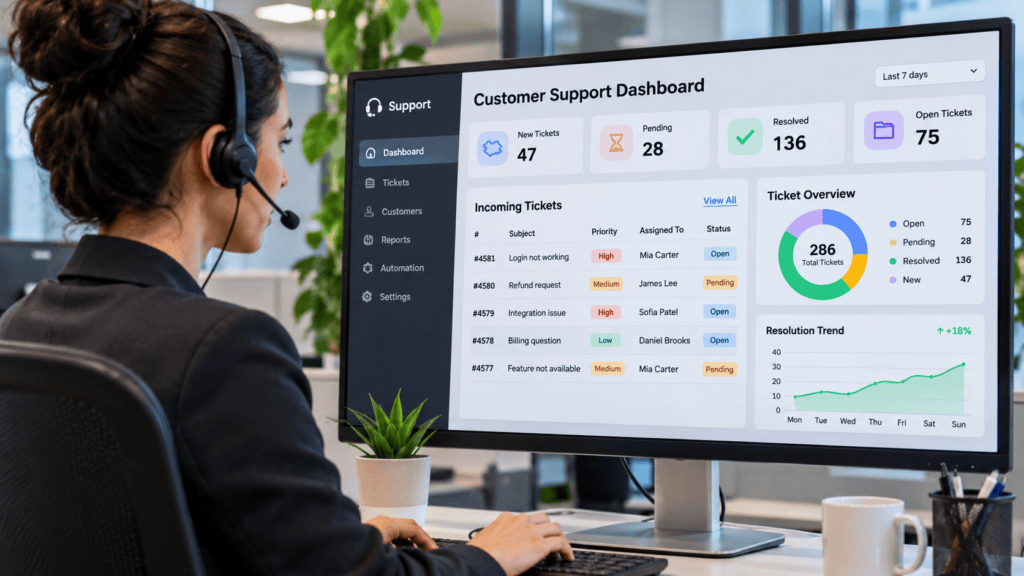
Whether you operate a small e-commerce brand, manage an enterprise customer service department, or oversee an IT support team, implementing a customer ticketing system transforms chaotic support workflows into a structured, data-driven operation.
This guide explores the essential features, core benefits, selection criteria, and leading platforms that make a customer ticketing system indispensable for modern service delivery.
What Is a Customer Ticketing System?
A customer ticketing system is a software application that receives customer enquiries, converts them into support tickets, and helps a business manage each request until it is successfully resolved.
Every ticket represents an individual customer issue or service request. It normally contains information such as:
- Ticket identification number.
- Customer name and contact details.
- Description of the issue.
- Date and time the request was submitted.
- Assigned support agent or department.
- Priority level.
- Current status.
- Communication history.
- Resolution details.
For example, imagine a customer purchases a product from an online store but never receives an order confirmation. The customer contacts the business through email. Instead of leaving the message buried in an ordinary shared inbox, the customer ticketing system automatically creates a support record, assigns it a unique reference number, and routes it directly to the appropriate support agent.
The agent then investigates the problem, communicates directly with the customer through the thread, and updates the ticket status until the issue is fully resolved. This creates a fully documented, accountable process that eliminates lost messages and makes it significantly easier for your team to track customer requests from start to finish.
How Does a Customer Ticketing System Work?
A customer ticketing system follows a structured lifecycle that takes a request from initial customer submission all the way through to final resolution. While exact interfaces vary across different platforms, most modern software solutions follow these core stages:
Step 1: Customer Submits a Request
A customer contacts your business through any available support channel. Modern platforms integrate multiple channels into a single unified workspace, capturing enquiries from:
- Website contact forms
- Live chat widgets
- Telephone calls
- Social media direct messages and mentions
- Dedicated customer support portals
- Messaging applications (such as WhatsApp or Telegram)
Step 2: The System Creates a Ticket
Once the communication is received, the software automatically records the message and creates a unique support record—a ticket. Each ticket is assigned a unique reference number (ID), which allows support agents to easily track, search, and monitor the issue throughout its lifecycle.
Step 3: The Ticket Is Categorized and Prioritized
The system or an intake agent classifies the incoming request based on its subject, department, urgency, or customer tier. Proper categorization ensures issues reach the right hands immediately.
| Ticket Category | Example Issue |
| Account issues | Customer cannot log in or reset a password |
| Billing enquiries | Incorrect invoice or payment failure |
| Technical support | Website malfunction or software bug |
| Order enquiries | Delayed delivery or tracking updates |
| Product complaints | Damaged or defective product received |
| General enquiries | Pre-sale questions or product information |
Priority levels (such as Low, Medium, High, and Urgent) are also assigned at this stage to help teams determine which requests require immediate attention. For instance, a critical system outage impacting multiple users receives immediate priority over a general product question.
Step 4: The Ticket Is Assigned to an Agent
The ticket is routed to the appropriate support representative or department. Assignment can occur manually by a support manager or automatically through predefined automation rules (e.g., routing all billing enquiries directly to the finance support team and technical problems to the IT department).
Step 5: The Support Agent Investigates and Responds
The assigned agent reviews the customer’s history, investigates the problem using internal company resources, and formulates a response. The agent communicates directly with the customer through the ticket interface, requesting further details if necessary or collaborating internally with other departments to find a solution.
Step 6: The Ticket Is Resolved and Closed
Once the problem is successfully addressed and the customer confirms satisfaction (or a reasonable resolution time lapses), the agent updates the ticket status to “Closed” or “Resolved” and logs the resolution details. This closed ticket becomes a permanent part of your company’s support history, providing valuable documentation if the customer reaches out again in the future.
Essential Features of a Customer Ticketing System
Not every ticketing platform offers the exact same capabilities, but high-performing platforms share a core set of features designed to streamline operations and elevate service delivery. When evaluating a customer ticketing system, look for these essential capabilities:
Ticket Creation and Tracking
This is the operational foundation of any customer ticketing system. It enables your business to automatically record incoming requests, assign unique reference numbers, monitor real-time progress, and maintain a complete historical audit trail of all customer interactions in one place.
Ticket Assignment and Routing
Assignment features help distribute incoming requests fairly and efficiently across your support staff. Advanced customer ticketing systems can automatically route tickets based on agent workload, availability, specific skill sets, or predefined business rules (e.g., routing billing queries straight to finance).
Priority Management
Priority management helps support teams identify urgent requests and determine which issues require immediate attention. Typical priority levels managed within a customer ticketing system include:
- Critical
- High
- Medium
- Low
Establishing clear internal definitions for each priority level prevents agents from assigning urgency inconsistently, ensuring true emergencies are handled first.
Automation and Workflow Management
Automation drastically reduces repetitive administrative work, freeing up agents to focus on complex problem-solving. Depending on the platform, a robust customer ticketing system can automate:
- Ticket assignment and routing
- Automated customer email notifications and auto-responders
- Intelligent ticket categorization
- Status updates and follow-up reminders
- Escalation rules for overdue tickets
Multi-Channel Support
Modern customers expect to reach businesses through their preferred communication apps. A customer ticketing system with multi-channel (or omni-channel) capabilities consolidates conversations from email, live chat widgets, social media channels, and messaging apps into a single, unified agent workspace.
Reporting and Analytics
Built-in reporting tools give support managers deep visibility into operational performance. Essential metrics tracked by a customer ticketing system include:
- Total tickets received
- First response time (FRT)
- Average resolution time
- Number of unresolved or open tickets
- Customer satisfaction (CSAT) scores
- Individual agent workload and ticket backlog
These metrics highlight operational bottlenecks, helping managers make data-driven staffing and process improvements.
Knowledge Base and Self-Service Portal
Many modern customer ticketing systems include built-in tools for creating searchable help centers, FAQ pages, product tutorials, and troubleshooting documentation. Empowering customers to find answers independently reduces incoming ticket volume and speeds up resolution times.
Service Level Agreement (SLA) Management
A Service Level Agreement establishes formal performance expectations, such as maximum allowable response and resolution times for different customer tiers. SLA management features inside a customer ticketing system track these deadlines automatically, flagging overdue tickets and escalating requests before targets are missed.
Benefits of Using a Customer Ticketing System
A customer ticketing system offers far more than a convenient digital filing cabinet for support emails. By centralizing operations, it fundamentally transforms how service teams handle enquiries, driving measurable improvements in speed, accountability, and overall service quality.
The major strategic and operational benefits of implementing a customer ticketing system include:
Prevents Customer Requests from Getting Lost
When support staff manage enquiries through separate personal inboxes, sticky notes, or disconnected messaging accounts, important requests inevitably slip through the cracks. A centralized customer ticketing system gives your entire team a shared, transparent view of all incoming requests, tracking every issue from creation to closure so that zero customers are ever left hanging.
Improves Response and Resolution Management
Ticket assignment, intelligent prioritization, and automated SLA notifications help support teams instantly identify which requests require immediate attention. This structured approach makes it significantly easier to monitor response targets and prevent unnecessary delays.
Note: While a customer ticketing system provides the visibility and tools needed for speed, actual resolution times still depend on adequate staffing, sound internal processes, and the complexity of each customer issue.
Increases Employee Productivity
Constantly switching between separate email tabs, live chat apps, and social media inboxes drains agent productivity and causes mental fatigue. A customer ticketing system consolidates all channels into one unified workspace. Features like saved reply templates, automated routing, and internal team notes drastically reduce repetitive administrative work and speed up handling times.
Elevates the Overall Customer Experience
Modern customers expect seamless, frictionless service. With a customer ticketing system, customers receive instant automated acknowledgements, timely status updates, and consistent communication across every touchpoint. Furthermore, support agents can review complete customer history logs instantly, sparing clients the frustration of having to explain the same problem to three different representatives.
Creates Total Accountability Within Support Teams
In a shared inbox, nobody knows who is responsible for replying, which often leads to duplicate responses or complete inaction. A customer ticketing system assigns every ticket a clear owner, current status, priority level, and documented audit trail. Managers can instantly see who is handling a request and whether it has been managed according to company standards.
Seamlessly Supports Business Growth
As your customer base expands, support volume inevitably spikes. Trying to manage high-volume enquiries manually leads to team burnout and customer churn. A scalable customer ticketing system empowers growing teams to handle larger workloads efficiently through automated ticket assignment, robust internal collaboration tools, and structured workflows.
Unlocks Valuable Business Insights
Beyond day-to-day firefighting, reporting tools built into a customer ticketing system aggregate historical data to reveal recurring customer pain points, product bugs, seasonal support surges, and operational bottlenecks.
For example, if data shows a sudden spike in tickets regarding a specific error code, management can address the root cause directly with the product team rather than treating every individual complaint as an isolated incident.
Best Customer Ticketing Systems and Software to Consider
Choosing the right customer ticketing software depends heavily on your business size, support channels, operational requirements, budget, and existing technology stack.
The following platforms are worth evaluating for modern support operations:
Zendesk — Best for Comprehensive Customer Support Operations
- Website: Zendesk official website
- Overview: Zendesk is an industry-leading customer service platform designed to help businesses manage customer interactions across multiple communication channels at scale.
Core Ticketing Capabilities:
- Centralized ticket management.
- Omnichannel support (email, messaging, phone, and social channels).
- Automated ticket routing.
- AI-powered response assistance.
- Workflow automation.
- Customer interaction history logs.
- Advanced reporting and performance monitoring.
- Best For: Growing businesses and established support teams that need comprehensive, enterprise-grade customer service management.
- Key Consideration: Businesses should carefully evaluate the total subscription cost, available feature tiers, and implementation complexity of their preferred plan before committing.
Freshdesk — Best for Small and Growing Support Teams
- Website: Freshdesk official website
- Overview: Developed by Freshworks, Freshdesk provides robust ticket management, shared inboxes, customer portals, automation, and reporting without overwhelming complexity.
Core Ticketing Capabilities:
- Centralized customer support inbox.
- Ticket categorization and manual/automatic assignment.
- Internal notes and seamless team collaboration.
- Automated ticket routing.
- SLA management.
- Customer self-service portal.
- AI-powered support assistance.
- Best For: Small and medium-sized businesses, e-commerce companies, and growing customer service teams looking for a fast setup.
- Key Consideration: Compare Freshdesk’s standard offering with Freshdesk Omni, as their supported channels and feature capabilities differ significantly.
Zoho Desk — Best for Businesses Seeking Automation and CRM Integration
- Website: Zoho Desk official website
- Overview: Zoho Desk is a context-aware help desk platform that helps businesses manage customer support activities, automate workflows, and monitor service performance.
Core Ticketing Capabilities:
- Multi-channel ticket management.
- Automated ticket assignment.
- AI-powered assistance through Zia.
- SLA management.
- Knowledge base creation.
- Customer feedback management.
- Reporting and analytics.
- Native integration with the wider Zoho CRM ecosystem.
- Best For: Small and medium-sized businesses, particularly those already utilizing other applications within the Zoho software suite.
- Key Consideration: Assess which features are locked behind specific subscription tiers and whether your team requires additional Zoho applications to maximize value.
Intercom — Best for AI-Assisted and Conversational Customer Support
- Website: Intercom official website
- Overview: Intercom combines customer messaging, help desk functionality, automation, and advanced AI-assisted customer service into a single conversational interface.
Core Ticketing Capabilities:
- Converting live customer conversations into tracked tickets.
- Customer and internal team ticket management.
- AI-powered customer support through Fin.
- Automated ticket assignment and triggers.
- Customer notifications.
- SLA management.
- Robust reporting and integrations.
- Best For: SaaS companies, digital-first businesses, and organizations that rely heavily on live chat and conversational support flows.
- Key Consideration: AI bot and messaging usage costs can scale with volume, so usage fees should be evaluated alongside per-seat subscription charges.
Help Scout — Best for Simple, Personalized Customer Support
- Website: Help Scout official website
- Overview: Help Scout provides a shared inbox and customer communication toolkit designed to feel like a standard email client while delivering powerful team collaboration features.
Core Ticketing Capabilities:
- Shared customer support inboxes.
- Email and live chat support integration.
- Internal team notes and @mentions.
- Saved reply templates for faster responses.
- Workflow automation rules.
- Detailed customer profiles.
- Integrated knowledge base and reporting features.
- Best For: Small businesses, startups, and customer-focused teams that prioritize a clean, straightforward customer communication experience over rigid ticketing bureaucracy.
- Key Consideration: Evaluate your channel coverage and advanced workflow automation requirements before choosing it for highly complex, multi-tiered service operations.
Salesforce Service Cloud — Best for Enterprise Customer Service Management
- Website: Salesforce official website
- Overview: Salesforce Service Cloud is an enterprise-grade customer service platform that combines case management, deep CRM data, automation, and extensive service operations.
Core Ticketing Capabilities:
- Advanced customer case management.
- Omnichannel routing.
- Comprehensive customer data and interaction history.
- Knowledge management.
- Service process automation.
- AI-assisted customer service.
- Enterprise-level reporting and analytics.
- Deep integration with the broader Salesforce ecosystem.
- Best For: Large organizations, enterprises, and businesses with complex, cross-functional customer service operations.
- Key Consideration: Implementation, ongoing administration, customization, and licensing require significantly greater financial and technical resources than simpler help desk solutions.
HubSpot Service Hub — Best for Connecting Customer Support with CRM
- Website: HubSpot Service Hub official website
- Overview: HubSpot Service Hub combines specialized customer service tools with HubSpot’s unified customer relationship management ecosystem, ensuring sales, marketing, and support share a single view.
Core Ticketing Capabilities:
- Customer ticket creation and tracking.
- Shared support inbox.
- Ticket prioritization workflows.
- Complete customer communication history.
- Service analytics and health dashboards.
- Customer portal capabilities.
- SLA management options.
- Seamless integration with other HubSpot marketing and sales products.
- Best For: Businesses already using HubSpot CRM or those looking to tightly couple customer support data with sales and marketing activities.
- Key Consideration: Advanced service and automation features require paid Professional or Enterprise subscriptions, so compare free entry-level options with your long-term operational needs.
Customer Ticketing Software Comparison
To help you quickly evaluate your options, the following matrix summarizes the primary use cases and core strengths of the seven platforms covered in this guide:
| Software | Best Suited For | Main Strength |
| Zendesk | Growing and established teams | Comprehensive support management |
| Freshdesk | Small and medium businesses | Ticketing and automation |
| Zoho Desk | Zoho users and SMBs | CRM integration and automation |
| Intercom | SaaS and digital businesses | Conversational and AI support |
| Help Scout | Small support teams | Simple shared inbox |
| Salesforce Service Cloud | Large enterprises | Advanced case management |
| HubSpot Service Hub | CRM-focused businesses | Connected customer information |
(Note: These are editorial recommendations based on the platforms’ published feature sets and market positioning, rather than results of independent hands-on product testing.)
Which Customer Ticketing System Should You Choose?
There is no single “best” customer ticketing system for every organization; the right choice depends entirely on your company size, existing software stack, and support workflows. Use this decision guide to narrow down your options:
- Small Business: Start by evaluating Freshdesk, Zoho Desk, and Help Scout for fast setup and low administrative overhead.
- Growing Support Team: Compare Zendesk, Freshdesk, and Zoho Desk to handle rising ticket volumes and basic automation needs.
- SaaS or Technology Company: Evaluate Intercom and Zendesk for conversational chat workflows and advanced integrations.
- Enterprise Organization: Consider Salesforce Service Cloud and Zendesk for multi-departmental scale, security, and complex case routing.
- Business Already Using HubSpot: Evaluate HubSpot Service Hub first to keep customer support data unified with existing sales and marketing pipelines.
- Business Already Using Zoho: Explore Zoho Desk before introducing a separate software ecosystem to maximize native app integration.
Before making a final software purchase or committing to an annual subscription, always verify current pricing tiers, available support channels, automation limits, third-party integrations, and security compliance requirements.
How to Choose the Right Customer Ticketing System
Selecting the right customer ticketing system requires strategic alignment between your operational requirements, team capacity, and budget—far beyond simply comparing checklist features. The ideal software should solve your immediate support bottlenecks without introducing unnecessary administrative overhead or bloated licensing costs.
Evaluate these critical factors before making your final purchasing decision:
Understand Your Support Requirements
Start by identifying the exact pain points you want the software to resolve. Ask yourself and your team core operational questions:
- Are customer complaints getting lost in shared inboxes?
- Are support agents struggling to juggle multiple disconnected communication channels?
- Do you need robust reporting metrics or automated ticket routing?
Your answers will immediately filter out unnecessary capabilities and highlight the features that matter most to your workflows.
Consider Your Business Size and Ticket Volume
A small online store receiving a few dozen enquiries daily has vastly different needs than an enterprise managing thousands of requests across multiple time zones. Choose a customer ticketing system that comfortably meets your current support volume while offering scalable tiers to accommodate future growth without forcing an early migration.
Check Supported Communication Channels
Determine whether the platform natively supports the exact communication channels your customers prefer. For instance, an e-commerce business operating in West Africa may require integrated email, website live chat, phone support, and WhatsApp Business capabilities. Never assume that every platform includes every channel in its entry-level subscription plan.
Evaluate Automation Capabilities
Look for built-in automation that reduces repetitive administrative friction, such as automatic ticket assignment, instant customer notifications, status reminders, and SLA escalation rules. However, avoid over-automating complex processes that still require genuine human empathy and critical judgement.
Examine Reporting and Analytics
A reliable customer ticketing system should provide clear, actionable visibility into overall support performance. Key metrics to look for include total ticket volume, first response time (FRT), average resolution time, agent workloads, and customer satisfaction (CSAT) scores. Check whether these reports can be filtered or customized to match your internal Key Performance Indicators (KPIs).
Review Third-Party Integrations
Your ticketing software cannot exist in a vacuum. Confirm that the platform integrates seamlessly with your existing tech stack, which may include:
- Customer relationship management (CRM) systems
- E-commerce platforms (such as Shopify or WooCommerce)
- Payment gateways
- Team communication and messaging tools
- Knowledge management bases
Always verify whether required integrations are included natively or locked behind expensive enterprise tiers.
Evaluate Security and Data Protection
Customer support records hold sensitive personal data, including customer names, email addresses, phone numbers, purchase history, and private conversation logs. Review the platform’s role-based access controls, multi-factor authentication (MFA) options, encryption standards, data residency, and compliance documentation.
If your business operates in Nigeria, ensure the solution aligns with data privacy obligations under the Nigeria Data Protection Act (NDPA) and guidance from the Nigeria Data Protection Commission (NDPC).
Test the Software Before Committing
Whenever possible, take advantage of free trials or structured product demonstrations to test the platform under real-world conditions. Have your team create sample tickets, assign roles, test automated triggers, and generate reports. A software interface that looks sleek in a marketing video may feel clunky or restrictive during daily agent use.
How to Implement a Customer Ticketing System in Your Business
Purchasing a customer ticketing system is only the first step. To ensure the platform genuinely improves customer support rather than introducing a new layer of administrative friction, businesses need a structured implementation framework.
Follow this step-by-step practical approach to roll out your ticketing software effectively:
Step 1: Identify the Types of Customer Requests
Start by auditing and listing the common enquiries your business receives. Common categories include:
- Account and login problems
- Payment and billing enquiries
- Product complaints or defective item claims
- Technical support requests
- Order and delivery tracking enquiries
Defining these categories early will form the foundation for organizing your incoming tickets and routing them accurately.
Step 2: Set up Your Support Channels
Connect the communication channels your business intends to manage through the platform. To avoid overwhelming your staff during rollout, start with the channels your customers use most frequently (such as email and live chat) rather than activating every available integration immediately. You can expand to social media and messaging apps later.
Step 3: Create Ticket Categories and Priorities
Define clear internal guidelines for how requests should be classified and prioritized. A standard priority matrix looks like this:
| Priority Level | Example Issue | Suggested Handling |
| Critical | Complete service outage or security breach | Immediate escalation to senior engineers |
| High | Failed payment or serious account lockout | Urgent attention within standard SLA |
| Medium | Delayed order enquiry or tracking update | Standard queue rotation |
| Low | General product enquiry or pre-sale question | Routine handling during off-peak hours |
(Note: These are illustrative priority guidelines, not universal response-time standards; adjust them to fit your team’s operational capacity.)
Step 4: Assign Roles and Responsibilities
Clearly determine who will manage incoming tickets, who handles technical escalations, and who possesses the managerial authority to resolve complex complaints. In a well-run customer ticketing system, every ticket must have a clear owner at all times to prevent dropped balls.
Step 5: Configure Automation
Set up automation rules selectively to handle repetitive administrative activities. Useful automations include:
- Automatically routing billing enquiries to the finance team
- Sending automated confirmation emails when new tickets are created
- Alerting team leads about overdue or unassigned tickets
- Escalating unresolved critical issues after a set time threshold
- Triggering status update notifications for customers
Step 6: Train Your Support Team
Comprehensive software training is essential. Ensure your support agents understand how to create, update, assign, prioritize, and resolve tickets efficiently. They must also be thoroughly trained on how to use internal notes properly without accidentally exposing confidential team discussions to customers.
Step 7: Monitor Performance and Improve Workflows
Once the platform is live, continuously monitor key support metrics. Review ticket backlogs, first response times, resolution speeds, customer satisfaction scores, and recurring complaints. Use these insights to refine your staffing schedules, adjust workflows, and address root-cause product issues.
Practical Recommendation
Start your rollout with a controlled pilot program involving a single department or support channel (e.g., your email support queue). Identify operational friction points, adjust your workflow rules, and expand the customer ticketing system across the rest of the organization gradually.
Common Mistakes to Avoid When Using Ticketing Software
Even the most advanced customer ticketing system can become ineffective if implemented without disciplined processes. Avoiding these common operational mistakes will ensure your software investment delivers maximum value:
Choosing Software Based on Popularity Alone
A platform that dominates industry reviews or suits enterprise corporations may completely mismatch your specific team size, budget, and channel requirements. Always choose software based on your operational needs rather than brand hype.
Overcomplicating Ticket Categories
Creating dozens of hyper-specific ticket categories or sub-tags makes classification confusing for both customers and support agents. Keep your initial categorization clean and intuitive to ensure consistent routing.
Failing to Assign Ticket Ownership
In a shared support environment, the unspoken assumption that “someone else will handle it” guarantees tickets fall through the cracks. Every unresolved ticket must have a single, clearly designated owner responsible for moving it toward resolution.
Over-Automating Workflows
While automation is powerful, poorly configured rules can misroute requests, trigger repetitive email loops, or send robotic replies that frustrate customers. Never automate processes that require human empathy and critical judgement.
Ignoring Customer Feedback and CSAT
Treating ticket closure as the final step without reviewing customer satisfaction scores hides underlying service failures. Regularly analyze customer feedback to catch recurring friction points.
Failing to Monitor Unresolved Backlogs
A customer ticketing system is not a set-it-and-forget-it tool. If support managers do not regularly audit outstanding requests and ageing queues, tickets will stall indefinitely.
Ignoring Security and Access Permissions
Granting every employee unrestricted access to all support tickets exposes sensitive personal data. Configure role-based access controls so employees only view the customer information necessary for their specific responsibilities.
Focusing Solely on Speed over Quality
While fast response times matter, a rushed and unhelpful reply leaves the customer unsatisfied. Avoid rewarding agents purely for closing tickets quickly; monitor resolution quality and first-contact resolution rates as well.
Customer Ticketing System vs. Help Desk vs. CRM: What’s the Difference?
While the terms customer ticketing system, help desk software, and customer relationship management (CRM) software are often used interchangeably in software marketing, they serve distinct primary functions within an organization.
Understanding the differences helps businesses avoid overpaying for unnecessary enterprise features or selecting underpowered tools.
| Technology | Primary Purpose | Core Focus |
| Customer Ticketing System | Records, assigns, tracks, and resolves support requests | Managing individual service issues from intake to closure |
| Help Desk Software | Provides broader tools and workflows for managing support operations | Comprehensive support management (ticketing + knowledge bases + SLAs + multi-channel routing) |
| CRM Software | Manages customer relationships, interactions, and business information | Sales pipelines, marketing tracking, and holistic customer data histories |
How They Relate and Overlap
- Ticketing System as a Foundation: A customer ticketing system is almost always the core operational engine of a larger help desk solution.
- Help Desk Expansion: A full help desk platform typically builds upon a ticketing system by adding customer self-service portals, searchable knowledge bases, Service Level Agreement (SLA) tracking, and advanced agent collaboration tools.
- CRM Scope: A CRM, by contrast, takes a macro view of the customer lifecycle. It tracks how a lead moves through sales pipelines, records marketing email interactions, and logs purchase histories long before a support ticket is ever opened.
Modern Convergence
Many modern software suites have blurred these lines by combining capabilities into unified platforms. For example, HubSpot Service Hub and Zoho Desk connect ticket management directly with their respective CRM ecosystems, ensuring support agents can see a customer’s sales history and past purchases alongside their active support tickets. Salesforce Service Cloud similarly merges enterprise-grade case management with broad CRM capabilities.
When choosing software, your decision should hinge on your primary operational bottleneck: whether you need to organize incoming support requests, manage an entire service department, or maintain a unified customer relationship database.
How AI Is Changing Customer Ticketing Systems
Artificial intelligence is fundamentally transforming how businesses manage customer support operations. Modern customer ticketing system platforms increasingly incorporate AI capabilities designed to assist support agents, eliminate repetitive manual tasks, and empower customers to resolve issues independently.
The most impactful applications of AI within modern ticketing platforms include:
Automated Ticket Classification
AI can analyze incoming customer messages in real time, automatically categorizing requests by subject, department, sentiment, or urgency. This eliminates hours of manual triage, ensuring tickets enter the correct queue instantly.
AI-Powered Customer Responses
Generative AI assistants can draft suggested replies for support agents based on the customer’s specific enquiry and your company’s approved knowledge base documentation. Agents can quickly review, edit, and approve these drafts, drastically cutting down average handling times.
Intelligent Ticket Routing
Beyond basic keyword matching, AI-assisted routing evaluates conversation context, customer history, and agent skill sets to direct complex issues to the most qualified support representative or specialized department.
Advanced Customer Self-Service
AI-powered chatbots and virtual assistants can answer common, repetitive customer questions 24/7 by pulling information directly from your knowledge base. When an issue becomes too complex or emotionally nuanced, the AI seamlessly transfers the customer to a human agent with full context preserved.
Ticket Summarization
For long-running support threads or accounts with extensive communication histories, AI can generate concise, bulleted summaries. This allows incoming agents to catch up on a case in seconds without reading every message from the beginning.
Predictive Support Insights
Advanced platforms leverage AI to analyze large volumes of support data over time, identifying recurring technical bugs, seasonal service bottlenecks, and emerging customer friction points before they escalate.
Important Consideration
AI-generated responses and automated workflows must be continuously monitored. Businesses must protect sensitive customer data, verify the factual accuracy of AI answers, and always maintain a clear, frictionless pathway for customers to reach a human support agent. Ultimately, AI should augment your customer service team’s efficiency—never remove human accountability for resolving customer problems.
What is the main purpose of a customer ticketing system?
Its primary purpose is to organize customer enquiries and support requests into structured, trackable records. A customer ticketing system helps businesses assign ownership, monitor real-time progress, communicate securely with customers, and document complete resolution histories.
Is a customer ticketing system the same as CRM software?
No. A ticketing system specifically focuses on managing customer support requests and issue resolution, whereas customer relationship management (CRM) software manages broader customer relationships, sales pipelines, and marketing interactions. Many modern platforms combine both capabilities into a single software suite.
Can small businesses use customer ticketing software?
Yes. Small businesses benefit greatly from using ticketing software to organize enquiries, eliminate lost messages, and maintain professional communication records.
Growing teams can start with a relatively simple platform or free tier, then introduce advanced automation and multi-channel routing as their operations scale.
Are there free customer ticketing systems?
Yes. Several providers offer free plans or limited free ticketing capabilities. For instance, HubSpot offers a free ticketing tool, while platforms like Freshdesk and Zoho Desk provide entry-level plans or free trials. Always check current eligibility, user limits, and feature restrictions directly with providers before signing up.
What is the difference between a ticket and a complaint?
A complaint is an expression of a customer’s dissatisfaction. A ticket is an operational record used by a business to manage any support request.
While a complaint can become a ticket, not every ticket represents a complaint—customers routinely submit technical questions, order-tracking enquiries, and pre-sale product questions.
What is an SLA in a ticketing system?
SLA stands for Service Level Agreement. It defines formal performance expectations between a business and its customers, such as maximum allowable response and resolution times.
Ticketing platforms track these deadlines automatically, helping teams monitor commitments and flag requests at risk of breaching targets.
Can ticketing systems integrate with WhatsApp?
Yes. Leading ticketing platforms support WhatsApp Business API integration, allowing support teams to manage incoming customer conversations from WhatsApp right alongside email, live chat, and social media channels. However, channel availability, setup requirements, and messaging fees vary by provider and subscription tier.
What is the best customer ticketing system for a small business?
Freshdesk, Zoho Desk, Help Scout, and HubSpot Service Hub are widely considered the top options for small businesses. The best choice ultimately depends on your budget, preferred communication channels, required integrations, and daily support workload.
Do customer ticketing systems use artificial intelligence?
Yes. Many modern platforms incorporate artificial intelligence features such as automated ticket classification, AI-assisted response drafting, ticket summarization, intelligent routing, and virtual customer service assistants. The depth and availability of these capabilities vary significantly by provider and plan level.
In Conclusion
A customer ticketing system is an indispensable operational asset for any business seeking to elevate how it manages customer enquiries, complaints, and service requests. By centralizing scattered communication channels, establishing clear ownership, automating repetitive administrative workflows, and tracking unresolved issues, organizations can build scalable, accountable, and customer-centric support operations.
However, selecting the ideal software requires careful alignment with your specific organizational needs, daily ticket volume, budget constraints, preferred communication channels, and long-term growth trajectory.
Whether you choose an industry giant like Zendesk or Salesforce Service Cloud, a mid-market solution like Freshdesk, Zoho Desk, or Intercom, or a specialized tool like Help Scout or HubSpot Service Hub, the right platform will transform support from a reactive headache into a strategic advantage.
Your Next Step
Audit your team’s most common customer support bottlenecks, shortlist two or three platforms that match your technical and financial requirements, and take advantage of free trials to test their live workflows before committing to a final purchase.