No-Code AI Automation: Beginner Tools and Concepts
No-code AI automation makes it possible to connect apps, use artificial intelligence, and streamline repetitive tasks without writing traditional software code. Instead of manually copying information between platforms, sorting messages, summarising documents, or updating records, you can create automated workflows that handle these activities for you.
For example, a workflow could receive information from a form, ask an AI tool to classify or summarise it, and then send the result to another app for storage, review, or further action.

This beginner-friendly guide explains the essential concepts behind no-code AI automation, introduces accessible tools, and explores practical use cases. You will also learn about its limitations and the key steps involved in building your first useful automation.
What is no-code AI automation?
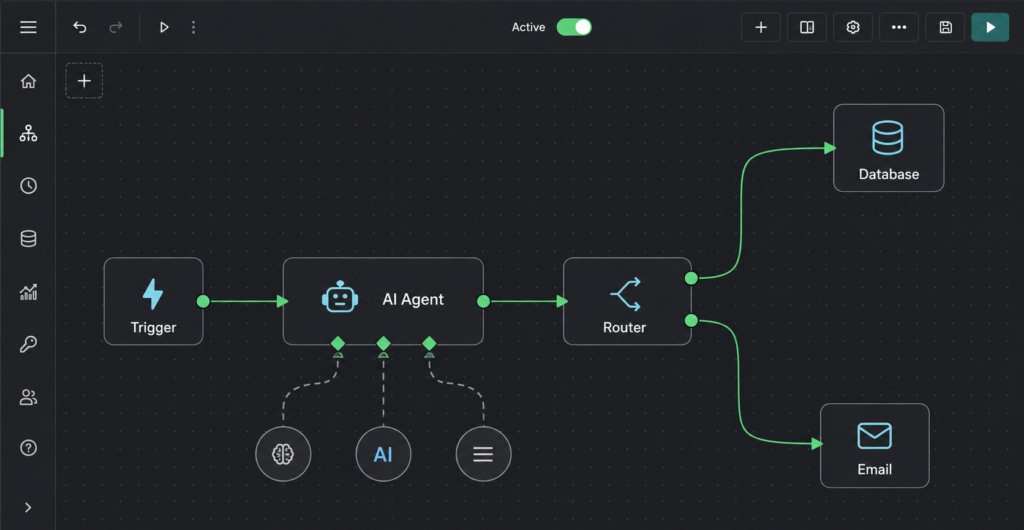
No-code AI automation is the use of visual software tools to connect applications, move information between them, and perform AI-powered tasks without writing code. Instead of writing a script, you build a visual pipeline by picking a trigger, configuring actions, connecting your accounts, and mapping data from step to step.
Traditional automation focuses on static rule-based actions, such as copying a form entry straight into a spreadsheet. No-code AI automation elevates this process by bringing language understanding, logic, and context into the loop. AI models within the pipeline can analyze responses, extract key entities, summarize complex text, or make conditional routing decisions before passing data to the next application.
An example of no-code AI automation in practice:
New lead arrives (Trigger)
  ↓
AI classifies lead intent & sentiment (No-Code AI Step)
  ↓
Data recorded in CRM spreadsheet (Action)
  ↓
Personalized response sent to customer (Action)Code language: PHP (php)
The underlying platform handles data transfer and API connections, while integrated large language models process the contextual judgment steps that previously required human intervention.
Core Components of No-Code AI Automation
| Component | Function in Workflow | Example Tool / Tech |
| Trigger | Starts the automation based on an event. | New email, web form, webhook |
| Data Connector | Moves payload securely between apps. | Zapier, Make, n8n |
| AI Model Step | Applies reasoning, extraction, or generation. | OpenAI API, Anthropic, Gemini |
| Action Step | Executes the final output or system update. | Database update, Slack alert, auto-draft |
Popular No-Code AI Automation Platforms
- Zapier: Best for quick, linear connections between thousands of standard SaaS applications.
- Make: Ideal for visual power users requiring complex data routing, error handling, and multi-branch logic.
- Gumloop / Lindy: Purpose-built no-code AI automation platforms designed for agentic workflows and advanced prompt processing.
- n8n: Strong choice for self-hosted, data-sensitive no-code AI automation architectures.
Automation versus AI automation
Understanding the difference between standard workflow tools and true no-code AI automation comes down to how decisions are handled within a system. While traditional setups rely strictly on rigid logic, modern AI implementations introduce dynamic reasoning.
| Automation Type | How It Operates | Practical Example |
| Traditional Automation | Executes strict, predetermined IF/THEN rules without context. | When a form is submitted, log the raw responses directly into a spreadsheet row. |
| AI-Assisted Automation | Integrates a no-code AI automation step within a fixed sequence to handle unstructured data. | When a form is submitted, summarize the entry using an LLM, then log the summary to a spreadsheet. |
| AI Agent Workflow | Grants an AI agent autonomous tool selection and multi-step reasoning within defined boundary rails. | Instruct an AI agent to research a support issue across a knowledge base, draft a response, and decide whether to send or escalate. |
Strategic Advice for Beginners
When starting with no-code AI automation, build fixed linear workflows containing a single AI step first. Deterministic pipelines with isolated AI tasks are vastly easier to test, debug, and govern than fully autonomous AI agents that make unpredictable operational decisions.
How does a no-code workflow work?
Every no-code AI automation operates on a fundamental pipeline architecture: Input → Processing → Output. The platform functions as the data router, while integrated applications and AI models handle execution.
Key Terminology in No-Code AI Automation
- Trigger: The specific event that initiates a no-code AI automation run. Common triggers include new form submissions, incoming emails, added database rows, webhooks, or fixed time schedules.
- Action: The operational step executed after a trigger occurs. Actions range from updating a CRM record to invoking an LLM via API to classify or transform data.
- Integration / Connector: Pre-built authentication bridges that allow your automation engine to pass data safely between third-party services (e.g., Slack, Gmail, Airtable, OpenAI).
- Field Mapping: The process of explicitly linking output parameters from a preceding step into the input payload of a subsequent step (e.g., mapping
Form.EmailtoCRM.Contact_Email). - Filters & Logic Rules: Conditional branch paths (e.g.,
IF/THENstatements) that route data based on evaluation criteria, preventing unnecessary AI API calls or execution errors. - AI Step: A specialized step inside a no-code AI automation workflow that sends unstructured data (text, images, audio) to an AI model to summarize, extract entities, format output, or return decision criteria.
Platform Naming Conventions
While the structural principles remain identical, leading no-code AI automation platforms use different terminology for their workflows:
| Platform | Workflow Term | Primary Strength |
| Zapier | Zap | Fast, linear app integrations with minimal configuration. |
| Make | Scenario | Visual canvas with advanced routing, data parsing, and error handling. |
| n8n | Workflow | Powerful self-hosted option with native AI node orchestration. |
| Microsoft Power Automate | Cloud Flow | Deep native integration within Microsoft enterprise environments. |
System Architecture Flow
[ Trigger Event ]
       ↓
[ Filter / Condition Check ]
       ↓
[ No-Code AI Automation Step (Processing & Structuring) ]
       ↓
[ Action Step (Database Update / Notification / API Call) ]Code language: CSS (css)
When building any no-code AI automation, always enforce strict field mapping and include conditional validation to handle variable AI responses reliably.
Beginner-friendly no-code AI automation tools
Beginner-friendly no-code AI automation tools help you connect apps, streamline repetitive tasks, and build intelligent workflows without programming. Compare their features, ease of use, and ideal use cases to find the right tool for your first automation.
| Tool | Suitable For | Main Advantage | Important Trade-off |
| Zapier | Beginners connecting standard business apps | Straightforward linear setup with 7,000+ app connectors and natural-language AI builders (Zapier Copilot) | High-volume operational workflows can quickly become expensive due to task-based pricing models |
| Make | Visual builders needing complex data logic | Highly flexible drag-and-drop canvas with visual branching and pre-built scenario templates | Steeper learning curve compared to simple linear builders |
| Microsoft Power Automate | Organizations embedded in the Microsoft ecosystem | Native integration across Microsoft 365, Teams, SharePoint, and enterprise apps | Licensing structures and advanced API connectors can be confusing to navigate |
| n8n | Teams seeking data control or self-hosting | Advanced node customization, native AI agent builders, and free open-source self-hosting options | Self-hosting requires technical responsibility for server management, security, and maintenance |
| AI-Native Platforms (e.g., Gumloop, Lindy) | Workflows centered primarily on AI processing | Built-in prompt management, autonomous routing, and dedicated LLM nodes | Smaller ecosystems for traditional SaaS app integrations |
Selecting the Right Tool for No-Code AI Automation
When evaluating no-code AI automation platforms, anchor your choice on these core criteria:
- Integration Ecosystem: Ensure the tool natively supports your essential tech stack (e.g., CRM, communication apps, databases).
- AI Capability: Check whether the platform provides direct LLM nodes (e.g., OpenAI, Claude, Gemini integrations) or requires custom HTTP API calls.
- Cost Scalability: Linear tools like Zapier charge per step/task, while platforms like Make or self-hosted n8n scale far more cost-effectively for heavy data processing.
Most modern no-code AI automation platforms now include natural-language flow generators (like n8n’s AI Workflow Builder or Zapier Copilot) that convert plain text instructions into draft pipelines. However, always manually verify your field mapping, prompt logic, and credentials before deploying any automated flow to production.
Which tool should a beginner choose?
Finding the right platform for no-code AI automation comes down to matching your existing software environment, growth requirements, and technical comfort.
Decision Matrix for Beginners
- Choose Zapier if: You want the simplest, fastest starting point for connecting everyday business applications. It features the widest app catalog (7,000+ connectors) and handles basic linear steps with minimal setup.
- Choose Make if: You need visual drag-and-drop routing, multi-branch logical paths, or granular data parsing. Make gives you visual flexibility and a lower cost per operation than Zapier.
- Choose Microsoft Power Automate if: Your daily operations occur strictly within the Microsoft 365 environment (Teams, Excel, Outlook, SharePoint, Dataverse) and you need built-in enterprise compliance.
- Choose n8n if: Data privacy, self-hosting options, or open-source control are priorities. It provides native LLM node support and predictable execution-based pricing as your workflows scale.
- Choose an AI-Native Platform (e.g., Gumloop, Lindy) if: Your primary objective is orchestrating autonomous AI agents, multi-prompt chains, or reasoning loops rather than basic app-to-app data syncing.
Key Takeaway for Your First Build
When launching your first no-code AI automation project, prioritize integration coverage and ease of testing over raw platform features. Select the tool that natively supports the apps you use every day so you can focus on mastering core workflow logic instead of troubleshooting custom API connections.
What tasks can you automate?
The most effective tasks to automate with no-code AI automation are repetitive, clearly defined, low-risk, and easily verifiable. Avoid starting with high-stakes processes that impact legal rights, medical decisions, financial transactions, or hiring choices.
Core Automatable Functions Across Sectors
Marketing & Content Operations
- Outline Generation: Convert raw topic briefs into structured article outlines automatically.
- Content Sorting: Classify incoming user-submitted content ideas by relevance or topic category.
- Analytics Summarization: Extract key performance metrics from weekly spreadsheet exports into plain-text updates.
- Social Media Repurposing: Generate platform-specific social post drafts immediately when a new article is published.
- Feedback Keyword Extraction: Identify recurring themes or pain points from raw customer feedback data.
- Message Routing: Direct social media comments or incoming site inquiries to specific channel managers.
Administrative & Operational Workflows
- Attachment Organization: Extract and auto-save incoming email attachments into labeled cloud folders.
- Invoice & Receipt Parsing: Extract metadata (vendor, totals, dates) from receipts and map it into financial tracking sheets.
- Meeting Action Items: Convert unstructured meeting transcripts into actionable task lists assigned in your project software.
- Automated Reminders: Trigger status alerts when project deadlines or follow-up windows are reached.
- Standard Acknowledgments: Send contextual acknowledgment drafts when new forms or tickets arrive.
Freelancing & Small Business Management
- Lead Tracking & Triage: Capture incoming leads, classify their service interest, and append them to your CRM.
- Proposal Drafts: Generate tailored proposal outlines directly from structured client brief submissions.
- Follow-up Orchestration: Trigger follow-up reminders after specified periods of prospect inactivity.
- Onboarding Workspace Setup: Auto-create structured client project folders upon agreement sign-off.
- Conversation Summaries: Compress long customer support or sales email threads into brief internal notes.
Learning & Career Development
- Document Summarization: Summarize key insights from long study documents or industry research PDFs.
- Skill Mapping: Transform lengthy job descriptions into structured target skill checklists.
- Resource Categorization: Automatically tag, format, and organize learning links saved from web clippings.
- Self-Assessment Generation: Create revision questions and practice quizzes from approved study notes.
- Job Application Tracking: Log submitted applications and auto-schedule precise follow-up dates.
Rule of Thumb: Treat every no-code AI automation output as a draft or recommendation. Incorporate a human-in-the-loop review step before executing customer-facing or data-altering actions.
How to build your first automation
Learn how to build your first no-code AI automation by choosing a repetitive task, setting up triggers and actions, connecting your apps, and testing the workflow before putting it into use.
Step 1: Define a Single Repetitive Task: Start small to ensure control.
Select a specific, recurring task and state its objective clearly:
“When someone submits my service inquiry form, I want to record the details and automatically flag urgent requests.”
Avoid broad goals like “I want to automate my entire inbox.” A narrow, single-purpose objective makes it easy to build, test, and troubleshoot your no-code AI automation.
Step 2: Map the System Architecture: Document inputs, logic, and outputs.
Write down every stage of your pipeline before opening your automation builder:
- Trigger: Form receives a new entry.
- AI Task: LLM analyzes the message text and classifies it into Sales, Support, or Other.
- Action/Output: Log the message payload and classification into a Google Sheet or Airtable.
- Human-in-the-Loop: If marked Urgent or flagged with low confidence, route a alert notification to a human reviewer.
Step 3: Build & Test the Non-AI Baseline First: Verify connections before adding complexity.
Connect your trigger directly to your destination action before introducing any AI nodes:
New Form Response → Create Spreadsheet Row
Testing this base layer verifies that your account authentications, app permissions, and basic field mappings work correctly without interference from AI processing.
Step 4: Add a Structured AI Instruction: Enforce predictable model outputs.
Insert an AI step into your flow and provide a structured prompt with clear output variables:
Role: You are a customer intent classifier.
Task: Classify the customer message into exactly one category: sales, support, or other.

Return ONLY JSON in this format:
{
  "category": "sales|support|other",
  "confidence": "high|medium|low",
  "reason": "one short sentence"
}

Customer Message: {{form_message}}
Code language: JavaScript (javascript)
Map the dynamic {{form_message}} variable directly from your form trigger payload into the prompt node.
Step 5: Implement Safety Logic & Error Handling: Protect downstream systems from unpredictable AI outputs.
Never allow raw AI responses to execute external actions blindly. Add a conditional filter path in your no-code AI automation platform:
- High Confidence: Route data straight to the destination database.
- Medium/Low Confidence: Route payload to a Slack/Teams channel for manual human verification.
- Sensitive Data Flag: Halt the flow immediately and log a security alert.
Step 6: Run Edge-Case Testing: Validate against realistic test payloads.
Test your setup with normal, incomplete, and deliberately ambiguous input samples. Verify that:
- Dynamic variables pass cleanly into the prompt context without truncation.
- The AI response strictly adheres to your required JSON scheme.
- Low-confidence outputs route correctly to human reviewers.
Note: Test samples inside platforms like Zapier or Make may differ slightly from live payload structures, so monitor your initial live executions closely.
Step 7: Deploy & Monitor: Publish with human oversight.
Publish your no-code AI automation and run it in a controlled environment. Maintain a human oversight stage for the first 50–100 live executions, updating your system prompts or logic filters based on real-world execution logs before full autonomy.
Important limitations and risks
While implementing no-code AI automation drastically reduces technical friction, introducing artificial intelligence into automated workflows creates unique operational, financial, and security risks. Managing these failure modes requires deliberate architectural safeguards.
Primary Risks & Mitigation Strategies
- Model Inaccuracy & Hallucinations: Large language models regularly output false or incomplete facts with high structural confidence.
- Mitigation: Limit autonomous execution to low-risk tasks (data formatting, initial drafting) and enforce a mandatory human review step for high-impact decisions.
- Integration Breaks & Silent Failures: Workflows fail unpredictably due to expired API tokens, updated vendor data schemas, platform rate limits, or deprecated connectors.
- Mitigation: Configure dedicated failure notification channels (e.g., Slack/Teams webhooks) and audit execution logs weekly.
- Sensitive Data Exposure: Unsanitized text streams can expose API keys, customer PII, or internal documents to external vendor training sets.
- Mitigation: Align your data flows with established frameworks such as the NIST AI Risk Management Framework (AI RMF). Redact sensitive data at the trigger level and review vendor data retention and model training opt-outs before launching workflows.
- Prompt Injection & Over-Privileged Agents: OWASP identifies Prompt Injection and Excessive Agency among top security risks for LLM applications. If an AI step parses untrusted inputs (e.g., public emails or support tickets), malicious instructions can hijack the prompt to execute unauthorized downstream actions.
- Mitigation: Apply the Principle of Least Privilege. Restrict AI step permissions, scope app credentials to read-only where possible, and never allow an AI agent to execute irreversible actions (e.g., sending external emails or modifying payment databases) without human approval.
- Uncontrolled API & Operations Costs: High-frequency triggers (such as looping over massive spreadsheet updates or busy inboxes) can rapidly exhaust platform task caps and API token balances.
- Mitigation: Implement strict filter steps early in the workflow to drop irrelevant events, batch process data runs, and set hard usage caps inside API dashboards.
Summary Checklist: Building Resilient AI Automations
| Risk Area | Governance Rule |
| Permissions | Scope integrations to minimum required access; never use super-admin tokens. |
| Data Safety | Strip sensitive PII/secrets before sending payloads to LLM endpoints. |
| Execution | Require human sign-off for external communications or data deletions. |
| Maintenance | Set up operational error alerts and review execution logs routinely. |
Key Takeaway: “No-code” does not mean “no maintenance.” Modern visual pipelines remove the need to write traditional software, but they still demand active governance, credential management, and continuous oversight.
Common beginner mistakes
Avoiding common traps when launching your first no-code AI automation saves significant troubleshooting time and prevents unintended execution errors.
Key Beginner Pitfalls & Solutions
- Vague Workflow Objectives: Trying to “automate entire business operations” at once leads to broken logic.
- Fix: Define a single, narrow trigger-action pair with a clear success criteria before scaling.
- Skipping Baseline Connectivity Tests: Adding an AI node before verifying that app integrations function cleanly makes debugging difficult.
- Fix: Map and test the raw data flow (
Trigger → Action) first; add the AI transformation node only after confirming successful app connections.
- Fix: Map and test the raw data flow (
- Unstructured AI Outputs: Asking the AI model for unstructured prose when downstream nodes require distinct database variables.
- Fix: Require JSON formatting or enforce structured outputs with explicit keys in your system prompt.
- Unsupervised High-Risk Actions: Allowing AI models to send external communications or alter database records directly without human approval.
- Fix: Implement a human-in-the-loop validation path for medium- or low-confidence outputs.
- Exposing Confidential Data: Inputting private PII, credentials, or proprietary business documents into public AI endpoints during initial tests.
- Fix: Sanitize test payloads and use non-sensitive sample data during design phases.
- Overlooking Duplicate Executions: Failing to set deduplication checks or rate limits on high-frequency triggers.
- Fix: Use platform filters to discard repeated incoming webhooks or redundant events.
- Tool Selection Based on Hype: Choosing platforms based on popularity rather than verified ecosystem app integrations.
- Fix: Select your no-code AI automation engine based strictly on native connector availability and ease of debugging.
- Lacking Documentation & Governance: Building complex visual flows without internal logs or ownership documentation.
- Fix: Add clear step annotations inside your workflow canvas and log execution failures to a central alert channel.
Core Rule for Beginners: Automate the repeatable, deterministic steps completely—and route the uncertain, variable decisions to a human reviewer.
Do I need to know how to code for no-code AI automation?
No. You can build functional pipelines using visual drag-and-drop builders, pre-made templates, connected app accounts, and natural-language prompt instructions. However, basic technical logic helps when configuring advanced API webhooks, complex data transformations, custom JSON outputs, or self-hosted environments.
Is ChatGPT or another AI chatbot a no-code AI automation platform?
No. A chatbot generates text and reasoning in an isolated interface, but it doesn’t automatically connect and sync external business apps. A dedicated no-code AI automation platform (such as Zapier, Make, Power Automate, or n8n) acts as the operational engine that routes data between triggers, actions, and integrated AI models.
What is the easiest no-code AI automation to build first?
Start with a simple linear pipeline that moves data from a form into a database and includes a single, low-risk AI task.
New Inquiry Form → AI Category Step → Spreadsheet Row → Review Alert
This single-purpose pattern teaches you trigger setup, field mapping, prompt structuring, and conditional logic without overwhelming scope.
Can no-code AI automation replace employees?
No. While no-code AI automation eliminates repetitive administrative tasks and manual data entry, it cannot replace human judgment, strategic thinking, or accountability across complex edge cases. The goal of automation is to handle routine workflows so teams can focus on high-value human oversight, client relationships, and decision-making.
What is the best path to learn no-code AI automation?
Master these foundational skills sequentially:
Core Mechanics: Learn how triggers and actions pass data between apps.
Data Integration: Practice authenticating connectors and mapping field variables.
Logic Control: Implement filters, multi-path conditions, and execution schedules.
AI Processing: Design structured prompts with strict JSON output schemas.
System Governance: Master error handling, testing edge cases, and credential security.
Advanced Extensions: Transition to webhooks, API requests, and custom scripts when platform limitations arise.
The video breaks down systems-driven strategies for identifying high-leverage digital skills and structuring automated workflows for maximum efficiency.
In Conclusion
pplications and adds AI capabilities through visual workflows rather than traditional programming. The essential building blocks are triggers, actions, integrations, field mapping, conditions, and AI steps.
For your first project, choose one repetitive, low-risk task. Build the basic workflow without AI, add one focused AI step, test unusual inputs, and keep human approval for uncertain or consequential results.
Practical next step: Write this sentence for a task you repeat every week: “When _ happens, I want the system to , and a person should review it when .” Then choose a tool that connects the apps involved.
When implementing no-code AI automation, the objective is not to remove human judgment entirely, but to eliminate low-leverage, repetitive data handling.
To successfully operationalize your first pipeline, use this operational checklist to evaluate your target workflow before deploying it into production:
Workflow Audit Checklist
- Scope Control: Is the trigger isolated to a single event (e.g., one form submission, one inbox alert)?
- Baseline Integrity: Does the app-to-app path function cleanly without the AI step connected?
- Prompt Schema: Does your system prompt enforce strict formatting (such as JSON) for predictable field mapping?
- Human-in-the-Loop: Is there a conditional fallback path for low-confidence or sensitive AI outputs?
- Data Redaction: Are sensitive credentials, payments, and PII stripped before reaching the model endpoint?
Executable Action Plan
Fill out this simple blueprint to define your first project:
Trigger Condition: "When [INSERT EVENT] occurs..."
AI Processing:    "...I want the system to [INSERT TRANSFORM/CLASSIFY TASK]..."
Governance Path:  "...and a person should review it when [INSERT UNCERTAINTY CONDITION]."
Code language: CSS (css)
Once defined, select a platform (Zapier, Make, Power Automate, or n8n) that natively supports the applications involved, map your fields, and run edge-case tests before removing human oversight.