Remote IT Technician Jobs: Required Skills & Where to Apply
Remote IT technician jobs offer the flexibility to provide technical support, troubleshoot hardware and software systems, and resolve user issues from anywhere with a reliable internet connection. As remote infrastructure expands, securing remote IT technician jobs requires a targeted blend of technical troubleshooting acumen and proactive digital communication.
This guide breaks down core responsibilities, essential technical competencies, high-value certifications, and top platforms to source legitimate remote IT technician jobs—with specific considerations for international applicants, including those based in Nigeria.
Who This Guide Is For
- Aspiring IT professionals looking to break into remote technology careers.
- Current help desk staff and IT support specialists transitioning from on-site roles to remote IT technician jobs.
- Career changers with foundational computer literacy targeting entry-level tech roles.
- Global job seekers, including professionals in Nigeria, seeking remote-first organizations that hire across borders.
By the end of this guide, you will have a clear roadmap to master the required skills, optimize your resume for applicant tracking systems, and land high-paying remote IT technician jobs.
What Remote IT Technicians Do (And What Can Be Handled Remotely)
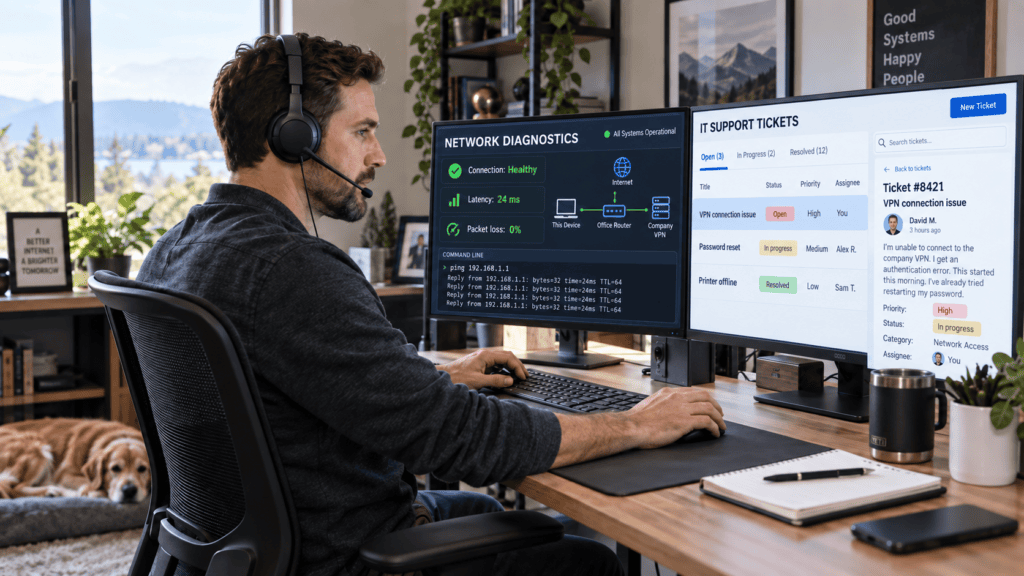
Remote IT technician jobs revolve around resolving technical issues for end-users without requiring a physical presence. Because modern infrastructure is largely cloud-driven, most Tier 1 and many Tier 2 support operations run seamlessly through screen-sharing utilities, remote desktop software, and centralized ticketing frameworks.
Core Responsibilities in Remote IT Technician Jobs
- Software & OS Troubleshooting: Diagnosing and resolving operating system faults across Windows and macOS, alongside application-level fixes for Microsoft 365, web browsers, and enterprise suites.
- Remote Desktop Support: Utilizing connection software such as TeamViewer, AnyDesk, or native OS remote management tools to directly manipulate and correct user workstation environments.
- Identity & Access Management (IAM): Managing user provisioning, executing secure password resets, and adjusting permissions via Active Directory or Microsoft Entra (formerly Azure AD).
- Remote Hardware Guidance: Instructing users through hardware validation, peripheral configurations, and preliminary diagnostics (noting that fully remote roles bypass physical repairs, while hybrid variations may require occasional on-site support).
- IT Service Management (ITSM) Ticket Handling: Logging, triage, prioritization, and ticket resolution through platforms like ServiceNow, Jira Service Management, Freshservice, or Spiceworks.
- Network Connectivity Diagnostics: Troubleshooting remote connectivity, Wi-Fi performance, Virtual Private Network (VPN) tunnels, DNS, and DHCP configurations from afar.
- Documentation & Technical Communication: Maintaining comprehensive ticketing audit trails, contributing to internal knowledge bases, and translating complex technical resolutions into plain language for non-technical stakeholders.
Scope Limitations: Remote vs. On-Site
While the vast majority of software, network, and account-level administration can be managed virtually, tasks requiring physical intervention—such as direct hardware component replacement, structured physical cabling, or enterprise server rack maintenance—remain restricted to on-site personnel or hybrid positions involving field travel.
What section of the guide should we draft next (e.g., Required Technical Skills, Essential Tools, or Where to Find Remote IT Technician Jobs)?
Required Skills for Remote IT Technician Roles
Landing remote IT technician jobs requires a balanced portfolio of hard technical proficiencies, effective remote communication, and disciplined self-management. While entry-level positions emphasize foundational support and customer service aptitude, mid-level roles demand deeper analytical troubleshooting and system administration competence.
Core Technical Competencies
- Operating Systems Management: Advanced proficiency in configuring, maintaining, and troubleshooting Windows 10/11 and macOS environments, handling profile management, updates, and registry/system errors.
- Cloud Productivity Suites: Hands-on experience administering Microsoft 365 (Exchange Online, SharePoint, Teams) and Google Workspace (Gmail, Drive, Meet).
- Remote Support Tooling: Mastery of remote desktop and screen-sharing utilities such as TeamViewer, AnyDesk, and native OS remote access tools.
- ITSM & Ticketing Frameworks: Practical familiarity with logging, tracking, and resolving incidents within platforms like ServiceNow, Jira Service Management, Freshservice, or Spiceworks.
- Networking Fundamentals: Solid grasp of TCP/IP addressing, DNS resolution, DHCP lease assignment, wireless network troubleshooting, and Virtual Private Network (VPN) configuration.
- Hardware Diagnostics & Imaging: Ability to remotely guide users through peripheral fixes, laptop/desktop diagnostics, and system imaging protocols.
- Cybersecurity Hygiene: Working knowledge of Multi-Factor Authentication (MFA) enforcement, phishing identification, patch management, and foundational security policies.
Communication and Soft Skills
- Technical Translation & Documentation: The ability to explain complex multi-step technical resolutions in plain, accessible language and write clear knowledge-base articles.
- Customer Empathy & De-escalation: Maintaining composure and a service-oriented mindset when assisting stressed or frustrated end-users.
- Analytical Troubleshooting: Utilizing first-principles thinking to isolate symptoms, test hypotheses systematically, and leverage vendor documentation effectively.
- Autonomy & Time Management: Prioritizing high-volume ticket queues, meeting strict Service Level Agreements (SLAs), and operating productively without constant on-site oversight.
- Collaborative Tooling: Proficiency using asynchronous and real-time coordination platforms like Slack, Microsoft Teams, Notion, or Trello.
Remote-Work Readiness
- Infrastructure Reliability: Maintaining stable, high-speed broadband connectivity and a distraction-free dedicated workspace.
- Cross-Time-Zone Coordination: Managing schedules efficiently across international time zones to support distributed global teams.
- Asynchronous Fluency: Comfort expressing ideas clearly through video interviews, documentation, and written updates.
What section would you like to build next—such as Essential Certifications or Where to Find Remote IT Technician Jobs (including global/Nigeria options)?
Entry Requirements and Useful Certifications
Many remote IT technician jobs accept candidates with minimal formal work history, provided they can clearly demonstrate foundational competence, troubleshooting intuition, and a proactive learning mindset. Because remote employers cannot evaluate physical workspaces during early screening, certifications and demonstrable technical baselines act as crucial trust signals.
Typical Entry Requirements
- Education: While some organizations prefer an associate or bachelor’s degree in Information Technology, Computer Science, or a related discipline, a significant portion of remote roles accept equivalent practical experience or industry certifications instead.
- Practical Experience: Entry-level help desk and IT support positions frequently welcome candidates with non-traditional backgrounds, including tech internships, part-time support gigs, volunteer IT initiatives, or dedicated home lab projects.
- Technical Baseline: A proven ability to install software, navigate common operating system errors, and operate remote support utilities seamlessly.
High-Impact Certifications for Remote IT Technician Jobs
Certifications bridge the gap for remote applicants by standardizing their technical qualifications. The table below outlines the most valuable credentials to target:
| Certification | Focus Area | Typical Roles Supported | Strategic Value |
| CompTIA A+ | Hardware, operating systems, troubleshooting, basic networking | Help desk technician, IT support specialist | The gold standard, widely recognized entry-level credential heavily featured in remote IT technician job postings. |
| Google IT Support Professional Certificate | IT fundamentals, networking, security, customer service | Help desk, remote support roles | Beginner-friendly curriculum featuring built-in remote support modules and broad industry acceptance. |
| CompTIA Network+ | Advanced networking concepts, diagnostics, security | Network support specialist, IT support (networking focus) | Ideal for distinguishing yourself in roles requiring heavier infrastructure and connectivity troubleshooting. |
| Microsoft 365 Certified: Fundamentals (MS-900) | Microsoft 365 services, identity, cloud concepts | M365-heavy support roles | Highly practical for organizations operating entirely within the Microsoft enterprise ecosystem. |
| AWS Certified Cloud Practitioner | Cloud infrastructure basics, AWS core services | Cloud-adjacent support roles | Valuable when targeting modern, cloud-first companies utilizing Amazon Web Services. |
For absolute beginners looking to break into the market quickly, starting with the CompTIA A+ or the Google IT Support Professional Certificate provides the most practical and recognized entry point.
How to Gain Practical Experience (Even Without a Formal IT Job)
Because employers hiring for remote IT technician jobs cannot observe you in person, they look for verifiable proof of competence. You can build a compelling portfolio of experience even if you have never held a formal technology title.
Proven Ways to Build Experience
- Volunteer IT Support: Offer pro bono assistance to local schools, community centers, religious institutions, non-profits, or micro-businesses. Document every technical issue solved, the ticketing or remote tools used, and the final resolution.
- Home Lab Projects: Spin up virtual machines using VirtualBox or Hyper-V, practice installing and configuring Windows and Linux distributions, set up local Active Directory domains, simulate network packet loss, and log your setups on GitHub or a technical blog.
- Freelance Micro-Projects: Utilize platforms like Upwork or Fiverr to pick up quick, verified troubleshooting, software installation, or system configuration gigs to secure real client feedback.
- Internships & Campus Tech Roles: Secure part-time technology help desk roles, institutional internships, or student-led IT support positions to gain direct experience managing ITSM ticketing systems.
- Maintain a Results-Driven Portfolio: Create a concise, one-page case study detailing 3 to 5 distinct technical issues you resolved, the diagnostic steps taken, and the quantified outcome. This serves as powerful validation for remote hiring managers.
Where to Find Legitimate Remote IT Technician Jobs
Landing remote IT technician jobs requires filtering out domestic-only postings and targeting platforms that feature genuine remote-first organizations.
Global and Remote-Focused Job Boards
- Indeed: Filter explicitly by “Remote” using exact string matches like “help desk”, “IT support”, and “remote technician”. Many listings detail explicit geographical restrictions or localized pay bands.
- LinkedIn Jobs: Set location filters to regions like “Worldwide” or specific countries, utilizing keyword variations for remote technical support to source direct listings from corporate employer pages.
- We Work Remotely: A curated portal heavily populated by tech-forward companies hiring globally for support and operations roles.
- Remote4Africa: Specialized job board highlighting technical and IT roles explicitly open to African professionals, including remote systems support.
- Crossover: Connects global talent with long-term, full-time remote roles (including technical support and administrative positions) for US-based software companies.
- FlexJobs: A vetted platform that manually screens postings to eliminate scam exposure and ambiguous listings.
Regional and Cross-Border Options
- NaijaJobPortal (Remote Section): Aggregates distributed roles and virtual assistance positions accessible to applicants based in Nigeria.
- LinkedIn Nigeria & Indeed Nigeria: Excellent for spotting multinational corporations, digital agencies, and Business Process Outsourcing (BPO) firms hiring local talent for remote service desk operations.
- Targeted Company Career Pages: Major SaaS companies, cloud providers, and global enterprises frequently hire remote support staff directly through their own portals. Search terms like “service desk”, “global technical support”, or “IT operations” yield direct results.
How to Check Location Eligibility
- Review Work Authorization Clauses: Carefully scan the “Location” or “About the Role” sections for clear boundaries, such as Remote (US only) versus Remote (Worldwide) or specific regional approvals.
- Verify with Human Resources: If a listing is ambiguous about international contracting or employer-of-record (EOR) setups, cross-reference the company’s careers page or contact HR directly.
- Leverage Region-Tagged Platforms: Using boards like Remote4Africa or Crossover inherently minimizes geographic ambiguity by design.
How to Avoid Remote IT Job Scams
Because remote IT technician jobs attract high volumes of applicants, they are prime targets for fraudulent postings and phishing schemes. Protect yourself by recognizing red flags and thoroughly verifying employers before sharing sensitive personal information.
Warning Signs of Remote Job Scams
- Upfront Financial Demands: Legitimate employers never require payment for training, software licenses, background checks, or equipment “processing fees.”
- Disproportionate Compensation: Be wary of vague job descriptions advertising unusually high hourly rates or salaries for low-barrier entry-level tasks.
- Unprofessional Communication Channels: Recruiters communicating exclusively via WhatsApp, Telegram, or personal webmail domains (
@gmail.com,@yahoo.com) instead of corporate email addresses or verified LinkedIn profiles. - High-Pressure Tactics: Urgency to accept offers on the spot or requests for sensitive identity or banking details before conducting a formal, multi-stage interview process.
- Ghost Companies: Complete lack of a verifiable corporate website, active LinkedIn company page, or recognizable employee footprints.
Steps to Verify a Posting
- Audit the Corporate Presence: Cross-reference the hiring company by visiting their official website and checking their career portal directly.
- Research on Review Platforms: Look up the organization on LinkedIn and Glassdoor to review employee profiles, office footprints, and candidate feedback.
- Inspect URL Security: Ensure job application portals use secure protocols (
https://) and that domain names align accurately with the official business name. - Protect Sensitive Data: Never disclose bank account details, Social Security numbers, or national identification documents until you have received and signed a formal, written employment contract from a fully verified entity.
Preparing a Stronger Résumé for Remote IT Technician Jobs
Because remote IT technician jobs rely heavily on asynchronous evaluation, your résumé must instantly communicate technical aptitude, remote operational readiness, and structured problem-solving skills.
Recommended Résumé Structure
- Professional Header: Display your full name, current city and country, professional email, phone number, and links to your LinkedIn profile, GitHub, or personal technical portfolio.
- Targeted Summary (2–3 lines): Define your core expertise in IT support or help desk operations, name-check essential toolsets (e.g., Windows, M365, ITSM platforms), and emphasize your remote-work independence.
- Optimized Skills Section: Categorize your technical proficiencies (operating systems, remote software, ticketing systems, networking) and integrate exact keyword matches pulled directly from target job postings.
- Professional & Project Experience: Frame past technical or customer-facing roles around diagnostic accuracy, service levels, and documentation. Include volunteer IT initiatives or freelance micro-projects to fill any employment gaps.
- Certifications & Training: List foundational credentials such as the CompTIA A+ or Google IT Support Professional Certificate, complete with credential identifiers or completion dates.
- Projects & Portfolio Section: Feature brief, outcome-oriented descriptions of home lab simulations or volunteer work (e.g., “Resolved 20+ support tickets for a local non-profit using Freshservice”).
Example Technical Skills Block
- Operating Systems: Windows 10/11, macOS
- Productivity Suites: Microsoft 365 (Exchange Online, Teams, OneDrive), Google Workspace
- Remote Support Tools: TeamViewer, AnyDesk, Zoom, Native Remote Desktop
- Ticketing Frameworks: Jira Service Management, Freshservice, Spiceworks, ServiceNow
- Networking Basics: TCP/IP, DNS, DHCP, Wi-Fi troubleshooting, VPN configuration
- Cybersecurity: MFA setup, phishing awareness, patch management
- Soft Skills: Customer service de-escalation, clear technical documentation, SLA management, asynchronous collaboration
Tailoring for Remote-First Employers
- Highlight Infrastructure Reliability: Briefly mention your stable broadband connection and professional home office setup if specified in the job description.
- Showcase Asynchronous Capability: Emphasize prior experience managing workflows across different time zones or coordinating via asynchronous communication tools.
- Quantify Your Impact: Use strong action verbs and metrics to demonstrate value: “Resolved 30+ support tickets per week” or “Reduced average ticket resolution time by 15%.”
Would you like to draft a concluding section or a quick checklist to finalize your application strategy?
Can I get a remote IT technician job with no experience?
Yes, though the market is competitive. Entry-level help desk and IT support roles frequently hire candidates who substitute formal work history with foundational certifications (such as CompTIA A+ or the Google IT Support Professional Certificate), documented volunteer IT work, or hands-on home lab projects.
Which certification is best for remote IT support?
For beginners entering remote IT technician jobs, the CompTIA A+ and the Google IT Support Professional Certificate are the most practical choices. They provide comprehensive coverage of troubleshooting methodologies, operating system basics, core networking, and customer service skills that directly map to remote help desk duties.
Do remote IT jobs accept applicants from Nigeria?
Yes, certain remote-first companies and international organizations welcome applicants based in Nigeria. Platforms like Crossover, Remote4Africa, and specialized global filters on LinkedIn and Indeed regularly feature positions tagged as “worldwide” or open to specific African regions. Always verify location eligibility clauses in individual listings before applying.
What salary can I expect as a remote IT technician?
Compensation varies significantly based on your geographic location, years of experience, and the hiring company’s headquarters. Entry-level remote tech support roles in international markets often start around $24 per hour, whereas mid-level technicians or those contracted directly with US and European enterprises frequently command higher, market-adjusted rates.
How do I demonstrate troubleshooting skills without a formal IT job?
Build a concise portfolio documenting 3 to 5 distinct technical problems you have resolved—whether for friends, family, local non-profits, or within a home lab environment. Detail the diagnostic steps you took, the tools deployed, and the outcome, then link this portfolio directly on your résumé or personal GitHub page.
In Conclusion
Remote IT technician jobs focus on troubleshooting software, OS, and basic network issues using remote desktop tools and ticketing systems. Employers expect solid communication skills, familiarity with Windows/macOS, Microsoft 365 or Google Workspace, remote support tools, and ticketing platforms.
Entry is possible with foundational certifications like CompTIA A+ or the Google IT Support certificate, plus evidence of practical problem-solving through volunteer work, internships, or home lab projects.
Practical Next Step
Pick one entry certification (CompTIA A+ or Google IT Support), start studying, and simultaneously create three short case studies of problems you have solved. Then begin applying on at least two trusted platforms (for example, LinkedIn and a remote-focused board like We Work Remotely or Remote4Africa), tailoring your résumé to each posting.