ATS Resume Format for Multiple Positions at Same Company
An ATS resume format for multiple positions at the same company is a structured layout that groups several roles, promotions, or internal transfers under a single employer heading. This ensures both human recruiters and Applicant Tracking Systems (ATS) parse your work history accurately. By combining a single company header with stacked, reverse-chronological job titles, distinct date ranges, and targeted bullet points, you showcase clear career progression without diluting your achievements or creating redundant entries.
Why Correct Formatting Matters
Managing an ATS resume format for multiple positions at the same company is one of the most frequent hurdles job seekers face—particularly mid-to-senior professionals with multi-year tenure.
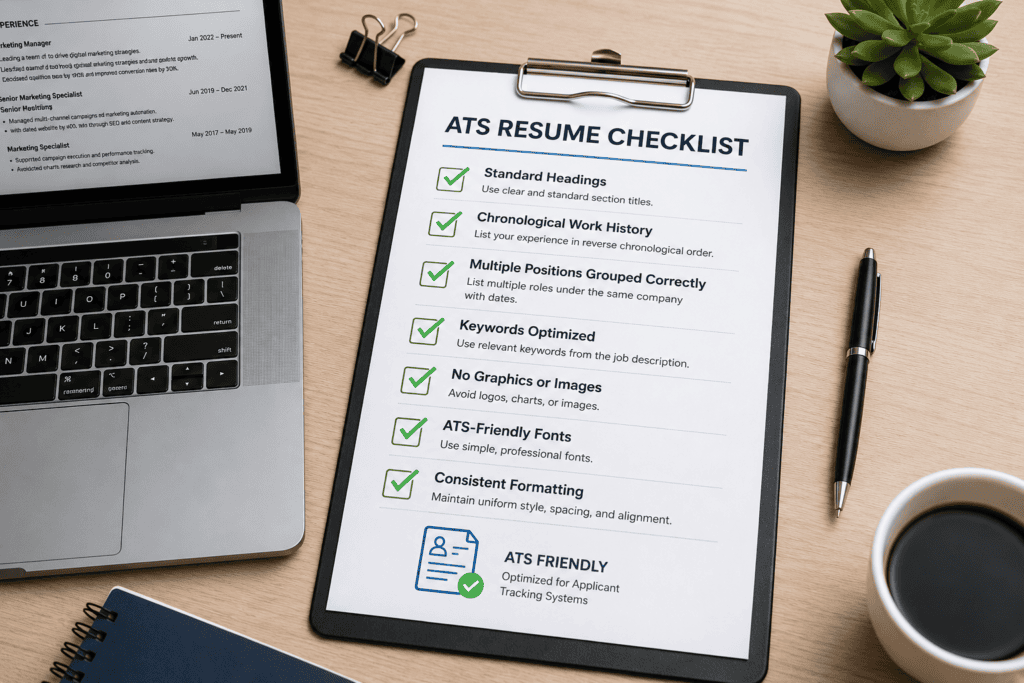
- The Upside: Properly structured multi-role entries signal internal mobility, long-term impact, and rapid career growth.
- The Risk: Incorrect formatting creates parsing errors, leading ATS software to mistake internal promotions for separate companies, flag overlapping dates, or fragment your total years of experience.
Who This Guide Is For
This guide provides an end-to-end strategy for anyone navigating an ATS resume format for multiple positions at the same company, including:
- Professionals who received linear promotions (e.g., Junior Analyst → Senior Analyst).
- Job seekers who made lateral shifts or internal transfers across departments.
- Candidates with evolving long-term contract roles or internship-to-full-time transitions.
What You Will Learn
Inside this guide, we break down the mechanics of the ATS resume format for multiple positions at the same company across seven key areas:
- ATS Mechanics: How parsing algorithms read stacked vs. split company entries.
- Formatting Architectures: When to use stacked titles under one header versus separate entries per role.
- Decision Framework: A practical logic flow to choose the right layout based on your role history.
- Plug-and-Play Examples: Real-world ATS-friendly resume templates for promotions and lateral moves.
- Resume Builder Criteria: How to select resume software that doesn’t break multi-role ATS parsing.
- Frequently Asked Questions: Edge cases like company rebrands, acquisitions, and overlapping dates.
- Long-Term Maintenance: Systematizing your resume updates for future internal applications.
What is an ATS‑friendly resume format for multiple positions at the same company?
An ATS resume format for multiple positions at the same company is a strategic layout that organizes your career progression under a single main employer header. Instead of repeating the company name, location, and overall tenure for every promotion or lateral move, this format nests each job title sequentially—ensuring Applicant Tracking Systems (ATS) parse your work history accurately while highlighting your internal growth to human recruiters.
Depending on how distinct your responsibilities were across roles, there are two primary structural approaches to implementing an ATS-friendly format for multi-role tenure.
Stacked Layout (Best for Similar Roles or Direct Promotions)
Use the stacked format when your responsibilities overlapped significantly or when you received linear promotions in the same department (e.g., Software Engineer → Senior Software Engineer).
- How it works: You place the employer name and location at the top with your overall tenure. Directly beneath, you stack each job title in reverse chronological order with its specific date range, followed by a unified set of bullet points.
- ATS Advantage: Prevents repetitive entries and keeps total years of experience consolidated under one company entity without triggering “duplicate employer” flags.
Plaintext
Company Name | Location                                      2019 – Present
Senior Marketing Specialist                             2022 – Present
Marketing Specialist                                    2019 – 2022
• Achieved a 35% increase in organic traffic by executing a full content refresh strategy.
• Spearheaded cross-functional campaign rollouts across 4 primary digital channels.
• Mentored 3 junior specialists on SEO performance tracking and analytical reporting.
Separate Entries Under One Company Header (Best for Distinct Roles or Lateral Transfers)
Use the split/nested format when your duties, key performance metrics, or departments changed substantially between roles (e.g., Account Executive → Product Manager).
- How it works: You list the company name once at the top, then create distinct sub-sections for each title. Each sub-section includes its own job title, date range, and a dedicated list of bullet points tailored to that specific role.
- ATS Advantage: Allows parsing engines to extract distinct skill sets and keyword densities for each specific job title without confusing the responsibilities of different roles.
Plaintext
Company Name | Location

Product Manager                                              2022 – Present
• Defined product roadmap for core SaaS offering, resulting in a 20% growth in ARR.
• Led daily standups and sprint planning for a cross-functional team of 8 engineers.

Account Executive                                             2020 – 2022
• Exceeded annual sales quota by 115% through strategic outbound enterprise prospecting.
• Managed full-cycle sales pipelines for mid-market and enterprise prospective clients.
Core Formatting Rules for ATS Parsers
To ensure an ATS resume format for multiple positions at the same company parses cleanly without data corruption, follow these baseline rules:
- Use Standard Text Headers: Avoid putting company names, dates, or titles inside graphic text boxes, tables, or page headers/footers, as many ATS parsers bypass these elements entirely.
- Clear Hierarchy: Keep the employer name clearly distinguishable above job titles so parsing algorithms recognize the nested relationship.
- Consistent Date Formatting: Use standard date formats across all entries (e.g., MM/YYYY – MM/YYYY or Year – Year) to prevent parsing errors in total tenure calculations.
How do ATS systems parse multiple roles under one employer?
Understanding how Applicant Tracking Systems (ATS) process your resume helps you format multi-role experience correctly. When an ATS scans a document, it runs the document through a parsing engine (such as Sovereign, HireEZ, or Workday’s proprietary parser). This engine strips away formatting and converts your resume into a structured database record with distinct fields: Employer, Job Title, Start Date, End Date, and Skills.
When handling multiple roles under one employer, ATS parsers generally evaluate your text through two core mechanisms.
Employer-Role Hierarchy Recognition
Modern ATS algorithms read top-down to map relationships between headers, titles, and dates:
- Parent-Child Mapping: When the parser encounters an employer name, it creates a “Parent Entity.” Sub-headings directly beneath it (job titles) are mapped as “Child Entities” belonging to that employer.
- Consolidated Tenure Calculation: If formatted correctly with sub-dates, the ATS calculates your total tenure at the company (e.g., 2018–2024 = 6 years) while preserving individual role durations.
- Keyword-to-Title Association: The ATS tags skills and keywords directly to the specific job title under which they appear. This ensures senior-level keywords are correctly indexed under your senior role rather than your entry-level position.
Common Parsing Failures (and Why They Happen)
If an ATS resume format for multiple positions at the same company is structured incorrectly, the parser defaults to fallback behavior:
| Formatting Error | ATS Parsing Result | Impact on Application |
| Buried Titles (Listing promotions as plain text bullets instead of dedicated title headers) | The ATS only extracts the top/most recent title. | Earlier promotions, titles, and specific tenure milestones are completely lost. |
| Inconsistent Employer Names (e.g., “Google LLC” for Role 1, then “Google” for Role 2) | The ATS reads them as two separate, unrelated companies. | Looks like job-hopping; breaks continuous tenure calculations. |
| Overlapping Date Ranges (e.g., listing overall company dates on every sub-role) | The ATS flags a date conflict or duplicates total experience years. | Distorts career timeline and total years of experience. |
| Tables or Multi-Column Layouts | The parser reads left-to-right across columns, mixing dates and job titles. | Scrambles job titles with responsibilities from other roles. |
Technical Formatting Rules for Error-Free Parsing
To guarantee that your multi-role experience parses cleanly across every major ATS platform (Workday, Taleo, Greenhouse, Lever, and iCIMS):
- Standardize Section Headers: Use universal titles like
Professional ExperienceorWork History. Avoid creative headers like Where I’ve Made an Impact. - Use Clear Text Hierarchy: Place the employer name on its own distinct line or clearly separated at the top of the block, with job titles indented or placed directly beneath.
- Format Dates Consistently: Stick to standard formats throughout the document—either
MM/YYYY – MM/YYYY(e.g., 03/2021 – Present) orYYYY – YYYY(e.g., 2021 – 2024). - Avoid Text Boxes and Tables: Never place company names, dates, or titles inside structural tables or text boxes; ATS parsers frequently skip or misorder content inside visual containers.
Should you combine or separate job titles at the same company?
When deciding how to structure an ATS resume format for multiple positions at the same company, choosing whether to combine (stack) or separate (nest) your job titles depends on two factors: how distinct your responsibilities were and what skill signals you need to send to the recruiter.
Decision Matrix: Stacked vs. Separated Layouts
| Scenario | Recommended Format | Primary Reason |
| Linear Progression (e.g., Analyst → Senior Analyst → Lead Analyst) | Stacked Layout | Day-to-day duties overlap; stacking highlights rapid promotion without repeating bullet points. |
| Department / Function Shift (e.g., Customer Support → Product Manager) | Separated Layout | Core duties, tools, and KPIs changed completely; needs dedicated skill sections for ATS indexing. |
| Lateral Move (e.g., Marketing Manager → Sales Enablement Manager) | Separated Layout | Requires distinct bullet points to prove domain expertise in the new functional area. |
| Minor Title Changes / Re-grades (e.g., Level I → Level II) | Stacked Layout | Responsibilities stayed 90% identical; grouping avoids redundant entries. |
Approach 1: Combine (Stack) Job Titles
Use a combined stacked format when your duties evolved naturally within the same functional area. Stacking demonstrates continuous loyalty and growth while eliminating redundant bullet points.
When to Use:
- Linear promotions in the same department.
- Title changes with similar core responsibilities.
- Scope increased, but core functions remained identical.
Example Structure:
Plaintext
TechCorp Solutions | Austin, TX                                   2019 – Present
Senior Software Engineer                                         2022 – Present
Software Engineer                                                2019 – 2022
• Promoted within 3 years to lead full-stack development across 3 core SaaS products.
• Architected scalable microservices using Node.js and AWS, reducing latency by 28%.
• Mentored 4 junior developers and led bi-weekly code reviews for the engineering team.
Approach 2: Separate Job Titles (Nested Under One Employer)
Use a separate sub-entry layout when each role had distinct deliverables, managed different teams, or required completely different skill sets.
When to Use:
- Major functional or departmental changes.
- Leadership transitions (e.g., Individual Contributor → People Manager).
- Roles with distinct KPIs, budgets, or tech stacks that need individual highlight sections for keyword optimization.
Example Structure:
Plaintext
Global Enterprise Inc. | Chicago, IL

Senior Product Manager                                           2022 – Present
• Led cross-functional team of 12 in launching enterprise AI feature set, driving $1.4M ARR.
• Managed end-to-end product roadmap, prioritizing features based on user telemetry.

Account Executive                                                2019 – 2022
• Closed $2.1M in new ARR across mid-market accounts, exceeding quota by 125% for 6 consecutive quarters.
• Negotiated multi-year enterprise contracts and led product demos for prospective clients.Code language: PHP (php)
Strategic Considerations for Long Tenures
If you have spent 10+ years at the same company and held 4 or 5 different titles:
- Focus on the Last 10–15 Years: Detail responsibilities for your most recent, high-impact positions.
- Group Early Roles: For earlier, entry-level titles at the same employer, you can condense them into a single summary line beneath your major roles: Plaintext
Earlier Roles (TechCorp Solutions): Junior Developer, Support Specialist (2012 – 2016) - Never Split into Multiple Employer Entries: Re-typing the employer name as if it were a separate company confuses ATS parsers and makes long-term tenure look like frequent job-hopping.
What are the main ATS‑friendly formatting options for multiple positions?
When implementing an ATS resume format for multiple positions at the same company, you have three primary visual and structural options. Selecting the right option depends on your career progression, how distinct your responsibilities were, and the technical quirks of the specific job portal you are applying to.
Option 1: Single Employer Block with Separate Sub-Entries (Recommended)
This is the standard and most reliable option for most job seekers. You list the employer name once at the top, then create distinct sub-sections for each job title in reverse chronological order. Each role gets its own date range and dedicated bullet points.
Plaintext
Acme Corporation | San Francisco, CA

Director of Marketing                                            2023 – Present
• Spearheaded global marketing strategy across 5 product lines, generating $4.2M in pipeline.
• Oversaw a $1.5M annual media budget and managed an expanded team of 12 marketers.

Senior Marketing Manager                                         2020 – 2023
• Led cross-functional team of 5 in executing demand generation campaigns that boosted leads by 40%.
• Implemented new CRM and marketing automation stack, reducing CAC by 18%.Code language: PHP (php)- Best for: Clear promotions, lateral transfers, or role changes where your day-to-day duties, KPIs, and leadership levels shifted significantly.
- ATS Benefit: Keeps your total tenure consolidated under one parent employer while cleanly indexing distinct skills under each specific title.
Option 2: Stacked Titles with Shared Bullet Points
If you were promoted quickly within the same department or your daily work remained largely the same, stacking titles is the cleanest, most space-efficient option. You list the overall company tenure on the employer line, stack the titles beneath with their respective date ranges, and use a single set of shared bullet points.
Plaintext
Acme Corporation | San Francisco, CA                             2020 – Present
Senior Software Engineer                                         2023 – Present
Software Engineer                                                2020 – 2023
• Promoted within 3 years to lead architecture for core cloud-native microservices.
• Reduced system downtime by 35% through complete refactoring of legacy codebases.
• Mentored junior developers and conducted technical interviews for candidate onboarding.- Best for: Rapid linear promotions (e.g., Level I → Level II → Senior) where duties overlap by 80%+ and you want to avoid repeating achievements.
- ATS Benefit: Maximizes high-impact keywords while eliminating redundant bullet points that dilute resume space.
Option 3: Separate Entries with Repeated Employer Names
In this approach, you treat each role as a completely separate entry, repeating the exact company name, location, and dates for each position.
Plaintext
Acme Corporation | San Francisco, CA
Director of Marketing                                            2023 – Present
• Spearheaded global marketing strategy across 5 product lines...

Acme Corporation | San Francisco, CA
Senior Marketing Manager                                         2020 – 2023
• Led cross-functional team of 5 in executing demand generation...Code language: PHP (php)- Best for: Online application portals (like older versions of Workday or Taleo) that force manual entry per job, or when working in entirely different subsidiaries, divisions, or geographic offices under the same corporate umbrella.
- ATS Benefit: Prevents older legacy parsers from failing to link sub-roles to an employer, provided the company name is spelled identically in every entry.
- Drawback: Human recruiters may mistake this layout for job-hopping at a glance if not clearly scanned.
Summary Comparison
| Format Option | Primary Use Case | Recruiter Readability | ATS Compatibility |
| Separate Sub-Entries | Distinct duties, different teams, or major promotions | High (shows growth & distinct impact) | High (standard for modern parsers) |
| Stacked Titles | Similar duties, linear promotions in same department | High (clean, concise, saves space) | High (when dates are clearly aligned) |
| Repeated Employer | Different divisions/locations or strict ATS forms | Moderate (can look like job-hopping) | Maximum (failsafe for legacy parsers) |
How should you show promotions and internal moves without confusing recruiters?
Showing promotions and internal moves on an ATS-friendly resume requires balancing algorithmic accuracy with human scannability. Recruiters spend an average of six seconds on an initial scan; if your internal career trajectory isn’t immediately obvious, they may mistake your growth for job-hopping or misinterpret your level of seniority.
To clearly signal internal progression to recruiters without confusing ATS parsers, use these strategic formatting and content techniques.
Visual Hierarchy: Anchor the Employer, Stack the Growth
Human eyes scan resumes in a top-down, left-to-right “F-pattern.” Make your internal growth obvious at a glance:
- Bold the Employer Name First: Use a prominent font weight or slightly larger point size for the company header so it acts as an anchor.
- Nest Titles Beneath: Place job titles indented or set in a lighter/italicized style directly under the main employer block.
- Align Dates to the Right: Keep date ranges consistently right-aligned so recruiters can instantly trace your timeline from entry to departure.
Plaintext
Global Tech Solutions | San Francisco, CA                       2020 – Present
Lead Systems Architect                                          2023 – Present
Senior DevOps Engineer                                          2021 – 2023
DevOps Engineer                                                 2020 – 2021Code language: PHP (php)
Explicitly State the Reason for Movement
Don’t force the recruiter to infer why your title changed. Add an explicit transition tag as the opening bullet point for new roles or internal moves:
- For Promotions: “Promoted to Lead Systems Architect after scaling infrastructure reliability to 99.99% across 4 high-traffic applications.”
- For Lateral Department Moves: “Selected for internal transfer to Product Operations to bridge engineering capabilities with go-to-market strategies.”
- For Mergers & Acquisitions: “Transitioned into Senior Business Analyst role following Acme Corp’s acquisition of Beta Software.”
Show Escalating Scope and Impact (Avoid Copy-Pasting)
A common mistake is repeating identical responsibilities across consecutive positions. To show clear trajectory, differentiate the focus of your bullet points at each career tier:
| Career Tier | What Your Bullet Points Should Focus On | Example Metric |
| Junior / Entry | Execution, task completion, learning key tools, baseline contribution. | “Executed test cases, fixing 45+ Jira tickets per sprint.” |
| Mid-Level | Independence, project ownership, cross-functional collaboration, efficiency. | “Led migration of 3 legacy databases, cutting load times by 22%.” |
| Senior / Lead | Strategy, team leadership, budget control, high-level business impact. | “Architected multi-region cloud strategy and managed a $1.2M budget.” |
How to Handle Edge Cases
Concurrent Duties & “Acting” Roles
If you held an interim title while performing your previous duties (e.g., Acting Manager), list the main title and note the dual responsibility in the bullets:
Plaintext
Engineering Manager (Interim)                                   2023 – 2024
• Held dual responsibility as Acting Manager while maintaining Senior Engineer output during team restructuring.Code language: JavaScript (javascript)
Rapid / Multi-Year Promotions
If you were promoted multiple times in under two years, avoid cluttering the resume with 10–12 tiny bullet blocks. Stack the titles under one combined set of high-impact bullets, explicitly calling out the accelerated timeline in your top bullet point:
Plaintext
Acme FinTech | New York, NY                                     2022 – Present
Senior Financial Analyst                                        2024 – Present
Financial Analyst II                                            2023 – 2024
Financial Analyst I                                             2022 – 2023
• Received two performance-based promotions within 24 months based on financial modeling accuracy.
• Managed quarterly forecasting models for $50M+ ARR business units.Code language: PHP (php)
Which Resume Tools Help Format Multiple Positions in ATS-Friendly Layouts?
Many modern resume builders provide ATS-friendly templates and formatting features that make it easier to list multiple positions within the same company. These tools can help you organize promotions, maintain consistent formatting, and create a resume that is easy for both recruiters and Applicant Tracking Systems (ATS) to read.
Below, we’ll review some of the most popular resume tools, highlighting their ATS compatibility, customization options, and features for showcasing career progression. Since features, pricing, and availability can change over time, choose the tool that best fits your needs and location.
Evaluation Matrix: Generic ATS Resume Builder
Evaluating online ATS-focused resume builders against multi-role entry criteria requires looking at structural flexibility, parsing reliability, and cost-to-value metrics.
┌────────────────────────────────────────────────────────────────────────┐
│                        EVALUATION FRAMEWORK                            │
│                                                                        │
│  [ Input Flexibility ] ──► Can it handle nested vs. stacked roles?    │
│  [ Parser Compliance ] ──► Does export output retain clean tagging?    │
│  [ ROI & Control     ] ──► Paid locks vs. native word processor control│
└────────────────────────────────────────────────────────────────────────┘Code language: CSS (css)
Core Strengths for Multi-Role Resumes
- Enforced Formatting Standards: Prevents candidates from using ATS-breaking design elements like floating text boxes, multi-column tables, or graphics inside experience blocks.
- Structured Input Fields: Standardized software forms prompt users for specific
Employer,Title, andDatevariables, reducing human formatting error during top-down construction. - Consistent Hierarchy: Automatically enforces standardized heading structures (
H1,H2,H3) and date alignments, ensuring ATS parsers map child roles to parent companies without error.
Structural Limitations to Watch For
- Nested Title Rigidity: Many commercial builders default to a strict
1 Employer = 1 Roledatabase schema. Forcing multiple titles under one employer often forces users to create duplicate employer entries, corrupting tenure calculations. - Export Code Bloat: Some web-based software exports PDF files with flattened canvas layers or DOCX files with hidden XML table tags that confuse legacy parsers like Taleo or older Workday installations.
- Paywalled Multi-Version Control: While basic builders allow one resume download, managing multiple variants tailored for different internal vs. external roles frequently requires ongoing premium subscriptions.
Feature Requirements Checklist
When selecting a third-party ATS resume tool specifically to list multiple positions at the same company, ensure the platform supports these features:
- Parent-Child Company Grouping: Ability to nest multiple sub-roles under a single company entry without re-entering the employer name.
- Dual Date Range Inputs: Supports an overall company tenure date alongside individual role tenure dates.
- Selectable Text Export: Guarantees PDF exports use native vector text layers rather than rasterized images.
- Custom Bullet Grouping: Allows either individual bullet sets per sub-role or a single shared bullet set across stacked titles.
Comparison: Web Builder vs. Native Word Processor
| Feature / Capability | Web-Based ATS Builder | Word Processor (MS Word / Google Docs) |
| Setup Speed | Fast (Plug-and-play form fields) | Moderate (Requires manual tab stop setup) |
| Multi-Role Nesting | Variable (Depends on schema support) | Complete (100% manual control over layout) |
| ATS Formatting Safety | High (Enforces single-column standards) | High (If standard templates are followed) |
| Cost / Access | Often requires recurring monthly plans | Free / Standard software utility |
| Long-Term Data Portability | Low (Data trapped in vendor ecosystem) | Maximum (Local source file retention) |
Evaluation Matrix: Native Word Processor Templates (MS Word & Google Docs)
Using native document editors like Microsoft Word or Google Docs allows complete manual control over resume layout. Unlike automated builders that constrain input fields, word processors give you total design freedom to construct custom parent-child hierarchies for multiple roles at the same employer.
Plaintext
┌────────────────────────────────────────────────────────────────────────┐
│                        EVALUATION FRAMEWORK                            │
│                                                                        │
│  [ Custom Layouts   ] ──► Full freedom to construct sub-role blocks.   │
│  [ ATS Formatting   ] ──► High risk if tables or columns are misused. │
│  [ Data Ownership   ] ──► 100% offline control with no subscriptions.  │
└────────────────────────────────────────────────────────────────────────┘Code language: CSS (css)
Core Strengths for Multi-Role Resumes
- Unrestricted Formatting Control: Allows you to switch between stacked job titles and nested sub-entries on the fly without database constraints.
- 100% Data Privacy & Portability: Files remain stored locally or on your private cloud (OneDrive/Google Drive), eliminating third-party vendor data risks or paywalled downloads.
- Native Parser Compatibility: Saving as
.docxor standard PDF directly ensures raw vector text that enterprise parsers like Workday, Taleo, and Greenhouse process reliably.
Common Formatting Traps (And How to Avoid Them)
When building a multi-role structure manually in Word or Google Docs, small design errors can break ATS parsing:
| Common Manual Error | How It Scrambles ATS Parsing | The Correct Manual Setup |
| Using Invisible Tables for Alignment | ATS parsers read tables left-to-right across columns, tangling job titles with dates or duties. | Use Right-Aligned Tab Stops (with paragraph spacing) to position dates on the right margin. |
| Placing Dates in Header/Footer Layers | Most ATS parsers skip document headers and footers entirely. | Place all company names, titles, and dates directly in the main document body. |
| Using Decorative Bullet Icons | Custom bullet symbols (arrows, stars, checkmarks) often parse as garbled symbols or ?. | Stick strictly to standard round solid black bullets (•). |
| Inconsistent Font Styles for Sub-Roles | Parsing engines rely on heading hierarchy to link sub-roles to parent companies. | Make the Company Name bold (12pt) and Job Titles bold/italicized (11pt) directly beneath. |
Step-by-Step Setup: Building an ATS-Friendly Multi-Role Section
Set Up the Parent Employer Line
Write the company name and location on a single line. Set a right-aligned tab stop at 6.5 inches (the right margin) for the overall tenure dates.
Plaintext
Global Solutions Inc. | Chicago, IL 2019 – PresentCode language: PHP (php)Add Nested Job Titles
Directly underneath, add your sub-roles. Keep job titles on their own lines, using the same right-aligned tab stop for individual role dates:
Plaintext
Senior Product Manager                                         2022 – Present
Product Manager                                                2019 – 2022
Add Structured Accomplishment Bullets
Indent bullet points by 0.25 inches to visually establish hierarchy for human readers without breaking ATS text flow.
Plaintext
• Promoted to Senior Product Manager after leading the core SaaS launch, generating $1.2M in ARR.
• Directed product roadmap for enterprise client tier, reducing churn by 14% year-over-year.
Summary Checklist for Word Processor Templates
- [x] No Multi-Column Layouts: Keep the entire document in a clean, single-column flow.
- [x] No Floating Text Boxes: Never put job titles or dates inside text boxes.
- [x] Consistent Tab Stops: Use native tab settings for date alignment rather than repeatedly pressing the spacebar.
- [x] Standard ATS Section Headers: Label the main section
Work ExperienceorProfessional Experience.
Evaluation Matrix: AI Resume Review & Scoring Tools
AI resume review and scoring platforms (such as Jobscan, Resume Worded, or VMock) act as diagnostic scanners. They simulate how ATS parsing engines process your resume, helping you verify whether your multi-role structure extracts accurately before submitting your application.
Plaintext
┌────────────────────────────────────────────────────────────────────────┐
│                        EVALUATION FRAMEWORK                            │
│                                                                        │
│  [ Parsing Verification ] ──► Tests parent-child role recognition.    │
│  [ Keyword Matching    ] ──► Checks title-specific keyword density.   │
│  [ Simulator Accuracy  ] ──► Estimates vs. actual ATS behavior.       │
└────────────────────────────────────────────────────────────────────────┘Code language: CSS (css)
Core Strengths for Multi-Role Resumes
- Parsing Verification: Instantly exposes whether a scanner misreads internal promotions as separate employers or drops stacked job titles entirely.
- Granular Keyword Analysis: Identifies whether your high-level skills (e.g., Strategic Planning, Budget Management) are correctly indexed under your senior-level title rather than diluted across earlier entry-level roles.
- Timeline Conflict Detection: Flags date overlap errors, duplicate tenure calculations, or missing date ranges that can trigger red flags during automated candidate screening.
Key Diagnostic Scenarios: What AI Reviews Reveal
When uploading an ATS resume format for multiple positions at the same company, pay attention to how the diagnostic dashboard categorizes your history:
| Diagnostic Finding | What It Means | Corrective Action |
| “Duplicate Employer Detected” | The simulator parsed your single employer as two distinct companies because of inconsistent formatting. | Standardize the company header and nest titles directly underneath using a single employer line. |
| “Missing Job Title” | A stacked or sub-role title was skipped by the parser because it was buried in plain bullet text. | Format every job title as a distinct header line using standard, recognizable job titles. |
| “Date Hierarchy Conflict” | The scanner struggled to reconcile overall company tenure with individual sub-role date ranges. | Ensure overall company dates sit on the employer line, while distinct role dates sit directly beside each job title. |
Best Practices & Limitations
- Treat Scores as Guidance, Not Absolute Rules: No scanner perfectly replicates every proprietary ATS setup (e.g., a custom Workday or Taleo instance). Aim for clean field extraction over chasing a perfect “100%” score.
- Audit Raw Text Extractions: Most scoring tools offer a “Parsed Text” or “ATS View” tab. Always inspect this plain-text output to confirm your job titles, dates, and bullet points appear in logical, chronological order.
- Mind Privacy & Data Security: Avoid uploading sensitive personal identifiers (such as home address, phone numbers, or confidential internal company project names) to free web scanners without reviewing their data retention policies.
Comparison Table: ATS Resume Formats for Multiple Positions at One Company
| Format Type | Structure Summary | Best Suited For | Key ATS Advantages | Main Trade-offs |
| Single Employer Block with Separate Roles | Company name & location listed once at top; each sub-role gets its own title, dates, and dedicated bullet points. | Clear promotions, major scope changes, lateral department transfers, or distinct responsibilities. | Distinct title/date mapping; attributes specific achievements, keywords, and metrics directly to senior roles. | Consumes more vertical space; requires carefully differentiated bullet points to avoid repetition. |
| Stacked Titles with Combined Bullets | Company heading at top with overall tenure; job titles stacked sequentially with specific dates, followed by a single shared set of bullets. | Rapid linear promotions, minor title upgrades, overlapping duties, or space-constrained resumes. | Space-efficient; maintains employer continuity without triggering “duplicate company” flags in parsers. | Less granular mapping of achievements to specific job titles; rapid promotions can look less pronounced. |
| Separate Entries with Matching Employer Name | Each role is treated as an independent entry, repeating the exact company name, location, and non-overlapping dates. | Stints in different divisions/geographies, non-consecutive roles (boomerang employee), or legacy ATS portals. | Maximum parsing compatibility across legacy software; avoids parent-child hierarchy parsing failures. | Risks appearing like job-hopping during human recruiter scans if progression isn’t obvious; repeats company header. |
Quick Decision Guide
Rule of Thumb:
- Use Separate Sub-Entries if your responsibilities shifted by more than 30% or you managed entirely different deliverables/teams.
- Use Stacked Titles if you did the same core job with a higher level of seniority (e.g., Analyst I → Analyst II).
- Use Repeated Employer Entries only if an online application form forces manual, per-job data entry or if you left the company and returned later.
Decision Framework: Choosing the Right Multi-Role Format
Selecting the right layout for an ATS resume format for multiple positions at the same company comes down to four core variables: role differentiation, page real estate, target job signals, and application portal mechanics.
Use the decision flowchart and logic matrix below to select the optimal structure for your specific career history.
Decision Flowchart
Plaintext
               [ Start: You have multiple roles at one employer ]
                                       │
                                       ▼
                 ┌───────────────────────────────────────────┐
                 │ Are you filling out a portal form that    │
                 │ forces separate entries per job title?    │
                 └─────────────────────┬─────────────────────┘
                                       │
                      ┌────────────────┴────────────────┐
                     YES                                NO
                      │                                 │
                      ▼                                 ▼
         ┌─────────────────────────┐       ┌─────────────────────────┐
         │ OPTION 3:               │       │ How different were the  │
         │ Repeated Employer Lines │       │ core responsibilities?  │
         └─────────────────────────┘       └────────────┬────────────┘
                                                        │
                      ┌─────────────────────────────────┴────────────────────────────────┐
                VERY DIFFERENT                                                    MOSTLY SIMILAR
          (e.g., Support -> PM)                                                (e.g., Analyst I -> II)
                      │                                                                  │
                      ▼                                                                  ▼
         ┌─────────────────────────┐                                        ┌─────────────────────────┐
         │ OPTION 1:               │                                        │ OPTION 2:               │
         │ Separate Sub-Entries    │                                        │ Stacked Titles          │
         │ (1 Employer Block)      │                                        │ (Shared Bullets)        │
         └─────────────────────────┘                                        └─────────────────────────┘Code language: CSS (css)
Detailed Decision Logic Matrix
| Evaluation Criteria | Scenario A: Choose Separate Sub-Entries | Scenario B: Choose Stacked Titles | Scenario C: Choose Repeated Employer |
| Role Differentiation | Responsibilities, core tools, KPIs, or departments changed by 30%+. | Duties remained 70%+ identical; scope or seniority increased. | Roles occurred in distinct business units, subsidiaries, or non-consecutive stints. |
| Space Constraints | You have 2–3 key roles and adequate real estate for detailed bullet points. | You have 3–4+ closely related titles or need to fit content onto a 1- or 2-page limit. | Page real estate is non-critical, or external form requirements mandate discrete entries. |
| Target Job Signal | Target role prioritizes diverse experience, leadership evolution, or cross-functional agility. | Target role prioritizes deep domain mastery, technical specialization, or rapid promotion speed. | Target application portal parses each entry into separate database tables. |
| Submission Type | Uploading standard .docx or PDF files directly to modern ATS platforms. | Uploading standard .docx or PDF files directly to modern ATS platforms. | Copy-pasting data into rigid legacy web application portals (e.g., older Taleo/Workday forms). |
Action Plan Summary
- Step 1: Audit Your Responsibilities. Write down your core metrics for each role. If the deliverables are completely different, split them into Separate Sub-Entries.
- Step 2: Check Page Constraints. If your total career history pushes your resume onto an awkward third page, compress linear promotions into Stacked Titles.
- Step 3: Match Portal Rules. Always inspect the application system. If an online form breaks your nested text into one big jumble during copy-paste, revert to Repeated Employer Lines for that specific portal upload.
Buying Guide: How to Choose the Best ATS Resume Tools and Templates
Choosing the right ATS resume builder or template can make it easier to showcase multiple positions at the same company while maintaining a professional, recruiter-friendly format. Instead of focusing on specific brands, this guide highlights the key features to look for, such as ATS compatibility, customizable templates, career progression formatting, and ease of use.
Because pricing, features, and availability vary by region and change over time, use these criteria to select the tool that best fits your needs.
Who should use dedicated ATS resume builders?
Dedicated ATS resume builders are best suited for job seekers who want an automated guardrail against common technical parsing errors. While experienced writers can format multi-role resumes manually in Microsoft Word or Google Docs, dedicated platforms eliminate layout trial-and-error by enforcing structured database entry.
Key Profiles That Benefit Most
┌────────────────────────────────────────────────────────────────────────┐
│                        PRIMARY USER PROFILES                           │
│                                                                        │
│  [ Career Changers & Movers ] ──► Need structured sub-role nesting.   │
│  [ Non-Technical Seekers    ] ──► Want to avoid manual tab stop setup. │
│  [ High-Volume Applicants   ] ──► Require fast, multi-version outputs. │
└────────────────────────────────────────────────────────────────────────┘Code language: CSS (css)
Career Changers & Internal Movers
- The Need: When transitioning between departments (e.g., Customer Operations → Product Manager), presenting distinct skill sets under a single company heading without breaking ATS parser logic can be tricky.
- The Builder Advantage: Built-in form schema explicitly prompts users for parent-company and child-role relationships, ensuring skills map accurately to the correct job title without manual layout tinkering.
Job Seekers Uncomfortable with Advanced Document Layouts
- The Need: Creating a clean, single-column resume with right-aligned dates, custom indentations, and parent-child hierarchy requires setting explicit tab stops and paragraph settings in Word or Google Docs.
- The Builder Advantage: Form-driven builders handle code styling natively in the background, preventing common visual errors like broken text wrapping or misaligned date margins.
High-Volume Applicants Needing Multi-Version Efficiency
- The Need: Tailoring an ATS resume format for multiple positions at the same company across dozens of applications requires rapid tweaking of bullet points and keyword density for specific job descriptions.
- The Builder Advantage: Integrated AI keyword-matching tools and automated formatting checks allow users to duplicate, adjust, and re-export structured resume versions in seconds without risking layout breakage.
Who Should Skip Dedicated Builders?
Dedicated web builders are generally unnecessary for:
- Experienced Document Designers: Anyone capable of applying native Word processor best practices (e.g., right-aligned tabs, standard section headers, no text boxes).
- Candidates Seeking Deep Design Customization: Builders heavily constrain visual styling to maintain parser safety; users looking for intricate layouts will find them rigid.
- Privacy-Conscious Job Seekers: Individuals who prefer keeping their personal career data offline on local storage rather than in third-party cloud databases.
Who should rely on word processor templates?
While ATS resume builders offer convenient, pre-configured guardrails, native word processor templates (Microsoft Word, Google Docs) remain the gold standard for candidates who require full structural control over their document.
Constructing an ATS resume format for multiple positions at the same company in a word processor requires applying precise layout rules to ensure clean parser extraction.
Primary Candidates Who Should Rely on Word Processors
Plaintext
┌────────────────────────────────────────────────────────────────────────┐
│                        PRIMARY USER PROFILES                           │
│                                                                        │
│  [ Experienced Professionals ] ──► Need tailored, complex hierarchies. │
│  [ Resume Writers & Coaches  ] ──► Require total design customization. │
│  [ Privacy-Conscious Users   ] ──► Demand 100% offline data control.    │
└────────────────────────────────────────────────────────────────────────┘Code language: CSS (css)
Mid-to-Senior Professionals with Complex Work Histories
- The Need: Executives, directors, and long-tenured employees often have intricate internal trajectories—such as concurrent interim roles, lateral cross-department transfers, or rapid sequence promotions.
- Why Word Processors: Form-based builders enforce rigid schema rules that struggle with non-linear career paths. Word processors allow you to customize nested sub-entries, add transition lines (e.g., “Selected for internal transfer…”), and adjust bullet groupings freely.
Professional Resume Writers and Career Coaches
- The Need: Practitioners creating tailored assets for clients need reusable, clean source files without hitting software paywalls or vendor lock-in.
- Why Word Processors: Operating in
.docxallows coaches to build master templates, set up precise tab-stop alignments, and deliver fully editable files that clients can update for decades without a recurring subscription.
Candidates Applying to Federal, Academic, or International Roles
- The Need: Federal resumes, academic CVs, and specific international formats require extended page counts (3–5+ pages) and unconventional section ordering.
- Why Word Processors: Standard ATS builders strictly limit layout length and field structures. Word processors give you unlimited space to format long-term tenure under one employer alongside exhaustive publication, security clearance, or project lists.
Privacy-Conscious Job Seekers
- The Need: High-profile candidates or individuals handling sensitive, NDA-bound internal company projects prefer not to upload personal employment histories into third-party AI databases.
- Why Word Processors: Drafting locally gives you 100% control over document storage, access permissions, and data security.
Non-Negotiable Rules When Using Word Processors for Multi-Role ATS Resumes
If you rely on Microsoft Word or Google Docs, enforce these rules to guarantee ATS compatibility:
- Never Use Tables or Columns for Layout: Tables scramble when read by legacy parsers. Use Right-Aligned Tab Stops to align dates on the right margin.
- Avoid Text Boxes: ATS algorithms skip headers, footers, and floating text boxes. Keep all text in the main document body.
- Maintain Clear Heading Hierarchy: Bold the Employer Name at the top level and place Job Titles directly beneath in regular or italicized text.
- Standardize Company Names: If using separate entries for different roles, spell the employer name identically across every entry to prevent the ATS from creating duplicate company records.
Budget considerations
Evaluating cost options for managing an ATS resume format for multiple positions at the same company comes down to balancing upfront investment against long-term document control.
Below is an overview of pricing structures, hidden costs, and value considerations across dedicated ATS platforms and native word processors.
Cost Breakdown by Category
Dedicated ATS Resume Builders & AI Scoring Tools
Most commercial builders and scoring platforms (such as Jobscan, Kickresume, or Resume Worded) operate on a freemium or recurring subscription model.
- Free Tiers:
- Typically allow basic document creation, access to 1–2 plain single-column templates, or a limited number of ATS parsing diagnostic scans (e.g., 5 free scans per month).
- Limitation: Free tiers frequently restrict multi-version downloads, watermark PDF exports, or block specialized multi-role database schemas.
- Short-Term Passes & Trial Subscriptions:
- Range from $1.75 to $12 for 7-to-14-day full-access passes.
- Risk: Many short-term trials automatically roll into recurring monthly plans ($19 to $49/month) if not canceled before the trial window closes.
- Monthly / Annual Plans:
- Range from $9 to $29/month (or up to $149 for rare lifetime access deals).
- Ideal for active job seekers tailoring dozens of application variants over a concentrated 1-to-3 month job hunt.
Native Word Processors (MS Word, Google Docs, LibreOffice)
Native document editors are the most cost-effective and sustainable option for managing multi-role resumes long-term.
- Free / Existing Software:
- Google Docs & LibreOffice: 100% free with no export paywalls or usage limits.
- Microsoft Word: Included in standard Microsoft 365 personal/business subscriptions ($6.99/month) or accessible via free web versions.
- Long-Term Cost Advantage:
- Zero recurring subscription fees to access or update your source files.
- Unlimited exports to
.docxand plain-text PDF without third-party paywalls, watermarks, or vendor lock-in.
Budget Summary & Recommendation
| Tool Category | Upfront Cost | Long-Term Cost | ROI & Value Assessment |
| Dedicated ATS Builders | Free basic tier | $10 – $30+/month | High short-term value if you need automated guardrails, keyword scoring, and quick parent-child role formatting. |
| AI Scoring Tools | Free basic scans | $20 – $50/month | Moderate value; best used sparingly for 1–2 initial scans to verify parser accuracy rather than ongoing monthly access. |
| Native Word Processors | $0 (Free) | $0 | Maximum long-term value; provides 100% data ownership, complete design freedom, and zero recurring costs. |
Strategy Tip: Build and maintain your master multi-role resume locally in Microsoft Word or Google Docs using right-aligned tab stops. If you want to verify how an ATS parses your sub-roles, use the free basic tier of an AI reviewer to check the extraction preview without upgrading to a paid plan.
Essential features for multi‑position formatting
Implementing an ATS resume format for multiple positions at the same company requires strict technical compliance. Parsing engines rely on clean visual and structural cues to properly map parent-child relationships between employers and internal roles.
Single-Column Flow with Standard Header Hierarchy
- The Technical Rule: Keep the entire document in a continuous single-column layout. Use a universally recognized section heading such as
Professional ExperienceorWork Experienceset in standard 12pt–14pt bold text. - Why ATS Demands It: Multi-column designs and custom graphics cause modern parsers (like Workday, Taleo, and Greenhouse) to read text horizontally across the page, tangling job titles, dates, and bullet points into an unreadable mess.
Nested Parent-Child Hierarchy (Single Employer Header)
- The Technical Rule: State the parent employer name and location once on a single line at the top of the block. Place individual job titles directly underneath as sub-headings without re-typing the company name.
- Why ATS Demands It: Repeating the employer name for every sub-role often tricks ATS algorithms into counting each promotion as a separate, short-term job at a different company, destroying continuous tenure calculations.
Strict, Standardized Date Alignment
- The Technical Rule: Use a single, uniform date format throughout the entire document—preferably
MM/YYYY – MM/YYYY(e.g., 03/2021 – Present) orYYYY – YYYY(e.g., 2021 – 2024). For multi-role entries, place the overall company tenure beside the main employer line, and specific sub-role dates directly beside each corresponding job title. - Why ATS Demands It: Inconsistent date formats (e.g., mixing “March 2021” with “03/21”) trigger date parsing errors or corrupt total years-of-experience calculations.
Text-Based File Export (.docx or Native Vector PDF)
- The Technical Rule: Always compile and export your resume as a standard Word document (
.docx) or a native, selectable-text PDF. Never place core text inside floating text boxes, tables, or image files (.png/.jpg). - Why ATS Demands It: Parsers strip visual formatting to analyze raw text stream data. Text locked inside image files or floating design containers is invisible to scanning algorithms and will be skipped entirely.
Nice‑to‑have features
While the technical non-negotiables guarantee your document doesn’t break in an ATS parser, these advanced features streamline the writing process and maximize your interview callback rate.
AI-Powered Bullet Optimization & Keyword Alignment
- How It Works: Modern platforms analyze target job descriptions to identify essential skill gaps and keyword density (e.g., Cross-Functional Leadership, Agile Frameworks, P&L Management).
- Why It Elevates Multi-Role Resumes: It helps you strategically distribute high-level keywords across your career timeline. Senior-level skills are mapped directly to your latest promotion, while operational and foundational keywords remain anchored to your earlier titles—showing natural progression.
Multi-Role ATS Parser Simulation
- How It Works: Diagnostics render an “ATS Raw Text Preview” that reveals exactly how parsing algorithms extract and categorize your document’s raw data stream.
- Why It Elevates Multi-Role Resumes: It acts as an instant check for sub-role nesting. You can verify that the system correctly mapped your promotions under a single employer entity rather than flagging them as “Duplicate Employer” errors or dropping earlier dates completely.
Region and Industry-Tuned Templates
- How It Works: Flexible templates automatically adapt structural spacing, section order, and date conventions for regional or industry expectations (e.g., US single-page standard vs. UK/International 2-page CVs, or Tech vs. Executive layouts).
- Why It Elevates Multi-Role Resumes: Allows you to toggle between a compact Stacked Titles layout (ideal for fitting 10+ years of linear growth onto a tight 2-page target) and an expanded Separate Sub-Entries layout without having to manually rebuild the document structure from scratch.
Privacy considerations
When building or editing an ATS resume format for multiple positions at the same company, managing personal data security is just as important as structural formatting. A resume contains sensitive career telemetry, including personal contact details, unreleased revenue metrics, internal organizational structures, and confidential project details.
Key Data Risks with Online Builders & AI Tools
- AI Model Training on Internal Metrics: Many cloud-based resume platforms and generative AI writers utilize user inputs to fine-tune their machine learning models. Uploading proprietary metrics (e.g., “Scaled internal logistics budget from $2M to $8M at Company X”) may unintentionally expose confidential corporate data.
- Third-Party Data Retention & Scraping: Free or freemium web tools may store your resume files indefinitely or sell aggregated candidate insights to recruiters and data brokers without explicit consent.
- Data Breaches on Unsecured Cloud Repositories: Centralized cloud platforms storing unencrypted resume files are primary targets for credential stuffing and data scraping.
Data Evaluation Checklist for Online Tools
Before uploading your resume to a web-based builder, AI writer, or scoring scanner, review their Terms of Service and Privacy Policy against these four core criteria:
| Security Factor | What to Look For in Privacy Terms | Risk Level |
| Model Training Exclusions | Clear opt-out clauses stating your document text will not be used to train public or proprietary AI models. | High |
| Data Retention Limits | Explicit policy outlining automatic file deletion after processing (e.g., “Uploaded files purged within 24 hours”). | High |
| Account & Data Erasure | One-click options to permanently delete your account, parsing history, and stored document versions. | Medium |
| Third-Party Sharing | No monetization or sharing of candidate profiles with external recruitment or lead-generation agencies. | Medium |
When to Choose Local Storage (MS Word / Google Docs)
For complete data governance, offline document processing using native word processors remains the most secure method.
┌────────────────────────────────────────────────────────────────────────┐
│                        PREFERRED FOR HIGH SECURITY                     │
│                                                                        │
│  [ Executive / Board Roles  ] ──► Highly sensitive financial impact.   │
│  [ Defense / Security / Gov ] ──► Strict NDA & clearance requirements. │
│  [ Proprietary Enterprise   ] ──► Confidential internal metrics.      │
└────────────────────────────────────────────────────────────────────────┘
Code language: CSS (css)- Zero Cloud Third-Party Exposure: Editing files locally on your hardware ensures your career history remains entirely under your personal access controls.
- Granular PDF Security: Allows you to apply local password protection or encryption to PDF exports before sharing directly with verified corporate recruiters.
- Full Regulatory Compliance: Ideal for professionals bound by strict Non-Disclosure Agreements (NDAs), defense security clearances, or regulated industry compliance frameworks.
Ecosystem and long‑term support
To safeguard your resume against evolving HR tech, long-term ecosystem compatibility relies on adhering to universal formatting standards rather than relying on short-lived design trends or proprietary platform tricks.
As enterprise Applicant Tracking Systems (Workday, Greenhouse, Taleo, Lever, iCIMS) update their parsing engines and AI scoring layers, core parsing mechanisms continue to enforce standard document structures.
The Core Ecosystem Framework
Plaintext
┌────────────────────────────────────────────────────────────────────────┐
│                   ECOSYSTEM COMPATIBILITY PILLARS                      │
│                                                                        │
│  [ Open Source File Formats ] ────► Universal .docx & Vector PDF       │
│  [ Institutional Templates  ] ────► Career center & association standards│
│  [ Standardized Schemas     ] ────► Plain-text parent/child hierarchies │
└────────────────────────────────────────────────────────────────────────┘
Code language: PHP (php)
Institutional Standards vs. Commercial Trends
- University Career Centers & Professional Associations: Higher education institutions (e.g., Harvard, Wharton, MIT) and global professional bodies (e.g., IEEE, PMI, SHRM) maintain resume templates grounded in plain-text, single-column frameworks. These standards prioritize machine readability and long-term stability over visual flair.
- Commercial “Design” Builders: Graphic-heavy resume platforms frequently introduce floating sidebars, custom skill bars, and multi-column CSS containers. While visually appealing to human eyes, these design choices repeatedly fail as parsers update, causing candidate data to scramble or drop entirely.
Universal File Formats: .docx vs. .pdf
When managing an ATS resume format for multiple positions at the same company, file type selection dictates how reliably parent-child job roles parse.
| File Format | Ecosystem Compatibility | Multi-Role Parsing Reliability | Best Used For |
Microsoft Word (.docx) | 100% Universal across all legacy and modern ATS platforms. | Maximum. XML text streams preserve parent-company headers and nested job titles cleanly. | High-volume online application portals, enterprise ATS forms (Workday, Taleo). |
Text-Based Vector PDF (.pdf) | High on modern parsers (Greenhouse, Lever); variable on older legacy systems. | High, provided the document uses a single-column layout with zero text boxes or embedded tables. | Email submissions, direct recruiter messages, or modern start-up portals. |
Scanned / Image PDFs (.pdf) | 0% Compatibility. Parsers treat the document as an unreadable image file. | Zero. Fails; yields zero text extraction. | Never use. |
Proprietary Files (.pages, .gdoc) | Low to Unsupported. Most portals reject or corrupt proprietary extensions. | Unreliable. Can corrupt nested sub-roles during conversion. | Local drafting only; always export to .docx or PDF before applying. |
Maintaining Your Asset Over Time
To maintain long-term compatibility as you progress in your career:
- Maintain a Master Document: Keep a single, unformatted
.docxfile containing every role, metric, title change, and accomplishment. - Audit Periodically: Re-run your standard master template through an ATS parsing simulator every 12–18 months to ensure newly added sub-roles, promotions, and date structures extract in clean chronological sequence.
- Stick to Standard Syntax: Rely on universal headings (
Professional Experience,Education,Skills) and standard date formats (MM/YYYY – MM/YYYY) to guarantee that future updates to ATS software read your experience accurately.
Common mistakes to avoid when listing multiple roles at one company
When creating an ATS resume format for multiple positions at the same company, even small structural mistakes can corrupt your career history during parsing. Below is a detailed breakdown of the most common pitfalls and the exact formatting fixes required to pass automated ATS filters.
Inconsistent Employer Names Across Sub-Entries
Plaintext
❌ WRONG (Triggers Duplicate Company Records):
Acme Corporation | San Francisco, CA                             2022 – Present
Senior Operations Manager

Acme Inc. | San Francisco, CA                                    2020 – 2022
Operations Analyst- The Pitfall: Writing slight variations of the same employer name (e.g., “Acme,” “Acme Inc,” “Acme Corporation”) tricks ATS parsers into treating each entry as a completely different company.
- The Impact: Distorts total tenure calculations, creates artificial gaps, and makes continuous growth appear to be job-hopping.
- The Fix: If you choose to repeat the employer header, spell and format the company name identically down to every character. Better yet, use a single parent employer header and nest titles directly beneath.
Plaintext
✅ CORRECT (Nested Parent-Child Structure):
Acme Corporation | San Francisco, CA                             2020 – Present
Senior Operations Manager                                        2022 – Present
Operations Analyst                                               2020 – 2022Code language: PHP (php)
Placing Titles, Dates, or Headers inside Text Boxes or Headers/Footers
- The Pitfall: Putting job titles, dates, or company names inside structural text boxes, tables, or Microsoft Word header/footer sections.
- The Impact: Most ATS algorithms (including Workday, Taleo, and iCIMS) extract text exclusively from the primary document body. Information embedded in text boxes or headers is frequently ignored or dropped entirely.
- The Fix: Keep all text in the main body of the document. Use native Right-Aligned Tab Stops to align dates along the right margin instead of creating invisible borderless tables.
Copy-Pasting Identical Bullets Across Consecutive Roles
- The Pitfall: Repeating the same responsibility bullets under every job title during internal promotions.
- The Impact: Fails to demonstrate career progression, wastes precious page real estate, and dilutes keyword optimization.
- The Fix: Reserve operational/execution tasks for earlier titles and focus higher-level roles on leadership, strategy, metrics, and expanded scope.
Plaintext
✅ Tailored Progression Example:

Senior Marketing Manager                                         2022 – Present
• Direct annual $1.5M marketing budget and lead a team of 6 demand generation specialists.
• Increased enterprise lead volume by 42% through full-funnel channel optimization.

Marketing Manager                                                2020 – 2022
• Managed paid search and social campaigns, generating 1,200+ qualified monthly leads.
• Collaborated with sales development reps to improve lead-to-opportunity conversion by 15%.Code language: JavaScript (javascript)
Omitting or Misaligning Sub-Role Date Ranges
- The Pitfall: Listing an overall company tenure (e.g., 2018 – Present) while leaving specific sub-role start and end dates blank, or switching date formats mid-document (e.g., mixing “March 2021” with “03/21”).
- The Impact: ATS algorithms rely on precise date parsing to calculate the total years of experience for each title. Missing or inconsistent sub-dates trigger parsing exceptions or attribute all achievements solely to your latest title.
- The Fix: Maintain strict date consistency across all entries using standard formats like
MM/YYYY – MM/YYYYorYYYY – YYYY.
Multi-Column, Graphic, or Visual Template Designs
- The Pitfall: Using modern multi-column resume layouts, skill rating bars, icons, or custom infographics.
- The Impact: Parsing engines strip formatting and read documents linearly from left to right. In a two-column resume, an ATS will read straight across both columns, jumbling company names, dates, and bullet points from adjacent sections.
- The Fix: Stick strictly to a single-column, top-down layout set in standard system fonts (Arial, Calibri, Georgia, or Times New Roman).
Summary Checklist: Pre-Submission Audit
Before uploading your resume to an application portal, verify these checks:
- Single-Column Check: The document contains zero multi-column setups, tables, or floating text boxes.
- Parent-Child Linkage: Company name is stated once at the top, or spelled 100% identically across separate entries.
- Date Format Uniformity: All dates follow the same syntax (e.g.,
01/2021 – 04/2023). - Body Text Placement: All contact info, employer names, titles, and dates sit in the main document canvas.
- Differentiated Impact: Every sub-role features unique bullet points highlighting escalating responsibility and metrics.
Practical Examples of ATS-Friendly Resume Entries for Multiple Positions at the Same Company
The examples below demonstrate how to format multiple positions at the same company in a way that is both ATS-friendly and easy for recruiters to read. Use these examples as a guide, then tailor the job titles, responsibilities, achievements, and dates to accurately reflect your own career progression and experience.
Here are three practical, ATS-friendly templates formatted in structured markdown. They demonstrate how to present internal promotions, lateral moves, and distinct roles under one employer for maximum machine readability and human recruiter scannability.
Example 1: Single Employer Block with Separate Sub-Entries
Best for: Clear promotions, major scope changes, or department transfers where each role had distinct duties, KPIs, and deliverables.
Plaintext
Acme Global Technologies | San Francisco, CA

Senior Product Manager                                        01/2022 – Present
• Led cross-functional team of 8 engineers and designers to launch core SaaS analytics platform, driving an 18% YoY revenue increase.
• Implemented data-driven backlog prioritization models using Jira, reducing development cycle time by 25%.
• Managed a $1.2M annual feature development budget, reporting quarterly performance directly to C-suite stakeholders.

Product Manager                                               06/2019 – 12/2021
• Managed end-to-end feature delivery for 15+ key enterprise clients, maintaining a 98% on-time release rate.
• Partnered with engineering teams to streamline QA workflows, cutting post-release software defects by 15%.
• Conducted 50+ user interviews to define product requirements for new integration modules.Code language: JavaScript (javascript)
Why this parses cleanly: The primary employer line acts as a top-level parent entity. The sub-roles are nested underneath with clear individual dates, ensuring the ATS maps specific skills and metrics directly to the corresponding title level.
Example 2: Stacked Titles with Combined Bullets
Best for: Rapid linear promotions within the same team where day-to-day duties overlapped heavily, or when space is limited.
Plaintext
TechCorp Solutions | Austin, TX                               07/2018 – Present
Senior Software Engineer                                      01/2021 – Present
Software Engineer                                             07/2018 – 12/2020
• Received performance-based promotion to Senior Engineer after architecting scalable microservices used by 2M+ monthly active users.
• Mentored 5 junior developers, establishing rigorous code review standards that reduced critical production incidents by 30%.
• Refactored legacy API codebases using Node.js and AWS, improving system response times by 40%.
Why this parses cleanly: Placing overall tenure on the main employer line alongside specific sub-dates on stacked title lines shows continuous loyalty while eliminating redundant bullet points that waste vertical resume space.
Example 3: Separate Entries with Matching Employer Header
Best for: Legacy application portals (e.g., older Workday/Taleo systems) that force per-job entry, or stints in completely different divisions/subsidiaries.
Plaintext
Logistics Enterprises Inc. | Chicago, IL
Regional Operations Manager                                   01/2023 – Present
• Promoted to oversee operations across 3 logistics hubs, managing a $4.5M operational budget and 45 field personnel.
• Executed regional process automation initiatives that reduced inventory shrinkage by 22% within 12 months.

Logistics Enterprises Inc. | Chicago, IL
Branch Operations Supervisor                                  05/2019 – 12/2022
• Managed day-to-day facility operations, supervising a team of 14 warehouse specialists.
• Implemented continuous-improvement quality controls, raising branch customer satisfaction scores from 82% to 94%.Code language: JavaScript (javascript)
Why this parses cleanly: Repeating the exact employer name (
Logistics Enterprises Inc.) with identical spelling and capitalization prevents legacy ATS algorithms from failing to connect the entries, while clear, non-overlapping date ranges show continuous internal advancement.
How should I list multiple promotions at the same company on my resume?
List the main company name and location once at the top of the block, then list each promoted title beneath it in reverse chronological order with its specific date range and targeted bullet points.
This nested parent-child structure explicitly highlights internal career growth to human recruiters while allowing Applicant Tracking Systems (ATS) to extract each job title, date range, and skill set without creating duplicate employer profiles.
Is it better to combine similar roles or separate them for ATS?
Separate Roles: Choose separate sub-entries under one employer if your responsibilities, team size, tools, or deliverables changed substantially (e.g., Software Engineer → Engineering Manager). This provides distinct sections for the ATS to index keywords and metrics specific to each level.
Combine Roles: Choose a stacked layout with shared bullets if your roles were linear promotions with 70%+ identical duties (e.g., Analyst I → Analyst II) or if you need to fit a long career history onto a 1- or 2-page limit.
Do I need to repeat the company name for every position?
For File Uploads (.docx / PDF): No. You should list the employer name once at the top and nest sub-roles beneath it. Repeating the company name unnecessarily can trigger “duplicate company” flags in some parsers.
For Web Application Forms: Yes. If an online portal (like Workday or Taleo) forces you to fill out discrete text fields per job entry, create a separate entry for each role. Crucial: Ensure you spell, capitalize, and format the company name identically across every entry so the system links them together behind the scenes.
How far back should I go with earlier positions at the same company?
Standard ATS best practices recommend providing detailed bullet points for the last 10 to 15 years of work history.
If you have been with the same company for 15+ years and held 5 or 6 different titles, detail the achievements for your most recent, high-impact roles. Earlier, entry-level titles under that same employer can be condensed into a single summary line directly beneath your main roles:
Earlier Roles (TechCorp Solutions): Junior Developer, Support Analyst (2008 – 2012)
Can creative resume designs hurt ATS parsing of multiple positions?
Yes. Heavily designed templates featuring multi-column layouts, graphics, skill rating bars, or text boxes frequently scramble or drop multi-role data.
Because ATS parsers read document text sequentially from top-to-bottom and left-to-right, multi-column designs can cause a parser to read across columns—mixing job titles from one role with dates or achievements from another. Stick strictly to a single-column, text-based layout using standard system fonts and explicit section headers.
How do I handle company rebrands, name changes, or mergers?
If the company changed its name or was acquired while you worked there, list the current/new legal name first, followed by the former name in parentheses. This ensures the ATS matches searches for both entities while keeping your tenure continuous:
Global Enterprise Corp (formerly TechStart Inc) | Chicago, IL 2018 – Present
Senior Operations Manager 2022 – Present
Operations Specialist 2018 – 2022
In Conclusion
Mastering an ATS resume format for multiple positions at the same company boils down to balancing machine readability with clear career progression. For most job seekers, the single employer block with separate sub-entries provides the optimal balance—consolidating your total tenure under one company header while giving distinct roles, dates, and achievements their own dedicated sections.
Key Takeaways
- Choose the Right Structure: Use separate sub-entries when responsibilities, teams, or metrics changed significantly. Opt for stacked titles with shared bullets when linear promotions shared 70%+ identical duties to save page space.
- Maintain Strict Technical Compliance: Keep your layout in a single-column flow, stick to standardized date syntax (
MM/YYYY – MM/YYYY), and keep all core text in the main body (avoid text boxes, tables, and headers/footers). - Signal Growth to Recruiters: Avoid repeating identical bullet points across consecutive roles. Shift bullet focus from execution in early titles to strategy, leadership, and higher-level KPIs in senior roles.
- Select the Right Tooling: Leverage dedicated ATS resume builders or AI review scanners if you want automated guardrails. Choose native word processors (MS Word / Google Docs) if you require complete layout customization and offline data privacy.
The Golden Rule: If a promotion or internal move brought a genuine shift in scope, authority, or deliverables, give that role its own distinct space under the main employer heading. If the move was a minor title upgrade with identical duties, stack the titles and keep the focus on high-impact results.